上一篇文章中介绍的CoreFilePropertiesPart类保存Word文档的核心属性,除此之外,ExtendedFilePropertiesPart类保存Word文档的扩展属性,CustomFilePropertiesPart类保存自定义属性,本文学习后面2种类型的数据读取方式。
读取扩展属性
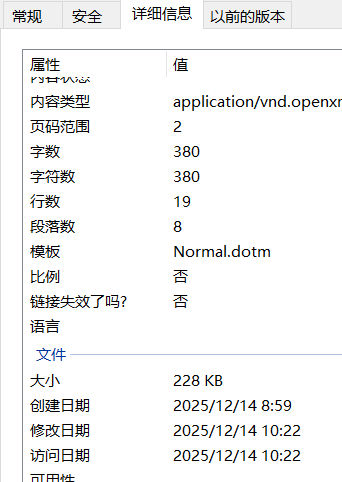
Word文档的扩展属性值具体保存在ExtendedFilePropertiesPart类的Properties属性中,后者类型为DocumentFormat.OpenXml.ExtendedProperties.Properties,其主要属性如下表所示(主要展示word文档的扩展属性,其它文档格式的扩展属性没有列出,有需要的请在参考文献3中查询):
| 序号 | 属性名称 | 说明 |
|---|---|---|
| 1 | Application | 程序名称 |
| 2 | ApplicationVersion | 程序版本号 |
| 3 | Company | 公司名称 |
| 4 | Characters | 字符数 |
| 5 | CharactersWithSpaces | 字符数(含空格) |
| 6 | DigitalSignature | 数字签名 |
| 7 | DocumentSecurity | 文档安全性 |
| 8 | HyperlinkList | 超链接列表 |
| 9 | Lines | 行数 |
| 10 | LinksUpToDate | 是否最新链接 |
| 11 | Manager | 经理 |
| 12 | Pages | 总页数 |
| 13 | Paragraphs | 段落数 |
| 14 | Words | 字数 |
| 15 | ScaleCrop | 比例 |
| 16 | Template | 文档模板名称 |
| 17 | TotalTime | 总编辑时间 |
扩展属性读取示例及word文档中的扩展属性截图如下所示:
csharp
using (WordprocessingDocument document = WordprocessingDocument.Open(txtFilePath.Text, false))
{
    StringBuilder sbInfo=new StringBuilder();
    ExtendedFilePropertiesPart ePart = document.ExtendedFilePropertiesPart;
    if(ePart != null && ePart.Properties!=null)
    {
        sbInfo.AppendLine("文档模板名称:" + ePart.Properties.Template.InnerText);
		...
		...
    }
}
读取自定义属性
Word文档的自定义属性值具体保存在CustomFilePropertiesPart类的Properties属性中,后者类型为DocumentFormat.OpenXml.CustomProperties.Properties,扩展属性值列表通过调用Elements<CustomDocumentProperty>函数获取,CustomDocumentProperty类最重要的字段是自定义属性名称Name、自定义属性值InnerText。
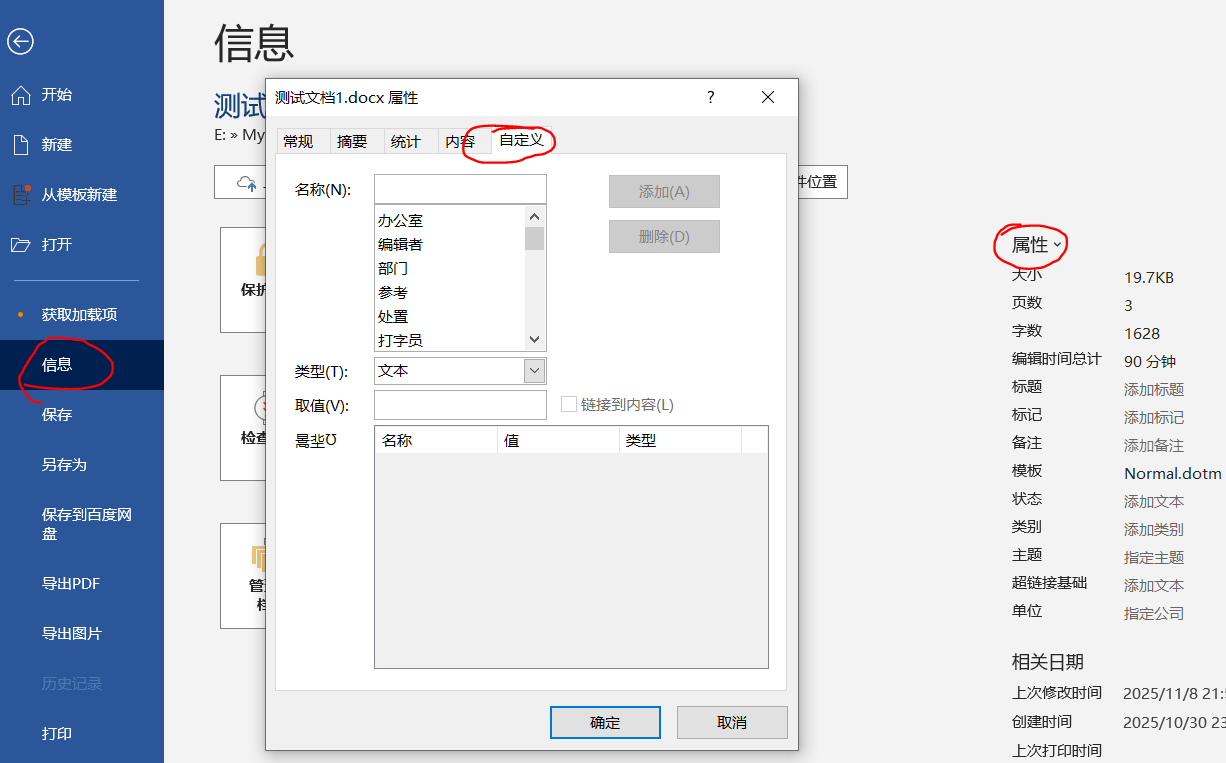
通常Word文档中没有自定义属性,可以打开word文档,点击"文件"菜单下的信息子菜单,然后点击右侧的属性文本,在弹出的属性窗口中切换到自定义页签以设置自定义名称及值。
下面的代码用于读取Word文档中的自定义属性列表:
csharp
StringBuilder sbInfo=new StringBuilder();
CustomFilePropertiesPart cPart = document.CustomFilePropertiesPart;
if(cPart != null && cPart.Properties!=null)
{
    foreach (CustomDocumentProperty property in cPart.Properties.Elements<CustomDocumentProperty>())
    {
        if (string.IsNullOrEmpty(property.Name))
        {
            continue;
        }

        sbInfo.AppendLine($"{property.Name}:{property.InnerText}");
    }

    MessageBox.Show(sbInfo.ToString());
}
参考文献
1https://github.com/dotnet/Open-XML-SDK
2https://learn.microsoft.com/zh-cn/office/open-xml/open-xml-sdk