前文我们梳理了 Watermark 相关的源码,Watermark 的作用就是用来触发窗口,本文我们就一起看一下窗口相关的源码。
写在前面
在Flink学习笔记:窗口一文中,我们介绍了窗口的分类以及基本的用法。按照处理数据流的类型划分,Flink 可以分为 Keyed Window 和 Non-Keyed Window,它们的用法如下:
scss
stream
       .keyBy(...)               <-  仅 keyed 窗口需要
       .window(...)              <-  必填项:"assigner"
      [.trigger(...)]            <-  可选项:"trigger" (省略则使用默认 trigger)
      [.evictor(...)]            <-  可选项:"evictor" (省略则不使用 evictor)
      [.allowedLateness(...)]    <-  可选项:"lateness" (省略则为 0)
      [.sideOutputLateData(...)] <-  可选项:"output tag" (省略则不对迟到数据使用 side output)
       .reduce/aggregate/apply()      <-  必填项:"function"
      [.getSideOutput(...)]      <-  可选项:"output tag"

stream
       .windowAll(...)           <-  必填项:"assigner"
      [.trigger(...)]            <-  可选项:"trigger" (else default trigger)
      [.evictor(...)]            <-  可选项:"evictor" (else no evictor)
      [.allowedLateness(...)]    <-  可选项:"lateness" (else zero)
      [.sideOutputLateData(...)] <-  可选项:"output tag" (else no side output for late data)
       .reduce/aggregate/apply()      <-  必填项:"function"
      [.getSideOutput(...)]      <-  可选项:"output tag"
下面我们根据用法,分别来看两种窗口的源码。
Keyed Window
WindowAssigner
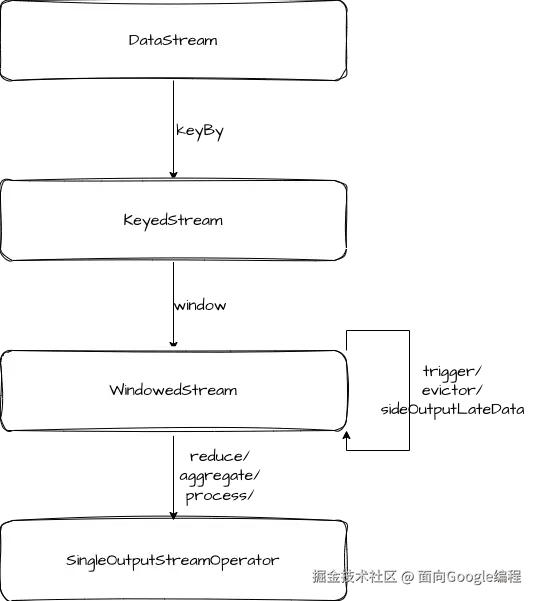
在示例代码中,数据流类型流转过程如图。我们聚焦于 WindowedStream,它是在调用 KeyedStream.window 方法之后生成的。window 方法需要传入一个 WindowAssigner,用来确定一条消息属于哪几个窗口,各个类型的窗口都有不同的实现。
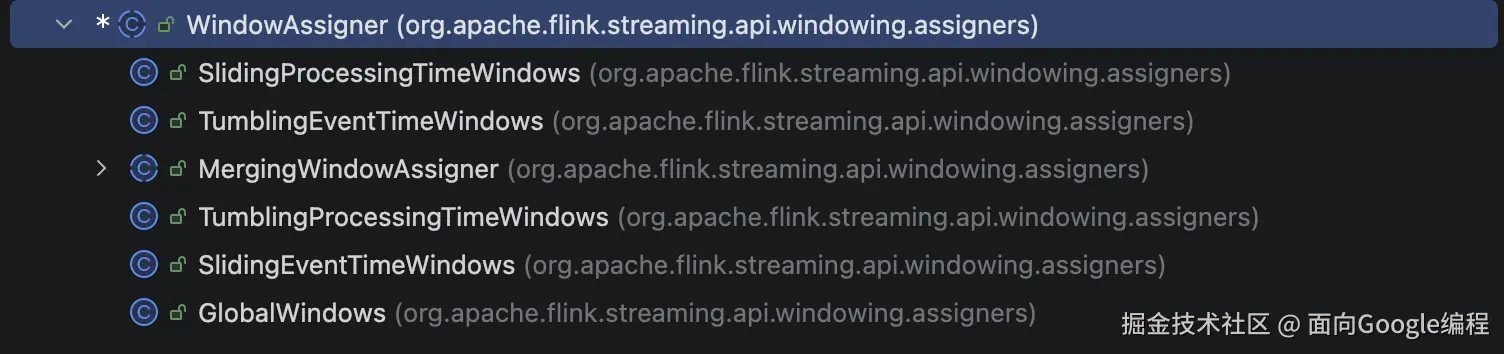
我们以 TumblingEventTimeWindows 为例,看一下它具体的分配逻辑。
arduino
public Collection<TimeWindow> assignWindows(
        Object element, long timestamp, WindowAssignerContext context) {
    if (timestamp > Long.MIN_VALUE) {
        if (staggerOffset == null) {
            staggerOffset =
                    windowStagger.getStaggerOffset(context.getCurrentProcessingTime(), size);
        }
        // Long.MIN_VALUE is currently assigned when no timestamp is present
        long start =
                TimeWindow.getWindowStartWithOffset(
                        timestamp, (globalOffset + staggerOffset) % size, size);
        return Collections.singletonList(new TimeWindow(start, start + size));
    } else {
        throw new RuntimeException(
                "Record has Long.MIN_VALUE timestamp (= no timestamp marker). "
                        + "Did you forget to call 'DataStream.assignTimestampsAndWatermarks(...)'?");
    }
}
这里就是根据消息的 timestamp 来确定窗口的开始和结束时间,然后返回消息所属的窗口。这里还有个 windowStagger 变量,它是窗口触发是否错峰的配置,如果你的任务有成千上万个子任务,同时触发窗口计算带来的瞬时流量可能会对服务器本身和下游造成稳定性的影响,这时就可以通过修改 WindowStagger 配置将流量打散。
将我们自己定义好的 WindowAssigner 传入 window 方法后,会创建一个 WindowOperatorBuilder,它负责创建一个 WindowOperator 对象,WindowOperator 来执行窗口具体的计算逻辑。
ini
public WindowedStream(KeyedStream<T, K> input, WindowAssigner<? super T, W> windowAssigner) {

    this.input = input;
    this.isEnableAsyncState = input.isEnableAsyncState();

    this.builder =
            new WindowOperatorBuilder<>(
                    windowAssigner,
                    windowAssigner.getDefaultTrigger(),
                    input.getExecutionConfig(),
                    input.getType(),
                    input.getKeySelector(),
                    input.getKeyType());
}
Trigger
有了 WindowOperatorBuilder 之后,我们可以对它进行一些设置,如 trigger、evictor 等,trigger 中提供了一些回调函数,这些回调函数的返回结果 TriggerResult 决定了是否触发窗口计算。
java
public abstract class Trigger<T, W extends Window> implements Serializable {

    private static final long serialVersionUID = -4104633972991191369L;

    public abstract TriggerResult onElement(T element, long timestamp, W window, TriggerContext ctx)
            throws Exception;

    public abstract TriggerResult onProcessingTime(long time, W window, TriggerContext ctx)
            throws Exception;

    public abstract TriggerResult onEventTime(long time, W window, TriggerContext ctx)
            throws Exception;

    public boolean canMerge() {
        return false;
    }

    public void onMerge(W window, OnMergeContext ctx) throws Exception {
        throw new UnsupportedOperationException("This trigger does not support merging.");
    }

    public abstract void clear(W window, TriggerContext ctx) throws Exception;
}
回调函数有三个,分别是 onElement、onProcessingTime、onEventTime,onElement 是在处理每条消息的时候触发,onProcessingTime 和 onEventTime 都是与定时器配合触发,上一篇文章我们提到过,在处理 Watermark 的时候会注册定时器,触发时就会回调这两个方法。
此外,Trigger 类中还有三个方法,我们简单介绍一下。canMerge 是用来判断窗口是否可以被合并,onMerge 则是在合并窗口时的回调方法。clear 方法用于清除窗口的状态数据。
php
public enum TriggerResult {

    /** No action is taken on the window. */
    CONTINUE(false, false),

    /** {@code FIRE_AND_PURGE} evaluates the window function and emits the window result. */
    FIRE_AND_PURGE(true, true),

    /**
     * On {@code FIRE}, the window is evaluated and results are emitted. The window is not purged,
     * though, all elements are retained.
     */
    FIRE(true, false),

    /**
     * All elements in the window are cleared and the window is discarded, without evaluating the
     * window function or emitting any elements.
     */
    PURGE(false, true);
}
说回 TriggerResult,它有四种枚举:
- CONTINUE:什么也不做
- FIRE_AND_PURGE:触发窗口计算并清除窗口中的元素
- FIRE:只触发窗口计算
- PURGE:清除窗口中的元素,不触发计算
Evictor
Evictor 是用来自定义删除窗口中元素的的接口,如果设置了 evictor,WindowOperatorBuilder 就会创建 EvictingWindowOperator。在执行窗口计算逻辑前后,都会调用 evictBefore 和 evictAfter。
swift
private void emitWindowContents(
        W window, Iterable<StreamRecord<IN>> contents, ListState<StreamRecord<IN>> windowState)
        throws Exception {
    ...
    evictorContext.evictBefore(recordsWithTimestamp, Iterables.size(recordsWithTimestamp));

    FluentIterable<IN> projectedContents =
            recordsWithTimestamp.transform(
                    new Function<TimestampedValue<IN>, IN>() {
                        @Override
                        public IN apply(TimestampedValue<IN> input) {
                            return input.getValue();
                        }
                    });

    processContext.window = triggerContext.window;
    userFunction.process(
            triggerContext.key,
            triggerContext.window,
            processContext,
            projectedContents,
            timestampedCollector);
    evictorContext.evictAfter(recordsWithTimestamp, Iterables.size(recordsWithTimestamp));
    ...
}
allowedLateness & sideOutputLateData
allowedLateness 和 sideOutputLateData 都是针对迟到数据的,allowedLateness 是用来指定允许的最大迟到时长,sideOutputLateData 则是将迟到数据输出到指定 outputTag。
判断是否迟到的方法如下:
scss
protected boolean isElementLate(StreamRecord<IN> element) {
    return (windowAssigner.isEventTime())
            && (element.getTimestamp() + allowedLateness
                    <= internalTimerService.currentWatermark());
}
如果是迟到数据,则进行如下处理:
scss
if (isSkippedElement && isElementLate(element)) {
    if (lateDataOutputTag != null) {
        sideOutput(element);
    } else {
        this.numLateRecordsDropped.inc();
    }
}
WindowOperator
设置好 WindowOperatorBuilder 之后,接着就可以调用 process/aggregate/reduce 等方法进行数据计算。
我们以 process 方法为例,来看下具体的处理逻辑。
ini
public <R> SingleOutputStreamOperator<R> process(
        ProcessWindowFunction<T, R, K, W> function, TypeInformation<R> resultType) {
    function = input.getExecutionEnvironment().clean(function);

    final String opName = builder.generateOperatorName();
    final String opDesc = builder.generateOperatorDescription(function, null);

    OneInputStreamOperator<T, R> operator =
            isEnableAsyncState ? builder.asyncProcess(function) : builder.process(function);

    return input.transform(opName, resultType, operator).setDescription(opDesc);
}
在 WindowedStream.process 方法中,就是调用 WindowOperatorBuilder 的 process 方法(如果是异步则调用异步方法)生成 WindowOperator,再将 WindowOperator 加入到执行图中。
下面我们来看 WindowOperator 中几个重要的方法。
open
首先是 open 方法,它主要负责进行初始化,包括创建 timerService,创建 windowState 等。
java
public void open() throws Exception {
    super.open();

    this.numLateRecordsDropped = metrics.counter(LATE_ELEMENTS_DROPPED_METRIC_NAME);
    timestampedCollector = new TimestampedCollector<>(output);

    internalTimerService = getInternalTimerService("window-timers", windowSerializer, this);

    triggerContext = new Context(null, null);
    processContext = new WindowContext(null);

    windowAssignerContext =
            new WindowAssigner.WindowAssignerContext() {
                @Override
                public long getCurrentProcessingTime() {
                    return internalTimerService.currentProcessingTime();
                }
            };

    // create (or restore) the state that hold the actual window contents
    // NOTE - the state may be null in the case of the overriding evicting window operator
    if (windowStateDescriptor != null) {
        windowState =
                (InternalAppendingState<K, W, IN, ACC, ACC>)
                        getOrCreateKeyedState(windowSerializer, windowStateDescriptor);
    }

    // create the typed and helper states for merging windows
    if (windowAssigner instanceof MergingWindowAssigner) {
        ...
    }
}
processElement
processElement 是负责处理进入窗口的数据,这里首先调用 WindowAssigner.assignWindows 方法确认元素属于哪些窗口。然后遍历窗口进行处理,包括向 windowState 中添加元素,调用 trigger 的 onElement 方法获取 TriggerResult。如果触发了窗口计算,调用 emitWindowContents 执行计算逻辑。最后是处理迟到数据,我们前面提到过。
scss
public void processElement(StreamRecord<IN> element) throws Exception {
    final Collection<W> elementWindows =
            windowAssigner.assignWindows(
                    element.getValue(), element.getTimestamp(), windowAssignerContext);

    // if element is handled by none of assigned elementWindows
    boolean isSkippedElement = true;

    final K key = this.<K>getKeyedStateBackend().getCurrentKey();

    if (windowAssigner instanceof MergingWindowAssigner) {
        ...
    } else {
        for (W window : elementWindows) {

            // drop if the window is already late
            if (isWindowLate(window)) {
                continue;
            }
            isSkippedElement = false;

            windowState.setCurrentNamespace(window);
            windowState.add(element.getValue());

            triggerContext.key = key;
            triggerContext.window = window;

            TriggerResult triggerResult = triggerContext.onElement(element);

            if (triggerResult.isFire()) {
                ACC contents = windowState.get();
                if (contents != null) {
                    emitWindowContents(window, contents);
                }
            }

            if (triggerResult.isPurge()) {
                windowState.clear();
            }
            registerCleanupTimer(window);
        }
    }

    // side output input event if
    // element not handled by any window
    // late arriving tag has been set
    // windowAssigner is event time and current timestamp + allowed lateness no less than
    // element timestamp
    if (isSkippedElement && isElementLate(element)) {
        if (lateDataOutputTag != null) {
            sideOutput(element);
        } else {
            this.numLateRecordsDropped.inc();
        }
    }
}
onEventTime
onEventTime 方法是 eventTime 触发窗口计算时调用的。主要逻辑就是获取 TriggerResult,然后触发计算逻辑,以及对 windowState 的处理。
scss
public void onEventTime(InternalTimer<K, W> timer) throws Exception {
    triggerContext.key = timer.getKey();
    triggerContext.window = timer.getNamespace();

    MergingWindowSet<W> mergingWindows;

    if (windowAssigner instanceof MergingWindowAssigner) {
        mergingWindows = getMergingWindowSet();
        W stateWindow = mergingWindows.getStateWindow(triggerContext.window);
        if (stateWindow == null) {
            // Timer firing for non-existent window, this can only happen if a
            // trigger did not clean up timers. We have already cleared the merging
            // window and therefore the Trigger state, however, so nothing to do.
            return;
        } else {
            windowState.setCurrentNamespace(stateWindow);
        }
    } else {
        windowState.setCurrentNamespace(triggerContext.window);
        mergingWindows = null;
    }

    TriggerResult triggerResult = triggerContext.onEventTime(timer.getTimestamp());

    if (triggerResult.isFire()) {
        ACC contents = windowState.get();
        if (contents != null) {
            emitWindowContents(triggerContext.window, contents);
        }
    }

    if (triggerResult.isPurge()) {
        windowState.clear();
    }

    if (windowAssigner.isEventTime()
            && isCleanupTime(triggerContext.window, timer.getTimestamp())) {
        clearAllState(triggerContext.window, windowState, mergingWindows);
    }

    if (mergingWindows != null) {
        // need to make sure to update the merging state in state
        mergingWindows.persist();
    }
}
onProcessingTime
onProcessingTime 和 onEventTime 逻辑基本一致,只是触发条件不同,这里就不再赘述了。
至此,Keyed Window 从设置到使用的源码我们就梳理完成了,下面再来看另外一种窗口 Non-Keyed Window。
Non-Keyed Window
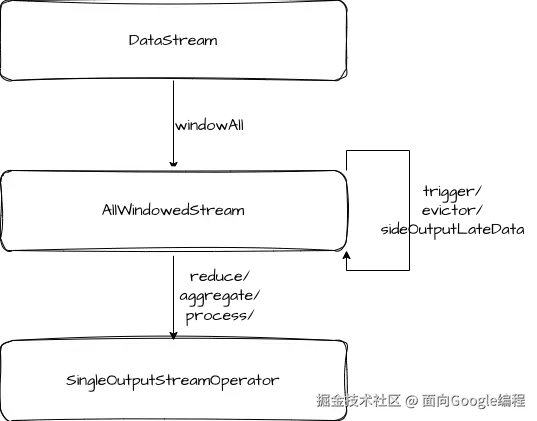
我们调用 windowAll 得到 AllWindowedStream,在构造函数中,会给对 input 调用 keyBy 方法,传入 NullByteKeySelector, NullByteKeySelector 对每个 key 都返回0,因此所有的 key 都会被分配到同一个节点。
java
public class NullByteKeySelector<T> implements KeySelector<T, Byte> {

    private static final long serialVersionUID = 614256539098549020L;

    @Override
    public Byte getKey(T value) throws Exception {
        return 0;
    }
}
Non-Keyed Window 后续的逻辑都和 Keyed Window 比较类似。
总结
本文我们梳理了窗口相关的源码,几个重点概念包括 WindowAssginer、WindowOperator、Trigger、Evictor。其中 WindowAssigner 是用来确定一条消息属于哪些窗口,WindowOperator 则是窗口计算逻辑的具体执行层。Trigger 和 Evictor 分别用于触发窗口和清理窗口中数据。