Computed 的核心是"计算缓存":
-
用于基于响应式数据计算新值
-
有缓存机制,依赖不变就不重新计算
-
计算结果是响应式的(依赖变化会自动更新)
-
适合模板中频繁使用的计算结果
method 普通方法
-
普通函数,没有响应式特性
-
每次调用都会执行
-
适合事件处理、需要参数的操作
案例
使用方法拼接姓名
javascript
<script setup>

import {computed, ref, watch} from "vue";
const firstName = ref("liu");
const lastName = ref("kang");

const fullName = () => {
  console.log("执行方法")
  return firstName.value + " " + lastName.value;
};
</script>

<template>
  全名:{{fullName()}}<br>
  全名:{{fullName()}}<br>
</template>

<style scoped>

</style>
控制台:

可见方法被调用几次就执行几次
使用计算属性拼接姓名
javascript
<script setup>

import {computed, ref, watch} from "vue";
const firstName = ref("liu");
const lastName = ref("kang");
const fullName = computed(() => {
  console.log("执行computed")
  return firstName.value + " " + lastName.value;
});

</script>

<template>
  全名:{{fullName}}<br>
  全名:{{fullName}}<br>
</template>

<style scoped>

</style>
控制台:

在依赖并未发生改变的情况下,只执行一次计算属性
如果依赖发生改变的情况:
javascript
<script setup>

import {computed, ref, watch} from "vue";
const firstName = ref("liu");
const lastName = ref("kang");
const fullName = computed(() => {
  console.log("执行computed")
  return firstName.value + " " + lastName.value;
});

</script>

<template>
  全名:{{fullName}}<br>
  全名:{{fullName}}<br>
  姓:<input type="text" v-model="firstName"/><br>
  名:<input type="text" v-model="lastName"/>
</template>

<style scoped>

</style>
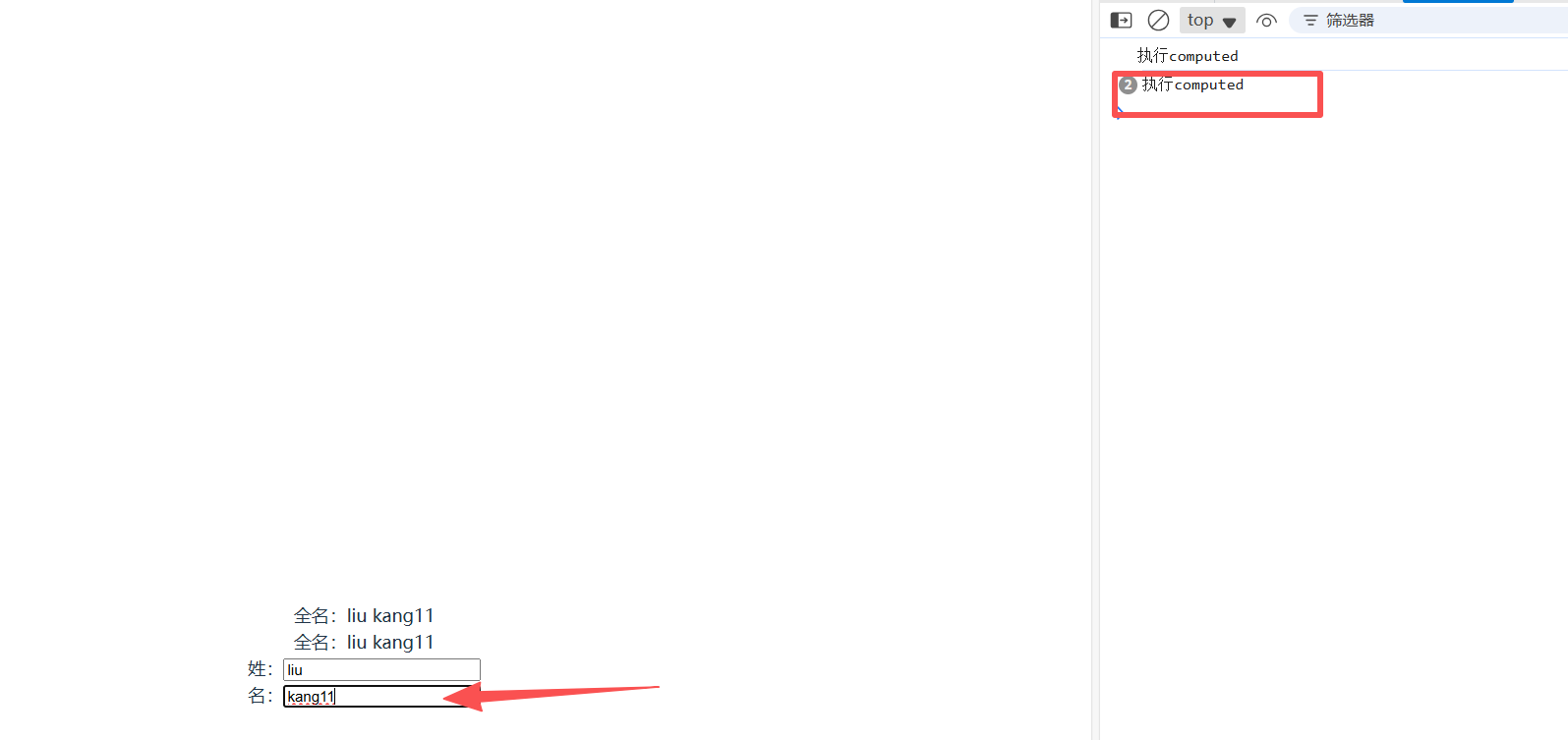
一开始进入页面,执行一次computed
当依赖发生改变时,立马再次执行computed计算最新的值,改变一次重新计算一次
计算属性是否可以传参?
计算属性不可以传参,以下代码时错误用法:
javascript
computed: {
  // 这是错误的!计算属性不能定义参数
  getItemPrice(item) {  // ❌ 不能这样写
    return item.price * this.taxRate
  }
}

// 模板中也不能传参
{{ getItemPrice(item) }}  // ❌ 不工作
如果想要传入参数,可以"曲线救国":
javascript
// Vue3 组合式API
import { computed } from 'vue'

// 返回一个函数,该函数可以接收参数
const getItemPrice = computed(() => {
  // 返回一个函数,这个函数可以接收参数
  return (item) => {
    return item.price * taxRate.value
  }
})

// 使用
<template>
  <div v-for="item in items" :key="item.id">
    价格: {{ getItemPrice(item) }}
  </div>
</template>