文章目录
一、简介
1、动态服务灰度发布IP/ID切流
用户无论访问应用服务还是静态页,都要经过Nginx代理层,我们可以在Nginx这里做灰度发布,如下图:
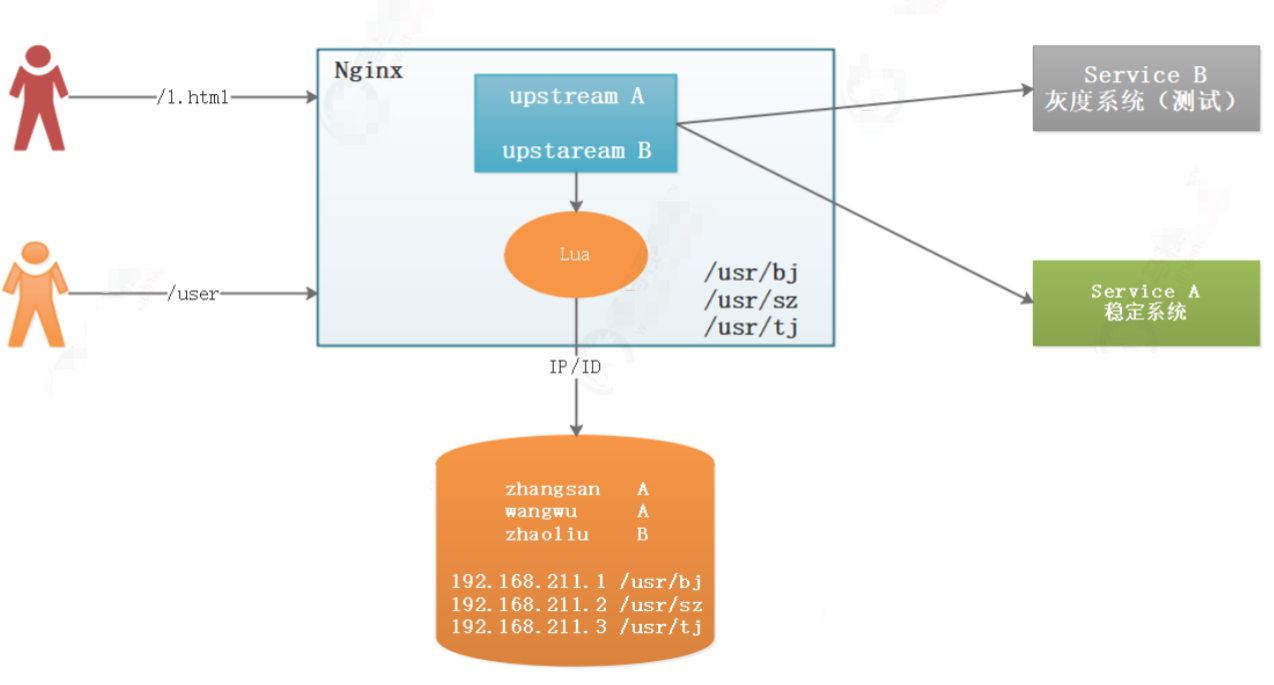
zhangsan、wangwu使用A应用
zhaoliu使用B应用
192.168.211.1/192.168.211.2 IP的用户使用A应用
192.168.211.3 IP的用户使用B应用
我们为了测试系统,通常把公司内部IP设置为测试IP,也就是使用灰度系统的IP,此时内部员工测试直接访问服务器即可,但是访问服务器又分为静态资源访问和动态服务访问,都有不同的实现策略。
在代理层实现灰度发布,可以采用Nginx+Lua实现。
二、实现
1、动态服务灰度发布
IP切流动态服务灰度发布方式的实现要借助Nginx+Lua和Redis了,我们可以先把公司内部的IP全部存储在Redis缓存中,当用户访问系统的时候,先通过Lua脚本根据IP查询Redis缓存,如果Redis缓存数据存在就表明使用灰度系统,如果没有缓存则使用稳定版系统。
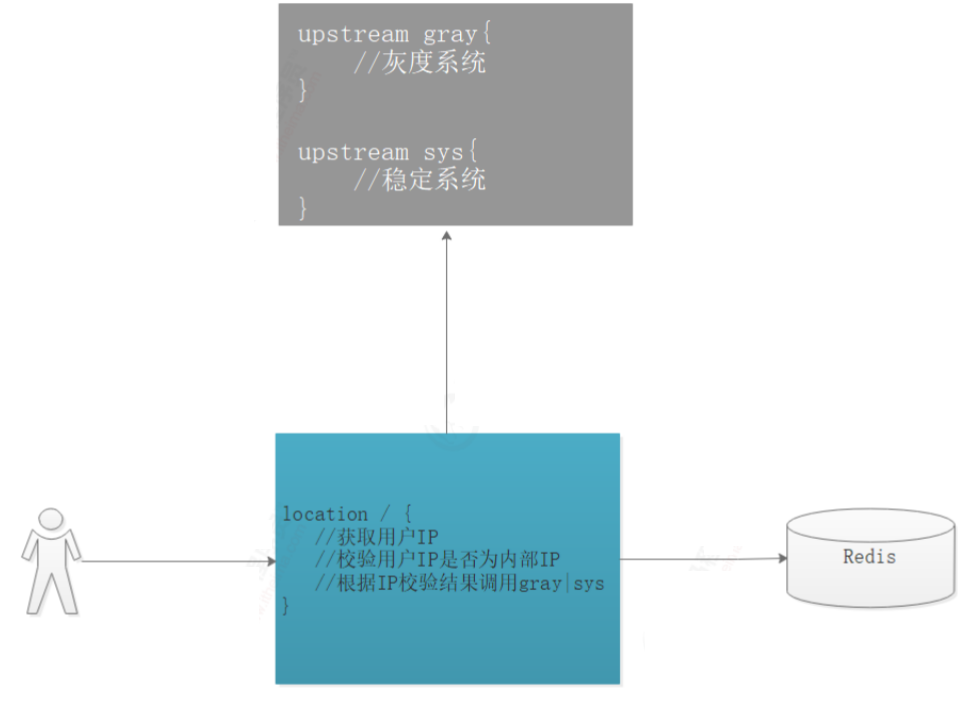
1)IP校验
在服务器上创建lua脚本文件 /usr/local/openresty/nginx/lua/loadip.lua :
lua
--客户端IP
local headers=ngx.req.get_headers()
local ip=headers["X-REAL-IP"] or headers["X_FORWARDED_FOR"] or
ngx.var.remote_addr or "0.0.0.0"
--local ip = "192.168.1.1"

--引入redis依赖
local redis = require("resty.redis");
local red = redis:new()
red:set_timeout(2000)
red:connect("192.168.10.1", 6379)

-- 执行查询
local grayresult=red:get(ip);
red:close()

if grayresult==nil or grayresult==nil or grayresult==ngx.null then
	--没有数据则查询主服务
	ngx.var.upstream = "sys"
else
	--如果有数据,则查询灰度服务
	ngx.var.upstream = "gray"
end
2)Nginx控制配置:
修改 nginx.conf 配置如下:
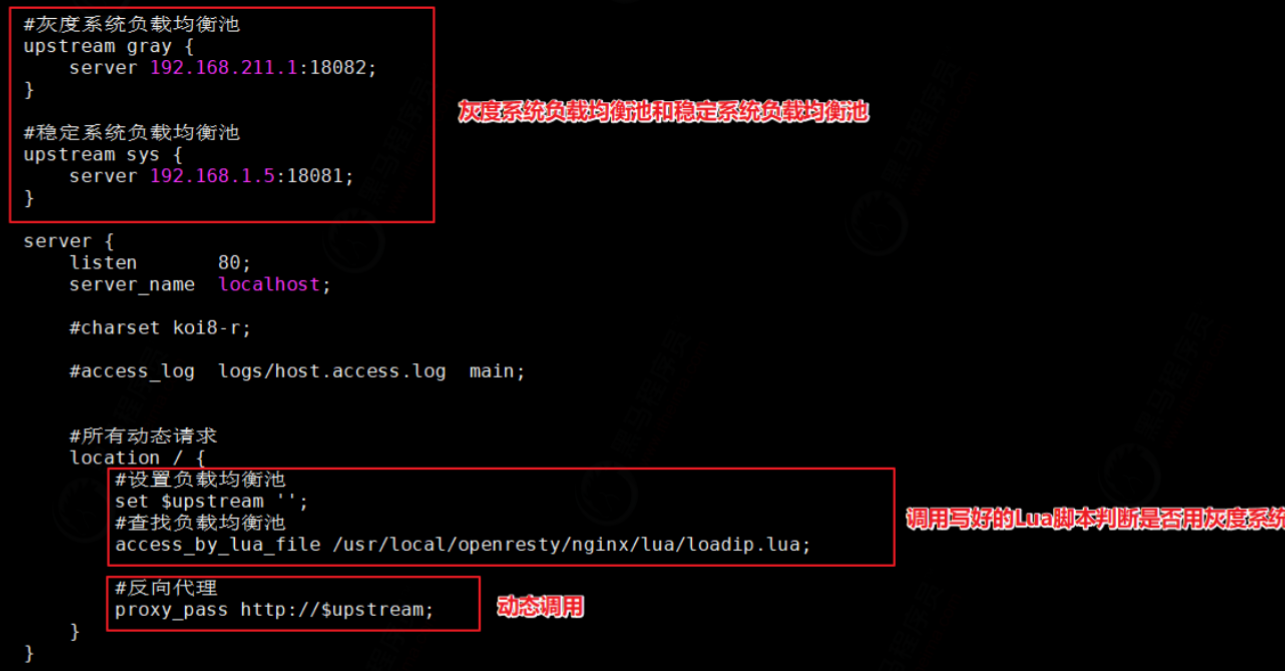
上图代码如下:
bash
#灰度系统负载均衡池
upstream gray {
	server 192.168.1.1:18082;
}

#稳定系统负载均衡池
upstream sys {
	server 192.168.1.2:18081;
}

server {
	listen 80;
	server_name localhost;

	#所有动态请求
	location / {
		#设置负载均衡池
		set $upstream '';
		#查找负载均衡池
		access_by_lua_file /usr/local/openresty/nginx/lua/loadip.lua;
		#反向代理
		proxy_pass http://$upstream;
	}
}
3)效果测试
在Redis中添加IP 192.168.1.10 ,该ip访问时会走灰度发布系统,把IP删除会走稳定系统。
2、静态资源灰度发布
我们把稳定静态资源和灰度静态页资源分别放在了 /usr/local/openresty/nginx/static1/和/usr/local/openresty/nginx/static2/目录下,我们要求公司员工IP访问灰度发布的静态页,非公司员工IP访问稳定版本页面,这里又需要用到指定IP查询了。
创建 home.lua 脚本如下:
lua
--客户端IP
local headers=ngx.req.get_headers()
local ip=headers["X-REAL-IP"] or headers["X_FORWARDED_FOR"] or
ngx.var.remote_addr or "0.0.0.0"
--local ip = "192.168.211.1"

--引入redis依赖
local redis = require("resty.redis");
local red = redis:new()
red:set_timeout(2000)
red:connect("192.168.10.1", 6379)

--执行查询
local grayresult=red:get(ip);
red:close()

if grayresult==nil or grayresult==nil or grayresult==ngx.null then
	--没有数据则查询主服务
	ngx.var.homepath = "/usr/local/openresty/nginx/static1/"
else
	--如果有数据,则查询灰度服务
	ngx.var.homepath = "/usr/local/openresty/nginx/static2/"
end
nginx.conf配置如下:图片、静态页、样式、脚本,我们都进行灰度发布,如下配合
bash
#静态资源
location ~* \.(jpg|png|html|css|js|woff|ttf|woff2) {
	#静态资源路径设置
	set $homepath '';
	#lua脚本校验使用静态资源
	access_by_lua_file /usr/local/openresty/nginx/lua/home.lua;
	#静态资源root配置
	root $homepath;
}