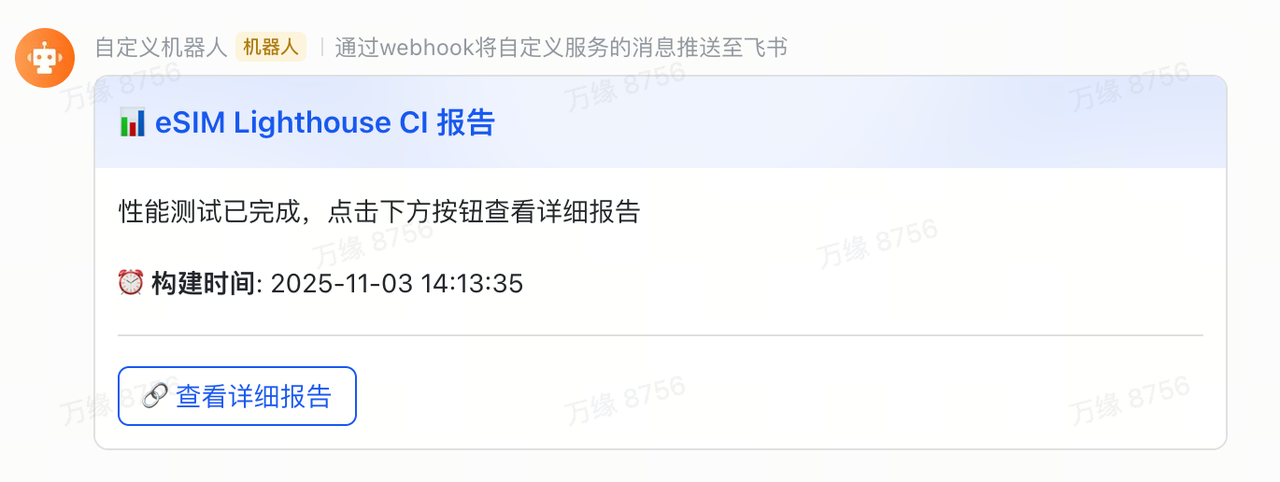
创建项目
bash
mkdir esim-lighthouse-ci
cd esim-lighthouse-ci/
npm init -y
安装依赖
bash
npm install -g @lhci/cli创建配置文件
bash
touch lighthouserc.js编写代码
javascript
module.exports = {
    ci: {
      collect: {
        url: ['https://esimnum.com/home'],
        numberOfRuns: 3,
        settings: {
          chromeFlags: '--no-sandbox --disable-dev-shm-usage --headless',
          preset: 'desktop',
        },
      },
      assert: {
        assertions: {
          'categories:performance': ['error', { minScore: 0.3 }],
          'categories:accessibility': ['warn', { minScore: 0.3 }],
        },
      },
      upload: {
        target: 'temporary-public-storage',
      },
    },
  };
json
{
  "name": "esim-lighthouse-ci",
  "version": "1.0.0",
  "description": "Lighthouse CI tests for esimnum.com",
  "main": "index.js",
  "scripts": {
    "test": "lhci autorun --config=lighthouserc.js",
    "test:ci": "LHCI_BUILD_CONTEXT__CURRENT_HASH=github-actions lhci autorun --config=lighthouserc.js"
  },
  "keywords": [],
  "author": "",
  "license": "ISC",
  "type": "commonjs",
  "dependencies": {
    "@lhci/cli": "^0.15.1"
  }
}
本地测试
bash
lhci autorun --config=lighthouserc.js执行日志
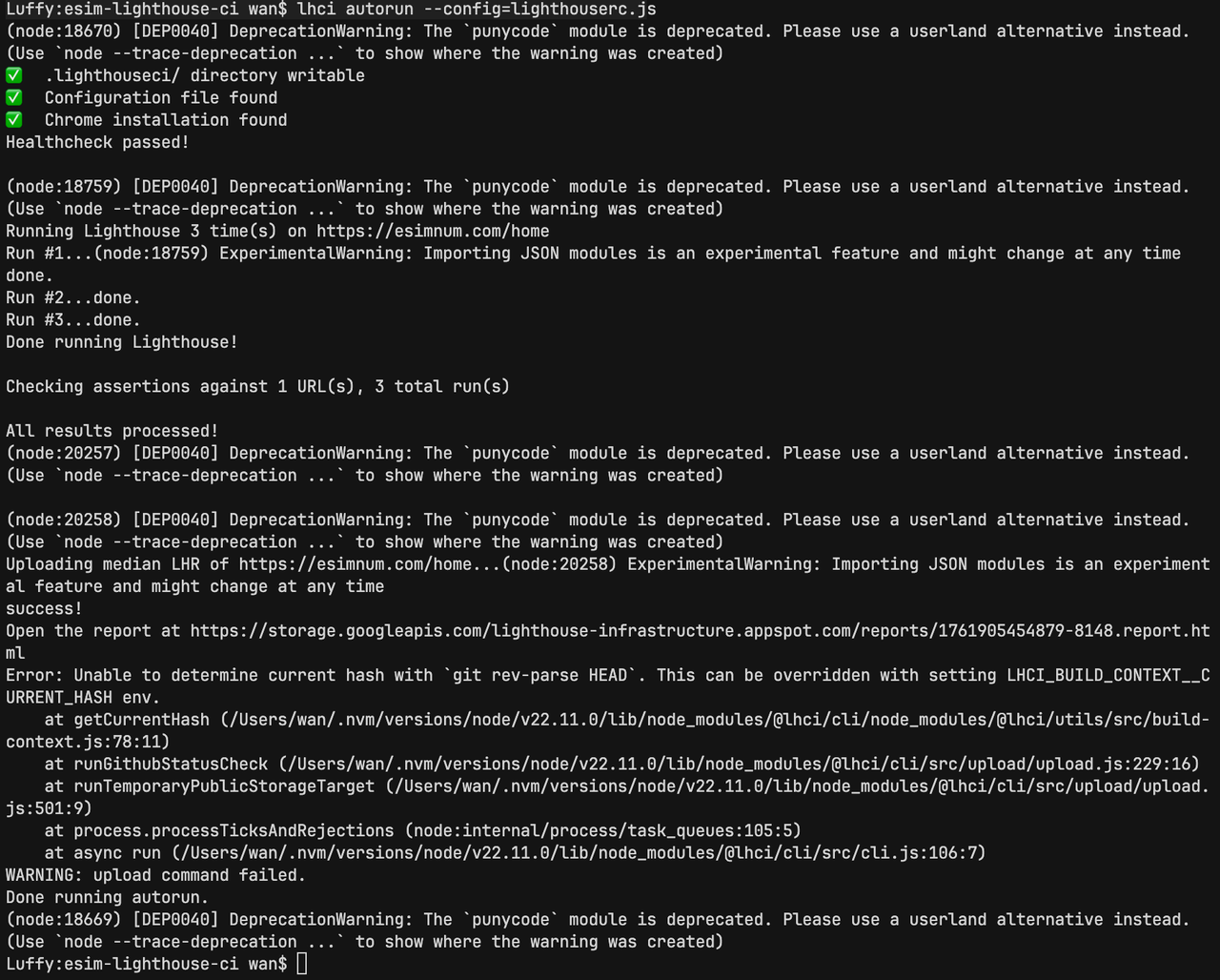
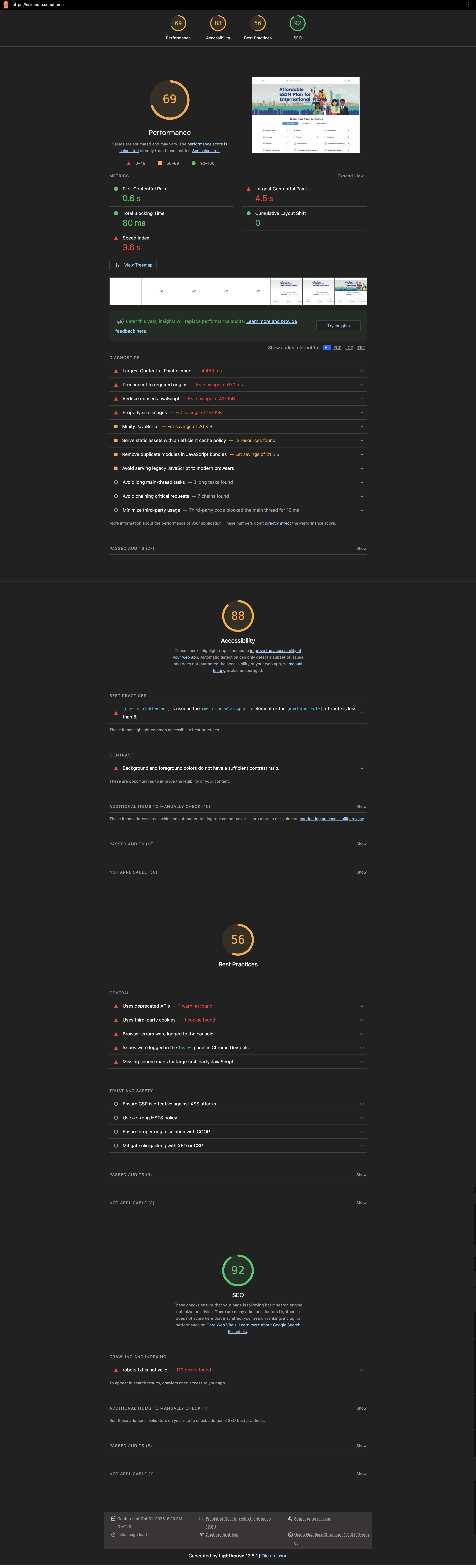
html报告
关于上传报告Error解决方案
方案1:在Git仓库运行
bash
git init
git add .
git commit -m "init"
lhci autorun --config=lighthouserc.js
方案2:绕过Git bash
bash
LHCI_BUILD_CONTEXT__CURRENT_HASH=github-actions lhci autorun --config=lighthouserc.jsGithub Actions集成
bash
mkdir -p .github/workflows && cd .github/workflows
touch lighthouse.yml
lighthouse.yml
yaml
name: Lighthouse CI

on:
  push:
    branches: [main]
  pull_request:

jobs:
  lighthouse:
    runs-on: ubuntu-latest
    permissions:
      contents: read
      statuses: write
      checks: write

    steps:
      - name: Checkout code
        uses: actions/checkout@v3

      - name: Setup Node.js
        uses: actions/setup-node@v3
        with:
          node-version: 20

      - name: Install Lighthouse CI
        run: npm install -g @lhci/cli

      - name: Run Lighthouse Collect
        run: |
          LHCI_BUILD_CONTEXT__CURRENT_HASH=github-actions \
          lhci collect --config=lighthouserc.js || true

      - name: Run Lighthouse Upload
        env:
          LHCI_GITHUB_APP_TOKEN: ${{ secrets.GITHUB_TOKEN }}
        run: |
          LHCI_BUILD_CONTEXT__CURRENT_HASH=github-actions \
          lhci upload --config=lighthouserc.js 2>&1 | tee upload_output.txt || true

      - name: Display Report URL
        run: |
          REPORT_URL=$(grep -oP 'https://storage\.googleapis\.com/[^\s]+\.html' upload_output.txt | head -1)

          if [ -n "$REPORT_URL" ]; then
            echo "## 📊 Lighthouse Report" >> $GITHUB_STEP_SUMMARY
            echo "" >> $GITHUB_STEP_SUMMARY
            echo "🔗 [View Online Report]($REPORT_URL)" >> $GITHUB_STEP_SUMMARY
            echo "" >> $GITHUB_STEP_SUMMARY
            echo "Report includes averages from all runs" >> $GITHUB_STEP_SUMMARY
            echo "✅ Report URL: $REPORT_URL"
          else
            echo "⚠️ No report URL found"
          fi
添加定时任务和飞书通知
yaml
name: Lighthouse CI

on:
  push:
    branches: [main]
  pull_request:
  schedule:
    # 每周三 24:00
    - cron: '0 16 * * 3'

jobs:
  lighthouse:
    runs-on: ubuntu-latest
    permissions:
      contents: read
      statuses: write
      checks: write

    steps:
      - name: Checkout code
        uses: actions/checkout@v3

      - name: Setup Node.js
        uses: actions/setup-node@v3
        with:
          node-version: 20

      - name: Install Lighthouse CI
        run: npm install -g @lhci/cli

      - name: Run Lighthouse Collect
        run: |
          LHCI_BUILD_CONTEXT__CURRENT_HASH=github-actions \
          lhci collect --config=lighthouserc.js || true

      - name: Run Lighthouse Upload
        env:
          LHCI_GITHUB_APP_TOKEN: ${{ secrets.GITHUB_TOKEN }}
        run: |
          LHCI_BUILD_CONTEXT__CURRENT_HASH=github-actions \
          lhci upload --config=lighthouserc.js 2>&1 | tee upload_output.txt || true

      - name: Display Report URL
        id: report
        run: |
          REPORT_URL=$(grep -oP 'https://storage\.googleapis\.com/[^\s]+\.html' upload_output.txt | head -1)

          if [ -n "$REPORT_URL" ]; then
            echo "## 📊 Lighthouse Report" >> $GITHUB_STEP_SUMMARY
            echo "" >> $GITHUB_STEP_SUMMARY
            echo "🔗 [View Online Report]($REPORT_URL)" >> $GITHUB_STEP_SUMMARY
            echo "" >> $GITHUB_STEP_SUMMARY
            echo "Report includes averages from all runs" >> $GITHUB_STEP_SUMMARY
            echo "✅ Report URL: $REPORT_URL"
            echo "report_url=$REPORT_URL" >> $GITHUB_OUTPUT
          else
            echo "⚠️ No report URL found"
            echo "report_url=" >> $GITHUB_OUTPUT
          fi

      - name: Send Feishu Notification
        if: steps.report.outputs.report_url != ''
        continue-on-error: true
        run: |
          FEISHU_WEBHOOK_URL="${{ secrets.FEISHU_WEBHOOK_URL }}"
          REPORT_URL="${{ steps.report.outputs.report_url }}"

          if [ -z "$FEISHU_WEBHOOK_URL" ]; then
            echo "⚠️ FEISHU_WEBHOOK_URL not configured, skipping notification"
            exit 0
          fi

          # 获取北京时间
          BUILD_TIME=$(TZ='Asia/Shanghai' date '+%Y-%m-%d %H:%M:%S')

          curl -X POST "$FEISHU_WEBHOOK_URL" \
            -H 'Content-Type: application/json' \
            -d "{
              \"msg_type\": \"interactive\",
              \"card\": {
                \"header\": {
                  \"title\": {
                    \"content\": \"📊 eSIM Lighthouse CI 报告\",
                    \"tag\": \"plain_text\"
                  },
                  \"template\": \"blue\"
                },
                \"elements\": [
                  {
                    \"tag\": \"div\",
                    \"text\": {
                      \"content\": \"性能测试已完成,点击下方按钮查看详细报告\",
                      \"tag\": \"plain_text\"
                    }
                  },
                  {
                    \"tag\": \"div\",
                    \"text\": {
                      \"content\": \"⏰ **构建时间**: $BUILD_TIME\",
                      \"tag\": \"lark_md\"
                    }
                  },
                  {
                    \"tag\": \"hr\"
                  },
                  {
                    \"tag\": \"action\",
                    \"actions\": [
                      {
                        \"tag\": \"button\",
                        \"text\": {
                          \"content\": \"🔗 查看详细报告\",
                          \"tag\": \"plain_text\"
                        },
                        \"url\": \"$REPORT_URL\",
                        \"type\": \"primary\"
                      }
                    ]
                  }
                ]
              }
            }"

          echo "✅ Feishu notification sent"
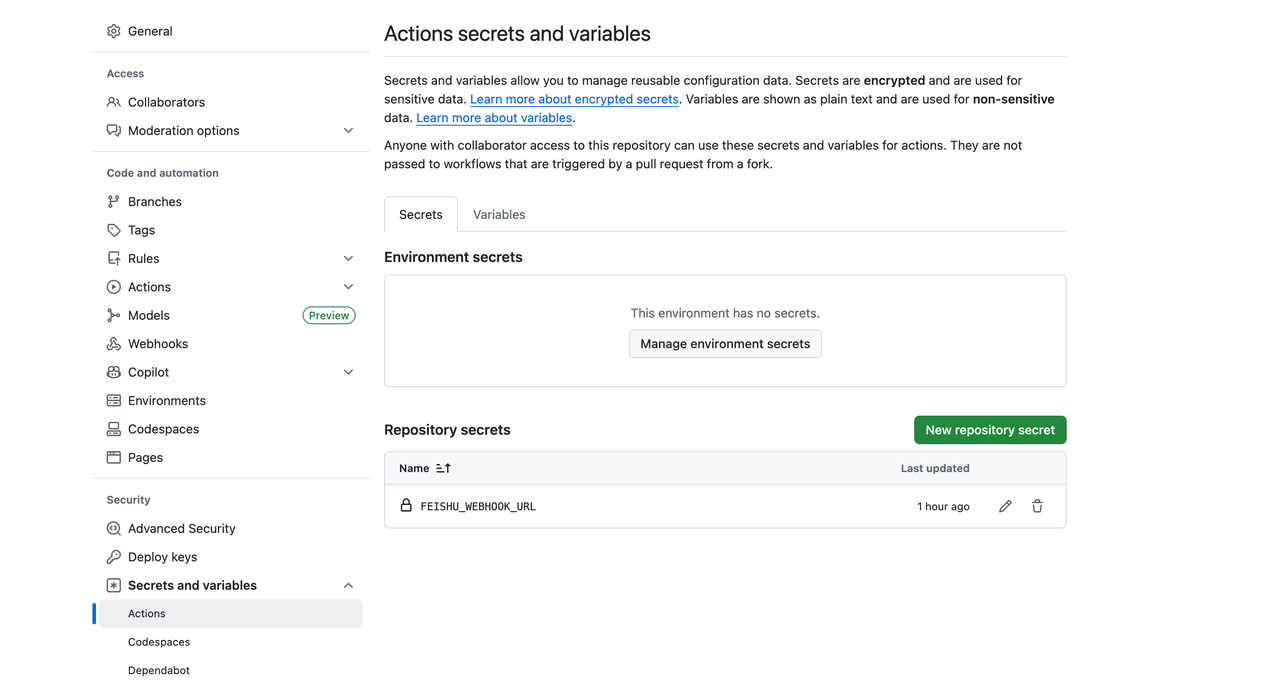
配置飞书链接
通知结果