文章目录
- [1 OpenResty 介绍及与 Nginx 的区别](#1 OpenResty 介绍及与 Nginx 的区别)
-
- [1.1 OpenResty 介绍](#1.1 OpenResty 介绍)
- [1.2 OpenResty 与 Nginx 的区别](#1.2 OpenResty 与 Nginx 的区别)
- 2.安装OpenResty
- [3 OpenResty+NtripCaster负载均衡](#3 OpenResty+NtripCaster负载均衡)
-
- [3.1 编写 Lua 辅助函数(缓存 + 解析 sourcetable)](#3.1 编写 Lua 辅助函数(缓存 + 解析 sourcetable))
- [3.2 配置 nginx.conf](#3.2 配置 nginx.conf)
- [4 启动 OpenResty](#4 启动 OpenResty)
-
- [4.1 启动 OpenResty命令](#4.1 启动 OpenResty命令)
- [4.2 可能会遇到的错误](#4.2 可能会遇到的错误)
- [5 挂载点负载均衡验证](#5 挂载点负载均衡验证)
-
- [5.1 挂载点自动选择测试](#5.1 挂载点自动选择测试)
- [5.2 挂载点自动切换测试](#5.2 挂载点自动切换测试)
- [6. 后记](#6. 后记)
-
- [6.1 本文相关资源](#6.1 本文相关资源)
- [6.2 待解决的问题](#6.2 待解决的问题)
1 OpenResty 介绍及与 Nginx 的区别
1.1 OpenResty 介绍
OpenResty(也称为 OpenResty/nginx)是一个基于Nginx核心的高性能 Web 平台,由章亦春(agentzh)主导开发。它将 Nginx 与众多 Lua 库、模块和工具链深度集成,实现了在 Nginx 核心中通过 Lua 脚本进行灵活的业务逻辑开发,本质上是"Nginx + Lua 生态"的扩展套件。
核心特点:
- 高性能:继承 Nginx 的事件驱动、非阻塞 I/O 模型,同时 Lua 脚本的执行开销极低。
- 扩展性:通过 Lua 可以轻松实现复杂的业务逻辑(如 API 网关、限流、缓存、鉴权等),无需修改 Nginx 核心代码。
- 丰富的生态 :内置大量 Lua 库(如
lua-nginx-module、lua-resty-redis、lua-resty-mysql),支持与主流数据库、缓存中间件交互。 - 一站式解决方案:可作为 Web 服务器、反向代理、API 网关、WAF(Web 应用防火墙)等使用。
1.2 OpenResty 与 Nginx 的区别
| 维度 | Nginx | OpenResty |
|---|---|---|
| 本质 | 轻量级高性能 Web 服务器/反向代理 | 基于 Nginx 核心的 Lua 扩展平台 |
| 功能扩展 | 主要通过 C 模块扩展,开发成本高 | 支持 Lua 脚本快速扩展,开发灵活高效 |
| 生态支持 | 原生模块较少,以基础网络功能为主 | 内置丰富的 Lua 库,适配各类中间件 |
| 使用场景 | 纯静态资源服务、简单反向代理 | 复杂 API 网关、动态业务逻辑处理、微服务网关等 |
| 性能 | 原生性能极致,无额外开销 | 继承 Nginx 性能,Lua 执行开销可忽略 |
| 开发门槛 | 扩展需掌握 C 语言 | 扩展可使用 Lua,门槛更低 |
简单总结:Nginx 是基础的高性能网络引擎,而 OpenResty 是在其之上构建的、面向业务开发的"超级引擎",通过 Lua 赋予了 Nginx 处理复杂业务逻辑的能力,同时保留了 Nginx 原有的高性能特性。
2.安装OpenResty
以Centos为例
bash
cd /etc/yum.repos.d
sudo wget -nc  https://openresty.org/package/centos/openresty.repo
sudo yum clean all
sudo yum list
sudo yum makecache
yum install openresty
以Ubuntu为例
bash
add-apt-repository -y ppa:openresty/ppa
apt-get update
apt-get install openresty
3 OpenResty+NtripCaster负载均衡
3.1 编写 Lua 辅助函数(缓存 + 解析 sourcetable)
例如现在有两台NtripCaster服务器,分别是:
bash
 { name = "A", host = "172.0.0.1", 数据端口 = 7001, 信息端口= 7070 },
{ name = "B", host = "172.0.0.1", 数据端口 = 8001, 信息端口 = 8080 }创建文件:/usr/local/openresty/nginx/conf/mountpoint_router.lua
文件中编辑如下信息:
lua
-- mountpoint_router.lua
local _M = {}

local cache = ngx.shared.mountpoint_cache

-- 解析 sourcetable 内容(支持纯文本或 <pre> 包裹的 HTML)
local function parse_sourcetable(content)
    if not content or type(content) ~= "string" then
        return {}
    end

    local mounts = {}

    -- 如果是 HTML,尝试提取 <pre> 内容
    local pre_match = string.match(content, "<pre[^>]*>(.-)</pre>")
    if pre_match then
        content = pre_match
    end

    -- 按行解析
    for line in string.gmatch(content, "[^\r\n]+") do
        line = string.gsub(line, "^%s+", "")  -- 去除行首空格
        if string.sub(line, 1, 3) == "STR" then
            local mount = string.match(line, "STR;([^;]+);")
            if mount and mount ~= "" then
                mounts[mount] = true
                -- 可选:记录日志用于调试
                -- ngx.log(ngx.DEBUG, "Found mountpoint: ", mount)
            end
        end
    end

    return mounts
end

-- 获取某主机的挂载点列表(带缓存)
local function get_mounts(host, port)
    local key = host .. ":" .. port
    local cached, err = cache:get(key)
    if cached then
        return cached
    end

    local http = require "resty.http"
    local httpc = http.new()
    local uri = "http://" .. host .. ":" .. port .. "/sourcetable.html"

    local res, err = httpc:request_uri(uri, {
        timeout = 1000,  -- 1秒超时
    })

    local mounts = {}
    if res and res.status == 200 and res.body then
        mounts = parse_sourcetable(res.body)
    else
        ngx.log(ngx.WARN, "Failed to fetch sourcetable from ", uri, ": ", err or ("status=" .. (res and res.status or "nil")))
    end

    -- 缓存 5 秒(可根据 sourcetable 更新频率调整)
    cache:set(key, mounts, 5)

    httpc:close()
    return mounts
end

-- 主路由逻辑
function _M.select_backend(mountpoint)
    if not mountpoint or mountpoint == "" then
        return nil
    end

    -- 定义后端(A 和 B)
    local BACKENDS = {
        { name = "A", host = "172.35.20.115", data_port = 7001, status_port = 7070 },
        { name = "B", host = "172.35.20.115", data_port = 8001, status_port = 8080 }
    }

    -- 先查 A
    local mounts_A = get_mounts(BACKENDS[1].host, BACKENDS[1].status_port)
    if mounts_A[mountpoint] then
        ngx.log(ngx.INFO, "Mountpoint '", mountpoint, "' found on backend A")
        return BACKENDS[1]
    end

    -- 再查 B
    local mounts_B = get_mounts(BACKENDS[2].host, BACKENDS[2].status_port)
    if mounts_B[mountpoint] then
        ngx.log(ngx.INFO, "Mountpoint '", mountpoint, "' found on backend B")
        return BACKENDS[2]
    end

    -- 都没有,返回 nil(调用方应处理 404)
    ngx.log(ngx.WARN, "Mountpoint '", mountpoint, "' not found on any backend")
    return nil
end

return _M
3.2 配置 nginx.conf
配置文件默认在:/usr/local/openresty/nginx/conf/nginx.conf
bash
# nginx.conf
worker_processes 1;
error_log logs/error.log warn;
pid logs/nginx.pid;

events {
    worker_connections 1024;
}

http {
    include       mime.types;
    default_type  application/octet-stream;

    log_format main '$remote_addr - $remote_user [$time_local] '
                    '"$request" $status $body_bytes_sent '
                    '"$http_referer" "$http_user_agent"';

    access_log logs/access.log main;

    # Lua 模块路径(确保能加载 .lua 文件)
    lua_package_path "/usr/local/openresty/nginx/conf/?.lua;;";

    # 共享内存缓存挂载点状态
    lua_shared_dict mountpoint_cache 10m;

    server {
        listen 2101;
        server_name localhost;

        # 必须预先声明变量!
        set $backend_host "";
        set $backend_port "";

        location ~ ^/(?<mount>[^/\s]+)$ {
            access_by_lua_block {
                local router = require "mountpoint_router"
                local backend = router.select_backend(ngx.var.mount)

                if not backend then
                    ngx.log(ngx.ERR, "Mountpoint not available: ", ngx.var.mount)
                    ngx.status = 404
                    ngx.say("Mountpoint not found: ", ngx.var.mount)
                    ngx.exit(404)
                end

                ngx.var.backend_host = backend.host
                ngx.var.backend_port = backend.data_port
            }

            # 转发到选中的后端
            proxy_pass http://$backend_host:$backend_port/$mount;

            # Ntrip 关键配置
            proxy_http_version 1.0;
            proxy_set_header Host $host;
            proxy_set_header Connection "";
            proxy_set_header User-Agent $http_user_agent;
            proxy_buffering off;
            proxy_read_timeout 3600s;
            proxy_send_timeout 3600s;
        }

        # 可选:根路径返回 sourcetable(兼容部分客户端)
        location = / {
            return 200 "Ntrip Caster Proxy\n";
        }
    }
}
4 启动 OpenResty
4.1 启动 OpenResty命令
bash
openresty或使用如下命令查看是否无错误
bash
openresty -t重新加载配置
bash
openresty -t && sudo openresty -s reload停止服务
bash
openresty -s stop 您可以通过访问 http://localhost:8080 来验证 OpenResty 是否正常运行
错误信息可以从如下命令查看
bash
tail -f /usr/local/openresty/nginx/logs/error.log4.2 可能会遇到的错误
遇到 'resty.http' not found的错误:
2025/12/24 12:21:02 error 16031#16031: *7 lua entry thread aborted: runtime error: /usr/local/openresty/nginx/conf/mountpoint_router.lua:44: module 'resty.http' not found:
这是因为你的 OpenResty 没有安装 lua-resty-http 库,而你的 Lua 脚本中使用了:
bash
local http = require "resty.http"可以到https://github.com/lewis6991/lua-resty-http获取/lib/resty/目录下获取http.lua、http_connect.lua以及http_headers.lua这三个脚本
放置在如下目录并重启服务即可:/usr/local/openresty/lualib
(备用下载地址1:https://github.com/lewis6991/lua-resty-http)
(备用下载地址2:lua-resty-http-master库及OpenResty 配置)
5 挂载点负载均衡验证
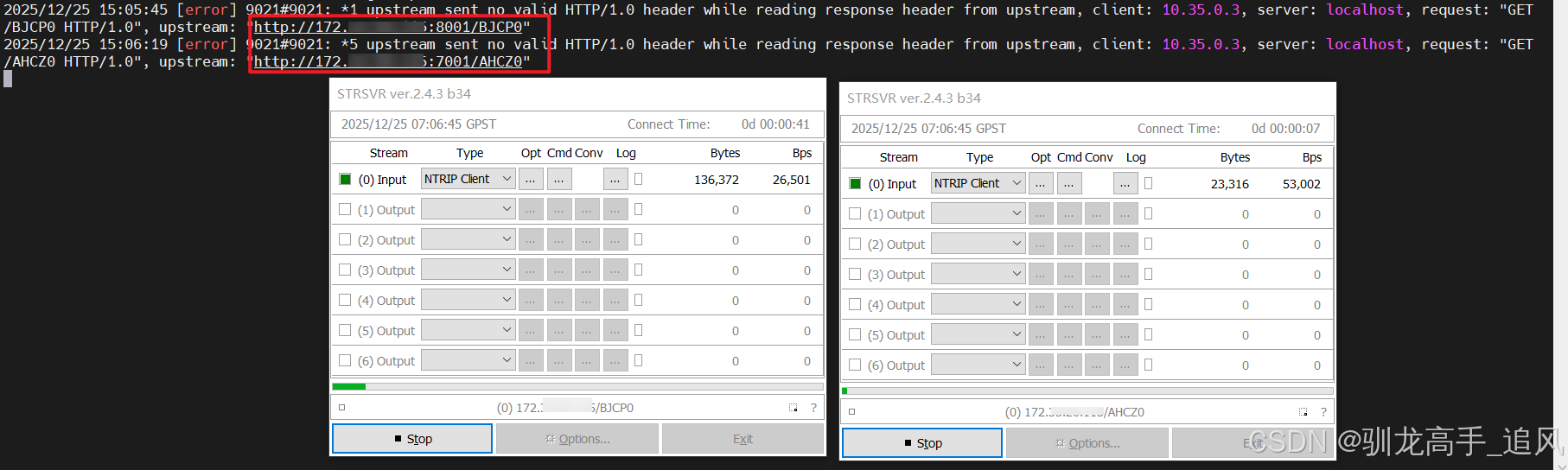
5.1 挂载点自动选择测试
A Caster上(7001端口)只配置了AHCZ0挂载点
B Caster上(8001端口)只配置了BJCP0挂载点
使用STRSVR工具连接 OpenResty(2101端口),即可自动根据挂载点情况,选择后台Caster服务。
5.2 挂载点自动切换测试
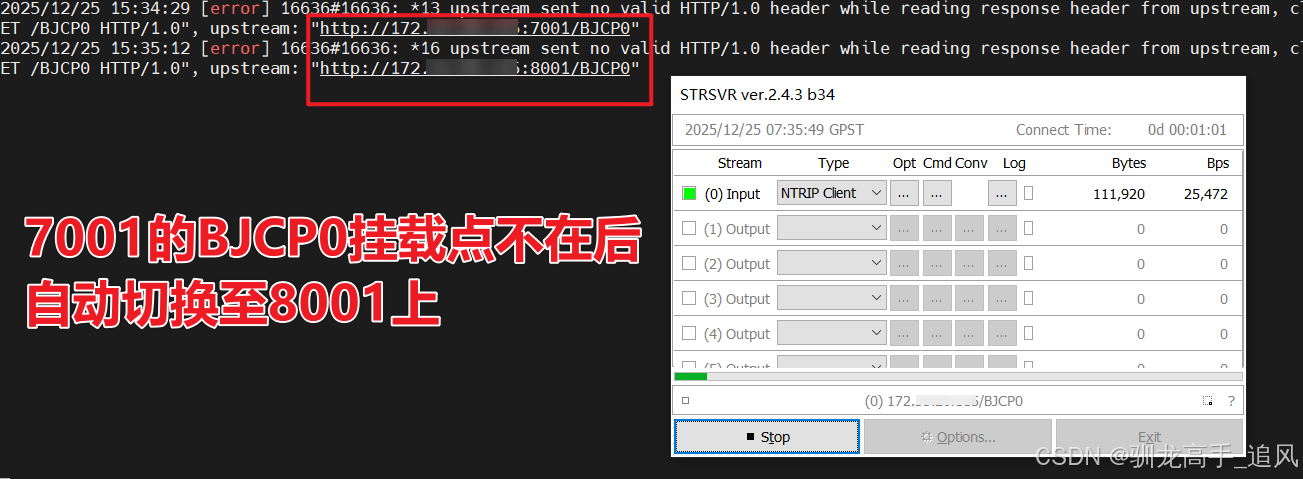
步骤1:A Caster上(7001端口)只配置了AHCZ0挂载点,利用STR工具上传BJCP0挂载点
步骤2:B Caster上(8001端口)只配置了BJCP0挂载点
步骤3:使用STRSVR工具连接 OpenResty(2101端口),BJCP0挂载点,可以看到先连接了A Caster 7001的上传的BJCP0挂载点;
步骤4:停止A Caster上的挂载点BJCP0,用户端短暂重连后,可发现自动成功定向至B Caster的挂载点。
可验证本脚本的有效性。
6. 后记
6.1 本文相关资源
本文用到的相关文件如下
lua-resty-http-master库及OpenResty 配置
6.2 待解决的问题
(1)目前后台连接数据流的时候会提示2025/12/25 15:57:26 [error] 16636#16636: *20 upstream sent no valid HTTP/1.0 header while reading response header from upstream, client: 10.35.0.3, server: localhost, request: "GET /BJCP0 HTTP/1.0", upstream: "http://172.XXX.XXX.XXX:8001/BJCP0",但不影响使用。
(2)通过OpenResty的2101端口,使用RTKLIB STRSVR等工具不能实现Get mountP按钮获取挂载点列表sourcetable信息。