文章目录
概要
某些情况下我们可能需要手动开启事务,比如由多个业务组合的功能,其中某一段业务报错我们需要进行回滚操作,或者是使用数据库事务实现分布式锁。那么该如何开启事务呢。
开启事务
方式一 :使用@Transactional注解,Spring会自动帮我们管理事务,包括开启事务、提交事务、回滚事务。
方式二 :从数据源DataSource中获取一个Connection,DataSource是自动装配的,SpringBoot默认使用的是HikariDataSource。将Connection自动提交设置为false,用此Connection执行业务SQL,然后提交事务、回滚事务。
方式三 :借助Spring中的事务管理器PlatformTransactionManager来开启事务。
方式四:使用TransactionTemplate,调用其execute方法来执行业务逻辑。
PlatformTransactionManager
方式一是自动管理事务。方式二虽然能手动管理事务,但实际操作起来不太优雅。方式四本质上还是方式三只不过把开启事务、提交事务、回滚事务做了封装,通过lambda函数回调执行我们的业务,可以认为还是帮我们自动管理了事务,这里重点介绍方式三。
先看一段代码和运行效果
java
    @Resource
    private UserMapper userMapper;

    @Resource
    private PlatformTransactionManager transactionManager;

    @GetMapping(value = "/transaction", produces = MediaType.APPLICATION_JSON_VALUE)
    public ResponseEntity<String> transaction() throws InterruptedException {
        TransactionStatus transaction = null;
        try {
            //开启事务
            transaction = transactionManager.getTransaction(new DefaultTransactionDefinition());
            User user = userMapper.findById(1L);
            System.out.println("更新前:" + user);

            user.setAge(28);
            userMapper.updateById(user);

            //事物未提交前其他线程读取数据
            Thread otherThread = new Thread(() -> {
                User newUser = userMapper.findById(1L);
                System.out.println("新线程获取更新后的值:" + newUser);
            });
            otherThread.start();
            otherThread.join();

            User newUser = userMapper.findById(1L);
            System.out.println("更新后:" + newUser);
        } finally {
            if (transaction != null) {
                //提交事务
                transactionManager.commit(transaction);
                //其他线程读取事务提交后的值
                Thread otherThread = new Thread(() -> {
                    User user = userMapper.findById(1L);
                    System.out.println("新线程获取事务提交后的值:" + user);
                });
                otherThread.start();
                otherThread.join();
            }
        }
        return ResponseEntity.ok("transaction");
    }
这里使用mybatis来作为持久层框架,PlatformTransactionManager系统已经自动装配,这里直接注入就可以使用。从运行效果来看手动开启的事务是生效的
上面的测试代码是开启了一个新线程来观察事务开启后的效果,由于是新线程必然和当前线程是不会共享事务。但是这种写法需要额外的线程来操作,下面是用mybatis的SqlSessionFactory来开启一个新的SqlSession和当前线程不共享事务。
java
    @Resource
    private UserMapper userMapper;

    @Resource
    private PlatformTransactionManager transactionManager;

    @Resource
    private SqlSessionFactory sqlSessionFactory;

    @GetMapping(value = "/transaction2", produces = MediaType.APPLICATION_JSON_VALUE)
    public ResponseEntity<String> transaction2() {
        TransactionStatus transaction = null;
        DefaultSqlSession sqlSession = null;
        try {
            //开启事务
            transaction = transactionManager.getTransaction(new DefaultTransactionDefinition());
            User user = userMapper.findById(1L);
            System.out.println("更新前:" + user);

            user.setAge(28);
            userMapper.updateById(user);

            //重新开启一个连接
            Configuration configuration = sqlSessionFactory.getConfiguration();
            sqlSession = new DefaultSqlSession(
                    configuration,
                    configuration.newExecutor(
                            new JdbcTransaction(configuration.getEnvironment().getDataSource().getConnection()),
                            ExecutorType.SIMPLE),
                    true);

            User user2 = sqlSession.getMapper(UserMapper.class).findById(1L);
            System.out.println("新SqlSession获取更新后的值:" + user2);

            User newUser = userMapper.findById(1L);
            System.out.println("更新后:" + newUser);
        } catch (SQLException e) {
            throw new RuntimeException(e);
        } finally {
            if (transaction != null) {
                //提交事务
                transactionManager.commit(transaction);
                if (sqlSession != null) {
                    User newUser = sqlSession.getMapper(UserMapper.class).findById(1L);
                    System.out.println("新SqlSession获取事务提交后的值:" + newUser);
                    sqlSession.close();
                }
            }
        }
        return ResponseEntity.ok("transaction2");
    }
从运行结果来看,事务提交后新sqlSession获取的age应该为28,但仍然是18。这是因为同一个sqlSession执行了相同的查询sql语句时,后续的查询会从缓存中拿值,我们需要在相应的mapper方法上加上@Options注解每次查询前会清空缓然后走数据库查询。
java
    @Options(flushCache = Options.FlushCachePolicy.TRUE)
    @Select("select * from user where id = #{id}")
    User findById(Long id);
技术细节
PlatformTransactionManager是如何实现手动管理事务的
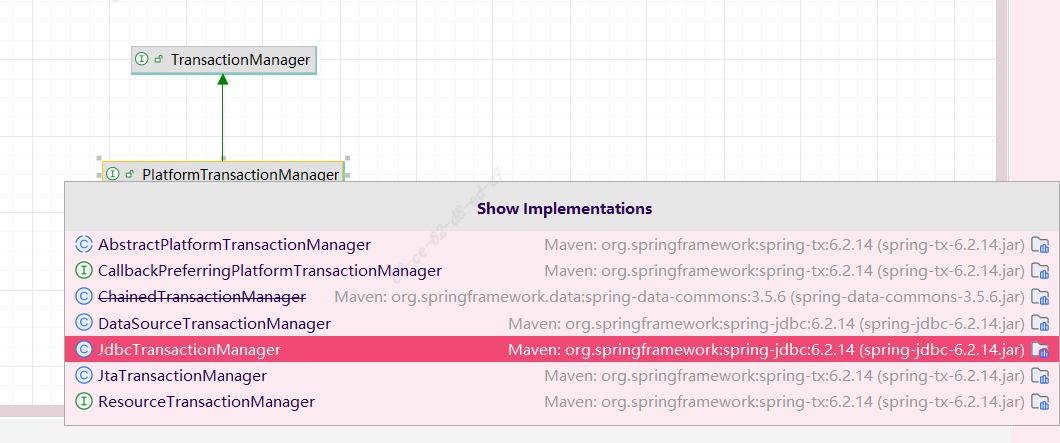
PlatformTransactionManager的实现是JdbcTransactionManager,参考DataSourceTransactionManagerAutoConfiguration自动装配类。如果引入了其他事务框架,如spring-boot-starter-data-jpa,那么PlatformTransactionManager实现会是JpaTransactionManager,可以参考HibernateJpaAutoConfiguration自动装配类。不管是JdbcTransactionManager还是JpaTransactionManager在开启事务时做的相关操作都是类似的,都是从数据源中获取到一个新的Connection后将其自动提交设置为false。
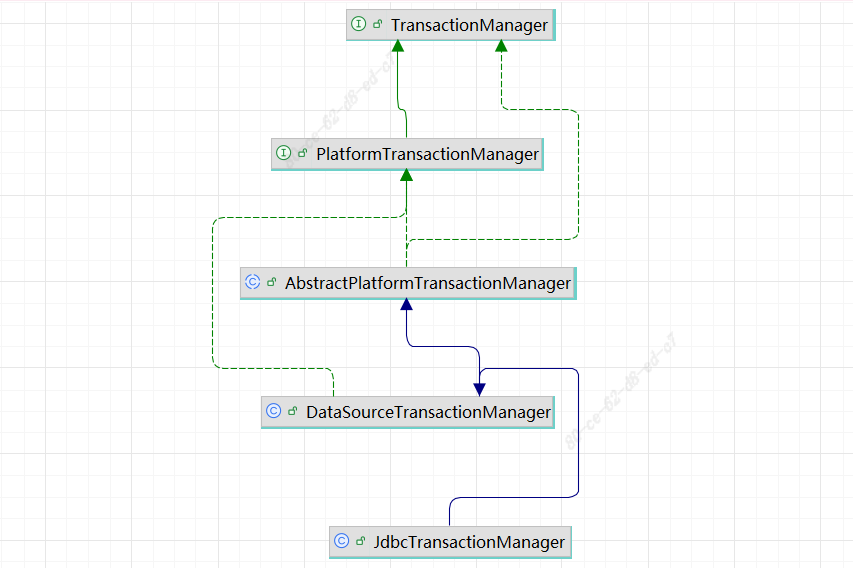
当我们在代码中执行
java
transaction = transactionManager.getTransaction(new DefaultTransactionDefinition());getTransaction方法在其抽象类AbstractPlatformTransactionManager中,源码如下
java
	public final TransactionStatus getTransaction(@Nullable TransactionDefinition definition)
			throws TransactionException {

		// 省略相关代码。。。

		// No existing transaction found -> check propagation behavior to find out how to proceed.
		if (def.getPropagationBehavior() == TransactionDefinition.PROPAGATION_MANDATORY) {
			throw new IllegalTransactionStateException(
					"No existing transaction found for transaction marked with propagation 'mandatory'");
		}
		else if (def.getPropagationBehavior() == TransactionDefinition.PROPAGATION_REQUIRED ||
				def.getPropagationBehavior() == TransactionDefinition.PROPAGATION_REQUIRES_NEW ||
				def.getPropagationBehavior() == TransactionDefinition.PROPAGATION_NESTED) {
			SuspendedResourcesHolder suspendedResources = suspend(null);
			if (debugEnabled) {
				logger.debug("Creating new transaction with name [" + def.getName() + "]: " + def);
			}
			try {
				//开启新的事务
				return startTransaction(def, transaction, false, debugEnabled, suspendedResources);
			}
			catch (RuntimeException | Error ex) {
				resume(null, suspendedResources);
				throw ex;
			}
		}
		else {
			// Create "empty" transaction: no actual transaction, but potentially synchronization.
			// 省略相关代码。。。
		}
	}
	private TransactionStatus startTransaction(TransactionDefinition definition, Object transaction,
			boolean nested, boolean debugEnabled, @Nullable SuspendedResourcesHolder suspendedResources) {

		boolean newSynchronization = (getTransactionSynchronization() != SYNCHRONIZATION_NEVER);
		DefaultTransactionStatus status = newTransactionStatus(
				definition, transaction, true, newSynchronization, nested, debugEnabled, suspendedResources);
		this.transactionExecutionListeners.forEach(listener -> listener.beforeBegin(status));
		try {
			//此处由实现类实现
			doBegin(transaction, definition);
		}
		catch (RuntimeException | Error ex) {
			this.transactionExecutionListeners.forEach(listener -> listener.afterBegin(status, ex));
			throw ex;
		}
		prepareSynchronization(status, definition);
		this.transactionExecutionListeners.forEach(listener -> listener.afterBegin(status, null));
		return status;
	}
doBegin是抽象方法,其实现在JdbcTransactionManager的父类DataSourceTransactionManager中实现。
java
	protected void doBegin(Object transaction, TransactionDefinition definition) {
		DataSourceTransactionObject txObject = (DataSourceTransactionObject) transaction;
		Connection con = null;

		try {
			if (!txObject.hasConnectionHolder() ||
					txObject.getConnectionHolder().isSynchronizedWithTransaction()) {
				//从数据源中获取一个新的连接
				Connection newCon = obtainDataSource().getConnection();
				if (logger.isDebugEnabled()) {
					logger.debug("Acquired Connection [" + newCon + "] for JDBC transaction");
				}
				if (definition.isReadOnly()) {
					checkDefaultReadOnly(newCon);
				}
				// 把新的数据库连接绑定到ConnectionHolder中
				txObject.setConnectionHolder(new ConnectionHolder(newCon), true);
			}

			txObject.getConnectionHolder().setSynchronizedWithTransaction(true);
			con = txObject.getConnectionHolder().getConnection();

			// 省略部分代码。。。

			// Switch to manual commit if necessary. This is very expensive in some JDBC drivers,
			// so we don't want to do it unnecessarily (for example if we've explicitly
			// configured the connection pool to set it already).
			// 正常情况下新获取的连接都是自动提交
			if (con.getAutoCommit()) {
				txObject.setMustRestoreAutoCommit(true);
				if (logger.isDebugEnabled()) {
					logger.debug("Switching JDBC Connection [" + con + "] to manual commit");
				}
				//将数据库连接改为手动提交
				con.setAutoCommit(false);
			}

			// 省略部分代码。。。

			// Bind the connection holder to the thread.
			if (txObject.isNewConnectionHolder()) {
				//给当前线程的数据源绑定一个ConnectionHolder
				TransactionSynchronizationManager.bindResource(obtainDataSource(), txObject.getConnectionHolder());
			}
		}

		catch (Throwable ex) {
			// 省略部分代码。。。
		}
	}
源码中可以看到新获取的连接其自动提交被设置为false这样就能实现手动提交事务了。且新的连接被TransactionSynchronizationManager(事务同步器)绑定到当前线程中,事务同步器在绑定数据时是用ThreadLocal来实现的,方便后续线程能直接拿到绑定的数据库连接。
当使用mybatis的mapper接口或者sqlSession查询以及更新数据时,是如何共享事务的。
mapper接口会变成一个代理对象(是一个MapperFactoryBean属于工厂Bean),sql的执行是交给代理对象中封装的sqlSession来完成操作。sqlSession在执行sql语句时最终会交给Executor。
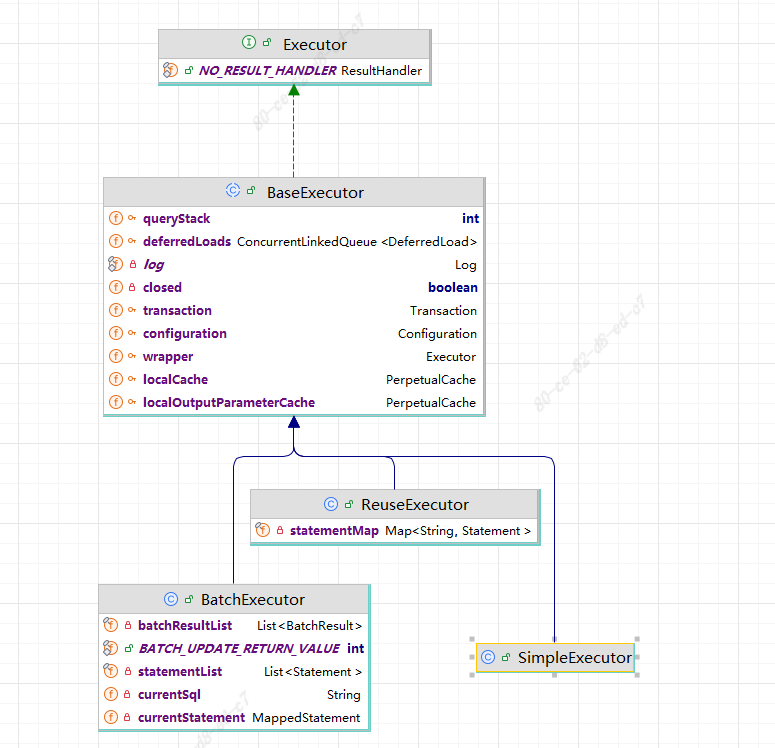
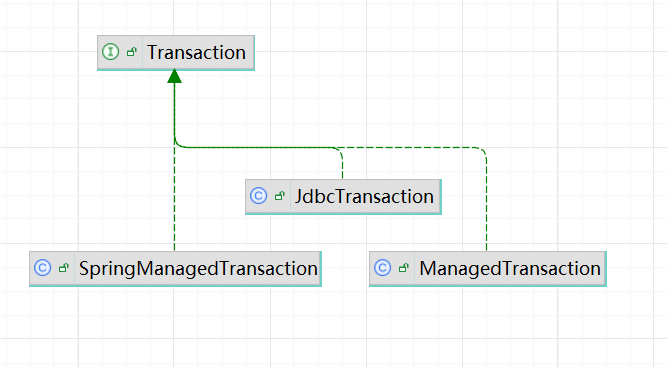
Executor中会有个事务字段transaction是一个接口。在Spring环境下它的实现是SpringManagedTransaction。Executor执行sql语句时会从transaction中获取一个数据连接。
java
  public Connection getConnection() throws SQLException {
    if (this.connection == null) {
      openConnection();
    }
    return this.connection;
  }
  private void openConnection() throws SQLException {
    this.connection = DataSourceUtils.getConnection(this.dataSource);
    this.autoCommit = this.connection.getAutoCommit();
    this.isConnectionTransactional = DataSourceUtils.isConnectionTransactional(this.connection, this.dataSource);

    LOGGER.debug(() -> "JDBC Connection [" + this.connection + "] will"
        + (this.isConnectionTransactional ? " " : " not ") + "be managed by Spring");
  }
可以看到连接的获取是通过工具类DataSourceUtils来操作完成的,这个是spring jdbc中所提供的工具类。
java
	public static Connection getConnection(DataSource dataSource) throws CannotGetJdbcConnectionException {
		try {
			return doGetConnection(dataSource);
		}
		catch (SQLException ex) {
			throw new CannotGetJdbcConnectionException("Failed to obtain JDBC Connection", ex);
		}
		catch (IllegalStateException ex) {
			throw new CannotGetJdbcConnectionException("Failed to obtain JDBC Connection", ex);
		}
	}
    public static Connection doGetConnection(DataSource dataSource) throws SQLException {
        Assert.notNull(dataSource, "No DataSource specified");

        //这里能看到连接是从事务同步器中拿的
        ConnectionHolder conHolder = (ConnectionHolder) TransactionSynchronizationManager.getResource(dataSource);
        if (conHolder != null && (conHolder.hasConnection() || conHolder.isSynchronizedWithTransaction())) {
            conHolder.requested();
            if (!conHolder.hasConnection()) {
                logger.debug("Fetching resumed JDBC Connection from DataSource");
                conHolder.setConnection(fetchConnection(dataSource));
            }
            return conHolder.getConnection();
        }
        // Else we either got no holder or an empty thread-bound holder here.

        // 省略相关代码。。。

        return con;
    }
由于前面开启事务时已经给当前线程绑定了一个ConnectionHolder,这里就直接接能获取到,这样就实现了同一个线程中数据库连接的共享。最后提交事务时是交给doCommit方法完成的。
java
	protected void doCommit(DefaultTransactionStatus status) {
		DataSourceTransactionObject txObject = (DataSourceTransactionObject) status.getTransaction();
		// 最开始创建一个新的事务时txObject中已经绑定了ConnectionHolder
		Connection con = txObject.getConnectionHolder().getConnection();
		if (status.isDebug()) {
			logger.debug("Committing JDBC transaction on Connection [" + con + "]");
		}
		try {
			con.commit();
		}
		catch (SQLException ex) {
			throw translateException("JDBC commit", ex);
		}
	}
事务提交之后从数据源中拿到的Connection自动提交要恢复为true。JdbcTransactionManager的操作是在父类DataSourceTransactionManager的doCleanupAfterCompletion方法中完成的。
java
	protected void doCleanupAfterCompletion(Object transaction) {
		DataSourceTransactionObject txObject = (DataSourceTransactionObject) transaction;

		// Remove the connection holder from the thread, if exposed.
		if (txObject.isNewConnectionHolder()) {
			TransactionSynchronizationManager.unbindResource(obtainDataSource());
		}

		// Reset connection.
		Connection con = txObject.getConnectionHolder().getConnection();
		try {
			if (txObject.isMustRestoreAutoCommit()) {
			  // 恢复为自动提交
				con.setAutoCommit(true);
			}
			DataSourceUtils.resetConnectionAfterTransaction(con,
					txObject.getPreviousIsolationLevel(),
					(txObject.isReadOnly() && !isDefaultReadOnly()));
		}
		catch (Throwable ex) {
			logger.debug("Could not reset JDBC Connection after transaction", ex);
		}
		// 省略部分代码。。。
	}
总结
为何mybatis的sqlSession在执行同一个查询sql语句时后续会从缓存中拿值。前面说到sql语句的执行会交给Executor,其查询方法如下。
java
  public <E> List<E> query(MappedStatement ms, Object parameter, RowBounds rowBounds, ResultHandler resultHandler,
      CacheKey key, BoundSql boundSql) throws SQLException {
    ErrorContext.instance().resource(ms.getResource()).activity("executing a query").object(ms.getId());
    if (closed) {
      throw new ExecutorException("Executor was closed.");
    }
    // 如果设置了强制刷新缓存,每次执行查询时都会清空一遍缓存
    if (queryStack == 0 && ms.isFlushCacheRequired()) {
      clearLocalCache();
    }
    List<E> list;
    try {
      queryStack++;
      // 如果从缓存中拿到了值就不从数据库中查询了
      list = resultHandler == null ? (List<E>) localCache.getObject(key) : null;
      if (list != null) {
        handleLocallyCachedOutputParameters(ms, key, parameter, boundSql);
      } else {
        list = queryFromDatabase(ms, parameter, rowBounds, resultHandler, key, boundSql);
      }
    } finally {
      queryStack--;
    }
    if (queryStack == 0) {
      for (DeferredLoad deferredLoad : deferredLoads) {
        deferredLoad.load();
      }
      // issue #601
      deferredLoads.clear();
      if (configuration.getLocalCacheScope() == LocalCacheScope.STATEMENT) {
        // issue #482
        clearLocalCache();
      }
    }
    return list;
  }
mybatis在扫描mapper接口时会默认让查询语句的刷新缓存为都为false,这里其实就是mybatis的一级缓存,属于会话级别。当指定Options注解且其flushCache为true时会设置查询语句要刷新缓存,如果是使用xml写sql语句,相应的select标签上指定flushCache属性为true。