Text的基本属性
目录
[1.1 系统预设字体](#1.1 系统预设字体)
[1.2 直接设置字体](#1.2 直接设置字体)
一、使用font修饰:
1.1 系统预设字体
Swift
struct SwiftUIViewText: View {
    var body: some View {
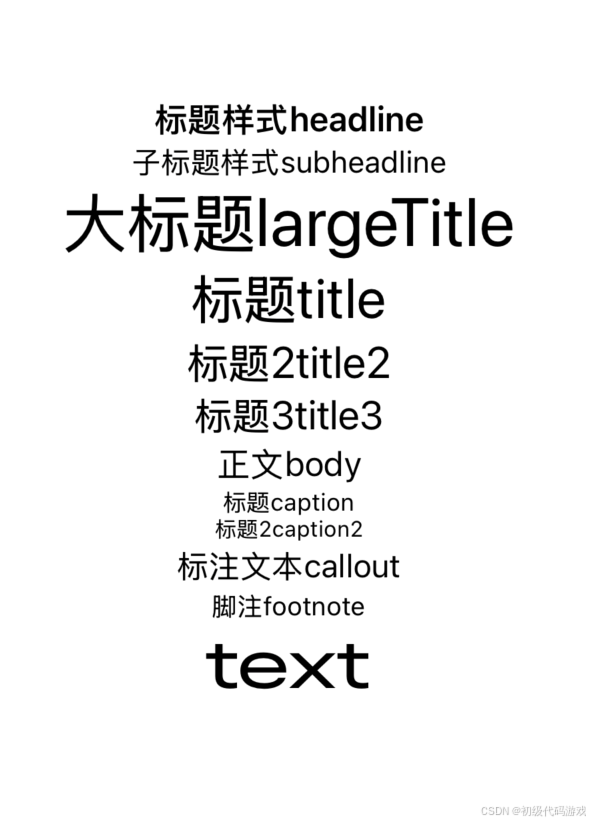
        Text("标题样式headline").font(.headline)
        Text("子标题样式subheadline").font(.subheadline)
        Text("大标题largeTitle").font(.largeTitle)
        Text("标题title").font(.title)
        Text("标题2title2").font(.title2)
        Text("标题3title3").font(.title3)
        Text("正文body").font(.body)
        Text("标题caption").font(.caption)
        Text("标题2caption2").font(.caption2)
        Text("标注文本callout").font(.callout)
        Text("脚注footnote").font(.footnote)

        Text("text")
            .font(.largeTitle)
    }
}
效果:
稍微解释一下几个"标题"的区别:
- headline 出版业的术语,一般指头版头条、整页的大标题
- title 文章的标题
- caption 其实根本不是标题,caption是图片下方的说明文字(也用于影片的字幕)
都是翻译的锅,如果分别翻译成"头条"、"标题"、"图注"应该就不会混淆了。
HTML一开始就错了?"H"是"heading"吧?怎么能分6级呢?
windows也不合适,窗口顶部为什么是"caption"?
1.2 直接设置字体
Swift
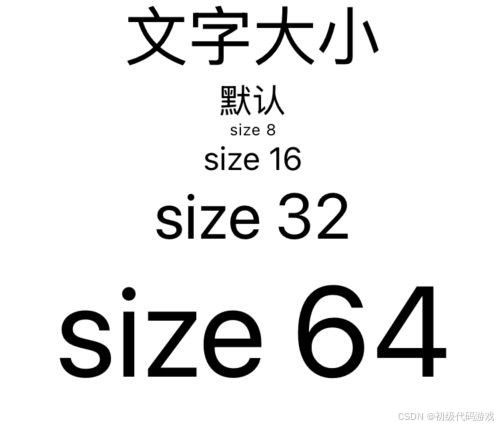
        Text("文字大小").font(.largeTitle)
        Text("默认")
        Text("size 8").font(.system(size:8))
        Text("size 16").font(.system(size:16))
        Text("size 32").font(.system(size:32))
        Text("size 64").font(.system(size:64))
效果:
二、使用fontWidth:
代码:
Swift
        Text("fontWidth").font(.largeTitle)
        Text("默认                 ABC")
        Text("标准standard     ABC").fontWidth(.standard)
        Text("压扁compressed     ABC").fontWidth(.compressed)
        Text("浓缩condensed    ABC").fontWidth(.condensed)
        Text("扩展expanded ABC").fontWidth(.expanded)
效果:
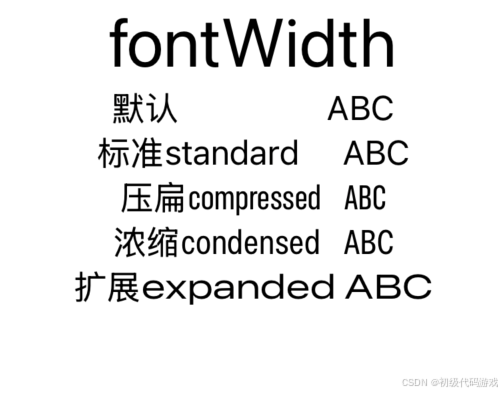
这里又有英文需要解释一下:
- compressed 压缩、压扁,伤害性比较大的
- condensed 浓缩,伤害性比较小
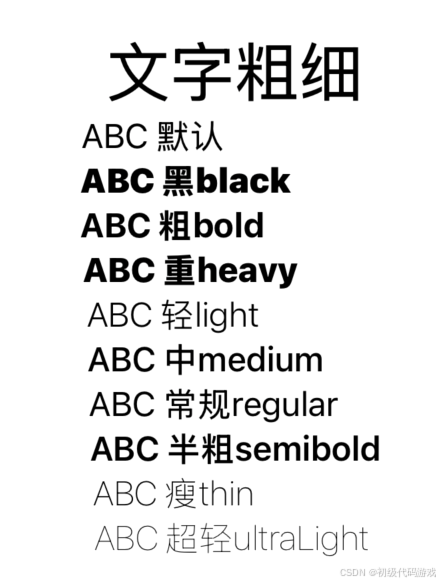
三、使用fontWeight:
Swift
        Text("文字粗细").font(.largeTitle)
        Text("ABC 默认                   ")
        Text("ABC 黑black              ").fontWeight(.black)
        Text("ABC 粗bold                ").fontWeight(.bold)
        Text("ABC 重heavy            ").fontWeight(.heavy)
        Text("ABC 轻light               ").fontWeight(.light)
        Text("ABC 中medium       ").fontWeight(.medium)
        Text("ABC 常规regular     ").fontWeight(.regular)
        Text("ABC 半粗semibold").fontWeight(.semibold)
        Text("ABC 瘦thin                ").fontWeight(.thin)
        Text("ABC 超轻ultraLight ").fontWeight(.ultraLight)
效果:
四、使用前景色(标准颜色)
Swift
        Text("标准颜色").font(.largeTitle)
        Text("颜色 默认")
        Text("黑色black").foregroundStyle(.black)
        Text("蓝色blue").foregroundStyle(.blue)
        Text("棕色brown").foregroundStyle(.brown)
        Text("透明clear👇")
        Text("透明clear").background(.blue).foregroundStyle(.clear).border(.blue)
        Text("透明clear").foregroundStyle(.clear).border(.blue)
        Text("青色cyan").foregroundStyle(.cyan)
        Text("灰色gray").foregroundStyle(.gray)
        Text("绿色green").foregroundStyle(.green)
        Text("靛蓝indigo").foregroundStyle(.indigo)
        Text("薄荷mint").foregroundStyle(.mint)
        Text("橙色orange").foregroundStyle(.orange)
        Text("粉色pink").foregroundStyle(.pink)
        Text("紫色purple").foregroundStyle(.purple)
        Text("红色red").foregroundStyle(.red)
        Text("青绿色teal").foregroundStyle(.teal)
        Text("白色white👇");
        Text("白色white").background(.blue).foregroundStyle(.white).border(.blue)
        Text("白色white").foregroundStyle(.white).border(.blue)
        Text("黄色yellow").foregroundStyle(.yellow)
注意以后要用foregroundStyle而不是foreground。
效果:
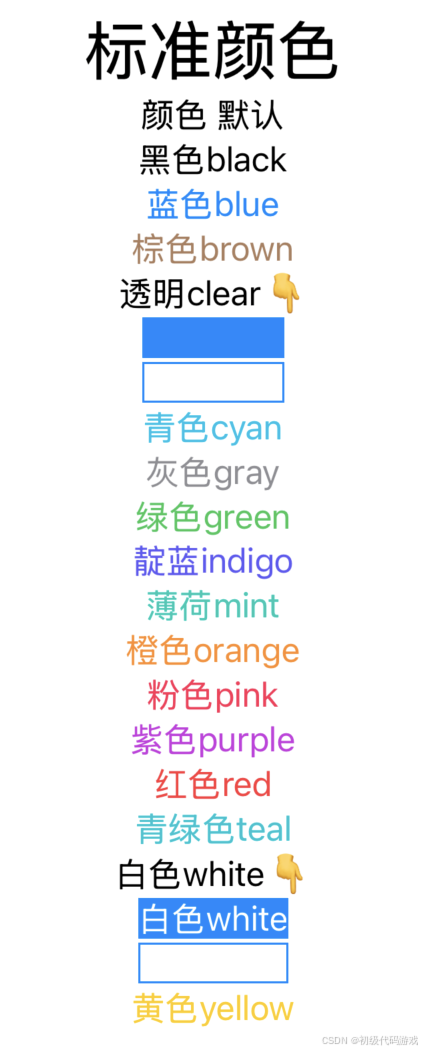
clear是透明色,也就是看不见(可能就是和背景色一致),为此加了边框和底色,可以看到白色背景和蓝色背景都是看不到的。
白色在白色背景上当然也看不到,所以也加了边框和背景来区别。
五、更多修饰
Swift
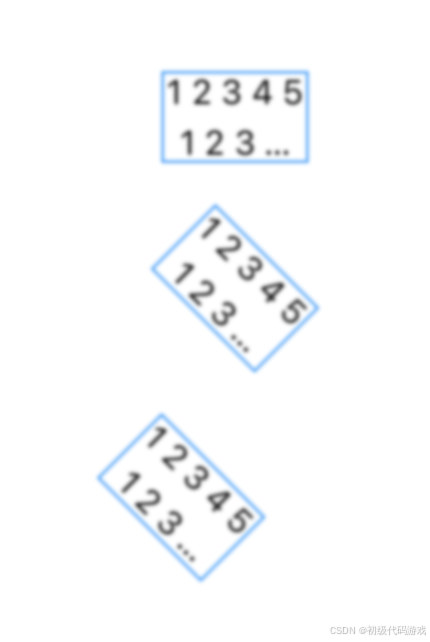
        Text("12345\n123\n12345").border(.blue).lineLimit(2).multilineTextAlignment(.center).tracking(5).lineSpacing(5).blur(radius: 1).padding()

        Text("12345\n123\n12345").border(.blue).lineLimit(2).multilineTextAlignment(.center).tracking(5).lineSpacing(5).blur(radius: 1)
            .rotationEffect(.degrees(45)).padding()
        Text("12345\n123\n12345").border(.blue).lineLimit(2).multilineTextAlignment(.center).tracking(5).lineSpacing(5).blur(radius: 1)
            .rotationEffect(.degrees(45),anchor:UnitPoint(x:0,y:0)).padding()
这三个只有旋转是不一样的。相关的几个修饰:
- border 边框,代码里设置了颜色,还可以设置宽度
- lineLimit 行数限制,换行可以是回车、换行和回车换行对,超出限制的显示为省略号
- multilineTextAlignment 多行文本的对齐方式,默认是左对齐
- tracking 字符间距
- lineSpacing 行间距
- blur 模糊度,0是不模糊,1-3比较模糊,更高就看不清是啥了
- rotationEffect 平面旋转,第一个参数是角度,第二个参数是中心点,默认是中心旋转,还有个名字中间有个"3D"的是三维旋转
- padding 外部的间距
效果: