1.查询和修改
1.1 MyBatis中的<where>, <set>和<trim>标签详解
1.1.1 <where>标签
<where>标签用于动态生成SQL语句中的WHERE子句,它会智能处理以下情况:
- 自动去除开头多余的AND或OR
- 当所有条件都不满足时,不会生成WHERE关键字
- 简化了条件判断的书写
示例用法
XML
<select id="dfFindUser" parameterType="entity.User" resultType="entity.User">
        select * from user
        <where>
            <if test="username != null">
                username like concat('%',#{username},'%')
            </if>
            <if test="phone != null">
                and phone like concat('%',#{phone},'%')
            </if>
            <if test="address != null">
                and address like concat('%',#{address},'%')
            </if>
        </where>
    </select>
应用场景
- 多条件查询时,避免手动处理WHERE和AND/OR的逻辑
- 不确定哪些条件会生效的动态查询
1.1.2 <set>标签
<set>标签用于动态生成UPDATE语句中的SET部分,特点包括:
- 自动去除末尾多余的逗号
- 当所有条件都不满足时,不会生成SET关键字
- 简化UPDATE语句的构建
示例用法
XML
<update id="dfupdate" parameterType="entity.User">
        update user
        <set>
            <if test="username != null">
                username=#{username},
            </if>
            <if test="password != null">
                password=#{password},
            </if>
            <if test="sex != null">
                sex=#{sex},
            </if>
            <if test="age != null">
                age=#{age},
            </if>
            <if test="phone != null">
                phone=#{phone}
            </if>
        </set>
        where id=#{id}
    </update>
应用场景
- 动态更新部分字段
- 不确定哪些字段需要更新的情况
1.1.3 <trim>标签
<trim>标签是更通用的解决方案,可以自定义前缀、后缀以及要移除的内容,功能更灵活:
- 可以完全替代
<where>和<set>标签 - 可以自定义处理逻辑
- 通过属性控制前缀、后缀和要移除的内容
基本属性
prefix:添加前缀suffix:添加后缀prefixOverrides:移除前缀中的指定内容suffixOverrides:移除后缀中的指定内容
示例用法
XML
<!-- 替代where标签 -->
<select id="trFindUser" parameterType="entity.User" resultType="entity.User">
        select * from user
        <trim prefix="where" prefixOverrides="and | or">
            <if test="username != null">
                username like concat('%',#{username},'%')
            </if>
            <if test="phone != null">
                and phone like concat('%',#{phone},'%')
            </if>
            <if test="address != null">
                and address like concat('%',#{address},'%')
            </if>
        </trim>
    </select>

<!-- 替代set标签 -->
<update id="trupdate" parameterType="entity.User">
        update user
        <trim prefix="set" suffixOverrides=",">
            <if test="username != null">
                username=#{username},
            </if>
            <if test="password != null">
                password=#{password},
            </if>
            <if test="sex != null">
                sex=#{sex},
            </if>
            <if test="age != null">
                age=#{age},
            </if>
            <if test="phone != null">
                phone=#{phone}
            </if>
        </trim>
        where id=#{id}
    </update>
应用场景
- 需要更精细控制SQL片段生成的场景
- 构建复杂的动态SQL语句
- 需要自定义前缀后缀处理逻辑的情况
1.1.4对比总结
| 标签 | 主要用途 | 自动处理 | 灵活性 |
|---|---|---|---|
| where | 生成WHERE子句 | 去除开头AND/OR | 中 |
| set | 生成SET子句 | 去除末尾逗号 | 中 |
| trim | 通用片段生成 | 可自定义 | 高 |
在实际开发中,可以根据具体需求选择合适的标签,<trim>标签虽然功能最强大,但<where>和<set>标签在特定场景下使用更加简洁明了。
1.2 选择查询
choose-when-otherwise 语法结构
等同于编程中的 if...else if...else 逻辑
结构说明:
- <choose>:作为整个条件结构的容器标签,是父级标签,包含所有when和otherwise子标签
- <when> :对应编程中的if或else if语句,每个when标签包含:
test属性:用于指定判断条件表达式- 标签体:条件满足时要执行的SQL片段或内容
- <otherwise>:对应编程中的else语句,不包含条件判断,是默认执行分支
查询示例:
根据用户输入执行不同查询逻辑:
- 当输入用户名时 → 按用户名查询
- 当输入地址时 → 按地址查询
- 当无输入时 → 默认按ID查询
用法示意:
XML
<select id="choose" parameterType="entity.User" resultType="entity.User">
        select * from user
        <where>
            <choose>
                <when test="username != null">
                    username = #{username}
                </when>
                <when test="address != null">
                    address = #{address}
                </when>
                <otherwise>
                    id = #{id}
                </otherwise>
            </choose>
        </where>
    </select>
1.3 批量操作
1.3.1 批量删除
使用 foreach 标签实现动态 SQL
在 Mapper XML 文件中使用 foreach 标签构建 IN 语句:
collection: 数组或集合名称,这个要和Mapper接口方法中的参数名称一致
item: 自定义循环变量名称
separator: 分割方式
open: 循环开始方式
close: 循环结束方式
XML
 <delete id="deleteMore">
        delete from user where id in
         <!--collection:数组或集合名称  item:自定义当前循环变量名称 -->
        <!--separator:分割方式  open:当前循环开始方式 close:当前循环结束方法-->
        <foreach collection="ids" item="id" open="(" separator="," close=")">
            #{id}
        </foreach>
    </delete>
对应的 Mapper 接口方法:
java
public int deleteMore(@Param("ids") Integer[] ids);//@Param强制注入这里必须使用@Param注解将数据强制注入
注意事项
- 大量数据删除操作可能造成数据库锁表,建议在低峰期执行
- 删除前最好先备份数据
- 考虑添加事务管理确保数据一致性
- 对于关联表数据,需要处理好外键约束
1.3.2 批量添加
sql语句
sql
insert into user (username,password,sex,age,phone,address)
    values (#{username},#{password},#{sex},#{age},#{phone},#{address}),
    (#{username},#{password},#{sex},#{age},#{phone},#{address}),
    (#{username},#{password},#{sex},#{age},#{phone},#{address});
使用 foreach 标签
在 XML 映射文件中使用 <foreach> 标签遍历集合,拼接多条 INSERT 语句:
XML
 <insert id="insertMore">
        insert into user (username,password,sex,age,phone,address) values
        <foreach collection="users" item="user" separator=",">
            (#{user.username},#{user.password},#{user.sex},#{user.age},#{user.phone},#{user.address})
        </foreach>
    </insert>
</mapper>
性能优化建议
对于大数据量批量插入,建议分批处理,每批 500-1000 条数据 设置 rewriteBatchedStatements=true 参数提升 MySQL 批量插入性能 考虑使用多线程并行插入提高效率
1.4 @Param注解在mybatis中的应用
1.4.1 基本概念
@Param注解是MyBatis框架提供的一个注解,用于在Mapper接口方法中为参数指定名称。当Mapper接口方法有多个参数时,使用@Param可以明确指定每个参数在SQL映射文件中的引用名称。
1.4.2 主要用途
-
多参数方法 :当Mapper接口方法需要接收多个参数时,使用
@Param为每个参数命名javaUser selectUser(@Param("username") String username, @Param("password") String password); -
集合/数组参数:传递集合或数组参数时,需要指定参数名
javaList<User> findUsersByIds(@Param("ids") List<Integer> ids); -
参数映射清晰:使SQL映射文件中的参数引用更加明确
1.4.3 使用场景
场景1:基本使用
java
public interface UserMapper {
    // 使用@Param为参数命名
    User selectByUsernameAndPassword(
        @Param("username") String username,
        @Param("password") String password
    );
}
对应的XML映射:
XML
<select id="selectByUsernameAndPassword" resultType="User">
    SELECT * FROM user
    WHERE username = #{username}
    AND password = #{password}
</select>
场景2:集合参数
java
public interface UserMapper {
    List<User> findByIds(@Param("ids") List<Integer> ids);
}
对应的XML映射:
XML
<select id="findByIds" resultType="User">
    SELECT * FROM user
    WHERE id IN
    <foreach item="item" collection="ids" open="(" separator="," close=")">
        #{item}
    </foreach>
</select>
场景3:对象参数
java
public interface UserMapper {
    int updateUser(
        @Param("user") User user,
        @Param("status") Integer status
    );
}
对应的XML映射:
XML
<update id="updateUser">
    UPDATE user
    SET status = #{status}
    WHERE id = #{user.id}
</update>
1.4.4 注意事项
- 当方法只有一个参数时,通常可以省略
@Param注解 - 使用
@Param注解后,XML中必须使用指定的名称引用参数 - 参数名不能包含特殊字符或空格
- 与Java 8的
-parameters编译选项相比,@Param提供了更明确的参数命名方式
1.4.5 最佳实践
- 为所有非简单类型参数添加
@Param注解,提高代码可读性 - 保持参数命名一致性和描述性
- 避免过度使用,对于简单查询可以省略
- 在团队中统一
@Param的使用规范
1.4.6 替代方案(不推荐)
如果不使用@Param注解,还可以:
- 使用Java 8的
-parameters编译选项,保留方法参数名 - 使用
param1, param2,...的默认命名方式 - 将多个参数封装为一个DTO对象
2. 关联查询
2.1 数据库关键字映射
2.1.1 resultMap标签的作用
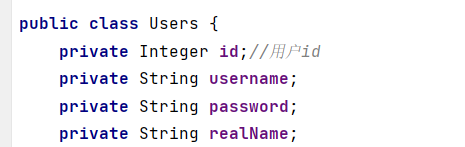
resultMap是MyBatis中用于定义数据库结果集与Java对象映射关系的核心标签。通过resultMap可以精确控制查询结果如何转换为Java对象,特别是处理复杂对象关系时。
2.1.2 标签和属性的具体说明
id属性 定义该resultMap的唯一标识符,在SQL映射文件中通过这个id引用该映射关系。
type属性 指定映射的目标Java类型,这里是entity.Order类,表示查询结果将映射为Order对象。
result子标签 用于定义简单字段的映射关系:
- property:Java对象的属性名
- column:数据库查询结果的字段名称
association子标签 处理对象类型的复杂属性映射(**集合使用:collection,**ofType:泛型的类型信息):
- property:目标对象在父对象中的属性名(这里是users)
- javaType:关联对象的Java类型(这里是entity.Users) 内部使用result标签定义关联对象的字段映射
2.1.3 关键注意事项
association标签用于处理"一对一"关系,如果是"一对多"关系应使用collection标签。当列名与属性名不一致时(如realname→realName),必须显式声明映射关系。
2.1.4 实际应用场景
一对一:(分开写)

XML
<resultMap id="UsersOrderMap" type="entity.Order">
        <result property="id" column="id"/>
        <result property="order_number" column="order_number"/>
        <result property="total_price" column="total_price"/>
        <result property="status" column="status"/>
        <result property="user_id" column="user_id"/>
        <!--复杂字段单独处理  对象使用:association  集合使用:collection-->
        <association property="users" javaType="entity.Users">
            <result property="id" column="id"/>
            <result property="username" column="username"/>
            <result property="password" column="password"/>
            <result property="realName" column="realname"/>
        </association>
    </resultMap>
XML
<select id="findUsersOrder1" resultMap="UsersOrderMap">
        select users.*,orders.order_number,total_price,status from users left join orders on users.id = orders.user_id
    </select>
一对一:(分布式)
分布式写法
select * from orders
select * from users where id = {user_id}
XML
<select id="getOrders" resultMap="orders">
        select * from orders
    </select>
    <resultMap id="orders" type="entity.Order">
        <result property="id" column="id"/>
        <result property="order_number" column="order_number"/>
        <result property="total_price" column="total_price"/>
        <result property="status" column="status"/>
        <result property="user_id" column="user_id"/>
        <!--cloumn:这里比较特殊是用来传值的-->
        <!--select:sql方法的调用-->
        <association property="users" javaType="entity.Users" column="user_id" select="getUserById"/>
    </resultMap>
    <select id="getUserById" resultType="entity.Users">
        select * from users where id = #{id}
    </select>
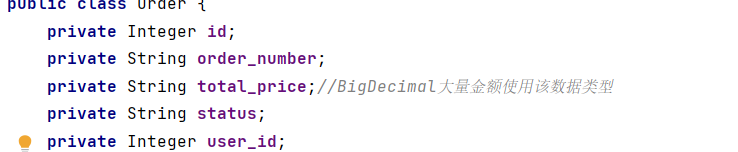
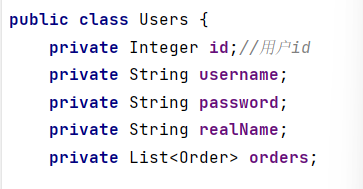
一对多:
XML
<select id="findUsersOrders" resultMap="UserOrders">
        select users.*,orders.order_number,total_price,status from users left join orders on users.id = orders.user_id
    </select>
    <resultMap id="UserOrders" type="entity.Users">
        <result property="id" column="id"/>
        <result property="username" column="username"/>
        <result property="password" column="password"/>
        <result property="realName" column="realname"/>
        <!--ofType:泛型的类型信息-->
        <collection property="orders" ofType="entity.Order">
            <result property="id" column="id"/>
            <result property="order_number" column="order_number"/>
            <result property="total_price" column="total_price"/>
            <result property="status" column="status"/>
            <result property="user_id" column="user_id"/>
        </collection>
    </resultMap>

    <!--分布式-->
    <!--查询user-->
     <select id="getUsers" resultMap="UserOrders1">
        select * from users
    </select>
     <resultMap id="UserOrders1" type="entity.Users">
         <result property="id" column="id"/>
         <result property="username" column="username"/>
         <result property="password" column="password"/>
         <result property="realName" column="realname"/>
         <collection property="orders" ofType="entity.Order"
                     fetchType="lazy" column="id" select="getOrders"/>
    </resultMap>
     <select id="getOrders" resultType="entity.Order">
        select * from orders where user_id =  #{user_id}
    </select>
2.2 懒加载
延迟加载(Lazy Loading)是 MyBatis 提供的一种优化技术,用于在需要时才加载关联对象的数据,避免一次性加载所有关联数据导致性能问题。以下是关于 MyBatis 延迟加载的详细说明和配置方法。
2.2.1 延迟加载的配置
在 MyBatis 的全局配置文件中,可以通过以下设置启用延迟加载:
XML
<settings>
    <!-- 启用延迟加载 -->
    <setting name="lazyLoadingEnabled" value="true"/>
    <!-- 禁用积极加载(按需加载) -->
    <setting name="aggressiveLazyLoading" value="false"/>
</settings>- lazyLoadingEnabled :设置为
true时,启用延迟加载。 - aggressiveLazyLoading :设置为
false时,MyBatis 会严格按需加载关联对象。如果设置为true,任何方法调用都会触发加载所有延迟加载的属性。
2.2.2 关联关系的延迟加载
在映射文件(Mapper XML)中,可以通过 fetchType="lazy" 为关联关系(如 association 或 collection)配置延迟加载:
XML
<resultMap id="orderResultMap" type="Order">
    <id property="id" column="id"/>
    <result property="orderNo" column="order_no"/>
    <!-- 延迟加载用户信息 -->
    <association property="user" column="user_id" javaType="User"
                 select="com.example.mapper.UserMapper.selectById" fetchType="lazy"/>
</resultMap>- fetchType :设置为
lazy时,该关联对象会延迟加载;设置为eager时会立即加载。
2.2.3 使用注解配置延迟加载
如果使用注解方式,可以通过 @Lazy 注解标记延迟加载:
java
public class Order {
    private Integer id;
    private String orderNo;

    @Lazy
    private User user;
}
2.2.4 延迟加载的触发条件
延迟加载的关联对象会在以下情况下被加载:
- 直接调用关联对象的
getter方法。 - 通过序列化或反射访问关联对象。
2.2.5 注意事项
- 序列化问题 :延迟加载的对象在序列化时可能会触发加载。可以通过实现
Serializable接口并重写writeReplace方法避免。 - 性能权衡:延迟加载可以减少初始查询的数据量,但可能增加后续查询的次数。需根据业务场景权衡。
- 代理对象:MyBatis 通过动态代理实现延迟加载,因此关联对象是代理实例而非实际对象。