📅 我们继续 50 个小项目挑战!------AutoTextEffect组件
仓库地址:https://gitee.com/hhm-hhm/50days50projects.git
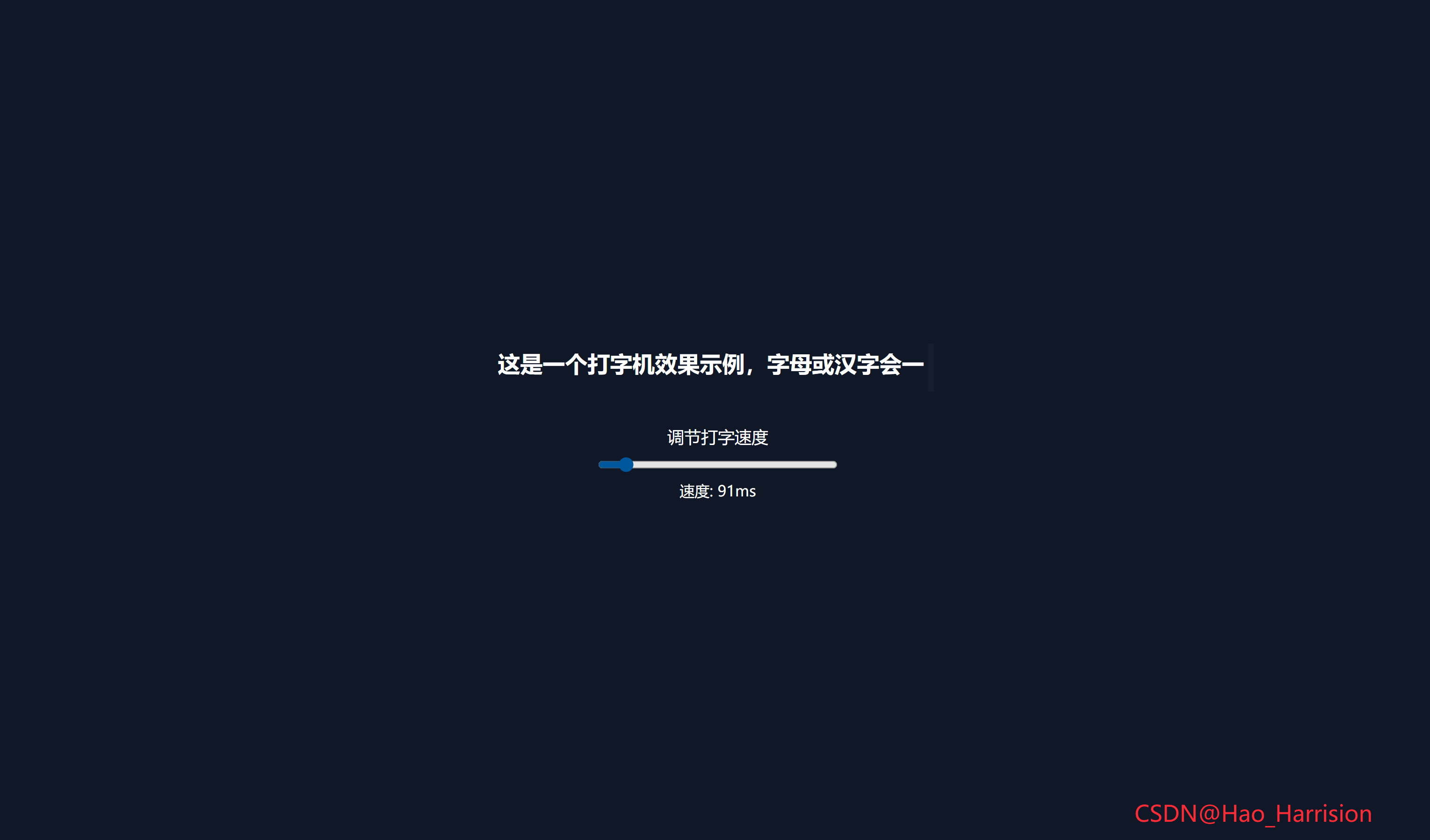
构建一个动态的打字机效果。这个效果不仅能够逐个字符地显示文本,还能模拟删除操作,为用户带来更丰富的视觉体验。
🌀 组件目标
- 实现逐字显现文本的打字机效果
- 支持调节打字速度
- 模拟删除操作,增加互动性
- 使用
TailwindCSS快速构建 UI 样式
🔧 AutoTextEffect.tsx组件实现
TypeScript
import React, { useState, useEffect, useRef } from 'react'

const AutoTextEffect: React.FC = () => {
    const fullText = '这是一个打字机效果示例,字母或汉字会一个个显示!'

    const [displayedText, setDisplayedText] = useState<string>('')
    const [speed, setSpeed] = useState<number>(150)
    const [isDeleting, setIsDeleting] = useState<boolean>(false)

    const indexRef = useRef<number>(0)
    const timeoutIdRef = useRef<NodeJS.Timeout | null>(null)

    const typeLoop = () => {
        const current = fullText.slice(0, indexRef.current)
        setDisplayedText(current)

        if (!isDeleting) {
            if (indexRef.current < fullText.length) {
                indexRef.current += 1
                timeoutIdRef.current = setTimeout(typeLoop, speed)
            } else {
                // 打字完成,停顿后开始删除
                setIsDeleting(true)
                timeoutIdRef.current = setTimeout(typeLoop, 1000)
            }
        } else {
            if (indexRef.current > 0) {
                indexRef.current -= 1
                timeoutIdRef.current = setTimeout(typeLoop, speed)
            } else {
                // 删除完成,停顿后重新打字
                setIsDeleting(false)
                timeoutIdRef.current = setTimeout(typeLoop, 500)
            }
        }
    }

    // 启动打字动画
    useEffect(() => {
        typeLoop()
        return () => {
            if (timeoutIdRef.current) {
                clearTimeout(timeoutIdRef.current)
            }
        }
    }, []) // 仅在挂载时启动

    // 监听 speed 变化:重置定时器以应用新速度
    useEffect(() => {
        if (timeoutIdRef.current) {
            clearTimeout(timeoutIdRef.current)
        }
        // 立即使用新速度继续动画
        timeoutIdRef.current = setTimeout(typeLoop, speed)
    }, [speed])

    return (
        <div className="flex min-h-screen flex-col items-center justify-center bg-gray-900 text-white">
            <div className="min-h-12 p-4 text-center text-2xl font-bold">
                {displayedText}
                <span className="inline-block w-[1ch] animate-ping align-bottom">|</span>
            </div>
            <div className="mt-8 flex flex-col items-center">
                <label htmlFor="speed" className="mb-2 text-lg">
                    调节打字速度
                </label>
                <input
                    id="speed"
                    type="range"
                    min="50"
                    max="500"
                    value={speed}
                    onChange={(e) => setSpeed(Number(e.target.value))}
                    className="w-64"
                />
                <span className="mt-2">速度: {speed}ms</span>
            </div>
            <div className="fixed right-20 bottom-5 z-100 text-2xl text-red-500">
                CSDN@Hao_Harrision
            </div>
        </div>
    )
}

export default AutoTextEffect
🔄 核心转换对照表
| 特性 | Vue 3 | React + TS |
|---|---|---|
| 响应式变量 | ref() |
useState(UI 相关) / useRef(非 UI) |
| 生命周期 | onMounted / onUnmounted |
useEffect(() => { ... }, []) |
| 响应式监听 | watch() |
useEffect(..., [deps]) |
| 表单绑定 | v-model |
value + onChange |
| 可变中间状态 | 模块级变量 | useRef |
| 清理副作用 | onUnmounted |
useEffect 返回函数 |
1. 状态管理:
ref → useState / useRef
| Vue | React |
|---|---|
displayedText = ref('') |
useState<string>('') |
speed = ref(150) |
useState<number>(150) |
isDeleting = ref(false) |
useState<boolean>(false) |
let index = 0(模块变量) |
useRef<number>(0) |
let timeoutId = null |
`useRef<NodeJS.Timeout |
✅ 为什么
index和timeoutId用useRef?因为它们是可变的中间状态 ,不需要触发 UI 更新。若用
useState,每次更新都会导致不必要的重渲染,且在闭包中可能捕获旧值。
2. 生命周期:
onMounted / onUnmounted → useEffect
onMounted(() => typeLoop())
→useEffect(() => { typeLoop(); return cleanup }, [])onUnmounted(() => clearTimeout(...))
→ 在useEffect的 cleanup 函数 中处理
✅ 这是 React 标准做法,确保组件卸载时清除定时器,防止内存泄漏。
3. 响应式监听:
watch(speed, ...) → useEffect(..., [speed])
Vue 的 watch 监听 speed 变化并重置定时器:
TypeScript
watch(speed, (newSpeed) => {
  clearTimeout(timeoutId)
  timeoutId = setTimeout(typeLoop, newSpeed)
})
React 中通过依赖数组实现:
TypeScript
useEffect(() => {
  if (timeoutIdRef.current) clearTimeout(timeoutIdRef.current);
  timeoutIdRef.current = setTimeout(typeLoop, speed);
}, [speed]); // 当 speed 变化时执行
⚠️ 注意:不能直接在
onChange中调用typeLoop(),因为typeLoop依赖当前isDeleting和index状态,必须由统一逻辑驱动。
4. 事件处理:
v-model → 受控组件
html
<input v-model="speed" />→ React 中手动绑定:
html
<input
  value={speed}
  onChange={(e) => setSpeed(Number(e.target.value))}
/>
✅ 实现完全等效的双向绑定。
5. 动画与样式:
Tailwind 完全兼容
animate-ping是 Tailwind 内置动画类(来自@tailwindcss/aspect或默认配置),无需额外处理;- 所有类名(
min-h-[3rem],w-[1ch],bg-gray-900等)直接复用; - 字体、颜色、布局行为一致。
6. 逻辑一致性保障
- 打字 → 停顿 1s → 删除 → 停顿 0.5s → 循环;
- 拖动滑块实时改变打字/删除速度;
- 组件卸载时清除所有定时器;
- 使用
useRef确保index和timeoutId在闭包中始终是最新的。
7. TypeScript 类型安全
- 明确定义
string、number、boolean类型; timeoutIdRef类型为NodeJS.Timeout | null,避免运行时错误;Number(e.target.value)确保输入为数字。
🎯 最终效果
- 页面中央显示打字机动画,带闪烁光标(
|+animate-ping); - 下方可拖动滑块调节打字/删除速度(50ms ~ 500ms);
- 支持中文字符逐字显示;
- 组件卸载安全,无内存泄漏;
- 完全类型安全,符合 React 最佳实践。
🎨 TailwindCSS 样式重点讲解
| 类名 | 作用 |
|---|---|
flex, min-h-screen, flex-col, items-center, justify-center |
使用 Flexbox 创建一个全屏垂直居中的布局 |
bg-gray-900 |
设置背景颜色为深灰色,增加对比度和视觉层次感 |
text-white |
设置文字颜色为白色,确保在深色背景下清晰可见 |
min-h-[3rem], p-4, text-center, text-2xl, font-bold |
控制文本显示区域的高度、内边距、文本对齐方式、字体大小及加粗效果 |
inline-block, w-[1ch], animate-ping, align-bottom |
实现光标的样式设置,包括宽度(字符单位)、动画效果以及垂直对齐 |
mt-8, flex, flex-col, items-center |
调整输入范围控件和其他元素的外边距、使用Flexbox进行布局,并使其内容居中对齐 |
mb-2, text-lg |
为标签提供下边距和字体大小 |
w-64 |
设置滑动条的最大宽度 |
mt-2 |
给速度显示文本添加上边距 |
| [🎯 TailwindCSS 样式说明] |
🦌 路由组件 + 常量定义
router/index.tsx 中 children数组中添加子路由
TypeScript
{
    path: '/',
    element: <App />,
    children: [
       ...
      {
                path: '/AutoTextEffect',
                lazy: () =>
                    import('@/projects/AutoTextEffect').then((mod) => ({
                        Component: mod.default,
                    })),
       },
    ],
 },
constants/index.tsx 添加组件预览常量``
TypeScript
import demo30Img from '@/assets/pic-demo/demo-30.png'
省略部分....
export const projectList: ProjectItem[] = [
    省略部分....
     {
        id: 30,
        title: 'Auto Text Effect',
        image: demo30Img,
        link: 'AutoTextEffect',
    },
]
🚀 小结
创建一个具有交互性的打字机效果。
扩展基础的打字机效果:
- ✅ 提供一个文本框让用户自行输入想要展示的文字。
- ✅ 字符颜色渐变
- ✅ 背景闪烁
- ✅ 添加粒子爆炸或其他动画效果
📅 明日预告: 我们将完成PasswordGenerator组件,一个密码生成器组件,可以对生成的密码进行配置、复制。🚀
感谢阅读,欢迎点赞、收藏和分享 😊
原文链接:https://blog.csdn.net/qq_44808710/article/details/149401154
每天造一个轮子,码力暴涨不是梦!🚀