前言
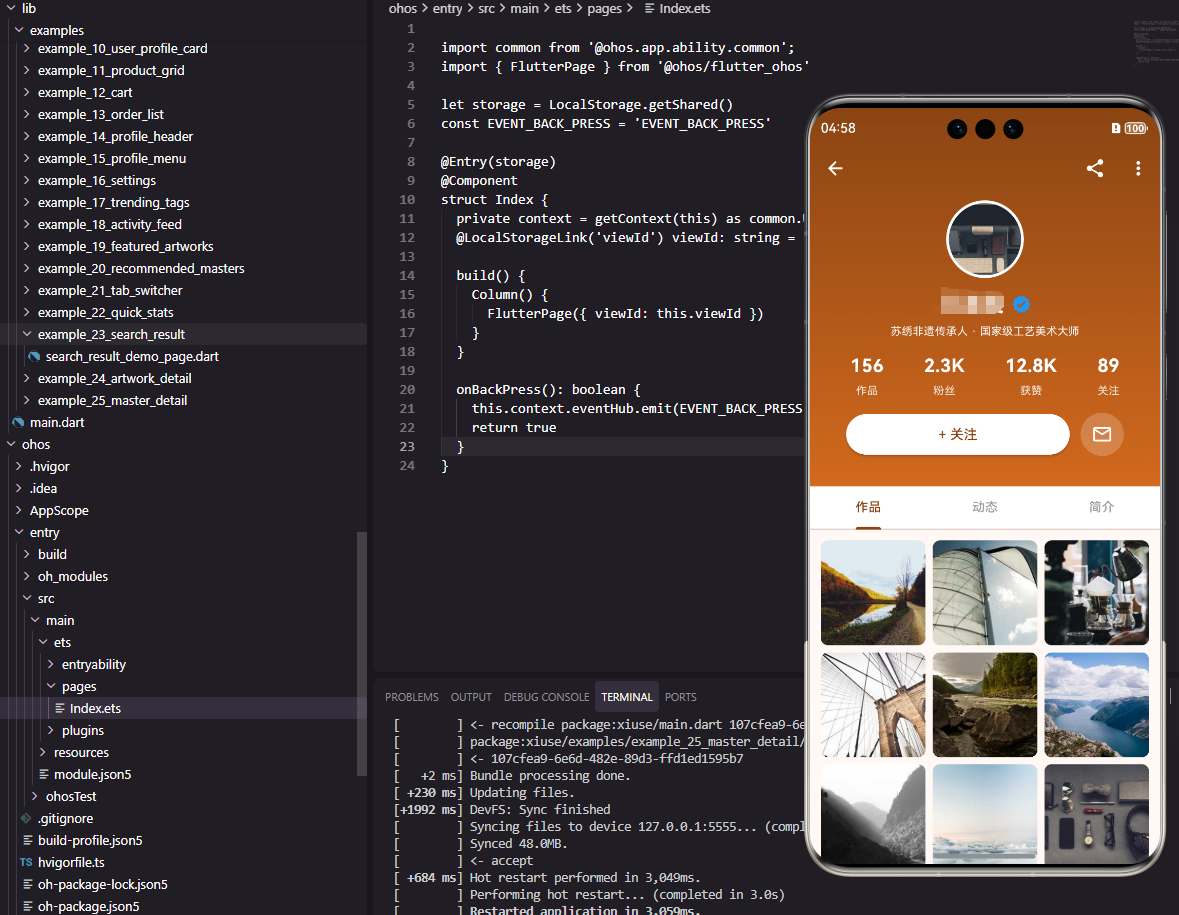
大师详情页面是展示创作者完整信息的重要页面。它需要展示大师的个人资料、作品集、成就荣誉、粉丝互动等内容。本文将详细介绍如何在Flutter和OpenHarmony平台上实现一个功能完善的大师详情页面。
大师详情页面的设计需要突出创作者的专业形象,同时展示其作品和成就,帮助用户决定是否关注。
Flutter大师详情页面实现
页面结构设计
大师详情页面接收大师信息参数。
dart
class MasterDetailPage extends StatefulWidget {
  final String name;
  final String specialty;

  const MasterDetailPage({super.key, required this.name, required this.specialty});

  @override
  State<MasterDetailPage> createState() => _MasterDetailPageState();
}

class _MasterDetailPageState extends State<MasterDetailPage> {
  bool _isFollowed = false;
使用StatefulWidget管理关注状态。name和specialty通过构造函数传入。
头部信息区域
展示大师头像、名称、头衔和统计数据。
dart
  @override
  Widget build(BuildContext context) {
    return Scaffold(
      appBar: AppBar(
        title: const Text('大师主页', style: TextStyle(color: Colors.white)),
        backgroundColor: const Color(0xFF8B4513),
        leading: IconButton(
          icon: const Icon(Icons.arrow_back, color: Colors.white),
          onPressed: () => Navigator.pop(context),
        ),
      ),
      body: SingleChildScrollView(
        child: Column(
          children: [
            Container(
              padding: const EdgeInsets.all(24),
              decoration: const BoxDecoration(
                gradient: LinearGradient(
                  begin: Alignment.topCenter,
                  end: Alignment.bottomCenter,
                  colors: [Color(0xFF8B4513), Color(0xFFD2691E)],
                ),
              ),
              child: Column(
                children: [
                  CircleAvatar(
                    radius: 50,
                    backgroundColor: Colors.white,
                    child: CircleAvatar(
                      radius: 46,
                      backgroundColor: const Color(0xFFF5F5DC),
                      child: Text(widget.name[0], style: const TextStyle(fontSize: 36, fontWeight: FontWeight.bold, color: Color(0xFF8B4513))),
                    ),
                  ),
                  const SizedBox(height: 16),
                  Row(
                    mainAxisAlignment: MainAxisAlignment.center,
                    children: [
                      Text(widget.name, style: const TextStyle(fontSize: 22, fontWeight: FontWeight.bold, color: Colors.white)),
                      const SizedBox(width: 8),
                      const Icon(Icons.verified, color: Colors.blue, size: 20),
                    ],
                  ),
                  const SizedBox(height: 4),
                  Text(widget.specialty, style: TextStyle(fontSize: 14, color: Colors.white.withOpacity(0.9))),
                  const SizedBox(height: 16),
渐变背景增强视觉效果。双层CircleAvatar创建白色边框效果。认证图标显示在名称旁边。
统计数据与关注按钮
展示作品数、粉丝数等统计信息。
dart
                  Row(
                    mainAxisAlignment: MainAxisAlignment.spaceEvenly,
                    children: [
                      _buildStatColumn('作品', '156'),
                      _buildStatColumn('粉丝', '2.3K'),
                      _buildStatColumn('获赞', '12.8K'),
                    ],
                  ),
                  const SizedBox(height: 20),
                  SizedBox(
                    width: double.infinity,
                    child: ElevatedButton(
                      onPressed: () => setState(() => _isFollowed = !_isFollowed),
                      style: ElevatedButton.styleFrom(
                        backgroundColor: _isFollowed ? Colors.white.withOpacity(0.2) : Colors.white,
                        padding: const EdgeInsets.symmetric(vertical: 12),
                        shape: RoundedRectangleBorder(borderRadius: BorderRadius.circular(25)),
                      ),
                      child: Text(
                        _isFollowed ? '已关注' : '+ 关注',
                        style: TextStyle(fontSize: 16, color: _isFollowed ? Colors.white : const Color(0xFF8B4513)),
                      ),
                    ),
                  ),
                ],
              ),
            ),
统计数据均匀分布。关注按钮根据状态显示不同样式。
作品展示区域
展示大师的作品列表。
dart
            Padding(
              padding: const EdgeInsets.all(16),
              child: Column(
                crossAxisAlignment: CrossAxisAlignment.start,
                children: [
                  const Text('代表作品', style: TextStyle(fontSize: 18, fontWeight: FontWeight.bold, color: Color(0xFF8B4513))),
                  const SizedBox(height: 12),
                  GridView.count(
                    crossAxisCount: 3,
                    shrinkWrap: true,
                    physics: const NeverScrollableScrollPhysics(),
                    crossAxisSpacing: 8,
                    mainAxisSpacing: 8,
                    children: List.generate(6, (index) => Container(
                      decoration: BoxDecoration(
                        color: Colors.grey[200],
                        borderRadius: BorderRadius.circular(8),
                      ),
                      child: const Center(child: Icon(Icons.image, color: Colors.grey)),
                    )),
                  ),
                ],
              ),
            ),
          ],
        ),
      ),
    );
  }

  Widget _buildStatColumn(String label, String value) {
    return Column(
      children: [
        Text(value, style: const TextStyle(fontSize: 20, fontWeight: FontWeight.bold, color: Colors.white)),
        const SizedBox(height: 4),
        Text(label, style: TextStyle(fontSize: 12, color: Colors.white.withOpacity(0.8))),
      ],
    );
  }
}
GridView展示作品网格。shrinkWrap和NeverScrollableScrollPhysics使其嵌套在ScrollView中正常工作。
OpenHarmony鸿蒙实现
页面定义
鸿蒙平台使用路由参数接收大师信息。
typescript
@Entry
@Component
struct MasterDetailPage {
  @State name: string = ''
  @State specialty: string = ''
  @State isFollowed: boolean = false

  aboutToAppear() {
    const params = router.getParams() as Record<string, string>
    this.name = params?.name || '大师'
    this.specialty = params?.specialty || '刺绣艺术家'
  }
页面布局实现
使用Scroll构建可滚动页面。
typescript
  build() {
    Column() {
      Row() {
        Image($r('app.media.back'))
          .width(24)
          .height(24)
          .fillColor(Color.White)
          .onClick(() => router.back())
        Text('大师主页')
          .fontSize(18)
          .fontColor(Color.White)
          .layoutWeight(1)
          .textAlign(TextAlign.Center)
        Blank().width(24)
      }
      .width('100%')
      .height(56)
      .padding({ left: 16, right: 16 })
      .backgroundColor('#8B4513')

      Scroll() {
        Column() {
          Column() {
            Text(this.name.charAt(0))
              .fontSize(36)
              .fontWeight(FontWeight.Bold)
              .fontColor('#8B4513')
              .width(92)
              .height(92)
              .borderRadius(46)
              .backgroundColor('#F5F5DC')
              .textAlign(TextAlign.Center)
              .border({ width: 4, color: Color.White })

            Row() {
              Text(this.name)
                .fontSize(22)
                .fontWeight(FontWeight.Bold)
                .fontColor(Color.White)
              Image($r('app.media.verified'))
                .width(20)
                .height(20)
                .margin({ left: 8 })
            }
            .margin({ top: 16 })

            Text(this.specialty)
              .fontSize(14)
              .fontColor('#FFFFFFE6')
              .margin({ top: 4 })

            Row() {
              this.StatColumn('作品', '156')
              this.StatColumn('粉丝', '2.3K')
              this.StatColumn('获赞', '12.8K')
            }
            .width('100%')
            .justifyContent(FlexAlign.SpaceEvenly)
            .margin({ top: 16 })

            Button(this.isFollowed ? '已关注' : '+ 关注')
              .width('90%')
              .height(44)
              .fontSize(16)
              .fontColor(this.isFollowed ? Color.White : '#8B4513')
              .backgroundColor(this.isFollowed ? '#FFFFFF33' : Color.White)
              .borderRadius(22)
              .margin({ top: 20 })
              .onClick(() => {
                this.isFollowed = !this.isFollowed
              })
          }
          .width('100%')
          .padding(24)
          .linearGradient({
            direction: GradientDirection.Bottom,
            colors: [['#8B4513', 0], ['#D2691E', 1]]
          })

          Column() {
            Text('代表作品')
              .fontSize(18)
              .fontWeight(FontWeight.Bold)
              .fontColor('#8B4513')
              .width('100%')

            Grid() {
              ForEach([1, 2, 3, 4, 5, 6], () => {
                GridItem() {
                  Stack() {
                    Image($r('app.media.placeholder'))
                      .width('100%')
                      .height('100%')
                      .objectFit(ImageFit.Cover)
                  }
                  .width('100%')
                  .height('100%')
                  .backgroundColor('#F0F0F0')
                  .borderRadius(8)
                }
              })
            }
            .columnsTemplate('1fr 1fr 1fr')
            .rowsGap(8)
            .columnsGap(8)
            .height(240)
            .margin({ top: 12 })
          }
          .width('100%')
          .padding(16)
        }
      }
      .layoutWeight(1)
    }
    .width('100%')
    .height('100%')
  }

  @Builder StatColumn(label: string, value: string) {
    Column() {
      Text(value)
        .fontSize(20)
        .fontWeight(FontWeight.Bold)
        .fontColor(Color.White)
      Text(label)
        .fontSize(12)
        .fontColor('#FFFFFFCC')
        .margin({ top: 4 })
    }
  }
}
@Builder定义可复用的统计列构建函数。Grid组件展示作品网格。
总结
本文介绍了Flutter和OpenHarmony平台上大师详情页面的实现方法。大师详情页面是展示创作者形象的重要页面,其设计需要突出专业性并提供便捷的关注入口。欢迎加入开源鸿蒙跨平台社区:https://openharmonycrossplatform.csdn.net