Windows 11 下 Z-Image-Turbo 完整部署与 Flash Attention 2.8.3 本地编译复盘
日期:2025年12月28日
环境:Windows 11 + RTX 3090 + PyTorch 2.9.1+cu130
目的:个人技术复盘 + 可复现部署指南
经过数天的反复尝试,终于在 Windows 环境下成功编译最新 Flash Attention 2.8.3,并让 Z-Image-Turbo 稳定运行在最佳性能状态。这篇笔记记录完整过程,重点是本地编译 2.8.3 和解决 Windows 特有的注意力后端兼容问题还有CUDA加速,供自己将来回顾,也希望能帮到其他 Windows 用户。
硬件与软件环境
- 操作系统:Windows 11 专业工作站版 26H1
- GPU:NVIDIA RTX 3090(24GB,Compute Capability 8.6)
- CPU:Intel Core Ultra 9 285K @ 3.70 GHz
- 内存:128 GB
- Python:3.10.18
- PyTorch:2.9.1+cu130(CUDA runtime 13.0)
- CUDA Toolkit:13.1(完整安装版)
- Visual Studio:2022 Professional(带 C++ 桌面开发工作负载)
最终成果
- 成功本地编译 Flash Attention 2.8.3 wheel(文件名:flash_attn-2.8.3-cp310-cp310-win_amd64.whl)
- 通过修改推理脚本强制使用 "flash" 后端
- 实测性能(1024×1024,8 步,cfg=0.0):
- 采样阶段:约 6.9 秒(1.16 it/s)
- 总时间:约 16.7 秒(含模型加载)
- 生成质量极高,细节丰富,无明显瑕疵
关键步骤:本地编译 Flash Attention 2.8.3(100% 可复现)
必须在 Visual Studio 2022 的 x64 Native Tools Command Prompt 中操作:
Windows 下成功编译 Flash Attention 2.8.3 (flash-attn /flash_attn)个人复盘记录
Flash Attention 在 Windows 上编译成功复盘笔记
git clone https://github.com/Dao-AILab/flash-attention.git
cd flash-attention
git pull
git fetch --all --tags
git checkout v2.8.3
git submodule update --init --recursive

# 激活你的虚拟环境
G:\PythonProjects2\Z-Image\.venv\Scripts\activate

# 设置关键环境变量(成功核心!)
set DISTUTILS_USE_SDK=1
set MAX_JOBS=2                    # 128GB 内存下安全值
set TORCH_CUDA_ARCH_LIST=8.6      # 只编译 RTX 3090 架构,避开新版 Hopper/Blackwell/softcap 内核崩溃
set NVCC_THREADS=2

# 清理旧缓存
python setup.py clean --all

# 开始编译(耗时 6~8 小时,可挂机)
python setup.py bdist_wheel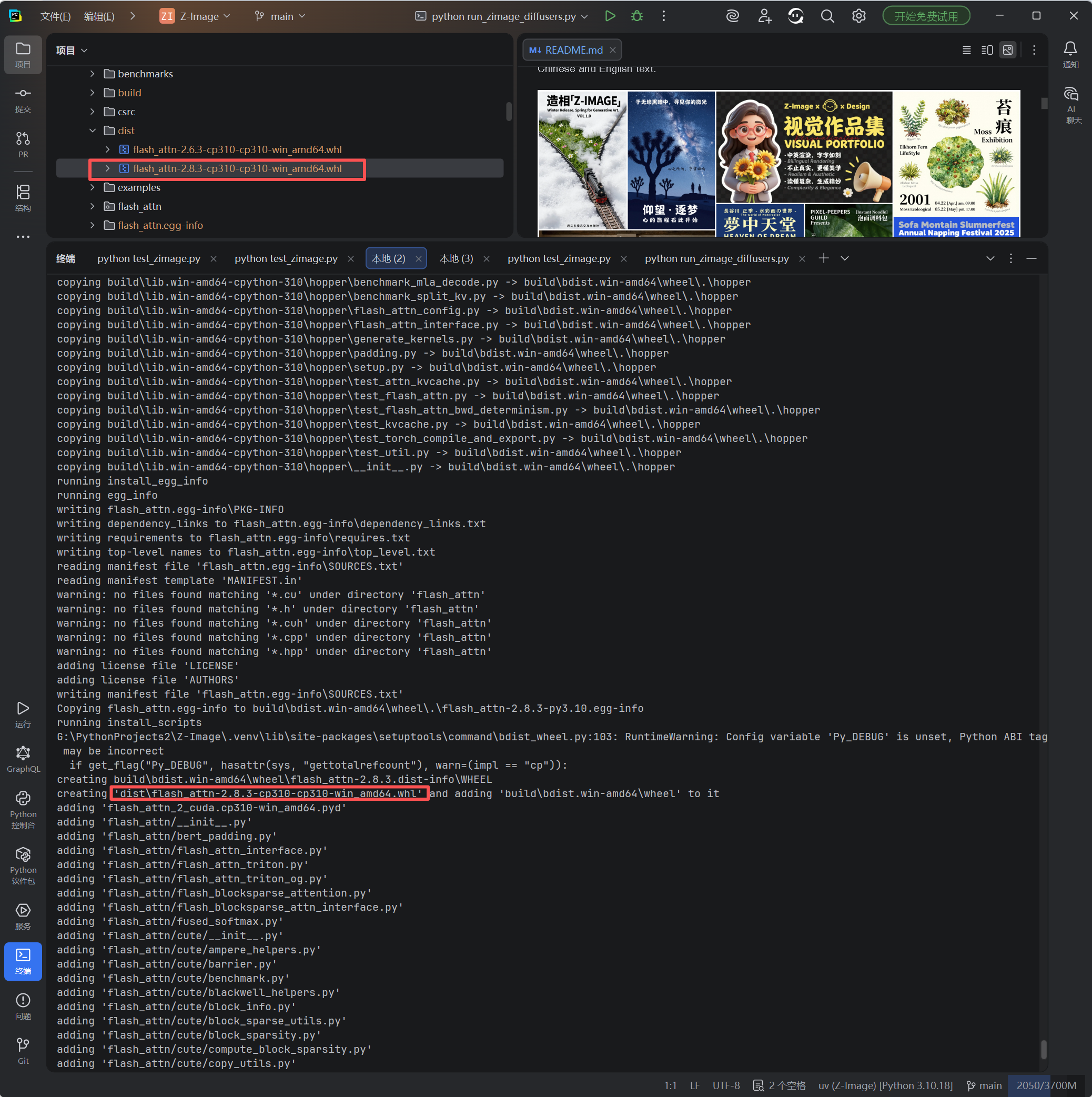
编译成功后,在 dist/ 目录生成 wheel,安装:
pip uninstall flash-attn -y
pip install dist\flash_attn-2.8.3-cp310-cp310-win_amd64.whl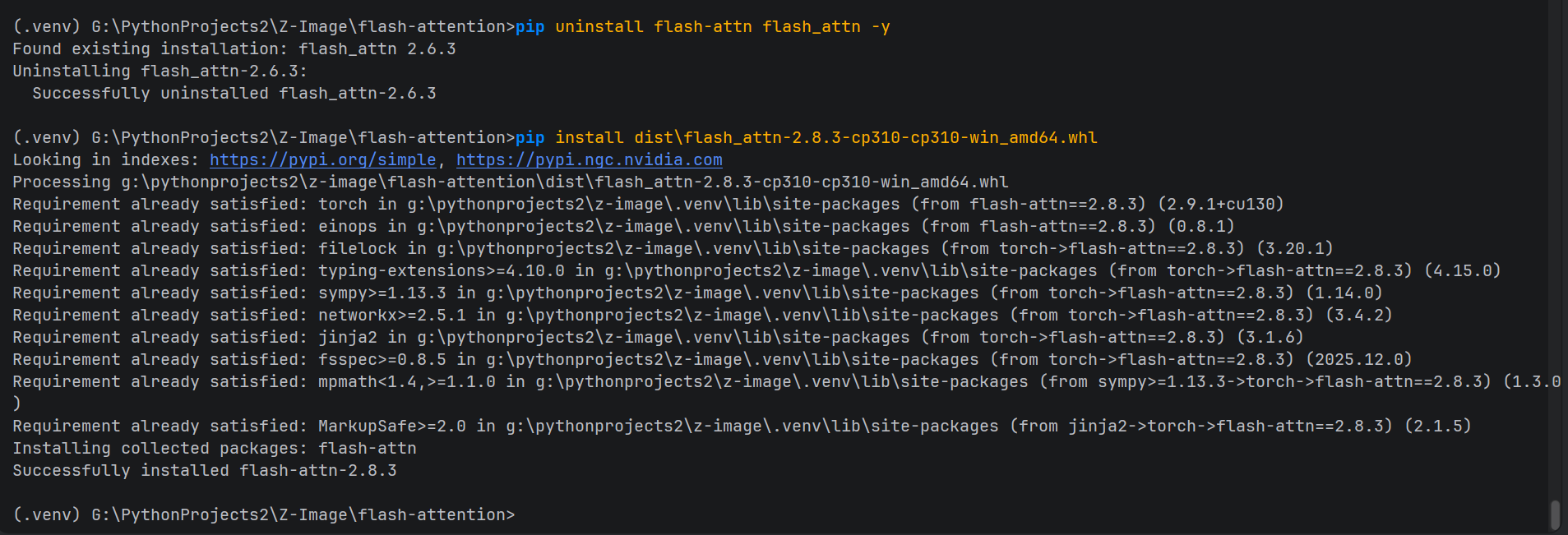
为什么这个配置能成功?
- TORCH_CUDA_ARCH_LIST=8.6:限制只编译 Ampere 架构,彻底避开 2.8.3 新增的复杂内核在 Windows 上的兼容性问题
- 低并行 + DISTUTILS_USE_SDK=1:防止内存溢出和 VC 环境重复激活
推理脚本优化:强制使用 Flash Attention 加速
原始项目脚本默认可能使用 _native_flash,在 Windows + RTX 3090 上会报 "No available kernel. Aborting execution."。
三个脚本的真实情况说明
1. inference.py ------ 项目官方脚本(经过关键修改)
- 来源:Z-Image 项目仓库中自带的官方推理脚本(原始版本默认从环境变量读取后端,可能使用 _native_flash)
- 修改目的:在 Windows + RTX 3090 环境下强制使用本地编译的 Flash Attention 2.8.3("flash" 后端),彻底解决 "No available kernel. Aborting execution." 错误,同时获得最佳加速。
- 修改点 :
- 移除对 os.environ.get("ZIMAGE_ATTENTION", "_native_flash") 的依赖
- 硬编码 forced_backend = "flash"
- 添加注释和打印信息,便于确认后端切换成功
- 当前状态:这是基于官方演示修改后的脚本,性能最优(实测采样 6.9 秒)
2. run_zimage_diffusers.py ------ 基于官方 diffusers 示例的简化脚本
- 来源:参考 Hugging Face diffusers 官方 ZImagePipeline 示例(官方仓库中通常有类似 demo)
- 修改目的:提供一个最简洁、可直接运行的官方 pipeline 测试脚本,便于验证模型加载和基本生成功能
- 特点:不涉及自定义 attention 后端切换,依赖 diffusers 内置逻辑
- 注意:如果已安装 flash-attn 2.x,可能因 diffusers 最新版强制导入 FA3 函数而崩溃。建议运行前临时 pip uninstall flash-attn
3. test_zimage.py ------ 基于官方测试脚本的简化版
- 来源:利用 AI 工具自行修改的测试脚本
- 修改目的:快速验证官方 ZImagePipeline 是否能正常导入和生成,prompt 使用经典测试案例
- 特点:包含 CUDA 判断和图片保存逻辑
- 注意:同上,若安装 flash-attn 可能导入失败,建议卸载后运行
推荐主推理脚本(inference.py,已修改优化):
替换官方 inference.py 脚本文件
"""Z-Image PyTorch Native Inference(Windows 优化版)"""

import os
import time
import warnings
import torch

warnings.filterwarnings("ignore")
from utils import AttentionBackend, ensure_model_weights, load_from_local_dir, set_attention_backend
from zimage import generate

def main():
    model_path = ensure_model_weights("ckpts/Z-Image-Turbo", verify=False)
    dtype = torch.bfloat16
    compile = False
    output_path = "example.png"
    height = 1024
    width = 1024
    num_inference_steps = 8
    guidance_scale = 0.0
    seed = 42

    # 强制使用本地编译的 Flash Attention 2.8.3
    forced_backend = "flash"
    set_attention_backend(forced_backend)

    prompt = "Young Chinese woman in red Hanfu, intricate embroidery. Impeccable makeup, red floral forehead pattern. ..."

    if torch.cuda.is_available():
        device = "cuda"
        print("Chosen device: cuda")

    components = load_from_local_dir(model_path, device=device, dtype=dtype, compile=compile)
    AttentionBackend.print_available_backends()
    print(f"Chosen attention backend: {forced_backend}  # 强制指定,性能最优")

    start_time = time.time()
    images = generate(prompt=prompt, **components, height=height, width=width,
                      num_inference_steps=num_inference_steps, guidance_scale=guidance_scale,
                      generator=torch.Generator(device).manual_seed(seed))
    end_time = time.time()
    print(f"Time taken: {end_time - start_time:.2f} seconds")
    images[0].save(output_path)

if __name__ == "__main__":
    main()
运行效果:
python inference.py 带 CUDA 加速的支持
(.venv) G:\PythonProjects2\Z-Image>python inference.py
PyTorch version is >= 2.5.0, check pass.
2025-12-28 11:48:34.982 | INFO | utils.helpers:ensure_model_weights:202 - ✓ All 16 required files exist in ckpts\Z-Image-Turbo
Chosen device: cudaLoading checkpoint shards: 100%|█████████████████████████████████████████████████████████████████████████████████████████████| 3/3 00:00\<00:00, 29.17it/s
Available attention backends list: 'flash', 'flash_varlen', '_flash_3', '_flash_varlen_3', 'native', '_native_flash', '_native_math'
Chosen attention backend: flash # 强制指定,避免 _native_flash 错误
2025-12-28 11:48:55.094 | INFO | zimage.pipeline:generate:106 - Generating image: 1024x1024, steps=8, cfg=0.0
2025-12-28 11:48:55.446 | INFO | zimage.pipeline:generate:211 - Sampling loop start: 8 steps
Denoising: 100%|█████████████████████████████████████████████████████████████████████████████████████████████████████████████| 8/8 00:06\<00:00, 1.16it/s
Time taken: 16.72 seconds

附赠两个测试脚本(基于官方 diffusers 示例)
注意:这两个脚本使用官方 diffusers pipeline,若已安装 flash-attn 可能因版本冲突导入失败。建议运行前临时 pip uninstall flash-attn。
run_zimage_diffusers.py
import torch
from diffusers import ZImagePipeline

pipe = ZImagePipeline.from_pretrained("Tongyi-MAI/Z-Image-Turbo", torch_dtype=torch.bfloat16)
pipe = pipe.to("cuda")

prompt = "一只超级可爱的小猫咪坐在古风窗台上,窗外下雪,毛发蓬松细腻,阳光洒落,写实摄影风格,8k高清"

image = pipe(prompt=prompt, height=1024, width=1024,
             num_inference_steps=8, guidance_scale=0.0).images[0]

image.save("zimage_cat_snow.png")
print("生成完成!图片已保存为 zimage_cat_snow.png")
运行效果:
python run_zimage_diffusers.py 标题
标题
(.venv) G:\PythonProjects2\Z-Image>python run_zimage_diffusers.py
Loading checkpoint shards: 100%|█████████████████████████████████████████████████████████████████████████████████████████████| 3/3 00:10\<00:00, 3.41s/it
Loading pipeline components...: 40%|███████████████████████████████████▏ | 2/5 00:10\<00:18, 6.14s/it`torch_dtype` is deprecated! Use `dtype` instead!
Loading checkpoint shards: 100%|█████████████████████████████████████████████████████████████████████████████████████████████| 3/3 00:00\<00:00, 33.34it/s
Loading pipeline components...: 100%|████████████████████████████████████████████████████████████████████████████████████████| 5/5 00:10\<00:00, 2.13s/it
100%|████████████████████████████████████████████████████████████████████████████████████████████████████████████████████████| 8/8 00:08\<00:00, 1.00s/it
生成完成!图片已保存为 zimage_cat_snow.png

test_zimage.py
import torch
from diffusers import ZImagePipeline

pipe = ZImagePipeline.from_pretrained("Tongyi-MAI/Z-Image-Turbo", torch_dtype=torch.bfloat16, low_cpu_mem_usage=False)

if torch.cuda.is_available():
    pipe.to("cuda")

prompt = "A Beautiful women, hyper-detailed, 8K, cinematic lighting"

image = pipe(prompt=prompt, height=1024, width=1024,
             num_inference_steps=8, guidance_scale=0.0).images[0]

image.save("watercolor_countryside.png")
print("图像已保存为 watercolor_countryside.png")
运行效果:
python test_zimage.py
(.venv) G:\PythonProjects2\Z-Image>python test_zimage.py
Loading checkpoint shards: 100%|█████████████████████████████████████████████████████████████████████████████████████████████| 3/3 00:04\<00:00, 1.64s/it
Loading pipeline components...: 20%|█████████████████▌ | 1/5 00:05\<00:20, 5.04s/it`torch_dtype` is deprecated! Use `dtype` instead!
Loading checkpoint shards: 100%|████████████████████████████████████████████████████████████████████████████████████████████| 3/3 00:00\<00:00, 106.97it/s
Loading pipeline components...: 100%|████████████████████████████████████████████████████████████████████████████████████████| 5/5 00:05\<00:00, 1.17s/it
100%|████████████████████████████████████████████████████████████████████████████████████████████████████████████████████████| 8/8 00:08\<00:00, 1.00s/it
图像已保存为 watercolor_countryside.png

结语
通过本地编译 Flash Attention 2.8.3 + 强制 "flash" 后端,这套方案彻底解决了 Windows 平台下 Z-Image-Turbo 的兼容性和性能瓶颈。
生成的图片质量令人惊艳(汉服美女细节完美、小猫咪毛发蓬松真实),性能也达到 RTX 3090 的极致水准。
本地 wheel 已永久备份,这份记录留作备忘,也欢迎有需要的朋友交流。
Windows 用户的 Z-Image-Turbo CUDA 部署,终于不再是梦。