最近使用QT结合AI整了一款Windows端的鼠标点击器,可以帮我我们解放双手,按照既定的xy坐标去处理点击动作!
软件截图:
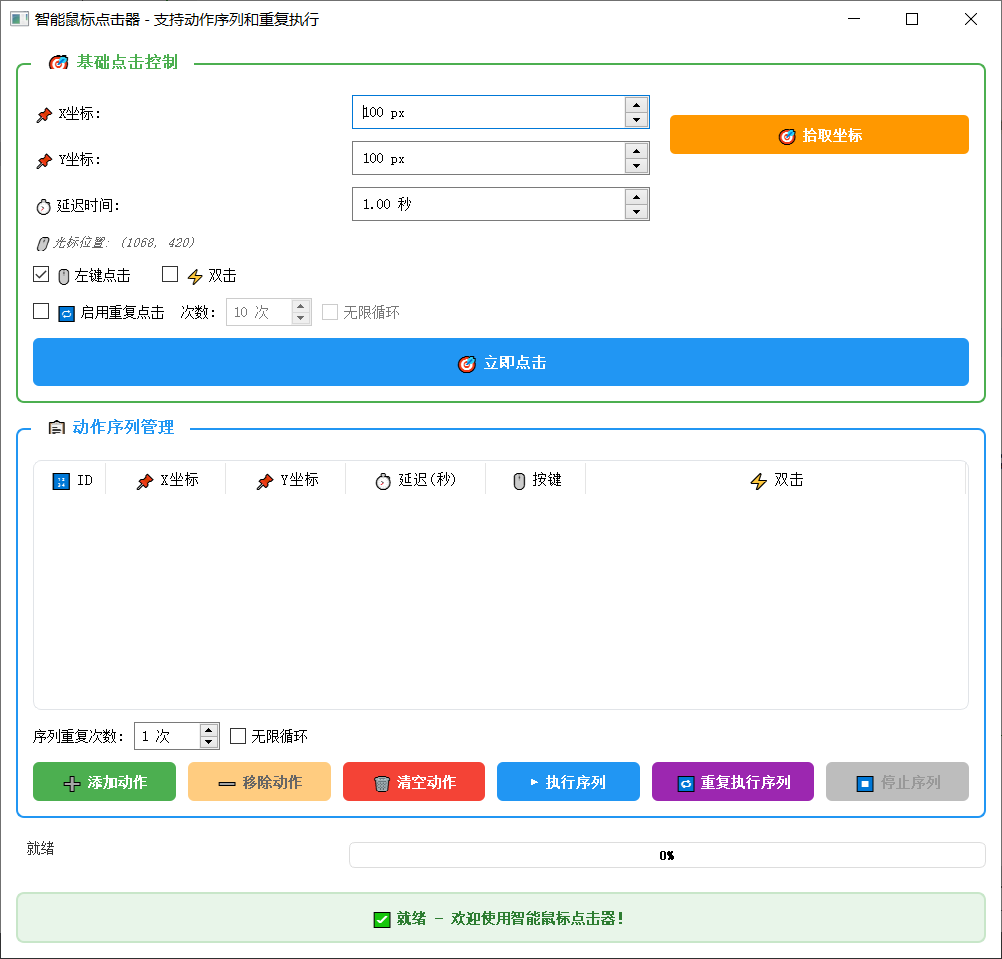
操作流程
1.录入动作

2.执行序列动作

3.重复执行序列动作

4.鼠标连续点击测试

源码分享
.pro文件
cpp
QT       += core gui

greaterThan(QT_MAJOR_VERSION, 4): QT += widgets

CONFIG += c++11

TARGET = WinMouseClicker
TEMPLATE = app

SOURCES += \
    main.cpp \
    mainwindow.cpp

HEADERS += \
    mainwindow.h

# Windows 平台需要链接 user32 库
win32 {
    LIBS += -luser32
}

# ========== 编码设置 ==========
# 对于 MSVC 编译器,添加 UTF-8 支持
win32-msvc* {
    QMAKE_CXXFLAGS += /utf-8
}

# 对于 MinGW 编译器
win32-g++ {
    QMAKE_CXXFLAGS += -finput-charset=UTF-8 -fexec-charset=UTF-8
}

# 设置源代码编码为 UTF-8
CODECFORSRC = UTF-8
mainwindow.h
cpp
#ifndef MAINWINDOW_H
#define MAINWINDOW_H

#include <QMainWindow>
#include <windows.h>
#include <vector>

QT_BEGIN_NAMESPACE
class QPushButton;
class QDoubleSpinBox;
class QSpinBox;
class QLabel;
class QCheckBox;
class QTimer;
class QListWidget;
class QListWidgetItem;
class QTableWidget;
class QTableWidgetItem;
class QProgressBar;
QT_END_NAMESPACE

// 动作数据结构
struct ClickAction {
    int id;
    int x;
    int y;
    double delay;      // 延迟时间(秒)
    bool leftButton;
    bool doubleClick;
    QString description;

    ClickAction(int id = 0, int x = 0, int y = 0, double delay = 0.0,
                bool leftButton = true, bool doubleClick = false,
                const QString& desc = "")
        : id(id), x(x), y(y), delay(delay),
          leftButton(leftButton), doubleClick(doubleClick),
          description(desc) {}
};

class MainWindow : public QMainWindow
{
    Q_OBJECT

public:
    MainWindow(QWidget *parent = nullptr);
    ~MainWindow();

protected:
    bool eventFilter(QObject *obj, QEvent *event) override;
    bool nativeEvent(const QByteArray &eventType, void *message, long *result) override;
    void resizeEvent(QResizeEvent *event) override;  // 新增:处理窗口大小变化

private slots:
    void onClickButtonClicked();      // 点击按钮槽函数
    void onPickCoordClicked();        // 拾取坐标槽函数
    void onRepeatTimeout();           // 重复点击定时器

    // 动作序列相关槽函数
    void onAddActionClicked();        // 添加动作
    void onRemoveActionClicked();     // 移除动作
    void onClearActionsClicked();     // 清空动作
    void onExecuteSequenceClicked();  // 执行序列
    void onRepeatSequenceClicked();   // 重复执行序列
    void onStopSequenceClicked();     // 停止序列
    void onSequenceTimeout();         // 序列定时器

    // 倒计时相关
    void onCountdownTimeout();        // 倒计时定时器

    // 表格相关
    void onActionTableItemChanged(QTableWidgetItem *item);
    void onActionTableSelectionChanged();

    // 复选框状态改变
    void onRepeatStateChanged(int state);
    void onRepeatCountChanged(int value);  // 重复次数改变
    void onInfiniteSequenceRepeatChanged(int state);  // 新增:序列无限循环状态改变

private:
    // Windows API 鼠标点击函数
    void clickAt(int x, int y, bool leftButton = true, bool doubleClick = false);
    void clickAction(const ClickAction& action);  // 执行单个动作

    // 移动鼠标到指定位置
    void moveMouseTo(int x, int y);

    // 创建鼠标点击事件
    void sendMouseClick(int x, int y, bool leftButton, bool down);

    // 动作序列管理
    void addActionToList(const ClickAction& action);
    void updateActionTable();
    void saveActionsToFile();
    void loadActionsFromFile();

    // 快捷键设置
    void setupShortcuts();

    // 开始倒计时
    void startCountdown(int seconds);

    // 转换延迟值为毫秒
    int delayToMilliseconds(double seconds);

    // 执行序列相关
    void startSequenceExecution(bool repeatMode = false);  // 开始执行序列

    // 更新进度显示
    void updateProgressInfo();

    // 显示状态消息
    void showStatusMessage(const QString& message, bool isError = false, bool isSuccess = false);

    // 激活窗口并显示在最前面
    void activateAndShowWindow();

    // UI 组件
    QSpinBox *xSpinBox;
    QSpinBox *ySpinBox;
    QDoubleSpinBox *delaySpinBox;
    QSpinBox *repeatCountSpinBox;     // 基础重复次数
    QSpinBox *sequenceRepeatSpinBox;  // 序列重复次数
    QPushButton *clickButton;
    QPushButton *pickCoordButton;
    QCheckBox *repeatCheckBox;
    QCheckBox *leftButtonCheck;
    QCheckBox *doubleClickCheck;
    QCheckBox *infiniteRepeatCheck;   // 基础点击无限重复复选框
    QCheckBox *infiniteSequenceRepeatCheck;  // 新增:序列无限重复复选框
    QLabel *statusLabel;
    QLabel *cursorLabel;
    QProgressBar *progressBar;        // 进度条
    QLabel *progressLabel;            // 进度文本

    // 动作序列相关UI组件
    QPushButton *addActionButton;
    QPushButton *removeActionButton;
    QPushButton *clearActionsButton;
    QPushButton *executeSequenceButton;
    QPushButton *repeatSequenceButton;
    QPushButton *stopSequenceButton;
    QTableWidget *actionTable;

    QTimer *repeatTimer;
    QTimer *sequenceTimer;
    QTimer *countdownTimer;
    bool isRepeating;
    bool isSequenceRunning;
    bool isRepeatingSequence;
    bool isInfiniteSequenceRepeat;    // 新增:是否序列无限循环

    // 动作数据
    std::vector<ClickAction> actionList;
    int currentActionIndex;
    int nextActionId;
    int countdownSeconds;

    // 计数相关
    int currentRepeatCount;           // 当前重复点击计数
    int totalRepeatCount;             // 总重复次数
    int currentSequenceRepeat;        // 当前序列重复计数
    int totalSequenceRepeat;          // 序列总重复次数

    // 中断标志
    bool stopRequested;
};

#endif // MAINWINDOW_H
mainwindow.cpp
cpp
#include "mainwindow.h"
#include <QApplication>
#include <QDesktopWidget>
#include <QVBoxLayout>
#include <QHBoxLayout>
#include <QGridLayout>
#include <QGroupBox>
#include <QPushButton>
#include <QSpinBox>
#include <QDoubleSpinBox>
#include <QLabel>
#include <QCheckBox>
#include <QTimer>
#include <QMouseEvent>
#include <QDebug>
#include <QMessageBox>
#include <QListWidget>
#include <QTableWidget>
#include <QHeaderView>
#include <QFile>
#include <QTextStream>
#include <QKeyEvent>
#include <QShortcut>
#include <QFileDialog>
#include <QDataStream>
#include <QProgressBar>
#include <QFont>
#include <QResizeEvent> // 新增
// 全局热键消息ID
#define HOTKEY_ID 1
MainWindow::MainWindow(QWidget *parent)
: QMainWindow(parent)
, isRepeating(false)
, isSequenceRunning(false)
, isRepeatingSequence(false)
, isInfiniteSequenceRepeat(false) // 初始化
, currentActionIndex(0)
, nextActionId(1)
, stopRequested(false)
, countdownSeconds(0)
, currentRepeatCount(0)
, totalRepeatCount(0)
, currentSequenceRepeat(0)
, totalSequenceRepeat(0)
{
// 设置窗口
setWindowTitle("智能鼠标点击器 - 支持动作序列和重复执行");
resize(1000, 800); // 稍微增加默认窗口大小
// 设置窗口图标和样式
setStyleSheet("QMainWindow { background-color: #f5f5f5; }");
// 注册全局热键 Ctrl+C
RegisterHotKey((HWND)winId(), HOTKEY_ID, MOD_CONTROL, 'C');
// 安装事件过滤器
qApp->installEventFilter(this);
// 创建中央部件
QWidget *centralWidget = new QWidget(this);
centralWidget->setStyleSheet("QWidget { background-color: white; }");
setCentralWidget(centralWidget);
// 创建主布局
QVBoxLayout *mainLayout = new QVBoxLayout(centralWidget);
mainLayout->setSpacing(15);
mainLayout->setContentsMargins(15, 15, 15, 15);
// ========== 基础点击控制区域 ==========
QGroupBox *basicGroup = new QGroupBox("🎯 基础点击控制", centralWidget);
basicGroup->setStyleSheet(
"QGroupBox {"
" font-weight: bold;"
" font-size: 16px;" // 增大字体
" border: 2px solid #4CAF50;"
" border-radius: 8px;"
" margin-top: 10px;"
" padding-top: 15px;" // 增加顶部内边距
"}"
"QGroupBox::title {"
" subcontrol-origin: margin;"
" left: 15px;"
" padding: 0 10px 0 10px;" // 增加左右内边距
" color: #4CAF50;"
" font-size: 16px;" // 增大字体
"}"
);
QGridLayout *basicLayout = new QGridLayout(basicGroup);
basicLayout->setVerticalSpacing(12); // 增加垂直间距
basicLayout->setHorizontalSpacing(20); // 增加水平间距
basicLayout->setContentsMargins(15, 15, 15, 15); // 增加内边距
// X坐标
QLabel *xLabel = new QLabel("📌 X坐标:", basicGroup);
xLabel->setToolTip("点击位置的X坐标 (0-" + QString::number(GetSystemMetrics(SM_CXSCREEN) - 1) + ")");
xLabel->setStyleSheet("QLabel { font-size: 14px; }");
basicLayout->addWidget(xLabel, 0, 0);
xSpinBox = new QSpinBox(basicGroup);
xSpinBox->setRange(0, GetSystemMetrics(SM_CXSCREEN) - 1);
xSpinBox->setValue(100);
xSpinBox->setSuffix(" px");
xSpinBox->setToolTip("设置点击位置的X坐标\n按空格键可快速拾取当前光标位置");
xSpinBox->setStyleSheet("QSpinBox { padding: 8px; font-size: 14px; }");
basicLayout->addWidget(xSpinBox, 0, 1);
// Y坐标
QLabel *yLabel = new QLabel("📌 Y坐标:", basicGroup);
yLabel->setToolTip("点击位置的Y坐标 (0-" + QString::number(GetSystemMetrics(SM_CYSCREEN) - 1) + ")");
yLabel->setStyleSheet("QLabel { font-size: 14px; }");
basicLayout->addWidget(yLabel, 1, 0);
ySpinBox = new QSpinBox(basicGroup);
ySpinBox->setRange(0, GetSystemMetrics(SM_CYSCREEN) - 1);
ySpinBox->setValue(100);
ySpinBox->setSuffix(" px");
ySpinBox->setToolTip("设置点击位置的Y坐标\n按空格键可快速拾取当前光标位置");
ySpinBox->setStyleSheet("QSpinBox { padding: 8px; font-size: 14px; }");
basicLayout->addWidget(ySpinBox, 1, 1);
// 延迟时间
QLabel *delayLabel = new QLabel("⏱️ 延迟时间:", basicGroup);
delayLabel->setToolTip("每次点击之间的间隔时间");
delayLabel->setStyleSheet("QLabel { font-size: 14px; }");
basicLayout->addWidget(delayLabel, 2, 0);
delaySpinBox = new QDoubleSpinBox(basicGroup);
delaySpinBox->setRange(0.01, 10800.0);
delaySpinBox->setValue(1.0);
delaySpinBox->setDecimals(2);
delaySpinBox->setSingleStep(0.1);
delaySpinBox->setSuffix(" 秒");
delaySpinBox->setToolTip("重复点击时的间隔时间\n范围: 0.01秒 到 3小时");
delaySpinBox->setStyleSheet("QDoubleSpinBox { padding: 8px; font-size: 14px; }");
basicLayout->addWidget(delaySpinBox, 2, 1);
// 拾取坐标按钮
pickCoordButton = new QPushButton("🎯 拾取坐标", basicGroup);
pickCoordButton->setToolTip("点击后移动鼠标到目标位置,按空格键拾取坐标");
pickCoordButton->setStyleSheet(
"QPushButton {"
" background-color: #FF9800;"
" color: white;"
" font-weight: bold;"
" font-size: 14px;"
" padding: 10px 20px;"
" border-radius: 5px;"
"}"
"QPushButton:hover {"
" background-color: #F57C00;"
"}"
);
basicLayout->addWidget(pickCoordButton, 0, 2, 2, 1);
connect(pickCoordButton, &QPushButton::clicked, this, &MainWindow::onPickCoordClicked);
// 光标位置显示
cursorLabel = new QLabel("🖱️ 光标位置: (0, 0)", basicGroup);
cursorLabel->setStyleSheet("QLabel { color: #666; font-style: italic; font-size: 13px; }");
basicLayout->addWidget(cursorLabel, 3, 0, 1, 3);
// 点击选项
QHBoxLayout *optionsLayout = new QHBoxLayout();
optionsLayout->setSpacing(25); // 增加间距
leftButtonCheck = new QCheckBox("🖱️ 左键点击", basicGroup);
leftButtonCheck->setChecked(true);
leftButtonCheck->setToolTip("使用鼠标左键点击\n取消勾选将使用右键点击");
leftButtonCheck->setStyleSheet("QCheckBox { font-size: 14px; }");
optionsLayout->addWidget(leftButtonCheck);
doubleClickCheck = new QCheckBox("⚡ 双击", basicGroup);
doubleClickCheck->setToolTip("执行双击操作而不是单击");
doubleClickCheck->setStyleSheet("QCheckBox { font-size: 14px; }");
optionsLayout->addWidget(doubleClickCheck);
optionsLayout->addStretch();
basicLayout->addLayout(optionsLayout, 4, 0, 1, 3);
// 重复点击设置
QHBoxLayout *repeatSettingsLayout = new QHBoxLayout();
repeatSettingsLayout->setSpacing(10);
repeatCheckBox = new QCheckBox("🔁 启用重复点击", basicGroup);
repeatCheckBox->setToolTip("勾选后可以设置重复点击次数和间隔");
repeatCheckBox->setChecked(false);
repeatCheckBox->setStyleSheet("QCheckBox { font-size: 14px; }");
repeatSettingsLayout->addWidget(repeatCheckBox);
connect(repeatCheckBox, &QCheckBox::stateChanged, this, &MainWindow::onRepeatStateChanged);
QLabel *repeatCountLabel = new QLabel("次数:", basicGroup);
repeatCountLabel->setStyleSheet("QLabel { font-size: 14px; }");
repeatSettingsLayout->addWidget(repeatCountLabel);
repeatCountSpinBox = new QSpinBox(basicGroup);
repeatCountSpinBox->setRange(1, 9999);
repeatCountSpinBox->setValue(10);
repeatCountSpinBox->setSuffix(" 次");
repeatCountSpinBox->setToolTip("重复点击的次数\n设置为1时相当于单次点击");
repeatCountSpinBox->setEnabled(false);
repeatCountSpinBox->setStyleSheet("QSpinBox { font-size: 14px; padding: 5px; }");
repeatSettingsLayout->addWidget(repeatCountSpinBox);
connect(repeatCountSpinBox, QOverload<int>::of(&QSpinBox::valueChanged),
this, &MainWindow::onRepeatCountChanged);
infiniteRepeatCheck = new QCheckBox("无限循环", basicGroup);
infiniteRepeatCheck->setToolTip("勾选后将无限重复点击,直到手动停止");
infiniteRepeatCheck->setEnabled(false);
infiniteRepeatCheck->setStyleSheet("QCheckBox { font-size: 14px; }");
repeatSettingsLayout->addWidget(infiniteRepeatCheck);
connect(infiniteRepeatCheck, &QCheckBox::stateChanged, this, [this](int state) {
repeatCountSpinBox->setEnabled(state == Qt::Unchecked);
});
repeatSettingsLayout->addStretch();
basicLayout->addLayout(repeatSettingsLayout, 5, 0, 1, 3);
// 立即点击按钮
clickButton = new QPushButton("🎯 立即点击", basicGroup);
clickButton->setStyleSheet(
"QPushButton {"
" background-color: #2196F3;"
" color: white;"
" font-size: 15px;"
" font-weight: bold;"
" padding: 14px;"
" border-radius: 6px;"
" min-width: 180px;"
"}"
"QPushButton:hover {"
" background-color: #1976D2;"
"}"
"QPushButton:disabled {"
" background-color: #BDBDBD;"
"}"
);
clickButton->setToolTip("重复点击启用时:开始/停止重复点击\n重复点击未启用时:执行单次点击\n快捷键: Ctrl+S");
basicLayout->addWidget(clickButton, 6, 0, 1, 3);
connect(clickButton, &QPushButton::clicked, this, &MainWindow::onClickButtonClicked);
mainLayout->addWidget(basicGroup);
// ========== 动作序列区域 ==========
QGroupBox *sequenceGroup = new QGroupBox("📋 动作序列管理", centralWidget);
sequenceGroup->setStyleSheet(
"QGroupBox {"
" font-weight: bold;"
" font-size: 16px;" // 增大字体
" border: 2px solid #2196F3;"
" border-radius: 8px;"
" margin-top: 10px;"
" padding-top: 15px;" // 增加顶部内边距
"}"
"QGroupBox::title {"
" subcontrol-origin: margin;"
" left: 15px;"
" padding: 0 10px 0 10px;" // 增加左右内边距
" color: #2196F3;"
" font-size: 16px;" // 增大字体
"}"
);
QVBoxLayout *sequenceLayout = new QVBoxLayout(sequenceGroup);
sequenceLayout->setSpacing(12); // 增加间距
sequenceLayout->setContentsMargins(15, 15, 15, 15); // 增加内边距
// 动作表格 - 重新设计样式
actionTable = new QTableWidget(sequenceGroup);
actionTable->setColumnCount(6);
QStringList headers;
headers << "🔢 ID" << "📌 X坐标" << "📌 Y坐标" << "⏱️ 延迟(秒)" << "🖱️ 按键" << "⚡ 双击";
actionTable->setHorizontalHeaderLabels(headers);
actionTable->setSelectionBehavior(QTableWidget::SelectRows);
actionTable->setSelectionMode(QTableWidget::SingleSelection);
actionTable->setEditTriggers(QTableWidget::DoubleClicked | QTableWidget::EditKeyPressed);
actionTable->setMinimumHeight(250); // 增加最小高度
actionTable->setMaximumHeight(450); // 设置最大高度
// 重新设计表格样式 - 现代化设计
actionTable->setStyleSheet(
"QTableWidget {"
" background-color: white;"
" alternate-background-color: #f8fafc;" // 设置交替行颜色
" border: 1px solid #e1e4e8;"
" border-radius: 8px;"
" padding: 2px;"
" gridline-color: #eef2f7;"
" font-size: 13px;"
" outline: 0;"
"}"
"QTableWidget::item {"
" padding: 10px 5px;"
" border-bottom: 1px solid #f0f0f0;"
" color: #333333;"
"}"
"QTableWidget::item:selected {"
" background-color: rgba(25, 118, 210, 0.2);" // 半透明蓝色背景
" color: #1976D2;"
" font-weight: bold;"
" border: 1px solid #1976D2;"
" border-radius: 4px;"
"}"
"QTableWidget::item:hover:!selected {"
" background-color: #f8fafc;"
"}"
"QHeaderView {"
" background-color: transparent;"
" border: none;"
"}"
"QHeaderView::section {"
" background-color: #2196F3;" // 蓝色背景
" color: white;"
" padding: 14px 8px;" // 增加内边距
" font-weight: bold;"
" font-size: 14px;"
" border: none;"
" border-right: 1px solid #1976D2;" // 分隔线
"}"
"QHeaderView::section:first {"
" border-top-left-radius: 6px;"
"}"
"QHeaderView::section:last {"
" border-top-right-radius: 6px;"
" border-right: none;"
"}"
"QTableCornerButton::section {"
" background-color: #2196F3;" // 表格角落按钮颜色
" border-top-left-radius: 6px;"
"}"
"QScrollBar:vertical {"
" border: none;"
" background: #f8f9fa;"
" width: 12px;"
" margin: 0px;"
"}"
"QScrollBar::handle:vertical {"
" background: #c1c1c1;"
" border-radius: 6px;"
" min-height: 30px;"
"}"
"QScrollBar::handle:vertical:hover {"
" background: #a8a8a8;"
"}"
"QScrollBar::add-line:vertical, QScrollBar::sub-line:vertical {"
" border: none;"
" background: none;"
"}"
);
// 启用交替行颜色
actionTable->setAlternatingRowColors(true);
QHeaderView* header = actionTable->horizontalHeader();
header->setStretchLastSection(true);
header->setDefaultAlignment(Qt::AlignCenter | Qt::AlignVCenter);
header->setSectionResizeMode(QHeaderView::Interactive);
header->setMinimumSectionSize(70); // 增加最小列宽
header->setDefaultSectionSize(120); // 设置默认列宽
header->setCascadingSectionResizes(true);
// 设置固定列宽
actionTable->setColumnWidth(0, 70); // ID列
actionTable->setColumnWidth(1, 120); // X坐标列
actionTable->setColumnWidth(2, 120); // Y坐标列
actionTable->setColumnWidth(3, 140); // 延迟列
actionTable->setColumnWidth(4, 100); // 按键列
actionTable->setColumnWidth(5, 100); // 双击列
// 设置行高
actionTable->verticalHeader()->setDefaultSectionSize(45); // 增加行高
actionTable->verticalHeader()->setVisible(false); // 隐藏垂直表头
// 设置表格属性
actionTable->setShowGrid(false); // 不显示网格线
actionTable->setFocusPolicy(Qt::StrongFocus);
actionTable->setSelectionMode(QAbstractItemView::SingleSelection);
actionTable->setSelectionBehavior(QAbstractItemView::SelectRows);
actionTable->setHorizontalScrollMode(QAbstractItemView::ScrollPerPixel);
actionTable->setVerticalScrollMode(QAbstractItemView::ScrollPerPixel);
actionTable->setAutoScroll(true);
actionTable->setCornerButtonEnabled(false); // 禁用角落按钮
sequenceLayout->addWidget(actionTable, 1); // 设置拉伸因子为1
// 连接表格信号
connect(actionTable, &QTableWidget::itemChanged, this, &MainWindow::onActionTableItemChanged);
connect(actionTable, &QTableWidget::itemSelectionChanged, this, &MainWindow::onActionTableSelectionChanged);
// 序列重复设置
QHBoxLayout *repeatSequenceLayout = new QHBoxLayout();
repeatSequenceLayout->setSpacing(10);
QLabel *seqRepeatLabel = new QLabel("序列重复次数:", sequenceGroup);
seqRepeatLabel->setStyleSheet("QLabel { font-size: 14px; }");
repeatSequenceLayout->addWidget(seqRepeatLabel);
sequenceRepeatSpinBox = new QSpinBox(sequenceGroup);
sequenceRepeatSpinBox->setRange(1, 9999);
sequenceRepeatSpinBox->setValue(1);
sequenceRepeatSpinBox->setSuffix(" 次");
sequenceRepeatSpinBox->setToolTip("序列重复执行的次数");
sequenceRepeatSpinBox->setStyleSheet("QSpinBox { font-size: 14px; padding: 5px; }");
repeatSequenceLayout->addWidget(sequenceRepeatSpinBox);
// 新增:序列无限循环复选框
infiniteSequenceRepeatCheck = new QCheckBox("无限循环", sequenceGroup);
infiniteSequenceRepeatCheck->setToolTip("勾选后将无限重复执行序列,直到手动停止");
infiniteSequenceRepeatCheck->setStyleSheet("QCheckBox { font-size: 14px; }");
repeatSequenceLayout->addWidget(infiniteSequenceRepeatCheck);
connect(infiniteSequenceRepeatCheck, &QCheckBox::stateChanged, this, &MainWindow::onInfiniteSequenceRepeatChanged);
repeatSequenceLayout->addStretch();
sequenceLayout->addLayout(repeatSequenceLayout);
// 序列控制按钮
QHBoxLayout *sequenceBtnLayout = new QHBoxLayout();
sequenceBtnLayout->setSpacing(12); // 增加按钮间距
addActionButton = new QPushButton("➕ 添加动作", sequenceGroup);
addActionButton->setToolTip("将当前设置的点击参数添加到序列中\n快捷键: Ctrl+A");
addActionButton->setStyleSheet(
"QPushButton {"
" background-color: #4CAF50;"
" color: white;"
" font-size: 14px;"
" font-weight: 500;"
" padding: 10px 18px;"
" border-radius: 6px;"
" border: none;"
"}"
"QPushButton:hover {"
" background-color: #388E3C;"
" box-shadow: 0 2px 4px rgba(0,0,0,0.2);"
"}"
);
sequenceBtnLayout->addWidget(addActionButton);
connect(addActionButton, &QPushButton::clicked, this, &MainWindow::onAddActionClicked);
removeActionButton = new QPushButton("➖ 移除动作", sequenceGroup);
removeActionButton->setToolTip("移除选中的动作\n快捷键: Ctrl+D");
removeActionButton->setStyleSheet(
"QPushButton {"
" background-color: #FF9800;"
" color: white;"
" font-size: 14px;"
" font-weight: 500;"
" padding: 10px 18px;"
" border-radius: 6px;"
" border: none;"
"}"
"QPushButton:hover {"
" background-color: #F57C00;"
" box-shadow: 0 2px 4px rgba(0,0,0,0.2);"
"}"
"QPushButton:disabled {"
" background-color: #FFCC80;"
" color: #666;"
"}"
);
removeActionButton->setEnabled(false);
sequenceBtnLayout->addWidget(removeActionButton);
connect(removeActionButton, &QPushButton::clicked, this, &MainWindow::onRemoveActionClicked);
clearActionsButton = new QPushButton("🗑️ 清空动作", sequenceGroup);
clearActionsButton->setToolTip("清空所有动作");
clearActionsButton->setStyleSheet(
"QPushButton {"
" background-color: #F44336;"
" color: white;"
" font-size: 14px;"
" font-weight: 500;"
" padding: 10px 18px;"
" border-radius: 6px;"
" border: none;"
"}"
"QPushButton:hover {"
" background-color: #D32F2F;"
" box-shadow: 0 2px 4px rgba(0,0,0,0.2);"
"}"
);
sequenceBtnLayout->addWidget(clearActionsButton);
connect(clearActionsButton, &QPushButton::clicked, this, &MainWindow::onClearActionsClicked);
executeSequenceButton = new QPushButton("▶️ 执行序列", sequenceGroup);
executeSequenceButton->setToolTip("执行动作序列一次\n快捷键: Ctrl+S");
executeSequenceButton->setStyleSheet(
"QPushButton {"
" background-color: #2196F3;"
" color: white;"
" font-weight: 600;"
" font-size: 14px;"
" padding: 10px 22px;"
" border-radius: 6px;"
" border: none;"
"}"
"QPushButton:hover {"
" background-color: #1976D2;"
" box-shadow: 0 2px 4px rgba(0,0,0,0.2);"
"}"
);
sequenceBtnLayout->addWidget(executeSequenceButton);
connect(executeSequenceButton, &QPushButton::clicked, this, &MainWindow::onExecuteSequenceClicked);
repeatSequenceButton = new QPushButton("🔁 重复执行序列", sequenceGroup);
repeatSequenceButton->setToolTip("重复执行动作序列\n快捷键: Ctrl+R");
repeatSequenceButton->setStyleSheet(
"QPushButton {"
" background-color: #9C27B0;"
" color: white;"
" font-weight: 600;"
" font-size: 14px;"
" padding: 10px 22px;"
" border-radius: 6px;"
" border: none;"
"}"
"QPushButton:hover {"
" background-color: #7B1FA2;"
" box-shadow: 0 2px 4px rgba(0,0,0,0.2);"
"}"
);
sequenceBtnLayout->addWidget(repeatSequenceButton);
connect(repeatSequenceButton, &QPushButton::clicked, this, &MainWindow::onRepeatSequenceClicked);
stopSequenceButton = new QPushButton("⏹️ 停止序列", sequenceGroup);
stopSequenceButton->setToolTip("停止正在执行的序列\n快捷键: Ctrl+C 或 Esc");
stopSequenceButton->setStyleSheet(
"QPushButton {"
" background-color: #757575;"
" color: white;"
" font-size: 14px;"
" font-weight: 500;"
" padding: 10px 18px;"
" border-radius: 6px;"
" border: none;"
"}"
"QPushButton:hover {"
" background-color: #616161;"
" box-shadow: 0 2px 4px rgba(0,0,0,0.2);"
"}"
"QPushButton:disabled {"
" background-color: #BDBDBD;"
" color: #999;"
"}"
);
stopSequenceButton->setEnabled(false);
sequenceBtnLayout->addWidget(stopSequenceButton);
connect(stopSequenceButton, &QPushButton::clicked, this, &MainWindow::onStopSequenceClicked);
sequenceLayout->addLayout(sequenceBtnLayout);
mainLayout->addWidget(sequenceGroup, 1); // 设置拉伸因子为1
// ========== 进度显示区域 ==========
QHBoxLayout *progressLayout = new QHBoxLayout();
progressLabel = new QLabel("就绪", centralWidget);
progressLabel->setAlignment(Qt::AlignLeft);
progressLabel->setStyleSheet(
"QLabel {"
" color: #333;"
" padding: 8px;"
" min-height: 28px;"
" font-size: 14px;"
"}"
);
progressBar = new QProgressBar(centralWidget);
progressBar->setRange(0, 100);
progressBar->setValue(0);
progressBar->setTextVisible(true);
progressBar->setFormat("%p%");
progressBar->setStyleSheet(
"QProgressBar {"
" border: 1px solid #ddd;"
" border-radius: 6px;"
" text-align: center;"
" height: 24px;"
" font-size: 13px;"
" font-weight: 500;"
"}"
"QProgressBar::chunk {"
" background-color: #4CAF50;"
" border-radius: 5px;"
" border: none;"
"}"
);
progressLayout->addWidget(progressLabel, 1);
progressLayout->addWidget(progressBar, 2);
mainLayout->addLayout(progressLayout);
// ========== 状态显示 ==========
statusLabel = new QLabel("✅ 就绪 - 欢迎使用智能鼠标点击器!", centralWidget);
statusLabel->setAlignment(Qt::AlignCenter);
statusLabel->setStyleSheet(
"QLabel {"
" background-color: #e8f5e9;"
" color: #2e7d32;"
" border: 2px solid #c8e6c9;"
" padding: 14px;"
" border-radius: 8px;"
" font-weight: 600;"
" font-size: 14px;" // 增大字体
"}"
);
mainLayout->addWidget(statusLabel);
mainLayout->addStretch();
// ========== 初始化定时器 ==========
repeatTimer = new QTimer(this);
connect(repeatTimer, &QTimer::timeout, this, &MainWindow::onRepeatTimeout);
sequenceTimer = new QTimer(this);
sequenceTimer->setSingleShot(true);
connect(sequenceTimer, &QTimer::timeout, this, &MainWindow::onSequenceTimeout);
// 倒计时定时器
countdownTimer = new QTimer(this);
countdownTimer->setInterval(1000);
connect(countdownTimer, &QTimer::timeout, this, &MainWindow::onCountdownTimeout);
// 定时更新光标位置
QTimer *cursorTimer = new QTimer(this);
connect(cursorTimer, &QTimer::timeout, [this]() {
POINT cursorPos;
GetCursorPos(&cursorPos);
cursorLabel->setText(QString("🖱️ 光标位置: (%1, %2)").arg(cursorPos.x).arg(cursorPos.y));
});
cursorTimer->start(100);
// 设置快捷键
setupShortcuts();
// 加载保存的动作
loadActionsFromFile();
}
MainWindow::~MainWindow()
{
// 注销全局热键
UnregisterHotKey((HWND)winId(), HOTKEY_ID);
// 保存动作到文件
saveActionsToFile();
}
// 处理窗口大小变化事件
void MainWindow::resizeEvent(QResizeEvent *event)
{
QMainWindow::resizeEvent(event);
// 根据窗口高度调整表格行高
int tableHeight = actionTable->height();
int rowCount = actionTable->rowCount();
if (rowCount > 0) {
// 计算合适的行高,最小35,最大50
int suggestedRowHeight = qMin(50, qMax(35, tableHeight / qMax(1, rowCount) - 2));
actionTable->verticalHeader()->setDefaultSectionSize(suggestedRowHeight);
}
}
// Windows消息处理 - 用于全局热键
bool MainWindow::nativeEvent(const QByteArray &eventType, void *message, long *result)
{
MSG* msg = static_cast<MSG*>(message);
if (msg->message == WM_HOTKEY) {
if (msg->wParam == HOTKEY_ID) {
// Ctrl+C 被按下
stopRequested = true;
if (isSequenceRunning) {
sequenceTimer->stop();
countdownTimer->stop();
isSequenceRunning = false;
isRepeatingSequence = false;
isInfiniteSequenceRepeat = false;
// 更新按钮状态
clickButton->setEnabled(true);
executeSequenceButton->setEnabled(true);
repeatSequenceButton->setEnabled(true);
stopSequenceButton->setEnabled(false);
addActionButton->setEnabled(true);
removeActionButton->setEnabled(actionTable->currentRow() >= 0);
clearActionsButton->setEnabled(true);
showStatusMessage("⏹️ 动作序列已通过全局快捷键 Ctrl+C 停止", false, true);
// 激活窗口
activateAndShowWindow();
}
if (isRepeating) {
isRepeating = false;
repeatTimer->stop();
if (repeatCheckBox->isChecked()) {
clickButton->setText("🎯 开始重复点击");
} else {
clickButton->setText("🎯 立即点击");
}
executeSequenceButton->setEnabled(true);
repeatSequenceButton->setEnabled(true);
showStatusMessage("⏹️ 重复点击已通过全局快捷键 Ctrl+C 停止", false, true);
// 激活窗口
activateAndShowWindow();
}
return true;
}
}
return QMainWindow::nativeEvent(eventType, message, result);
}
// 事件过滤器 - 用于快捷键
bool MainWindow::eventFilter(QObject *obj, QEvent *event)
{
if (event->type() == QEvent::KeyPress) {
QKeyEvent *keyEvent = static_cast<QKeyEvent*>(event);
// 空格键获取坐标(任何时候都有效)
if (keyEvent->key() == Qt::Key_Space && !keyEvent->isAutoRepeat()) {
// 获取当前光标位置
POINT cursorPos;
GetCursorPos(&cursorPos);
xSpinBox->setValue(cursorPos.x);
ySpinBox->setValue(cursorPos.y);
showStatusMessage(QString("🎯 坐标已拾取: (%1, %2)").arg(cursorPos.x).arg(cursorPos.y), false, true);
// 阻止空格键触发按钮点击
return true;
}
// Esc键停止
if (keyEvent->key() == Qt::Key_Escape && !keyEvent->isAutoRepeat()) {
if (isSequenceRunning || isRepeating) {
onStopSequenceClicked();
return true;
}
}
}
return QMainWindow::eventFilter(obj, event);
}
// 设置快捷键
void MainWindow::setupShortcuts()
{
// Ctrl+S 开始/停止序列
QShortcut *shortcutStartStop = new QShortcut(QKeySequence("Ctrl+S"), this);
connect(shortcutStartStop, &QShortcut::activated, [this]() {
if (isSequenceRunning) {
onStopSequenceClicked();
} else {
if (actionList.empty()) {
onClickButtonClicked();
} else {
onExecuteSequenceClicked();
}
}
});
// Ctrl+R 重复执行序列
QShortcut *shortcutRepeat = new QShortcut(QKeySequence("Ctrl+R"), this);
connect(shortcutRepeat, &QShortcut::activated, this, &MainWindow::onRepeatSequenceClicked);
// Ctrl+A 添加动作
QShortcut *shortcutAdd = new QShortcut(QKeySequence("Ctrl+A"), this);
connect(shortcutAdd, &QShortcut::activated, this, &MainWindow::onAddActionClicked);
// Ctrl+D 删除选中动作
QShortcut *shortcutDelete = new QShortcut(QKeySequence("Ctrl+D"), this);
connect(shortcutDelete, &QShortcut::activated, this, &MainWindow::onRemoveActionClicked);
// Esc 停止
QShortcut *shortcutEsc = new QShortcut(QKeySequence("Esc"), this);
connect(shortcutEsc, &QShortcut::activated, [this]() {
if (isSequenceRunning || isRepeating) {
onStopSequenceClicked();
}
});
}
// 激活窗口并显示在最前面
void MainWindow::activateAndShowWindow()
{
// 确保窗口不在最小化状态
if (isMinimized()) {
showNormal();
}
// 激活窗口
activateWindow();
// 置顶显示
raise();
// 确保窗口在最前面
setWindowState((windowState() & ~Qt::WindowMinimized) | Qt::WindowActive);
}
// 显示状态消息
void MainWindow::showStatusMessage(const QString& message, bool isError, bool isSuccess)
{
if (isError) {
statusLabel->setStyleSheet(
"QLabel {"
" background-color: #ffebee;"
" color: #c62828;"
" border: 2px solid #ffcdd2;"
" padding: 14px;"
" border-radius: 8px;"
" font-weight: 600;"
" font-size: 14px;"
"}"
);
} else if (isSuccess) {
statusLabel->setStyleSheet(
"QLabel {"
" background-color: #e8f5e9;"
" color: #2e7d32;"
" border: 2px solid #c8e6c9;"
" padding: 14px;"
" border-radius: 8px;"
" font-weight: 600;"
" font-size: 14px;"
"}"
);
} else {
statusLabel->setStyleSheet(
"QLabel {"
" background-color: #e3f2fd;"
" color: #1565c0;"
" border: 2px solid #bbdefb;"
" padding: 14px;"
" border-radius: 8px;"
" font-weight: 600;"
" font-size: 14px;"
"}"
);
}
statusLabel->setText(message);
}
// 更新进度信息
void MainWindow::updateProgressInfo()
{
if (isSequenceRunning) {
if (actionList.empty()) {
progressLabel->setText("就绪");
progressBar->setValue(0);
return;
}
int totalActions = actionList.size();
int currentProgress = 0;
QString progressText;
if (isRepeatingSequence) {
if (isInfiniteSequenceRepeat) {
// 无限重复执行序列模式
progressText = QString("🔁 无限重复执行: 第 %1 次 | 动作: %2/%3")
.arg(currentSequenceRepeat)
.arg(currentActionIndex + 1)
.arg(totalActions);
currentProgress = 0; // 无限模式不显示进度
} else {
// 有限重复执行序列模式
int totalSteps = totalActions * totalSequenceRepeat;
int completedSteps = (currentSequenceRepeat - 1) * totalActions + currentActionIndex;
currentProgress = (totalSteps > 0) ? (completedSteps * 100 / totalSteps) : 0;
progressText = QString("🔁 重复执行: 第 %1/%2 次 | 动作: %3/%4")
.arg(currentSequenceRepeat)
.arg(totalSequenceRepeat)
.arg(currentActionIndex + 1)
.arg(totalActions);
}
} else {
// 单次执行序列模式
currentProgress = (totalActions > 0) ? ((currentActionIndex * 100) / totalActions) : 0;
progressText = QString("▶️ 执行序列: 动作 %1/%2")
.arg(currentActionIndex + 1)
.arg(totalActions);
}
progressLabel->setText(progressText);
progressBar->setValue(currentProgress);
} else if (isRepeating) {
// 基础重复点击模式
QString progressText;
int currentProgress = 0;
if (infiniteRepeatCheck->isChecked()) {
// 无限重复点击模式
int completed = totalRepeatCount - currentRepeatCount;
progressText = QString("🔁 重复点击: 第 %1 次 (无限循环)").arg(completed + 1);
currentProgress = 0; // 无限模式不显示进度
} else {
// 有限重复点击模式
int completed = totalRepeatCount - currentRepeatCount;
currentProgress = (totalRepeatCount > 0) ? (completed * 100 / totalRepeatCount) : 0;
progressText = QString("🔁 重复点击: %1/%2 次").arg(completed + 1).arg(totalRepeatCount);
}
progressLabel->setText(progressText);
progressBar->setValue(currentProgress);
} else {
progressLabel->setText("就绪");
progressBar->setValue(0);
}
}
// 开始倒计时
void MainWindow::startCountdown(int seconds)
{
countdownSeconds = seconds;
QString modeText;
if (isRepeatingSequence) {
if (isInfiniteSequenceRepeat) {
modeText = "无限重复执行序列";
} else {
modeText = QString("重复执行序列 (%1次)").arg(totalSequenceRepeat);
}
} else {
modeText = "执行序列";
}
showStatusMessage(QString("⏱️ 倒计时: %1 秒后开始%2...").arg(countdownSeconds).arg(modeText));
countdownTimer->start();
}
// 转换延迟值为毫秒
int MainWindow::delayToMilliseconds(double seconds)
{
return static_cast<int>(seconds * 1000);
}
// 开始执行序列
void MainWindow::startSequenceExecution(bool repeatMode)
{
if (actionList.empty()) {
showStatusMessage("⚠️ 动作列表为空,请先添加动作", true);
QMessageBox::warning(this, "警告", "动作列表为空,请先添加动作!");
return;
}
if (isRepeating) {
isRepeating = false;
repeatTimer->stop();
clickButton->setText("🎯 开始重复点击");
showStatusMessage("⏹️ 重复点击已停止", false, true);
}
// 设置执行模式
isRepeatingSequence = repeatMode;
isInfiniteSequenceRepeat = infiniteSequenceRepeatCheck->isChecked();
// 设置重复次数
if (isRepeatingSequence) {
if (isInfiniteSequenceRepeat) {
totalSequenceRepeat = 0; // 0表示无限
} else {
totalSequenceRepeat = sequenceRepeatSpinBox->value();
}
currentSequenceRepeat = 1;
} else {
totalSequenceRepeat = 1;
currentSequenceRepeat = 1;
isInfiniteSequenceRepeat = false;
}
// 更新按钮状态
clickButton->setEnabled(false);
executeSequenceButton->setEnabled(false);
repeatSequenceButton->setEnabled(false);
stopSequenceButton->setEnabled(true);
addActionButton->setEnabled(false);
removeActionButton->setEnabled(false);
clearActionsButton->setEnabled(false);
sequenceRepeatSpinBox->setEnabled(false);
infiniteSequenceRepeatCheck->setEnabled(false);
// 开始3秒倒计时
startCountdown(3);
isSequenceRunning = true;
stopRequested = false;
updateProgressInfo();
}
// 鼠标点击函数
void MainWindow::clickAt(int x, int y, bool leftButton, bool doubleClick)
{
// 保存原始光标位置
POINT originalPos;
GetCursorPos(&originalPos);
// 移动鼠标到目标位置
moveMouseTo(x, y);
// 执行点击
if (doubleClick) {
// 双击:点击-延迟-点击
sendMouseClick(x, y, leftButton, true);
sendMouseClick(x, y, leftButton, false);
Sleep(50);
sendMouseClick(x, y, leftButton, true);
sendMouseClick(x, y, leftButton, false);
} else {
// 单次点击
sendMouseClick(x, y, leftButton, true);
sendMouseClick(x, y, leftButton, false);
}
// 可选:恢复原始光标位置
// moveMouseTo(originalPos.x, originalPos.y);
}
// 执行单个动作
void MainWindow::clickAction(const ClickAction& action)
{
QString modeText = isRepeatingSequence ? "重复执行中" : "执行中";
QString buttonText = action.leftButton ? "左键" : "右键";
QString clickType = action.doubleClick ? "双击" : "单击";
showStatusMessage(QString("%1 - 动作 %2: (%3, %4) | %5 %6 | 延迟: %7秒")
.arg(modeText)
.arg(action.id)
.arg(action.x)
.arg(action.y)
.arg(buttonText)
.arg(clickType)
.arg(action.delay));
clickAt(action.x, action.y, action.leftButton, action.doubleClick);
updateProgressInfo();
}
// 移动鼠标到指定位置
void MainWindow::moveMouseTo(int x, int y)
{
INPUT input = {0};
input.type = INPUT_MOUSE;
input.mi.dx = x * (65535.0f / GetSystemMetrics(SM_CXSCREEN));
input.mi.dy = y * (65535.0f / GetSystemMetrics(SM_CYSCREEN));
input.mi.dwFlags = MOUSEEVENTF_MOVE | MOUSEEVENTF_ABSOLUTE;
SendInput(1, &input, sizeof(INPUT));
}
// 发送鼠标点击事件
void MainWindow::sendMouseClick(int x, int y, bool leftButton, bool down)
{
INPUT input = {0};
input.type = INPUT_MOUSE;
if (leftButton) {
if (down) {
input.mi.dwFlags = MOUSEEVENTF_LEFTDOWN;
} else {
input.mi.dwFlags = MOUSEEVENTF_LEFTUP;
}
} else {
if (down) {
input.mi.dwFlags = MOUSEEVENTF_RIGHTDOWN;
} else {
input.mi.dwFlags = MOUSEEVENTF_RIGHTUP;
}
}
SendInput(1, &input, sizeof(INPUT));
}
// 添加动作到列表
void MainWindow::addActionToList(const ClickAction& action)
{
actionList.push_back(action);
updateActionTable();
}
// 更新动作表格
void MainWindow::updateActionTable()
{
// 断开信号,避免更新时触发事件
actionTable->blockSignals(true);
actionTable->setRowCount(actionList.size());
for (size_t i = 0; i < actionList.size(); ++i) {
const ClickAction& action = actionList[i];
// ID
QTableWidgetItem *idItem = new QTableWidgetItem(QString::number(action.id));
idItem->setFlags(idItem->flags() & ~Qt::ItemIsEditable);
idItem->setTextAlignment(Qt::AlignCenter);
idItem->setData(Qt::UserRole, QVariant(action.id)); // 存储ID作为用户数据
actionTable->setItem(i, 0, idItem);
// X坐标
QTableWidgetItem *xItem = new QTableWidgetItem(QString::number(action.x));
xItem->setTextAlignment(Qt::AlignCenter);
actionTable->setItem(i, 1, xItem);
// Y坐标
QTableWidgetItem *yItem = new QTableWidgetItem(QString::number(action.y));
yItem->setTextAlignment(Qt::AlignCenter);
actionTable->setItem(i, 2, yItem);
// 延迟时间(秒)
QTableWidgetItem *delayItem = new QTableWidgetItem(QString::number(action.delay, 'f', 2));
delayItem->setTextAlignment(Qt::AlignCenter);
actionTable->setItem(i, 3, delayItem);
// 按键类型
QTableWidgetItem *buttonItem = new QTableWidgetItem(action.leftButton ? "左键" : "右键");
buttonItem->setTextAlignment(Qt::AlignCenter);
actionTable->setItem(i, 4, buttonItem);
// 是否双击
QTableWidgetItem *doubleItem = new QTableWidgetItem(action.doubleClick ? "是" : "否");
doubleItem->setTextAlignment(Qt::AlignCenter);
actionTable->setItem(i, 5, doubleItem);
}
// 重新连接信号
actionTable->blockSignals(false);
// 调整表格行高
resizeEvent(nullptr);
}
// 保存动作到文件 - 使用QDataStream二进制格式
void MainWindow::saveActionsToFile()
{
QFile file("actions.dat");
if (file.open(QIODevice::WriteOnly)) {
QDataStream out(&file);
out.setVersion(QDataStream::Qt_5_12);
// 写入文件版本标识(用于兼容性)
out << QString("CLICKER_V4");
// 写入动作数量
out << (int)actionList.size();
for (const auto& action : actionList) {
out << action.id
<< action.x
<< action.y
<< action.delay
<< action.leftButton
<< action.doubleClick
<< action.description;
}
file.close();
qDebug() << "动作已保存到文件,数量:" << actionList.size();
} else {
qDebug() << "无法打开文件进行保存";
}
}
// 从文件加载动作 - 使用QDataStream二进制格式
void MainWindow::loadActionsFromFile()
{
QFile file("actions.dat");
if (file.open(QIODevice::ReadOnly)) {
QDataStream in(&file);
in.setVersion(QDataStream::Qt_5_12);
// 检查文件版本
QString fileVersion;
in >> fileVersion;
if (fileVersion != "CLICKER_V4" && fileVersion != "CLICKER_V3" && fileVersion != "CLICKER_V2") {
// 旧版本文件,不加载
qDebug() << "检测到旧版本文件,跳过加载";
file.close();
return;
}
int count;
in >> count;
qDebug() << "从文件加载动作,数量:" << count;
for (int i = 0; i < count; ++i) {
ClickAction action;
in >> action.id
>> action.x
>> action.y
>> action.delay
>> action.leftButton
>> action.doubleClick
>> action.description;
// 如果是旧版本数据(延迟为int),需要转换
if (action.delay < 0.01 && action.delay > 0) {
// 可能是旧的毫秒值,转换为秒
action.delay = action.delay / 1000.0;
}
actionList.push_back(action);
nextActionId = qMax(nextActionId, action.id + 1);
}
updateActionTable();
file.close();
if (!actionList.empty()) {
showStatusMessage(QString("✅ 已加载 %1 个动作").arg(actionList.size()), false, true);
}
qDebug() << "动作加载完成,当前动作数量:" << actionList.size();
} else {
qDebug() << "无法打开动作文件或文件不存在";
}
}
// 重复点击状态改变
void MainWindow::onRepeatStateChanged(int state)
{
bool enabled = (state == Qt::Checked);
repeatCountSpinBox->setEnabled(enabled);
infiniteRepeatCheck->setEnabled(enabled);
if (enabled) {
clickButton->setText("🎯 开始重复点击");
showStatusMessage("🔁 已启用重复点击模式");
} else {
clickButton->setText("🎯 立即点击");
showStatusMessage("✅ 已禁用重复点击模式");
// 如果正在重复点击,停止它
if (isRepeating) {
isRepeating = false;
repeatTimer->stop();
clickButton->setText("🎯 立即点击");
executeSequenceButton->setEnabled(true);
repeatSequenceButton->setEnabled(true);
// 激活窗口
activateAndShowWindow();
}
}
}
// 重复次数改变
void MainWindow::onRepeatCountChanged(int value)
{
infiniteRepeatCheck->setChecked(false);
}
// 序列无限循环状态改变
void MainWindow::onInfiniteSequenceRepeatChanged(int state)
{
bool enabled = (state == Qt::Checked);
sequenceRepeatSpinBox->setEnabled(!enabled);
}
// ========== 基础功能槽函数 ==========
void MainWindow::onClickButtonClicked()
{
int x = xSpinBox->value();
int y = ySpinBox->value();
bool leftButton = leftButtonCheck->isChecked();
bool doubleClick = doubleClickCheck->isChecked();
double delaySeconds = delaySpinBox->value();
// 检查是否启用重复点击
if (repeatCheckBox->isChecked()) {
// 切换重复点击状态
if (isRepeating) {
// 停止重复点击
isRepeating = false;
repeatTimer->stop();
clickButton->setText("🎯 开始重复点击");
showStatusMessage("⏹️ 重复点击已停止", false, true);
executeSequenceButton->setEnabled(true);
repeatSequenceButton->setEnabled(true);
progressBar->setValue(0);
progressLabel->setText("就绪");
// 激活窗口
activateAndShowWindow();
} else {
// 开始重复点击
isRepeating = true;
stopRequested = false;
// 设置重复次数
if (infiniteRepeatCheck->isChecked()) {
totalRepeatCount = 0; // 0表示无限
currentRepeatCount = 0;
} else {
totalRepeatCount = repeatCountSpinBox->value();
currentRepeatCount = repeatCountSpinBox->value();
}
int delayMs = delayToMilliseconds(delaySeconds);
repeatTimer->start(delayMs);
clickButton->setText("⏹️ 停止重复点击");
if (infiniteRepeatCheck->isChecked()) {
showStatusMessage(QString("🔁 开始无限重复点击 (间隔: %1秒)").arg(delaySeconds));
} else {
showStatusMessage(QString("🔁 开始重复点击 %1 次 (间隔: %2秒)").arg(totalRepeatCount).arg(delaySeconds));
}
// 立即执行第一次点击
clickAt(x, y, leftButton, doubleClick);
if (totalRepeatCount > 0) {
currentRepeatCount--;
}
// 如果是有限次数,检查是否完成
if (totalRepeatCount > 0 && currentRepeatCount <= 0) {
isRepeating = false;
repeatTimer->stop();
clickButton->setText("🎯 开始重复点击");
showStatusMessage(QString("✅ 重复点击完成,共 %1 次").arg(totalRepeatCount), false, true);
executeSequenceButton->setEnabled(true);
repeatSequenceButton->setEnabled(true);
progressBar->setValue(100);
progressLabel->setText("完成");
// 激活窗口
activateAndShowWindow();
} else {
// 禁用其他按钮
executeSequenceButton->setEnabled(false);
repeatSequenceButton->setEnabled(false);
}
updateProgressInfo();
}
} else {
// 单次点击
showStatusMessage(QString("🎯 正在点击 (%1, %2)").arg(x).arg(y));
// 执行点击
clickAt(x, y, leftButton, doubleClick);
showStatusMessage(QString("✅ 点击完成 (%1, %2)").arg(x).arg(y), false, true);
// 更新状态1秒后恢复
QTimer::singleShot(1000, this, [this]() {
showStatusMessage("✅ 就绪", false, true);
});
}
}
void MainWindow::onPickCoordClicked()
{
// 直接获取坐标
POINT cursorPos;
GetCursorPos(&cursorPos);
xSpinBox->setValue(cursorPos.x);
ySpinBox->setValue(cursorPos.y);
showStatusMessage(QString("🎯 坐标已拾取: (%1, %2)").arg(cursorPos.x).arg(cursorPos.y), false, true);
}
void MainWindow::onRepeatTimeout()
{
if (stopRequested) {
isRepeating = false;
repeatTimer->stop();
clickButton->setText("🎯 开始重复点击");
showStatusMessage("⏹️ 重复点击已停止", false, true);
executeSequenceButton->setEnabled(true);
repeatSequenceButton->setEnabled(true);
progressBar->setValue(0);
progressLabel->setText("就绪");
// 激活窗口
activateAndShowWindow();
return;
}
int x = xSpinBox->value();
int y = ySpinBox->value();
bool leftButton = leftButtonCheck->isChecked();
bool doubleClick = doubleClickCheck->isChecked();
// 执行点击
clickAt(x, y, leftButton, doubleClick);
// 更新计数(如果是有限次数)
if (totalRepeatCount > 0) {
currentRepeatCount--;
// 检查是否完成
if (currentRepeatCount <= 0) {
isRepeating = false;
repeatTimer->stop();
clickButton->setText("🎯 开始重复点击");
showStatusMessage(QString("✅ 重复点击完成,共 %1 次").arg(totalRepeatCount), false, true);
executeSequenceButton->setEnabled(true);
repeatSequenceButton->setEnabled(true);
progressBar->setValue(100);
progressLabel->setText("完成");
// 激活窗口
activateAndShowWindow();
}
}
updateProgressInfo();
}
// ========== 倒计时相关 ==========
void MainWindow::onCountdownTimeout()
{
countdownSeconds--;
if (countdownSeconds > 0) {
QString modeText;
if (isRepeatingSequence) {
if (isInfiniteSequenceRepeat) {
modeText = "无限重复执行序列";
} else {
modeText = QString("重复执行序列 (%1次)").arg(totalSequenceRepeat);
}
} else {
modeText = "执行序列";
}
showStatusMessage(QString("⏱️ 倒计时: %1 秒后开始%2...").arg(countdownSeconds).arg(modeText));
} else {
// 倒计时结束
countdownTimer->stop();
QString modeText;
if (isRepeatingSequence) {
if (isInfiniteSequenceRepeat) {
modeText = "开始无限重复执行动作序列";
} else {
modeText = QString("开始重复执行动作序列 (%1次)").arg(totalSequenceRepeat);
}
} else {
modeText = "开始执行动作序列";
}
showStatusMessage(QString("▶️ %1").arg(modeText));
// 实际开始执行序列
currentActionIndex = 0;
onSequenceTimeout();
}
}
// ========== 动作序列功能槽函数 ==========
void MainWindow::onAddActionClicked()
{
int x = xSpinBox->value();
int y = ySpinBox->value();
double delaySeconds = delaySpinBox->value();
bool leftButton = leftButtonCheck->isChecked();
bool doubleClick = doubleClickCheck->isChecked();
// 验证延迟范围
if (delaySeconds < 0.01 || delaySeconds > 10800.0) {
showStatusMessage("⚠️ 延迟时间必须在0.01秒到3小时之间!", true);
QMessageBox::warning(this, "警告", "延迟时间必须在0.01秒到3小时之间!");
return;
}
QString description = QString("动作 %1: (%2, %3) 延迟: %4秒")
.arg(nextActionId).arg(x).arg(y).arg(delaySeconds);
ClickAction newAction(nextActionId++, x, y, delaySeconds, leftButton, doubleClick, description);
addActionToList(newAction);
showStatusMessage(QString("✅ 已添加动作 %1").arg(newAction.id), false, true);
}
void MainWindow::onRemoveActionClicked()
{
int currentRow = actionTable->currentRow();
if (currentRow >= 0 && currentRow < (int)actionList.size()) {
int id = actionList[currentRow].id;
actionList.erase(actionList.begin() + currentRow);
updateActionTable();
showStatusMessage(QString("✅ 已移除动作 %1").arg(id), false, true);
}
}
void MainWindow::onClearActionsClicked()
{
if (!actionList.empty()) {
QMessageBox::StandardButton reply;
reply = QMessageBox::question(this, "确认清空",
"确定要清空所有动作吗?此操作不可撤销!",
QMessageBox::Yes | QMessageBox::No);
if (reply == QMessageBox::Yes) {
actionList.clear();
updateActionTable();
nextActionId = 1;
showStatusMessage("✅ 所有动作已清空", false, true);
}
}
}
void MainWindow::onExecuteSequenceClicked()
{
startSequenceExecution(false); // 单次执行模式
}
void MainWindow::onRepeatSequenceClicked()
{
startSequenceExecution(true); // 重复执行模式
}
void MainWindow::onStopSequenceClicked()
{
stopRequested = true;
isSequenceRunning = false;
isRepeatingSequence = false;
isInfiniteSequenceRepeat = false;
sequenceTimer->stop();
countdownTimer->stop();
// 更新按钮状态
clickButton->setEnabled(true);
executeSequenceButton->setEnabled(true);
repeatSequenceButton->setEnabled(true);
stopSequenceButton->setEnabled(false);
addActionButton->setEnabled(true);
removeActionButton->setEnabled(actionTable->currentRow() >= 0);
clearActionsButton->setEnabled(true);
sequenceRepeatSpinBox->setEnabled(true);
infiniteSequenceRepeatCheck->setEnabled(true);
showStatusMessage("⏹️ 动作序列已停止", false, true);
progressBar->setValue(0);
progressLabel->setText("已停止");
// 激活窗口
activateAndShowWindow();
// 清除表格高亮
for (int i = 0; i < actionTable->rowCount(); ++i) {
for (int j = 0; j < actionTable->columnCount(); ++j) {
QTableWidgetItem *item = actionTable->item(i, j);
if (item) {
item->setBackground(QBrush());
item->setForeground(QBrush());
}
}
}
}
void MainWindow::onSequenceTimeout()
{
if (stopRequested) {
// 序列被停止
onStopSequenceClicked();
return;
}
if (currentActionIndex >= (int)actionList.size()) {
// 当前序列执行完成
if (isRepeatingSequence) {
// 检查是否完成所有重复次数(非无限模式)
if (!isInfiniteSequenceRepeat && currentSequenceRepeat >= totalSequenceRepeat) {
// 所有重复次数完成
onStopSequenceClicked();
showStatusMessage(QString("✅ 序列重复执行完成,共 %1 次").arg(totalSequenceRepeat), false, true);
progressBar->setValue(100);
progressLabel->setText("完成");
// 激活窗口
activateAndShowWindow();
return;
} else {
// 还有更多重复次数,开始下一轮
currentSequenceRepeat++;
currentActionIndex = 0;
if (isInfiniteSequenceRepeat) {
showStatusMessage(QString("🔁 开始第 %1 次无限重复执行").arg(currentSequenceRepeat));
} else {
showStatusMessage(QString("🔁 开始第 %1/%2 次重复执行").arg(currentSequenceRepeat).arg(totalSequenceRepeat));
}
}
} else {
// 单次执行模式:执行完成
onStopSequenceClicked();
showStatusMessage("✅ 动作序列执行完成", false, true);
progressBar->setValue(100);
progressLabel->setText("完成");
// 激活窗口
activateAndShowWindow();
return;
}
}
// 执行当前动作
const ClickAction& action = actionList[currentActionIndex];
clickAction(action);
// 高亮显示当前执行的行
if (currentActionIndex < actionTable->rowCount()) {
// 清除之前的高亮
for (int i = 0; i < actionTable->rowCount(); ++i) {
for (int j = 0; j < actionTable->columnCount(); ++j) {
QTableWidgetItem *item = actionTable->item(i, j);
if (item) {
// 如果是之前高亮的行,清除背景色
if (i == currentActionIndex - 1) {
item->setBackground(QBrush());
item->setForeground(QBrush());
}
// 当前执行行设置高亮
if (i == currentActionIndex) {
item->setBackground(QColor(255, 235, 180)); // 浅黄色背景
item->setForeground(QColor(102, 60, 0)); // 深棕色文字
item->setFont(QFont("", -1, QFont::Bold)); // 加粗字体
}
}
}
}
actionTable->scrollToItem(actionTable->item(currentActionIndex, 0), QAbstractItemView::EnsureVisible);
}
// 移动到下一个动作
currentActionIndex++;
if (currentActionIndex < (int)actionList.size()) {
// 设置定时器执行下一个动作
const ClickAction& nextAction = actionList[currentActionIndex];
int delayMs = delayToMilliseconds(nextAction.delay);
sequenceTimer->start(delayMs);
} else {
// 当前序列完成,等待后继续处理(用于重复执行)
QTimer::singleShot(100, this, &MainWindow::onSequenceTimeout);
}
}
// ========== 表格相关槽函数 ==========
void MainWindow::onActionTableItemChanged(QTableWidgetItem *item)
{
int row = item->row();
int column = item->column();
if (row >= 0 && row < (int)actionList.size()) {
ClickAction& action = actionList[row];
switch (column) {
case 1: // X坐标
action.x = item->text().toInt();
break;
case 2: // Y坐标
action.y = item->text().toInt();
break;
case 3: // 延迟时间(秒)
action.delay = item->text().toDouble();
// 验证延迟范围
if (action.delay < 0.01 || action.delay > 10800.0) {
action.delay = qBound(0.01, action.delay, 10800.0);
item->setText(QString::number(action.delay, 'f', 2));
showStatusMessage("⚠️ 延迟时间已自动调整到有效范围", true);
}
break;
case 4: // 按键类型
action.leftButton = (item->text() == "左键");
break;
case 5: // 是否双击
action.doubleClick = (item->text() == "是");
break;
}
// 更新描述
action.description = QString("动作 %1: (%2, %3) 延迟: %4秒")
.arg(action.id).arg(action.x).arg(action.y).arg(action.delay);
showStatusMessage(QString("📝 已更新动作 %1").arg(action.id), false, true);
}
}
void MainWindow::onActionTableSelectionChanged()
{
bool hasSelection = actionTable->currentRow() >= 0;
removeActionButton->setEnabled(hasSelection);
}main.cpp
cpp
#include "mainwindow.h"
#include <QApplication>
#include <QTextCodec>

int main(int argc, char *argv[])
{
    // 设置应用程序编码
    QTextCodec::setCodecForLocale(QTextCodec::codecForName("UTF-8"));

    QApplication app(argc, argv);

    // 设置应用程序信息
    app.setApplicationName("动作序列鼠标点击器");
    app.setApplicationVersion("1.0");

    // 创建并显示主窗口
    MainWindow window;
    window.show();

    return app.exec();
}
智能鼠标点击器使用说明书
一、软件简介
智能鼠标点击器是一款功能强大的Windows自动化工具,支持:
-
基础点击功能:单次点击、重复点击(支持无限循环)
-
动作序列功能:创建、编辑、执行复杂的鼠标点击序列
-
全局热键控制:即使软件不在前台也能控制
-
坐标拾取功能:快速获取鼠标当前位置
-
进度可视化:实时显示执行进度
-
数据保存:自动保存动作列表
二、系统要求
-
操作系统:Windows 7/8/10/11(64位/32位)
-
运行环境:需要安装Qt运行库或编译为独立可执行文件
-
权限要求:需要管理员权限以正常使用全局热键功能
三、界面布局
3.1 基础点击控制区域(🎯 绿色区域)
-
X/Y坐标输入框:设置点击位置的屏幕坐标
-
延迟时间:设置点击间隔(0.01秒~3小时)
-
拾取坐标按钮:快速获取当前鼠标位置
-
点击选项:选择左键/右键、单击/双击
-
重复点击设置:启用重复点击、设置次数或无限循环
-
立即点击按钮:执行点击操作
3.2 动作序列管理区域(📋 蓝色区域)
-
动作表格:显示所有已添加的动作
-
ID:动作编号(自动生成)
-
X/Y坐标:点击位置
-
延迟:执行后等待时间
-
按键:左键或右键
-
双击:是否执行双击操作
-
-
序列重复设置:设置序列重复次数或无限循环
-
控制按钮:添加、移除、清空、执行、停止动作序列
3.3 状态显示区域
-
进度条:显示当前执行进度
-
进度文本:显示详细执行信息
-
状态栏:显示软件当前状态和提示信息
-
光标位置:实时显示鼠标当前位置
四、基础功能介绍
4.1 单次点击
-
设置坐标:
-
手动输入X、Y坐标值
-
或点击"拾取坐标"按钮,移动鼠标到目标位置后按空格键
-
-
配置点击参数:
-
选择点击按钮(左键/右键)
-
选择点击类型(单击/双击)
-
设置延迟时间(如果需要)
-
-
执行点击:
-
确保"启用重复点击"未勾选
-
点击"立即点击"按钮
-
或按快捷键Ctrl+S
-
4.2 重复点击
-
启用重复功能:
-
勾选"🔁 启用重复点击"
-
设置重复次数(或勾选"无限循环")
-
-
开始重复点击:
-
点击"立即点击"按钮(按钮文本变为"⏹️ 停止重复点击")
-
软件会按照设定的间隔重复执行点击
-
-
停止重复点击:
-
再次点击"立即点击"按钮
-
或按Ctrl+C(全局热键)
-
或按Esc键
-
4.3 坐标拾取技巧
-
快速拾取 :随时按空格键可拾取当前鼠标位置
-
精确拾取:点击"拾取坐标"按钮进入拾取模式,移动鼠标到目标位置后按空格键
五、动作序列功能
5.1 创建动作序列
方法一:逐个添加动作
-
在基础区域设置好点击参数
-
点击"➕ 添加动作"按钮(快捷键:Ctrl+A)
-
重复以上步骤添加多个动作
方法二:编辑已有动作
-
修改参数:双击表格中的单元格直接编辑
-
调整顺序:目前不支持直接拖拽,需按执行顺序添加
5.2 管理动作序列
-
删除动作 :选中表格中的行,点击"➖ 移除动作"(快捷键:Ctrl+D)
-
清空所有:点击"🗑️ 清空动作"按钮(需确认)
-
自动保存:退出软件时自动保存,下次启动自动加载
5.3 执行动作序列
单次执行序列
-
添加至少一个动作到序列
-
点击"▶️ 执行序列"按钮(快捷键:Ctrl+S)
-
等待3秒倒计时后开始执行
-
执行过程中当前动作会高亮显示
重复执行序列
-
设置重复次数(或勾选"无限循环")
-
点击"🔁 重复执行序列"按钮(快捷键:Ctrl+R)
-
序列会按照设定的次数重复执行
停止执行
-
点击"⏹️ 停止序列"按钮
-
或按Ctrl+C(全局热键,即使软件最小化也有效)
-
或按Esc键
5.4 序列执行说明
-
倒计时机制:开始执行前有3秒倒计时,便于准备
-
进度显示:执行过程中显示详细进度信息
-
表格高亮:当前执行的动作行会高亮显示
-
自动滚动:表格会自动滚动到当前执行的动作
六、快捷键说明
全局快捷键(任何情况下都有效)
| 快捷键 | 功能 | 说明 |
|---|---|---|
| 空格键 | 拾取坐标 | 拾取当前鼠标位置到X/Y输入框 |
| Ctrl+C | 停止所有操作 | 全局热键,即使软件不在前台也有效 |
| Esc | 停止当前操作 | 停止正在执行的点击或序列 |
窗口内快捷键
| 快捷键 | 功能 | 说明 |
|---|---|---|
| Ctrl+S | 开始/停止 | 根据情况开始或停止操作 |
| Ctrl+R | 重复执行序列 | 开始重复执行动作序列 |
| Ctrl+A | 添加动作 | 将当前设置添加到动作序列 |
| Ctrl+D | 删除动作 | 删除选中的动作 |
七、高级功能
7.1 无限循环模式
基础点击无限循环
-
勾选"启用重复点击"
-
勾选"无限循环"
-
点击"立即点击"开始
-
按Ctrl+C 或Esc停止
动作序列无限循环
-
添加动作到序列
-
勾选"无限循环"
-
点击"重复执行序列"
-
序列将无限重复执行直到手动停止
7.2 延迟时间设置
-
范围:0.01秒 ~ 3小时(10800秒)
-
精度:支持两位小数(0.01秒)
-
用途:
-
重复点击间隔
-
动作序列中动作之间的等待时间
-
7.3 坐标范围
-
X坐标:0 ~ (屏幕宽度-1)
-
Y坐标:0 ~ (屏幕高度-1)
-
自动限制:输入超出范围的值会自动调整
7.4 数据持久化
-
自动保存 :退出程序时自动保存动作序列到
actions.dat文件 -
自动加载:启动程序时自动加载上次保存的动作序列
-
文件位置 :与程序同目录下的
actions.dat文件
八、常见问题
Q1: 点击没有反应怎么办?
可能原因及解决方法:
-
坐标超出屏幕范围:检查坐标值是否在屏幕范围内
-
目标窗口被遮挡:确保目标窗口在最前面
-
权限问题:尝试以管理员身份运行程序
-
防病毒软件拦截:检查防病毒软件是否阻止了程序
Q2: 全局热键Ctrl+C无效?
解决方法:
-
确保程序正在运行
-
检查是否有其他程序占用了Ctrl+C热键
-
以管理员身份重新启动程序
Q3: 动作序列执行顺序错乱?
可能原因:
-
延迟时间设置过短,系统来不及响应
-
动作之间没有足够的等待时间
建议: 适当增加延迟时间,特别是连续点击相同位置时
Q4: 如何精确设置坐标?
建议方法:
-
使用"拾取坐标"功能配合空格键
-
对于需要精确计算的位置,可以使用屏幕标尺工具
-
先设置大致位置,再通过微调找到最佳位置
Q5: 程序崩溃或异常退出?
处理措施:
-
重新启动程序
-
检查
actions.dat文件是否损坏(可删除该文件让程序重新创建) -
查看Windows事件查看器中的错误日志
九、注意事项
9.1 使用建议
-
测试再使用:正式使用前先用少量次数测试
-
合理设置延迟:避免设置过短的延迟导致系统响应不过来
-
注意目标窗口:确保执行时目标窗口处于活动状态
-
备份动作序列 :定期备份
actions.dat文件
9.2 安全提示
-
合法使用:请勿用于游戏作弊等非法用途
-
避免滥用:不要设置过快的点击频率,避免对系统造成负担
-
注意隐私:不要在涉及隐私信息的窗口使用自动点击
9.3 性能优化
-
减少动作数量:动作序列过长可能影响执行稳定性
-
适当增加延迟:在连续操作之间留出足够时间
-
关闭不必要的程序:执行时关闭其他占用资源的程序
9.4 故障处理
-
停止无效时:尝试多次按Ctrl+C或Esc
-
程序无响应:通过任务管理器结束进程
-
配置丢失 :删除
actions.dat文件后重新配置
十、更新日志
-
版本1.0(当前版本)
-
基础点击功能(单次、重复、无限循环)
-
动作序列管理(添加、编辑、删除、执行)
-
全局热键支持(Ctrl+C停止所有操作)
-
进度可视化显示
-
数据自动保存/加载
-
快捷键支持(空格键拾取坐标等)
-
注意:本软件为免费工具,不提供技术支持。使用过程中请自行承担风险。