"大鱼吃小鱼"开发流程文档
一、小试牛刀(新手扫盲)
🧱 阶段 0:项目初始化与环境搭建
✅ 开发目标
- 引入图形库(EasyX)
- 创建窗口
- 显示空白窗口或背景图
🔧 核心代码
c
#include <graphics.h>
#include <stdlib.h>
#include <stdio.h>
#define WIDTH 1000
#define HEIGHT 600

int main() {
    initgraph(WIDTH, HEIGHT);
    closegraph();
    return 0;
}
🖼️ 效果
- 弹出一个 1000×600 的空白窗口。
- 按任意键退出。
✅ 此阶段验证图形库是否正常工作。
🎨 阶段 1:加载并显示背景图
✅ 开发目标
- 加载
background.jpg - 在窗口中绘制背景
🔧 新增代码
c
IMAGE background;

//加载图像资源
void LoadResources() {
    loadimage(&background, "./Res/background.jpg", WIDTH, HEIGHT);
}

int main() {
    initgraph(WIDTH, HEIGHT);
    LoadResources();
    while (1) {
        putimage(0, 0, &background);
    }
    closegraph();
    return 0;
}
🖼️ 效果
- 窗口显示完整的背景图(需确保
./Res/background.jpg存在)。
✅ 背景渲染完成,为后续角色叠加做准备。
🐟 阶段 2:定义鱼结构体 + 初始化一条测试鱼
✅ 开发目标
- 定义
Fish结构体 - 手动创建一条鱼(固定位置、方向)
- 加载一张鱼图片并绘制
🔧 新增代码
c
struct Fish {
    int x, y, dir, w, h;
};
struct Fish fish;

IMAGE fishImg; // 先用单张图测试

void LoadResources() {
    loadimage(&background, "./Res/background.jpg", WIDTH, HEIGHT);
    loadimage(&fishImg, "./Res/0_right.jpg", 100, 40); // 假设尺寸
}

int main() {
    initgraph(WIDTH, HEIGHT);
    LoadResources();
    while (1) {
        putimage(0, 0, &background);
        putimage(300, 200, &fishImg); // 固定位置画鱼
        FlushBatchDraw(); // 使用批量绘图
    }
    closegraph();
}
🖼️ 效果
- 背景上显示一条静止的鱼(右侧朝向)。
✅ 验证图像加载与绘制机制。
🔄 阶段 3:支持透明贴图(掩码图)
✅ 开发目标
- 使用掩码图实现透明背景(避免黑块)
- 支持左右朝向切换
🔧 修改
- 使用两张图:掩码图(黑白)+ 原图
- 绘制时用
SRCAND+SRCPAINT
c
// 替换 fishImg 为数组
IMAGE fishIMG[2]; // [0]=掩码, [1]=原图

// 加载
loadimage(&fishIMG[0], "./Res/0_right_y.jpg", 100, 40); // 掩码
loadimage(&fishIMG[1], "./Res/0_right.jpg", 100, 40);   // 原图

// 绘制
putimage(fish.x, fish.y, &fishIMG[0], SRCAND);//第一步:SRCAND 用掩码清除目标区域
putimage(fish.x, fish.y, &fishIMG[1], SRCPAINT);//第二步:SRCPAINT 用原图填充
🖼️ 效果
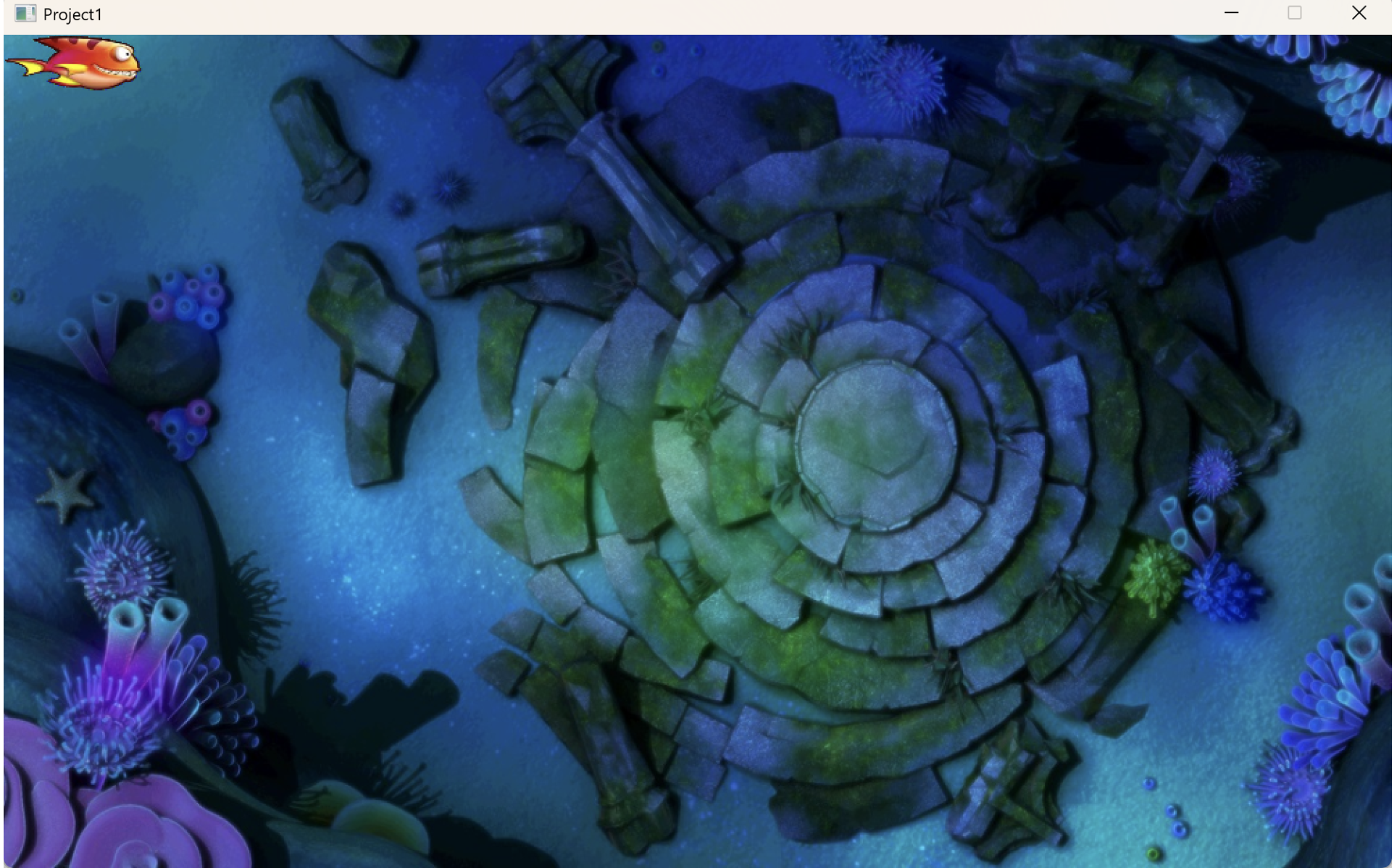
- 鱼不再有黑色背景,边缘透明,自然融入背景。
✅ 实现专业级精灵绘制。
- 完整代码:
c
#include <graphics.h>
#include <stdlib.h>
#include <stdio.h>
#define WIDTH 1000
#define HEIGHT 600
IMAGE background;
// 替换 fishImg 为数组
IMAGE fishIMG[2]; // [0]=掩码, [1]=原图
struct Fish {
    int x, y, dir, w, h;
};
struct Fish fish;

//加载图像资源
void LoadResources() {
    loadimage(&background, "./Res/background.jpg", WIDTH, HEIGHT);
    loadimage(&fishIMG[0], "./Res/0_right_y.jpg", 100, 40); // 掩码
    loadimage(&fishIMG[1], "./Res/0_right.jpg", 100, 40);   // 原图
}

int main() {
    initgraph(WIDTH, HEIGHT);
    LoadResources();
    while (1) {
        putimage(0, 0, &background);
        putimage(fish.x, fish.y, &fishIMG[0], SRCAND);
        putimage(fish.x, fish.y, &fishIMG[1], SRCPAINT);
        FlushBatchDraw(); // 使用批量绘图
    }
    closegraph();
    return 0;
}
🎮 阶段 4:手动更改鱼的方向
✅ 开发目标
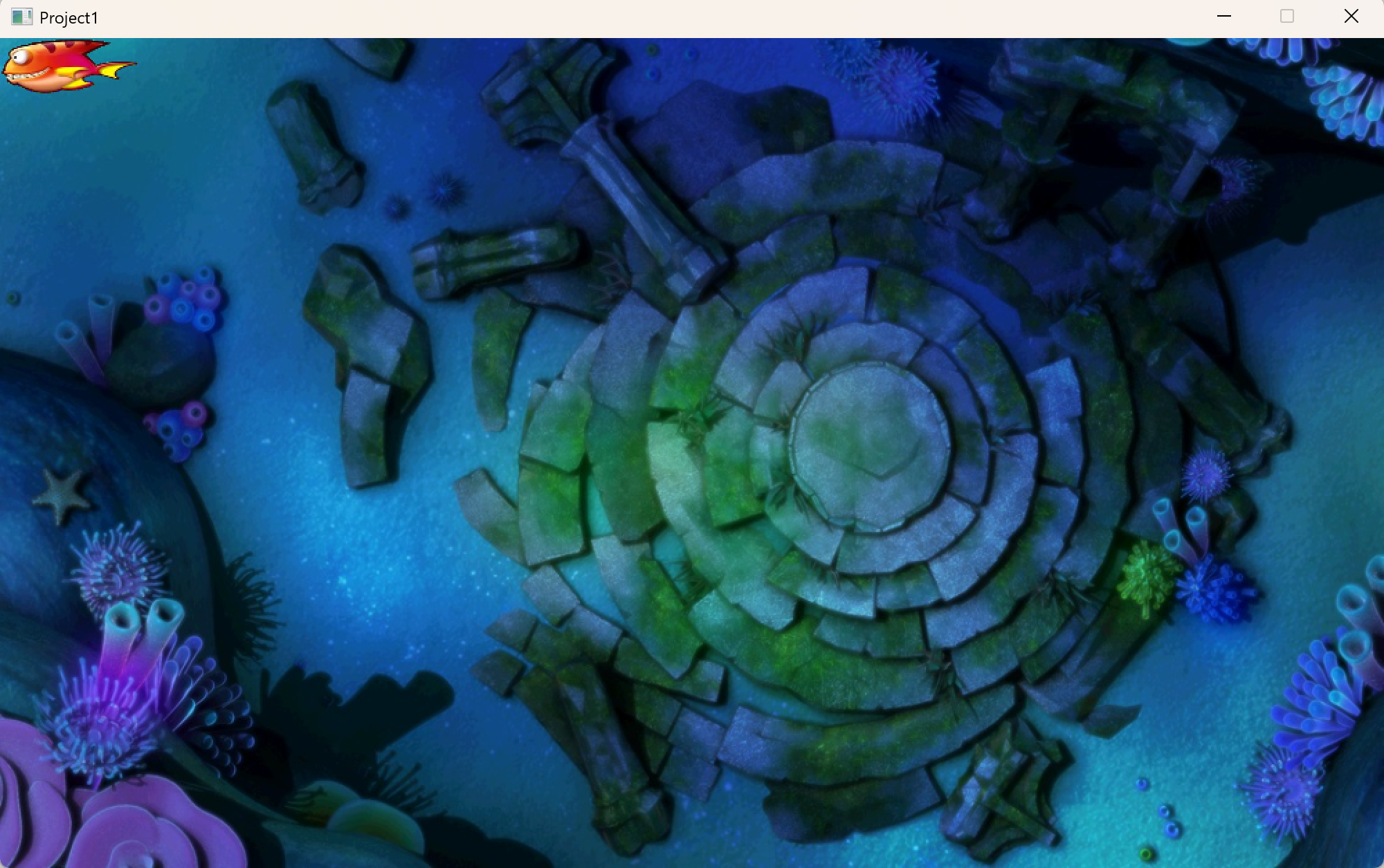
- 改变鱼的初始方向,可以实现鱼的左右朝向
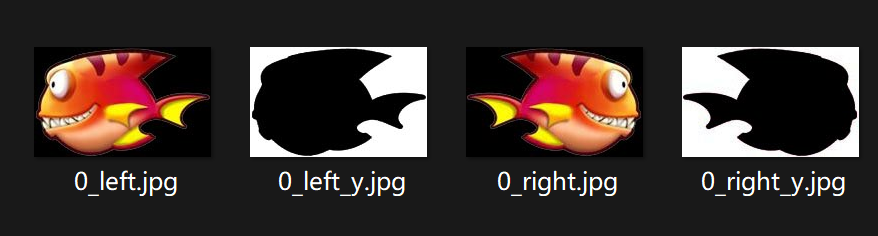
分析:由于鱼的状态需要左右切换,所以每种鱼实际上有4种状态【每种鱼有左右掩码+原图(共4张)】,故重新定义为:IMAGE fishIMG4,如下所示:
c
IMAGE fishIMG[4]; // [0]=左掩码, [1]=左原图, [2]=右掩码, [3]=右原图

//加载图像资源
void LoadResources() {
    loadimage(&background, "./Res/background.jpg", WIDTH, HEIGHT);
    loadimage(&fishIMG[0], "./Res/0_left_y.jpg", 100, 40);  // 左掩码
    loadimage(&fishIMG[1], "./Res/0_left.jpg", 100, 40);    // 左原图
    loadimage(&fishIMG[2], "./Res/0_right_y.jpg", 100, 40); // 右掩码
    loadimage(&fishIMG[3], "./Res/0_right.jpg", 100, 40);   // 右原图
}


//宏定义鱼的方向
#define ASPECT_LEFT 0
#define ASPECT_RIGHT 2

int main() {
    //...
    fish.dir = ASPECT_LEFT;//鱼的初始方向【后续鱼的初始化用InitFish函数封装】
    while (1) {
        putimage(0, 0, &background);
        int idx = (fish.dir == ASPECT_LEFT) ? 0 : 2;
        putimage(fish.x, fish.y, &fishIMG[idx], SRCAND);
        putimage(fish.x, fish.y, &fishIMG[idx + 1], SRCPAINT);
        FlushBatchDraw(); // 使用批量绘图
    }
    closegraph();
    return 0;
}- 完整代码:
c
#include <graphics.h>
#include <stdlib.h>
#include <stdio.h>
#define WIDTH 1000
#define HEIGHT 600
#define ASPECT_LEFT 0
#define ASPECT_RIGHT 2
IMAGE background;
IMAGE fishIMG[4]; // [0]=左掩码, [1]=左原图, [2]=右掩码, [3]=右原图
struct Fish {
    int x, y, dir, w, h;
};
struct Fish fish;

//加载图像资源
void LoadResources() {
    loadimage(&background, "./Res/background.jpg", WIDTH, HEIGHT);
    loadimage(&fishIMG[0], "./Res/0_left_y.jpg", 100, 40);  // 左掩码
    loadimage(&fishIMG[1], "./Res/0_left.jpg", 100, 40);    // 左原图
    loadimage(&fishIMG[2], "./Res/0_right_y.jpg", 100, 40); // 右掩码
    loadimage(&fishIMG[3], "./Res/0_right.jpg", 100, 40);   // 右原图
}

int main() {
    initgraph(WIDTH, HEIGHT);
    LoadResources();
    fish.dir = ASPECT_LEFT;
    while (1) {
        putimage(0, 0, &background);
        int idx = (fish.dir == ASPECT_LEFT) ? 0 : 2;
        putimage(fish.x, fish.y, &fishIMG[idx], SRCAND);
        putimage(fish.x, fish.y, &fishIMG[idx + 1], SRCPAINT);
        FlushBatchDraw(); // 使用批量绘图
    }
    closegraph();
    return 0;
}
二、正式开发阶段
🎮 阶段 0:游戏效果演示
大鱼吃小鱼
🧱 阶段1:宏定义【鱼的大小、数量、方向等等】
c
#include <graphics.h>
#include <time.h>
#include <stdlib.h>
#include <stdio.h>
//窗口大小
#define WIDTH 1000
#define HEIGHT 600
//鱼的大小
#define FISH_MIN_W 50
#define FISH_MIN_H 20
//鱼的数目
#define FISH_MAX_NUMS 7
//朝向
#define ASPECT_LEFT 0
#define ASPECT_RIGHT 2
//角色
#define ROLE 0
🐟 阶段 2:定义鱼的结构体+图片二维数组
c
struct Fish
{
	//鱼的坐标
	int x;
	int y;
	int dir; //鱼的方向
	int type; //鱼的类型
	int w; //鱼的宽度
	int h; //鱼的高度
};
struct Fish fish[FISH_MAX_NUMS];		//等效struct Fish fish[7];
IMAGE background;			//背景图
IMAGE fishIMG[7][4];		//第一个下标表示鱼种类; 第二个下标:【0 1 】:左边的背景和掩码 【2 3】 :右边的背景和掩码
🔄 阶段 3:初始化多条鱼(含随机生成)
✅ 开发目标
fish[0]为玩家角色(固定初始化)fish[1~6]为敌对鱼(随机位置、方向、类型)
🔧 添加 InitFish 函数
c
void InitFish(int type)
{
	if (type == ROLE)
	{
		//角色属性
		fish[type].x = 0;
		fish[type].y = 0;
		fish[type].dir = ASPECT_RIGHT;
		fish[type].type = ROLE;
		fish[type].w = FISH_MIN_W + 50;
		fish[type].h = FISH_MIN_H + 50;
	}
	else
	{
		//其他鱼是随机产生
		fish[type].type = rand() % (FISH_MAX_NUMS - 1) + 1; //[1,6];
		fish[type].dir = rand() % 2 ? ASPECT_LEFT : ASPECT_RIGHT;
		fish[type].y = rand() % 50 * 10+100;
		fish[type].x = rand() % 1000;
		fish[type].w = FISH_MIN_W + 10 * type;
		fish[type].h = FISH_MIN_H + 10 * type;
	}
}
🐠 阶段 4:批量加载多类型鱼资源
✅ 开发目标
- 支持 7 种鱼(0~6)
- 自动按文件名加载
🔧 修改资源加载
c
//加载图像资源
void LoadResources()
{
	loadimage(&background, "./Res/background.jpg", WIDTH, HEIGHT);
	char fileName[20] = { "" };
	for (int i = 0; i < FISH_MAX_NUMS; i++)
	{
		InitFish(i);
		for (int j = 0; j < 4; j++)
		{
			switch (j)
			{
			case 0:
				sprintf(fileName, "./Res/%d_left_y.jpg", i);
				break;
			case 1:
				sprintf(fileName, "./Res/%d_left.jpg", i);
				break;
			case 2:
				sprintf(fileName, "./Res/%d_right_y.jpg", i);
				break;
			case 3:
				sprintf(fileName, "./Res/%d_right.jpg", i);
				break;
			}
			loadimage(&fishIMG[i][j], fileName, fish[i].w, fish[i].h);
		}
	}
}
▶️ 阶段 5:绘制所有鱼 + 批量绘图优化
✅ 开发目标
- 循环绘制所有鱼
- 使用
BeginBatchDraw()提升性能
🔧 添加 DrawFish()
c
//绘制过程
void DrawFish()
{
	for (int i = 0; i < FISH_MAX_NUMS; i++)
	{
		putimage(fish[i].x, fish[i].y, &fishIMG[i][fish[i].dir], SRCAND);
		putimage(fish[i].x, fish[i].y, &fishIMG[i][fish[i].dir + 1], SRCPAINT);
	}
}

int main()
{
	srand((unsigned int)time(NULL));
	HWND hwnd = initgraph(WIDTH, HEIGHT);
	LoadResources();
	BeginBatchDraw();
	while (1)
	{
		putimage(0, 0, &background);
		DrawFish();
		FlushBatchDraw();// 使用批量绘图
	}
	EndBatchDraw();
	closegraph();
	return 0;
}
🖼️ 效果
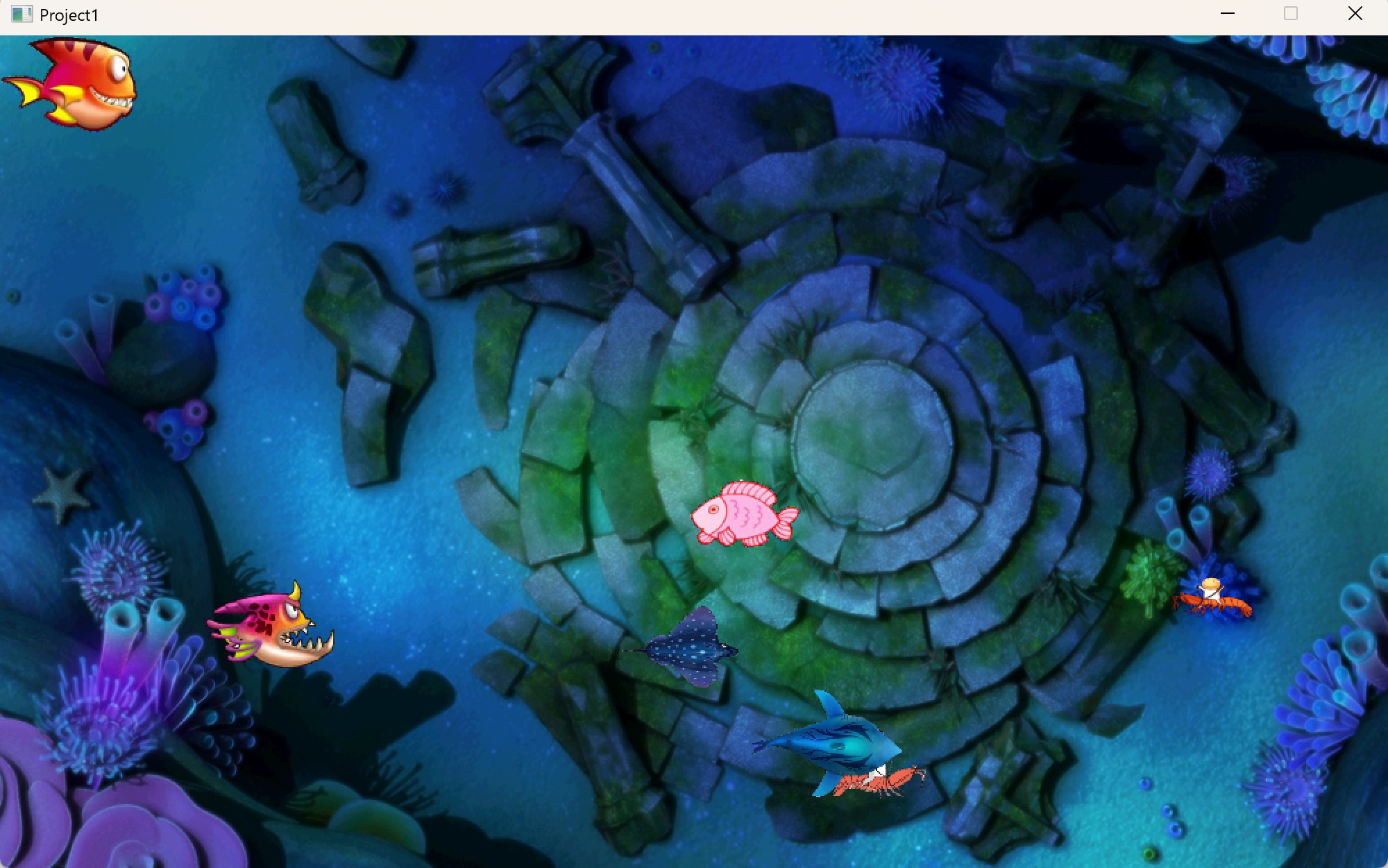
- 所有鱼一次性绘制,画面流畅。
✅ 渲染系统完成。
- 完整代码:
c
#include <graphics.h>
#include <time.h>
#include <stdlib.h>
#include <stdio.h>
//窗口大小
#define WIDTH 1000
#define HEIGHT 600
//鱼的大小
#define FISH_MIN_W 50
#define FISH_MIN_H 20
//鱼的数目
#define FISH_MAX_NUMS 7
//朝向
#define ASPECT_LEFT 0
#define ASPECT_RIGHT 2
//角色
#define ROLE 0

struct Fish
{
	//鱼的坐标
	int x;
	int y;
	int dir; //鱼的方向
	int type; //鱼的类型
	int w; //鱼的宽度
	int h; //鱼的高度
};
struct Fish fish[FISH_MAX_NUMS];		//等效struct Fish fish[7];
IMAGE background;			//背景图
IMAGE fishIMG[7][4];		//第一个下标表示鱼种类; 第二个下标:【0 1 】:左边的背景和掩码 【2 3】 :右边的背景和掩码

//初始化鱼
void InitFish(int type)
{
	if (type == ROLE)
	{
		//角色属性
		fish[type].x = 0;
		fish[type].y = 0;
		fish[type].dir = ASPECT_RIGHT;
		fish[type].type = ROLE;
		fish[type].w = FISH_MIN_W + 50;
		fish[type].h = FISH_MIN_H + 50;
	}
	else
	{
		//其他鱼是随机产生
		fish[type].type = rand() % (FISH_MAX_NUMS - 1) + 1; //[1,6];
		fish[type].dir = rand() % 2 ? ASPECT_LEFT : ASPECT_RIGHT;
		fish[type].y = rand() % 50 * 10+100;
		fish[type].x = rand() % 1000;
		fish[type].w = FISH_MIN_W + 10 * type;
		fish[type].h = FISH_MIN_H + 10 * type;
	}
}

//加载图像资源
void LoadResources()
{
	loadimage(&background, "./Res/background.jpg", WIDTH, HEIGHT);
	char fileName[20] = { "" };
	for (int i = 0; i < FISH_MAX_NUMS; i++)
	{
		InitFish(i);
		for (int j = 0; j < 4; j++)
		{
			switch (j)
			{
			case 0:
				sprintf(fileName, "./Res/%d_left_y.jpg", i);
				break;
			case 1:
				sprintf(fileName, "./Res/%d_left.jpg", i);
				break;
			case 2:
				sprintf(fileName, "./Res/%d_right_y.jpg", i);
				break;
			case 3:
				sprintf(fileName, "./Res/%d_right.jpg", i);
				break;
			}
			loadimage(&fishIMG[i][j], fileName, fish[i].w, fish[i].h);
		}
	}
}

//绘制过程
void DrawFish()
{
	for (int i = 0; i < FISH_MAX_NUMS; i++)
	{
		putimage(fish[i].x, fish[i].y, &fishIMG[i][fish[i].dir], SRCAND);
		putimage(fish[i].x, fish[i].y, &fishIMG[i][fish[i].dir + 1], SRCPAINT);
	}
}

int main()
{
	srand((unsigned int)time(NULL));
	HWND hwnd = initgraph(WIDTH, HEIGHT);
	LoadResources();
	BeginBatchDraw();
	while (1)
	{
		putimage(0, 0, &background);
		DrawFish();
		FlushBatchDraw();// 使用批量绘图
	}
	EndBatchDraw();
	closegraph();
	return 0;
}
🚶 阶段 6:控制主角的移动
🔧 添加 Control()
c
void Control()
{
	if (GetAsyncKeyState(VK_LEFT) && fish[ROLE].x > 0)
	{
		fish[ROLE].x -= 1;
		fish[ROLE].dir = ASPECT_LEFT;
	}
	if (GetAsyncKeyState(VK_RIGHT) && fish[ROLE].x < WIDTH - fish[ROLE].w)
	{
		fish[ROLE].x += 1;
		fish[ROLE].dir = ASPECT_RIGHT;
	}
	if (GetAsyncKeyState(VK_UP) && fish[ROLE].y > 0)
	{
		fish[ROLE].y -= 1;
	}
	if (GetAsyncKeyState(VK_DOWN) && fish[ROLE].y < HEIGHT - fish[ROLE].h)
	{
		fish[ROLE].y += 1;
	}
}
🏁 阶段 7:添加自动移动 + 定时器控制
✅ 开发目标
- 敌对鱼自动左右移动
- 使用定时器
🔧 MoveFish
c
void MoveFish()
{
	for (int i = 1; i < FISH_MAX_NUMS; i++)
	{
		// 水平移动并在遇到左右边界时反弹(改变方向并夹紧位置)
		if (fish[i].dir == ASPECT_LEFT)
		{
			fish[i].x -= 1;
			if (fish[i].x <= 0)
			{
				fish[i].x = 0;
				fish[i].dir = ASPECT_RIGHT;
			}
		}
		else if (fish[i].dir == ASPECT_RIGHT)
		{
			fish[i].x += 1;
			if (fish[i].x >= WIDTH - fish[i].w)
			{
				fish[i].x = WIDTH - fish[i].w;
				fish[i].dir = ASPECT_LEFT;
			}
		}
	}
}
🔧 添加 OnTimer【避免移动过快】
c
//定时器
int OnTimer(int duration)
{
	static int startTime = 0; // 单个定时器的起始时间
	int endTime = clock();
	if (endTime - startTime >= duration)
	{
		startTime = endTime; // 更新起始时间
		return 1; // 定时器触发
	}
	return 0; // 定时器未触发
}- 完整代码:
c
#include <graphics.h>
#include <time.h>
#include <stdlib.h>
#include <stdio.h>
//窗口大小
#define WIDTH 1000
#define HEIGHT 600
//鱼的大小
#define FISH_MIN_W 50
#define FISH_MIN_H 20
//鱼的数目
#define FISH_MAX_NUMS 7
//朝向
#define ASPECT_LEFT 0
#define ASPECT_RIGHT 2
//角色
#define ROLE 0

struct Fish
{
	//鱼的坐标
	int x;
	int y;
	int dir; //鱼的方向
	int type; //鱼的类型
	int w; //鱼的宽度
	int h; //鱼的高度
};
struct Fish fish[FISH_MAX_NUMS];		//等效struct Fish fish[7];
IMAGE background;			//背景图
IMAGE fishIMG[7][4];		//第一个下标表示鱼种类; 第二个下标:【0 1 】:左边的背景和掩码 【2 3】 :右边的背景和掩码

//初始化鱼
void InitFish(int type)
{
	if (type == ROLE)
	{
		//角色属性
		fish[type].x = 0;
		fish[type].y = 0;
		fish[type].dir = ASPECT_RIGHT;
		fish[type].type = ROLE;
		fish[type].w = FISH_MIN_W + 50;
		fish[type].h = FISH_MIN_H + 50;
	}
	else
	{
		//其他鱼是随机产生
		fish[type].type = rand() % (FISH_MAX_NUMS - 1) + 1; //[1,6];
		fish[type].dir = rand() % 2 ? ASPECT_LEFT : ASPECT_RIGHT;
		fish[type].y = rand() % 50 * 10+100;
		fish[type].x = rand() % 1000;
		fish[type].w = FISH_MIN_W + 10 * type;
		fish[type].h = FISH_MIN_H + 10 * type;
	}
}

//加载图像资源
void LoadResources()
{
	loadimage(&background, "./Res/background.jpg", WIDTH, HEIGHT);
	char fileName[20] = { "" };
	for (int i = 0; i < FISH_MAX_NUMS; i++)
	{
		InitFish(i);
		for (int j = 0; j < 4; j++)
		{
			switch (j)
			{
			case 0:
				sprintf(fileName, "./Res/%d_left_y.jpg", i);
				break;
			case 1:
				sprintf(fileName, "./Res/%d_left.jpg", i);
				break;
			case 2:
				sprintf(fileName, "./Res/%d_right_y.jpg", i);
				break;
			case 3:
				sprintf(fileName, "./Res/%d_right.jpg", i);
				break;
			}
			loadimage(&fishIMG[i][j], fileName, fish[i].w, fish[i].h);
		}
	}
}

//绘制过程
void DrawFish()
{
	for (int i = 0; i < FISH_MAX_NUMS; i++)
	{
		putimage(fish[i].x, fish[i].y, &fishIMG[i][fish[i].dir], SRCAND);
		putimage(fish[i].x, fish[i].y, &fishIMG[i][fish[i].dir + 1], SRCPAINT);
	}
}

//控制角色鱼
void Control()
{
	if (GetAsyncKeyState(VK_LEFT) && fish[ROLE].x > 0)
	{
		fish[ROLE].x -= 1;
		fish[ROLE].dir = ASPECT_LEFT;
	}
	if (GetAsyncKeyState(VK_RIGHT) && fish[ROLE].x < WIDTH - fish[ROLE].w)
	{
		fish[ROLE].x += 1;
		fish[ROLE].dir = ASPECT_RIGHT;
	}
	if (GetAsyncKeyState(VK_UP) && fish[ROLE].y > 0)
	{
		fish[ROLE].y -= 1;
	}
	if (GetAsyncKeyState(VK_DOWN) && fish[ROLE].y < HEIGHT - fish[ROLE].h)
	{
		fish[ROLE].y += 1;
	}
}

//定时器
int OnTimer(int duration)
{
	static int startTime = 0; // 单个定时器的起始时间
	int endTime = clock();
	if (endTime - startTime >= duration)
	{
		startTime = endTime; // 更新起始时间
		return 1; // 定时器触发
	}
	return 0; // 定时器未触发
}

//自动控制
void MoveFish()
{
	for (int i = 1; i < FISH_MAX_NUMS; i++)
	{
		// 水平移动并在遇到左右边界时反弹(改变方向并夹紧位置)
		if (fish[i].dir == ASPECT_LEFT)
		{
			fish[i].x -= 1;
			if (fish[i].x <= 0)
			{
				fish[i].x = 0;
				fish[i].dir = ASPECT_RIGHT;
			}
		}
		else if (fish[i].dir == ASPECT_RIGHT)
		{
			fish[i].x += 1;
			if (fish[i].x >= WIDTH - fish[i].w)
			{
				fish[i].x = WIDTH - fish[i].w;
				fish[i].dir = ASPECT_LEFT;
			}
		}
	}
}

int main()
{
	srand((unsigned int)time(NULL));
	HWND hwnd = initgraph(WIDTH, HEIGHT);
	LoadResources();
	BeginBatchDraw();
	while (1)
	{
		putimage(0, 0, &background);
		DrawFish();
		Control();
		if (OnTimer(10))
			MoveFish();
		FlushBatchDraw();// 使用批量绘图
	}
	EndBatchDraw();
	closegraph();
	return 0;
}
🖼️ 效果
- 敌对鱼缓慢左右移动(每10ms一帧),遇到边界自动反弹。
✅ 动态世界激活。
🔄 阶段 8::碰撞检测 + 吃鱼逻辑
✅ 开发目标
- 检测玩家与敌人是否相交
- 大鱼吃小鱼,如果主角碰到更大的鱼则 Game Over
🔧 添加 EatFish 和 GameOver
c
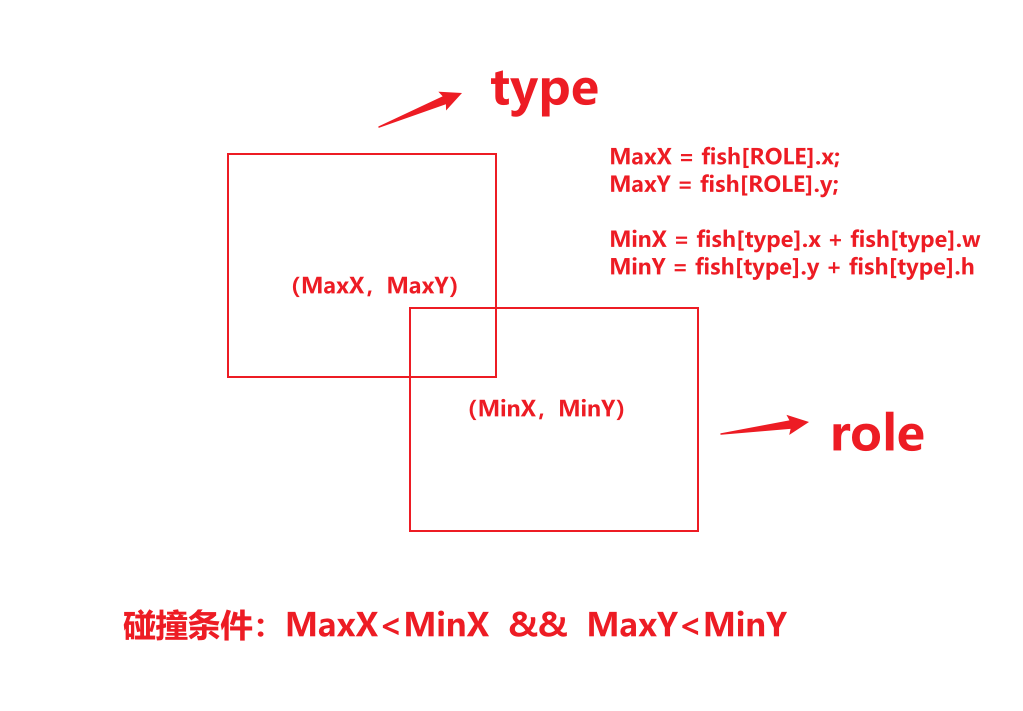
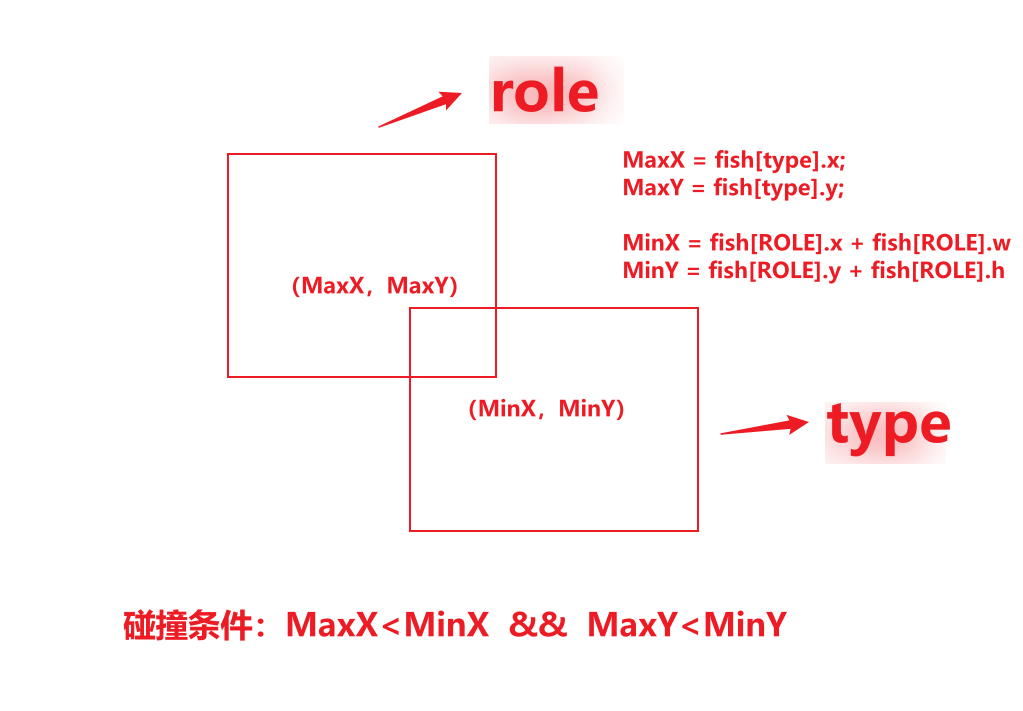
//碰撞检测【两个矩形相交】
int EatFish(int type) //假设吃的是type这条鱼
{
	//左上角求最大值
	int MaxX = max(fish[ROLE].x, fish[type].x);
	int MaxY = max(fish[ROLE].y, fish[type].y);
	//右下角求最小值
	int MinX = min(fish[ROLE].x + fish[ROLE].w, fish[type].x + fish[type].w);
	int MinY = min(fish[ROLE].y + fish[ROLE].h, fish[type].y + fish[type].h);
	if (MaxX < MinX && MaxY < MinY) {
		//面积判断大小【大鱼吃小鱼】
		if (fish[ROLE].w * fish[ROLE].h > fish[type].w * fish[type].h)
		{
			InitFish(type);
			return 0;
		}
		else
		{
			return 1;//碰到更大的鱼
		}
	}
	else {
		return 0;//不相交
	}
}

//游戏结束检测
int GameOver()
{
	for (int i = 1; i < FISH_MAX_NUMS; i++)
	{
		if (EatFish(i))
			return 1;
	}
	return 0;
}
分析:
- MaxX = max(leftA, leftB) --- 实际上是相交矩形的左边界(取两者左边坐标的较大者)。
- MinX = min(rightA, rightB) --- 实际上是相交矩形的右边界(取两者右边坐标的较小者)。
- 无论是谁处于右下方,只要满足碰撞条件 MaxX < MinX && MaxY < MinY, 则是标准的轴对齐矩形相交判定。
🖼️ 效果
- 玩家碰到比自己小的鱼 → 小鱼消失(重置)
- 玩家碰到比自己大的鱼 → 游戏结束
✅ 核心玩法实现!
⚔️ 阶段 9:整合主循环 + 游戏结束提示
✅ 开发目标
- 主循环整合所有逻辑
- 游戏结束弹窗
🔧 最终 main
c
int main()
{
	srand((unsigned int)time(NULL));
	HWND hwnd = initgraph(WIDTH, HEIGHT);
	LoadResources();
	BeginBatchDraw();
	while (1)
	{
		putimage(0, 0, &background);
		DrawFish();
		Control();
		if (OnTimer(10))
			MoveFish();
		if (GameOver())
		{
			MessageBox(hwnd, "GameOver", "You Lose", MB_OK);
			break;
		}
		FlushBatchDraw();// 使用批量绘图
	}
	EndBatchDraw();
	closegraph();
	return 0;
}
🖼️ 效果
- 完整可玩的"大鱼吃小鱼"游戏!
- 玩家控制红色大鱼
- 吃小鱼存活,被大鱼吃则失败
- 完整代码:
c
#include <graphics.h>
#include <time.h>
#include <stdlib.h>
#include <stdio.h>
//窗口大小
#define WIDTH 1000
#define HEIGHT 600
//鱼的大小
#define FISH_MIN_W 50
#define FISH_MIN_H 20
//鱼的数目
#define FISH_MAX_NUMS 7
//朝向
#define ASPECT_LEFT 0
#define ASPECT_RIGHT 2
//角色
#define ROLE 0

struct Fish
{
	//鱼的坐标
	int x;
	int y;
	int dir; //鱼的方向
	int type; //鱼的类型
	int w; //鱼的宽度
	int h; //鱼的高度
};
struct Fish fish[FISH_MAX_NUMS];		//等效struct Fish fish[7];
IMAGE background;			//背景图
IMAGE fishIMG[7][4];		//第一个下标表示鱼种类; 第二个下标:【0 1 】:左边的背景和掩码 【2 3】 :右边的背景和掩码

//初始化鱼
void InitFish(int type)
{
	if (type == ROLE)
	{
		//角色属性
		fish[type].x = 0;
		fish[type].y = 0;
		fish[type].dir = ASPECT_RIGHT;
		fish[type].type = ROLE;
		fish[type].w = FISH_MIN_W + 50;
		fish[type].h = FISH_MIN_H + 50;
	}
	else
	{
		//其他鱼是随机产生
		fish[type].type = rand() % (FISH_MAX_NUMS - 1) + 1; //[1,6];
		fish[type].dir = rand() % 2 ? ASPECT_LEFT : ASPECT_RIGHT;
		fish[type].y = rand() % 50 * 10+100;
		fish[type].x = rand() % 1000;
		fish[type].w = FISH_MIN_W + 10 * type;
		fish[type].h = FISH_MIN_H + 10 * type;
	}
}

//加载图像资源
void LoadResources()
{
	loadimage(&background, "./Res/background.jpg", WIDTH, HEIGHT);
	char fileName[20] = { "" };
	for (int i = 0; i < FISH_MAX_NUMS; i++)
	{
		InitFish(i);
		for (int j = 0; j < 4; j++)
		{
			switch (j)
			{
			case 0:
				sprintf(fileName, "./Res/%d_left_y.jpg", i);
				break;
			case 1:
				sprintf(fileName, "./Res/%d_left.jpg", i);
				break;
			case 2:
				sprintf(fileName, "./Res/%d_right_y.jpg", i);
				break;
			case 3:
				sprintf(fileName, "./Res/%d_right.jpg", i);
				break;
			}
			loadimage(&fishIMG[i][j], fileName, fish[i].w, fish[i].h);
		}
	}
}

//绘制过程
void DrawFish()
{
	for (int i = 0; i < FISH_MAX_NUMS; i++)
	{
		putimage(fish[i].x, fish[i].y, &fishIMG[i][fish[i].dir], SRCAND);
		putimage(fish[i].x, fish[i].y, &fishIMG[i][fish[i].dir + 1], SRCPAINT);
	}
}

//控制角色鱼
void Control()
{
	if (GetAsyncKeyState(VK_LEFT) && fish[ROLE].x > 0)
	{
		fish[ROLE].x -= 1;
		fish[ROLE].dir = ASPECT_LEFT;
	}
	if (GetAsyncKeyState(VK_RIGHT) && fish[ROLE].x < WIDTH - fish[ROLE].w)
	{
		fish[ROLE].x += 1;
		fish[ROLE].dir = ASPECT_RIGHT;
	}
	if (GetAsyncKeyState(VK_UP) && fish[ROLE].y > 0)
	{
		fish[ROLE].y -= 1;
	}
	if (GetAsyncKeyState(VK_DOWN) && fish[ROLE].y < HEIGHT - fish[ROLE].h)
	{
		fish[ROLE].y += 1;
	}
}

//定时器
int OnTimer(int duration)
{
	static int startTime = 0; // 单个定时器的起始时间
	int endTime = clock();
	if (endTime - startTime >= duration)
	{
		startTime = endTime; // 更新起始时间
		return 1; // 定时器触发
	}
	return 0; // 定时器未触发
}

//自动控制
void MoveFish()
{
	for (int i = 1; i < FISH_MAX_NUMS; i++)
	{
		// 水平移动并在遇到左右边界时反弹(改变方向并夹紧位置)
		if (fish[i].dir == ASPECT_LEFT)
		{
			fish[i].x -= 1;
			if (fish[i].x <= 0)
			{
				fish[i].x = 0;
				fish[i].dir = ASPECT_RIGHT;
			}
		}
		else if (fish[i].dir == ASPECT_RIGHT)
		{
			fish[i].x += 1;
			if (fish[i].x >= WIDTH - fish[i].w)
			{
				fish[i].x = WIDTH - fish[i].w;
				fish[i].dir = ASPECT_LEFT;
			}
		}
	}
}

//碰撞检测【两个矩形相交】
int EatFish(int type) //假设吃的是type这条鱼
{
	//左上角求最大值
	int MaxX = max(fish[ROLE].x, fish[type].x);
	int MaxY = max(fish[ROLE].y, fish[type].y);
	//右下角求最小值
	int MinX = min(fish[ROLE].x + fish[ROLE].w, fish[type].x + fish[type].w);
	int MinY = min(fish[ROLE].y + fish[ROLE].h, fish[type].y + fish[type].h);
	if (MaxX < MinX && MaxY < MinY) {
		//面积判断大小【大鱼吃小鱼】
		if (fish[ROLE].w * fish[ROLE].h > fish[type].w * fish[type].h)
		{
			InitFish(type);
			return 0;
		}
		else
		{
			return 1;//碰到更大的鱼
		}
	}
	else {
		return 0;//不相交
	}
}

//游戏结束检测
int GameOver()
{
	for (int i = 1; i < FISH_MAX_NUMS; i++)
	{
		if (EatFish(i))
			return 1;
	}
	return 0;
}

int main()
{
	srand((unsigned int)time(NULL));
	HWND hwnd = initgraph(WIDTH, HEIGHT);
	LoadResources();
	BeginBatchDraw();
	while (1)
	{
		putimage(0, 0, &background);
		DrawFish();
		Control();
		if (OnTimer(10))
			MoveFish();
		if (GameOver())
		{
			MessageBox(hwnd, "GameOver", "You Lose", MB_OK);
			break;
		}
		FlushBatchDraw();// 使用批量绘图
	}
	EndBatchDraw();
	closegraph();
	return 0;
}