OpenXml中使用FootnotesPart类保存Word文档内所有脚注的定义和文本。采用解压缩软件打开Word文档,其内的word文件夹中有独立的footnotes.xml文件,用于保存文档中使用的脚注信息,如下图所示。
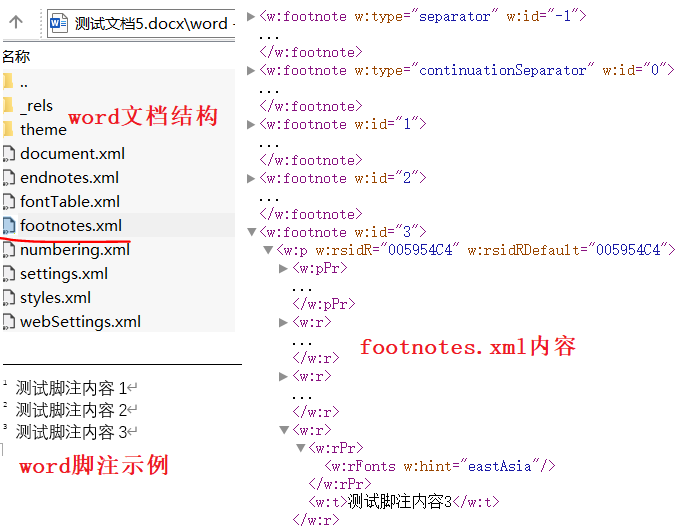
FootnotesPart类的Footnotes属性保存脚注集合,其命名空间及类型为DocumentFormat. OpenXml.Wordprocessing.Footnotes,通过调用Footnotes.Elements函数获取DocumentFormat. OpenXml.Wordprocessing.Footnote类型集合,Footnote类保存具体的脚注信息,继承自FootnoteEndnoteType类。
FootnoteEndnoteType类的主要属性包括Id和Type,前者为脚注唯一ID,用于在文档正文中引用,而后者为脚注类型,包括ContinuationNotice(连续通知)、ContinuationSeparator(连续分隔符)、Normal(普通脚注或尾注)、Separator(分隔符)等,同时可通过Elements函数或GetFirstChild等函数获取脚注内容,可能的内容类型如下所示:
csharp
DocumentFormat.OpenXml.Wordprocessing.AltChunk <w:altChunk>
DocumentFormat.OpenXml.Wordprocessing.BookmarkStart <w:bookmarkStart>
DocumentFormat.OpenXml.Wordprocessing.ContentPart <w:contentPart>
DocumentFormat.OpenXml.Wordprocessing.CustomXmlBlock <w:customXml>
DocumentFormat.OpenXml.Wordprocessing.CustomXmlInsRangeEnd <w:customXmlInsRangeEnd>
DocumentFormat.OpenXml.Wordprocessing.CustomXmlDelRangeEnd <w:customXmlDelRangeEnd>
DocumentFormat.OpenXml.Wordprocessing.CustomXmlMoveFromRangeEnd <w:customXmlMoveFromRangeEnd>
DocumentFormat.OpenXml.Wordprocessing.CustomXmlMoveToRangeEnd <w:customXmlMoveToRangeEnd>
DocumentFormat.OpenXml.Office2010.Word.CustomXmlConflictInsertionRangeEnd <w14:customXmlConflictInsRangeEnd>
DocumentFormat.OpenXml.Office2010.Word.CustomXmlConflictDeletionRangeEnd <w14:customXmlConflictDelRangeEnd>
DocumentFormat.OpenXml.Wordprocessing.BookmarkEnd <w:bookmarkEnd>
DocumentFormat.OpenXml.Wordprocessing.CommentRangeStart <w:commentRangeStart>
DocumentFormat.OpenXml.Wordprocessing.CommentRangeEnd <w:commentRangeEnd>
DocumentFormat.OpenXml.Wordprocessing.MoveFromRangeEnd <w:moveFromRangeEnd>
DocumentFormat.OpenXml.Wordprocessing.MoveToRangeEnd <w:moveToRangeEnd>
DocumentFormat.OpenXml.Wordprocessing.MoveFromRangeStart <w:moveFromRangeStart>
DocumentFormat.OpenXml.Wordprocessing.MoveToRangeStart <w:moveToRangeStart>
DocumentFormat.OpenXml.Wordprocessing.Paragraph <w:p>
DocumentFormat.OpenXml.Wordprocessing.PermEnd <w:permEnd>
DocumentFormat.OpenXml.Wordprocessing.PermStart <w:permStart>
DocumentFormat.OpenXml.Wordprocessing.ProofError <w:proofErr>
DocumentFormat.OpenXml.Wordprocessing.InsertedRun <w:ins>
DocumentFormat.OpenXml.Wordprocessing.DeletedRun <w:del>
DocumentFormat.OpenXml.Wordprocessing.MoveFromRun <w:moveFrom>
DocumentFormat.OpenXml.Wordprocessing.MoveToRun <w:moveTo>
DocumentFormat.OpenXml.Office2010.Word.RunConflictInsertion <w14:conflictIns>
DocumentFormat.OpenXml.Office2010.Word.RunConflictDeletion <w14:conflictDel>
DocumentFormat.OpenXml.Wordprocessing.SdtBlock <w:sdt>
DocumentFormat.OpenXml.Wordprocessing.Table <w:tbl>
DocumentFormat.OpenXml.Wordprocessing.CustomXmlInsRangeStart <w:customXmlInsRangeStart>
DocumentFormat.OpenXml.Wordprocessing.CustomXmlDelRangeStart <w:customXmlDelRangeStart>
DocumentFormat.OpenXml.Wordprocessing.CustomXmlMoveFromRangeStart<w:customXmlMoveFromRangeStart>
DocumentFormat.OpenXml.Wordprocessing.CustomXmlMoveToRangeStart<w:customXmlMoveToRangeStart>
DocumentFormat.OpenXml.Office2010.Word.CustomXmlConflictInsertionRangeStart<w14:customXmlConflictInsRangeStart>
DocumentFormat.OpenXml.Office2010.Word.CustomXmlConflictDeletionRangeStart
下面的代码示例用于获取word文档的脚注及内容:
csharp
using (WordprocessingDocument document = WordprocessingDocument.Open(txtFilePath.Text, false))
{
    FootnotesPart fPart = document.MainDocumentPart.FootnotesPart;
    if (fPart != null && fPart.Footnotes != null)
    {
        Footnotes footnotes = fPart.Footnotes;

        // 遍历所有脚注
        foreach (Footnote fn in footnotes.Elements<Footnote>())
        {
            // 获取脚注ID
            Console.WriteLine($"脚注ID: {fn.Id?.Value}");

            // 获取脚注类型
            FootnoteEndnoteValues? footnoteType = fn.Type?.Value;

            // 提取脚注的段落文本内容
            DocumentFormat.OpenXml.Wordprocessing.Paragraph para = fn.GetFirstChild<DocumentFormat.OpenXml.Wordprocessing.Paragraph>();
            if (para != null)
            {
                Console.WriteLine($"内容: {para.InnerText}");
            }
        }
    }
}
Word文档中的尾注类EndnotesPart的用法与脚注类FootnotesPart极其相似,EndnotesPart类的Endnotes属性保存尾注集合,其命名空间及类型为DocumentFormat.OpenXml.Wordprocessing. Endnotes,通过调用Endnotes.Elements函数获取DocumentFormat.OpenXml.Wordprocessing. Endnote类型集合,Endnote类保存具体的尾注信息,继承自FootnoteEndnoteType类。
参考文献
1https://github.com/dotnet/Open-XML-SDK
2https://learn.microsoft.com/zh-cn/office/open-xml/open-xml-sdk