基本概念
将当前分支的提交移动到另一个基端
base上,从而重新组织提交历史与
merge不同,rebase会创建新提交来替代旧提交,使得提交历史呈现线性结构
适用场景
- 整理本地提交历史 ------ 在推送前用
rebase整理杂乱的分支提交,使其更清晰 - 避免不必要的合并提交 ------ 希望提交历史是线性结构时(如开源项目的
PR) - 同步上游代码 ------ 将当前分支基于上游最新代码重新应用更改(如
git pull --rebase)
原理
初始状态
-
初始时,
master分支与feature分支均有提交,HEAD当前分支在feature,此时执行指令:shellgit rebase master # feature分支上执行,将当前分支feature变基到目标分支master上
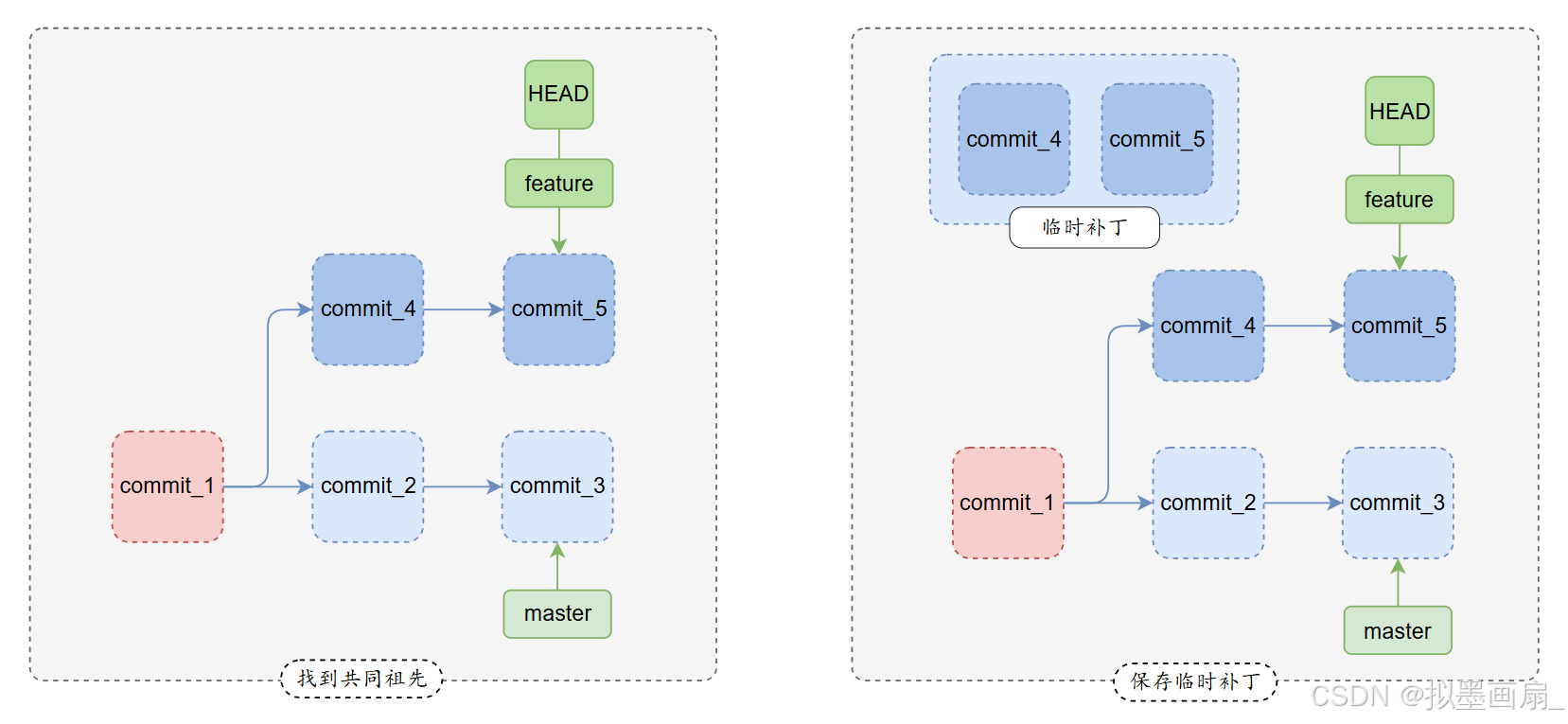
找到共同祖先
- 找到当前分支
feature和目标分支master的最近共同祖先common ancestor,即两个分支分叉处的提交
提取当前分支独有提交
- 从共同祖先开始,提取当前分支
feature之后的所有提交更改,保存为临时补丁
应用提交到目标分支
-
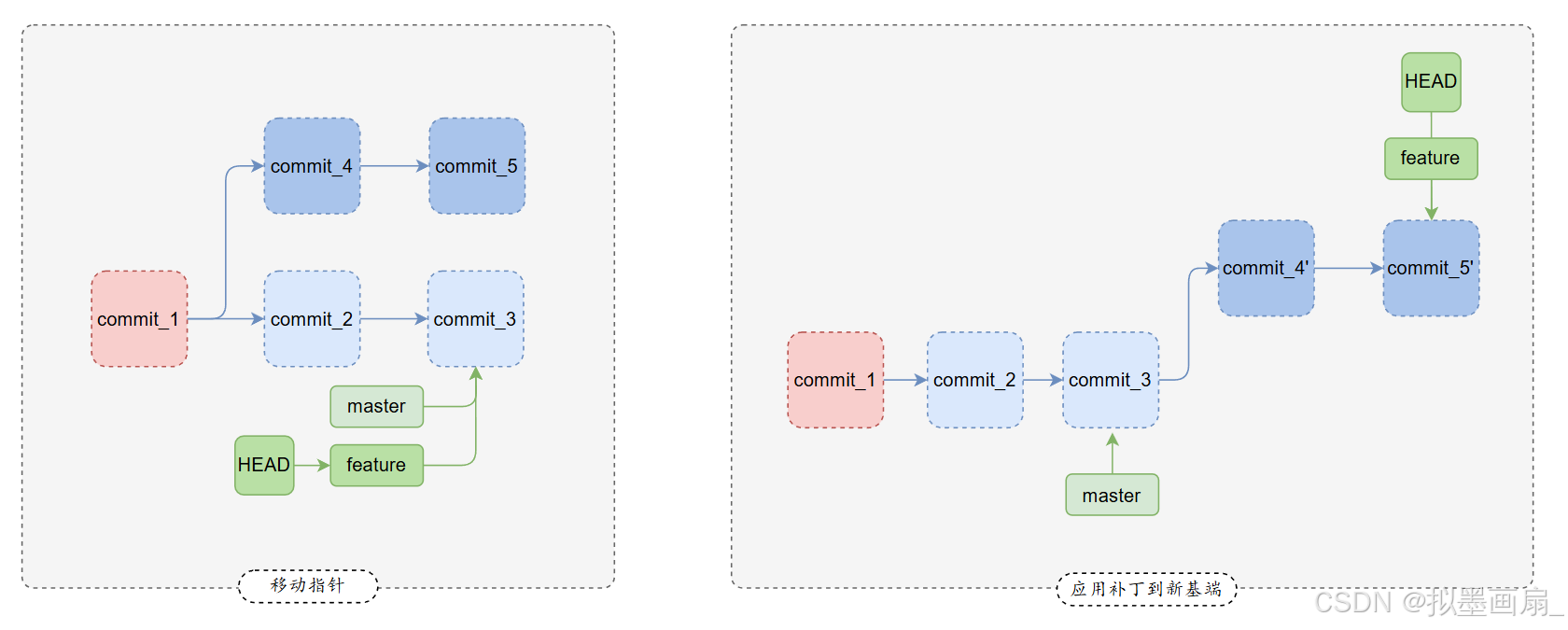
移动
feature分支的指针到master的最新提交(新基端)此时
feature的提交历史没有指针指向,暂时丢失游离(可以通过git reflog找回) -
将之前提取的补丁应用到
master新基端,生成新提交(内容相同,提交哈希值不同)如果遇到冲突,
Git暂停rebase过程,解决冲突后继续shellgit add git rebase --continue
对比 merge(合并)与 rebase(变基)
示意图
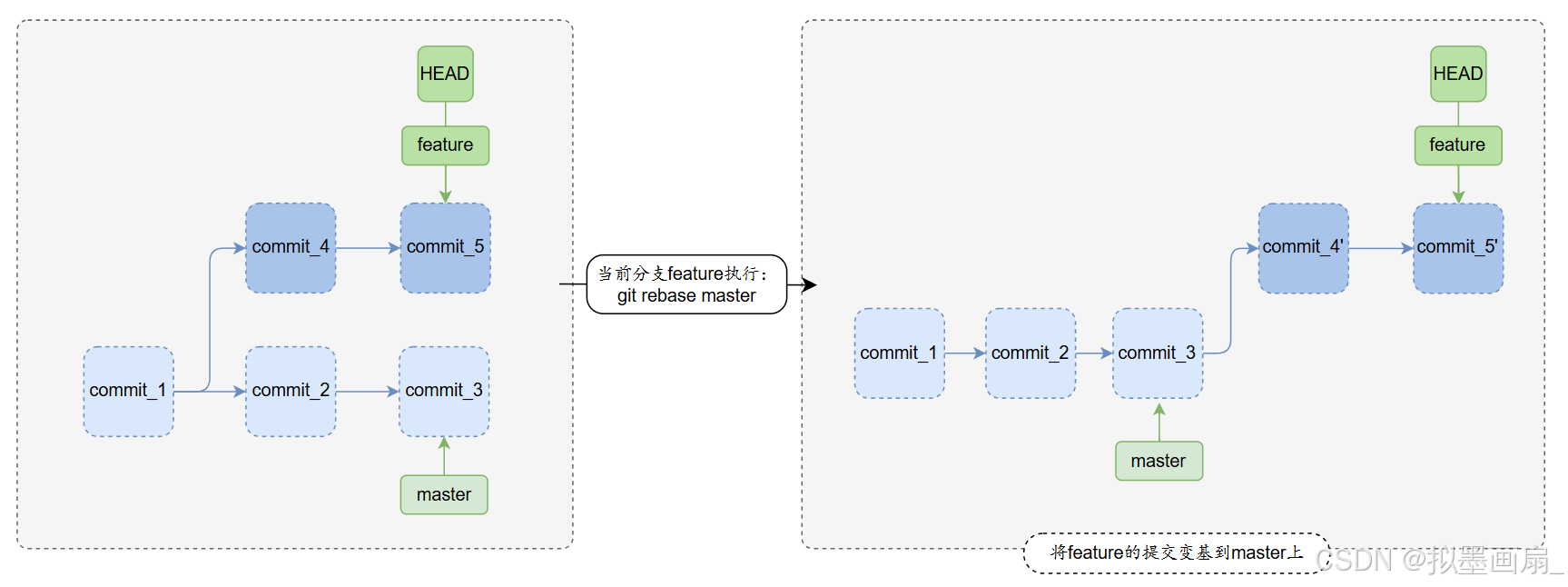
- 变基 ------ 在当前分支
feature执行git rebase master,将feature的提交嫁接到master上,重写历史,保持线性
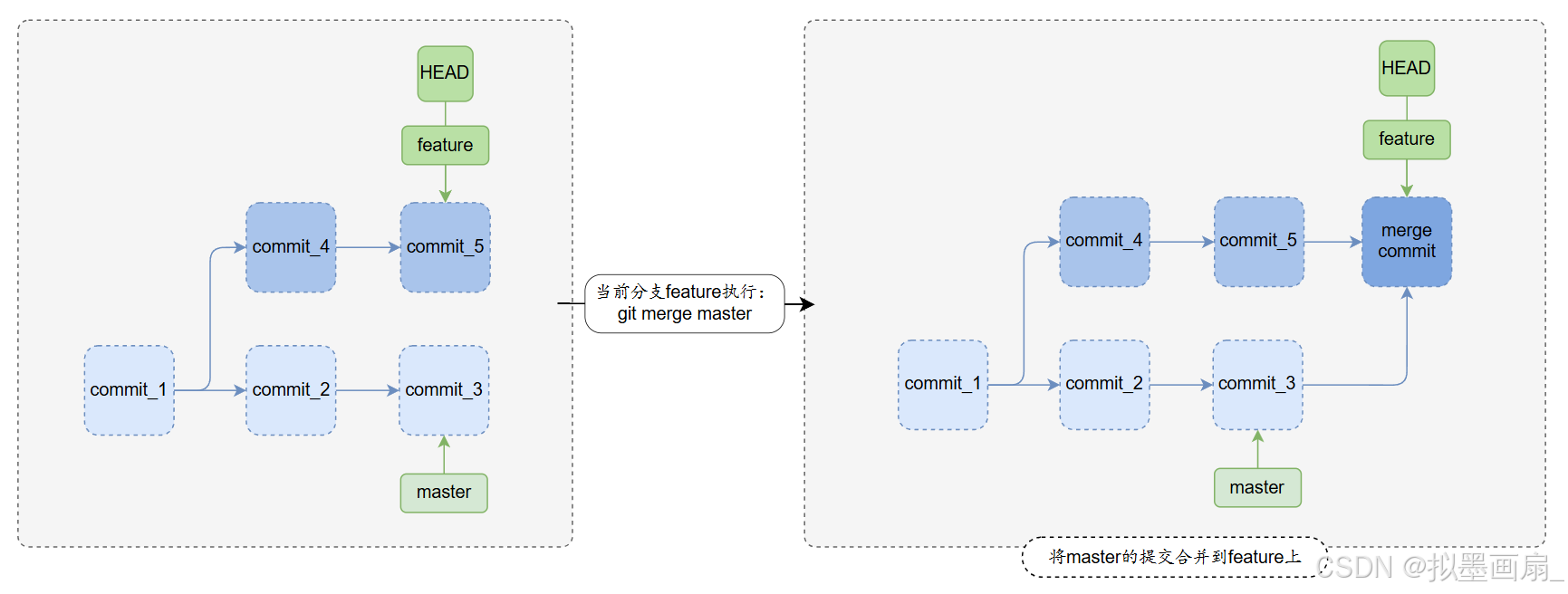
- 合并 ------ 在当前分支
feature执行git merge master,将master的提交合并到feature上,生成合并提交,保留历史
关键区别
rebase重写历史,merge保留历史rebase让feature的提交看起来基于master的最新提交开发(线性历史)merge会保留分支的分叉和合并记录(非线性的历史)
merge会生成新提交,rebase不会merge一定会生成合并提交,即使没有冲突rebase只是重新应用提交,不会额外生成提交
rebase更适合本地整理,merge更适合公共分支- 如果在开发本地分支,并希望提交历史清晰,用
rebase - 如果在合并公共分支(如团队协作的
develop),用merge更安全
- 如果在开发本地分支,并希望提交历史清晰,用
指令介绍
变基分支 git rebase
-
语法
shgit rebase [选项] <目标分支>参数 说明 -i/--interactive进入交互式变基(可修改提交) --continue解决冲突后继续变基 --abort终止变基,恢复到变基前的状态 --skip跳过当前提交(冲突无法解决时使用) --onto <新基端>将提交移动到另一个基端(复杂变基场景) -p/--preserve-merges保留合并提交(默认会丢弃) --autostash自动暂存未提交的更改(防止变基失败) -
具体示例
-
基本变基 ------ 将当前分支
feature变基到目标分支mastershell$ git checkout feature $ git rebase mastershell# 初始状态 A---B---C (master) \ D---E (feature) # 执行 git rebase master 后 A---B---C (master) \ D'---E' (feature) -
交互式变基(修改提交)
shell$ git rebase -i HEAD~3 # 修改最近3个提交进入交互式界面后,可以:
方法 说明 方法 说明 pick保留提交(默认) squash合并到前一个提交 reword修改提交信息 drop删除提交 edit修改提交内容 --- --- shellpick 1a2b3c Commit 1 reword 4d5e6f Commit 2 squash 7g8h9i Commit 3 -
变基过程中遇到冲突
sh$ git add <冲突文件> # 手动解决冲突后添加文件sh$ git rebase --continue # 继续变基shell$ git rebase --abort # 放弃变基 -
部分提交移动到另一个分支 ------ 把当前分支
topic(G和H)移动到目标分支mainshellgit rebase --onto main feature topicshell# 初始状态 A---B---C (main) \ D---E---F (feature) \ G---H (topic) # 把 topic 分支(G 和 H)移动到 main 分支的最新提交 C 上 A---B---C (main) \ \ \ G'---H' (topic) \ D---E---F (feature)
-
变基
相关指令
git rebase------ 将当前分支的提交变基到指定分支,重新组织提交历史
场景一:基本变基
-
切换分支 ------ 从
master分支切换到feature分支shell$ git checkout feature -
变基 ------ 将当前分支
feature变基到目标分支mastershell$ git rebase master效果:
shell# 初始状态 A---B---C (master) \ D---E (feature) # 执行 git rebase master 后 A---B---C (master) \ D'---E' (feature)
场景二:变基时冲突
-
变基时报错
shell$ git rebase Auto-merging main.py CONFLICT (content): Merge conflict in main.py error: could not apply 2264188... add function_a hint: Resolve all conflicts manually, mark them as resolved with hint: "git add/rm <conflicted_files>", then run "git rebase --continue". hint: You can instead skip this commit: run "git rebase --skip". hint: To abort and get back to the state before "git rebase", run "git rebase --abort". Could not apply 2264188... add function_a冲突文件 :
main.py存在内容冲突冲突原因 :在变基过程中,提交
2264188的修改与当前代码存在冲突 -
查看冲突文件 ------ 输出未合并的路径
Unmerged pathsshell$ git status Unmerged paths: (use "git add <file>..." to mark resolution) both modified: main.py -
手动解决冲突 ------ 打开
main.py,保留正确的代码,并添加到暂存区shell<<<<<<< HEAD 当前分支的代码(HEAD指向的版本) ======= 要应用的提交代码(2264188的修改) >>>>>>> 2264188... add function_ashell$ git add main.py -
继续变基
shell$ git rebase --continue -
放弃变基 ------ 回到
rebase前的状态shell$ git rebase --abort -
跳过当前提交 ------ 该提交的修改将被丢弃
shell$ git rebase --skip
场景三:检测到存在未完成的变基
-
检测到存在未完成的变基操作
shellfatal: It seems that there is already a rebase-merge directory, and I wonder if you are in the middle of another rebase. If that is the case, please try git rebase (--continue | --abort | --skip) If that is not the case, please rm -fr ".git/rebase-merge" and run me again. I am stopping in case you still have something valuable there.问题原因 ------
Git在.git/rebase-merge目录保存未完成的变基状态,可能由于:- 之前的
git rebase被意外中断(如关闭终端) - 冲突未完全解决就停止了操作
- 系统崩溃或强制退出
- 之前的
-
解决方案
- 继续未完成的变基:
git rebase --continue - 放弃当前变基:
git rebase --abort - 跳过当前提交:
git rebase --skip - 手动清理(仅当确认无价值内容时):
rm -fr ".git/rebase-merge"
- 继续未完成的变基:
参考文献
更多内容可以参考以下文章: