前言
本章主要讲述 ESP32S3(N16R8) CAMMERA 基于arduino 实现图像上传并显示
1:硬件及环境
arduino 2.3.*
ESP32S3-CAM(N16R8 44pin),不是 S3-EYE版本的
LCD 2.4 320*240 (st7789 SPI 8PIN引脚,就是有背板的)
面包板 杜邦线 若干
2:安装esp32
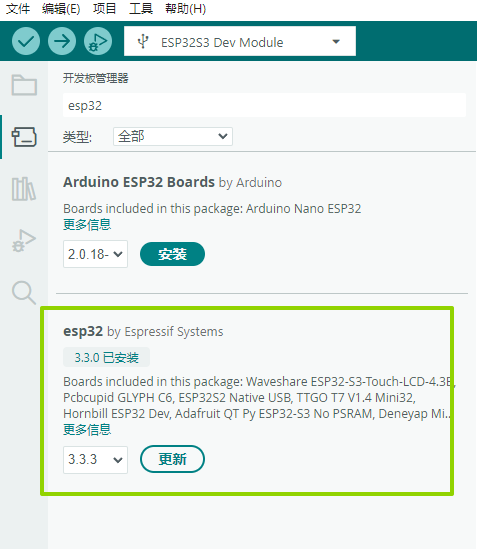
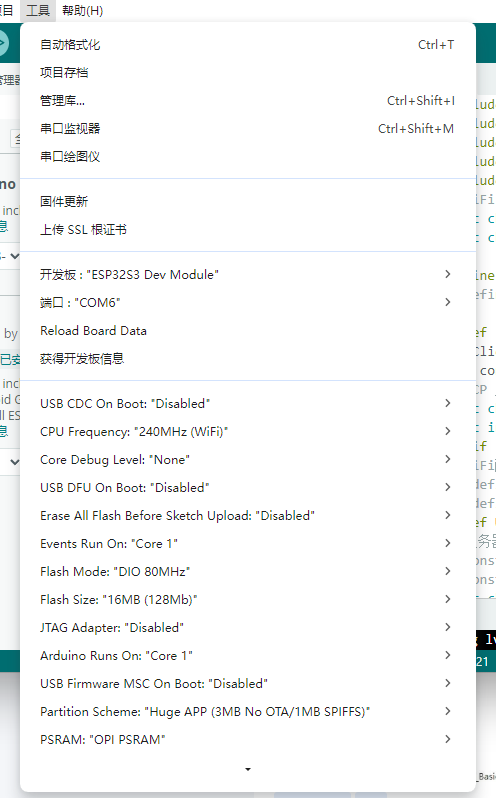
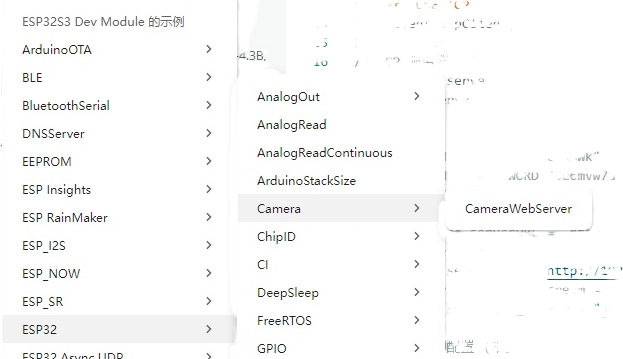
3:代码 基于 esp32->camera->camerawebserver 修改
c
#include "esp_camera.h"
#include "WiFi.h"
#include "HTTPClient.h"
#include "base64.h"
#include "driver/ledc.h"
// WiFi 配置
const char* ssid = "换成自己的SSID";
const char* password = "换成自己的密码";

#define  USE_TCP
//#define USE_HTTP

#ifdef  USE_TCP
WiFiClient tcpClient;
bool connected = false;
// TCP 服务器配置
const char* serverIP = "192.168.1.3";  // Python 服务器 IP
const int serverPort = 8081;
#endif
// WiFi配置
// #define WIFI_SSID "*****"
// #define WIFI_PASSWORD "*****"
#ifdef USE_HTTP
// 服务器配置
// const char* serverURL = "http://your-server.com/upload";
// const char* serverURL_stream = "http://your-server.com/stream";
const char* serverURL = "http://192.168.1.3:8080/upload";
//const char* serverURL_stream = "http://192.168.1.3:8080/stream";
const char* serverURL_stream = "http://192.168.1.3:5000/stream";
#endif
// 摄像头引脚配置 (根据你的 ESP32-S3 CAM 板)
#define PWDN_GPIO_NUM     -1
#define RESET_GPIO_NUM    -1
#define XCLK_GPIO_NUM     15
#define SIOD_GPIO_NUM     4
#define SIOC_GPIO_NUM     5
#define Y9_GPIO_NUM       16
#define Y8_GPIO_NUM       17
#define Y7_GPIO_NUM       18
#define Y6_GPIO_NUM       12
#define Y5_GPIO_NUM       10
#define Y4_GPIO_NUM       8
#define Y3_GPIO_NUM       9
#define Y2_GPIO_NUM       11
#define VSYNC_GPIO_NUM    6
#define HREF_GPIO_NUM     7
#define PCLK_GPIO_NUM     13

// #define PWDN_GPIO_NUM -1
// #define RESET_GPIO_NUM -1
// #define XCLK_GPIO_NUM 15
// #define SIOD_GPIO_NUM 4
// #define SIOC_GPIO_NUM 5

// #define Y2_GPIO_NUM 11
// #define Y3_GPIO_NUM 9
// #define Y4_GPIO_NUM 8
// #define Y5_GPIO_NUM 10
// #define Y6_GPIO_NUM 12
// #define Y7_GPIO_NUM 18
// #define Y8_GPIO_NUM 17
// #define Y9_GPIO_NUM 16

// #define VSYNC_GPIO_NUM 6
// #define HREF_GPIO_NUM 7
// #define PCLK_GPIO_NUM 13

// 流媒体设置
bool enableStream = true;
unsigned long lastCaptureTime = 0;
//const unsigned long CAPTURE_INTERVAL = 100; // 毫秒 (10 FPS)
const unsigned long CAPTURE_INTERVAL = 50; // 毫秒 (10 FPS)
/////////////////////////////////////////////
// RGB LED 引脚定义 (根据你的实际连接修改)
#define RGB_RED    1    // 红色引脚
#define RGB_GREEN  2    // 绿色引脚
#define RGB_BLUE   3    // 蓝色引脚

// PWM 设置
const int freq = 5000;
const int resolution1 = 8;  // 8位分辨率 (0-255)

// LED 状态
int ledMode = 0;  // 0=关闭, 1=呼吸灯, 2=彩虹, 3=状态指示
bool ledEnabled = true;

#define RGB_LED 48

#ifdef  USE_TCP
void connectTCP() {
  Serial.printf("尝试连接TCP服务器: %s:%d\n", serverIP, serverPort);

  if (tcpClient.connect(serverIP, serverPort)) {
    connected = true;
    Serial.println("✅ TCP连接成功!");
  } else {
    connected = false;
    Serial.println("TCP连接失败!");
  }
}

void sendVideoFrame() {
  camera_fb_t *fb = esp_camera_fb_get();
  if (!fb) {
    Serial.println(" 摄像头捕获失败");
    return;
  }

  if (tcpClient.connected()) {
    // 发送帧头:4字节长度 + 数据
    uint32_t frameSize = fb->len;
    tcpClient.write((uint8_t*)&frameSize, 4);  // 先发送长度
    tcpClient.write(fb->buf, fb->len);         // 再发送数据

    Serial.printf("📹 发送帧: %d bytes\n", fb->len);
  }

  esp_camera_fb_return(fb);
}
#endif

void setupRGB() {
  // 配置PWM通道
  // ledcSetup(0, freq, resolution1);  // 红色通道
  // ledcSetup(1, freq, resolution1);  // 绿色通道
  // ledcSetup(2, freq, resolution1);  // 蓝色通道


  // 绑定引脚到PWM通道
  // ledcAttachPin(RGB_RED, 0);
  // ledcAttachPin(RGB_GREEN, 1);
  // ledcAttachPin(RGB_BLUE, 2);

  ledcAttach(RGB_LED,freq,resolution1);

  // 初始关闭LED
 // setRGBColor(0, 0, 0);
  Serial.println("✅ RGB LED 初始化完成");
}

// 设置RGB颜色
void setRGBColor(int red, int green, int blue) {
  // ledcWrite(0, red);     // 红色
  // ledcWrite(1, green);   // 绿色
  // ledcWrite(2, blue);    // 蓝色
  ledcWrite(RGB_LED,0);
}

void setup() {
  Serial.begin(115200);
  Serial.println("ESP32-S3 Camera WiFi Streaming");

  // 初始化摄像头
  if (!setupCamera()) {
    Serial.println("摄像头初始化失败!");
    while (true) delay(1000);
  }

  // 连接WiFi
  connectWiFi();
  // 连接TCP服务器
  connectTCP();

  //setupRGB();
  Serial.println("系统启动完成");
}

bool setupCamera() {
  camera_config_t config;
  config.ledc_channel = LEDC_CHANNEL_0;
  config.ledc_timer = LEDC_TIMER_0;
  config.pin_d0 = Y2_GPIO_NUM;
  config.pin_d1 = Y3_GPIO_NUM;
  config.pin_d2 = Y4_GPIO_NUM;
  config.pin_d3 = Y5_GPIO_NUM;
  config.pin_d4 = Y6_GPIO_NUM;
  config.pin_d5 = Y7_GPIO_NUM;
  config.pin_d6 = Y8_GPIO_NUM;
  config.pin_d7 = Y9_GPIO_NUM;
  config.pin_xclk = XCLK_GPIO_NUM;
  config.pin_pclk = PCLK_GPIO_NUM;
  config.pin_vsync = VSYNC_GPIO_NUM;
  config.pin_href = HREF_GPIO_NUM;
  config.pin_sscb_sda = SIOD_GPIO_NUM;
  config.pin_sscb_scl = SIOC_GPIO_NUM;
  config.pin_pwdn = PWDN_GPIO_NUM;
  config.pin_reset = RESET_GPIO_NUM;
  config.xclk_freq_hz = 20000000;
  config.pixel_format = PIXFORMAT_JPEG;

  // OV3640 初始化参数
  config.frame_size = FRAMESIZE_VGA;//FRAMESIZE_SVGA  800x600  FRAMESIZE_VGA,      // 640x480
  config.jpeg_quality = 12;           // 0-63, 数值越小质量越高
  config.fb_count = 2;

  esp_err_t err = esp_camera_init(&config);
  if (err != ESP_OK) {
    Serial.printf("摄像头初始化失败,错误代码: 0x%x", err);
    return false;
  }

  // 调整摄像头设置
  // sensor_t *s = esp_camera_sensor_get();
  // if (s != NULL) {
  //   s->set_brightness(s, 0);     // -2 to 2
  //   s->set_contrast(s, 0);       // -2 to 2
  //   s->set_saturation(s, 0);     // -2 to 2
  //   s->set_special_effect(s, 0); // 0 to 6 (0 - No Effect)
  //   s->set_whitebal(s, 1);       // 0 = disable , 1 = enable
  //   s->set_awb_gain(s, 1);       // 0 = disable , 1 = enable
  //   s->set_wb_mode(s, 0);        // 0 to 4 - if awb_gain enabled (0 - Auto)
  //   s->set_exposure_ctrl(s, 1);  // 0 = disable , 1 = enable
  //   s->set_aec2(s, 0);           // 0 = disable , 1 = enable
  //   s->set_ae_level(s, 0);       // -2 to 2
  //   s->set_aec_value(s, 300);    // 0 to 1200
  //   s->set_gain_ctrl(s, 1);      // 0 = disable , 1 = enable
  //   s->set_agc_gain(s, 0);       // 0 to 30
  //   s->set_gainceiling(s, (gainceiling_t)0);  // 0 to 6
  //   s->set_bpc(s, 0);            // 0 = disable , 1 = enable
  //   s->set_wpc(s, 1);            // 0 = disable , 1 = enable
  //   s->set_raw_gma(s, 1);        // 0 = disable , 1 = enable
  //   s->set_lenc(s, 1);           // 0 = disable , 1 = enable
  //   s->set_hmirror(s, 0);        // 0 = disable , 1 = enable
  //   s->set_vflip(s, 0);          // 0 = disable , 1 = enable
  //   s->set_dcw(s, 1);            // 0 = disable , 1 = enable
  //   s->set_colorbar(s, 0);       // 0 = disable , 1 = enable
  // }
  //彩色图像
  sensor_t *s = esp_camera_sensor_get();
  if(s){
    s->set_quality(s,12);
    s->set_brightness(s,1);                // 提高亮度补偿室内光线
    s->set_contrast(s, 1);
    s->set_saturation(s, 2);                  // 提高饱和度
    s->set_sharpness(s,1);
    s->set_wb_mode(s,3);                   // 办公室/室内白平衡
    s->set_aec_value(s,600);               // 增加曝光补偿
    s->set_agc_gain(s, 12);                 // 提高增益
    s->set_gainceiling(s,GAINCEILING_32X);               // 32x增益上限

    ///////////////////////////////////
    //保持
    s->set_special_effect(s, 0); // 0 to 6 (0 - No Effect)
    s->set_whitebal(s, 1);       // 0 = disable , 1 = enable
    s->set_awb_gain(s, 1);       // 0 = disable , 1 = enable
    s->set_exposure_ctrl(s, 1);  // 0 = disable , 1 = enable
    s->set_aec2(s, 0);           // 0 = disable , 1 = enable
    s->set_ae_level(s, 0);       // -2 to 2
    //s->set_aec_value(s, 300);    // 0 to 1200
    s->set_gain_ctrl(s, 1);      // 0 = disable , 1 = enable
    s->set_bpc(s, 0);            // 0 = disable , 1 = enable
    s->set_wpc(s, 1);            // 0 = disable , 1 = enable
    s->set_raw_gma(s, 1);        // 0 = disable , 1 = enable
    s->set_lenc(s, 1);           // 0 = disable , 1 = enable
    s->set_hmirror(s, 0);        // 0 = disable , 1 = enable
    s->set_vflip(s, 0);          // 0 = disable , 1 = enable
    s->set_dcw(s, 1);            // 0 = disable , 1 = enable
    s->set_colorbar(s, 0);       // 0 = disable , 1 = enable
  }

  Serial.println("摄像头初始化成功");
  return true;
}

void connectWiFi() {
  WiFi.begin(ssid, password);
  Serial.print("连接WiFi");

  int attempts = 0;
  while (WiFi.status() != WL_CONNECTED && attempts < 20) {
    delay(500);
    Serial.print(".");
    attempts++;
  }

  if (WiFi.status() == WL_CONNECTED) {
    Serial.println("\nWiFi连接成功!");
    Serial.print("IP地址: ");
    Serial.println(WiFi.localIP());
  } else {
    Serial.println("\nWiFi连接失败!");
  }
}

void loop() {
  // 检查WiFi连接
  if (WiFi.status() != WL_CONNECTED) {
    Serial.println("WiFi断开,尝试重连...");
    connectWiFi();
    #ifdef USE_TCP
    connectTCP();
    #endif
    delay(1000);
    return;
  }
  #ifdef USE_TCP
   // 检查TCP连接
  if (!tcpClient.connected()) {
    Serial.println("TCP连接断开,尝试重连...");
   // rgbLED.setMode(3);
    connectTCP();
    delay(1000);
    return;
  }
  #endif

  // 控制捕获频率
  unsigned long currentTime = millis();
  if (currentTime - lastCaptureTime >= CAPTURE_INTERVAL) {
    lastCaptureTime = currentTime;

    if (enableStream) {
      // 实时流媒体模式
      #ifdef USE_TCP
      sendVideoFrame();
      #endif
      #ifdef USE_HTTP
      streamVideo();
      #endif
    } else {
      // 单张图片上传模式
      #ifdef USE_HTTP
        captureAndUpload();
      #endif
    }
  }

  // 其他任务可以在这里执行
  delay(10);
}

void streamVideo() {
  #ifdef USE_HTTP
  camera_fb_t *fb = esp_camera_fb_get();
  if (!fb) {
    Serial.println("摄像头捕获失败");
    return;
  }

  // 将图像转换为base64
  String imageData = base64::encode(fb->buf, fb->len);

  // 发送HTTP POST请求
  if (sendImageToServer(imageData, true)) {
    Serial.printf("流媒体帧发送成功, 大小: %d bytes\n", fb->len);
  } else {
    Serial.println("流媒体发送失败");
  }

  esp_camera_fb_return(fb);
  #endif
}

void captureAndUpload() {
  #ifdef USE_HTTP
  camera_fb_t *fb = esp_camera_fb_get();
  if (!fb) {
    Serial.println("摄像头捕获失败");
    return;
  }

  // 将图像转换为base64
  String imageData = base64::encode(fb->buf, fb->len);

  // 发送HTTP POST请求
  if (sendImageToServer(imageData, false)) {
    Serial.printf("图片上传成功, 大小: %d bytes\n", fb->len);
  } else {
    Serial.println("图片上传失败");
  }

  esp_camera_fb_return(fb);
  #endif
}
#ifdef USE_HTTP
bool sendImageToServer(String imageData, bool isStream) {
  HTTPClient http;

  if (isStream) {
    http.begin(serverURL_stream);
  } else {
    http.begin(serverURL);
  }

  http.addHeader("Content-Type", "application/json");

  // 创建JSON数据
  String jsonData = "{\"image\":\"" + imageData + "\",";
  jsonData += "\"timestamp\":" + String(millis()) + ",";
  jsonData += "\"camera\":\"ESP32-S3\",";
  jsonData += "\"format\":\"jpg\"}";

  int httpResponseCode = http.POST(jsonData);

  bool success = (httpResponseCode == 200);

  if (!success) {
    Serial.printf("HTTP错误代码: %d\n", httpResponseCode);
  }

  http.end();
  return success;
}
#endif
// 串口命令处理
void serialEvent() {
  while (Serial.available()) {
    String command = Serial.readStringUntil('\n');
    command.trim();

    if (command == "stream on") {
      enableStream = true;
      Serial.println("开启流媒体模式");
    } else if (command == "stream off") {
      enableStream = false;
      Serial.println("关闭流媒体模式");
    } else if (command == "capture") {
      captureAndUpload();
    } else if (command == "status") {
      printStatus();
    } else if (command.startsWith("quality ")) {
      int quality = command.substring(8).toInt();
      setJpegQuality(quality);
    }
  }
}

void printStatus() {
  Serial.println("=== 系统状态 ===");
  Serial.printf("WiFi状态: %s\n", WiFi.status() == WL_CONNECTED ? "已连接" : "未连接");
  Serial.printf("流媒体模式: %s\n", enableStream ? "开启" : "关闭");
  Serial.printf("IP地址: %s\n", WiFi.localIP().toString().c_str());

  sensor_t *s = esp_camera_sensor_get();
  if (s != NULL) {
    Serial.printf("图像质量: %d\n", s->status.quality);
    Serial.printf("帧大小: %d\n", s->status.framesize);
  }
}

void setJpegQuality(int quality) {
  sensor_t *s = esp_camera_sensor_get();
  if (s != NULL) {
    if (quality >= 0 && quality <= 63) {
      s->set_quality(s, quality);
      Serial.printf("设置图像质量为: %d\n", quality);
    } else {
      Serial.println("图像质量范围: 0-63 (0=最好, 63=最差)");
    }
  }
}
python( 3.13.0) 服务器代码 基本上由AI生成,只修改了PORT就OK
可能需要安装opencv numpy等,提示缺撒就安装撒
python
import socket
import cv2
import numpy as np
import threading
import time
import struct
from datetime import datetime

#FRAMESIZE_VGA,      // 640x480
video_width = 640
video_heigth =480

class TCPCameraServer:
    def __init__(self, host='0.0.0.0', port=8081):
        self.host = host
        self.port = port
        self.socket = None
        self.running = False
        self.clients = []
        self.window_name = "ESP32-S3 实时视频流"

    def start_server(self):
        """启动TCP服务器"""
        try:
            self.socket = socket.socket(socket.AF_INET, socket.SOCK_STREAM)
            self.socket.setsockopt(socket.SOL_SOCKET, socket.SO_REUSEADDR, 1)
            self.socket.bind((self.host, self.port))
            self.socket.listen(5)
            self.socket.settimeout(1.0)  # 设置超时以便可以检查 running 状态

            self.running = True
            print(f"🚀 TCP视频流服务器启动在 {self.host}:{self.port}")
            print("🎥 等待ESP32摄像头连接...")

            # 启动客户端接受线程
            accept_thread = threading.Thread(target=self.accept_clients)
            accept_thread.daemon = True
            accept_thread.start()

            # 创建OpenCV窗口
            cv2.namedWindow(self.window_name, cv2.WINDOW_NORMAL)
            cv2.resizeWindow(self.window_name, video_width, video_heigth)

            # 主显示循环
            self.display_loop()

        except Exception as e:
            print(f"❌ 服务器启动失败: {e}")
        finally:
            self.stop_server()

    def accept_clients(self):
        """接受客户端连接"""
        while self.running:
            try:
                client_socket, client_address = self.socket.accept()
                client_socket.settimeout(2.0)
                print(f"✅ 客户端连接: {client_address}")

                # 为每个客户端启动处理线程
                client_thread = threading.Thread(
                    target=self.handle_client,
                    args=(client_socket, client_address)
                )
                client_thread.daemon = True
                client_thread.start()

                self.clients.append((client_socket, client_address, client_thread))

            except socket.timeout:
                continue
            except Exception as e:
                if self.running:
                    print(f"❌ 接受客户端错误: {e}")

    def handle_client(self, client_socket, client_address):
        """处理单个客户端连接"""
        print(f"📡 开始处理客户端: {client_address}")

        try:
            while self.running and client_socket.fileno() != -1:
                # 接收帧长度 (4字节)
                frame_size_data = self.recv_all(client_socket, 4)
                if not frame_size_data:
                    break

                frame_size = struct.unpack('<I', frame_size_data)[0]
                # print(f"📦 接收帧大小: {frame_size} bytes")

                # 接收图像数据
                frame_data = self.recv_all(client_socket, frame_size)
                if not frame_data:
                    break

                # 处理图像数据
                self.process_frame(frame_data, client_address)

        except socket.timeout:
            print(f"⏰ 客户端 {client_address} 接收超时")
        except Exception as e:
            print(f"❌ 处理客户端 {client_address} 错误: {e}")
        finally:
            client_socket.close()
            self.remove_client(client_socket)
            print(f"🔌 客户端断开: {client_address}")

    def recv_all(self, sock, size):
        """接收指定数量的数据"""
        data = b''
        while len(data) < size:
            try:
                chunk = sock.recv(size - len(data))
                if not chunk:
                    return None
                data += chunk
            except socket.timeout:
                continue
            except:
                return None
        return data

    def process_frame(self, frame_data, client_address):
        """处理接收到的图像帧"""
        try:
            # 解码JPEG图像
            nparr = np.frombuffer(frame_data, np.uint8)
            frame = cv2.imdecode(nparr, cv2.IMREAD_COLOR)

            if frame is not None:
                # 在图像上添加信息
                timestamp = datetime.now().strftime("%Y-%m-%d %H:%M:%S")
                cv2.putText(frame, f"ESP32-S3 Camera - {client_address[0]}", (10, 30),
                           cv2.FONT_HERSHEY_SIMPLEX, 0.7, (0, 255, 0), 2)
                cv2.putText(frame, timestamp, (10, 60),
                           cv2.FONT_HERSHEY_SIMPLEX, 0.6, (255, 255, 255), 2)
                cv2.putText(frame, f"Frame Size: {len(frame_data)} bytes", (10, 90),
                           cv2.FONT_HERSHEY_SIMPLEX, 0.6, (255, 255, 0), 2)

                # 存储最新的帧用于显示
                self.latest_frame = frame

            else:
                print("❌ 图像解码失败")

        except Exception as e:
            print(f"❌ 处理帧错误: {e}")

    def display_loop(self):
        """主显示循环"""
        frame_count = 0
        start_time = time.time()
        self.latest_frame = None

        print("🎥 开始显示视频流...")
        print("💡 按 'q' 退出, 按 's' 保存截图")

        while self.running:
            if self.latest_frame is not None:
                # 计算帧率
                frame_count += 1
                elapsed = time.time() - start_time
                if elapsed >= 1.0:
                    fps = frame_count / elapsed
                    display_frame = self.latest_frame.copy()
                    cv2.putText(display_frame, f"FPS: {fps:.1f}", (10, 120),
                               cv2.FONT_HERSHEY_SIMPLEX, 0.6, (0, 255, 255), 2)
                    cv2.imshow(self.window_name, display_frame)
                    frame_count = 0
                    start_time = time.time()
                else:
                    cv2.imshow(self.window_name, self.latest_frame)

            # 处理键盘输入
            key = cv2.waitKey(1) & 0xFF
            if key == ord('q'):
                print("👋 用户退出")
                break
            elif key == ord('s'):
                self.save_screenshot()
            elif key == ord('c'):
                self.show_client_info()

    def save_screenshot(self):
        """保存截图"""
        if self.latest_frame is not None:
            filename = f"capture_{datetime.now().strftime('%Y%m%d_%H%M%S')}.jpg"
            cv2.imwrite(filename, self.latest_frame)
            print(f"📸 截图已保存: {filename}")

    def show_client_info(self):
        """显示客户端信息"""
        print(f"\n=== 客户端信息 ===")
        print(f"连接客户端数: {len(self.clients)}")
        for i, (sock, addr, thread) in enumerate(self.clients):
            status = "活跃" if sock.fileno() != -1 else "断开"
            print(f"客户端 {i+1}: {addr} - {status}")
        print("================\n")

    def remove_client(self, client_socket):
        """移除客户端"""
        self.clients = [(s, a, t) for s, a, t in self.clients if s != client_socket]

    def stop_server(self):
        """停止服务器"""
        self.running = False
        if self.socket:
            self.socket.close()
        for client_socket, _, _ in self.clients:
            client_socket.close()
        cv2.destroyAllWindows()
        print("🛑 服务器已停止")

if __name__ == "__main__":
    # 配置服务器
    HOST = '0.0.0.0'  # 监听所有网络接口
    PORT = 8081

    server = TCPCameraServer(HOST, PORT)

    try:
        server.start_server()
    except KeyboardInterrupt:
        print("\n👋 用户中断")
    finally:
        server.stop_server()
4:测试结果 如果对你又帮助,麻烦点个赞,加个关注
晚上测试 角度 没设置好,由点曝光
