Spring Cloud 核心组件详解:Eureka、Ribbon、Feign 与 Hystrix

- [Spring Cloud 核心组件详解:Eureka、Ribbon、Feign 与 Hystrix](#Spring Cloud 核心组件详解:Eureka、Ribbon、Feign 与 Hystrix)
-
- 一、各组件功能定位与作用
-
- [1. Eureka:服务注册与发现中心](#1. Eureka:服务注册与发现中心)
- [2. Ribbon:客户端负载均衡器](#2. Ribbon:客户端负载均衡器)
- [3. Feign:声明式 REST 客户端](#3. Feign:声明式 REST 客户端)
- [4. Hystrix:服务熔断与容错保护](#4. Hystrix:服务熔断与容错保护)
- 二、整合使用场景
- [三、代码示例(基于 Spring Boot 2.7.x + Spring Cloud Netflix 3.1.x)](#三、代码示例(基于 Spring Boot 2.7.x + Spring Cloud Netflix 3.1.x))
-
- [1. Eureka Server 与 Client 配置](#1. Eureka Server 与 Client 配置)
-
- [(1)Eureka Server 配置](#(1)Eureka Server 配置)
- [(2)Eureka Client 配置(服务提供者)](#(2)Eureka Client 配置(服务提供者))
- [2. Ribbon 实现负载均衡(基于 RestTemplate)](#2. Ribbon 实现负载均衡(基于 RestTemplate))
- [3. Feign 声明式接口调用](#3. Feign 声明式接口调用)
- [4. Hystrix 熔断与降级实现](#4. Hystrix 熔断与降级实现)
- 四、完整调用链路流程图
- 五、总结
在微服务架构中,服务的注册发现、负载均衡、远程调用及容错保护是核心问题。Spring Cloud Netflix 套件提供了 Eureka、Ribbon、Feign、Hystrix 四大核心组件,分别对应上述问题的解决方案。本文基于 Spring Boot 2.x + Spring Cloud Netflix 版本,从功能定位、整合场景、代码示例及调用链路四个维度,带大家吃透这四大组件的使用逻辑。
📕个人领域 :Linux/C++/java/AI
🚀 个人主页 :有点流鼻涕 · CSDN
💬 座右铭 : "向光而行,沐光而生。"

一、各组件功能定位与作用
四大组件各司其职,又相互协同,共同支撑微服务架构的稳定性和可扩展性。
1. Eureka:服务注册与发现中心
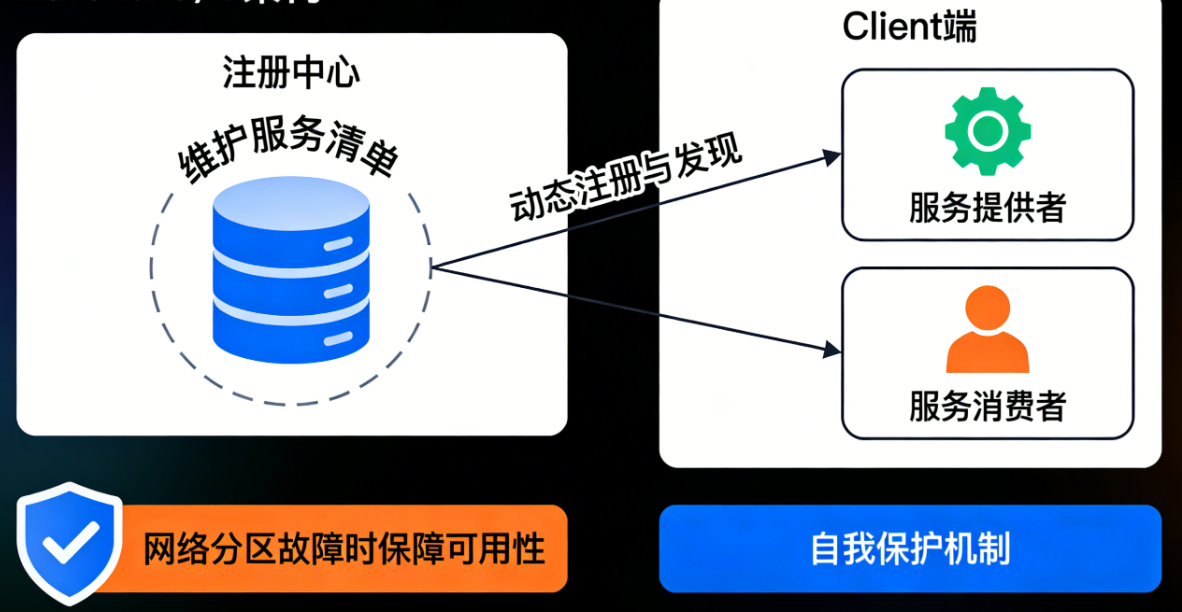
Eureka 采用 C/S 架构,分为 Server 端(注册中心)和 Client 端(服务提供者/消费者)。其核心作用是维护服务清单,让服务消费者能快速找到服务提供者,实现服务的动态注册与发现,避免硬编码服务地址带来的扩展性问题。Eureka 具备自我保护机制,当网络分区故障时,不会轻易剔除未心跳的服务,保障系统的可用性。
2. Ribbon:客户端负载均衡器
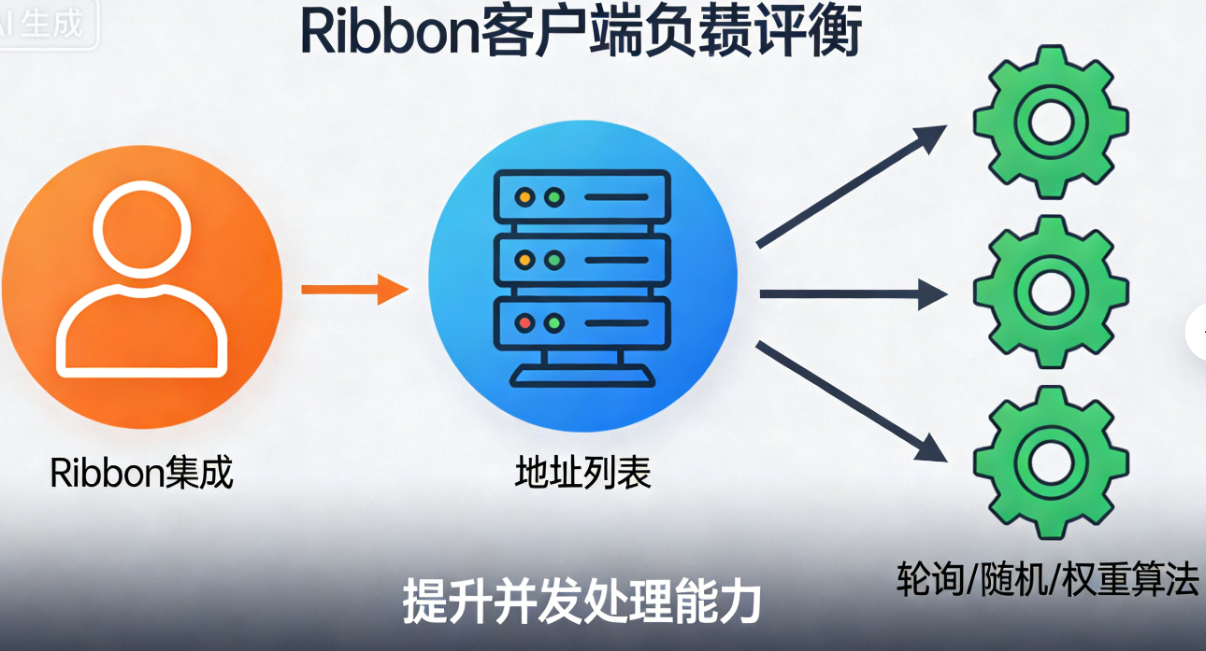
Ribbon 是客户端侧的负载均衡组件,无需独立部署,集成在服务消费者中。它会从 Eureka 服务器获取服务提供者的地址列表,通过预设的负载均衡算法(如轮询、随机、权重等)选择一个服务实例发起请求,实现请求的分发,避免单一服务实例过载,提升系统的并发处理能力。
3. Feign:声明式 REST 客户端
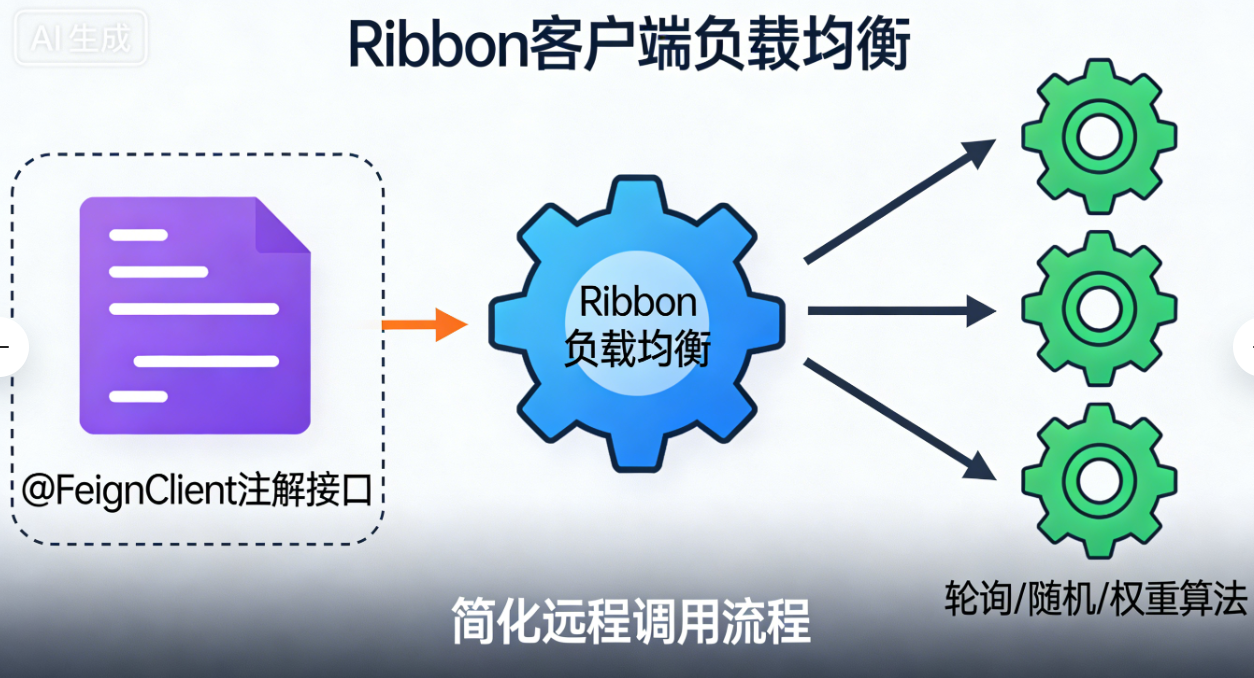
Feign 基于 Ribbon 实现,封装了远程调用的细节,提供声明式接口编程方式。开发者只需定义接口并添加注解,即可像调用本地方法一样发起远程服务调用,无需手动编写 RestTemplate 代码,简化了远程调用的开发流程,同时自动集成负载均衡功能。
4. Hystrix:服务熔断与容错保护
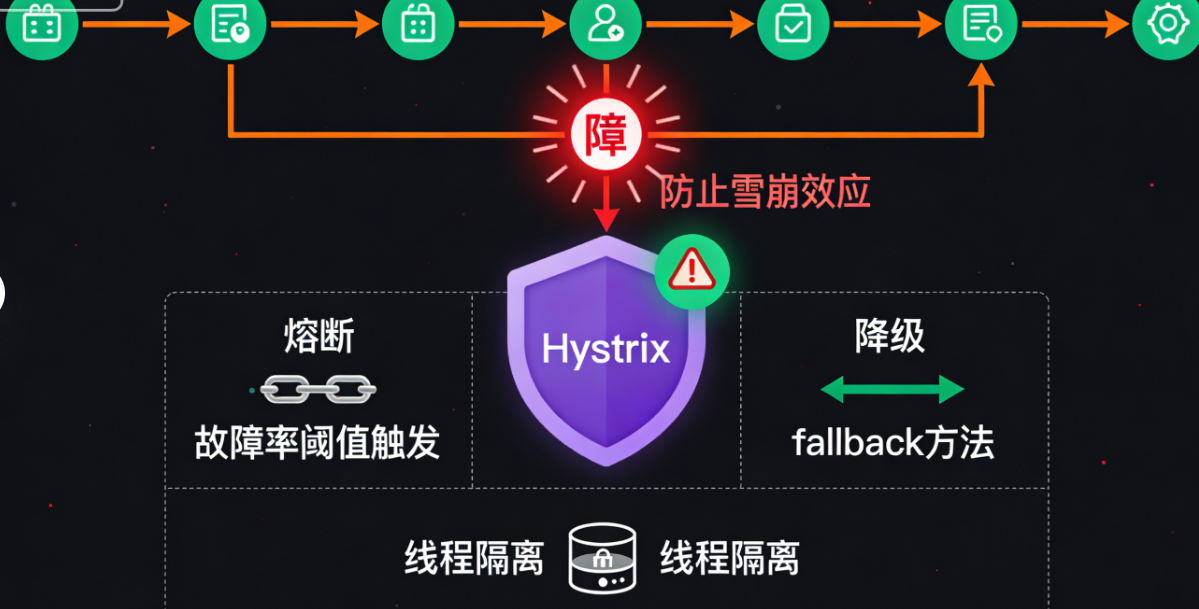
在微服务调用链路中,若某个服务故障或响应延迟,可能引发雪崩效应。Hystrix 通过熔断机制(当故障率达到阈值时,自动断开调用)、降级机制(故障时执行预设的 fallback 方法)、线程隔离等方式,实现服务容错,防止故障扩散,保障核心服务的正常运行。
二、整合使用场景
四大组件协同工作的完整流程如下:首先,服务提供者(Client)启动后向 Eureka Server 注册自身信息;Eureka Server 维护服务注册表,实时同步服务状态;服务消费者(Client)从 Eureka Server 拉取服务清单;Feign 基于接口定义发起远程调用,底层由 Ribbon 从服务清单中选择实例实现负载均衡;Hystrix 对 Feign 调用进行包裹,全程监控调用状态,当出现故障时触发熔断或降级,保护消费者服务。
这种整合方案能构建出高可用、弹性强的微服务系统:Eureka 保障服务动态感知,Ribbon 实现负载分发,Feign 简化调用开发,Hystrix 抵御故障风险,形成闭环的微服务调用生态。
三、代码示例(基于 Spring Boot 2.7.x + Spring Cloud Netflix 3.1.x)
先准备基础环境,在父工程 pom.xml 中引入 Spring Cloud Netflix 依赖(统一版本管理):
xml
<parent>
<groupId>org.springframework.boot</groupId>
<artifactId>spring-boot-starter-parent</artifactId>
<version>2.7.18</version>
<relativePath/>
</parent>
<dependencies>
<!-- Spring Cloud Eureka Client -->
<dependency>
<groupId>org.springframework.cloud</groupId>
<artifactId>spring-cloud-starter-netflix-eureka-client</artifactId>
</dependency><!-- Spring Cloud Eureka Server -->
<dependency>
<groupId>org.springframework.cloud</groupId>
<artifactId>spring-cloud-starter-netflix-eureka-server</artifactId>
</dependency>
<!-- Spring Cloud Ribbon(Feign 已集成,可单独引入增强) -->
<dependency>
<groupId>org.springframework.cloud</groupId>
<artifactId>spring-cloud-starter-netflix-ribbon</artifactId>
</dependency>
<!-- Spring Cloud Feign -->
<dependency>
<groupId>org.springframework.cloud</groupId>
<artifactId>spring-cloud-starter-openfeign</artifactId>
</dependency>
<!-- Spring Cloud Hystrix -->
<dependency>
<groupId>org.springframework.cloud</groupId>
<artifactId>spring-cloud-starter-netflix-hystrix</artifactId>
</dependency><!-- Spring Boot Web -->
<dependency>
<groupId>org.springframework.boot</groupId>
<artifactId>spring-boot-starter-web</artifactId>
</dependency>
</dependencies>
<dependencyManagement>
<dependencies>
<dependency>
<groupId>org.springframework.cloud</groupId>
<artifactId>spring-cloud-dependencies</artifactId>
<version>2021.0.9</version>
<type>pom</type>
<scope>import</scope>
</dependency>
</dependencies>
</dependencyManagement>1. Eureka Server 与 Client 配置
(1)Eureka Server 配置
创建 Eureka Server 模块,启动类添加 @EnableEurekaServer 注解:
java
import org.springframework.boot.SpringApplication;
import org.springframework.boot.autoconfigure.SpringBootApplication;
import org.springframework.cloud.netflix.eureka.server.EnableEurekaServer;

@SpringBootApplication
@EnableEurekaServer // 开启 Eureka Server 功能
public class EurekaServerApplication {
    public static void main(String[] args) {
        SpringApplication.run(EurekaServerApplication.class, args);
    }
}
application.yml 配置:
yaml
server:
  port: 8761 # Eureka Server 默认端口

eureka:
  instance:
    hostname: localhost # 服务实例主机名
  client:
    register-with-eureka: false # 禁止自身注册(单机版)
    fetch-registry: false # 禁止拉取服务清单(单机版)
    service-url:
      defaultZone: http://${eureka.instance.hostname}:${server.port}/eureka/ # 服务注册地址
  server:
    enable-self-preservation: true # 开启自我保护机制
(2)Eureka Client 配置(服务提供者)
创建服务提供者模块(如 user-service),启动类添加 @EnableEurekaClient 注解:
java
import org.springframework.boot.SpringApplication;
import org.springframework.boot.autoconfigure.SpringBootApplication;
import org.springframework.cloud.netflix.eureka.EnableEurekaClient;

@SpringBootApplication
@EnableEurekaClient // 开启 Eureka Client 功能
public class UserServiceApplication {
    public static void main(String[] args) {
        SpringApplication.run(UserServiceApplication.class, args);
    }
}
编写测试接口(Controller):
java
import org.springframework.web.bind.annotation.GetMapping;
import org.springframework.web.bind.annotation.PathVariable;
import org.springframework.web.bind.annotation.RestController;

@RestController
public class UserController {
    // 测试接口:根据 ID 查询用户
    @GetMapping("/user/{id}")
    public String getUserById(@PathVariable Integer id) {
        // 模拟数据库查询
        return "User ID: " + id + ", Name: ZhangSan";
    }
}
application.yml 配置:
yaml
server:
  port: 8081 # 服务提供者端口(可启动多个实例,修改端口即可)

spring:
  application:
    name: user-service # 服务名称(注册到 Eureka 的服务名,消费者通过该名称调用)

eureka:
  client:
    service-url:
      defaultZone: http://localhost:8761/eureka/ # Eureka Server 地址
  instance:
    prefer-ip-address: true # 优先使用 IP 注册
2. Ribbon 实现负载均衡(基于 RestTemplate)
创建服务消费者模块(如 order-service),通过 RestTemplate + Ribbon 调用 user-service,实现负载均衡。
(1)启动类配置 RestTemplate,添加 @LoadBalanced 注解开启负载均衡:
java
import org.springframework.boot.SpringApplication;
import org.springframework.boot.autoconfigure.SpringBootApplication;
import org.springframework.cloud.client.loadbalancer.LoadBalanced;
import org.springframework.cloud.netflix.eureka.EnableEurekaClient;
import org.springframework.context.annotation.Bean;
import org.springframework.web.client.RestTemplate;

@SpringBootApplication
@EnableEurekaClient
public class OrderServiceApplication {
    public static void main(String[] args) {
        SpringApplication.run(OrderServiceApplication.class, args);
    }

    // 注入 RestTemplate,添加 @LoadBalanced 开启 Ribbon 负载均衡
    @Bean
    @LoadBalanced
    public RestTemplate restTemplate() {
        return new RestTemplate();
    }
}
(2)编写 Service 调用远程接口:
java
import org.springframework.beans.factory.annotation.Autowired;
import org.springframework.stereotype.Service;
import org.springframework.web.client.RestTemplate;

@Service
public class OrderService {
    @Autowired
    private RestTemplate restTemplate;

    public String getOrderUser(Integer userId) {
        // 调用 user-service 接口,使用服务名替代 IP:端口(Ribbon 自动解析)
        String url = "http://user-service/user/" + userId;
        return restTemplate.getForObject(url, String.class);
    }
}
(3)编写 Controller 测试:
java
import org.springframework.beans.factory.annotation.Autowired;
import org.springframework.web.bind.annotation.GetMapping;
import org.springframework.web.bind.annotation.PathVariable;
import org.springframework.web.bind.annotation.RestController;

@RestController
public class OrderController {
    @Autowired
    private OrderService orderService;

    @GetMapping("/order/user/{userId}")
    public String getOrderUser(@PathVariable Integer userId) {
        return orderService.getOrderUser(userId);
    }
}
(4)测试负载均衡:启动 2 个 user-service 实例(端口 8081、8082),多次访问 http://localhost:8083/order/user/1(order-service 端口 8083),Ribbon 会默认采用轮询算法,交替调用两个 user-service 实例。
3. Feign 声明式接口调用
Feign 简化了远程调用代码,在 order-service 中集成 Feign,替代 RestTemplate + Ribbon 的手动调用方式。
(1)启动类添加 @EnableFeignClients注解,开启 Feign 功能:
java
import org.springframework.boot.SpringApplication;
import org.springframework.boot.autoconfigure.SpringBootApplication;
import org.springframework.cloud.client.loadbalancer.LoadBalanced;
import org.springframework.cloud.netflix.eureka.EnableEurekaClient;
import org.springframework.cloud.openfeign.EnableFeignClients;
import org.springframework.context.annotation.Bean;
import org.springframework.web.client.RestTemplate;

@SpringBootApplication
@EnableEurekaClient
@EnableFeignClients // 开启 Feign 功能
public class OrderServiceApplication {
    public static void main(String[] args) {
        SpringApplication.run(OrderServiceApplication.class, args);
    }

    // 若不使用 Feign,可保留 RestTemplate;使用 Feign 可省略
    @Bean
    @LoadBalanced
    public RestTemplate restTemplate() {
        return new RestTemplate();
    }
}
(2)定义 Feign 接口,映射 user-service 的接口:
java
import org.springframework.cloud.openfeign.FeignClient;
import org.springframework.web.bind.annotation.GetMapping;
import org.springframework.web.bind.annotation.PathVariable;

// name:指定调用的服务名(与 user-service 的 spring.application.name 一致)
@FeignClient(name = "user-service")
public interface UserFeignClient {
    // 接口方法与 user-service 的 Controller 接口完全一致
    @GetMapping("/user/{id}")
    String getUserById(@PathVariable("id") Integer id);
}
(3)修改 OrderService,使用 Feign 接口调用:
java
import org.springframework.beans.factory.annotation.Autowired;
import org.springframework.stereotype.Service;

@Service
public class OrderService {
    @Autowired
    private UserFeignClient userFeignClient;

    public String getOrderUser(Integer userId) {
        // 像调用本地方法一样调用远程接口,Feign 自动实现负载均衡
        return userFeignClient.getUserById(userId);
    }
}
(4)测试:访问 http://localhost:8083/order/user/1,效果与 Ribbon 一致,Feign 底层已集成 Ribbon,默认实现负载均衡。
4. Hystrix 熔断与降级实现
在 order-service 中集成 Hystrix,对 Feign 调用进行容错保护,避免 user-service 故障导致 order-service 不可用。
(1)启动类添加 @EnableCircuitBreaker注解,开启 Hystrix 功能(也可使用 @SpringCloudApplication 组合注解):
java
import org.springframework.boot.SpringApplication;
import org.springframework.boot.autoconfigure.SpringBootApplication;
import org.springframework.cloud.client.circuitbreaker.EnableCircuitBreaker;
import org.springframework.cloud.netflix.eureka.EnableEurekaClient;
import org.springframework.cloud.openfeign.EnableFeignClients;

@SpringBootApplication
@EnableEurekaClient
@EnableFeignClients
@EnableCircuitBreaker // 开启 Hystrix 熔断功能
public class OrderServiceApplication {
    public static void main(String[] args) {
        SpringApplication.run(OrderServiceApplication.class, args);
    }
}
(2)application.yml 配置 Hystrix(可选,默认配置可满足基础需求):
yaml
hystrix:
  command:
    default:
      circuitBreaker:
        enabled: true # 开启熔断
        failureThresholdPercentage: 50 # 故障率阈值(达到 50% 触发熔断)
        sleepWindowInMilliseconds: 5000 # 熔断后休眠时间(5 秒后尝试恢复)
      execution:
        isolation:
          thread:
            timeoutInMilliseconds: 3000 # 调用超时时间(3 秒)
(3)Feign 接口集成 Hystrix,指定 fallback 降级类:
java
import org.springframework.cloud.openfeign.FeignClient;
import org.springframework.web.bind.annotation.GetMapping;
import org.springframework.web.bind.annotation.PathVariable;

// fallback:指定降级类,当调用失败时执行该类的对应方法
@FeignClient(name = "user-service", fallback = UserFeignFallback.class)
public interface UserFeignClient {
    @GetMapping("/user/{id}")
    String getUserById(@PathVariable("id") Integer id);
}
(4)实现 fallback 降级类:
java
import org.springframework.stereotype.Component;

// 必须交给 Spring 管理(添加 @Component)
@Component
public class UserFeignFallback implements UserFeignClient {
    // 降级方法:与 UserFeignClient 接口方法签名一致
    @Override
    public String getUserById(Integer id) {
        // 故障时返回友好提示,避免服务雪崩
        return "获取用户信息失败,请稍后重试(用户 ID:" + id + ")";
    }
}
(5)测试:关闭所有 user-service 实例,访问 http://localhost:8083/order/user/1,会返回降级提示"获取用户信息失败,请稍后重试(用户 ID:1)";启动 user-service 实例后,调用恢复正常,若故障率达到阈值,Hystrix 会触发熔断,直接执行降级方法。
四、完整调用链路流程图
以下流程图展示四大组件的协同链路,清晰标注各组件的介入节点:
1.服务注册
2.维护服务清单
3.拉取服务清单
4.声明式调用(Feign接口)
5.负载均衡(集成Ribbon)
6.选择服务实例
7.熔断容错监控
8.调用正常
8.调用失败/超时
服务提供者(user-service)
Eureka Server(注册中心)
服务消费者(order-service)
Feign组件
Ribbon组件
Hystrix组件
执行fallback降级方法
流程图说明:
-
服务提供者启动后,向 Eureka Server 注册自身服务信息(服务名、IP、端口等);
-
Eureka Server 实时维护服务注册表,确保服务信息的准确性;
-
服务消费者启动后,从 Eureka Server 拉取服务清单并缓存;
-
消费者通过 Feign 接口发起远程调用,Feign 封装调用细节;
-
Feign 底层调用 Ribbon,Ribbon 从服务清单中选择实例(负载均衡);
-
Ribbon 向选中的服务提供者实例发起请求;
-
Hystrix 对整个 Feign 调用过程进行监控,判断调用是否正常;
-
若调用正常,返回服务提供者的响应结果;若调用失败/超时/熔断,执行预设的 fallback 降级方法,返回容错提示。
五、总结
Eureka、Ribbon、Feign、Hystrix 是 Spring Cloud Netflix 套件的核心,构成了微服务调用的基础生态:Eureka 解决"服务在哪里"的问题,Ribbon 解决"选哪个服务"的问题,Feign 解决"如何调用服务"的问题,Hystrix 解决"服务调用失败怎么办"的问题。
掌握这四大组件的整合使用,能快速构建出高可用、弹性强的微服务系统。实际开发中,可根据业务需求调整组件配置(如 Ribbon 负载均衡算法、Hystrix 熔断阈值等),同时结合 Spring Cloud 其他组件(如 Gateway、Config 等),实现更完善的微服务架构。
