项目背景:vue2,主要使用antd1.7.8
没找到合适的自带虚拟列表的下拉选择框,所以这里我基于vue-virtual-scroller和vue-select封装了一个选择框,功能样式都参考antd-select,支持多选/单选/清除/搜索功能。
为什么不用antd-select结合vue-virtual-scroller呢?
因为我第一次做是想在模板中option外层套虚拟列表,但是1.7.8版本不支持,要求select子元素必须是option,所以我才选了vue-select,一开始也是写在模板中的,然后有一些问题(具体什么来着有点忘了,这组件不是最近写的)。然后选择了动态挂载dom的方式来做:聚焦选择框,再挂载虚拟列表。
这里用vue-select比较麻烦就是改了许多样式来仿照antd,主要因为样式我都写完了才换的动态挂载,其实可以尝试直接用antd-select来动态挂载,我觉得应该会少些很多代码!!!
目前该组件还有一个问题待优化:把下拉列表挂载到body上,让其脱离文档流,不用影响父元素的高度。 这个后面再做一下。
使用示例
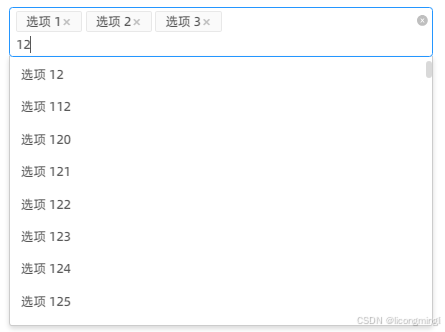
1.components中创建一个VirtualSelect.vue组件
javascript
<template>
  <div class="ant-select-wrapper" :class="{ 'is-multiple': isMultiple }">
    <v-select
      ref="select"
      class="form-item"
      :value="localValue"
      :options="options"
      :multiple="isMultiple"
      :placeholder="placeholder"
      label="label"
      track-by="value"
      :close-on-select="isMultiple ? false : true"
      :filterable="false"
      :reduce="option => option.value"
      :search-from-dropdown="isMultiple ? true : false"
      @input="handleInput"
      @on-option-selected="optionAfterSelect"
      @search-blur="handleSearchBlur"
      @search-focus="handleSearchFocus"
      @search="handleCustomSearch"
    >
      <!-- 自定义每个已选tag -->
      <template v-if="isMultiple" #selected-option-container="{ option, deselect }">
        <span class="ant-select-selection__choice" :title="option.label">
          <span class="ant-select-selection__choice__content">
            {{ option.label }}
          </span>
          <span class="ant-select-selection__choice__remove" @click.stop="deselect(option)" @mousedown.prevent>
            <i class="iconfont icon-close"></i>
          </span>
        </span>
      </template>
      <!-- ✅ 关键:自定义选中值样式(不换行、省略号、悬浮提示) -->
      <template v-else #selected-option="{ label }">
        <div class="vs_selected-value" :title="label">
          {{ label }}
        </div>
      </template>
    </v-select>
    <!-- 清除图标 (Ant Design 风格) -->
    <span v-if="allowClear && localValue.length" class="ant-select-clear" @click.stop="clearAll" title="清除">
      <a-icon type="close-circle" theme="filled" style="font-size:12px" />
    </span>
  </div>
</template>
import { RecycleScroller } from 'vue-virtual-scroller'
import VirtualOptions from './VirtualOptions.vue' // ✅ 模板组件
import DropdownOption from './DropdownOption.vue'
import { Empty } from 'ant-design-vue'

export default {
  name: 'VirtualSelect',
  inheritAttrs: false, // 确保$attrs/$props特性不会被应用到根元素上
  components: {
    // 注意:我们不直接在这里注册 VirtualOptions,因为要手动 $mount RecycleScroller,✅ 注册一下确保模板能识别(虽然这里没用到)
    RecycleScroller,
    DropdownOption
  },
  model: {
    prop: 'value',
    event: 'input'
  },
  props: {
    value: {
      type: [String, Number, Array],
      default: null
    },
    // 原始全量数据
    options: {
      type: Array,
      default: () => []
    },
    placeholder: {
      type: String,
      default: '请选择'
    },
    mode: {
      type: String,
      default: 'single', // 'single' | 'multiple'
      validator: (val) => ['single', 'multiple'].includes(val)
    },
    // 清空全选项
    allowClear: {
      type: Boolean,
      default: true
    },
    // 是否清空搜索框keyword
    clearSearchKey: {
      type: Boolean,
      default: true
    }
  },
  data() {
  return {
    simpleEmptyImage: Empty.PRESENTED_IMAGE_SIMPLE,
    searchDebounce: null,
    pointer: -1,
    localOptions: [...this.options], // 当前下拉框中显示的选项(搜索过滤后的)
    virtualListComponent: null,
    dropdownMenuEl: null,
    localValue: Array.isArray(this.value) ? [...this.value] : this.value !== null ? [this.value] : [] // 使用本地副本避免直接修改 prop
  };
},
computed: {
  isMultiple() {
    return this.mode === 'multiple'
  },
  selectedOptions() {
    return this.localValue.map(val => {
      const opt = this.options.find(o => o.value === val)
      return opt || { Value: val, label: String(val) }
    })
  }
},
watch: {
  value: {
    handler(newVal) {
      const validValues = this.options.map(opt => opt.value)
      // 如果options原始数据有被删除的,直接过滤掉 避免回显id
      this.localValue = Array.isArray(newVal) ? newVal.filter((value) => validValues.includes(value)) : []
    },
    immediate: true,
    deep: true
  }
},
methods: {
  handleCustomSearch(query) {
    clearTimeout(this.searchDebounce)
    this.searchDebounce = setTimeout(() => {
      const vs = this.$refs.select
      if (!vs) return
      // 自定义过滤
      const filtered = this.options.filter((option) => option.label.toLowerCase().includes(query.toLowerCase()))
      this.localOptions = filtered
      vs.typeAheadPointer = -1
      if (filtered.length === 0) {
        this.renderVirtualList()
      } else {
        const vs = this.$refs.select
        if (!vs || !vs.$el) return
        // 清除之前的虚拟列表内容
        const menu = vs.$el.querySelector('.vs__dropdown-menu')
        if (menu) {
          menu.innerHTML = ''
        }
        // 设置固定高度(必须 定高虚拟列表)
        const dropdownHeight = '150px'
        menu.style.height = dropdownHeight
        // 如果是空结果,渲染"暂无数据"占位符
        const noDataEl = document.createElement('div')
        noDataEl.className = 'vs__no-options'
        // 添加svg和文字
        const simpleEmptySvg = `
          <svg width="64" height="41" viewBox="0 0 64 41" xmlns="http://www.w3.org/2000/svg" style="max-width: 100%; height: auto;">
            <g transform="translate(0 1)">
              <ellipse cx="32" cy="7" fill="#f5f5f5" rx="29" ry="15"></ellipse>
              <path d="M22 11.046 20 8.954 20 20.8-2.954 20-20.825 32.846 21 10.954 12 2 8c-2.21 0-4 1.79-4 4s1.79 4 4 4zm8-2.21 0-4.1-1.38-1.12-2.5-2.5-2.5.25-2.5.25c-2.5 0-2.5 2.55-2.5 2.55 17.38 17.8 17.66 5.23 4.477 10 10 0 1.38-1.12 2.5-2.5 2.5-2.5 2.5-5 2.24-5 0-1.38-1.12-2.5-2.5-2.55 17.38 17.8 17.66 5.23 4.477 10 10 0 1.38-1.12 2.5-2.5 2.5z"></path>
            </g>
          </svg>
        `
        noDataEl.innerHTML = `
          <div class="ant-empty-normal">
            <div class="ant-empty-image">
              ${simpleEmptySvg}
            </div>
            <p class="ant-empty-description">暂无数据</p>
          </div>
        `
        menu.appendChild(noDataEl)
      }
    }, 200)
  },
  handleInput(val) {
    // 用户选择,更新本地值,触发 watch -> emit 给父组件 实现双向绑定 写watch导致卡死后就这样写吧
    this.localValue = Array.isArray(val) ? val : val !== null ? [val] : []
    this.$emit('input', val) // 现在会打印了!
    console.log('input', val)
  },
  clearAll() {
    // 清空全部选中值
    this.localValue = [] // 触发 watch -> emit
    this.$emit('input', this.localValue)
  },
  // 选中值后的回调
  blurAfterSelect() {
    // 单选:选中值后默认失焦
    if (this.isMultiple) return
    this.$nextTick(() => {
      const vsEl = this.$refs.select ? this.$refs.select.$el : undefined
      if (!vsEl) return
      const input = vsEl.querySelector('input[type="search"]')
      if (input && document.activeElement === input) {
        input.blur()
      }
    })
  },
  // 搜索后,没有选择值,失焦应该清除输入项
  handleSearchBlur() {
    const vs = this.$refs.select
    if (!vs) return
    // 如果没有pendingOption(即没有高亮/准备选中的选项)
    // 并且当前搜索词不为空,则清空它
    if (!vs.pendingOption && vs.search.length) {
      vs.search = ''
    }
  },
  // 核心:当搜索框聚焦时,挂载虚拟滚动组件
  handleSearchFocus() {
    this.$nextTick(() => {
      const vs = this.$refs.select
      if (vs) {
        // 立即清空原生下拉菜单
        const menu = vs.$el.querySelector('.vs__dropdown-menu')
        if (menu) {
          menu.innerHTML = ''
        }
        // 设置透明背景避免闪烁
        menu.style.backgroundColor = 'transparent'
        setTimeout(() => {
          this.renderVirtualList()
        }, 50)
      }
    })
  },
  renderVirtualList() {
  const vs = this.$refs.select
  if (!vs) return
  const menu = vs.$el.querySelector('.vs__dropdown-menu')
  if (!menu) return
  // 设置固定高度(必须) 定高虚拟列表
  let dropdownHeight = '300px'
  // 优化思路 避免数据项太短太长一拉空白
  if (this.localOptions.length < 3) {
    dropdownHeight = '85px'
  } else if (this.localOptions.length < 6) {
    dropdownHeight = '195px'
  }
  menu.style.height = dropdownHeight
  menu.style.maxHeight = dropdownHeight

  // 销毁旧实例
  if (this.virtualListComponent) {
    this.virtualListComponent.$destroy()
    this.virtualListComponent.$el.remove()
    this.virtualListComponent = null
  }
  // 创建新实例
  const VueConstructor = this.$vue
  const appInstance = new VueConstructor({
    render: (h) =>
      h(VirtualOptions, {
        props: {
          options: this.localOptions,
          selectedValue: this.localValue,
          pointeIndex: this.pointer,
          setPointer: (index) => {
            vs.typeAheadPointer = index
          }
        },
        on: {
          select: (option) => {
            vs.select(option)
            this.burAfterSelect()
          }
        }
      })
  }).$mount()
  this.virtualListComponent = appInstance
  menu.innerHTML = ''
  menu.appendChild(this.virtualListComponent.$el)
}
}
}
<style scoped lang="less">
.ant-select-wrapper {
  position: relative;
  display: inline-block;
  width: 100%;
}
.form-item {
  /deep/ .vs_dropdown-toggle {
    border: 1px solid #d9d9d9;
    border-radius: 4px;
    padding: 0 8px;
    transition: all 0.3s;
    min-height: 32px;
    display: flex;
    align-items: center;
    &:hover {
      border-color: #2496ff;
    }
/* 多选自定义 Ant Design 风格 Tag ✨✨✨ */
	.ant-select-selection__choice {
	  position: relative;
	  float: left;
	  max-width: 92%; // 给清空按钮留位置
	  margin-right: 4px;
	  padding: 0 10px;
	  color: rgba(0, 0, 0, 0.65);
	  background-color: #f4f4f4;
	  border: 1px solid #e8e8e8;
	  border-radius: 2px;
	  cursor: default;
	  -webkit-transition: padding 0.3s cubic-bezier(0.645, 0.045, 0.355, 1);
	  transition: padding 0.3s cubic-bezier(0.645, 0.045, 0.355, 1);
	  font-size: 14px;
	  height: 24px;
	  margin-top: 3px;
	  line-height: 22px;
	  display: flex;
	  justify-content: space-between;
	.ant-select-selection__choice__content {
	  white-space: nowrap;
	  overflow: hidden;
	  text-overflow: ellipsis;
	  display: inline-block;
	}
	.ant-select-selection__choice__remove {
	  padding: 0 2px;
	  color: #bfbfbf;
	  cursor: pointer;
	}
  }
	// 输入搜索 仅在多选时生效 换行
	.vs_search,
	  .vs_search:focus {
	    padding: 0;
	    border: none;
	    outline: none;
	    box-shadow: none;
	    font-size: 14px;
	    color: rgba(0, 0, 0, 0.65);
	    /* 搜索输入光标自动换行 */
		 align-self: flex-start; /* 靠左对齐 */
		 width: 100%; /* 占满宽度 */
		 &::placeholder {
		    color: #bfbfbf;
		    margin-left: 0px;
		  }
	  }
	// 单选选中值样式
	.ant-select-selection-selected-value {
	  flex-grow: 1;
	  display: inline-block;
	  max-width: 100%;
	  overflow: hidden;
	  white-space: nowrap;
	  margin-left: 6px;
	  color: rgba(0, 0, 0, 0.65);
	}
}
	/deep/ .vs_open_indicator {
	  fill: #bfbfbf;
	  transform: rotate(0deg);
	  transition: transform 0.2s;
	  .vs_open & {
	    transform: rotate(180deg);
	  }
	}
}
}
/* 单选多选都隐藏 vue-select 清空按钮,用了自定义 */
/deep/ .vs__clear {
  display: none;
}

/* 多选时默认下拉展开图标 */
.ant-select-wrapper.is-multiple /deep/ .vs__actions {
  opacity: 0;
}

/* 多选操作区 */
.ant-select-wrapper.is-multiple /deep/ .vs__selected-options {
  width: 100%;
  margin-left: 5px;
  flex-wrap: wrap;
}

/* 单选 */
.ant-select-wrapper:not(.is-multiple) /deep/ .vs__selected-options {
  width: 92%; /* 给下拉图标留位置 */
  flex-wrap: nowrap; /* 单选不换行 */
}

/deep/ .vs__selected {
  width: 100%;
}

// 单选选中值
.vs_selected-value {
display: inline-block;
max-width: 100%;
white-space: nowrap;
overflow: hidden;
text-overflow: ellipsis;
line-height: 1.5; /* 可选:对抗高度 */
font-size: 14px;
color: rgba(0, 0, 0, 0.65);
}

/* 清除按钮 */
.ant-select-clear {
position: absolute;
top: 8px;
right: 6px;
color: #bbb;
cursor: pointer;
font-weight: bold;
line-height: 1;
user-select: none;
opacity: 0;
&:hover {
color: #8c8c8c;
}
}

// 鼠标移入显示清除按钮
.ant-select-wrapper:hover .ant-select-clear {
opacity: 1;
cursor: pointer;
}

// 并隐藏下拉图标
.ant-select-wrapper:hover /deep/ .vs_actions {
opacity: 0;
}

/* 确保 SVG 正确显示 */
.ant-empty-image {
width: 64px;
height: 41px;
overflow: visible;
}
2.components中创建一个VirtualOptions.vue组件
这是使用虚拟列表做下拉列表
javascript
<template>
  <RecycleScroller ref="scroller" class="virtual-options custom-scrollbar" :items="options" :item-size="36"
    key-field="value" v-slot="{ item, index }">
    <DropdownOption :option="item" :selected-value="selectedValue" :pointer="pointer" :index="index"
      @set-pointer="setPointer" @select="select" />
  </RecycleScroller>
</template>

<script>
import DropdownOption from './DropdownOption.vue'
export default {
  name: 'VirtualOptions',
  components: {
    DropdownOption
  },
  props: {
    options: { type: Array, required: true },
    selectedValue: { type: [String, Number, Array], default: null },
    pointer: { type: Number, default: -1 },
    setPointer: { type: Function, required: true },
    select: { type: Function, required: true }
  }
}
</script>

<style scoped lang="less">
.virtual-options {
  height: 100%;
  width: 100%;
  overflow: auto;
}
.custom-scrollbar {
  /* 自定义下拉滚动条样式 */
  &::-webkit-scrollbar {
    width: 7px;
    height: 7px;
  }
  &::-webkit-scrollbar-thumb {
    cursor: pointer;
    border-radius: 5px;
    background: rgba(0, 0, 0, 0.15);
    transition: color 0.2s ease;
  }
  &::-webkit-scrollbar-thumb:hover {
    background: rgba(0, 0, 0, 0.3);
  }
}
</style>
3.components中创建一个DropdownOption.vue组件
这是下拉选项自定义组件
javascript
<template>
  <div class="vs_dropdown-option" :class="{
    'vs_dropdown-option--selected': isSelected,
    'vs_dropdown-option--highlighted': isHighlighted
  }" @mouseover.prevent="setHover" @click="selectOption">
    <div class="vs_option-content">
      <span class="vs_option-label" :title="option.label">{{ option.label }}</span>
      <!-- 显示勾选图标(Ant Design 风格) -->
      <span v-if="isSelected" class="vs_selected-indicator">
        <a-icon type="check" />
      </span>
    </div>
  </div>
</template>

<script>
export default {
  name: 'DropdownOption',
  props: {
    option: { type: Object, required: true },
    selectedValue: { type: [String, Number, Array], default: null },
    pointer: { type: Number, default: -1 },
    index: { type: Number, required: true },
    setPointer: { type: Function, required: true },
    select: { type: Function, required: true }
  },
  computed: {
    isSelected() {
      if (Array.isArray(this.selectedValue)) {
        return this.selectedValue.includes(this.option.value)
      }
      return this.selectedValue === this.option.value
    },
    isHighlighted() {
      return this.index === this.pointer
    }
  },
  methods: {
    selectOption() {
      this.select(this.option)
    },
    setHover() {
      this.setPointer(this.index)
    }
  }
}
</script>

<style scoped lang="less">
// 下拉选项样式
.vs_dropdown-option {
  padding: 6px 12px;
  cursor: pointer;
  white-space: nowrap;
  overflow: hidden;
  text-overflow: ellipsis;
  color: rgba(0, 0, 0, 0.65);
  font-size: 14px;
  &.vs_dropdown-option--highlight {
    background-color: #e6f7ff;
    color: #1890ff;
  }
  // 选中加租
  &.vs_dropdown-option--selected {
    background-color: #f5f5f5;
    font-weight: bold;
  }
  &:hover {
    background-color: #e6f7ff;
    color: #1890ff;
  }
}

.vs_option-content {
  display: flex;
  justify-content: space-between;
  align-items: center;
  // 自定义原label
  .vs_option-label {
    white-space: nowrap;
    overflow: hidden;
    text-overflow: ellipsis;
  }
  // 自定义勾选标记
  .vs_selected-indicator {
    color: #1890ff;
    font-weight: bold;
    margin-left: 8px;
  }
}
</style>
4.在其他文件中使用该选择框
使用很简单,常规使用传入options就行,一个注意项是需要映射label value,写在示例的注释中了
javascript
<template>
  <div class="demo-container">
    <h3>虚拟滚动选择器示例</h3>
    <virtual-select
      v-model="selectedValue"
      :options="largeOptions"
      placeholder="请选择城市"
    />
    <div class="selected-info">
      已选择: {{ selectedValue ? selectedLabel : '未选择' }}
    </div>
  </div>
</template>

<script>
import VirtualSelect from '@/components/VirtualSelect.vue';

export default {
  components: {
    VirtualSelect
  },
  data() {
    return {
      selectedValue: null,
      largeOptions: [] // 大量数据
    };
  },
  computed: {
    selectedLabel() {
      const selectedItem = this.largeOptions.find(
        item => item.value === this.selectedValue
      );
      return selectedItem ? selectedItem.label : '';
    }
  },
  created() {
    // 生成10000条模拟数据
    this.largeOptions = Array.from({ length: 10000 }, (_, i) => ({
    // 注意这里 不管你的真实数据是什么格式,都要求映射为value 和label  value是值 label用于支持搜索
      value: i + 1,
      label: `城市 ${i + 1}`
    }));
  },
};
</script>

<style scoped>
.demo-container {
  padding: 20px;
}

.selected-info {
  margin-top: 20px;
  color: #666;
}
</style>