使用Python进行PDF隐私信息检测
随着个人信息安全越来越受重视,检测PDF文件中的隐私信息(如身份证号、手机号、邮箱等)变得尤为重要。以下是如何使用Python进行PDF隐私信息检测的具体内容。
需要最终运行版软件的可以留言邮箱。
1. 安装必要库
pip install pdfplumber PyPDF2 regex2.提取PDF文本内容
import pdfplumber

def extract_text_from_pdf(file_path):
    """从PDF文件中提取文本内容"""
    text = ""
    with pdfplumber.open(file_path) as pdf:
        for page in pdf.pages:
            text += page.extract_text() + "\n"
    return text

# 使用示例
pdf_file_path = "example.pdf"
text = extract_text_from_pdf(pdf_file_path)
print(text)
3.检测隐私信息
import re

def detect_sensitive_info(text):
    """检测文本中的隐私信息"""
    # 定义常见隐私信息的正则表达式模式
    patterns = {
        "身份证号": r"([1-9]\d{5}(18|19|20)\d{2}(0[1-9]|1[0-2])(0[1-9]|[12]\d|3[01])\d{3}([0-9]|X|x))",
        "手机号": r"1[3-9]\d{9}",
        "邮箱": r"[a-zA-Z0-9_.+-]+@[a-zA-Z0-9-]+\.[a-zA-Z0-9-.]+",
        "姓名": r"([A-Za-z]{2,10})\s+([A-Za-z]{2,10})"  # 简单姓名匹配
    }

    results = {}

    for info_type, pattern in patterns.items():
        matches = re.findall(pattern, text)
        if matches:
            results[info_type] = matches

    return results

# 使用示例
sensitive_info = detect_sensitive_info(text)
for info_type, matches in sensitive_info.items():
    print(f"检测到{info_type}:{matches}")
4.完整GUI应用示例
GUI版本需要安装wxPython,执行pip install wxPython完成安装。如已安装请忽略。
import wx
import pdfplumber
import re

class PDFPrivacyChecker(wx.Frame):
    def __init__(self):
        super().__init__(None, title="PDF个人隐私检查", size=(600, 400))

        panel = wx.Panel(self)
        vbox = wx.BoxSizer(wx.VERTICAL)

        # 选择文件按钮
        self.btn_select = wx.Button(panel, label="选择PDF文件")
        self.btn_select.Bind(wx.EVT_BUTTON, self.on_select_file)
        vbox.Add(self.btn_select, 0, wx.ALL | wx.CENTER, 5)

        # 结果显示区域
        self.result_text = wx.TextCtrl(panel, style=wx.TE_READONLY | wx.TE_MULTILINE)
        vbox.Add(self.result_text, 1, wx.EXPAND | wx.ALL, 5)

        # 布局
        panel.SetSizer(vbox)
        self.Centre()
        self.Show()

    def on_select_file(self, event):
        with wx.FileDialog(self, "选择PDF文件", wildcard="PDF files (*.pdf)|*.pdf",
                          style=wx.FD_OPEN | wx.FD_FILE_MUST_EXIST) as fileDialog:
            if fileDialog.ShowModal() == wx.ID_CANCEL:
                return

            file_path = fileDialog.GetPath()
            text = self.extract_text_from_pdf(file_path)
            results = self.detect_sensitive_info(text)

            if results:
                self.result_text.SetValue("检测到以下隐私信息:\n")
                for info_type, matches in results.items():
                    self.result_text.AppendText(f"{info_type}: {matches}\n")
            else:
                self.result_text.SetValue("未检测到隐私信息")

    def extract_text_from_pdf(self, file_path):
        """从PDF文件中提取文本内容"""
        text = ""
        with pdfplumber.open(file_path) as pdf:
            for page in pdf.pages:
                text += page.extract_text() + "\n"
        return text

    def detect_sensitive_info(self, text):
        """检测文本中的隐私信息"""
        patterns = {
            "身份证号": r"([1-9]\d{5}(18|19|20)\d{2}(0[1-9]|1[0-2])(0[1-9]|[12]\d|3[01])\d{3}([0-9]|X|x))",
            "手机号": r"1[3-9]\d{9}",
            "邮箱": r"[a-zA-Z0-9_.+-]+@[a-zA-Z0-9-]+\.[a-zA-Z0-9-.]+"
        }

        results = {}

        for info_type, pattern in patterns.items():
            matches = re.findall(pattern, text)
            if matches:
                results[info_type] = matches

        return results

if __name__ == "__main__":
    app = wx.App(False)
    frame = PDFPrivacyChecker()
    app.MainLoop()
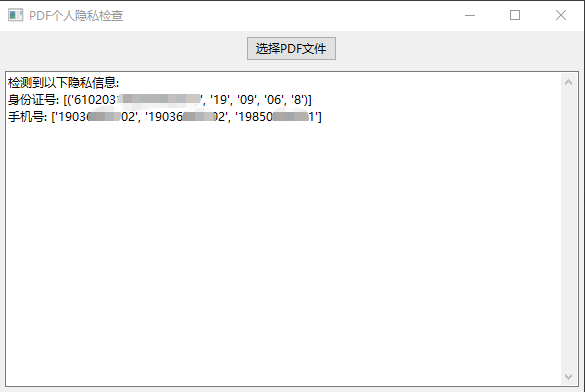
5.执行结果示例如下