目录
-
-
-
- [OpenCL 开发流程](#OpenCL 开发流程)
- 参考实例
-
-
OpenCL 开发流程
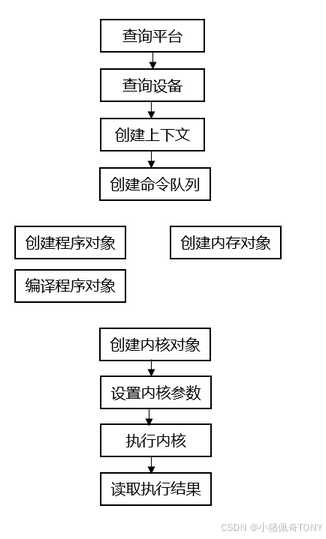
OpenCL 编程的标准开发流程如下:
- 查询平台(
platform)和设备(device),选择需要的计算设备 - 创建上下文(
context) - 创建命令队列(
command queue) - 创建和编译程序对象(
program) - 创建内核对象,设置内核参数(
kernel Arg) - 执行内核
- 数据拷贝回主机端
基本流程如下所示:
参考实例
c
static const int ARRAY_SIZE = 100;

static const char *kernel_function_vec_add =
		"__kernel void vector_add(global const float *a, global const float *b, global float *result)"
		"{                                                                                           "
		"int gid = get_global_id(0);                                                                 "
		"result[gid] = a[gid] + b[gid];                                                              "
		"}                                                                                           ";

int demoVectorAddOptimizeImpl(int argc, char* argv[]) {
	cl_int errNum;

	/*prepare input data*/
	float result[ARRAY_SIZE];
	float a[ARRAY_SIZE];
	float b[ARRAY_SIZE];

	for (int i = 0; i < ARRAY_SIZE; i++) {
		a[i] = (float)i + 0.123;
		b[i] = (float)(i * 2) + 0.345;
	}

	cl_uint numPlatforms;
	cl_platform_id firstPlatformId;
	cl_context context;
	cl_device_id device_id;
	errNum = clGetPlatformIDs(1, &firstPlatformId, &numPlatforms);
	if (errNum != CL_SUCCESS || numPlatforms <= 0) {
		printf("Failed to find any OpenCL platforms.");
		return EXIT_FAILURE;
	}

	errNum = clGetDeviceIDs(firstPlatformId, CL_DEVICE_TYPE_GPU, 1, &device_id, NULL);
	if (errNum != CL_SUCCESS) {
		printf("There is no GPU, trying CPU... \n");
		errNum = clGetDeviceIDs(firstPlatformId, CL_DEVICE_TYPE_CPU, 1, &device_id, NULL);
		if (errNum != CL_SUCCESS) {
			printf("There is NO GPU or CPU \n");
			return EXIT_FAILURE;
		}
	}

	context = clCreateContext(NULL, 1, &device_id, NULL, NULL, &errNum);
	if (errNum != CL_SUCCESS) {
		printf("create context error\n");
		return NULL;
	}

	cl_command_queue commandQueue = clCreateCommandQueueWithProperties(context, device_id, 0, NULL);
	if (commandQueue == NULL) {
		printf("Failed to create commandQueue for device 0 \n");
		return EXIT_FAILURE;
	}

	cl_program program;
	program = clCreateProgramWithSource(context, 1, &kernel_function_vec_add, NULL, NULL);
	if (program == NULL) {
		printf("Failed to create CL program from source. \n");
		return EXIT_FAILURE;
	}

	errNum = clBuildProgram(program, 0, NULL, NULL, NULL, NULL);
	if (errNum != CL_SUCCESS) {
		char buildLog[16384];
		clGetProgramBuildInfo(program, device_id, CL_PROGRAM_BUILD_LOG, sizeof(buildLog), buildLog, NULL);
		printf("Error in kernel:%s \n", buildLog);
		clReleaseProgram(program);
		return NULL;
	}

	cl_kernel kernel;
	kernel = clCreateKernel(program, "vector_add", NULL);
	if (kernel == NULL) {
		printf("Failed to create kernel \n");
		return EXIT_FAILURE;
	}

	cl_mem input_mem0 = clCreateBuffer(context, CL_MEM_READ_ONLY | CL_MEM_COPY_HOST_PTR, sizeof(float)*ARRAY_SIZE, a, NULL);
	cl_mem input_mem1 = clCreateBuffer(context, CL_MEM_READ_ONLY | CL_MEM_COPY_HOST_PTR, sizeof(float)*ARRAY_SIZE, b, NULL);
	cl_mem output_mem = clCreateBuffer(context, CL_MEM_READ_WRITE, sizeof(float)*ARRAY_SIZE, NULL, NULL);
	if (input_mem0 == NULL || input_mem1 == NULL || output_mem == NULL) {
		printf("Error creating memory objects. \n");
		return EXIT_FAILURE;
	}

	errNum = clSetKernelArg(kernel, 0, sizeof(cl_mem), &input_mem0);
	errNum |= clSetKernelArg(kernel, 1, sizeof(cl_mem), &input_mem1);
	errNum |= clSetKernelArg(kernel, 2, sizeof(cl_mem), &output_mem);
	if (errNum != CL_SUCCESS) {
		printf("Error setting kernel arguments.\n");
		return EXIT_FAILURE;
	}

	size_t globalWorkSize[1] = { ARRAY_SIZE };
	size_t localWorkSize[1] = { 1 };
	//执行内核
	errNum = clEnqueueNDRangeKernel(commandQueue, kernel, 1, NULL, globalWorkSize, localWorkSize, 0, NULL, NULL);
	if (errNum != CL_SUCCESS) {
		printf("Error queuing kernel for execution. \n");

		return EXIT_FAILURE;
	}

	errNum = clEnqueueReadBuffer(commandQueue, output_mem, CL_TRUE, 0, ARRAY_SIZE * sizeof(float), result, 0, NULL, NULL);
	if (errNum != CL_SUCCESS) {
		printf("Error reading result buffer. \n");

		return EXIT_FAILURE;
	}

	for (int i = 0; i < ARRAY_SIZE; i++) {
		printf("a[%d]=%f b[%d]=%f result[%d]=%f\n", i, a[i], i, b[i], i, result[i]);
	}
	printf("Executed program succesfully. \n");

cleanup:
	if (input_mem0)
		clReleaseMemObject(input_mem0);
	if (input_mem1)
		clReleaseMemObject(input_mem1);
	if (output_mem)
		clReleaseMemObject(output_mem);
	if (commandQueue)
		clReleaseCommandQueue(commandQueue);
	if (kernel)
		clReleaseKernel(kernel);
	if (program)
		clReleaseProgram(program);
	if (context)
		clReleaseContext(context);

	return 0;
}