flowable常用表梳理:
sql
-- 流程部署时 比如模型key 为tiaojian  ,repositoryService.createDeployment().addClasspathResource("tiaojian.bpmn20.xml").deploy();
select * from ACT_RE_DEPLOYMENT;
select * from ACT_GE_BYTEARRAY; # 两条 BPMN XML 文件(NAME_ = tiaojian.bpmn20.xml) 流程图 PNG(如果有,NAME_ = tiaojian.png) 关联 DEPLOYMENT_ID_
select * from ACT_RE_PROCDEF; # 解析 BPMN 后生成流程定义 ID_ = tiaojian:1:xxx, KEY_ = tiaojian, VERSION_ = 1, DEPLOYMENT_ID_

# 流程启动时 运行时表(Runtime Tables),runtimeService.startProcessInstanceByKey("tiaojian", "BK-001", variables);
select * from ACT_RU_EXECUTION; # *N 创建执行流(Execution)- 主流程实例(PARENT_ID_ = null)- 每个并行分支/子流程也会创建子 Execution  ACT_HI_PROCINST;#(历史流程实例表)
select * from ACT_RU_VARIABLE;  # *M 存储传入的流程变量(如 t1=true, test=false)按类型存入 TEXT_, LONG_, DOUBLE_ 等字段

#流程运行时
select * from ACT_RU_TASK; # 如果流程启动后立即进入用户任务(如你的 H01),则创建任务记录 字段:ASSIGNEE_ 或 CANDIDATE_GROUP_ ; ACT_HI_ACTINST(历史活动实例表)新增一条

# 网关相关
select * from ACT_RU_EXECUTION	; # 认领任务  ACT_HI_TASKINST(历史任务实例表)+1

select * from ACT_RU_IDENTITYLINK; # 运行时关联表(处理"候选任务"和"监听器")
select * from ACT_RU_JOB  # 作业与定时器(异步、超时、边界事件)

#历史表(History Tables) ------ 即使结束也保留
select * from ACT_HI_PROCINST; #创建历史流程实例记录START_TIME_ 被设置,END_TIME_ = null
select * from ACT_HI_ACTINST; #记录"开始事件"或首个活动的开始ACT_TYPE_ = startEvent
select * from ACT_HI_VARINST; #历史变量快照(与 ACT_RU_VARIABLE 内容一致)
select * from ACT_HI_TASKINST; # 如果启动后立即有任务,则创建历史任务(END_TIME_ = null)

# 阶段三:流程结束(正常完成或终止),历史表(History Tables) ------ 数据被更新/补全
select * from ACT_RU_EXECUTION; #	DELETE	删除该流程实例所有 Execution
select * from ACT_RU_VARIABLE;	#DELETE	删除所有流程变量
select * from ACT_RU_TASK;	#DELETE	删除所有未完成的任务(如果强制终止)
select * from ACT_HI_PROCINST;	#UPDATE	设置 END_TIME_ = now(), DURATION_ = 毫秒数, DELETE_REASON_ = completed/terminated
select * from ACT_HI_ACTINST;	#INSERT	插入"结束事件"记录(ACT_TYPE_ = endEvent)
select * from ACT_HI_TASKINST;	#UPDATE(对已完成任务)	设置 END_TIME_, DURATION_未完成任务:DELETE_REASON_ = terminated
select * from ACT_HI_DETAIL; #(可选)	INSERT	如果启用了详细历史,会记录变量变更轨迹

-- 所有用户
SELECT * FROM ACT_ID_USER;
-- 所有组(角色)
SELECT * FROM ACT_ID_GROUP;
-- 用户-组关系
SELECT * FROM ACT_ID_MEMBERSHIP;

select * from ACT_ADM_DATABASECHANGELOG	;
flowable 测试清表脚本
sql
-- ==============================================
-- Flowable 6.8 清理脚本(按外键依赖顺序,MySQL版)
-- 执行前:1. 停止Flowable引擎  2. 备份数据库  3. 确认已禁用外键检查(可选,避免删表时校验)
-- ==============================================

-- 第一步:禁用外键约束(可选,但建议开启,避免删除时因外键报错)
SET FOREIGN_KEY_CHECKS = 0;

-- ==============================================
-- 阶段1:清理历史表(先删子表,再删主表)
-- ==============================================
-- 1.1 历史子表(依赖 ACT_HI_PROCINST)
TRUNCATE TABLE ACT_HI_DETAIL;          -- 历史变量明细(依赖 ACT_HI_VARINST/ACT_HI_PROCINST)
TRUNCATE TABLE ACT_HI_COMMENT;         -- 历史评论(依赖 ACT_HI_PROCINST/ACT_HI_TASKINST)
TRUNCATE TABLE ACT_HI_ATTACHMENT;      -- 历史附件(依赖 ACT_HI_PROCINST/ACT_HI_TASKINST)
TRUNCATE TABLE ACT_HI_IDENTITYLINK;    -- 历史身份关联(依赖 ACT_HI_PROCINST/ACT_HI_TASKINST)
#TRUNCATE TABLE ACT_HI_JOB_LOG;         -- 历史任务日志(依赖 ACT_HI_PROCINST)
#TRUNCATE TABLE ACT_HI_OP_LOG;          -- 历史操作日志(依赖 ACT_HI_PROCINST)
TRUNCATE TABLE ACT_HI_VARINST;         -- 历史变量(依赖 ACT_HI_PROCINST)
TRUNCATE TABLE ACT_HI_TASKINST;        -- 历史任务(依赖 ACT_HI_PROCINST)
TRUNCATE TABLE ACT_HI_ACTINST;         -- 历史活动实例(依赖 ACT_HI_PROCINST)

-- 1.2 历史主表(无外键依赖其他历史表)
TRUNCATE TABLE ACT_HI_PROCINST;        -- 历史流程实例(历史表主表)

-- ==============================================
-- 阶段2:清理运行时表(先删子表,再删主表)
-- ==============================================
-- 2.1 运行时子表(依赖 ACT_RU_EXECUTION)
TRUNCATE TABLE ACT_RU_IDENTITYLINK;    -- 运行时身份关联(依赖 ACT_RU_TASK/ACT_RU_EXECUTION)
TRUNCATE TABLE ACT_RU_VARIABLE;        -- 运行时变量(依赖 ACT_RU_EXECUTION)
TRUNCATE TABLE ACT_RU_TASK;            -- 运行时任务(依赖 ACT_RU_EXECUTION)
#TRUNCATE TABLE ACT_RU_INCIDENT;        -- 运行时异常(依赖 ACT_RU_EXECUTION)
TRUNCATE TABLE ACT_RU_EVENT_SUBSCR;    -- 运行时事件订阅(依赖 ACT_RU_EXECUTION)
TRUNCATE TABLE ACT_RU_ENTITYLINK;      -- 运行时实体关联(依赖 ACT_RU_EXECUTION)
TRUNCATE TABLE ACT_RU_DEADLETTER_JOB;  -- 死信任务(依赖 ACT_RU_EXECUTION)
TRUNCATE TABLE ACT_RU_SUSPENDED_JOB;   -- 暂停任务(依赖 ACT_RU_EXECUTION)
TRUNCATE TABLE ACT_RU_TIMER_JOB;       -- 定时器任务(依赖 ACT_RU_EXECUTION)
TRUNCATE TABLE ACT_RU_JOB;             -- 运行时任务(依赖 ACT_RU_EXECUTION)
#TRUNCATE TABLE ACT_RU_METER_LOG;       -- 运行时计量日志(依赖 ACT_RU_EXECUTION)

-- 2.2 运行时主表(无外键依赖其他运行时表)
TRUNCATE TABLE ACT_RU_EXECUTION;       -- 运行时执行实例(运行时表主表)

-- ==============================================
-- 阶段3:清理通用表/日志表(无严格外键依赖)
-- ==============================================
-- 3.1 通用二进制表:仅删除非部署相关数据(保留BPMN/流程图片)
#DELETE FROM ACT_GE_BYTEARRAY
#WHERE DEPLOYMENT_ID_ IS NULL          -- 无部署ID的临时数据
#   OR TYPE_ NOT IN ('bpmn20.xml', 'resource'); -- 仅保留流程部署文件

-- 3.2 事件日志表(无外键依赖)
TRUNCATE TABLE ACT_EVT_LOG;

-- ==============================================
-- 阶段4:恢复外键约束 + 重置自增ID(可选)
-- ==============================================
-- 4.1 恢复外键约束
SET FOREIGN_KEY_CHECKS = 1;

-- 4.2 重置自增ID(可选,避免ID断层,测试环境推荐)
ALTER TABLE ACT_RU_EXECUTION AUTO_INCREMENT = 1;
ALTER TABLE ACT_RU_TASK AUTO_INCREMENT = 1;
ALTER TABLE ACT_HI_PROCINST AUTO_INCREMENT = 1;
ALTER TABLE ACT_HI_TASKINST AUTO_INCREMENT = 1;
ALTER TABLE ACT_GE_BYTEARRAY AUTO_INCREMENT = 1;

-- 执行完成后重启Flowable引擎
1.首先看pom依赖
XML
<?xml version="1.0" encoding="UTF-8"?>
<project xmlns="http://maven.apache.org/POM/4.0.0" xmlns:xsi="http://www.w3.org/2001/XMLSchema-instance"
         xsi:schemaLocation="http://maven.apache.org/POM/4.0.0 https://maven.apache.org/xsd/maven-4.0.0.xsd">
    <modelVersion>4.0.0</modelVersion>
    <parent>
        <groupId>org.springframework.boot</groupId>
        <artifactId>spring-boot-starter-parent</artifactId>
        <version>2.7.18</version>
        <relativePath/>
    </parent>
    <groupId>org.ai</groupId>
    <artifactId>flowable-test</artifactId>
    <version>0.0.1-SNAPSHOT</version>
    <name>flowable-test</name>
    <description>flowable-test</description>


    <properties>
        <java.version>1.8</java.version>
        <flowable.version>6.8.0</flowable.version>
    </properties>
    <dependencies>
        <!-- Spring Boot Web 核心 -->
        <dependency>
            <groupId>org.springframework.boot</groupId>
            <artifactId>spring-boot-starter-web</artifactId>
        </dependency>

        <dependency>
            <groupId>org.springframework.boot</groupId>
            <artifactId>spring-boot-starter-validation</artifactId>
        </dependency>

        <!-- Flowable 核心 + Spring Boot 集成 -->
        <dependency>
            <groupId>org.flowable</groupId>
            <artifactId>flowable-spring-boot-starter</artifactId>
            <version>${flowable.version}</version>
            <exclusions>
                <exclusion>
                    <groupId>org.springframework.boot</groupId>
                    <artifactId>spring-boot-starter-logging</artifactId>
                </exclusion>
            </exclusions>
        </dependency>

        <!-- 补充 Flowable Engine 依赖(解决 Task 类找不到的问题) -->
        <dependency>
            <groupId>org.flowable</groupId>
            <artifactId>flowable-engine</artifactId>
            <version>6.8.0</version>
        </dependency>

        <!-- MySQL 驱动 -->
        <dependency>
            <groupId>mysql</groupId>
            <artifactId>mysql-connector-java</artifactId>
            <version>8.0.33</version>
            <scope>runtime</scope>
        </dependency>

        <!-- 连接池(Spring Boot 2.7 默认 HikariCP) -->
        <dependency>
            <groupId>com.zaxxer</groupId>
            <artifactId>HikariCP</artifactId>
        </dependency>

        <!-- Lombok(简化代码,可选) -->
        <dependency>
            <groupId>org.projectlombok</groupId>
            <artifactId>lombok</artifactId>
            <optional>true</optional>
        </dependency>

        <dependency>
            <groupId>cn.hutool</groupId>
            <artifactId>hutool-all</artifactId>
            <version>5.8.22</version>
        </dependency>

        <dependency>
            <groupId>org.springframework.boot</groupId>
            <artifactId>spring-boot-starter-test</artifactId>
            <scope>test</scope>
        </dependency>
    </dependencies>

    <build>
        <plugins>
            <plugin>
                <groupId>org.springframework.boot</groupId>
                <artifactId>spring-boot-maven-plugin</artifactId>
            </plugin>
        </plugins>
    </build>

</project>
2.flowable ui 6.8 加 jetty 9.4.58(也可用tomcat来代替 ui的启动容器)
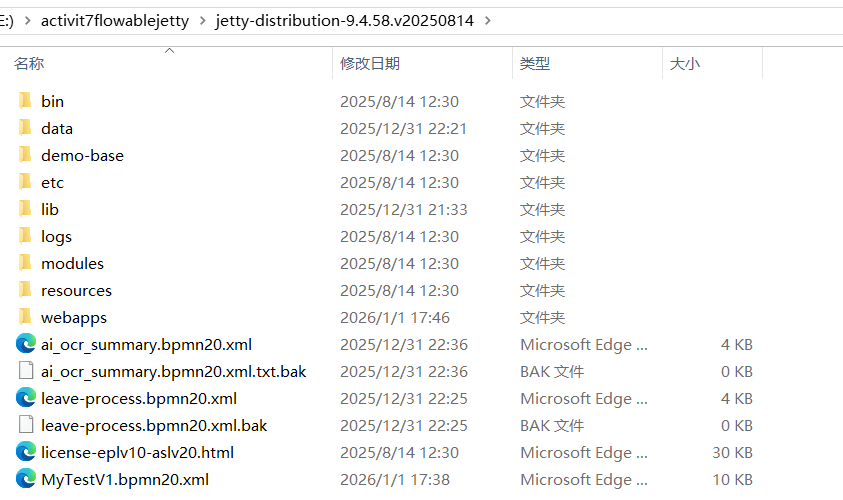
修改ui的配置文件,指向我们的数据库,主要修改点:
bash
# 数据库配置(与 Activiti Core 共用)
spring.datasource.url=jdbc:mysql://localhost:3306/flowable?useUnicode=true&characterEncoding=utf8&useSSL=false&serverTimezone=Asia/Shanghai&allowPublicKeyRetrieval=true&nullCatalogMeansCurrent=true
spring.datasource.username=root
spring.datasource.password=root
spring.datasource.driver-class-name=com.mysql.cj.jdbc.Driver
# 关闭 Flowable 引擎(用 Activiti Core)
flowable.engine.enabled=false
# Jetty 适配:禁用 Tomcat 特定配置
server.container-type=jetty
完整配置文件如下:
bash
server.port=8080
server.servlet.context-path=/flowable-ui
spring.jmx.unique-names=true
# This is needed to force use of JDK proxies instead of using CGLIB
spring.aop.proxy-target-class=false
spring.aop.auto=false
spring.application.name=flowable-ui
spring.banner.location=classpath:/org/flowable/spring/boot/flowable-banner.txt
# The default domain for generating ObjectNames must be specified. Otherwise when multiple Spring Boot applications start in the same servlet container
# all would be created with the same name (com.zaxxer.hikari:name=dataSource,type=HikariDataSource) for example
spring.jmx.default-domain=${spring.application.name}
#
# SECURITY
#
spring.security.filter.dispatcher-types=REQUEST,FORWARD,ASYNC

# Expose all actuator endpoints to the web
# They are exposed, but only authenticated users can see /info and /health abd users with access-admin can see the others
management.endpoints.web.exposure.include=*
# Full health details should only be displayed when a user is authorized
management.endpoint.health.show-details=when_authorized
# Only users with role access-admin can access full health details
management.endpoint.health.roles=access-admin
# Spring prefixes the roles with ROLE_. However, Flowable does not have that concept yet, so we need to override that with an empty string
flowable.common.app.role-prefix=

#
# SECURITY OAuth2
# Examples are for Keycloak
#
#spring.security.oauth2.resourceserver.jwt.issuer-uri=<keycloakLocation>/auth/realms/<realmName>
#spring.security.oauth2.client.registration.keycloak.client-id=<clientId>
#spring.security.oauth2.client.registration.keycloak.client-secret=<clientSecret>
#spring.security.oauth2.client.registration.keycloak.client-name=Flowable UI Keycloak
#spring.security.oauth2.client.registration.keycloak.authorization-grant-type=authorization_code
#spring.security.oauth2.client.provider.keycloak.issuer-uri=<keycloakLocation>/auth/realms/<realmName>
#spring.security.oauth2.client.provider.keycloak.user-name-attribute=preferred_username

#flowable.common.app.security.type=oauth2
#flowable.common.app.security.oauth2.authorities-attribute=groups
#flowable.common.app.security.oauth2.groups-attribute=userGroups
#flowable.common.app.security.oauth2.default-authorities=access-task
#flowable.common.app.security.oauth2.default-groups=flowableUser
#flowable.common.app.security.oauth2.full-name-attribute=name
#flowable.common.app.security.oauth2.email-attribute=email

#
# DATABASE
#

#spring.datasource.driver-class-name=org.h2.Driver
#spring.datasource.url=jdbc:h2:~/flowable-db/engine-db;AUTO_SERVER=TRUE;AUTO_SERVER_PORT=9093;DB_CLOSE_DELAY=-1

#spring.datasource.driver-class-name=com.mysql.jdbc.Driver
#spring.datasource.url=jdbc:mysql://127.0.0.1:3306/flowable?characterEncoding=UTF-8

#spring.datasource.driver-class-name=org.postgresql.Driver
#spring.datasource.url=jdbc:postgresql://localhost:5432/flowable

#spring.datasource.driver-class-name=com.microsoft.sqlserver.jdbc.SQLServerDriver
#spring.datasource.url=jdbc:sqlserver://localhost:1433;databaseName=flowablea

#spring.datasource.driver-class-name=oracle.jdbc.driver.OracleDriver
#spring.datasource.url=jdbc:oracle:thin:@localhost:1521:FLOWABLE

#spring.datasource.driver-class-name=com.ibm.db2.jcc.DB2Driver
#spring.datasource.url=jdbc:db2://localhost:50000/flowable

#spring.datasource.username=flowable
#spring.datasource.password=flowable

# 数据库配置(与 Activiti Core 共用)
spring.datasource.url=jdbc:mysql://localhost:3306/flowable?useUnicode=true&characterEncoding=utf8&useSSL=false&serverTimezone=Asia/Shanghai&allowPublicKeyRetrieval=true&nullCatalogMeansCurrent=true
spring.datasource.username=root
spring.datasource.password=root
spring.datasource.driver-class-name=com.mysql.cj.jdbc.Driver
# 关闭 Flowable 引擎(用 Activiti Core)
flowable.engine.enabled=false
# Jetty 适配:禁用 Tomcat 特定配置
server.container-type=jetty

# JNDI CONFIG

# If uncommented, the datasource will be looked up using the configured JNDI name.
# This will have preference over any datasource configuration done below that doesn't use JNDI
#
# Eg for JBoss: java:jboss/datasources/flowableDS
#
#spring.datasource.jndi-name==jdbc/flowableDS

# Set whether the lookup occurs in a J2EE container, i.e. if the prefix "java:comp/env/" needs to be added if the JNDI
# name doesn't already contain it. Default is "true".
#datasource.jndi.resourceRef=true

#
# Connection pool (see https://github.com/brettwooldridge/HikariCP#configuration-knobs-baby)
#

spring.datasource.hikari.poolName=${spring.application.name}
# 10 minutes
spring.datasource.hikari.maxLifetime=600000
# 5 minutes
spring.datasource.hikari.idleTimeout=300000
spring.datasource.hikari.minimumIdle=10
spring.datasource.hikari.maximumPoolSize=50
# test query for H2, MySQL, PostgreSQL and Microsoft SQL Server
#spring.datasource.hikari.connection-test-query=select 1
# test query for Oracle
#spring.datasource.hikari.connection-test-query=SELECT 1 FROM DUAL
# test query for DB2
#spring.datasource.hikari.connection-test-query=SELECT current date FROM sysibm.sysdummy1

#
# Default Task Executor (will be used for @Async)
#
spring.task.execution.pool.core-size=2
spring.task.execution.pool.max-size=50
spring.task.execution.pool.queue-capacity=10000
spring.task.execution.thread-name-prefix=flowable-ui-task-Executor-

#
# Task scheduling
#
spring.task.scheduling.pool.size=5

#
# EMAIL
#

#flowable.mail.server.host=localhost
#flowable.mail.server.port=1025
#flowable.mail.server.username=
#flowable.mail.server.password=

#
# FLOWABLE
#

flowable.process.definition-cache-limit=512
#flowable.dmn.strict-mode=false
flowable.process.async.executor.default-async-job-acquire-wait-time=PT5S
flowable.process.async.executor.default-timer-job-acquire-wait-time=PT5S

flowable.cmmn.async.executor.default-async-job-acquire-wait-time=PT5S
flowable.cmmn.async.executor.default-timer-job-acquire-wait-time=PT5S

# The maximum file upload limit. Set to -1 to set to 'no limit'. Expressed in bytes
spring.servlet.multipart.max-file-size=10MB
# The maximum request size limit. Set to -1 to set to 'no limit'.
# When multiple files can be uploaded this needs to be more than the 'max-file-size'.
spring.servlet.multipart.max-request-size=10MB

# For development purposes, data folder is created inside the sources ./data folder
flowable.content.storage.root-folder=data/
flowable.content.storage.create-root=true

flowable.common.app.idm-admin.user=admin
flowable.common.app.idm-admin.password=test

flowable.experimental.debugger.enabled=false

# Rest API in task application

# If false, disables the rest api in the task app
flowable.task.app.rest-enabled=true

# Configures the way user credentials are verified when doing a REST API call:
# 'any-user' : the user needs to exist and the password need to match. Any user is allowed to do the call (this is the pre 6.3.0 behavior)
# 'verify-privilege' : the user needs to exist, the password needs to match and the user needs to have the 'rest-api' privilege
# If nothing set, defaults to 'verify-privilege'
flowable.rest.app.authentication-mode=verify-privilege

# Enable form field validation after form submission on the engine side
flowable.form-field-validation-enabled=false

# Flowable Admin Properties

# Passwords for rest endpoints and master configs are stored encrypted in the database using AES/CBC/PKCS5PADDING
# It needs a 128-bit initialization vector (http://en.wikipedia.org/wiki/Initialization_vector)
# and a 128-bit secret key represented as 16 ascii characters below
#
# Do note that if these properties are changed after passwords have been saved, all existing passwords
# will not be able to be decrypted and the password would need to be reset in the UI.
flowable.admin.app.security.encryption.credentials-i-v-spec=j8kdO2hejA9lKmm6
flowable.admin.app.security.encryption.credentials-secret-spec=9FGl73ngxcOoJvmL
#flowable.admin.app.security.preemptive-basic-authentication=true

# Flowable IDM Properties

#
# LDAP
#
#flowable.idm.ldap.enabled=true
#flowable.idm.ldap.server=ldap://localhost
#flowable.idm.ldap.port=10389
#flowable.idm.ldap.user=uid=admin, ou=system
#flowable.idm.ldap.password=secret
#flowable.idm.ldap.base-dn=o=flowable
#flowable.idm.ldap.query.user-by-id=(&(objectClass=inetOrgPerson)(uid={0}))
#flowable.idm.ldap.query.user-by-full-name-like=(&(objectClass=inetOrgPerson)(|({0}=*{1}*)({2}=*{3}*)))
#flowable.idm.ldap.query.all-users=(objectClass=inetOrgPerson)
#flowable.idm.ldap.query.groups-for-user=(&(objectClass=groupOfUniqueNames)(uniqueMember={0}))
#flowable.idm.ldap.query.all-groups=(objectClass=groupOfUniqueNames)
#flowable.idm.ldap.query.group-by-id=(&(objectClass=groupOfUniqueNames)(uniqueId={0}))
#flowable.idm.ldap.attribute.user-id=uid
#flowable.idm.ldap.attribute.first-name=cn
#flowable.idm.ldap.attribute.last-name=sn
#flowable.idm.ldap.attribute.email=mail
#flowable.idm.ldap.attribute.group-id=cn
#flowable.idm.ldap.attribute.group-name=cn
#flowable.idm.ldap.cache.group-size=10000
#flowable.idm.ldap.cache.group-expiration=180000

#
# Keycloak
#
#flowable.idm.app.keycloak.enabled=true
#flowable.idm.app.keycloak.server=<keycloakLocation>
#flowable.idm.app.keycloak.authentication-realm=master
#flowable.idm.app.keycloak.authentication-user=admin
#flowable.idm.app.keycloak.authentication-password=admin
#flowable.idm.app.keycloak.realm=<realm>

#
# DEFAULT ADMINISTRATOR ACCOUNT
#

flowable.idm.app.admin.user-id=admin
flowable.idm.app.admin.password=test
flowable.idm.app.admin.first-name=Test
flowable.idm.app.admin.last-name=Administrator
flowable.idm.app.admin.email=test-admin@example-domain.tld

# Enable and configure JMS
#flowable.task.app.jms-enabled=true
#spring.activemq.broker-url=tcp://localhost:61616

# Enable and configure RabbitMQ
#flowable.task.app.rabbit-enabled=true
#spring.rabbitmq.addresses=localhost:5672
#spring.rabbitmq.username=guest
#spring.rabbitmq.password=guest

# Enable and configure Kafka
#flowable.task.app.kafka-enabled=true
#spring.kafka.bootstrap-servers=localhost:9092
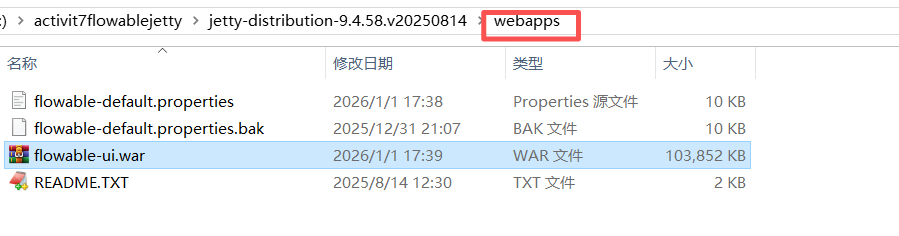
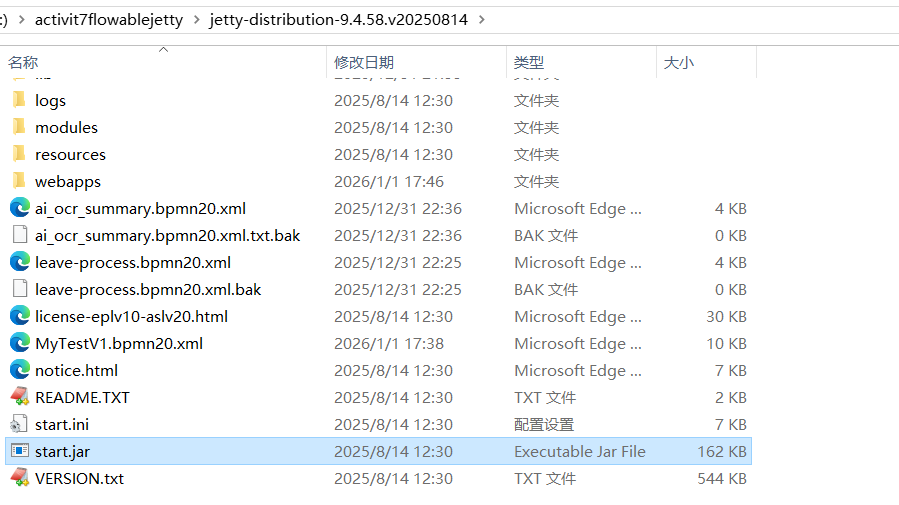
然后将jar放到webapps下,然后再jetty根目录执行java -jar start.jar就可以启动了。
我们举一个开发流程的例子:
启动一个项目--》后端开发--》提交给测试人员1,或者测试人员2(这里用排他网关,如果通过则流程结束,如果测试不通过则回退给开发,但是回退流程不能超过3次)--》流程结束
这是bpmn文件:
XML
<?xml version="1.0" encoding="UTF-8"?>
<definitions xmlns="http://www.omg.org/spec/BPMN/20100524/MODEL" xmlns:xsi="http://www.w3.org/2001/XMLSchema-instance" xmlns:xsd="http://www.w3.org/2001/XMLSchema" xmlns:flowable="http://flowable.org/bpmn" xmlns:bpmndi="http://www.omg.org/spec/BPMN/20100524/DI" xmlns:omgdc="http://www.omg.org/spec/DD/20100524/DC" xmlns:omgdi="http://www.omg.org/spec/DD/20100524/DI" typeLanguage="http://www.w3.org/2001/XMLSchema" expressionLanguage="http://www.w3.org/1999/XPath" targetNamespace="http://www.flowable.org/processdef" exporter="Flowable Open Source Modeler" exporterVersion="6.8.0">
  <process id="tiaojian" name="条件测试" isExecutable="true">
    <documentation>各种条件的测试</documentation>
    <startEvent id="startEvent1" flowable:formFieldValidation="true"></startEvent>
    <userTask id="H01" name="后端开发" flowable:candidateGroups="H01" flowable:formFieldValidation="true">
      <extensionElements>
        <modeler:group-info-name-H01 xmlns:modeler="http://flowable.org/modeler"><![CDATA[后端组]]></modeler:group-info-name-H01>
        <modeler:activiti-idm-candidate-group xmlns:modeler="http://flowable.org/modeler"><![CDATA[true]]></modeler:activiti-idm-candidate-group>
        <modeler:initiator-can-complete xmlns:modeler="http://flowable.org/modeler"><![CDATA[false]]></modeler:initiator-can-complete>
      </extensionElements>
    </userTask>
    <endEvent id="sid-1EA24CC9-13DC-4AF3-8265-E5EC3F2348F3"></endEvent>
    <userTask id="C1" name="测试人员1" flowable:assignee="CU001" flowable:formFieldValidation="true">
      <extensionElements>
        <modeler:activiti-idm-assignee xmlns:modeler="http://flowable.org/modeler"><![CDATA[true]]></modeler:activiti-idm-assignee>
        <modeler:assignee-info-email xmlns:modeler="http://flowable.org/modeler"><![CDATA[1244356524@qq.com]]></modeler:assignee-info-email>
        <modeler:assignee-info-firstname xmlns:modeler="http://flowable.org/modeler"><![CDATA[测试1]]></modeler:assignee-info-firstname>
        <modeler:assignee-info-lastname xmlns:modeler="http://flowable.org/modeler"><![CDATA[测]]></modeler:assignee-info-lastname>
        <modeler:initiator-can-complete xmlns:modeler="http://flowable.org/modeler"><![CDATA[false]]></modeler:initiator-can-complete>
      </extensionElements>
    </userTask>
    <userTask id="C2" name="测试人员2" flowable:assignee="CU002" flowable:formFieldValidation="true">
      <extensionElements>
        <modeler:activiti-idm-assignee xmlns:modeler="http://flowable.org/modeler"><![CDATA[true]]></modeler:activiti-idm-assignee>
        <modeler:assignee-info-email xmlns:modeler="http://flowable.org/modeler"><![CDATA[124435524@qq.com]]></modeler:assignee-info-email>
        <modeler:assignee-info-firstname xmlns:modeler="http://flowable.org/modeler"><![CDATA[测试2]]></modeler:assignee-info-firstname>
        <modeler:assignee-info-lastname xmlns:modeler="http://flowable.org/modeler"><![CDATA[测]]></modeler:assignee-info-lastname>
        <modeler:initiator-can-complete xmlns:modeler="http://flowable.org/modeler"><![CDATA[false]]></modeler:initiator-can-complete>
      </extensionElements>
    </userTask>
    <exclusiveGateway id="sid-1BEBF62F-7D28-477D-931A-C2A4E3578B51"></exclusiveGateway>
    <exclusiveGateway id="sid-7297861D-E93A-4C37-9854-66E4DD9DD96B" default="sid-84DAE15D-2CEB-4161-97E4-2D0587C4B9CC"></exclusiveGateway>
    <sequenceFlow id="sid-C2BD5D51-548A-4251-A52D-68B73ED4A874" sourceRef="H01" targetRef="sid-1BEBF62F-7D28-477D-931A-C2A4E3578B51"></sequenceFlow>
    <sequenceFlow id="sid-1F89A892-0277-4CE2-B465-FEA316DCCC61" sourceRef="startEvent1" targetRef="H01"></sequenceFlow>
    <sequenceFlow id="sid-F5C3B285-4A48-417A-BF63-994AF8132BE6" sourceRef="C1" targetRef="sid-7297861D-E93A-4C37-9854-66E4DD9DD96B"></sequenceFlow>
    <userTask id="sid-1442D20C-C9A4-4CD7-8DF3-991B071BAF6A" name="运维人员" flowable:formFieldValidation="true"></userTask>
    <sequenceFlow id="sid-EA16300A-E20C-435C-83B1-02C98438A55B" sourceRef="sid-1442D20C-C9A4-4CD7-8DF3-991B071BAF6A" targetRef="sid-1EA24CC9-13DC-4AF3-8265-E5EC3F2348F3"></sequenceFlow>
    <sequenceFlow id="sid-84DAE15D-2CEB-4161-97E4-2D0587C4B9CC" sourceRef="sid-7297861D-E93A-4C37-9854-66E4DD9DD96B" targetRef="sid-1442D20C-C9A4-4CD7-8DF3-991B071BAF6A"></sequenceFlow>
    <sequenceFlow id="sid-A84EE88A-CE50-4293-BDCD-2523F65ADA32" sourceRef="sid-1BEBF62F-7D28-477D-931A-C2A4E3578B51" targetRef="C2">
      <conditionExpression xsi:type="tFormalExpression"><![CDATA[${!t1}]]></conditionExpression>
    </sequenceFlow>
    <sequenceFlow id="sid-98983439-418A-439B-AAC5-D62E0D3CF73F" sourceRef="sid-1BEBF62F-7D28-477D-931A-C2A4E3578B51" targetRef="C1">
      <conditionExpression xsi:type="tFormalExpression"><![CDATA[${t1}]]></conditionExpression>
    </sequenceFlow>
    <sequenceFlow id="sid-EDC4CAE5-23ED-46FC-A7FB-AAF451A1DF0B" sourceRef="C2" targetRef="sid-7297861D-E93A-4C37-9854-66E4DD9DD96B"></sequenceFlow>
    <sequenceFlow id="sid-BBC6AE6E-9912-4E95-BD21-9E9CFAAD7746" sourceRef="sid-7297861D-E93A-4C37-9854-66E4DD9DD96B" targetRef="H01">
      <conditionExpression xsi:type="tFormalExpression"><![CDATA[${test != true && retryCount < 3}]]></conditionExpression>
    </sequenceFlow>
  </process>
  <bpmndi:BPMNDiagram id="BPMNDiagram_tiaojian">
    <bpmndi:BPMNPlane bpmnElement="tiaojian" id="BPMNPlane_tiaojian">
      <bpmndi:BPMNShape bpmnElement="startEvent1" id="BPMNShape_startEvent1">
        <omgdc:Bounds height="30.0" width="30.0" x="89.99999932944775" y="198.9999929219486"></omgdc:Bounds>
      </bpmndi:BPMNShape>
      <bpmndi:BPMNShape bpmnElement="H01" id="BPMNShape_H01">
        <omgdc:Bounds height="80.0" width="99.99999999999997" x="214.99999672174457" y="173.99999406933796"></omgdc:Bounds>
      </bpmndi:BPMNShape>
      <bpmndi:BPMNShape bpmnElement="sid-1EA24CC9-13DC-4AF3-8265-E5EC3F2348F3" id="BPMNShape_sid-1EA24CC9-13DC-4AF3-8265-E5EC3F2348F3">
        <omgdc:Bounds height="28.0" width="28.0" x="989.9999926239252" y="198.99999037385018"></omgdc:Bounds>
      </bpmndi:BPMNShape>
      <bpmndi:BPMNShape bpmnElement="C1" id="BPMNShape_C1">
        <omgdc:Bounds height="80.0" width="100.0" x="449.99999664723873" y="0.0"></omgdc:Bounds>
      </bpmndi:BPMNShape>
      <bpmndi:BPMNShape bpmnElement="C2" id="BPMNShape_C2">
        <omgdc:Bounds height="79.99999999999997" width="99.99999999999994" x="449.99998994171625" y="173.999992772937"></omgdc:Bounds>
      </bpmndi:BPMNShape>
      <bpmndi:BPMNShape bpmnElement="sid-1BEBF62F-7D28-477D-931A-C2A4E3578B51" id="BPMNShape_sid-1BEBF62F-7D28-477D-931A-C2A4E3578B51">
        <omgdc:Bounds height="40.0" width="40.0" x="359.999997317791" y="192.999994583428"></omgdc:Bounds>
      </bpmndi:BPMNShape>
      <bpmndi:BPMNShape bpmnElement="sid-7297861D-E93A-4C37-9854-66E4DD9DD96B" id="BPMNShape_sid-7297861D-E93A-4C37-9854-66E4DD9DD96B">
        <omgdc:Bounds height="40.0" width="40.0" x="689.9999845772984" y="192.99999185651563"></omgdc:Bounds>
      </bpmndi:BPMNShape>
      <bpmndi:BPMNShape bpmnElement="sid-1442D20C-C9A4-4CD7-8DF3-991B071BAF6A" id="BPMNShape_sid-1442D20C-C9A4-4CD7-8DF3-991B071BAF6A">
        <omgdc:Bounds height="80.0" width="100.0" x="794.999988153577" y="173.999992772937"></omgdc:Bounds>
      </bpmndi:BPMNShape>
      <bpmndi:BPMNEdge bpmnElement="sid-A84EE88A-CE50-4293-BDCD-2523F65ADA32" id="BPMNEdge_sid-A84EE88A-CE50-4293-BDCD-2523F65ADA32" flowable:sourceDockerX="20.5" flowable:sourceDockerY="20.5" flowable:targetDockerX="49.99999999999997" flowable:targetDockerY="39.999999999999986">
        <omgdi:waypoint x="399.363215748362" y="213.57895263689923"></omgdi:waypoint>
        <omgdi:waypoint x="449.9999899417161" y="213.79078849663108"></omgdi:waypoint>
      </bpmndi:BPMNEdge>
      <bpmndi:BPMNEdge bpmnElement="sid-C2BD5D51-548A-4251-A52D-68B73ED4A874" id="BPMNEdge_sid-C2BD5D51-548A-4251-A52D-68B73ED4A874" flowable:sourceDockerX="49.999999999999986" flowable:sourceDockerY="40.0" flowable:targetDockerX="20.0" flowable:targetDockerY="20.0">
        <omgdi:waypoint x="314.9499967217431" y="213.5652116864132"></omgdi:waypoint>
        <omgdi:waypoint x="360.17241102213643" y="213.17197725351255"></omgdi:waypoint>
      </bpmndi:BPMNEdge>
      <bpmndi:BPMNEdge bpmnElement="sid-1F89A892-0277-4CE2-B465-FEA316DCCC61" id="BPMNEdge_sid-1F89A892-0277-4CE2-B465-FEA316DCCC61" flowable:sourceDockerX="29.64843711454887" flowable:sourceDockerY="15.0" flowable:targetDockerX="49.999999999999986" flowable:targetDockerY="40.0">
        <omgdi:waypoint x="149.24686684534217" y="213.99999315559546"></omgdi:waypoint>
        <omgdi:waypoint x="214.99999672174457" y="213.99999367464343"></omgdi:waypoint>
      </bpmndi:BPMNEdge>
      <bpmndi:BPMNEdge bpmnElement="sid-98983439-418A-439B-AAC5-D62E0D3CF73F" id="BPMNEdge_sid-98983439-418A-439B-AAC5-D62E0D3CF73F" flowable:sourceDockerX="20.5" flowable:sourceDockerY="20.5" flowable:targetDockerX="50.0" flowable:targetDockerY="40.0">
        <omgdi:waypoint x="388.6366015367364" y="201.65699129415023"></omgdi:waypoint>
        <omgdi:waypoint x="472.4495636650669" y="79.95"></omgdi:waypoint>
      </bpmndi:BPMNEdge>
      <bpmndi:BPMNEdge bpmnElement="sid-EDC4CAE5-23ED-46FC-A7FB-AAF451A1DF0B" id="BPMNEdge_sid-EDC4CAE5-23ED-46FC-A7FB-AAF451A1DF0B" flowable:sourceDockerX="49.99999999999997" flowable:sourceDockerY="40.0" flowable:targetDockerX="20.0" flowable:targetDockerY="20.0">
        <omgdi:waypoint x="549.9499899417162" y="213.999992772937"></omgdi:waypoint>
        <omgdi:waypoint x="619.9999906122686" y="213.999992772937"></omgdi:waypoint>
        <omgdi:waypoint x="619.9999906122686" y="212.99999185651563"></omgdi:waypoint>
        <omgdi:waypoint x="689.9999845772984" y="212.99999185651563"></omgdi:waypoint>
      </bpmndi:BPMNEdge>
      <bpmndi:BPMNEdge bpmnElement="sid-BBC6AE6E-9912-4E95-BD21-9E9CFAAD7746" id="BPMNEdge_sid-BBC6AE6E-9912-4E95-BD21-9E9CFAAD7746" flowable:sourceDockerX="20.5" flowable:sourceDockerY="20.5" flowable:targetDockerX="49.999999999999986" flowable:targetDockerY="40.0">
        <omgdi:waypoint x="710.4999845772984" y="232.44183078872882"></omgdi:waypoint>
        <omgdi:waypoint x="710.4999845772984" y="329.4999955259264"></omgdi:waypoint>
        <omgdi:waypoint x="264.99999672174454" y="329.4999955259264"></omgdi:waypoint>
        <omgdi:waypoint x="264.99999672174454" y="253.94999406933798"></omgdi:waypoint>
      </bpmndi:BPMNEdge>
      <bpmndi:BPMNEdge bpmnElement="sid-EA16300A-E20C-435C-83B1-02C98438A55B" id="BPMNEdge_sid-EA16300A-E20C-435C-83B1-02C98438A55B" flowable:sourceDockerX="50.0" flowable:sourceDockerY="40.0" flowable:targetDockerX="14.0" flowable:targetDockerY="14.0">
        <omgdi:waypoint x="894.9499881535769" y="213.999992772937"></omgdi:waypoint>
        <omgdi:waypoint x="942.4999933503568" y="213.999992772937"></omgdi:waypoint>
        <omgdi:waypoint x="942.4999933503568" y="212.99999037385018"></omgdi:waypoint>
        <omgdi:waypoint x="989.9999926239252" y="212.99999037385018"></omgdi:waypoint>
      </bpmndi:BPMNEdge>
      <bpmndi:BPMNEdge bpmnElement="sid-F5C3B285-4A48-417A-BF63-994AF8132BE6" id="BPMNEdge_sid-F5C3B285-4A48-417A-BF63-994AF8132BE6" flowable:sourceDockerX="50.0" flowable:sourceDockerY="40.0" flowable:targetDockerX="20.0" flowable:targetDockerY="20.0">
        <omgdi:waypoint x="548.4917470817819" y="79.95"></omgdi:waypoint>
        <omgdi:waypoint x="699.0293503299505" y="203.96604924623566"></omgdi:waypoint>
      </bpmndi:BPMNEdge>
      <bpmndi:BPMNEdge bpmnElement="sid-84DAE15D-2CEB-4161-97E4-2D0587C4B9CC" id="BPMNEdge_sid-84DAE15D-2CEB-4161-97E4-2D0587C4B9CC" flowable:sourceDockerX="20.5" flowable:sourceDockerY="20.5" flowable:targetDockerX="50.0" flowable:targetDockerY="40.0">
        <omgdi:waypoint x="729.3728378932155" y="213.57017716800348"></omgdi:waypoint>
        <omgdi:waypoint x="794.9999881535769" y="213.81411883125423"></omgdi:waypoint>
      </bpmndi:BPMNEdge>
    </bpmndi:BPMNPlane>
  </bpmndi:BPMNDiagram>
</definitions>
后端配置如下:
bash
spring:
  # MySQL ?????
  datasource:
    url: jdbc:mysql://localhost:3306/flowable?useUnicode=true&characterEncoding=utf8&useSSL=false&serverTimezone=Asia/Shanghai&allowPublicKeyRetrieval=true&nullCatalogMeansCurrent=true
    driver-class-name: com.mysql.cj.jdbc.Driver
    username: root  # ????? MySQL ???
    password: root  # ????? MySQL ??
    hikari:
      maximum-pool-size: 10
      minimum-idle: 5
      connection-timeout: 30000

server:
  port: 8089
  servlet:
    context-path: /

#flowable:
#  ui:
#    modeler:
#      app:
#        rest-enabled: true
#    security:
#      csrf:
#        enabled: false
测试案例如下:
java
package org.ai.flowabletest.test;

import org.flowable.engine.*;
import org.flowable.engine.runtime.ProcessInstance;
import org.flowable.task.api.Task;
import org.junit.jupiter.api.BeforeEach;
import org.junit.jupiter.api.Test;
import org.junit.jupiter.api.extension.ExtendWith;
import org.springframework.beans.factory.annotation.Autowired;
import org.springframework.boot.test.context.SpringBootTest;
import org.springframework.test.context.ActiveProfiles;
import org.springframework.test.context.junit.jupiter.SpringExtension;

import java.util.HashMap;
import java.util.Map;

import static org.assertj.core.api.Assertions.assertThat;

/**
 * Flowable 测试基类(所有 Flowable 测试用例继承此类)
 * ActiveProfiles 指定使用 test 环境配置
 */
@ExtendWith(SpringExtension.class)
@SpringBootTest(webEnvironment = SpringBootTest.WebEnvironment.NONE) // 非 Web 环境,加速测试
//@ActiveProfiles("test") // 激活 application-test.yml 配置
public class BaseFlowableTest {

    // 注入 Flowable 核心服务
    @Autowired
    protected RuntimeService runtimeService;

    @Autowired
    protected TaskService taskService;

    @Autowired
    protected RepositoryService repositoryService;

    @Autowired
    protected HistoryService historyService;

    @Autowired
    protected IdentityService identityService;

    // 测试前清空流程数据(避免测试用例之间相互影响)
    //@BeforeEach
    public void setUp() {
        // 删除所有流程实例
        runtimeService.createProcessInstanceQuery().list().forEach(pi -> {
            runtimeService.deleteProcessInstance(pi.getId(), "测试清理");
        });
        // 删除所有任务
        taskService.createTaskQuery().list().forEach(task -> {
            taskService.deleteTask(task.getId(), true);
        });
        // 删除所有流程部署
        /*repositoryService.createDeploymentQuery().list().forEach(deployment -> {
            repositoryService.deleteDeployment(deployment.getId(), true);
        });*/
    }

    @Test
    public void testNormalPathToEnd() {
        // 1. 启动流程实例,并设置初始变量 t1=true (走C1), test=true (不返工)
        Map<String, Object> variables = new HashMap<>();
        variables.put("t1", true);
        variables.put("test", true); // 关键:测试通过

        //ProcessInstance processInstance = runtimeService.startProcessInstanceByKey("tiaojian", variables);
        //System.out.println(processInstance.getId());
        // 2. 候选组里的候选人员查询,任务并认领
        // 已分配(assignee = userA)	✅ 只有 userA 能直接 complete	无需 claim
        // 组候选(candidateGroups = H01)	❌ 不能直接 complete	必须先 claim 或使用 setAssignee + complete
        // 用户候选(candidateUsers = userA,userB)	❌ 不能直接 complete	必须先 claim
        // 无人分配(assignee=null 且无 candidate)	⚠️ 可以 complete,但不推荐	任何用户都能办,无权限控制
        // 2. 查询 HU001 可认领的后端开发任务
        /*Task task = taskService.createTaskQuery()
            .processInstanceId("ed10a15b-e72d-11f0-b2cf-dc41a9f26f12")
            .taskCandidateGroup("H01")
            .taskCandidateUser("HU001") // 确保有权办理 认领前:任务是"候选任务"
            .singleResult();
        if (task != null) {
            System.out.println(task.getId());
            // 一般获取当前登录用户名
            // String currentUser = SecurityContextHolder.getContext().getAuthentication().getName();
            // 3. 认领任务
            //taskService.claim(task.getId(), "HU001");
        }*/

        // ✅ 按处理人查询
        /*Task task1 = taskService.createTaskQuery()
                .processInstanceId("ed10a15b-e72d-11f0-b2cf-dc41a9f26f12")
                .taskAssignee("HU001") // 关键:查 assignee 认领后是专属任务(Assigned Task)
                .singleResult();
        if (task1 != null) {
            System.out.println(task1.getId());
            // 4. 完成任务(可传变量)
            variables = new HashMap<>();
            variables.put("t1", false);
            taskService.complete(task1.getId(), variables);
        }*/
        /*Task task3 = taskService.createTaskQuery()
                .processInstanceId("ed10a15b-e72d-11f0-b2cf-dc41a9f26f12")
                .taskAssignee("CU002") // 关键:查 assignee 认领后是专属任务(Assigned Task)
                .singleResult();
        System.out.println(task3.getId());
        //taskService.claim(task3.getId(), "CU002");
        if (task3 != null) {
            System.out.println(task3.getId());
            // 4. 完成任务(可传变量)
            variables = new HashMap<>();
            variables.put("test", true);
            variables.put("retryCount ", 4);
            taskService.complete(task3.getId(), variables);
        }*/

        //如果一个用户任务(UserTask)既没有设置 assignee,也没有设置 candidateUsers 或 candidateGroups,
        // 那么:任何用户都可以直接 complete() 它(无需 claim)
        Task task4 = taskService.createTaskQuery()
                .processInstanceId("ed10a15b-e72d-11f0-b2cf-dc41a9f26f12")
                .singleResult();
        System.out.println(task4.getId()); //3f53acf3-e730-11f0-a950-dc41a9f26f12

        if (task4 != null) {
            taskService.complete(task4.getId());
        }


        /*Map<String, Object> variables1 = new HashMap<>();
        //variables.put("t1", true);
        variables1.put("test", false);
        variables1.put("retryCount", 1);
        // 3. 完成 "测试人员1" 任务 (C1) - 指定处理人 CU001
        Task c1Task = taskService.createTaskQuery()
                //.processInstanceId(processInstance.getId())
                .processInstanceId("a02b4593-e722-11f0-adb2-dc41a9f26f12")

                .taskAssignee("CU001")
                .singleResult();
        System.out.println(c1Task.getId());
        taskService.complete(c1Task.getId(), variables1);*/

        // 4. 完成 "运维人员" 任务
        /*Task opsTask = taskService.createTaskQuery()
                .processInstanceId(processInstance.getId())
                .taskDefinitionKey("sid-1442D20C-C9A4-4CD7-8DF3-991B071BAF6A") // 使用ID更可靠
                .singleResult();
        taskService.complete(opsTask.getId());*/


    }


}