一、基本概念
二、练习
新建文件夹30,复制练习ui5_Walkthrough_Step 30: Routing and Navigation 路由和导航 文件夹下内容。
2.1 webapp/manifest.json
将上一练习manifest.json文件中配置的路由规则routes中detail路由的"pattern"从
"pattern": "detail", 改为**"pattern": "detail/{invoicePath}",**
javascript
{
  "_version": "1.12.0",
  "sap.app": {
    "id": "sap.ui5.walkthrough",
    "type": "application",
    "i18n": "i18n/i18n.properties",
    "title": "{{appTitle}}",
    "description": "{{appDescription}}",
    "applicationVersion": {
      "version": "1.0.0"
    },
    	  "dataSources": {
            "invoiceRemote": {
              "uri": "V2/Northwind/Northwind.svc/",
              "type": "OData",
              "settings": {
              "odataVersion": "2.0"
                          }
                    }
	}
  },
  "sap.ui": {
    "technology": "UI5",
    "deviceTypes": {
      "desktop": true,
      "tablet": true,
      "phone": true
    }
  },
  "sap.ui5": {
    "rootView": {
      "viewName": "sap.ui5.walkthrough.view.App",
      "type": "XML",
      "async": true,
      "id": "app"
    },
    "resources": {
      "css": [
        {
          "uri": "css/style.css"
        }
      ]
    },
    "dependencies": {
      "minUI5Version": "1.93",
      "libs": {
        "sap.ui.core": {},
        "sap.m": {}
      }
    },
    "models": {
      "i18n": {
        "type": "sap.ui.model.resource.ResourceModel",
        "settings": {
          "bundleName": "sap.ui5.walkthrough.i18n.i18n",
          "supportedLocales": [],
          "fallbackLocale": ""
        }
      },

      "invoice": {
			"dataSource": "invoiceRemote"
		}
    },
    "routing": {
	  "config": {
		"routerClass": "sap.m.routing.Router",
		"type": "View",
		"viewType": "XML",
		"path": "sap.ui5.walkthrough.view",
		"controlId": "app",
		"controlAggregation": "pages"
	  },
	  "routes": [
		{
		  "pattern": "",
		  "name": "overview",
		  "target": "overview"
		},
		{
		  "pattern": "detail/{invoicePath}",
		  "name": "detail",
		  "target": "detail"
		}
	  ],
	  "targets": {
		"overview": {
		  "id": "overview",
		  "name": "Overview"
		},
		"detail": {
		  "id": "detail",
		  "name": "Detail"
		}
	  }
	}
  }
}
2.2 webapp/view/Detail.view.xml
Detail视图XML文件新增controllerName属性controllerName="sap.ui5.walkthrough.controller.Detail"
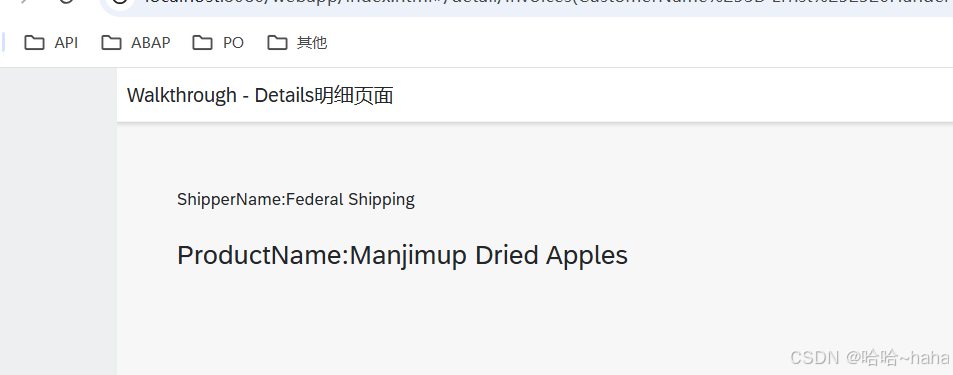
ObjectHeader页签修改属性intro 和title,页面显示invoice模型中的ShipperName和ProductName字段信息
XML
<mvc:View
    controllerName="sap.ui5.walkthrough.controller.Detail"
	xmlns="sap.m"
	xmlns:mvc="sap.ui.core.mvc">
	<Page
		title="{i18n>detailPageTitle}">
		<ObjectHeader
		    title="ProductName:{invoice>ProductName}"
		    intro="ShipperName:{invoice>ShipperName}"/>

	</Page>
</mvc:View>
2.3 webapp/controller/InvoiceList.controller.js
onPress函数中oRouter.navTo()方法新增传参invoicePath: window.encodeURIComponent(oItem.getBindingContext("invoice").getPath().substr(1)),
javascript
sap.ui.define(
  [
    "sap/ui/core/mvc/Controller",
    "sap/ui/model/json/JSONModel",
    "../model/formatter",
    "sap/ui/model/Filter",
    "sap/ui/model/FilterOperator",
  ],
  function (Controller, JSONModel, formatter, Filter, FilterOperator) {
    "use strict";

    return Controller.extend("sap.ui5.walkthrough.controller.InvoiceList", {
      formatter: formatter,
      //初始化
      onInit: function () {
        var oViewModel = new JSONModel({
          currency: "EUR",
        });
        this.getView().setModel(oViewModel, "view");
      },
      //选择行
      onSelectionChange:function(oEvent){
			var oSelected = oEvent.getSource().getSelectedItem();
			var oList = this.byId("invoiceList");
			var aItems = oList.getItems();
			alert(aItems.indexOf(oSelected));
		},
      //发票列表搜索
      onFilterInvoices: function (oEvent) {
        // build filter array
        const aFilter = [];
        const sQuery = oEvent.getParameter("query");
        if (sQuery) {
          aFilter.push(
            new Filter("ProductName", FilterOperator.Contains, sQuery)
          );
        }

        // filter binding
        const oList = this.byId("invoiceList");
        const oBinding = oList.getBinding("items");
        oBinding.filter(aFilter);
      },
      //详情页面跳转
      onPress: function (oEvent) {
      //获取路由
			var oRouter = this.getOwnerComponent().getRouter();
      //获取事件
      var oItem = oEvent.getSource();
      //getPath().substr(1)对路径去掉第一个字符(即去除开头的斜杠)并进行URI编码
      //将编码后的路径作为参数invoicePath传递,导航到"detail"路由
			oRouter.navTo("detail",{
				invoicePath: window.encodeURIComponent(oItem.getBindingContext("invoice").getPath().substr(1))
         }

      );
		}
    });
  }
);
2.4 webapp/controller/Detail.controller.js
javascript
sap.ui.define([
	"sap/ui/core/mvc/Controller"
], function (Controller) {
	"use strict";
	return Controller.extend("sap.ui5.walkthrough.controller.Detail", {
		onInit: function () {
            // 获取路由
			var oRouter = this.getOwnerComponent().getRouter();
            // 监听路由匹配
			oRouter.getRoute("detail").attachPatternMatched(this._onObjectMatched, this);
		},
     /* oEvent.getParameter获取列表传入参数invoicePath
        window.decodeURIComponent对路径解码
        this.getView().bindElement 绑定到视图*/
		_onObjectMatched: function (oEvent) {
			this.getView().bindElement({
				path: "/" + window.decodeURIComponent(oEvent.getParameter("arguments").invoicePath),
				model: "invoice"
			});
		}
	});
});
三、运行结果
http://localhost:8080/webapp/index.html
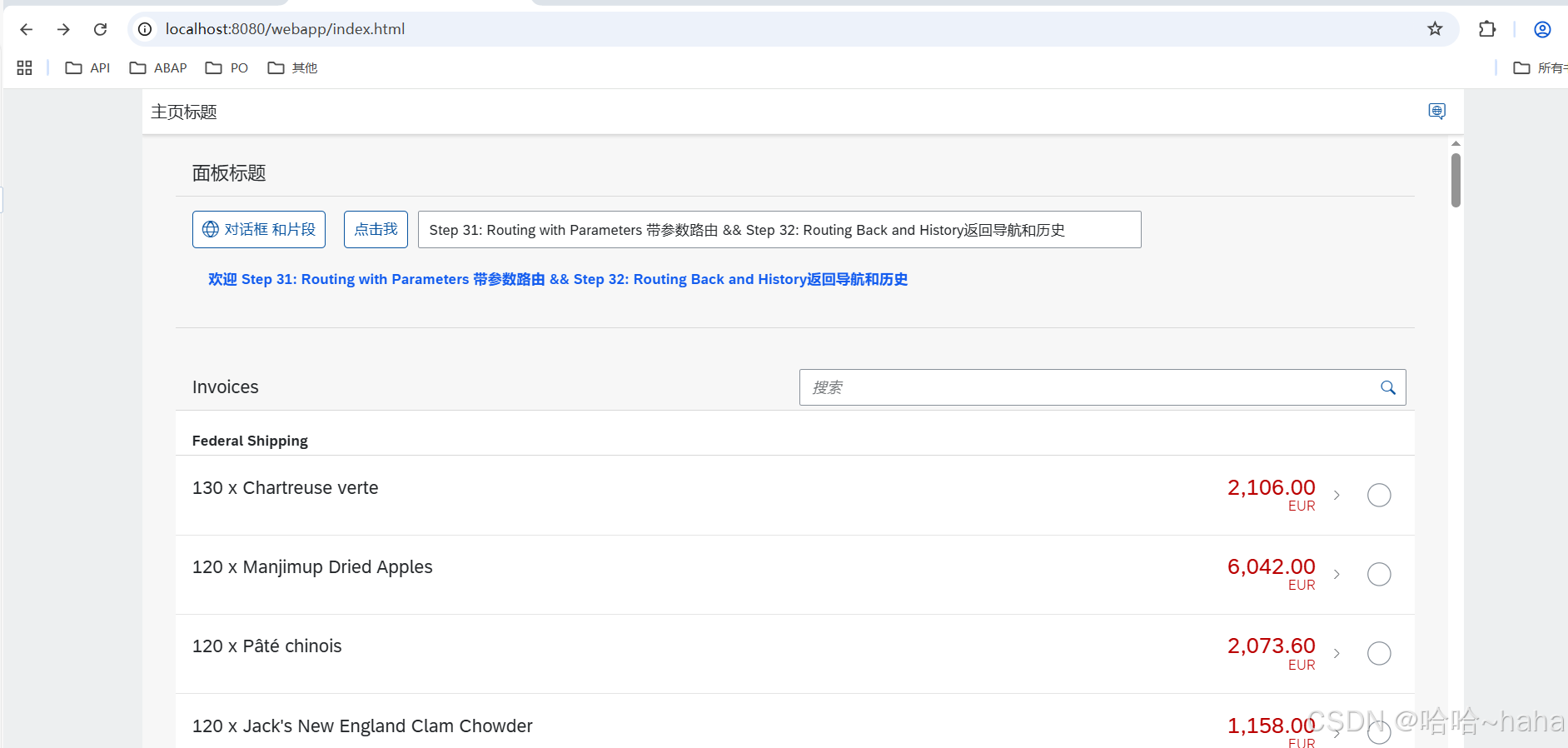
双击列表任意行进去页面