上一篇参考:
1. 简介
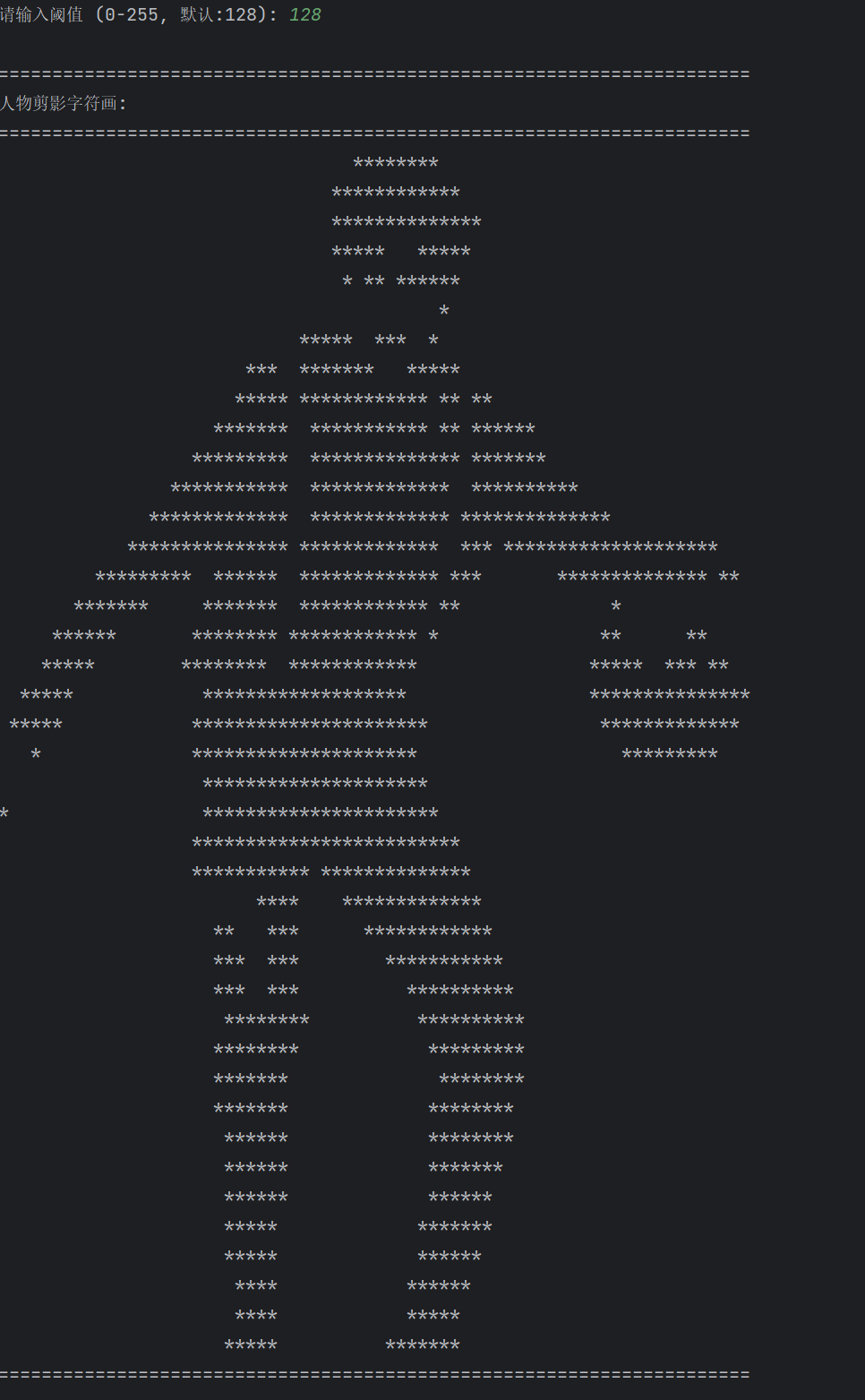
上一篇实现了将文字转换成ACII艺术字,但是同事有个要求,他是一个Ikun,非常想将打篮球的图变成ASCII艺术字,不知道怎么实现。
我瞅了下,其实都是使用Pillow库的,那么就尝试实现一下吧。
2. 技术细节
给定一张图,提取出人物,然后转换为ASCII
2.1 三种提取方法,总有一种适合你
程序提供了三种人物剪影提取方法:
-
threshold - 阈值分割法:简单粗暴,适合背景简单的照片
-
grabcut - GrabCut算法:比较智能,适合复杂背景
-
deep - 深度学习模型:最准确,但需要安装rembg
class SilhouetteViewer:
def init(self):
self.original_image = None
self.silhouette = None
self.mask = None
self.method_used = ""
人物提取
python
def _extract_with_grabcut(self):
    """使用GrabCut算法提取剪影"""
    self.method_used = "GrabCut算法"

    # 创建掩码,告诉AI"这是背景,这是前景"
    mask = np.zeros(self.original_image.shape[:2], np.uint8)
    bgd_model = np.zeros((1, 65), np.float64)
    fgd_model = np.zeros((1, 65), np.float64)

    # 定义矩形(假设人物在中央,AI:我猜的,对了算我牛逼)
    height, width = self.original_image.shape[:2]
    rect = (width // 4, height // 4, width // 2, height // 2)

    # 应用GrabCut(AI:我尽力了)
    cv2.grabCut(self.original_image, mask, rect, bgd_model, fgd_model, 5, cv2.GC_INIT_WITH_RECT)
2.2 字符画生成
python
def silhouette_to_ascii(silhouette, char='*', width=80, threshold=128):
    """将剪影转换为字符画"""
    if silhouette is None:
        return ["无剪影数据"]  # AI:我也不知道怎么处理

    # 调整大小,毕竟字符画不能太大(手机屏幕不够用)
    height, orig_width = silhouette.shape
    new_height = int(height * width / orig_width * 0.5)

    resized = cv2.resize(silhouette, (width, new_height))

    # 生成字符画(像素值 > 阈值 = 字符,否则 = 空格)
    output_lines = []
    for y in range(new_height):
        line = ""
        for x in range(width):
            if resized[y, x] > threshold:
                line += char
            else:
                line += " "
        output_lines.append(line)

    return output_lines
3. 完整代码显示
python
import cv2
import numpy as np
from PIL import Image
import matplotlib.pyplot as plt
import os


class SilhouetteViewer:
    def __init__(self):
        self.original_image = None
        self.silhouette = None
        self.mask = None
        self.method_used = ""

    def load_and_show_image(self, image_path):
        """加载并显示原始图片"""
        # 读取图片
        self.original_image = cv2.imread(image_path)
        if self.original_image is None:
            raise ValueError(f"无法读取图片: {image_path}")

        # 转换为RGB
        self.original_image = cv2.cvtColor(self.original_image, cv2.COLOR_BGR2RGB)

        # 显示原始图片
        plt.figure(figsize=(10, 6))
        plt.subplot(2, 3, 1)
        plt.imshow(self.original_image)
        plt.title('原始图片')
        plt.axis('off')

        return self.original_image

    def extract_and_show_silhouette(self, image_path, method='auto'):
        """
        提取并显示人物剪影
        """
        # 加载图片
        self.load_and_show_image(image_path)

        # 根据方法提取剪影
        if method == 'threshold':
            self._extract_with_threshold()
        elif method == 'grabcut':
            self._extract_with_grabcut()
        elif method == 'deep':
            self._extract_with_deep(image_path)
        else:  # auto
            # 尝试GrabCut,失败则用阈值
            try:
                self._extract_with_grabcut()
            except:
                self._extract_with_threshold()

        # 显示处理过程
        self._display_processing_steps()

        # 显示最终剪影
        self._display_final_silhouette()

        plt.tight_layout()
        plt.show()

        return self.silhouette, self.mask

    def _extract_with_threshold(self):
        """使用阈值方法提取剪影"""
        self.method_used = "阈值分割法"

        # 转换为灰度
        gray = cv2.cvtColor(self.original_image, cv2.COLOR_RGB2GRAY)

        # 使用大津算法自动计算阈值
        _, binary = cv2.threshold(gray, 0, 255, cv2.THRESH_BINARY + cv2.THRESH_OTSU)

        # 取反(假设人物比背景暗)
        if np.mean(binary[binary > 0]) > 127:
            binary = 255 - binary

        # 形态学操作去除噪声
        kernel = np.ones((3, 3), np.uint8)
        binary = cv2.morphologyEx(binary, cv2.MORPH_OPEN, kernel)
        binary = cv2.morphologyEx(binary, cv2.MORPH_CLOSE, kernel)

        self.silhouette = binary
        self.mask = binary > 0

        # 显示灰度图和二值化结果
        plt.subplot(2, 3, 2)
        plt.imshow(gray, cmap='gray')
        plt.title('灰度图')
        plt.axis('off')

        plt.subplot(2, 3, 3)
        plt.imshow(binary, cmap='gray')
        plt.title('二值化结果')
        plt.axis('off')

    def _extract_with_grabcut(self):
        """使用GrabCut算法提取剪影"""
        self.method_used = "GrabCut算法"

        # 创建掩码
        mask = np.zeros(self.original_image.shape[:2], np.uint8)
        bgd_model = np.zeros((1, 65), np.float64)
        fgd_model = np.zeros((1, 65), np.float64)

        # 定义矩形(假设人物在中央)
        height, width = self.original_image.shape[:2]
        rect = (width // 4, height // 4, width // 2, height // 2)

        # 应用GrabCut
        cv2.grabCut(self.original_image, mask, rect, bgd_model, fgd_model, 5, cv2.GC_INIT_WITH_RECT)

        # 创建最终掩码
        mask2 = np.where((mask == 2) | (mask == 0), 0, 1).astype('uint8') * 255

        self.silhouette = mask2
        self.mask = mask2 > 0

        # 显示GrabCut中间结果
        plt.subplot(2, 3, 2)
        plt.imshow(mask, cmap='gray')
        plt.title('GrabCut初始掩码')
        plt.axis('off')

        plt.subplot(2, 3, 3)
        plt.imshow(mask2, cmap='gray')
        plt.title('GrabCut结果')
        plt.axis('off')

    def _extract_with_deep(self, image_path):
        """使用深度学习模型提取剪影"""
        self.method_used = "深度学习模型"

        try:
            from rembg import remove

            # 使用rembg去除背景
            input_image = Image.open(image_path)
            output_image = remove(input_image)
            output_image = output_image.convert('RGBA')

            rgba_array = np.array(output_image)

            if rgba_array.shape[2] == 4:
                alpha_channel = rgba_array[:, :, 3]
                mask = alpha_channel > 0

                # 创建剪影
                silhouette = np.zeros(rgba_array.shape[:2], dtype=np.uint8)
                silhouette[mask] = 255

                self.silhouette = silhouette
                self.mask = mask
            else:
                raise ValueError("深度学习提取失败")

            # 显示去除背景的结果
            plt.subplot(2, 3, 2)
            plt.imshow(output_image)
            plt.title('去除背景')
            plt.axis('off')

            plt.subplot(2, 3, 3)
            plt.imshow(silhouette, cmap='gray')
            plt.title('Alpha通道掩码')
            plt.axis('off')

        except ImportError:
            print("未安装rembg,使用阈值方法")
            self._extract_with_threshold()

    def _display_processing_steps(self):
        """显示处理步骤"""
        # 应用掩码的图片
        masked_img = self.original_image.copy()
        if self.mask is not None:
            masked_img[~self.mask] = [255, 255, 255]  # 背景设为白色

        plt.subplot(2, 3, 4)
        plt.imshow(masked_img)
        plt.title('提取的人物')
        plt.axis('off')

        # 纯剪影
        plt.subplot(2, 3, 5)
        if self.silhouette is not None:
            plt.imshow(self.silhouette, cmap='gray')
            plt.title('纯剪影')
        plt.axis('off')

    def _display_final_silhouette(self):
        """显示最终剪影效果"""
        # 创建对比图:原始 vs 剪影
        plt.subplot(2, 3, 6)

        if self.silhouette is not None:
            # 将剪影转换为彩色以便对比
            silhouette_color = cv2.cvtColor(self.silhouette, cv2.COLOR_GRAY2RGB)

            # 并排显示
            comparison = np.hstack([self.original_image, silhouette_color])
            plt.imshow(comparison)
            plt.title('原始 vs 剪影')
            plt.axis('off')

            # 在图上添加文字说明
            plt.figtext(0.5, 0.01, f"使用方法: {self.method_used}",
                        ha='center', fontsize=12, bbox=dict(boxstyle="round,pad=0.3", facecolor="yellow", alpha=0.5))


def silhouette_to_ascii(silhouette, char='*', width=80, threshold=128):
    """将剪影转换为字符画"""
    if silhouette is None:
        return ["无剪影数据"]

    # 调整大小
    height, orig_width = silhouette.shape
    new_height = int(height * width / orig_width * 0.5)

    resized = cv2.resize(silhouette, (width, new_height))

    # 生成字符画
    output_lines = []
    for y in range(new_height):
        line = ""
        for x in range(width):
            if resized[y, x] > threshold:
                line += char
            else:
                line += " "
        output_lines.append(line)

    # 裁剪空白
    output_lines = trim_whitespace(output_lines)

    return output_lines


def trim_whitespace(lines):
    """裁剪空白行和列"""
    if not lines:
        return lines

    # 移除顶部空白行
    while lines and all(c == ' ' for c in lines[0]):
        lines.pop(0)

    # 移除底部空白行
    while lines and all(c == ' ' for c in lines[-1]):
        lines.pop()

    if not lines:
        return lines

    # 移除左侧空白列
    min_left = len(lines[0])
    for line in lines:
        for i, c in enumerate(line):
            if c != ' ':
                min_left = min(min_left, i)
                break

    # 移除右侧空白列
    max_right = 0
    for line in lines:
        for i in range(len(line) - 1, -1, -1):
            if line[i] != ' ':
                max_right = max(max_right, i)
                break

    # 裁剪每一行
    trimmed_lines = []
    for line in lines:
        if min_left <= max_right:
            trimmed_lines.append(line[min_left:max_right + 1])
        else:
            trimmed_lines.append(line)

    return trimmed_lines


def main():
    """主程序"""
    print("=" * 70)
    print("人物剪影提取与字符画生成器")
    print("=" * 70)

    # 创建查看器
    viewer = SilhouetteViewer()

    # 获取输入
    image_path = input("请输入图片路径: ").strip()

    # 检查文件是否存在
    if not image_path or not os.path.exists(image_path):
        print("图片不存在,创建示例图片...")
        # 创建一个示例图片
        create_sample_image()
        image_path = "sample_person.jpg"
        print(f"已创建示例图片: {image_path}")

    # 选择提取方法
    print("\n选择剪影提取方法:")
    print("1. 自动选择 (推荐)")
    print("2. 阈值分割 (适合简单背景)")
    print("3. GrabCut算法 (适合复杂背景)")
    print("4. 深度学习 (需要安装rembg,最准确)")

    method_choice = input("请选择 (1-4, 默认:1): ").strip() or "1"

    methods = {
        '1': 'auto',
        '2': 'threshold',
        '3': 'grabcut',
        '4': 'deep'
    }

    method = methods.get(method_choice, 'auto')

    print(f"\n使用 {method} 方法提取剪影...")
    print("正在显示处理结果...")

    try:
        # 提取并显示剪影
        silhouette, mask = viewer.extract_and_show_silhouette(image_path, method)

        # 询问用户是否满意
        print("\n" + "-" * 70)
        satisfaction = input("剪影效果是否满意? (y/n): ").lower()

        if satisfaction != 'y':
            print("重新选择提取方法...")
            return main()  # 重新开始

        # 生成字符画
        print("\n生成字符画...")
        char = input("请输入要使用的字符 (默认:*): ").strip() or "*"
        width = int(input("请输入字符画宽度 (默认:80): ").strip() or 80)
        threshold = int(input("请输入阈值 (0-255, 默认:128): ").strip() or 128)

        ascii_art = silhouette_to_ascii(silhouette, char, width, threshold)

        # 显示字符画
        if ascii_art:
            output_width = max(len(line) for line in ascii_art)

            print("\n" + "=" * output_width)
            print("人物剪影字符画:")
            print("=" * output_width)

            for line in ascii_art:
                print(line)

            print("=" * output_width)

            # 保存选项
            save = input("\n是否保存字符画到文件? (y/n): ").lower()
            if save == 'y':
                filename = input("文件名 (默认: silhouette_art.txt): ").strip() or "silhouette_art.txt"
                with open(filename, 'w', encoding='utf-8') as f:
                    f.write('\n'.join(ascii_art))
                print(f"已保存到 {filename}")

            # 是否保存剪影图片
            save_img = input("\n是否保存剪影图片? (y/n): ").lower()
            if save_img == 'y':
                img_filename = input("图片文件名 (默认: silhouette.png): ").strip() or "silhouette.png"
                cv2.imwrite(img_filename, silhouette)
                print(f"剪影图片已保存到 {img_filename}")
        else:
            print("未能生成有效的字符画")

    except Exception as e:
        print(f"处理失败: {e}")
        import traceback
        traceback.print_exc()


def create_sample_image():
    """创建示例图片"""
    # 创建一个白色背景的图片
    img = np.ones((400, 300, 3), dtype=np.uint8) * 255

    # 画一个人物剪影
    # 头部
    cv2.circle(img, (150, 100), 40, (0, 0, 0), -1)
    # 身体
    cv2.rectangle(img, (120, 140), (180, 250), (0, 0, 0), -1)
    # 左臂
    cv2.line(img, (120, 160), (80, 200), (0, 0, 0), 20)
    # 右臂
    cv2.line(img, (180, 160), (220, 200), (0, 0, 0), 20)
    # 左腿
    cv2.line(img, (140, 250), (130, 320), (0, 0, 0), 20)
    # 右腿
    cv2.line(img, (160, 250), (170, 320), (0, 0, 0), 20)

    # 保存图片
    cv2.imwrite("sample_person.jpg", cv2.cvtColor(img, cv2.COLOR_RGB2BGR))


def interactive_demo():
    """交互式演示"""
    print("\n" + "=" * 70)
    print("人物剪影提取演示")
    print("=" * 70)

    while True:
        print("\n选项:")
        print("1. 处理新图片")
        print("2. 查看示例")
        print("3. 退出")

        choice = input("请选择 (1-3): ").strip()

        if choice == '1':
            main()
        elif choice == '2':
            # 显示示例
            show_examples()
        elif choice == '3':
            print("再见!")
            break
        else:
            print("无效选择,请重试")


def show_examples():
    """显示示例"""
    print("\n示例效果:")

    # 创建示例图片
    create_sample_image()

    # 处理示例图片
    viewer = SilhouetteViewer()
    silhouette, mask = viewer.extract_and_show_silhouette("sample_person.jpg", "threshold")

    # 生成字符画示例
    print("\n生成字符画示例...")
    ascii_art = silhouette_to_ascii(silhouette, '*', 60, 128)

    if ascii_art:
        output_width = max(len(line) for line in ascii_art)

        print("\n" + "=" * output_width)
        print("示例字符画:")
        print("=" * output_width)

        for line in ascii_art:
            print(line)

        print("=" * output_width)


if __name__ == "__main__":
    # 检查依赖
    try:
        import cv2
        import numpy as np
        from PIL import Image
        import matplotlib.pyplot as plt

        # 设置matplotlib中文字体(如果有中文的话)
        try:
            plt.rcParams['font.sans-serif'] = ['SimHei']
            plt.rcParams['axes.unicode_minus'] = False
        except:
            pass

        # 启动交互式演示
        interactive_demo()

    except ImportError as e:
        print(f"缺少依赖库: {e}")
        print("\n请安装以下库:")
        print("pip install opencv-python pillow numpy matplotlib")
        print("\n如需深度学习功能,请安装:")
        print("pip install rembg onnxruntime")
4. 效果展示
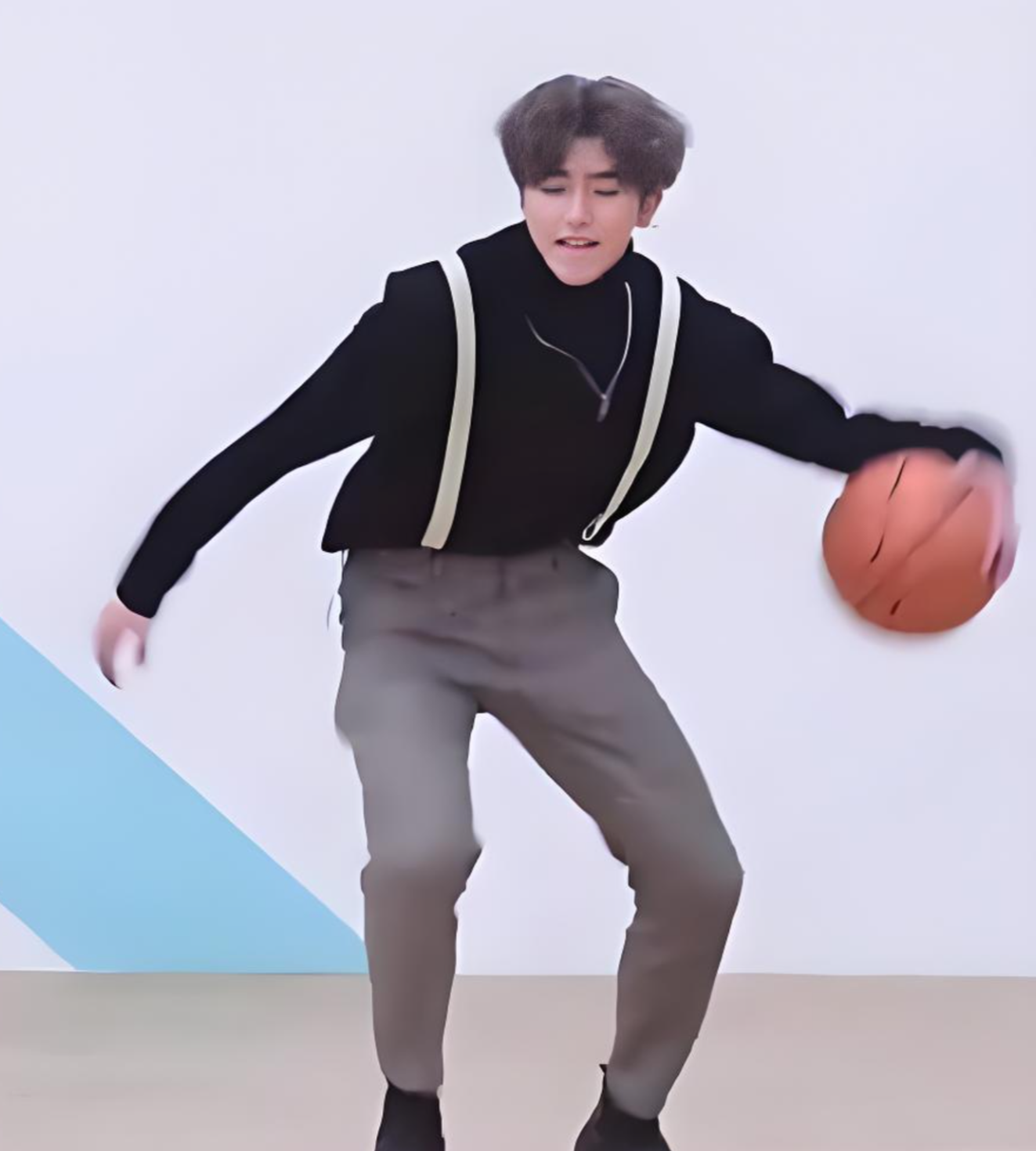
示例图如下:
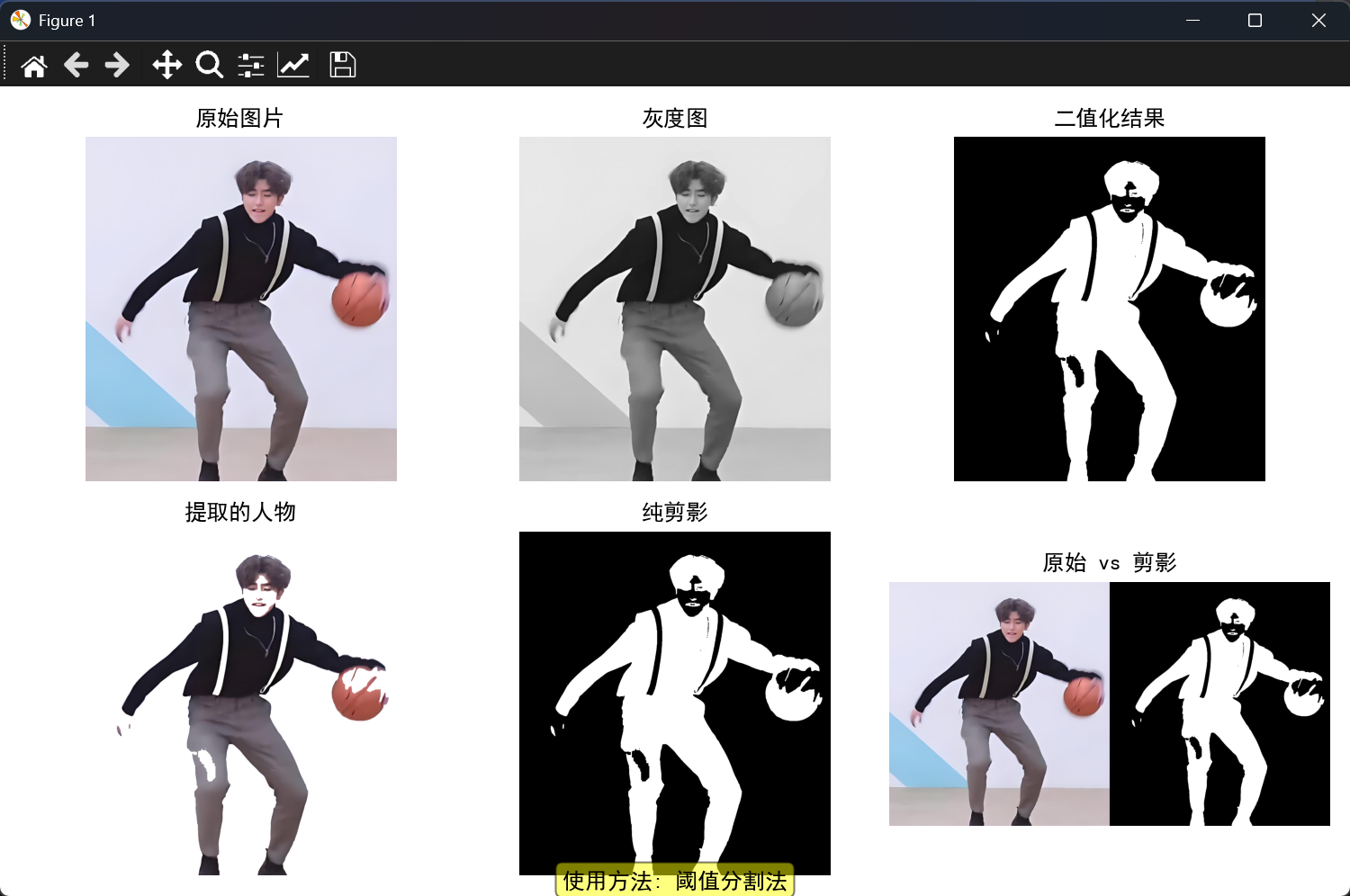
使用阈值分割得到的剪影图如下:
最终结果: