QUdpSocket类的简单使用
下面我们用一个做一个简单的例子。
一、发送端
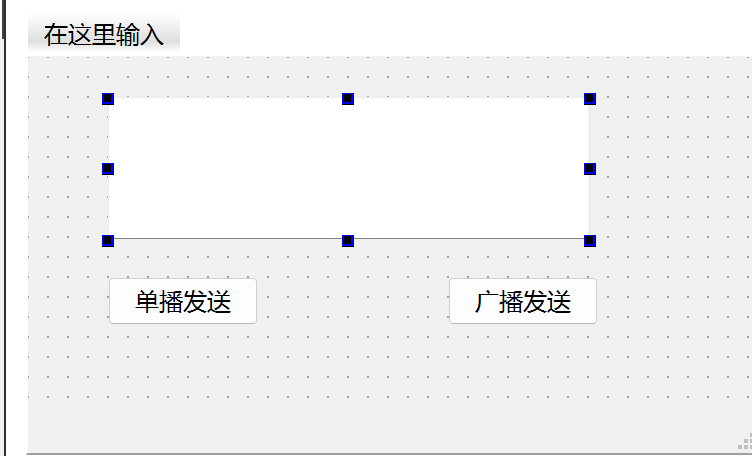
发送端界面:
发送端代码:
.h
c++
#ifndef MAINWINDOW_H
#define MAINWINDOW_H

#include <QMainWindow>
#include <QUdpSocket>

QT_BEGIN_NAMESPACE
namespace Ui {
class MainWindow;
}
QT_END_NAMESPACE

class MainWindow : public QMainWindow
{
    Q_OBJECT

public:
    MainWindow(QWidget *parent = nullptr);
    ~MainWindow();

private slots:
    void on_btnUnicast_clicked();

    void on_btnBoardcast_clicked();

private:
    Ui::MainWindow *ui;

    QUdpSocket* m_pSender = nullptr;
};
#endif // MAINWINDOW_H
.cpp
c++
#include "mainwindow.h"
#include "ui_mainwindow.h"
#include <QHostAddress>
#include <QDebug>

MainWindow::MainWindow(QWidget *parent)
    : QMainWindow(parent)
    , ui(new Ui::MainWindow)
{
    ui->setupUi(this);

    m_pSender = new QUdpSocket(this);

}

MainWindow::~MainWindow()
{
    delete ui;
    delete m_pSender;
}

void MainWindow::on_btnUnicast_clicked()
{
    QString strText = ui->lineEdit->text();
    if(strText.isEmpty())
        return;

    QHostAddress host("127.0.0.1");
    quint16 nPort = 8888;
    qint64 nSend = m_pSender->writeDatagram(strText.toUtf8(),host,nPort);
    if(nSend == -1)
    {
        qDebug() << "单播发送失败" << m_pSender->errorString();
    }
    else
    {
        qDebug() << "单播发送成功,字节数" << nSend;
    }

}


void MainWindow::on_btnBoardcast_clicked()
{
    QString strText = ui->lineEdit->text();
    if(strText.isEmpty())
        return;

    quint16 nPort = 8888;
    qint64 nSend = m_pSender->writeDatagram(strText.toUtf8(),QHostAddress::Broadcast,nPort);
    if(nSend == -1)
    {
        qDebug() << "广播发送失败" << m_pSender->errorString();
    }
    else
    {
        qDebug() << "广播发送成功,字节数" << nSend;
    }
}
二、接收端
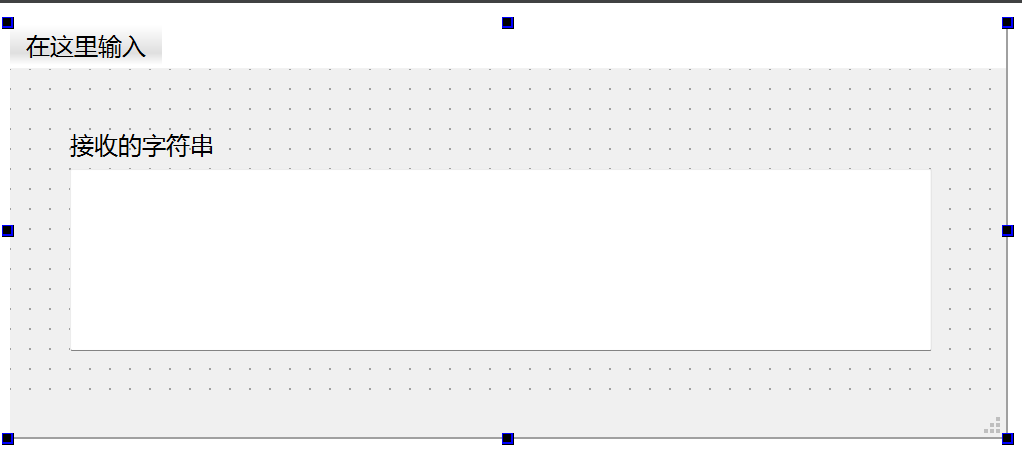
接受端的界面,比较简单:
接受端代码如下:
.h
c++
#ifndef MAINWINDOW_H
#define MAINWINDOW_H

#include <QMainWindow>
#include <QUdpSocket>

QT_BEGIN_NAMESPACE
namespace Ui {
class MainWindow;
}
QT_END_NAMESPACE

class MainWindow : public QMainWindow
{
    Q_OBJECT

public:
    MainWindow(QWidget *parent = nullptr);
    ~MainWindow();

public slots:
    void ReadDatagram();

private:
    Ui::MainWindow *ui;
    QUdpSocket* m_pReceiver;
};
#endif // MAINWINDOW_H
.cpp
C++
#include "mainwindow.h"
#include "ui_mainwindow.h"

MainWindow::MainWindow(QWidget *parent)
    : QMainWindow(parent)
    , ui(new Ui::MainWindow)
{
    ui->setupUi(this);

    m_pReceiver = new QUdpSocket(this);
    quint16 listenPort = 8888;

    // 绑定端口:QHostAddress::Any 表示监听所有网卡的该端口(支持本机/局域网/外网)
    bool bBind = m_pReceiver->bind(QHostAddress::Any,listenPort);

    if(!bBind)
    {
        ui->textEdit->append("绑定端口失败:" + m_pReceiver->errorString());
    }
    else
    {
        ui->textEdit->append("已绑定端口 " + QString::number(listenPort) + ",等待接收数据...");
    }

    // 绑定接收数据信号:当有数据到达时触发readyRead()
    connect(m_pReceiver,&QUdpSocket::readyRead,this,&MainWindow::ReadDatagram);
}

MainWindow::~MainWindow()
{
    delete ui;
    delete m_pReceiver;
}

void MainWindow::ReadDatagram()
{
    // 循环读取所有待处理的数据包(可能同时有多个)
    while (m_pReceiver->hasPendingDatagrams())
    {
        QByteArray datagram;
        // 预留足够的缓冲区(根据数据包大小调整,这里设为1024)
        datagram.resize(m_pReceiver->pendingDatagramSize());
        QHostAddress senderIp; // 发送方IP
        quint16 senderPort;    // 发送方端口

        // 读取数据包,同时获取发送方的IP和端口
        qint64 readBytes = m_pReceiver->readDatagram(
            datagram.data(),
            datagram.size(),
            &senderIp,
            &senderPort
            );

        if (readBytes == -1)
        {
            ui->textEdit->append("接收失败:" + m_pReceiver->errorString());
            continue;
        }

        // 解析并显示数据
        QString recvData = QString::fromUtf8(datagram);
        QString log = QString("[%1:%2] 接收数据:%3")
                          .arg(senderIp.toString())
                          .arg(senderPort)
                          .arg(recvData);
        ui->textEdit->append(log);
    }
}
代码说明:
- 核心类
QUdpSocket:- 发送:
writeDatagram()直接发送数据包,无需建立连接,这是 UDP "无连接" 的核心体现; - 接收:绑定端口后,通过
readyRead()信号监听数据,readDatagram()读取数据并获取发送方信息; - 广播:
QHostAddress::Broadcast是 UDP 独有的能力,TCP 无法实现。
- 发送:
- 绑定端口的参数 :
QHostAddress::Any:监听所有网卡的指定端口,支持接收来自本机、局域网其他设备的 UDP 数据;- 若仅监听本机,可用
QHostAddress::LocalHost(127.0.0.1)。
- 数据编码 :
- 用
toUtf8()/fromUtf8()转换QString和QByteArray,保证跨平台编码一致性,避免中文乱码。
- 用
- 对比 TCP 的简化点 :
- UDP 无需调用
connectToHost()建立连接,也无需处理connected()/disconnected()信号; - 无需处理粘包:
pendingDatagramSize()可获取单个数据包的大小,一次读取即可,而 TCP 需自定义协议拆包。
- UDP 无需调用
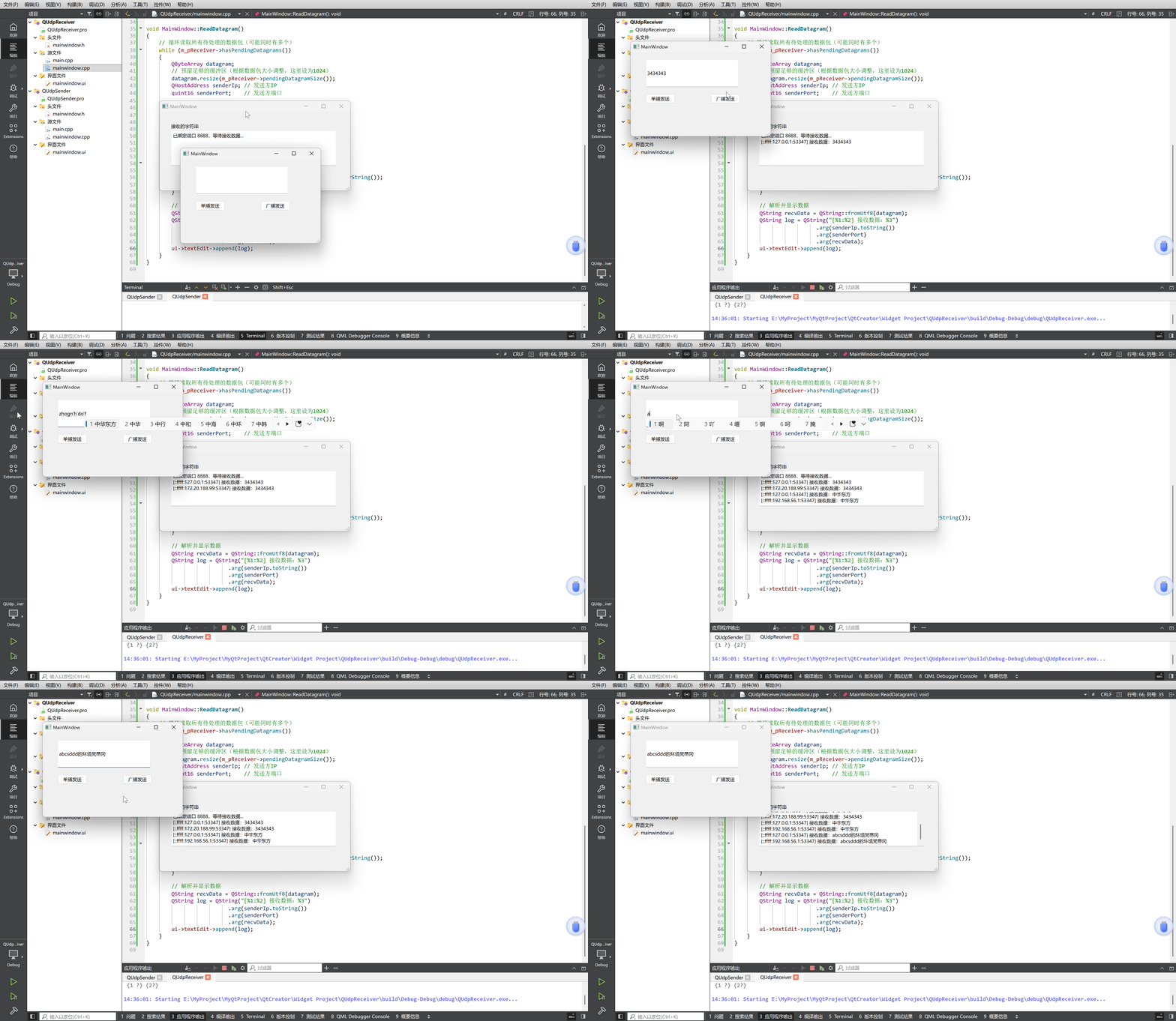
项目运行结果: