一、简介
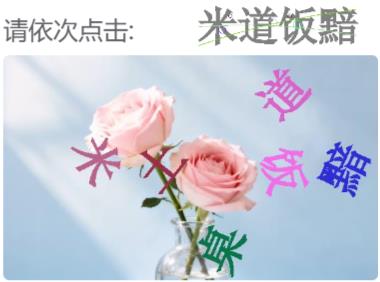
2026年元旦节,国家税务总局中文点选验证码居然又更新了。这次更新对识别还是有很大的影响。
1、文字的位置变得随机
2、文字的旋转角度变得更乱
让识别变得更加困难。我们在元旦节期间快速反应,迅速的采集最新的图片,完成了数据标记与训练。最终正确率达到了99%。
二、识别说明
识别这个验证码需要两张原图
1、点击区大图

2、点击顺序的小图

三、识别代码
下面的代码是样例代码,需要制定两张图片的路径,img1是点击区大图,img2是点击顺序小图。图片顺序不能传错。
python
import base64
import requests
import datetime
from io import BytesIO
from PIL import Image, ImageDraw, ImageFont

t1 = datetime.datetime.now()

#PIL图片保存为base64编码
def PIL_base64(img, coding='utf-8'):
    img_format = img.format
    if img_format == None:
        img_format = 'JPEG'

    format_str = 'JPEG'
    if 'png' == img_format.lower():
        format_str = 'PNG'
    if 'gif' == img_format.lower():
        format_str = 'gif'

    if img.mode == "P":
        img = img.convert('RGB')
    if img.mode == "RGBA":
        format_str = 'PNG'
        img_format = 'PNG'

    output_buffer = BytesIO()
    # img.save(output_buffer, format=format_str)
    img.save(output_buffer, quality=100, format=format_str)
    byte_data = output_buffer.getvalue()
    base64_str = 'data:image/' + img_format.lower() + ';base64,' + base64.b64encode(byte_data).decode(coding)
    # base64_str = base64.b64encode(byte_data).decode(coding)

    return base64_str

# 加载图片
img1 = Image.open(r'E:\Python\lixin_project\OpenAPI接口测试\test_img\85-1.jpg')
# 图片转base64
img1_base64 = PIL_base64(img1)
img2 = Image.open(r'E:\Python\lixin_project\OpenAPI接口测试\test_img\85-2.png')
# 图片转base64
img2_base64 = PIL_base64(img2)

验证码识别接口
可以根据自己网络情况选择不同接口
http://bq1gpmr8.xiaomy.net(电信)
http://220.167.181.200:9009(移动、电信、联通)

# 验证码识别接口
url = "http://220.167.181.200:9009/openapi/verify_code_identify/"
data = {
    # 用户的key
    "key": "qaXZNkpHniKPxw4ZYJj0",
    # 验证码类型
    "verify_idf_id": "85",
    # 点击区大图
    "img1": img1_base64,
    # 点击顺序小图
    "img2": img2_base64,
}
header = {"Content-Type": "application/json"}

# 发送请求调用接口
response = requests.post(url=url, json=data, headers=header)

# 获取响应数据,识别结果
print(response.text)
print("耗时:", datetime.datetime.now() - t1)

# 标记识别结果
draw = ImageDraw.Draw(img1)
# 字体设置
font_type = "./msyhl.ttc"
font_size = 20
font = ImageFont.truetype(font_type, font_size)
# 获取结果列表
y = response.json()['data']['res_str']
point_list = eval(y)
# 标记点击序号
for i, point in enumerate(point_list):
    draw.ellipse((point[0] - 15, point[1] - 15,point[0] + 15, point[1] + 15), fill=(255, 0, 0))
    draw.text((point[0] - 5, point[1] - 15), str(i + 1), fill=(255, 255, 255), font=font)

img1.show()
运行上面的代码会看到下面的点击效果

想了解更多验证码识别,请访问:http://bq1gpmr8.xiaomy.net/tool/verifyCodeHomePage2/?_=1767453173457