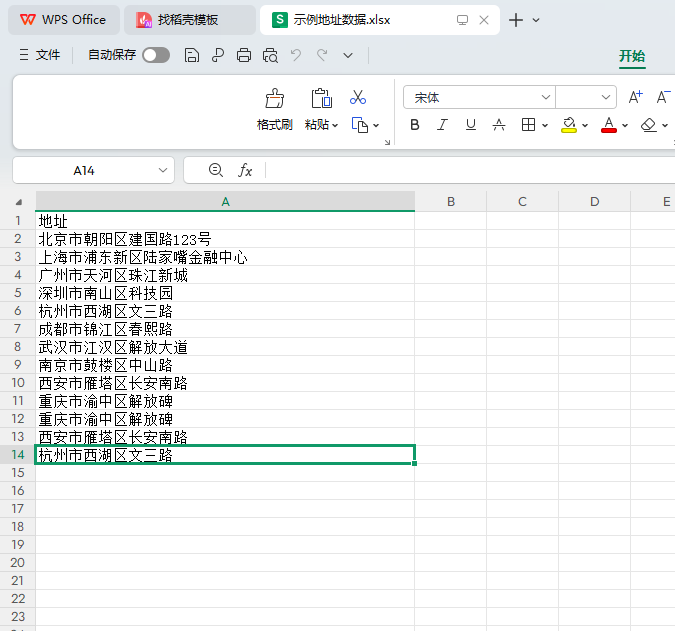
一、上传表格提取地址数据,统计同一地址数量,转化经纬度。
部分代码如下:
bash
// 处理Excel上传和地址解析

    public function uploadExcel(Request $request)
    {
        $file = $request->file('excel_file');

        if (empty($file)) {
            return json(['code' => 0, 'msg' => '未上传文件']);
        }

        // 移动文件到临时目录
        $info = $file->move('/www/wwwroot/113.45.17.169_93/public/uploads');

        if (!$info) {

            return json(['code' => 0, 'msg' => $file->getError()]);
        }


        $filePath = $info->getRealPath();


        try {

            // 解析Excel文件
            $spreadsheet = IOFactory::load($filePath);
            $worksheet = $spreadsheet->getActiveSheet();
            $rows = $worksheet->toArray();

            if (count($rows) < 2) {
                return json(['code' => 0, 'msg' => '表格中没有有效数据']);
            }

            // 获取表头
            $header = array_shift($rows);
            $addressIndex = array_search('地址', $header);

            if ($addressIndex === false) {
                return json(['code' => 0, 'msg' => '未找到"地址"列']);
            }

            // 提取地址并统计数量
            $addresses = array_column($rows, $addressIndex);
            $addressCounts = array_count_values(array_filter($addresses));

            // 转换为地理坐标
            $locations = [];
            foreach ($addressCounts as $address => $count) {
                $coords = $this->geocodeAddress($address);
                if ($coords) {
                    $locations[] = [
                        'address' => $address,
                        'lat' => $coords['lat'],
                        'lng' => $coords['lng'],
                        'count' => $count
                    ];
                }
            }

           try {
                Db::startTrans();
                Db::name('address_location')->where('1=1')->delete();
                Db::name('address_location')->insertAll($locations);
                Db::commit();
            } catch (\Exception $e) {
                Db::rollback();
                echo "插入失败:" . $e->getMessage(); // 输出具体错误信息
            }

            // 保存到数据库
            // Db::name('address_location')->where('1=1')->delete();
            // foreach ($locations as $location) {
            //     $datasz=$location;
            //     $aa=Db::name('address_location')->insert($datasz);
            // }

            return json(['code' => 1, 'msg' => '处理成功', 'data' => $locations]);
        } catch (\Exception $e) {

            return json(['code' => 0, 'msg' => '处理文件时出错: ' . $e->getMessage()]);
        }
    }
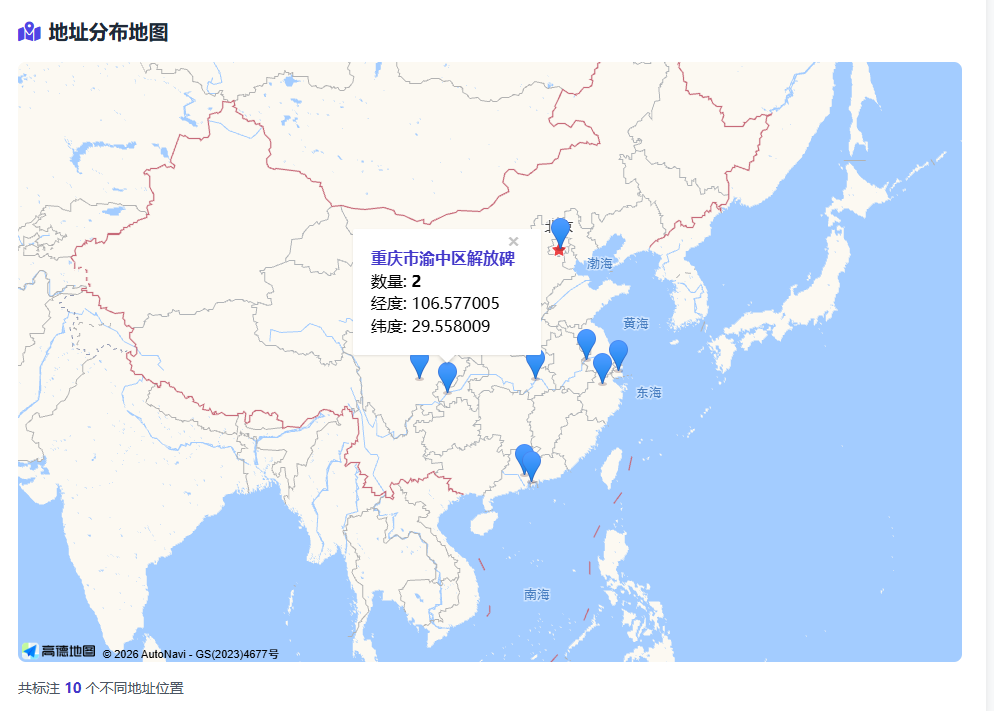
二、前端展示地图,按照获取地址做出标记。
部分代码如下:
bash
<div class="container mx-auto px-4 py-8">
        <header class="text-center mb-10">
            <h1 class="text-3xl md:text-4xl font-bold text-indigo-700 mb-2">Excel地址数据地图标注系统</h1>
            <p class="text-gray-600">上传包含地址信息的Excel文件,在高德地图上批量标注地址分布</p>
        </header>

        <main class="bg-white rounded-xl shadow-lg p-6 mb-8">
            <section class="mb-8">
                <h2 class="text-xl font-semibold text-gray-800 mb-4 flex items-center">
                    <i class="fas fa-file-excel text-green-600 mr-2"></i>上传Excel文件
                </h2>
                <form id="uploadForm" enctype="multipart/form-data" class="space-y-4">
                    <div>
                        <label for="excelFile" class="block text-sm font-medium text-gray-700 mb-2">
                            选择Excel文件 (需包含"地址"列)
                        </label>
                        <div id="fileDropArea" class="border-2 border-dashed border-gray-300 rounded-lg p-8 text-center cursor-pointer transition-all hover:border-indigo-400">
                            <i class="fas fa-cloud-upload-alt text-4xl text-gray-400 mb-3"></i>
                            <p class="text-gray-600 mb-2">拖拽文件到此处或点击选择文件</p>
                            <p class="text-sm text-gray-500">支持 .xlsx, .xls 格式</p>
                            <input type="file" id="excelFile" name="excel_file" accept=".xlsx,.xls" class="hidden">
                        </div>
                        <div id="fileInfo" class="mt-3 text-sm text-gray-600 hidden">
                            <span id="fileName"></span>
                            <span id="fileSize"></span>
                        </div>
                    </div>
                    <div class="flex flex-wrap gap-3">
                        <button type="submit" id="uploadBtn" class="inline-flex items-center px-5 py-2.5 border border-transparent text-sm font-medium rounded-md shadow-sm text-white bg-indigo-600 hover:bg-indigo-700 focus:outline-none focus:ring-2 focus:ring-offset-2 focus:ring-indigo-500 disabled:opacity-50">
                            <i class="fas fa-upload mr-2"></i>上传并标注
                        </button>
                        <button type="button" id="showMapBtn" class="inline-flex items-center px-5 py-2.5 border border-gray-300 text-sm font-medium rounded-md shadow-sm text-gray-700 bg-white hover:bg-gray-50 focus:outline-none focus:ring-2 focus:ring-offset-2 focus:ring-indigo-500">
                            <i class="fas fa-map-marked-alt mr-2"></i>显示地图
                        </button>
                    </div>
                </form>
            </section>

            <section>
                <h2 class="text-xl font-semibold text-gray-800 mb-4 flex items-center">
                    <i class="fas fa-map-marked-alt text-indigo-600 mr-2"></i>地址分布地图
                </h2>
                <div id="mapContainer" class="w-full bg-gray-100 flex items-center justify-center">
                    <p class="text-gray-500">地图将在此处显示</p>
                </div>
                <div id="mapInfo" class="mt-4 text-sm text-gray-600 hidden">
                    <p>共标注 <span id="addressCount" class="font-semibold text-indigo-700"></span> 个不同地址位置</p>
                </div>
            </section>
        </main>

        <div id="loadingModal" class="fixed inset-0 bg-black bg-opacity-50 flex items-center justify-center hidden z-50">
            <div class="bg-white rounded-lg p-6 max-w-md w-full mx-4">
                <div class="flex items-center mb-4">
                    <div class="w-8 h-8 border-4 border-indigo-600 border-t-transparent rounded-full animate-spin mr-3"></div>
                    <h3 class="text-lg font-medium text-gray-900">正在处理数据</h3>
                </div>
                <p class="text-gray-600 mb-4" id="loadingText">正在上传文件...</p>
                <div class="w-full bg-gray-200 rounded-full h-2">
                    <div id="progressBar" class="bg-indigo-600 h-2 rounded-full transition-all duration-300" style="width: 0%"></div>
                </div>
            </div>
        </div>

        <footer class="text-center text-gray-500 text-sm mt-12">
            <p>© 2025 Excel地址数据地图标注系统. All rights reserved.</p>
        </footer>
    </div>
三、效果图如下
上传部分

地图标记
上传表格数据