ORM
-
MVC或者MVC框架中包括一个重要的部分,就是ORM,它实现了数据模型与数据库的解耦,即数据模型的设计不需要依赖于特定的数据库,通过简单的配置就可以轻松更换数据库,这极大的减轻了开发人员的工作量,不需要面对因数据库变更而导致的无效劳动
-
ORM是"对象-关系-映射"的简称。(Object Relational Mapping,简称ORM)(将来会学一个sqlalchemy,是和他很像的,但是django的orm没有独立出来让别人去使用,虽然功能比sqlalchemy更强大,但是别人用不了)
-
类对象--->sql--->pymysql--->mysql服务端--->磁盘,orm其实就是将类对象的语法翻译成sql语句的一个引擎,明白orm是什么了,剩下的就是怎么使用orm,怎么来写类对象关系语句。
M:model,数据库相关操作
pycharm配置连接数据库
第一步
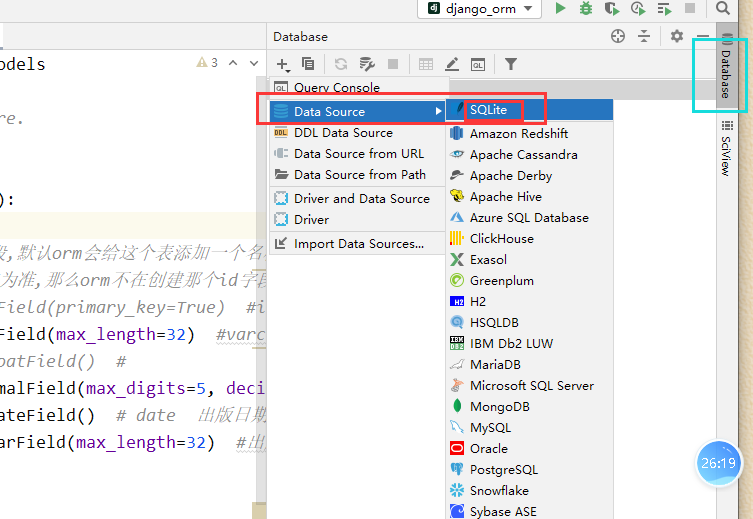
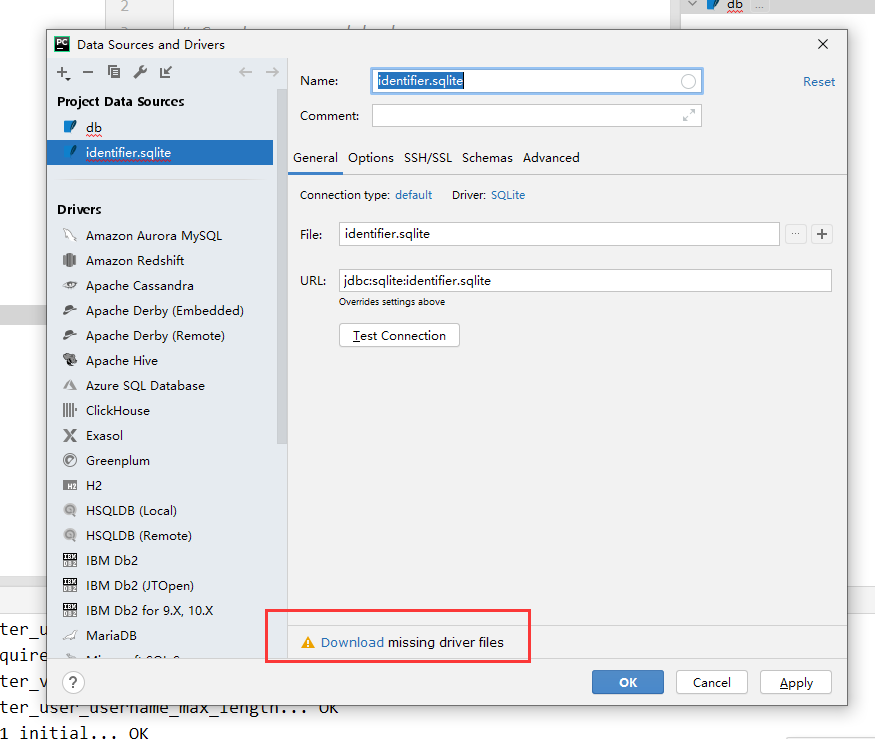
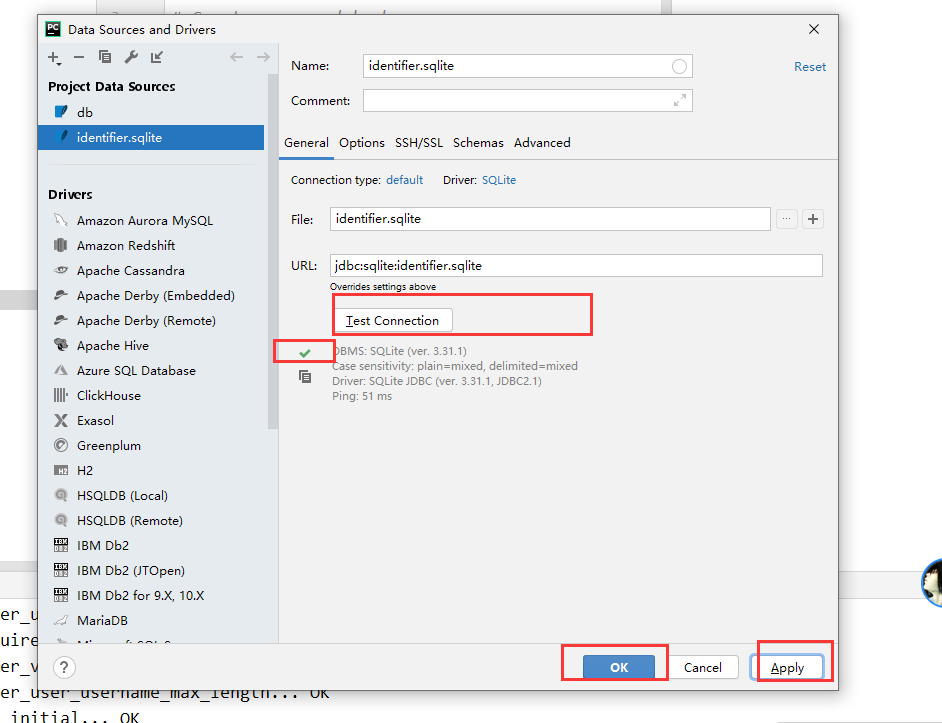
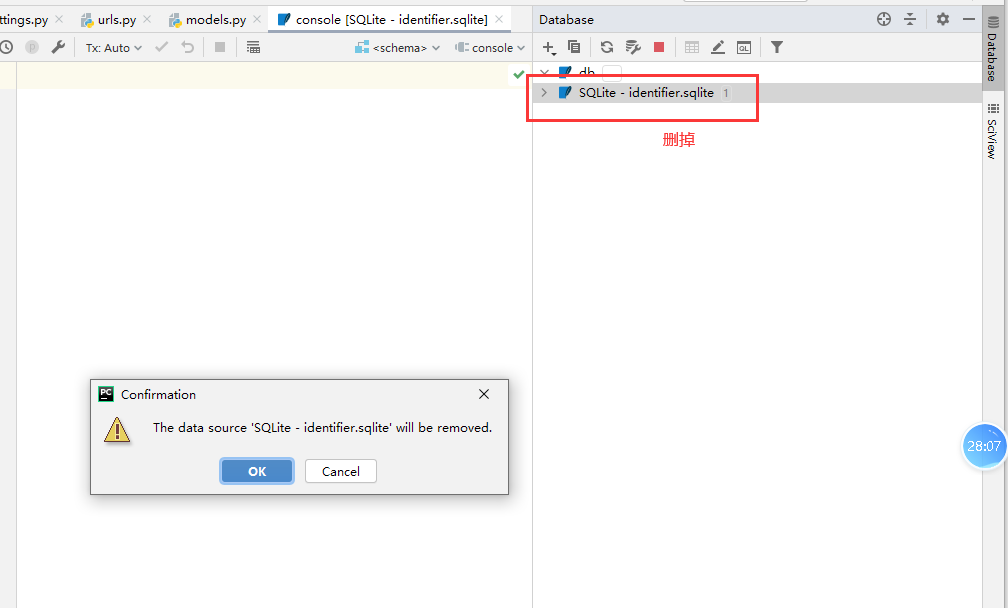
创建模型类
在应用文件夹的models.py文件中写上如下内容
# 属性对应的字段,默认都是不能为空的,也就是加了not null约束
class Book(models.Model):
# 如果没有指定主键字段,默认orm会给这个表添加一个名称为id的主键自增字段
# 如果制定了,以指定的为准,那么orm不在创建那个id字段了
# nid = models.AutoField(primary_key=True) #int primary_key auto_increment,
title = models.CharField(max_length=32) #varchar 书籍名称
# price = models.FloatField() #
price = models.DecimalField(max_digits=5, decimal_places=2) # 999.99 价格
pub_date = models.DateField() # date 出版日期
publish = models.CharField(max_length=32) #出版社名称
# xx = models.CharField(max_length=18, null=True, blank=True) # null=True,blank=True允许该字段数据为空
# xx = models.CharField(max_length=18, default='xxx') # null=True,blank=True允许该字段数据为空
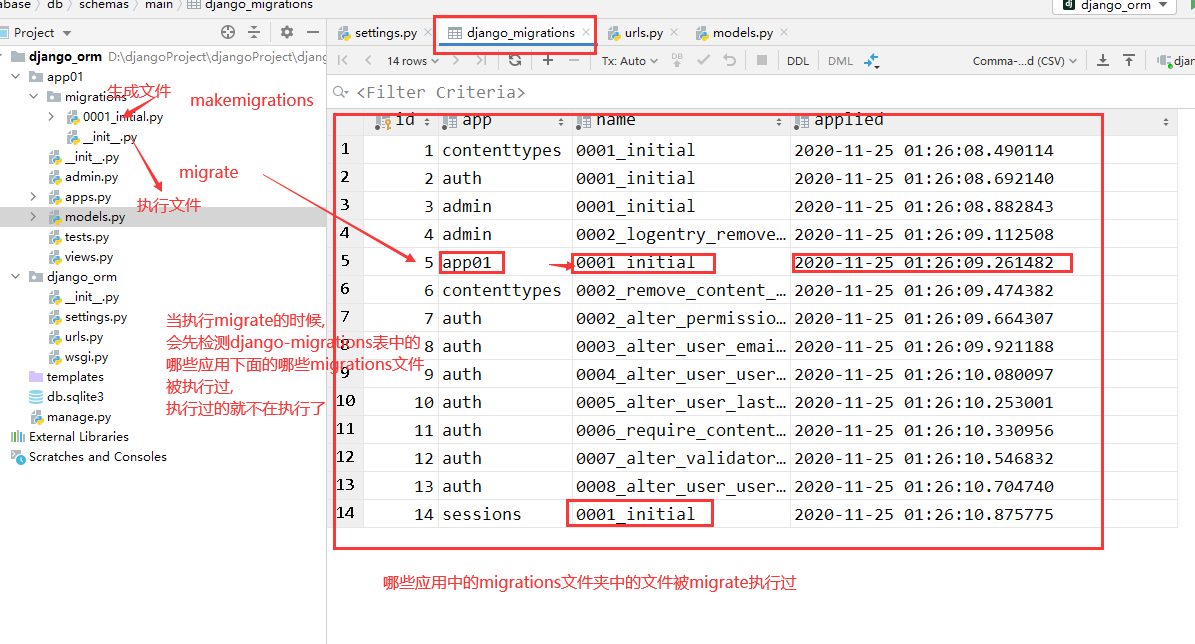
Book生成的表名称为 应用名称_模型类名小写数据库同步(迁移)指令
python manage.py makemigrations
python manage.py migrate
指令的执行流程:
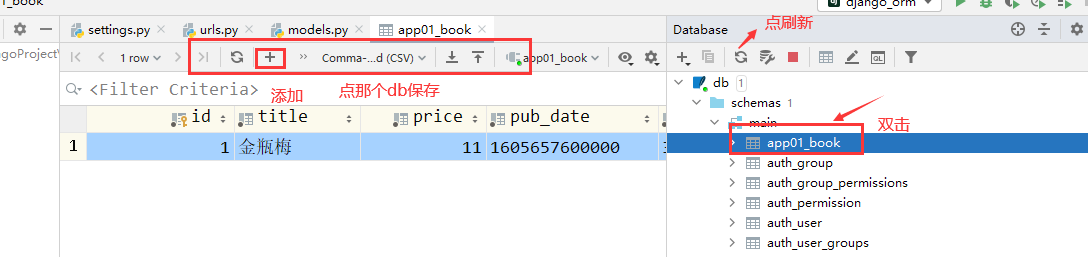
pycharm简单使用
django配置连接msyql
1 创建数据库
create database orm01 charset=utf8mb4;2 settings.py配置文件中写上如下内容
DATABASES = {
    'default': {
        'ENGINE': 'django.db.backends.mysql',
        'NAME': 'orm01',
        'HOST':'127.0.0.1',
        'PORT':3306,
        'USER':'root',
        'PASSWORD':'',  #有密码的填密码

    }
}
3 安装pymysql
pip install pymsyql4 在项目主目录下的__init__.py文件中写上如下内容
import pymysql
pymysql.install_as_MySQLdb()5 执行数据库同步指令
python manage.py migrate只要换了新的数据库,migrate会重新执行migrations文件
查看orm的field对应MySQL的什么字段类型在下面看
C:\python36\Lib\site-packages\django\db\backends\mysql\base.py对应关系
 _data_types = {
        'AutoField': 'integer AUTO_INCREMENT',
        'BigAutoField': 'bigint AUTO_INCREMENT',
        'BinaryField': 'longblob',
        'BooleanField': 'bool',
        'CharField': 'varchar(%(max_length)s)',
        'CommaSeparatedIntegerField': 'varchar(%(max_length)s)',
        'DateField': 'date',
        'DateTimeField': 'datetime',
        'DecimalField': 'numeric(%(max_digits)s, %(decimal_places)s)',
        'DurationField': 'bigint',
        'FileField': 'varchar(%(max_length)s)',
        'FilePathField': 'varchar(%(max_length)s)',
        'FloatField': 'double precision',
        'IntegerField': 'integer',
        'BigIntegerField': 'bigint',
        'IPAddressField': 'char(15)',
        'GenericIPAddressField': 'char(39)',
        'NullBooleanField': 'bool',
        'OneToOneField': 'integer',
        'PositiveIntegerField': 'integer UNSIGNED',
        'PositiveSmallIntegerField': 'smallint UNSIGNED',
        'SlugField': 'varchar(%(max_length)s)',
        'SmallIntegerField': 'smallint',
        'TextField': 'longtext',
        'TimeField': 'time',
        'UUIDField': 'char(32)',
    }
记录的增删改查
增加
# 添加数据记录  方式1
	new_book = models.Book(
		# id=2,
		title='金瓶梅',
		price=9.9,
		# pub_date=datetime.datetime.now(),  #添加时间日期类型数据时可以是时间日期类型的数据,也可以是字符串数据
		pub_date='2022-02-02',
		publish='32期红浪漫出版社'
		# 有默认值的或者可以为空的或者主键字段,都可以不用传值
	)
	new_book.save()

	# 添加方式2 create方法,create方法的返回值为 新添加的数据的模型类对象
	new_book = models.Book.objects.create(
		title='金瓶梅4',
		price=19.9,
		# pub_date=datetime.datetime.now(),
		pub_date='2022-04-02',
		publish='32期红浪漫出版社'
	)

	print(new_book.title)  #通过模型类对象,直接获取属性对应的值
	print(new_book.price)
批量添加
	obj_list = []
	for i in range(10):
		book_obj = models.Book(
			title=f'少年阿宾{i}',
			price=10 + i,
			pub_date=f'2022-04-1{i}',
			publish='32期红浪漫出版社'

		)
		obj_list.append(book_obj)

	models.Book.objects.bulk_create(obj_list)  #bulk_create 批量添加
查询
book_objs = models.Book.objects.all()  #queryset 类似于列表
book_objs = models.Book.objects.filter(id=3)  #条件查询 结果为queryset类型数据
	models.Book.objects.filter()  # filter没有加条件,和all一样的效果
    models.Book.objects.filter(id=100)  #查不到数据,不会保存,返回空干的queryset类型数据
book_objs = models.Book.objects.get(id=3) # 条件查找 结果为: 模型类对象
	models.Book.objects.get() 也是查所有
    但是get方法的查询结果有要求,有且只能有一条
    models.Book.objects.get(id=100)  # 查询不到结果会报错 Book matching query does not exist.
    								 # 查询结果多于一条也会报错
删除
models.Book.objects.filter(id=3).delete()  queryset类型数据可以调用delete方法删除查询结果数据
models.Book.objects.get(id=4).delete()  模型类对象也可以调用delete方法删除数据
改
# 修改方式1  通过queryset类型数据修改
	models.Book.objects.filter(id=5).update(
		price=20,
		title='xxxx'
	)
	models.Book.objects.get(id=5).update(  #报错:模型类对象不能调用update方法
		price=30,
	)

# 修改方式2  通过模型类对象来修改
ret = models.Book.objects.get(id=5)
	ret.price = 30
	ret.title = '少年阿宾00'
	ret.save()
两个参数解释
DatetimeField、DateField、TimeField这个三个时间字段,都可以设置如下属性
(7)auto_now_add
    配置auto_now_add=True,创建数据记录的时候会把当前时间添加到数据库。

(8)auto_now
    配置上auto_now=True,每次更新数据记录的时候会更新该字段,标识这条记录最后一次的修改时间。
看示例
	# models.userinfo.objects.filter(id=1).update(  #update不能触发自动更新时间的auto_now参数的作用,
	# 	# 如果用update方法来更新记录,并保存更新记录的时间,需要我们手动给该字段传入当前时间
	# 	name='xxoo',
	# 	b1=datetime.datetime.now()
	#
	# )

	# 这种save方式能够触发auto_now参数自动更新修改时间的动作
	ret = models.userinfo.objects.get(id=2)
	ret.name='xxoo2'
	ret.save()
django默认用的utc时间来操作时间数据,
如果需要改为本地时区来存储时间,那么需要修改django的配置文件
在settings.py文件中修改如下内容
# USE_TZ = True
USE_TZ = False
基于双下划线的模糊查询
# 查询书名以少年开头的哪些书
	# obj_list = models.Book.objects.filter(title__startswith='少年')  #以什么开头
	# obj_list = models.Book.objects.filter(title__endswith='梅') #以什么结尾
	# obj_list = models.Book.objects.filter(title__startswith='p')  #区分大小写
	# obj_list = models.Book.objects.filter(title__istartswith='p')  #不区分大小写
	# obj_list = models.Book.objects.filter(title__contains='th') #包含
	# obj_list = models.Book.objects.filter(title__icontains='th') #包含 不区分大小写

	# obj_list = models.Book.objects.filter(price__gt=15)  大于
	# obj_list = models.Book.objects.filter(price__gte=15)  大于等于
	# obj_list = models.Book.objects.filter(price__lt=15)  小于
	# obj_list = models.Book.objects.filter(price__lte=15)  小于等于

	# obj_list = models.Book.objects.filter(price=15 or price=18 or price=30)
	# obj_list = models.Book.objects.filter(price__in=[15,18,30])  价格等于15或者等于18或者等于30的书籍
	# obj_list = models.Book.objects.filter(price__range=[15, 20])  #价格大于等于15并且小于等于20, between and

	# obj_list = models.Book.objects.filter(id=10, price=15)  #逗号连接的查询条件就是and的关系
	# obj_list = models.Book.objects.filter(pub_date__year='2020')  #2020年的所有书籍
	# obj_list = models.Book.objects.filter(pub_date__year='2020',pub_date__month='11')  #2020年11月份的所有书籍
	# obj_list = models.Book.objects.filter(pub_date__year='2020',pub_date__month='11',pub_date__day='25')  #2020年11月5号的所有书籍
	obj_list = models.Book.objects.filter(pub_date='2020-11-25')  #2020年11月5号的所有书籍

	print(obj_list)