文章目录
- 一、最终访问效果
- 二、整体访问链路
- 三、浏览器这一层发生了什么?
- [四、Spring Boot 如何找到 index.html?](#四、Spring Boot 如何找到 index.html?)
- [五、Vue 在 /wvp 场景下如何工作?](#五、Vue 在 /wvp 场景下如何工作?)
- [六、Spring Security 需要注意什么?](#六、Spring Security 需要注意什么?)
- 七、常见错误总结
- 八、一句话总结
在 Vue + Spring Boot 项目中,为前端统一添加访问前缀(如 /wvp)是一个非常常见的需求,尤其在 多项目部署、反向代理、统一网关 的场景下。
很多人只改了前端配置,却遇到 404、白屏、资源加载失败 等问题,根本原因在于:
/wvp 必须在浏览器、Vue、Spring Boot 三个层面同时生效。
本文从访问链路 的角度,完整梳理 /wvp 前缀是如何一步步生效的。
一、最终访问效果
修改前:
http://localhost:9528/#/dashboard修改后:
http://localhost:9528/wvp/#/dashboard二、整体访问链路
Vue 不是在 Spring Boot 里跑的,
Vue 是在浏览器里跑的。
Spring Boot 只负责"把文件给浏览器" ,
不负责"页面怎么跳转、怎么渲染"。
第 1 步:你在浏览器地址栏输入
http://localhost:9528/wvp/#/dashboard⚠️ 注意:
-
#/dashboard不会发给后端 -
浏览器真正发出的请求只有:
GET /wvp
第 2 步:Spring Boot 收到 /wvp
Spring Boot 想一想:
"有人访问
/wvp,这是不是我认识的一个路径?"
如果你没写:
java
@GetMapping("/wvp")也没写静态资源映射,
👉 Spring Boot 会说:
"我不认识 → 404 → /error → Whitelabel"
第 3 步:你写了 WvpIndexController
java
@GetMapping({"/wvp", "/wvp/"})现在 Spring Boot 明白了:
"哦,访问
/wvp我要返回
index.html"
于是它做了一件事:
把 classpath:/static/index.html
发给浏览器
第 4 步:浏览器拿到 index.html
这一步 Spring Boot 已经下线了 ❌
接下来全是浏览器的事。
浏览器打开 index.html,发现里面有:
html
<script src="/wvp/static/js/app.js"></script>
<link href="/wvp/static/css/app.css">
第 5 步:浏览器继续请求 JS / CSS
浏览器自动发请求:
GET /wvp/static/js/app.js
GET /wvp/static/css/app.css
第 6 步:Spring Boot 再次出场(静态资源)
这次 Spring Boot 看到了:
/wvp/static/js/app.js它对照 WebMvcConfig:
java
/wvp/static/** → classpath:/static/static/**于是:
classpath:/static/static/js/app.js被正确返回给浏览器。
第 7 步:Vue 开始运行(关键!)
现在:
- JS 下载完了
- Vue 代码在 浏览器里执行
Vue 做的第一件事是:
js
router.base = '/wvp/'然后它再看:
URL 里有 #/dashboard于是 Vue 说:
"我要渲染 Dashboard 页面"
⚠️ 这一切都发生在浏览器里
⚠️ 不会再请求 Spring Boot
第 8 步:页面显示出来
Dashboard.vue 被渲染
页面正常显示
🎉 到这里流程结束
① 浏览器 → Spring Boot
   只干一件事:要文件

② 浏览器里跑 Vue
   只干一件事:渲染页面
三、浏览器这一层发生了什么?
用户在浏览器中访问:
http://localhost:9528/wvp/#/dashboard浏览器首先发起的请求其实是:
GET /wvp/index.html👉 这一步与 Vue 路由无关,只是普通的 HTTP 请求。
四、Spring Boot 如何找到 index.html?
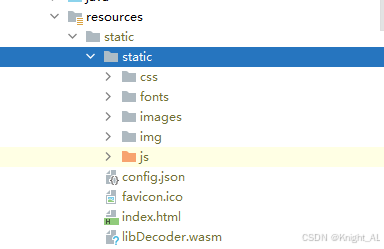
1️⃣ 问题点
Spring Boot 默认只能识别:
/index.html
/static/**它并不知道 /wvp/index.html 是什么。
2️⃣ 解决方案:WebMvcConfig
java
@Configuration
public class WebMvcConfig implements WebMvcConfigurer {

    @Override
    public void addResourceHandlers(ResourceHandlerRegistry registry) {

        // /wvp/static/** → 前端静态资源
        registry.addResourceHandler("/wvp/static/**")
                .addResourceLocations("classpath:/static/static/");

        // /wvp/index.html 等入口文件
        registry.addResourceHandler(
                "/wvp/index.html",
                "/wvp/favicon.ico",
                "/wvp/config.json",
                "/wvp/libDecoder.wasm"
        ).addResourceLocations("classpath:/static/");
    }
}
3️⃣ 实际效果
| 浏览器访问 | 实际读取 |
|---|---|
/wvp/index.html |
classpath:/static/index.html |
/wvp/static/js/app.js |
classpath:/static/static/js/app.js |
👉 这是 /wvp 在后端真正"生效"的地方
兜底
java
import org.springframework.core.io.ClassPathResource;
import org.springframework.core.io.Resource;
import org.springframework.http.MediaType;
import org.springframework.util.StreamUtils;
import org.springframework.web.bind.annotation.GetMapping;
import org.springframework.web.bind.annotation.RestController;

import javax.servlet.http.HttpServletResponse;
import java.io.IOException;

/**
 * WVP 前端页面控制器
 * 处理 /wvp 和 /wvp/ 路径,返回 index.html
 * 处理 /wvp/config.json,返回配置文件
 *
 * @author system
 */
@RestController
public class WvpIndexController {

    @GetMapping({"/wvp", "/wvp/"})
    public void index(HttpServletResponse response) throws IOException {
        Resource resource = new ClassPathResource("static/index.html");
        response.setContentType(MediaType.TEXT_HTML_VALUE + ";charset=UTF-8");
        StreamUtils.copy(resource.getInputStream(), response.getOutputStream());
    }

    @GetMapping("/wvp/config.json")
    public void configJson(HttpServletResponse response) throws IOException {
        Resource resource = new ClassPathResource("static/config.json");
        response.setContentType(MediaType.APPLICATION_JSON_VALUE + ";charset=UTF-8");
        StreamUtils.copy(resource.getInputStream(), response.getOutputStream());
    }
}
五、Vue 在 /wvp 场景下如何工作?
1️⃣ publicPath:资源路径前缀
js
// vue.config.js
module.exports = {
  publicPath: '/wvp/'
}
作用:
- 生成的
index.html中 - JS / CSS / 图片路径全部带
/wvp/
2️⃣ router.base:前端路由前缀
js
const router = new VueRouter({
  base: '/wvp/',
  routes
})
作用:
/#/dashboard→/wvp/#/dashboard- 代码中写的
/dashboard自动加前缀
3️⃣ 路由跳转是否需要修改?
不需要。
js
this.$router.push('/dashboard')Vue Router 会自动解析为:
/wvp/#/dashboard👉 推荐始终使用相对路径,避免硬编码 /wvp
六、Spring Security 需要注意什么?
如果项目使用了 Spring Security,需要显式放行 /wvp/**:
java
.antMatchers("/wvp/**").permitAll()否则会出现:
- 403
- 页面或静态资源无法加载
七、常见错误总结
| 错误点 | 表现 |
|---|---|
| 只改 Vue,不改后端 | 404 / 白屏 |
忘了 publicPath |
JS / CSS 加载失败 |
忘了 router.base |
路由错乱 |
| Security 未放行 | 403 |
八、一句话总结
/wvp前缀不是"某一个配置"决定的,而是 浏览器、Vue、Spring Boot 三方协作的结果。
只有当:
- Vue 知道
/wvp - Spring Boot 认识
/wvp - 静态资源能从
/wvp映射到磁盘
整个系统才能真正稳定运行。