<!DOCTYPE html>
<html lang="zh-CN">
<head>
<meta charset="UTF-8" />
<meta name="viewport" content="width=device-width, initial-scale=1.0" />
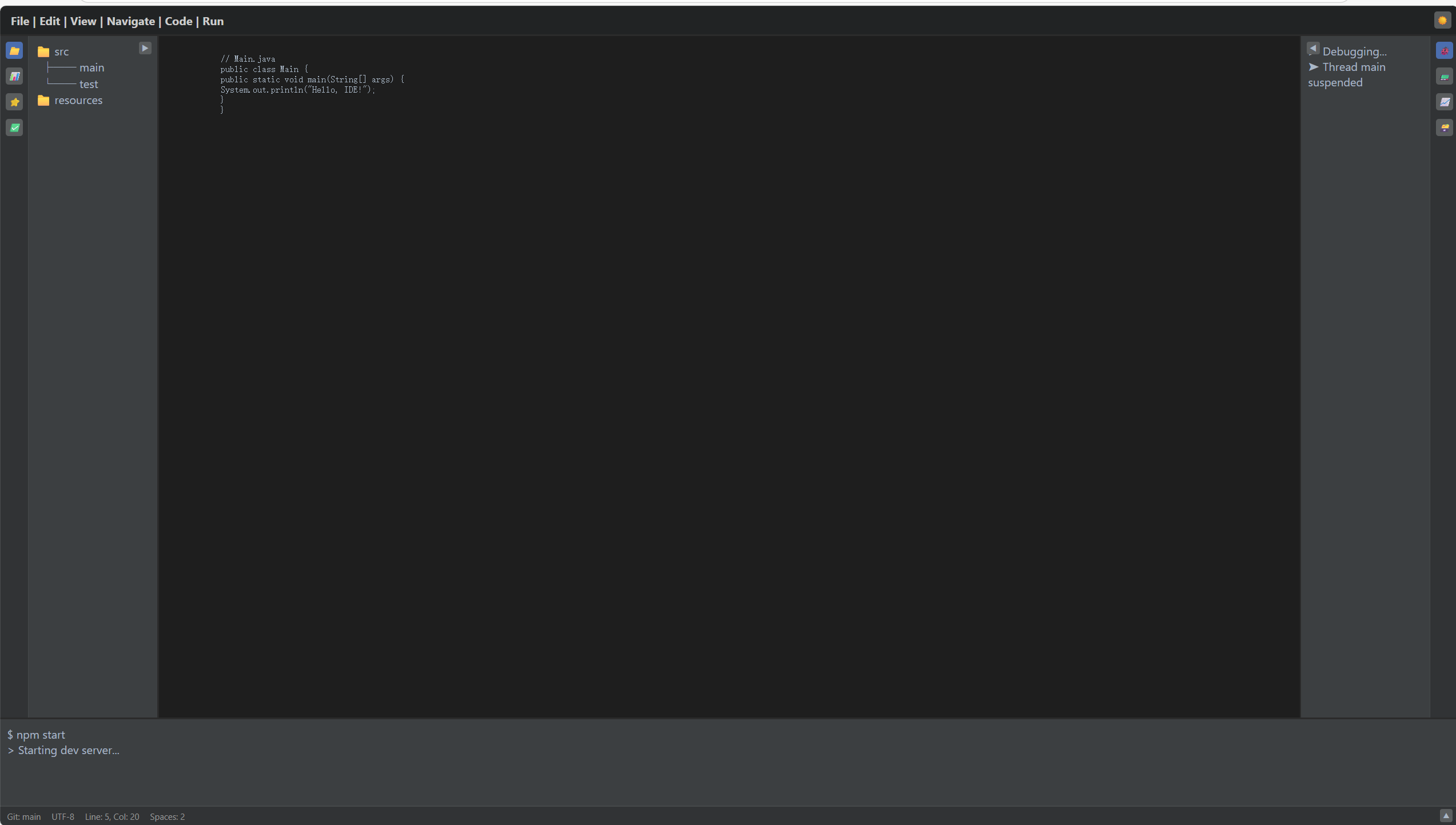
<title>IDE风格的布局界面</title>
<style id="theme-style">
/* ==================== 主题变量 ==================== */
:root {
--bg-main: #2b2b2b;
--bg-panel: #3c3f41;
--bg-toolbar: #313335;
--bg-top: #212324;
--bg-center: #1e1e1e;
--border-color: #45494a;
--text-color: #a9b7c6;
--text-light: #ccc;
--icon-bg: #5a5d5e;
--icon-active-bg: #4b6eaf;
--icon-active-color: white;
--fold-btn-bg: #5a5d5e;
--restore-btn-bg: #5a5d5e;
--restore-btn-hover-bg: #4b6eaf;
}
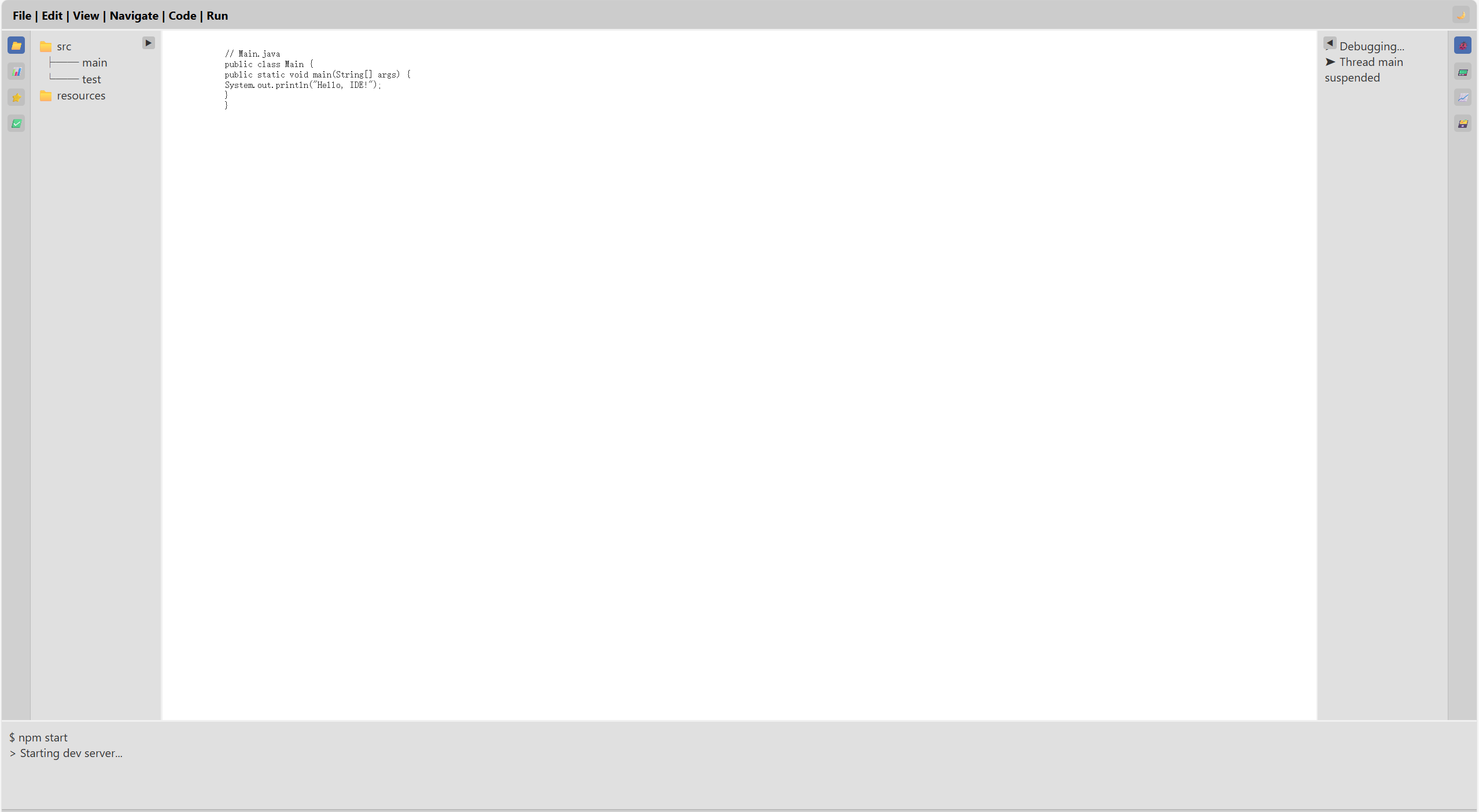
.light-theme {
--bg-main: #f0f0f0;
--bg-panel: #e0e0e0;
--bg-toolbar: #d0d0d0;
--bg-top: #cccccc;
--bg-center: #ffffff;
--border-color: #bbb;
--text-color: #333;
--text-light: #000;
--icon-bg: #c0c0c0;
--icon-active-bg: #4b6eaf;
--icon-active-color: white;
--fold-btn-bg: #c0c0c0;
--restore-btn-bg: #c0c0c0;
--restore-btn-hover-bg: #4b6eaf;
}
/* ==================== 全局重置 ==================== */
* {
margin: 0;
padding: 0;
box-sizing: border-box;
}
body,
html {
height: 100%;
overflow: hidden;
font-family: -apple-system, BlinkMacSystemFont, 'Segoe UI', sans-serif;
}
/* ==================== 布局容器 ==================== */
.ide-layout {
position: relative;
display: grid;
--left-width: 220px;
--right-width: 220px;
--bottom-height: 150px;
grid-template-areas:
"top top top"
"left center right"
"bottom bottom bottom";
grid-template-rows: 40px 1fr var(--bottom-height);
grid-template-columns: var(--left-width) 1fr var(--right-width);
height: 100vh;
gap: 2px;
background-color: var(--bg-main);
transition:
grid-template-columns 0.3s ease,
grid-template-rows 0.3s ease;
}
/* 折叠状态:宽度/高度设为 0 */
.ide-layout.collapsed-left {
--left-width: 0;
}
.ide-layout.collapsed-right {
--right-width: 0;
}
.ide-layout.collapsed-bottom {
--bottom-height: 0;
}
/* ==================== 通用面板样式 ==================== */
.panel {
background: var(--bg-panel);
color: var(--text-color);
overflow: hidden;
display: flex;
position: relative;
}
/* ==================== 顶部菜单栏 ==================== */
.top {
grid-area: top;
background: var(--bg-top);
color: var(--text-light);
display: flex;
align-items: center;
padding: 0 15px;
font-weight: bold;
user-select: none;
}
/* ==================== 中央编辑区 ==================== */
.center {
grid-area: center;
background: var(--bg-center);
padding: 10px;
overflow: auto;
color: var(--text-color);
white-space: pre;
font-family: monospace;
}
/* ==================== 工具栏图标通用样式 ==================== */
.toolbar i {
width: 24px;
height: 24px;
background: var(--icon-bg);
border-radius: 4px;
display: flex;
align-items: center;
justify-content: center;
cursor: pointer;
font-size: 12px;
color: var(--text-color);
}
.toolbar i.active {
background: var(--icon-active-bg);
color: var(--icon-active-color);
}
/* ==================== 左侧面板 ==================== */
.left {
grid-area: left;
flex-direction: row;
}
.left .toolbar {
width: 40px;
background: var(--bg-toolbar);
display: flex;
flex-direction: column;
align-items: center;
justify-content: flex-start;
padding: 8px 0;
gap: 12px;
border-right: 1px solid var(--border-color);
}
.left .content {
flex: 1;
padding: 10px;
overflow: auto;
}
.left .fold-btn {
position: absolute;
top: 8px;
right: 8px;
}
/* ==================== 右侧面板 ==================== */
.right {
grid-area: right;
flex-direction: row;
}
.right .toolbar {
width: 40px;
background: var(--bg-toolbar);
display: flex;
flex-direction: column;
align-items: center;
justify-content: flex-start;
padding: 8px 0;
gap: 12px;
border-left: 1px solid var(--border-color);
}
.right .content {
flex: 1;
padding: 10px;
overflow: auto;
}
.right .fold-btn {
position: absolute;
top: 8px;
left: 8px;
}
/* ==================== 底部面板 ==================== */
.bottom {
grid-area: bottom;
flex-direction: column;
}
.bottom .content {
flex: 1;
padding: 10px;
overflow: auto;
border-bottom: 1px solid var(--border-color);
}
.bottom .toolbar {
height: 28px;
background: var(--bg-toolbar);
display: flex;
align-items: center;
padding: 0 10px;
font-size: 12px;
color: #999;
border-top: 1px solid var(--border-color);
}
.bottom .toolbar span {
margin-right: 15px;
}
.bottom .fold-btn {
position: absolute;
bottom: 6px;
right: 8px;
}
/* ==================== 折叠按钮通用样式 ==================== */
.fold-btn,
.restore-btn {
width: 18px;
height: 18px;
background: var(--fold-btn-bg);
color: var(--text-color);
border-radius: 3px;
display: flex;
align-items: center;
justify-content: center;
cursor: pointer;
font-size: 10px;
z-index: 10;
}
/* ==================== 拖拽手柄 ==================== */
.resize-handle {
position: absolute;
z-index: 20;
}
.left .resize-handle {
right: 0;
top: 0;
width: 5px;
height: 100%;
cursor: col-resize;
}
.right .resize-handle {
left: 0;
top: 0;
width: 5px;
height: 100%;
cursor: col-resize;
}
.bottom .resize-handle {
left: 0;
top: 0;
width: 100%;
height: 5px;
cursor: row-resize;
}
/* 拖拽时禁用文本选择 */
.dragging {
user-select: none;
}
/* ==================== 恢复按钮(折叠后显示) ==================== */
.restore-btn {
background: var(--restore-btn-bg);
opacity: 0.8;
transition: opacity 0.2s;
z-index: 30;
/* 确保在最上层 */
position: absolute;
/* 显式声明 */
}
.restore-btn:hover {
opacity: 1;
background: var(--restore-btn-hover-bg);
color: white;
}
.restore-left {
left: 8px;
top: 50%;
transform: translateY(-50%);
width: 18px;
height: 24px;
display: none;
}
.ide-layout.collapsed-left .restore-left {
display: flex;
}
.restore-right {
right: 8px;
top: 50%;
transform: translateY(-50%);
width: 18px;
height: 24px;
display: none;
}
.ide-layout.collapsed-right .restore-right {
display: flex;
}
.restore-bottom {
bottom: 8px;
left: 50%;
transform: translateX(-50%);
width: 24px;
height: 18px;
display: none;
}
.ide-layout.collapsed-bottom .restore-bottom {
display: flex;
}
.restore-bottom {
bottom: 4px;
left: 50%;
transform: translateX(-50%);
width: 24px;
height: 18px;
display: none;
}
.ide-layout.collapsed-bottom .restore-bottom {
display: flex;
}
/* ==================== 主题切换按钮 ==================== */
.theme-toggle {
position: absolute;
right: 10px;
top: 8px;
background: var(--icon-bg);
color: var(--text-color);
width: 24px;
height: 24px;
border-radius: 4px;
display: flex;
align-items: center;
justify-content: center;
cursor: pointer;
font-size: 12px;
z-index: 100;
}
</style>
</head>
<body>
<!-- ==================== IDE 布局容器 ==================== -->
<div class="ide-layout" id="layout">
<!-- 顶部菜单栏 -->
<div class="top" id="topBar">
File | Edit | View | Navigate | Code | Run
<div class="theme-toggle" id="themeToggle">☀️</div>
</div>
<!-- 左侧面板 -->
<div class="panel left" id="leftPanel">
<div class="fold-btn" data-target="left">▶</div>
<div class="resize-handle" data-dir="left"></div>
<div class="toolbar">
<i data-view="project" title="Project">📁</i>
<i data-view="structure" title="Structure">📊</i>
<i data-view="favorites" title="Favorites">⭐</i>
<i data-view="commit" title="Commit">✅</i>
</div>
<div class="content" id="leftContent"></div>
</div>
<!-- 中央编辑区 -->
<div class="center">
// Main.java
public class Main {
public static void main(String[] args) {
System.out.println("Hello, IDE!");
}
}
</div>
<!-- 右侧面板 -->
<div class="panel right" id="rightPanel">
<div class="content" id="rightContent"></div>
<div class="toolbar">
<i data-view="debug" title="Debug">🐞</i>
<i data-view="console" title="Console">📟</i>
<i data-view="profiler" title="Profiler">📈</i>
<i data-view="database" title="Database">🗃️</i>
</div>
<div class="resize-handle" data-dir="right"></div>
<div class="fold-btn" data-target="right">◀</div>
</div>
<!-- 底部面板 -->
<div class="panel bottom" id="bottomPanel">
<div class="resize-handle" data-dir="bottom"></div>
<div class="content" id="bottomContent"></div>
<div class="toolbar">
<span>Git: main</span>
<span>UTF-8</span>
<span>Line: 5, Col: 20</span>
<span>Spaces: 2</span>
</div>
<div class="fold-btn" data-target="bottom">▲</div>
</div>
<!-- 恢复按钮(面板折叠后显示) -->
<div class="restore-btn restore-left" data-target="left">◀</div>
<div class="restore-btn restore-right" data-target="right">▶</div>
<div class="restore-btn restore-bottom" data-target="bottom">▼</div>
</div>
<script>
// ==================== 主题切换 ====================
const themeToggle = document.getElementById('themeToggle');
themeToggle.addEventListener('click', () => {
document.body.classList.toggle('light-theme');
const isLight = document.body.classList.contains('light-theme');
themeToggle.textContent = isLight ? '🌙' : '☀️';
});
// ==================== 面板内容数据 ====================
const PANEL_CONTENTS = {
left: {
project: `📁 src<br/> ├── main<br/> └── test<br/>📁 resources`,
structure: `📊 Main.java<br/>├── main()<br/>└── imports...`,
favorites: `⭐ MyUtils.java<br/>⭐ config.json`,
commit: `✅ 未提交更改 (3)<br/>• Main.java`
},
right: {
debug: `➤ Debugging...<br/>➤ Thread main suspended`,
console: `$ Running app...<br/>> Server started`,
profiler: `📈 CPU: 12%<br/>Memory: 245 MB`,
database: `🗃️ Connected to local DB<br/>Tables: users, logs`
},
bottom: {
terminal: `$ npm start<br/>> Starting dev server...`,
log: `[INFO] App initialized<br/>[WARN] Low memory`,
problems: `⚠️ 2 warnings in Main.java`,
build: `✓ Build successful (1.2s)`
}
};
// ==================== 初始化内容 ====================
function initPanelContent() {
document.getElementById('leftContent').innerHTML = PANEL_CONTENTS.left.project;
document.getElementById('rightContent').innerHTML = PANEL_CONTENTS.right.debug;
document.getElementById('bottomContent').innerHTML = PANEL_CONTENTS.bottom.terminal;
// 默认激活第一个图标
document.querySelector('.left .toolbar i').classList.add('active');
document.querySelector('.right .toolbar i').classList.add('active');
}
// ==================== 工具栏图标切换逻辑 ====================
function setupToolbarListeners(panelClass, contentId, views) {
document.querySelectorAll(`.${panelClass} .toolbar i`).forEach(btn => {
btn.addEventListener('click', () => {
const viewKey = btn.dataset.view;
// 移除其他激活状态
document.querySelectorAll(`.${panelClass} .toolbar i`).forEach(b => b.classList.remove('active'));
btn.classList.add('active');
document.getElementById(contentId).innerHTML = views[viewKey] || '';
});
});
}
// ==================== 折叠/展开逻辑 ====================
const layout = document.getElementById('layout');
const foldStates = { left: false, right: false, bottom: false };
function updateFoldButton(target, isCollapsed) {
const btn = document.querySelector(`.${target} .fold-btn`);
if (!btn) return;
const symbols = {
left: isCollapsed ? '▶' : '◀',
right: isCollapsed ? '◀' : '▶',
bottom: isCollapsed ? '▲' : '▼'
};
btn.textContent = symbols[target];
}
function setupFoldButtons() {
// 内部折叠按钮
document.querySelectorAll('.fold-btn').forEach(btn => {
btn.addEventListener('click', () => {
const target = btn.dataset.target;
const isNowCollapsed = !foldStates[target];
layout.classList.toggle(`collapsed-${target}`, isNowCollapsed);
foldStates[target] = isNowCollapsed;
updateFoldButton(target, isNowCollapsed);
});
});
// 外部恢复按钮
document.querySelectorAll('.restore-btn').forEach(btn => {
btn.addEventListener('click', () => {
const target = btn.dataset.target;
layout.classList.remove(`collapsed-${target}`);
foldStates[target] = false;
updateFoldButton(target, false);
});
});
}
// ==================== 拖拽调整尺寸 ====================
let isDragging = false;
let dragDir = null;
let startX, startY;
let startLeft, startRight, startBottom;
function setupResizeHandles() {
document.querySelectorAll('.resize-handle').forEach(handle => {
handle.addEventListener('mousedown', (e) => {
isDragging = true;
dragDir = handle.dataset.dir;
startX = e.clientX;
startY = e.clientY;
const style = getComputedStyle(layout);
startLeft = parseFloat(style.getPropertyValue('--left-width')) || 220;
startRight = parseFloat(style.getPropertyValue('--right-width')) || 220;
startBottom = parseFloat(style.getPropertyValue('--bottom-height')) || 150;
document.body.classList.add('dragging');
});
});
document.addEventListener('mousemove', (e) => {
if (!isDragging) return;
const dx = e.clientX - startX;
const dy = e.clientY - startY;
let newLeft = startLeft;
let newRight = startRight;
let newBottom = startBottom;
if (dragDir === 'left') {
newLeft = Math.max(40, startLeft + dx);
} else if (dragDir === 'right') {
newRight = Math.max(40, startRight - dx);
} else if (dragDir === 'bottom') {
newBottom = Math.max(30, startBottom - dy);
}
layout.style.setProperty('--left-width', newLeft + 'px');
layout.style.setProperty('--right-width', newRight + 'px');
layout.style.setProperty('--bottom-height', newBottom + 'px');
});
document.addEventListener('mouseup', () => {
if (isDragging) {
isDragging = false;
dragDir = null;
document.body.classList.remove('dragging');
}
});
}
// ==================== 初始化整个应用 ====================
function initApp() {
initPanelContent();
setupToolbarListeners('left', 'leftContent', PANEL_CONTENTS.left);
setupToolbarListeners('right', 'rightContent', PANEL_CONTENTS.right);
setupFoldButtons();
setupResizeHandles();
}
// 启动
document.addEventListener('DOMContentLoaded', initApp);
</script>
</body>
</html>