经过前面的学习,Flink 的几个核心概念相关的源码实现我们已经了解了。本文我们来梳理 Task 的数据交互相关的源码。
数据输出
话不多说,我们直接进入正题。首先来看 Task 的数据输出,在进入流程之前,我们先介绍几个基本概念。
基本概念
-
RecordWriterOutput:它是 Output 接口的一个具体实现类,底层使用 RecordWriter 来发送数据。
-
RecordWriter:数据写入的执行者,负责将数据写到 ResultPartition。
-
ResultPartition 和 ResultSubpartition:ResultPartition 是 ExecutionGraph 中一个节点的输出结果,下游的每个需要从当前 ResultPartition 消费数据的 Task 都会有一个 ResultSubpartition。
-
ChannelSelector:用来决定一个 Record 要被写到哪个 Subpartition 中。
-
LocalBufferPool:用来管理 Buffer 的缓冲池。在介绍反压的原理时,我们提到过。
对这些基本概念有了一定的了解之后,我们来看数据输出的具体流程。
执行流程
我们以 map 为例,看一下数据的输出过程。

在 StreamMap.processElement 方法中,调用完 map 方法之后,就会调用 output.collect 方法将数据输出,这里的 output 就是 RecordWriterOutput。在 RecordWriterOutput 中,会调用 RecordWriter 的 emit 方法。
java
private <X> void pushToRecordWriter(StreamRecord<X> record) {
    serializationDelegate.setInstance(record);

    try {
        recordWriter.emit(serializationDelegate);
    } catch (IOException e) {
        throw new UncheckedIOException(e.getMessage(), e);
    }
}
这里的 serializationDelegate 是用来对 record 进行序列化的。RecordWriter 有两个实现类,一个是 ChannelSelectorRecordWriter,另一个是 BroadcastRecordWriter。ChannelSelectorRecordWriter 需要先调用 ChannelSelector 选择对应的 subparition,然后进行写入。BroadcastRecordWriter 则是写到所有的 subparition。
接下来就是调用 BufferWritingResultPartition.emitRecord 来写入数据。
java
public void emitRecord(ByteBuffer record, int targetSubpartition) throws IOException {
    totalWrittenBytes += record.remaining();

    BufferBuilder buffer = appendUnicastDataForNewRecord(record, targetSubpartition);

    while (record.hasRemaining()) {
        // full buffer, partial record
        finishUnicastBufferBuilder(targetSubpartition);
        buffer = appendUnicastDataForRecordContinuation(record, targetSubpartition);
    }

    if (buffer.isFull()) {
        // full buffer, full record
        finishUnicastBufferBuilder(targetSubpartition);
    }

    // partial buffer, full record
}
这里把 record 写入到 buffer 中,如果 buffer 不够,则会从 LocalBufferPool 中申请新的 buffer,申请到之后就会继续写入。下面是具体的申请过程。
java
private MemorySegment requestMemorySegment(int targetChannel) {
    MemorySegment segment = null;
    synchronized (availableMemorySegments) {
        checkDestroyed();

        if (!availableMemorySegments.isEmpty()) {
            segment = availableMemorySegments.poll();
        } else if (isRequestedSizeReached()) {
            // Only when the buffer request reaches the upper limit(i.e. current pool size),
            // requests an overdraft buffer.
            segment = requestOverdraftMemorySegmentFromGlobal();
        }

        if (segment == null) {
            return null;
        }

        if (targetChannel != UNKNOWN_CHANNEL) {
            if (++subpartitionBuffersCount[targetChannel] == maxBuffersPerChannel) {
                unavailableSubpartitionsCount++;
            }
        }

        checkAndUpdateAvailability();
    }
    return segment;
}
如果有可用内存,就直接从队列中出队。如果达到了本地 BufferPool 的上限,就从全局的 NetworkBufferPool 中申请,申请不到就会阻塞写入过程,等待申请。最后还会检查并更新可用内存状态。
有了可用的 buffer 之后,就会调用 addToSubpartition,最终数据存储在 PipelinedSubpartition 的 buffers 队列中。
java
private void addToSubpartition(
        BufferBuilder buffer,
        int targetSubpartition,
        int partialRecordLength,
        int minDesirableBufferSize)
        throws IOException {
    int desirableBufferSize =
            subpartitions[targetSubpartition].add(
                    buffer.createBufferConsumerFromBeginning(), partialRecordLength);

    resizeBuffer(buffer, desirableBufferSize, minDesirableBufferSize);
}
数据输入
看完了数据输出的过程之后,我们再来看一下数据输入的过程。首先还是了解几个基本概念。
基本概念
-
InputGate:InputGate 是对输入的封装,与 JobGraph 中的 JobEdge 一一对应,每个 InputGate 消费上游一个或多个 Resultpartition。
-
InputChannel:InputChannel 是和 ExecutionGraph 中的 ExecutionEdge 一一对应的。每个 InputChannel 接收一个 ResultSubpartition 的输出,InputChannel 主要关注 LocalInputChannel 和 RemoteInputChannel 两种实现。
执行流程
了解了具体概念之后,我们再看数据输入的具体流程。
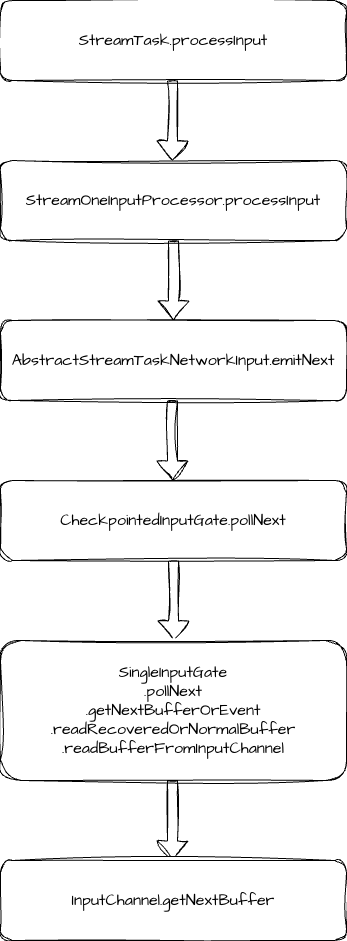
数据输入的入口是 StreamTask.processInput 方法,这个方法中主要是调用 inputProcessor.processInput 方法,我们以 StreamOneInputProcessor 为例。这个方法就是调用 input.emitNext 方法。
java
public DataInputStatus emitNext(DataOutput<T> output) throws Exception {

    while (true) {
        // get the stream element from the deserializer
        if (currentRecordDeserializer != null) {
            RecordDeserializer.DeserializationResult result;
            try {
                result = currentRecordDeserializer.getNextRecord(deserializationDelegate);
            } catch (IOException e) {
                throw new IOException(
                        String.format("Can't get next record for channel %s", lastChannel), e);
            }
            if (result.isBufferConsumed()) {
                currentRecordDeserializer = null;
            }

            if (result.isFullRecord()) {
                final boolean breakBatchEmitting =
                        processElement(deserializationDelegate.getInstance(), output);
                if (canEmitBatchOfRecords.check() && !breakBatchEmitting) {
                    continue;
                }
                return DataInputStatus.MORE_AVAILABLE;
            }
        }

        Optional<BufferOrEvent> bufferOrEvent = checkpointedInputGate.pollNext();
        if (bufferOrEvent.isPresent()) {
            // return to the mailbox after receiving a checkpoint barrier to avoid processing of
            // data after the barrier before checkpoint is performed for unaligned checkpoint
            // mode
            if (bufferOrEvent.get().isBuffer()) {
                processBuffer(bufferOrEvent.get());
            } else {
                DataInputStatus status = processEvent(bufferOrEvent.get(), output);
                if (status == DataInputStatus.MORE_AVAILABLE && canEmitBatchOfRecords.check()) {
                    continue;
                }
                return status;
            }
        } else {
            if (checkpointedInputGate.isFinished()) {
                checkState(
                        checkpointedInputGate.getAvailableFuture().isDone(),
                        "Finished BarrierHandler should be available");
                return DataInputStatus.END_OF_INPUT;
            }
            return DataInputStatus.NOTHING_AVAILABLE;
        }
    }
}
这里是调用 checkpointedInputGate.pollNext 来获取输入的数据。它的内部就是调用 InputGate 的 pollNext 方法来获取数据。当获取到完整数据之后,就会调用 processElement 来处理数据。
我们以 SingleInputGate 为例看 InputGate 的 pollNext 方法。它的内部调用链路可用一直追踪到 readBufferFromInputChannel 方法,这个方法内会调用 inputChannel.getNextBuffer,这里交给 InputChannel 来具体执行数据读取。
java
public Optional<BufferAndAvailability> getNextBuffer() throws IOException {
    checkError();

    if (!toBeConsumedBuffers.isEmpty()) {
        return getBufferAndAvailability(toBeConsumedBuffers.removeFirst());
    }

    ResultSubpartitionView subpartitionView = this.subpartitionView;
    if (subpartitionView == null) {
        // There is a possible race condition between writing a EndOfPartitionEvent (1) and
        // flushing (3) the Local
        // channel on the sender side, and reading EndOfPartitionEvent (2) and processing flush
        // notification (4). When
        // they happen in that order (1 - 2 - 3 - 4), flush notification can re-enqueue
        // LocalInputChannel after (or
        // during) it was released during reading the EndOfPartitionEvent (2).
        if (isReleased) {
            return Optional.empty();
        }

        // this can happen if the request for the partition was triggered asynchronously
        // by the time trigger
        // would be good to avoid that, by guaranteeing that the requestPartition() and
        // getNextBuffer() always come from the same thread
        // we could do that by letting the timer insert a special "requesting channel" into the
        // input gate's queue
        subpartitionView = checkAndWaitForSubpartitionView();
    }

    BufferAndBacklog next = subpartitionView.getNextBuffer();
    // ignore the empty buffer directly
    while (next != null && next.buffer().readableBytes() == 0) {
        next.buffer().recycleBuffer();
        next = subpartitionView.getNextBuffer();
        numBuffersIn.inc();
    }

    if (next == null) {
        if (subpartitionView.isReleased()) {
            throw new CancelTaskException(
                    "Consumed partition " + subpartitionView + " has been released.");
        } else {
            return Optional.empty();
        }
    }

    Buffer buffer = next.buffer();

    if (buffer instanceof FullyFilledBuffer) {
        List<Buffer> partialBuffers = ((FullyFilledBuffer) buffer).getPartialBuffers();
        int seq = next.getSequenceNumber();
        for (Buffer partialBuffer : partialBuffers) {
            toBeConsumedBuffers.add(
                    new BufferAndBacklog(
                            partialBuffer,
                            next.buffersInBacklog(),
                            buffer.getDataType(),
                            seq++));
        }

        return getBufferAndAvailability(toBeConsumedBuffers.removeFirst());
    }

    return getBufferAndAvailability(next);
}
我们先来看 LocalInputChannel,先获取到了 subpartitionView,并调用 getNextBuffer,这里其实就是从 PipelinedSubpartition 的 buffers 队列中读取数据。
RemoteInputChannel 则需要从 receivedBuffers 中读取数据,这个队列的数据就是消费上游数据后保存的。
至此,Flink 中 Task 的数据输入和输出过程的源码就梳理完了,更加底层的 Netty 相关代码我们在后面继续梳理。
总结
最后简单总结一下,本文我们梳理了 Task 的数据输出和输入的过程。输出过程主要是利用 RecordWriter 将数据写入到 Buffer 中,输入过程则是利用 InputChannel 从 Buffer 消费的过程。如果你的 Flink 任务数据量特别大,并且没什么复杂的逻辑,可以考虑适当调整 localBufferPool 的大小来调优任务的吞吐。