前言
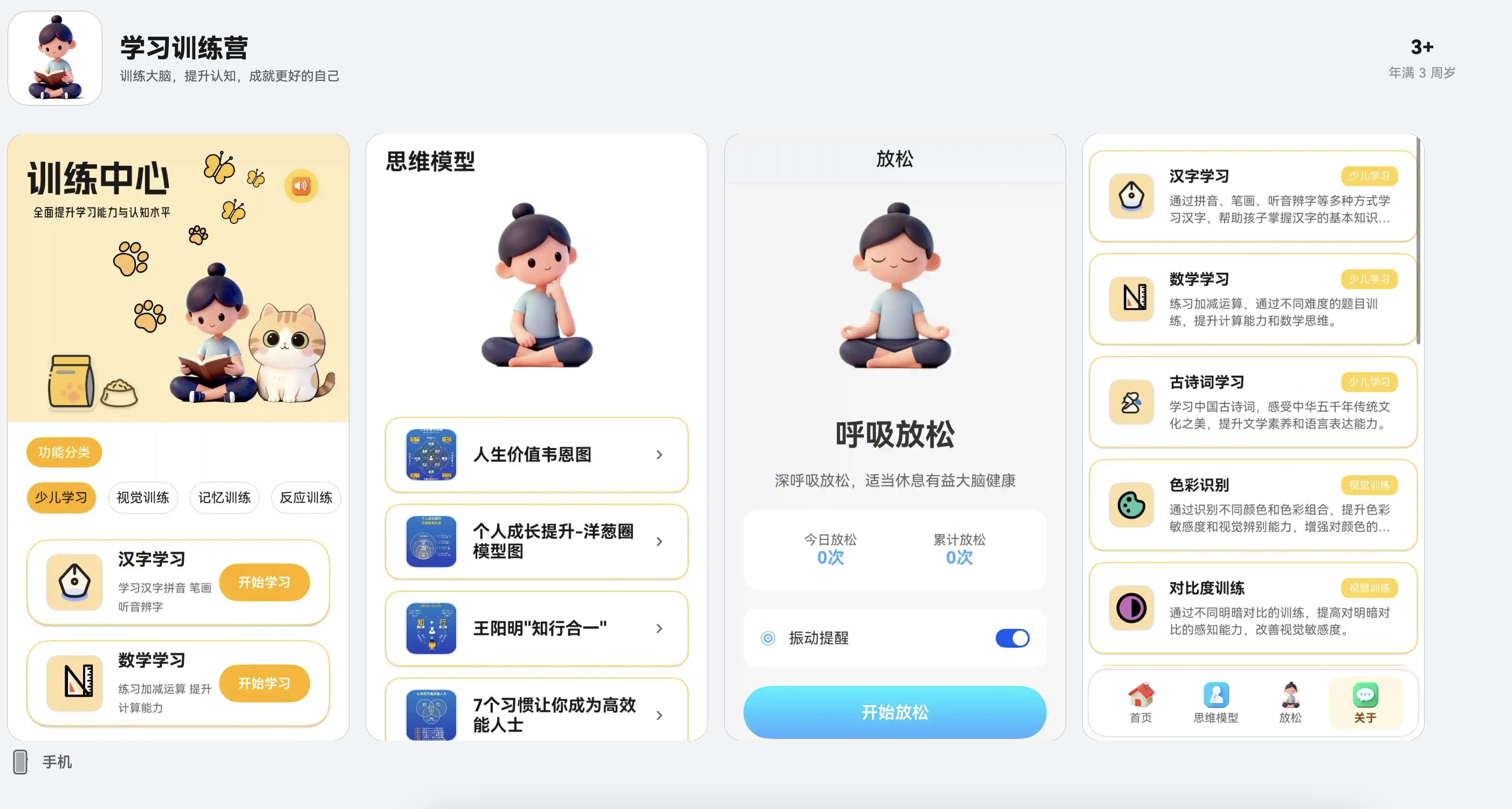
随着HarmonyOS生态的快速发展,越来越多的开发者开始关注HarmonyOS应用开发。本文基于一个实际的教育类应用项目,分享HarmonyOS应用开发中的核心技术实践,包括ArkTS与WebView混合开发、JavaScript Proxy通信机制、TTS语音服务集成、关系型数据库应用等关键技术点。
一、项目架构设计
1.1 整体架构
本项目采用ArkTS + WebView混合开发架构,充分利用两种技术的优势:
-
ArkTS层:负责原生功能(TTS、数据库、路由、状态管理)
-
WebView层:负责交互逻辑(HTML/CSS/JavaScript实现复杂的学习界面)
┌─────────────────────────────────┐
│ ArkTS 原生层 │
│ - 页面路由 │
│ - TTS语音服务 │
│ - 数据库服务 │
│ - 学习报告服务 │
│ - JavaScript Proxy │
└──────────────┬──────────────────┘
│ JavaScript Proxy
│ 双向通信
┌──────────────▼──────────────────┐
│ WebView H5层 │
│ - 学习界面UI │
│ - 交互逻辑 │
│ - 题目生成 │
│ - 答题逻辑 │
└─────────────────────────────────┘
1.2 技术栈选型
- 开发语言:ArkTS(TypeScript的超集)
- UI框架:ArkUI声明式开发
- 数据存储:关系型数据库(relationalStore)
- 语音服务:@kit.CoreSpeechKit
- WebView:@ohos.web.webview
二、ArkTS与WebView混合开发实践
2.1 WebView基础配置
在ArkTS页面中嵌入WebView,加载本地HTML资源:
typescript
@Entry
@Component
export struct PinyinPracticePage {
  private controller: web_webview.WebviewController = new web_webview.WebviewController();

  build() {
    Column() {
      Web({
        src: $rawfile('PinyinPractice.html'),  // 加载rawfile资源
        controller: this.controller
      })
      .width('100%')
      .layoutWeight(1)
      .javaScriptAccess(true)      // 启用JavaScript
      .domStorageAccess(true)       // 启用DOM存储
      .darkMode(WebDarkMode.Auto)   // 自动适配深色模式
    }
  }
}
2.2 JavaScript Proxy通信机制
HarmonyOS提供了javaScriptProxy机制,实现ArkTS与H5的双向通信。这是混合开发的核心技术。
2.2.1 创建Native代理类
首先创建一个代理类,封装需要暴露给H5的方法:
typescript
class PinyinNativeProxy {
  private ttsService: TtsService;

  constructor(ttsService: TtsService) {
    this.ttsService = ttsService;
  }

  // TTS语音朗读
  ttsSpeak(text: string, speed?: number, volume?: number, pitch?: number): void {
    this.ttsService.speak(text, speed || 0.7, volume || 1.0, pitch || 1.0);
  }

  // 停止朗读
  ttsStop(): void {
    this.ttsService.stop();
  }

  // 检查是否正在播放
  ttsIsPlaying(): boolean {
    return this.ttsService.getIsPlaying();
  }

  // 添加错题(异步方法)
  async addWrongQuestion(
    type: string,
    question: string,
    userAnswer: string,
    correctAnswer: string,
    category?: string
  ): Promise<void> {
    // 映射字符串类型到枚举
    let questionType: WrongQuestionType = WrongQuestionType.PINYIN_PRACTICE;
    if (type === 'pinyin_practice') {
      questionType = WrongQuestionType.PINYIN_PRACTICE;
    }
    // ... 其他类型映射

    await wrongQuestionService.addWrongQuestion(
      questionType,
      question,
      userAnswer,
      correctAnswer,
      category
    );
  }
}
2.2.2 注册JavaScript Proxy
在WebView组件中注册代理对象:
typescript
Web({
  src: $rawfile('PinyinPractice.html'),
  controller: this.controller
})
.javaScriptProxy({
  object: this.nativeProxy,           // 代理对象实例
  name: "nativeProxy",                // 在window上的名称
  methodList: [                       // 同步方法列表
    "ttsSpeak",
    "ttsStop",
    "ttsIsPlaying",
    "addWrongQuestion"
  ],
  controller: this.controller,
  asyncMethodList: ["addWrongQuestion"]  // 异步方法列表
})
2.2.3 H5端调用原生方法
在HTML/JavaScript中直接调用注册的代理方法:
javascript
// 调用TTS朗读
window.nativeProxy.ttsSpeak('你好', 0.7, 1.0, 1.0);

// 调用异步方法添加错题
await window.nativeProxy.addWrongQuestion(
  'pinyin_practice',
  '题目内容',
  '用户答案',
  '正确答案',
  '分类'
);

// 检查TTS是否正在播放
const isPlaying = window.nativeProxy.ttsIsPlaying();
2.2.4 ArkTS向H5传递数据
使用runJavaScript方法向H5注入数据:
typescript
.onPageEnd(() => {
  const typeSafe = this.practiceType;
  const nameSafe = this.practiceName;

  setTimeout(() => {
    this.controller.runJavaScript(
      `if (window.__setPinyinPracticeMode) {
        window.__setPinyinPracticeMode('${typeSafe}', '${nameSafe}');
      }`
    ).catch((err: Error) => {
      console.error('执行JavaScript失败:', err);
    });
  }, 300);
})
2.3 通信机制的优势
- 类型安全:ArkTS提供完整的类型检查
- 性能优化:原生方法调用,性能优于Web API
- 功能扩展:可以访问所有HarmonyOS原生能力
- 开发效率:H5快速迭代UI,原生处理复杂逻辑
三、TTS语音服务集成
3.1 TTS服务封装
教育类应用需要大量的语音朗读功能。我们封装了一个TTS服务类:
typescript
import { textToSpeech } from '@kit.CoreSpeechKit';

export class TtsService {
  private ttsEngine?: textToSpeech.TextToSpeechEngine;
  private ttsEngineCreated: boolean = false;
  private isPlaying: boolean = false;

  /**
   * 初始化TTS引擎
   */
  initializeTtsEngine(): void {
    if (this.ttsEngineCreated || this.ttsEngine) {
      return;
    }

    const initParamsInfo: textToSpeech.CreateEngineParams = {
      language: 'zh-CN',
      person: 0,        // 0-女声,1-男声
      online: 1,        // 1-在线,0-离线
      extraParams: {
        'style': 'interaction-broadcast',
        'locate': 'CN'
      }
    };

    textToSpeech.createEngine(initParamsInfo,
      (err: BusinessError, engine: textToSpeech.TextToSpeechEngine) => {
        if (!err) {
          this.ttsEngine = engine;
          this.ttsEngineCreated = true;
          this.setupListener();
        }
      }
    );
  }

  /**
   * 设置监听器
   */
  private setupListener(): void {
    if (!this.ttsEngine) return;

    const speakListener: textToSpeech.SpeakListener = {
      onStart: (requestId: string, response: textToSpeech.StartResponse) => {
        this.isPlaying = true;
      },
      onComplete: (requestId: string, response: textToSpeech.CompleteResponse) => {
        if (response.type === 1) {
          this.isPlaying = false;
        }
      },
      onStop: () => {
        this.isPlaying = false;
      },
      onError: (requestId: string, errorCode: number, errorMessage: string) => {
        console.error(`TTS错误: ${errorCode}, ${errorMessage}`);
        this.isPlaying = false;
      }
    };

    this.ttsEngine.setListener(speakListener);
  }

  /**
   * 朗读文本
   */
  speak(text: string, speed: number = 0.7, volume: number = 1.0, pitch: number = 1.0): void {
    if (!text || !text.trim()) return;

    if (!this.ttsEngineCreated || !this.ttsEngine) {
      this.initializeTtsEngine();
      // 等待引擎初始化
      setTimeout(() => this.doSpeak(text, speed, volume, pitch), 100);
      return;
    }

    this.doSpeak(text, speed, volume, pitch);
  }

  /**
   * 执行朗读
   */
  private doSpeak(text: string, speed: number, volume: number, pitch: number): void {
    if (!this.ttsEngine) return;

    const speakParams: textToSpeech.SpeakParams = {
      requestId: 'tts_' + Date.now(),
      extraParams: {
        'queueMode': 0,        // 0-覆盖模式,1-队列模式
        'speed': speed,        // 语速 0.0-2.0
        'volume': volume,      // 音量 0.0-1.0
        'pitch': pitch,        // 音调 0.0-2.0
        'languageContext': 'zh-CN',
        'audioType': 'pcm',
        'soundChannel': 3,
        'playType': 1
      }
    };

    this.ttsEngine.speak(text, speakParams);
  }

  /**
   * 停止朗读
   */
  stop(): void {
    if (this.ttsEngine && this.isPlaying) {
      if (this.ttsEngine.isBusy()) {
        this.ttsEngine.stop();
      }
      this.isPlaying = false;
    }
  }
}
3.2 TTS使用场景
- 汉字学习:朗读汉字发音
- 拼音练习:朗读拼音和汉字
- 古诗词学习:朗读整首诗词
- 成语故事:朗读成语和故事内容
- 对联学习:朗读上下联
四、关系型数据库实现错题本系统
4.1 数据库设计
使用HarmonyOS的关系型数据库(relationalStore)存储错题数据:
typescript
// 错题类型枚举
export enum WrongQuestionType {
  IDIOM_FILL = 'idiom_fill',
  PINYIN_PRACTICE = 'pinyin_practice',
  MATH = 'math',
  COUPLET = 'couplet',
  PROVERB = 'proverb',
  HANZI = 'hanzi',
  COLOR_RECOGNITION = 'color_recognition'
}

// 错题数据结构
export interface WrongQuestion {
  id: string;
  type: WrongQuestionType;
  question: string;
  userAnswer: string;
  correctAnswer: string;
  createTime: number;
  lastReviewTime: number;
  reviewCount: number;
  nextReviewTime: number;      // 基于遗忘曲线的下次复习时间
  masteryLevel: number;        // 掌握程度 0-100
  category?: string;
}

// 建表SQL
const SQL_CREATE_TABLE = `
  CREATE TABLE IF NOT EXISTS WRONG_QUESTION (
    id TEXT PRIMARY KEY NOT NULL,
    type TEXT NOT NULL,
    question TEXT NOT NULL,
    userAnswer TEXT NOT NULL,
    correctAnswer TEXT NOT NULL,
    createTime INTEGER NOT NULL,
    lastReviewTime INTEGER NOT NULL,
    reviewCount INTEGER NOT NULL,
    nextReviewTime INTEGER NOT NULL,
    masteryLevel INTEGER NOT NULL,
    category TEXT
  )
`;
4.2 数据库服务实现
typescript
export class WrongQuestionService {
  private static instance: WrongQuestionService | null = null;
  private store: relationalStore.RdbStore | undefined = undefined;

  // 单例模式
  public static getInstance(): WrongQuestionService {
    if (!WrongQuestionService.instance) {
      WrongQuestionService.instance = new WrongQuestionService();
    }
    return WrongQuestionService.instance;
  }

  /**
   * 初始化数据库
   */
  private async initializeStore(): Promise<void> {
    const context = AppUtil.getContext();
    const STORE_CONFIG: relationalStore.StoreConfig = {
      name: 'WrongQuestion.db',
      securityLevel: relationalStore.SecurityLevel.S3
    };

    this.store = await relationalStore.getRdbStore(context, STORE_CONFIG);

    // 创建表
    await this.store.execute(SQL_CREATE_TABLE);
  }

  /**
   * 添加错题
   */
  async addWrongQuestion(
    type: WrongQuestionType,
    question: string,
    userAnswer: string,
    correctAnswer: string,
    category?: string
  ): Promise<void> {
    await this.ensureInitialized();

    const id = `${type}_${Date.now()}_${Math.random()}`;
    const now = Date.now();

    const wrongQuestion: WrongQuestion = {
      id,
      type,
      question,
      userAnswer,
      correctAnswer,
      createTime: now,
      lastReviewTime: now,
      reviewCount: 0,
      nextReviewTime: now + 24 * 60 * 60 * 1000,  // 1天后复习
      masteryLevel: 0,
      category
    };

    // 检查是否已存在相同错题
    const existing = await this.findDuplicate(type, question, userAnswer);
    if (existing) {
      // 更新复习次数和掌握程度
      await this.updateReviewInfo(existing.id);
      return;
    }

    // 插入新错题
    const valueBucket: relationalStore.ValuesBucket = {
      'id': wrongQuestion.id,
      'type': wrongQuestion.type,
      'question': wrongQuestion.question,
      'userAnswer': wrongQuestion.userAnswer,
      'correctAnswer': wrongQuestion.correctAnswer,
      'createTime': wrongQuestion.createTime,
      'lastReviewTime': wrongQuestion.lastReviewTime,
      'reviewCount': wrongQuestion.reviewCount,
      'nextReviewTime': wrongQuestion.nextReviewTime,
      'masteryLevel': wrongQuestion.masteryLevel,
      'category': wrongQuestion.category || ''
    };

    await this.store?.insert('WRONG_QUESTION', valueBucket);
  }

  /**
   * 查询错题列表
   */
  async getWrongQuestions(
    type?: WrongQuestionType,
    limit?: number,
    offset?: number
  ): Promise<WrongQuestion[]> {
    await this.ensureInitialized();

    let predicates = new relationalStore.RdbPredicates('WRONG_QUESTION');

    if (type) {
      predicates.equalTo('type', type);
    }

    predicates.orderByDesc('createTime');

    if (limit) {
      predicates.limit(limit);
    }
    if (offset) {
      predicates.offset(offset);
    }

    const resultSet = await this.store?.query(predicates);
    const wrongQuestions: WrongQuestion[] = [];

    if (resultSet) {
      while (resultSet.goToNextRow()) {
        wrongQuestions.push({
          id: resultSet.getString(resultSet.getColumnIndex('id')),
          type: resultSet.getString(resultSet.getColumnIndex('type')) as WrongQuestionType,
          question: resultSet.getString(resultSet.getColumnIndex('question')),
          userAnswer: resultSet.getString(resultSet.getColumnIndex('userAnswer')),
          correctAnswer: resultSet.getString(resultSet.getColumnIndex('correctAnswer')),
          createTime: resultSet.getLong(resultSet.getColumnIndex('createTime')),
          lastReviewTime: resultSet.getLong(resultSet.getColumnIndex('lastReviewTime')),
          reviewCount: resultSet.getInt(resultSet.getColumnIndex('reviewCount')),
          nextReviewTime: resultSet.getLong(resultSet.getColumnIndex('nextReviewTime')),
          masteryLevel: resultSet.getInt(resultSet.getColumnIndex('masteryLevel')),
          category: resultSet.getString(resultSet.getColumnIndex('category'))
        });
      }
      resultSet.close();
    }

    return wrongQuestions;
  }

  /**
   * 基于遗忘曲线更新复习时间
   */
  private calculateNextReviewTime(reviewCount: number): number {
    const FORGETTING_CURVE_INTERVALS = [1, 2, 4, 7, 15, 30, 60, 90]; // 天数
    const index = Math.min(reviewCount, FORGETTING_CURVE_INTERVALS.length - 1);
    const days = FORGETTING_CURVE_INTERVALS[index];
    return Date.now() + days * 24 * 60 * 60 * 1000;
  }
}
4.3 遗忘曲线算法
错题本系统实现了基于艾宾浩斯遗忘曲线的复习提醒:
typescript
// 遗忘曲线间隔(天)
const FORGETTING_CURVE_INTERVALS = [1, 2, 4, 7, 15, 30, 60, 90];

// 根据复习次数计算下次复习时间
private calculateNextReviewTime(reviewCount: number): number {
  const index = Math.min(reviewCount, FORGETTING_CURVE_INTERVALS.length - 1);
  const days = FORGETTING_CURVE_INTERVALS[index];
  return Date.now() + days * 24 * 60 * 60 * 1000;
}
五、学习报告服务实现
5.1 学习时长统计
使用preferences存储学习时长数据:
typescript
export class StudyReportService {
  private static instance: StudyReportService | null = null;
  private prefs?: preferences.Preferences;

  /**
   * 记录学习时长
   */
  async recordStudyTime(module: string, duration: number): Promise<void> {
    const today = this.getTodayStr();
    const key = `${module}_${today}`;

    const existing = await this.prefs?.get(key, 0) as number;
    await this.prefs?.put(key, existing + duration);
    await this.prefs?.flush();
  }

  /**
   * 获取今日学习时长
   */
  async getTodayStudyTime(): Promise<number> {
    const today = this.getTodayStr();
    const modules = ['hanzi', 'pinyin', 'math', 'idiom', 'poem', 'couplet'];
    let total = 0;

    for (const module of modules) {
      const key = `${module}_${today}`;
      const time = await this.prefs?.get(key, 0) as number;
      total += time;
    }

    return total;
  }

  /**
   * 获取本周学习时长
   */
  async getWeekStudyTime(): Promise<number> {
    const weekDates = this.getWeekDates();
    let total = 0;

    for (const date of weekDates) {
      const dayTotal = await this.getDayStudyTime(date);
      total += dayTotal;
    }

    return total;
  }
}
5.2 学习时长记录
在页面生命周期中记录学习时长:
typescript
@Entry
@Component
export struct PinyinPracticePage {
  private startTime: number = 0;

  aboutToAppear(): void {
    this.startTime = Date.now();
  }

  aboutToDisappear(): void {
    const duration = Math.floor((Date.now() - this.startTime) / 1000); // 秒
    studyReportService.recordStudyTime('pinyin', duration);
  }
}
六、性能优化实践
6.1 WebView性能优化
- 延迟加载 :使用
onPageEnd回调确保页面完全加载后再执行JavaScript - 资源优化:HTML/CSS/JS文件压缩,图片使用WebP格式
- 缓存策略 :启用
domStorageAccess,利用本地存储缓存数据
6.2 数据库优化
- 索引优化:为常用查询字段创建索引
- 批量操作:使用事务批量插入/更新数据
- 分页查询 :使用
limit和offset实现分页,避免一次性加载大量数据
6.3 TTS服务优化
- 单例模式:TTS服务使用单例,避免重复创建引擎
- 延迟初始化:按需初始化TTS引擎,减少启动时间
- 队列管理 :使用
queueMode控制语音播放队列
七、开发经验总结
7.1 架构设计建议
- 职责分离:ArkTS负责原生功能,H5负责UI交互
- 服务封装:将TTS、数据库等功能封装成服务类,便于复用
- 类型安全:充分利用ArkTS的类型系统,减少运行时错误
7.2 常见问题解决
- JavaScript Proxy未注册 :确保在
onPageEnd回调中调用,给WebView足够的初始化时间 - 异步方法调用 :异步方法需要在
asyncMethodList中声明 - 数据库初始化:使用单例模式确保数据库只初始化一次
7.3 最佳实践
- 错误处理:所有异步操作都要有错误处理
- 日志记录:使用统一的前缀记录日志,便于调试
- 资源管理:及时释放TTS引擎、数据库连接等资源
八、总结
本文分享了HarmonyOS教育类应用开发中的核心技术实践:
- 混合开发架构:ArkTS + WebView,充分发挥两种技术优势
- JavaScript Proxy通信:实现H5与原生代码的双向通信
- TTS语音服务:封装易用的语音朗读功能
- 关系型数据库:实现错题本系统,支持遗忘曲线算法
- 学习报告服务:记录和统计学习数据
这些技术方案不仅适用于教育类应用,也可以应用到其他类型的HarmonyOS应用中。希望本文能为HarmonyOS开发者提供一些参考和启发。
作者简介 :专注于HarmonyOS应用开发,致力于探索HarmonyOS生态的最佳实践。
技术交流:欢迎在评论区交流HarmonyOS开发经验!