1. 项目准备
1.1 环境要求
-
Python 3.8+
-
pip 20.0+
1.2 安装依赖
```bash
安装智谱AI SDK
pip install zai-sdk
安装其他依赖
pip install requests python-dotenv
```
1.3 获取API密钥
- 通过邀请链接注册智谱AI账号:
https://www.bigmodel.cn/glm-coding?ic=WDUDWJ5IGY(https://www.bigmodel.cn/glm-coding?ic=WDUDWJ5IGY)
- 登录后,在「控制台-API密钥」页面创建并获取API密钥
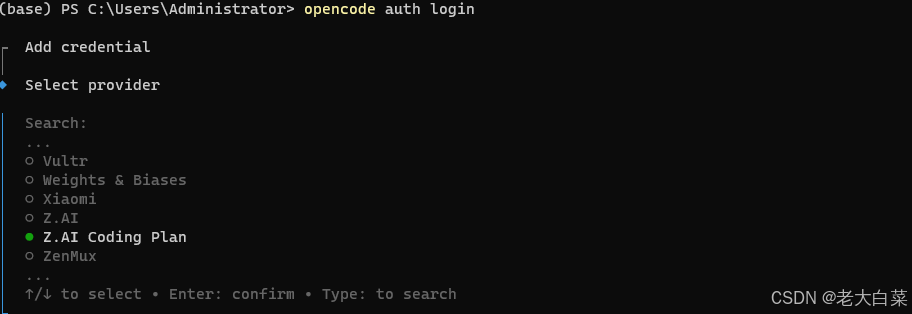
之后输入你自己在bigmodel.cn中的api key
2. 配置文件设置
创建`.env`文件,存储API密钥:
```dotenv
智谱AI API密钥
ZHIPU_API_KEY=your-api-key-here
邀请链接
INVITE_LINK=https://www.bigmodel.cn/glm-coding?ic=WDUDWJ5IGY
```
3. API调用示例
3.1 基础调用
```python
from zai import ZhipuAiClient
from dotenv import load_dotenv
import os
加载环境变量
load_dotenv()
初始化客户端
client = ZhipuAiClient(api_key=os.getenv("ZHIPU_API_KEY"))
调用GLM-4.7模型
def call_glm47(prompt):
response = client.chat.completions.create(
model="glm-4.7",
messages=[
{"role": "user", "content": prompt}
],
thinking={
"type": "enabled", # 启用深度思考模式
},
max_tokens=65536,
temperature=1.0
)
return response.choices0.message.content
使用示例
if name == "main":
result = call_glm47("编写一个Python函数来计算阶乘")
print("GLM-4.7响应:")
print(result)
print(f"\n通过邀请链接注册享受更多优惠: {os.getenv('INVITE_LINK')}")
```
3.2 流式调用
```python
from zai import ZhipuAiClient
from dotenv import load_dotenv
import os
加载环境变量
load_dotenv()
初始化客户端
client = ZhipuAiClient(api_key=os.getenv("ZHIPU_API_KEY"))
流式调用GLM-4.7模型
def stream_call_glm47(prompt):
response = client.chat.completions.create(
model="glm-4.7",
messages=[
{"role": "user", "content": prompt}
],
thinking={
"type": "enabled",
},
stream=True,
max_tokens=65536,
temperature=1.0
)
print("GLM-4.7流式响应:")
print("=" * 50)
for chunk in response:
if chunk.choices0.delta.reasoning_content:
print(chunk.choices0.delta.reasoning_content, end='', flush=True)
if chunk.choices0.delta.content:
print(chunk.choices0.delta.content, end='', flush=True)
使用示例
if name == "main":
stream_call_glm47("详细解释Python中的生成器和迭代器")
print(f"\n\n通过邀请链接注册享受更多优惠: {os.getenv('INVITE_LINK')}")
```
4. 完整项目结构
```
opencode/
├── main.py # 主程序入口
├── glm4_client.py # GLM-4.7客户端封装
├── .env # 环境变量配置
├── requirements.txt # 依赖声明
├── README.md # 项目说明
└── opencode.md # 本文档
```
4.1 glm4_client.py (客户端封装)
```python
from zai import ZhipuAiClient
from dotenv import load_dotenv
import os
加载环境变量
load_dotenv()
class GLM4Client:
"""GLM-4.7模型客户端封装"""
def init(self):
self.api_key = os.getenv("ZHIPU_API_KEY")
self.invite_link = os.getenv("INVITE_LINK")
self.client = ZhipuAiClient(api_key=self.api_key)
self.model = "glm-4.7"
def call(self, prompt, thinking=True, max_tokens=65536, temperature=1.0):
"""基础调用方法"""
response = self.client.chat.completions.create(
model=self.model,
messages={"role": "user", "content": prompt},
thinking={"type": "enabled"} if thinking else None,
max_tokens=max_tokens,
temperature=temperature
)
return response.choices0.message.content
def stream_call(self, prompt, thinking=True, max_tokens=65536, temperature=1.0):
"""流式调用方法"""
response = self.client.chat.completions.create(
model=self.model,
messages={"role": "user", "content": prompt},
thinking={"type": "enabled"} if thinking else None,
stream=True,
max_tokens=max_tokens,
temperature=temperature
)
for chunk in response:
if chunk.choices0.delta.reasoning_content:
yield ("thinking", chunk.choices0.delta.reasoning_content)
if chunk.choices0.delta.content:
yield ("content", chunk.choices0.delta.content)
def get_invite_link(self):
"""获取邀请链接"""
return self.invite_link
```
4.2 main.py (主程序)
```python
from glm4_client import GLM4Client
初始化客户端
client = GLM4Client()
print("=== OpenCode GLM-4.7 调用工具 ===")
print("通过邀请链接注册享受更多优惠:", client.get_invite_link())
print("=" * 60)
示例1: 基础调用
print("\n示例1: 基础调用")
print("查询: 编写一个Python函数来计算斐波那契数列")
result = client.call("编写一个Python函数来计算斐波那契数列")
print("响应:", result)
示例2: 流式调用
print("\n示例2: 流式调用")
print("查询: 解释什么是机器学习")
print("响应:", end=" ")
for type_, content in client.stream_call("解释什么是机器学习"):
print(content, end="", flush=True)
print("\n" + "=" * 60)
print("感谢使用!通过邀请链接注册获得更多福利:", client.get_invite_link())
```
4.3 requirements.txt
```txt
zai-sdk>=0.2.0
python-dotenv>=1.0.0
requests>=2.31.0
```
5. 运行项目
5.1 配置API密钥
将从智谱AI平台获取的API密钥填入`.env`文件:
```dotenv
ZHIPU_API_KEY=your-actual-api-key-here
INVITE_LINK=https://www.bigmodel.cn/glm-coding?ic=WDUDWJ5IGY
```
5.2 执行程序
```bash
安装依赖
pip install -r requirements.txt
运行主程序
python main.py
```
6. 邀请链接集成
在项目中,邀请链接通过以下方式集成:
-
存储在`.env`文件中,便于配置和管理
-
在`GLM4Client`类中封装获取方法
-
在程序启动和结束时显示邀请链接
-
可根据需要在其他位置调用`get_invite_link()`方法显示
7. 高级功能扩展
7.1 支持多轮对话
```python
def multi_round_call(self, messages, thinking=True, max_tokens=65536, temperature=1.0):
"""多轮对话调用"""
response = self.client.chat.completions.create(
model=self.model,
messages=messages,
thinking={"type": "enabled"} if thinking else None,
max_tokens=max_tokens,
temperature=temperature
)
return response.choices0.message.content
使用示例
messages = [
{"role": "user", "content": "你好,我想学习Python"},
{"role": "assistant", "content": "当然可以!Python是一种非常流行的编程语言,适合初学者。你想了解Python的哪些方面呢?"},
{"role": "user", "content": "请推荐一些学习资源"}
]
result = client.multi_round_call(messages)
```
7.2 批量处理
```python
def batch_call(self, prompts, thinking=True, max_tokens=65536, temperature=1.0):
"""批量调用"""
results = \[\]
for prompt in prompts:
result = self.call(prompt, thinking, max_tokens, temperature)
results.append(result)
return results
```
8. 注意事项
-
**API密钥安全**:不要将API密钥直接硬编码在代码中,使用环境变量或配置文件管理
-
**请求频率**:注意智谱AI API的请求频率限制,避免过度调用
-
**错误处理**:在实际项目中,建议添加适当的错误处理和重试机制
-
**邀请链接**:分享项目时,确保邀请链接正确集成,让更多用户通过你的邀请注册
9. 总结
通过本文档的指导,你可以轻松在OpenCode项目中集成智谱AI BigModel平台的GLM-4.7模型API,并通过邀请链接功能邀请更多用户。
立即通过邀请链接注册,享受更多优惠:
https://www.bigmodel.cn/glm-coding?ic=WDUDWJ5IGY(https://www.bigmodel.cn/glm-coding?ic=WDUDWJ5IGY)
**OpenCode项目** | 让编程更智能,让分享更有价值# OpenCode调用BigModel API指南
本文档将详细介绍如何在OpenCode项目中调用智谱AI BigModel平台的GLM-4.7模型API,并集成邀请链接功能。
1. 项目准备
1.1 环境要求
-
Python 3.8+
-
pip 20.0+
1.2 安装依赖
```bash
安装智谱AI SDK
pip install zai-sdk
安装其他依赖
pip install requests python-dotenv
```
1.3 获取API密钥
- 通过邀请链接注册智谱AI账号:
https://www.bigmodel.cn/glm-coding?ic=WDUDWJ5IGY(https://www.bigmodel.cn/glm-coding?ic=WDUDWJ5IGY)
- 登录后,在「控制台-API密钥」页面创建并获取API密钥
2. 配置文件设置
创建`.env`文件,存储API密钥:
```dotenv
智谱AI API密钥
ZHIPU_API_KEY=your-api-key-here
邀请链接
INVITE_LINK=https://www.bigmodel.cn/glm-coding?ic=WDUDWJ5IGY
```
3. API调用示例
3.1 基础调用
```python
from zai import ZhipuAiClient
from dotenv import load_dotenv
import os
加载环境变量
load_dotenv()
初始化客户端
client = ZhipuAiClient(api_key=os.getenv("ZHIPU_API_KEY"))
调用GLM-4.7模型
def call_glm47(prompt):
response = client.chat.completions.create(
model="glm-4.7",
messages=[
{"role": "user", "content": prompt}
],
thinking={
"type": "enabled", # 启用深度思考模式
},
max_tokens=65536,
temperature=1.0
)
return response.choices0.message.content
使用示例
if name == "main":
result = call_glm47("编写一个Python函数来计算阶乘")
print("GLM-4.7响应:")
print(result)
print(f"\n通过邀请链接注册享受更多优惠: {os.getenv('INVITE_LINK')}")
```
3.2 流式调用
```python
from zai import ZhipuAiClient
from dotenv import load_dotenv
import os
加载环境变量
load_dotenv()
初始化客户端
client = ZhipuAiClient(api_key=os.getenv("ZHIPU_API_KEY"))
流式调用GLM-4.7模型
def stream_call_glm47(prompt):
response = client.chat.completions.create(
model="glm-4.7",
messages=[
{"role": "user", "content": prompt}
],
thinking={
"type": "enabled",
},
stream=True,
max_tokens=65536,
temperature=1.0
)
print("GLM-4.7流式响应:")
print("=" * 50)
for chunk in response:
if chunk.choices0.delta.reasoning_content:
print(chunk.choices0.delta.reasoning_content, end='', flush=True)
if chunk.choices0.delta.content:
print(chunk.choices0.delta.content, end='', flush=True)
使用示例
if name == "main":
stream_call_glm47("详细解释Python中的生成器和迭代器")
print(f"\n\n通过邀请链接注册享受更多优惠: {os.getenv('INVITE_LINK')}")
```
4. 完整项目结构
```
opencode/
├── main.py # 主程序入口
├── glm4_client.py # GLM-4.7客户端封装
├── .env # 环境变量配置
├── requirements.txt # 依赖声明
├── README.md # 项目说明
└── opencode.md # 本文档
```
4.1 glm4_client.py (客户端封装)
```python
from zai import ZhipuAiClient
from dotenv import load_dotenv
import os
加载环境变量
load_dotenv()
class GLM4Client:
"""GLM-4.7模型客户端封装"""
def init(self):
self.api_key = os.getenv("ZHIPU_API_KEY")
self.invite_link = os.getenv("INVITE_LINK")
self.client = ZhipuAiClient(api_key=self.api_key)
self.model = "glm-4.7"
def call(self, prompt, thinking=True, max_tokens=65536, temperature=1.0):
"""基础调用方法"""
response = self.client.chat.completions.create(
model=self.model,
messages={"role": "user", "content": prompt},
thinking={"type": "enabled"} if thinking else None,
max_tokens=max_tokens,
temperature=temperature
)
return response.choices0.message.content
def stream_call(self, prompt, thinking=True, max_tokens=65536, temperature=1.0):
"""流式调用方法"""
response = self.client.chat.completions.create(
model=self.model,
messages={"role": "user", "content": prompt},
thinking={"type": "enabled"} if thinking else None,
stream=True,
max_tokens=max_tokens,
temperature=temperature
)
for chunk in response:
if chunk.choices0.delta.reasoning_content:
yield ("thinking", chunk.choices0.delta.reasoning_content)
if chunk.choices0.delta.content:
yield ("content", chunk.choices0.delta.content)
def get_invite_link(self):
"""获取邀请链接"""
return self.invite_link
```
4.2 main.py (主程序)
```python
from glm4_client import GLM4Client
初始化客户端
client = GLM4Client()
print("=== OpenCode GLM-4.7 调用工具 ===")
print("通过邀请链接注册享受更多优惠:", client.get_invite_link())
print("=" * 60)
示例1: 基础调用
print("\n示例1: 基础调用")
print("查询: 编写一个Python函数来计算斐波那契数列")
result = client.call("编写一个Python函数来计算斐波那契数列")
print("响应:", result)
示例2: 流式调用
print("\n示例2: 流式调用")
print("查询: 解释什么是机器学习")
print("响应:", end=" ")
for type_, content in client.stream_call("解释什么是机器学习"):
print(content, end="", flush=True)
print("\n" + "=" * 60)
print("感谢使用!通过邀请链接注册获得更多福利:", client.get_invite_link())
```
4.3 requirements.txt
```txt
zai-sdk>=0.2.0
python-dotenv>=1.0.0
requests>=2.31.0
```
5. 运行项目
5.1 配置API密钥
将从智谱AI平台获取的API密钥填入`.env`文件:
```dotenv
ZHIPU_API_KEY=your-actual-api-key-here
INVITE_LINK=https://www.bigmodel.cn/glm-coding?ic=WDUDWJ5IGY
```
5.2 执行程序
```bash
安装依赖
pip install -r requirements.txt
运行主程序
python main.py
```
6. 邀请链接集成
在项目中,邀请链接通过以下方式集成:
-
存储在`.env`文件中,便于配置和管理
-
在`GLM4Client`类中封装获取方法
-
在程序启动和结束时显示邀请链接
-
可根据需要在其他位置调用`get_invite_link()`方法显示
7. 高级功能扩展
7.1 支持多轮对话
```python
def multi_round_call(self, messages, thinking=True, max_tokens=65536, temperature=1.0):
"""多轮对话调用"""
response = self.client.chat.completions.create(
model=self.model,
messages=messages,
thinking={"type": "enabled"} if thinking else None,
max_tokens=max_tokens,
temperature=temperature
)
return response.choices0.message.content
使用示例
messages = [
{"role": "user", "content": "你好,我想学习Python"},
{"role": "assistant", "content": "当然可以!Python是一种非常流行的编程语言,适合初学者。你想了解Python的哪些方面呢?"},
{"role": "user", "content": "请推荐一些学习资源"}
]
result = client.multi_round_call(messages)
```
7.2 批量处理
```python
def batch_call(self, prompts, thinking=True, max_tokens=65536, temperature=1.0):
"""批量调用"""
results = \[\]
for prompt in prompts:
result = self.call(prompt, thinking, max_tokens, temperature)
results.append(result)
return results
```
8. 注意事项
-
**API密钥安全**:不要将API密钥直接硬编码在代码中,使用环境变量或配置文件管理
-
**请求频率**:注意智谱AI API的请求频率限制,避免过度调用
-
**错误处理**:在实际项目中,建议添加适当的错误处理和重试机制
-
**邀请链接**:分享项目时,确保邀请链接正确集成,让更多用户通过你的邀请注册
9. 总结
通过本文档的指导,你可以轻松在OpenCode项目中集成智谱AI BigModel平台的GLM-4.7模型API,并通过邀请链接功能邀请更多用户。
立即通过邀请链接注册,享受更多优惠:
https://www.bigmodel.cn/glm-coding?ic=WDUDWJ5IGY(https://www.bigmodel.cn/glm-coding?ic=WDUDWJ5IGY)
**OpenCode项目** | 让编程更智能,让分享更有价值# OpenCode调用BigModel API指南
本文档将详细介绍如何安装OpenCode工具,以及在OpenCode项目中调用智谱AI BigModel平台的GLM-4.7模型API,并集成邀请链接功能。
1. OpenCode 安装
1.1 安装 OpenCode 工具
OpenCode 是一个强大的 AI 编程助手工具,支持多种安装方式:
方式一:使用 npm 安装(推荐)
```bash
全局安装 OpenCode
npm install -g opencode
验证安装
opencode --version
```
方式二:使用 yarn 安装
```bash
全局安装 OpenCode
yarn global add opencode
验证安装
opencode --version
```
方式三:使用 pnpm 安装
```bash
全局安装 OpenCode
pnpm add -g opencode
验证安装
opencode --version
```
方式四:从源码安装
```bash
克隆仓库
git clone https://github.com/your-repo/opencode.git
cd opencode
安装依赖
npm install
构建项目
npm run build
链接到全局
npm link
验证安装
opencode --version
```
1.2 初始化配置
安装完成后,首次使用需要初始化配置:
```bash
初始化 OpenCode
opencode init
按照提示输入配置信息
```
配置会存储在 `~/.opencode/config.json` 文件中。
1.3 常用命令
```bash
查看帮助
opencode --help
生成代码
opencode generate "创建一个 React 组件"
代码解释
opencode explain
代码优化
opencode optimize
启动交互式聊天
opencode chat
查看配置
opencode config show
```
2. 项目准备
2.1 环境要求
-
Python 3.8+
-
pip 20.0+
1.2 安装依赖
```bash
安装智谱AI SDK
pip install zai-sdk
安装其他依赖
pip install requests python-dotenv
```
1.3 获取API密钥
- 通过邀请链接注册智谱AI账号:
https://www.bigmodel.cn/glm-coding?ic=WDUDWJ5IGY(https://www.bigmodel.cn/glm-coding?ic=WDUDWJ5IGY)
- 登录后,在「控制台-API密钥」页面创建并获取API密钥
2. 配置文件设置
创建`.env`文件,存储API密钥:
```dotenv
智谱AI API密钥
ZHIPU_API_KEY=your-api-key-here
邀请链接
INVITE_LINK=https://www.bigmodel.cn/glm-coding?ic=WDUDWJ5IGY
```
3. API调用示例
3.1 基础调用
```python
from zai import ZhipuAiClient
from dotenv import load_dotenv
import os
加载环境变量
load_dotenv()
初始化客户端
client = ZhipuAiClient(api_key=os.getenv("ZHIPU_API_KEY"))
调用GLM-4.7模型
def call_glm47(prompt):
response = client.chat.completions.create(
model="glm-4.7",
messages=[
{"role": "user", "content": prompt}
],
thinking={
"type": "enabled", # 启用深度思考模式
},
max_tokens=65536,
temperature=1.0
)
return response.choices0.message.content
使用示例
if name == "main":
result = call_glm47("编写一个Python函数来计算阶乘")
print("GLM-4.7响应:")
print(result)
print(f"\n通过邀请链接注册享受更多优惠: {os.getenv('INVITE_LINK')}")
```
3.2 流式调用
```python
from zai import ZhipuAiClient
from dotenv import load_dotenv
import os
加载环境变量
load_dotenv()
初始化客户端
client = ZhipuAiClient(api_key=os.getenv("ZHIPU_API_KEY"))
流式调用GLM-4.7模型
def stream_call_glm47(prompt):
response = client.chat.completions.create(
model="glm-4.7",
messages=[
{"role": "user", "content": prompt}
],
thinking={
"type": "enabled",
},
stream=True,
max_tokens=65536,
temperature=1.0
)
print("GLM-4.7流式响应:")
print("=" * 50)
for chunk in response:
if chunk.choices0.delta.reasoning_content:
print(chunk.choices0.delta.reasoning_content, end='', flush=True)
if chunk.choices0.delta.content:
print(chunk.choices0.delta.content, end='', flush=True)
使用示例
if name == "main":
stream_call_glm47("详细解释Python中的生成器和迭代器")
print(f"\n\n通过邀请链接注册享受更多优惠: {os.getenv('INVITE_LINK')}")
```
4. 完整项目结构
```
opencode/
├── main.py # 主程序入口
├── glm4_client.py # GLM-4.7客户端封装
├── .env # 环境变量配置
├── requirements.txt # 依赖声明
├── README.md # 项目说明
└── opencode.md # 本文档
```
4.1 glm4_client.py (客户端封装)
```python
from zai import ZhipuAiClient
from dotenv import load_dotenv
import os
加载环境变量
load_dotenv()
class GLM4Client:
"""GLM-4.7模型客户端封装"""
def init(self):
self.api_key = os.getenv("ZHIPU_API_KEY")
self.invite_link = os.getenv("INVITE_LINK")
self.client = ZhipuAiClient(api_key=self.api_key)
self.model = "glm-4.7"
def call(self, prompt, thinking=True, max_tokens=65536, temperature=1.0):
"""基础调用方法"""
response = self.client.chat.completions.create(
model=self.model,
messages={"role": "user", "content": prompt},
thinking={"type": "enabled"} if thinking else None,
max_tokens=max_tokens,
temperature=temperature
)
return response.choices0.message.content
def stream_call(self, prompt, thinking=True, max_tokens=65536, temperature=1.0):
"""流式调用方法"""
response = self.client.chat.completions.create(
model=self.model,
messages={"role": "user", "content": prompt},
thinking={"type": "enabled"} if thinking else None,
stream=True,
max_tokens=max_tokens,
temperature=temperature
)
for chunk in response:
if chunk.choices0.delta.reasoning_content:
yield ("thinking", chunk.choices0.delta.reasoning_content)
if chunk.choices0.delta.content:
yield ("content", chunk.choices0.delta.content)
def get_invite_link(self):
"""获取邀请链接"""
return self.invite_link
```
4.2 main.py (主程序)
```python
from glm4_client import GLM4Client
初始化客户端
client = GLM4Client()
print("=== OpenCode GLM-4.7 调用工具 ===")
print("通过邀请链接注册享受更多优惠:", client.get_invite_link())
print("=" * 60)
示例1: 基础调用
print("\n示例1: 基础调用")
print("查询: 编写一个Python函数来计算斐波那契数列")
result = client.call("编写一个Python函数来计算斐波那契数列")
print("响应:", result)
示例2: 流式调用
print("\n示例2: 流式调用")
print("查询: 解释什么是机器学习")
print("响应:", end=" ")
for type_, content in client.stream_call("解释什么是机器学习"):
print(content, end="", flush=True)
print("\n" + "=" * 60)
print("感谢使用!通过邀请链接注册获得更多福利:", client.get_invite_link())
```
4.3 requirements.txt
```txt
zai-sdk>=0.2.0
python-dotenv>=1.0.0
requests>=2.31.0
```
5. 运行项目
5.1 配置API密钥
将从智谱AI平台获取的API密钥填入`.env`文件:
```dotenv
ZHIPU_API_KEY=your-actual-api-key-here
INVITE_LINK=https://www.bigmodel.cn/glm-coding?ic=WDUDWJ5IGY
```
5.2 执行程序
```bash
安装依赖
pip install -r requirements.txt
运行主程序
python main.py
```
6. 邀请链接集成
在项目中,邀请链接通过以下方式集成:
-
存储在`.env`文件中,便于配置和管理
-
在`GLM4Client`类中封装获取方法
-
在程序启动和结束时显示邀请链接
-
可根据需要在其他位置调用`get_invite_link()`方法显示
7. 高级功能扩展
7.1 支持多轮对话
```python
def multi_round_call(self, messages, thinking=True, max_tokens=65536, temperature=1.0):
"""多轮对话调用"""
response = self.client.chat.completions.create(
model=self.model,
messages=messages,
thinking={"type": "enabled"} if thinking else None,
max_tokens=max_tokens,
temperature=temperature
)
return response.choices0.message.content
使用示例
messages = [
{"role": "user", "content": "你好,我想学习Python"},
{"role": "assistant", "content": "当然可以!Python是一种非常流行的编程语言,适合初学者。你想了解Python的哪些方面呢?"},
{"role": "user", "content": "请推荐一些学习资源"}
]
result = client.multi_round_call(messages)
```
7.2 批量处理
```python
def batch_call(self, prompts, thinking=True, max_tokens=65536, temperature=1.0):
"""批量调用"""
results = \[\]
for prompt in prompts:
result = self.call(prompt, thinking, max_tokens, temperature)
results.append(result)
return results
```
8. 注意事项
-
**API密钥安全**:不要将API密钥直接硬编码在代码中,使用环境变量或配置文件管理
-
**请求频率**:注意智谱AI API的请求频率限制,避免过度调用
-
**错误处理**:在实际项目中,建议添加适当的错误处理和重试机制
-
**邀请链接**:分享项目时,确保邀请链接正确集成,让更多用户通过你的邀请注册
9. 总结
通过本文档的指导,你可以轻松在OpenCode项目中集成智谱AI BigModel平台的GLM-4.7模型API,并通过邀请链接功能邀请更多用户。
立即通过邀请链接注册,享受更多优惠:
https://www.bigmodel.cn/glm-coding?ic=WDUDWJ5IGY(https://www.bigmodel.cn/glm-coding?ic=WDUDWJ5IGY)
**OpenCode项目** | 让编程更智能,让分享更有价值