android compose 左右滑动带指示器,HorizontalPager和HorizontalPagerIndicator使用
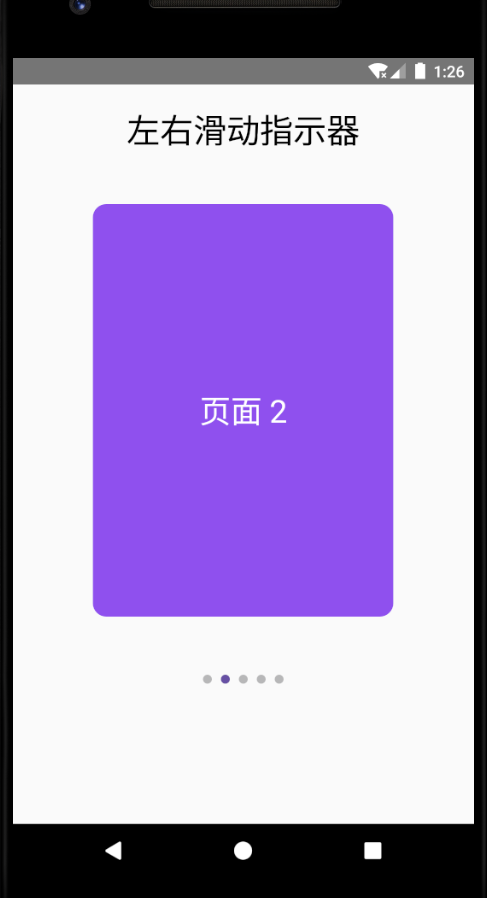
/**
 * Author : wn
 * Email : maoning20080809@163.com
 * Date : 2026/1/5 20:58
 * Description : 左右滑动 带指示器, HorizontalPager 和 PagerIndicator
 */
class HorizontalPagerActivity : ComponentActivity(){

    override fun onCreate(savedInstanceState: Bundle?) {
        super.onCreate(savedInstanceState)

        setContent {
            testHorizontalPagerWidthIndicator()
        }
    }

    @OptIn(ExperimentalPagerApi::class)
    @Preview
    @Composable
    private fun testHorizontalPagerWidthIndicator(){
        //页面数量
        val pageCount = 5

        val pagerState = rememberPagerState()

        Column(modifier = Modifier.fillMaxSize(),
            horizontalAlignment = Alignment.CenterHorizontally){

            Spacer(Modifier.height(20.dp))
            Text(text = "左右滑动指示器", fontSize = 30.sp)

            Spacer(Modifier.height(20.dp))

            //水平分页器
            HorizontalPager(
                count = pageCount,
                state = pagerState,
                modifier = Modifier.padding(10.dp)
            ) { page ->
                //每个页面的内容
                Box(modifier = Modifier.width(300.dp).height(400.dp).padding(16.dp)
                    .background(
                        Color(Random.nextInt(256),
                            Random.nextInt(256),
                            Random.nextInt(256),
                            ),
                        shape = RoundedCornerShape(12.dp)
                    ), contentAlignment = Alignment.Center){
                    Text(text = "页面 ${page + 1}", style = MaterialTheme.typography.headlineMedium,
                        color = Color.White)
                }
            }

            Spacer(modifier = Modifier.height(16.dp))

            // 指示器固定在底部
            Box(
                modifier = Modifier.padding(10.dp),
                contentAlignment = Alignment.BottomCenter
            ) {
                HorizontalPagerIndicator(
                    pagerState = pagerState,
                    modifier = Modifier.padding(bottom = 32.dp),
                    activeColor = MaterialTheme.colorScheme.primary,
                    inactiveColor = MaterialTheme.colorScheme.onSurface.copy(alpha = 0.3f)
                )
            }
        }
    }

}