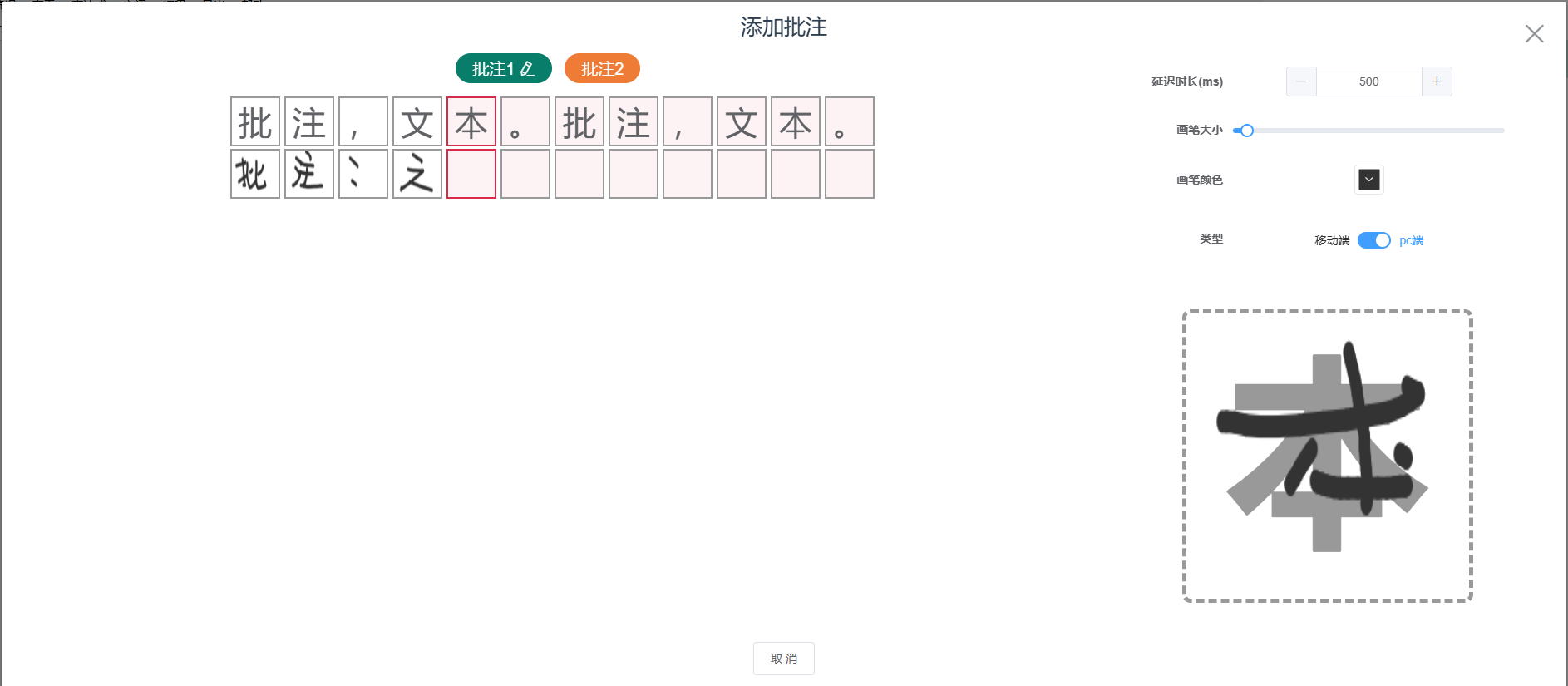
javascript
<template>
  <div class="handwritten-notes">
    <el-dialog top="10px" width="98%" :visible.sync="dialogVisible">
      <span slot="title" class="dialog-title">
        添加批注
      </span>
      <div class="modal-body">
        <div class="model-left">
          <!-- 批注列表 -->
          <div class="note-list">
            <div
              v-for="(item, index) in docNoteList"
              class="note-item"
              :key="item.code"
              @click="_checkNotes(item, 'click')"
            >
              <div
                class="note-btn"
                :class="curNode.code == item.code ? 'actice-node' : ''"
              >
                <span>批注{{ index + 1 }}</span>
                <i
                  class="el-icon-edit"
                  style="margin-left: 5px;"
                  v-if="curNode.code == item.code"
                ></i>
              </div>
              <i
                class="el-icon-check"
                style="color: #087e6a;font-size: 30px;"
                v-if="item.isDone"
              ></i>
            </div>
          </div>
          <div class="texts-list">
            <div class="note-box">
              <div
                v-for="item in curNode.notesList"
                class="note-item"
                @click="_checkItem(item)"
                :key="item.index"
                :class="[
                  activeItem.index == item.index ? 'active' : '',
                  !item.imgSrc ? 'noSrc' : '',
                ]"
              >
                <div class="note-label">{{ item.label }}</div>
                <div class="note-img">
                  <img v-if="item.imgSrc" :src="item.imgSrc" alt="" />
                </div>
              </div>
            </div>
          </div>
          <!-- 合成的最终图片 -->
          <canvas
            :style="{ height: outputHeight, width: outputWidth }"
            id="outputCanvas"
          ></canvas>
        </div>
        <div class="model-right">
          <el-form v-if="true"
            style="width: 80%;"
            label-position="right"
            label-width="100px"
            :model="canvasSeting"
            size="medium"
          >
            <el-form-item label="延迟时长(ms)">
              <el-input-number
                v-model="canvasSeting.delay"
                :step="100"
                step-strictly
              ></el-input-number>
            </el-form-item>
            <el-form-item label="画笔大小">
              <el-slider
                v-model="canvasSeting.lwidth"
                :min="10"
                :max="50"
              ></el-slider>
            </el-form-item>
            <el-form-item label="画笔颜色">
              <el-color-picker v-model="canvasSeting.lcolor"></el-color-picker>
            </el-form-item>
            <el-form-item label="类型">
              <el-switch
                v-model="canvasSeting.platform"
                active-text="pc端"
                inactive-text="移动端"
                @change="_changePlatform"
              >
              </el-switch>
            </el-form-item>
          </el-form>
          <div class="canvas-container">
            <canvas
              class="canvas-content"
              id="canvasSign"
              ref="canvas"
            ></canvas>
            <div class="bg-text">{{ activeItem.label }}</div>
          </div>
        </div>
      </div>
      <span slot="footer" class="dialog-footer">
        <el-button @click="closeDialog">取 消</el-button>
        <el-button
          v-if="isComplete"
          type="primary"
          @click="_submitDraw"
          :disable="btnLoading"
          :loading="btnLoading"
          >确 定</el-button
        >
      </span>
    </el-dialog>
  </div>
</template>

<script>
import { addNoteImg } from "@/api/document";
export default {
  props: {
    curDoc: {
      type: Object,
      default: () => {},
    },
    dialogVisible: {
      type: Boolean,
      default: false,
    },
  },
  data() {
    return {
      canvasSign: null,
      context: null,
      btnLoading: false, //确认按钮是否加载中
      isDrawing: false, //控制是否在手写
      timer: null, //延迟处理
      outputHeight: "100px",
      outputWidth: "100px",
      activeItem: {}, //当前的批注文字
      docNoteList: [], //所有批注列表
      curNode: {
        notesList: [],
      }, //当前批注
      isComplete: false, //当前文档所有批注书否全部写完,控制完成按钮的显示
      tempPathObj: {},
      canvasSeting: {
        lcolor: "#333333", //画笔颜色
        lwidth: 12, //画笔大小
        platform: false, //是否是pc端
        delay: 500, //延迟时长
      },
    };
  },
  watch: {
    dialogVisible: {
      handler(newVal, oldVal) {
        if (newVal) {
          this.init();
        }
      },
      immediate: true,
    },
    curDoc: {
      handler(newVal, oldVal) {
        if (newVal) {
          const _documentData = JSON.parse(newVal.documentData);
          console.log("_documentData", _documentData);
          this._checkDocData(_documentData);
        }
      },
      deep: true,
      immediate: true,
    },
  },
  mounted() {},
  methods: {
    _checkItem(val) {
      this.activeItem = { ...val };
    },
    // 处理当前批注数据
    _checkNotes(value) {
      this.curNode = { ...value };
      this._checkItem(this.curNode.notesList[0]);
    },
    // 处理批注,形成列表
    _checkDocData(data) {
      console.log("data", data);
      let tempPathObj = {};
      let docNote = [];
      for (const key in data) {
        const element = data[key];
        if (key.includes("note_text")) {
          let notesList = [];
          // 处理批注内容
          const _text = element.split("");
          for (let i = 0; i < _text.length; i++) {
            const ele = _text[i];
            notesList.push({
              label: ele,
              imgSrc: "",
              index: i,
              code: key,
            });
          }
          const _key = key.split("note_text")[1] || "";
          const _imgCode = "note_img" + _key;
          docNote.push({
            code: key,
            imgCode: _imgCode,
            label: element,
            nodeImg: "", //最终合成的图片
            isDone: false, //当前批注是否已写完
            notesList, //所有批注问字
          });
          this.$set(tempPathObj, _imgCode, "");
        }
      }
      console.log(docNote, 142545);
      this.docNoteList = docNote;
      this.curNode = { ...docNote[0] };
      this._checkItem(this.curNode.notesList[0]);
    },
    closeDialog() {
      this.$emit("onClose", false);
    },
    preHandler(e) {
      e.preventDefault();
    },
    // 切换平台
    _changePlatform(val) {
      this.canvasSeting.platform = val;
      this.clearCanvas();
      if (this.canvasSeting.platform) {
        document.removeEventListener("touchstart", this.preHandler, false);
        document.removeEventListener("touchend", this.preHandler, false);
        document.removeEventListener("touchmove", this.preHandler, false);
        this._addEventOnMouse();
      } else {
        document.removeEventListener("onmousedown", this.preHandler, false);
        document.removeEventListener("onmouseup", this.preHandler, false);
        document.removeEventListener("onmousemove", this.preHandler, false);
        this._addEventOnTouch();
      }
    },
    //初始化画布
    init() {
      this.$nextTick(() => {
        this.canvasSign = document.getElementById("canvasSign");
        this.context = this.canvasSign.getContext("2d");
        // 监听事件
        if (this.canvasSeting.platform) {
          this._addEventOnMouse();
        } else {
          this._addEventOnTouch();
        }
      });
    },
    //监听鼠标
    _addEventOnMouse() {
      console.log("_addEventOnMouse");
      let self = this;
      let lastPoint = { x: 0, y: 0 };
      let rect = self.canvasSign.getBoundingClientRect();
      var scaleX = self.canvasSign.width / rect.width;
      var scaleY = self.canvasSign.height / rect.height;
      self.canvasSign.onmousedown = function(e) {
        self.isDrawing = true;
        if (self.timer) {
          clearTimeout(self.timer);
          self.timer = null;
        }
        let x1 = e.clientX - rect.left;
        let y1 = e.clientY - rect.top;
        lastPoint = { x: x1 * scaleX, y: y1 * scaleY };
        var thee = e ? e : window.event;
        self.stopBubble(thee);
      };
      self.canvasSign.onmousemove = function(e) {
        if (!self.isDrawing) return;
        let x2 = e.clientX - rect.left;
        let y2 = e.clientY - rect.top;
        let newPoint = { x: x2 * scaleX, y: y2 * scaleY };
        self.drawLine(lastPoint.x, lastPoint.y, newPoint.x, newPoint.y);
        lastPoint = newPoint;
        var thee = e ? e : window.event;
        self.stopBubble(thee);
      };
      self.canvasSign.onmouseup = function() {
        self.isDrawing = false;
        lastPoint = { x: 0, y: 0 };
        self.timer = setTimeout(() => {
          self.canvasDraw();
        }, self.canvasSeting.delay);
      };
    },
    //监听触摸事件
    _addEventOnTouch() {
      console.log("_addEventOnTouch");
      let self = this;
      let lastPoint = { x: 0, y: 0 };
      let rect = self.canvasSign.getBoundingClientRect();
      var scaleX = self.canvasSign.width / rect.width;
      var scaleY = self.canvasSign.height / rect.height;
      self.canvasSign.addEventListener("touchstart", function(e) {
        self.isDrawing = true;
        if (self.timer) {
          clearTimeout(self.timer);
          self.timer = null;
        }
        let x1 = e.changedTouches[0].clientX - rect.left;
        let y1 = e.changedTouches[0].clientY - rect.top;
        lastPoint = { x: x1 * scaleX, y: y1 * scaleY };
        var thee = e ? e : window.event;
        self.stopBubble(thee);
      });
      self.canvasSign.addEventListener("touchmove", function(e) {
        if (!self.isDrawing) return;
        let x2 = e.changedTouches[0].clientX - rect.left;
        let y2 = e.changedTouches[0].clientY - rect.top;
        let newPoint = { x: x2 * scaleX, y: y2 * scaleY };
        self.drawLine(lastPoint.x, lastPoint.y, newPoint.x, newPoint.y);
        lastPoint = newPoint;
        var thee = e ? e : window.event;
        self.stopBubble(thee);
      });
      self.canvasSign.addEventListener("touchend", function(e) {
        self.isDrawing = false;
        lastPoint = { x: undefined, y: undefined };
        self.timer = setTimeout(() => {
          self.canvasDraw();
        }, 800);
      });
    },
    //阻止事件冒泡
    stopBubble(evt) {
      if (evt.stopPropagation) {
        // 阻止事件冒泡
        evt.stopPropagation();
      } else {
        //ie
        evt.cancelBubble = true;
      }
    },
    //画线
    drawLine(fromX, fromY, toX, toY) {
      let ctx = this.context;
      ctx.beginPath();
      ctx.lineWidth = this.canvasSeting.lwidth;
      ctx.lineCap = "round";
      ctx.lineJoin = "round";
      ctx.fillStyle = this.canvasSeting.lcolor;
      ctx.strokeStyle = this.canvasSeting.lcolor;
      ctx.moveTo(fromX, fromY);
      ctx.lineTo(toX, toY);
      ctx.stroke();
      ctx.closePath();
    },
    //清屏
    clearCanvas() {
      this.context.clearRect(
        0,
        0,
        this.canvasSign.width,
        this.canvasSign.height
      );
    },
    //定格画布图片
    canvasDraw() {
      const _canvasURL = this.canvasSign.toDataURL("image/png");
      // 手写处理
      this.curNode.notesList.map((item) => {
        if (item.index == this.activeItem.index) {
          item.imgSrc = _canvasURL;
        }
      });
      // 自动轮下一个
      const _notesList = this.curNode.notesList;
      this._checkNotePass();
      if (this.activeItem.index < _notesList.length - 1) {
        this._checkItem(_notesList[this.activeItem.index + 1]);
      }
      this.clearCanvas();
    },
    // 检查是否所有批注都写完
    _checkNotePass() {
      let isDone = true; //是否全部批注都写完,默认都写完了
      const _curNode = this.curNode;
      this.docNoteList.map((item) => {
        if (item.code == _curNode.code) {
          item.isDone = _curNode.notesList.every((item) => {
            return item.imgSrc != "";
          });
          if (item.isDone) {
            this._drawImage(_curNode.notesList, _curNode.imgCode);
          }
        }
        if (!item.isDone) {
          //如有未完成的
          isDone = false;
        }
      });
      this.isComplete = isDone;
    },
    //保存图片
    downLoad() {
      const imgUrl = this.canvasSign.toDataURL("image/png");
      const a = document.createElement("a");
      a.href = imgUrl;
      a.download = "绘图保存记录" + new Date().getTime();
      a.target = "_blank";
      document.body.appendChild(a);
      a.click();
      document.body.removeChild(a);
    },
    //批注合成处理
    _drawImage(notesList, imgCode) {
      const outputCanvas = document.getElementById("outputCanvas");
      const ctx = outputCanvas.getContext("2d");
      const charSize = 40; // 调整字符大小
      const maxCharsPerRow = 20; // 每行最大字符数
      // 动态设置高度
      const numRows = Math.ceil(notesList.length / maxCharsPerRow); // 计算行数
      this.outputHeight = `${numRows * charSize}px`; // 动态计算输出画布的高度
      this.outputWidth = `${maxCharsPerRow * charSize}px`; // 动态计算输出画布的宽度
      // 设置画布尺寸
      outputCanvas.width = maxCharsPerRow * charSize;
      outputCanvas.height = numRows * charSize;
      // 清空画布
      ctx.clearRect(0, 0, outputCanvas.width, outputCanvas.height);
      // 设置白色背景
      ctx.fillStyle = "#ffffff";
      ctx.fillRect(0, 0, outputCanvas.width, outputCanvas.height);
      // 创建图片对象数组
      const imagePromises = notesList.map((item, index) => {
        return new Promise((resolve, reject) => {
          if (!item.imgSrc) {
            // 如果没有图片,创建一个空白图片
            const tempCanvas = document.createElement("canvas");
            tempCanvas.width = charSize;
            tempCanvas.height = charSize;
            const tempCtx = tempCanvas.getContext("2d");
            tempCtx.fillStyle = "#ffffff";
            tempCtx.fillRect(0, 0, charSize, charSize);
            resolve({
              img: tempCanvas,
              index,
              rowIndex: Math.floor(index / maxCharsPerRow),
              colIndex: index % maxCharsPerRow,
            });
            return;
          }
          const img = new Image();
          img.crossOrigin = "anonymous";
          img.onload = () => {
            resolve({
              img,
              index,
              rowIndex: Math.floor(index / maxCharsPerRow),
              colIndex: index % maxCharsPerRow,
            });
          };
          img.onerror = () => {
            // 图片加载失败,创建空白图片
            const tempCanvas = document.createElement("canvas");
            tempCanvas.width = charSize;
            tempCanvas.height = charSize;
            const tempCtx = tempCanvas.getContext("2d");
            tempCtx.fillStyle = "#ffffff";
            tempCtx.fillRect(0, 0, charSize, charSize);
            resolve({
              img: tempCanvas,
              index,
              rowIndex: Math.floor(index / maxCharsPerRow),
              colIndex: index % maxCharsPerRow,
            });
          };
          img.src = item.imgSrc;
        });
      });
      // 等待所有图片加载完成
      Promise.all(imagePromises)
        .then((imageData) => {
          // 绘制所有图片
          imageData.forEach((data) => {
            const x = data.colIndex * charSize;
            const y = data.rowIndex * charSize;
            ctx.drawImage(data.img, x, y, charSize, charSize);
          });
          setTimeout(() => {
            const _outputContext = outputCanvas.toDataURL("image/png");
            this.tempPathObj[imgCode] = _outputContext;
          }, 500);
        })
        .catch((error) => {
          console.error("图片合成失败,请重试:", error);
        });
    },
    // 保存更新
    async _submitDraw() {
      //防止多次点击提交
      this.btnLoading = true;
      setTimeout(() => {
        this.btnLoading = false;
      }, 3000);
      let documentData = JSON.parse(this.curDoc.documentData);
      for (const key in this.tempPathObj) {
        documentData[key] = this.tempPathObj[key];
      }
      const query = {
        documentId: this.curDoc.documentId,
        documentData: JSON.stringify(documentData),
      };
      console.log(query, 142545);
      await addNoteImg(query).then(({ data: res }) => {
        if (res.code == 0) {
          this.$message({
            message: res.msg,
            type: "success",
          });
          this.$emit("onClose", true);
        }
      });
    },
  },
};
</script>
<style lang="scss" scoped>
.handwritten-notes /deep/ .el-dialog {
  margin-bottom: 0;
}
.el-dialog__wrapper /deep/ .el-dialog__header {
  padding-top: 10px;
  padding-bottom: 0;
}
.el-dialog__wrapper /deep/ .el-dialog__footer {
  padding-bottom: 15px;
  text-align: center;
}
.el-dialog__wrapper /deep/ .el-dialog__headerbtn .el-dialog__close {
  font-size: 36px;
}
.dialog-title {
  font-size: 26px !important;
}
.modal-body {
  width: 100%;
  height: 75vh;
  display: flex;
  justify-content: space-between;
  align-items: flex-start;
}
.model-right {
  position: relative;
  display: flex;
  flex-direction: column;
  justify-content: space-around;
  align-items: center;
  width: 29%;
  height: 100%;
  .canvas-container {
    position: relative;
    background-color: transparent;
    border: 5px dashed #999;
    border-radius: 10px;
    .canvas-content {
      width: 340px;
      height: 340px;
      position: relative;
      z-index: 999;
    }
  }
  .bg-text {
    position: absolute;
    top: 0;
    left: 0;
    z-index: 1;
    width: 340px;
    height: 340px;
    line-height: 340px;
    font-size: 250px;
    font-weight: bold;
    text-align: center;
    color: #999;
  }
}
.model-left {
  width: 70%;
  height: 100%;
  overflow: hidden;
  // 批注列表
  .note-list {
    width: 100%;
    height: 7%;
    display: flex;
    justify-content: center;
    align-items: center;
    .note-item {
      display: flex;
      justify-content: space-between;
      align-items: center;
      font-size: 20px;
      margin-right: 15px;
      color: #fff;
    }
    .note-btn {
      padding: 5px 20px;
      border-radius: 20px;
      background-color: #ee7c36;
      cursor: pointer;
    }
    .actice-node {
      background-color: #087e6a;
    }
  }
  .texts-list {
    width: 100%;
    height: 92%;
    margin-top: 10px;
    background-color: #fff;
    overflow: auto;
    .note-box {
      width: 100%;
      display: flex;
      flex-direction: row;
      justify-content: center;
      flex-wrap: wrap;
    }
    .note-item {
      margin-bottom: 6px;
    }
    .note-label,
    .note-img {
      width: 60px;
      height: 60px;
      line-height: 60px;
      text-align: center;
      margin-right: 5px;
      margin-bottom: 3px;
      border: 2px solid #999;
      background-color: #fff;
      font-size: 40px;
      img {
        width: 100%;
        height: 100%;
      }
    }
    .active {
      .note-label,
      .note-img {
        border: 2px solid rgba(212, 21, 53, 0.9);
      }
    }
    .noSrc {
      .note-label,
      .note-img {
        background-color: rgba(212, 21, 53, 0.05);
      }
    }
  }
}
</style>
可根据需求调整,
数据格式:
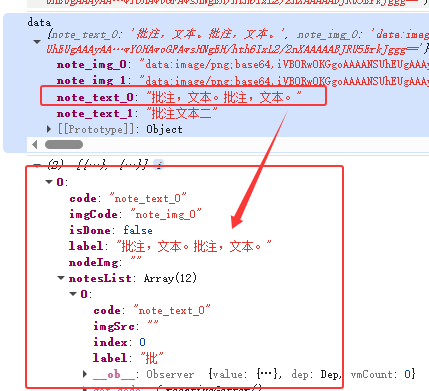
页面效果图