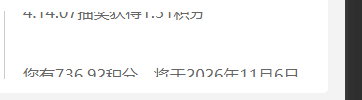
思路,放两个滚动区域,第一个区域即将滚动出容器时,第二个滚动开始
css:
css
.carousel_view {
    margin-top: 30rpx;
    display: flex;
    align-items: center;
    width: 100%;
    height: 170rpx;
    background: #FFFFFF;
    border-radius: var(--borderRadius);
    .tipText {
        width: 127rpx;
        height: 120rpx;
        border-right: 1rpx solid #CCCCCC;
        margin-right: 33rpx;

        image {
            width: 77rpx;
            height: 80rpx;
            margin-top: 20rpx;
            margin-left: 30rpx;
        }
    }

    .context_view {
        flex: 1;
        height: 100%;
        max-height: 65px;
        overflow: hidden;
        padding-right: 30rpx;
        position: relative;

        .text_view {
          padding-right: 30rpx;
            width: 100%;
            position: relative;
            font-size: 24rpx;
            word-break: break-all;
            font-family: PingFang SC, PingFang SC;
            font-weight: 400;
            font-size: 28rpx;
            color: #666666;
            position: absolute;
            top: 0;
            left: 0;
.textBox{
  font-family: PingFang SC, PingFang SC;
font-weight: 400;
font-size: 28rpx;
color: #666666;
line-height: 42rpx;
text-align: left;
padding-right: 30rpx;
}
        }

    }
}
html:
html
<view class="carousel_view" wx:if="{{userInfo.promptMessage && userInfo.promptMessage.length > 0}}">
  <view class="tipText">
    <image src="../../static/my/ico_ts.png"></image>
  </view>
  <view class="context_view">
    <view class="text_view text_view1" style="transform:translateY({{marindistance1}}px);"  >
      <block wx:for="{{scrollMessages1}}" wx:key="index">
        <view  class="textBox"  wx:if="{{scrollshow1}}" style="margin-bottom: {{index === scrollMessages1.length - 1 ? 0 : messageSpacing1}}px;">
          {{item}}
        </view>
      </block>
    </view>
    <view class="text_view text_view2" style="transform:translateY({{marindistance2}}px);">
      <block wx:for="{{scrollMessages2}}" wx:key="index">
        <view class="textBox"  wx:if="{{scrollshow2}}" style="margin-bottom: {{index === scrollMessages2.length - 1 ? 0 : messageSpacing2}}px;">
          {{item}}
        </view>
      </block>
    </view>
  </view>
</view>
js:
javascript
getMarketingHome(){
//省略,通过接口获取公告内容

  this.setData({
        userInfo:res.result
      })
},
onscroll() {
    var that = this;

    // 初始化第一个滚动
    this.initScroll(
      // that.data.userInfo.promptMessage,
      ['您有736.92积分,将于2026年11月6日零点到期,请及时使用!',
      '张*超 138****5627 2026年01月06日 14:14:07抽奖获得1.31积分',
      // 'lmy 138****5627 2026年01月06日 14:14:07抽奖获得9999积分',
      // 'lmy1 138****5627 2026年01月06日 14:14:07抽奖获得8888积分',
      // 'lmy2 138****5627 2026年01月06日 14:14:07抽奖获得7777积分',
      // 'lmy3 138****5627 2026年01月06日 14:14:07抽奖获得6666积分',
    ],
      1,
      function() {
        console.log("第一个滚动初始化完成");
        // 初始化第二个滚动
        that.initScroll(
          // that.data.userInfo.promptMessage,
          ['您有736.92积分,将于2026年11月6日零点到期,请及时使用!',
          '张*超 138****5627 2026年01月06日 14:14:07抽奖获得1.31积分',
          // 'lmy 138****5627 2026年01月06日 14:14:07抽奖获得9999积分',
          // 'lmy1 138****5627 2026年01月06日 14:14:07抽奖获得8888积分',
          // 'lmy2 138****5627 2026年01月06日 14:14:07抽奖获得7777积分',
          // 'lmy3 138****5627 2026年01月06日 14:14:07抽奖获得6666积分',
        ],
          2,
          function() {
            console.log("第二个滚动初始化完成");
          }
        );
      }
    );
  },

  // 新增初始化滚动的方法
  initScroll: function(messages, scrollNum, callback) {
    let that=this
    const query = wx.createSelectorQuery();
    // const selector = scrollNum === 1 ? '.context_view' : '.context_view:nth-of-type(2)';
    const selector = scrollNum === 1 ? '.context_view' : '.context_view:nth-of-type(2)';

    query.select(selector).boundingClientRect();
    query.exec(function(res) {
      const lineHeight = 16;
      const messageSpacing = 10;
      that.setData({
        messageSpacing:messageSpacing
      })
      let totalHeight = 0;

      if (res[0]) {
        totalHeight = res[0].height + (messages.length - 1) * messageSpacing;
        console.log("totalHeight文字总高度",totalHeight);
        // 容器总高度
        console.log("res[0].height容器总高度",res[0].height);


        that.setData({
          containerHeight:Math.floor(res[0].height),
          marindistance1:Math.floor(res[0].height)
        })
      } else {
        totalHeight = messages.reduce((sum, msg) => {
          return sum + (msg.length * 12 / 3);
        }, 0) + (messages.length - 1) * messageSpacing;
      }
      const selector = '.text_view1';

      query.select(selector).boundingClientRect();
      query.exec(function(res) {
            console.log(res);

      if (res[1]) {
        console.log("容器高度dade",res[1].height);
        that.setData({
          textHeight1:res[1].height,
          textHeight2:res[1].height,
        })
      }


      })

      // 根据滚动编号设置不同的数据
      const dataKey = `scrollMessages${scrollNum}`;
      const distanceKey = `marindistance${scrollNum}`;
      const spacingKey = `messageSpacing${scrollNum}`;
      const heightKey = `textHeight${scrollNum}`;

      const updateData = {
        [dataKey]: messages,
        [distanceKey]: 0,
        [spacingKey]: messageSpacing,
        // [heightKey]: totalHeight
      };

      that.setData(updateData, () => {
        // 启动滚动
        that[`scrolltext${scrollNum}`]();
        if (callback) callback();
      });
    });
  },

  // 第一个滚动方法
  scrolltext1: function() {
    if (this.interval1) clearInterval(this.interval1);

    this.interval1 = setInterval(() => {

      let containerHeightBan=Math.floor(this.data.containerHeight/3)
      // console.log("this.data.textHeight1",this.data.textHeight1);

      if (-this.data.marindistance1 == this.data.textHeight1 - containerHeightBan - this.data.messageSpacing) {

        console.log("第一个信息还差完全滚出,这时第二个消息重置");
        this.setData({
          marindistance2: this.data.containerHeight,
          currentMessageIndex2: 0
        });

        setTimeout(() => {
          clearInterval(this.interval2);
          this.scrolltext2();
        }, 400);
        setTimeout(()=>{
          this.setData({
            scrollshow2:true,
             });
        },700)

      }

      //
      if (-this.data.marindistance1 >= this.data.textHeight1+this.data.containerHeight + this.data.messageSpacing) {

     console.log("第一个消息完全滚出");
     setTimeout(() => {
      clearInterval(this.interval1);
    }, 400);

      } else {
        // console.log("第一个消息正常滚动");
        // console.log("this.data.textHeight1 ",this.data.textHeight1 );


        const currentMsgTop = this.data.currentMessageIndex1 * (this.data.textHeight1 / this.data.scrollMessages1.length);
        const nextMsgTop = (this.data.currentMessageIndex1 + 1) * (this.data.textHeight1 / this.data.scrollMessages1.length);

        if (-this.data.marindistance1 > nextMsgTop &&
            this.data.currentMessageIndex1 < this.data.scrollMessages1.length - 1) {
          this.setData({
            currentMessageIndex1: this.data.currentMessageIndex1 + 1
          });
        }

        this.setData({
          marindistance1: this.data.marindistance1 - 1
        });
      }
    }, 90);
  },

  // 第二个滚动方法
  scrolltext2: function() {
    if (this.interval2) clearInterval(this.interval2);

    this.interval2 = setInterval(() => {
      let containerHeightBan=Math.floor(this.data.containerHeight/3)

        if (-this.data.marindistance2 == this.data.textHeight2 - containerHeightBan  - this.data.messageSpacing) {
        console.log("第二个信息还差容器一半完全滚出,这时第一个消息重置");
               this.setData({
          marindistance1: this.data.containerHeight,
          currentMessageIndex1: 0
        });

        setTimeout(() => {
          clearInterval(this.interval1);
          this.scrolltext1();
        }, 400);
        setTimeout(()=>{
          this.setData({
            scrollshow1:true
             });
        },700)


      }


          if (-this.data.marindistance2 >= this.data.textHeight1+this.data.containerHeight + this.data.messageSpacing) {
        console.log("第2个消息完全滚出");
        setTimeout(() => {
          clearInterval(this.interval2);
        }, 400);

         } else {
        // console.log("第2个消息正常滚动");
        const currentMsgTop = this.data.currentMessageIndex2 * (this.data.textHeight2 / this.data.scrollMessages2.length);
        const nextMsgTop = (this.data.currentMessageIndex2 + 1) * (this.data.textHeight2 / this.data.scrollMessages2.length);

        if (-this.data.marindistance2 > nextMsgTop &&
            this.data.currentMessageIndex2 < this.data.scrollMessages2.length - 1) {
          this.setData({
            currentMessageIndex2: this.data.currentMessageIndex2 + 1
          });
        }

        this.setData({
          marindistance2: this.data.marindistance2 - 1
        });
      }
    }, 90);
  },

  // 在生命周期或适当位置清除定时器
  onUnload: function() {
    if (this.interval1) clearInterval(this.interval1);
    if (this.interval2) clearInterval(this.interval2);
  },
  /**
   * 生命周期函数--监听页面隐藏
   */
  onHide() {
    console.log("清空定时器");

  // 页面卸载时清除定时器
  if (this.interval1) clearInterval(this.interval1);
  if (this.interval2) clearInterval(this.interval2);
  },
效果