二、Kotlin高级特性以及Compose状态驱动UI
在昨天的基础上,学习Kotlin的高级特性(扩展函数和作用域函数)
并且了解Compose状态管理
1、Kotlin高级特性
-
扩展函数与扩展属性
-
无需继承,Kotlin就可以给现有类添加方法,并可以直接调用(添加之后整个项目中都可以使用)
kotlin//给String类添加验证邮箱的方法 fun String.isValidEmail(): Boolean { return this.contains("@") && this.contains(".") } //在其他类中可以直接使用 "xxx@163.com.com".isValidEmail() // true-
扩展属性同理
kotlinval Note.type: Int get() = 1 //注意,如果添加的扩展属性原类中已存在,则不会生效。 -
-
作用域函数
-
用于简化对象操作,常用的作用域函数有:let,apply,run,also,with
-
let:常用于空安全操作、转换、作用域隔离等,返回最后一行代码值,上下文使用it引用
kotlinval name2: String? = "Marry" name2?.let { print("Hello,$it") it.length //返回的字符串长度 } //链式转换 val toPrint = name2?.let { it.uppercase() } ?.let { "Hi,$it" } //toPrint结果为:Hi,MARRY -
run:常用于初始化并返回计算结果,上下文使用this引用
kotlinval noteEX = Note(1L, title = "测试笔记", content = "我是内容", timestamp = "2026-01-07") val printStr = noteEX.run { "${this.title}(${this.timestamp}):${this.content}" } //返回值为:测试笔记(2026-01-07):我是内容 -
apply:配置对象并返回自身,上下文使用this引用
kotlindata class Parson( var name: String, var age: Int ) val parson = Parson(name = "susan", age = 18) val newParson = parson.apply { this.age = 20//这里age一定是用var定义的,如果是val定义的是不可变的,会报错 } -
also:执行副作用并返回自身,上下文使用it引用
kotlinval parson = Parson(name = "susan", age = 18) parson.also{ Log.d("Parson","Parson name : ${it.name}") } -
with:对现有对象执行多步操作(非扩展函数,是普通函数!),上下文使用this引用
kotlinval anote = Note() val a = with(anote) { this.title this.content } //这里返回值为contentwith返回值是最后一行结果
-
-
数据类增强
-
我们在(昨天的Note)数据类中新增一个标签字段
kotlinval tags: List<String> = emptyList() // 新增标签字段emptyList()是不可变空列表,安全高效-
数据类可以使用copy()方法创建新实例,用于状态更新:
kotlinval updatedNote = originalNote.copy(title = "新标题") -
-
委托
-
使用by进行属性委托
kotlininterface Base { fun print() } class BaseImpl(val x: Int) : Base { override fun print() = println(x) } // 使用 by 委托:Derived 将 Base 接口的实现委托给 baseObject class Derived(baseObject: Base) : Base by baseObject -
2、Jetpack Compose状态管理
- 什么是状态(State)
- 状态是 驱动 UI 变化的数据
- 当状态改变 → Compose 自动 重组(Recompose) 相关 UI
- 比如旧的android中控制组件隐藏显示通过控制**
visibility** 值来实现,而使用状态管理之后则可以使用一个自定义的状态值来控制,值为true显示,false隐藏,具体逻辑是可控的。
- mutableStateOf+by委托
mutableStateOf(false):创建一个可变状态容器by:使用属性委托,让expanded行为像普通变量remember:在重组时保持状态值(避免每次重建为 false)- 注意
mutableStateOf(false)方法使用时不要用错了,有很多类似的方法,用来做不同的状态管理。
- 状态提升(State Hoisting)原则
- 状态应定义在 需要控制它的最高共同父组件
- 今日暂不提升(状态在 NoteCard 内部),后续会移到 ViewModel
3、完整的项目代码升级
-
更新Note.kt文件,新增tags字段用来保存标签的tag信息。
kotlin// Note.kt data class Note( val id: Long = 0L, val title: String = "", val content: String = "", val timestamp: String = "", val tags: List<String> = emptyList() // ← 新增 ) -
更新NoteCard.kt,新增标签展示和支持通过状态进行页面组件管理。
kotlinpackage com.jiahengfei.ktdm import android.widget.Toast import androidx.compose.foundation.clickable import androidx.compose.foundation.layout.Arrangement import androidx.compose.foundation.layout.Column import androidx.compose.foundation.layout.Row import androidx.compose.foundation.layout.Spacer import androidx.compose.foundation.layout.fillMaxWidth import androidx.compose.foundation.layout.height import androidx.compose.foundation.layout.padding import androidx.compose.foundation.lazy.staggeredgrid.rememberLazyStaggeredGridState import androidx.compose.material3.Button import androidx.compose.material3.Card import androidx.compose.material3.CardDefaults import androidx.compose.material3.MaterialTheme import androidx.compose.material3.OutlinedButton import androidx.compose.material3.Scaffold import androidx.compose.material3.SnackbarHost import androidx.compose.material3.SnackbarHostState import androidx.compose.material3.Text import androidx.compose.runtime.Composable import androidx.compose.runtime.getValue import androidx.compose.runtime.mutableStateOf import androidx.compose.runtime.remember import androidx.compose.runtime.rememberCoroutineScope import androidx.compose.runtime.setValue import androidx.compose.ui.Alignment import androidx.compose.ui.Modifier import androidx.compose.ui.graphics.Color import androidx.compose.ui.unit.dp import kotlinx.coroutines.launch /** * Create by zFox from AndroidStudio2022.01 * 日期:2026/1/5 20:01 * 描述:UI组件 */ @Composable fun NoteCard( note: Note, showSnackBar: (String) -> Unit, modifier: Modifier = Modifier ) { //状态声明 var expanded by remember { mutableStateOf(false) } Card( modifier = modifier .padding(8.dp) .fillMaxWidth() .clickable { showSnackBar("点击了卡片${note.id}") }, elevation = CardDefaults.cardElevation(defaultElevation = 4.dp), colors = CardDefaults.cardColors(containerColor = Color.White) ) { Column( modifier = Modifier .padding(16.dp) .fillMaxWidth(), verticalArrangement = Arrangement.Top ) { Text( text = note.title, style = MaterialTheme.typography.headlineSmall ) Spacer(modifier = Modifier.height(8.dp)) Text( text = note.content, style = MaterialTheme.typography.bodyMedium ) if (expanded) { if (note.tags.isNotEmpty()) { Spacer(modifier = Modifier.height(8.dp)) Row( horizontalArrangement = Arrangement.spacedBy(4.dp), verticalAlignment = Alignment.CenterVertically ) { note.tags.forEach { tag -> OutlinedButton( onClick = { }, shape = MaterialTheme.shapes.small, modifier = Modifier.height(32.dp) ) { Text( text = "#$tag", style = MaterialTheme.typography.labelSmall ) } } } } } Spacer(modifier = Modifier.height(8.dp)) Text( text = note.timestamp, style = MaterialTheme.typography.labelSmall, color = MaterialTheme.colorScheme.outline ) //展开-收起按钮 Spacer(modifier = Modifier.height(12.dp)) if (note.tags.isNotEmpty()) { Button( onClick = { expanded = !expanded }, modifier = Modifier .align(Alignment.End) .height(32.dp) ) { Text( if (expanded) "收起Tags" else "展开Tags", style = MaterialTheme.typography.labelSmall, ) } } } } } -
更新MainActivity.kt,传入带标签的笔记,以及提供给子组件一个显示Snackbar的方法
kotlinsetContent { NoteAppTheme() { val snackBarHostState = remember { SnackbarHostState() } val scope = rememberCoroutineScope() Scaffold( snackbarHost = { SnackbarHost(snackBarHostState) } ) { Surface( modifier = Modifier .fillMaxWidth() .systemBarsPadding(), color = MaterialTheme.colorScheme.background, ) { Column( modifier = Modifier .fillMaxWidth() ) { val showMsg = { msg: String -> scope.launch { snackBarHostState.showSnackbar(msg) } Unit } val sampleNote = Note( 1L, "第一天学习笔记", "今天非常之Nice!", "2026-01-05", ) NoteCard(sampleNote, showMsg) val sampleNote2 = Note( 2L, "第二天学习笔记", "今天学习了 Kotlin 扩展函数和 Compose 状态管理,实现了可交互的笔记卡片!", "2026-01-06", listOf("Kotlin", "Compose", "Android") ) NoteCard(sampleNote2, showMsg) } } } } }
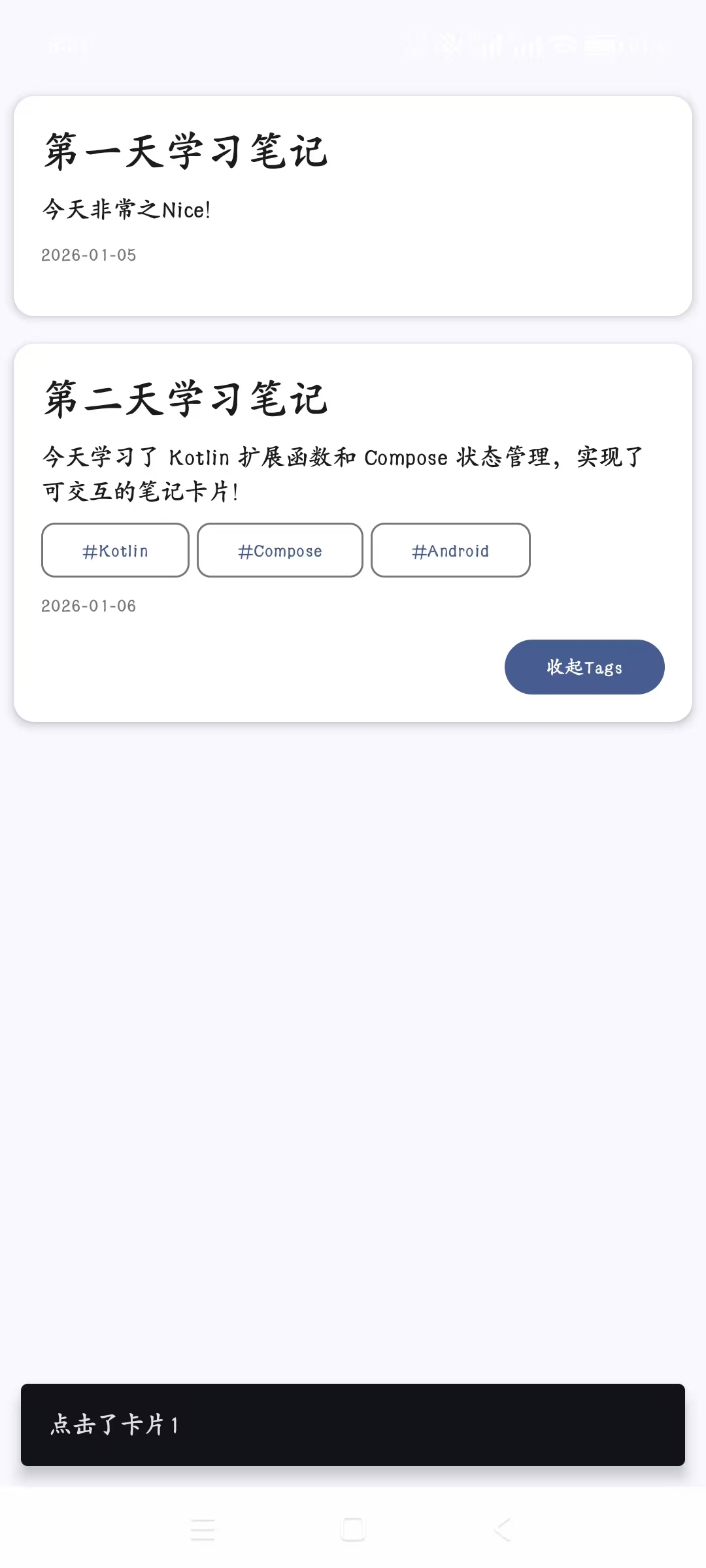
查看运行效果:
第二天的学习就到这里吧!明日见~