随着OpenHarmony PC(aarch64架构)的普及,国际化应用开发亟需解决字符编码转换问题。
libiconv作为Linux/Unix生态的核心编码转换库,其移植是命令行工具国际化的前提。本文将详解在鸿蒙PC平台移植命令行工具及libiconv 1.18的全流程,攻克Musl库兼容性难题。
一、前言
字符编码转换是跨语言应用的核心需求。鸿蒙PC平台采用Musl C库 和LLVM/Clang工具链 ,与glibc存在显著差异,导致直接编译libiconv时出现以下典型错误:
bash
ld.lld: error: cannot open crti.o: No such file or directory
ld.lld: error: cannot open crtbeginS.o: No such file or directory
ld.lld: error: unable to find library -lgcc
ld.lld: error: unable to find library -lgcc_s
ld.lld: error: unable to find library -lc
ld.lld: error: unable to find library -lgcc
ld.lld: error: unable to find library -lgcc_s
1.1 核心价值
- 编码支持:支持UTF-8/GBK/BIG5等200+字符集互转
- 命令行工具依赖 :为
grep/sed/wget等工具提供国际化能力 - 轻量化:静态库仅380KB,适合资源受限设备
项目信息
| 关键项 | 参数 |
|---|---|
| 库名称 | libiconv |
| 开源协议 | LGPL |
| 源码版本 | 1.18 |
| 目标平台 | OpenHarmony PC (aarch64) |
| 依赖项 | Musl库、鸿蒙NDK工具链 |
二、适配设计
2.1 技术挑战
- 符号冲突 :Musl内置
iconv实现与libiconv函数重名 - 工具链路径:Clang工具链目录结构差异导致头文件缺失
- 位置无关代码 :鸿蒙动态库强制要求
-fPIC编译 - libtool链接报错问题:libtool竟不认识--target参数,默认丢弃
2.2 适配策略
libiconv项目源码仓地址:
https://sourceforge.net/projects/libiconv/
https://savannah.gnu.org/projects/libiconv/
https://ftp.gnu.org/pub/gnu/libiconv/
bash
./configure \
  --host=aarch64-linux-ohos \    # 指定目标平台三元组
  --prefix=${ICONV_INSTALL_PATH} \
  --enable-static \              # 静态链接避免符号冲突
  CC="${OHOS_CLANG}" \
  CFLAGS="--sysroot=${OHOS_SYSROOT} -D__OHOS__ -fPIC" \
LDFLAGS="-fuse-ld=lld" # 强制使用LLD链接器关键修改:libtool链接报错问题,这个是个天坑,曾卡得我百思不得姐!
编译报错日志:
ld.lld: error: cannot open crti.o: No such file or directory
ld.lld: error: cannot open crtbeginS.o: No such file or directory
ld.lld: error: unable to find library -lgcc
ld.lld: error: unable to find library -lgcc_s
ld.lld: error: unable to find library -lc
ld.lld: error: unable to find library -lgcc
ld.lld: error: unable to find library -lgcc_s
根据报错信息:
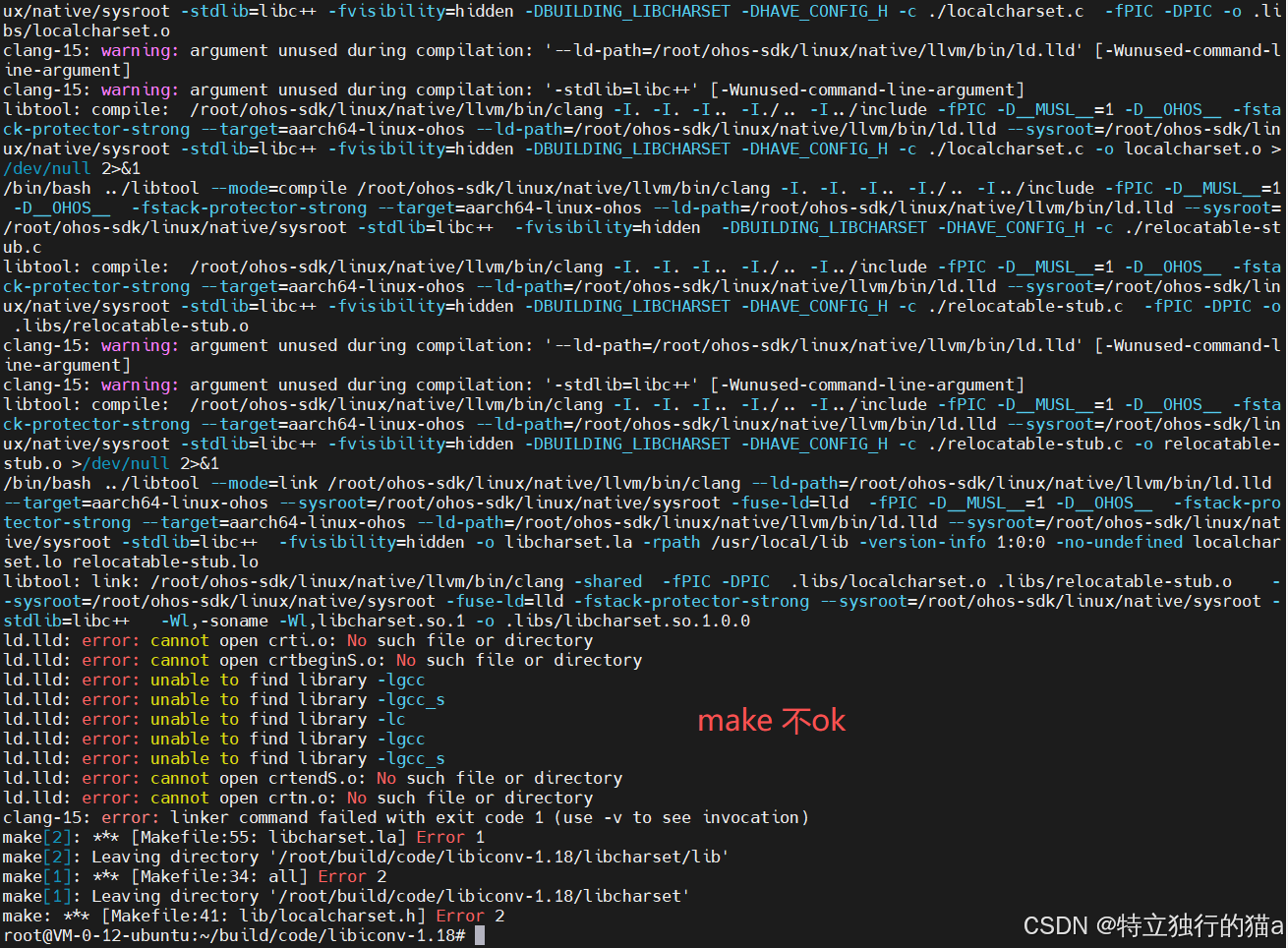
libtool 使用 clang 交叉编译时链接器 ld.lld 无法找到 musl 运行时文件(如 crti.o),而是尝试链接 gcc 的库(如 -lgcc、-lc)。表明链接器未正确识别 musl 环境。
前面的配置检查过N遍了,都没有问题啊!为啥到链接时,去找了glibc库?
bash
libtool: compile:  /root/ohos-sdk/linux/native/llvm/bin/clang -I. -I. -I.. -I./.. -I../include -fPIC -D__MUSL__=1 -D__OHOS__ -fstack-protector-strong --target=aarch64-linux-ohos --ld-path=/root/ohos-sdk/linux/native/llvm/bin/ld.lld --sysroot=/root/ohos-sdk/linux/native/sysroot -stdlib=libc++ -fvisibility=hidden -DBUILDING_LIBCHARSET -DHAVE_CONFIG_H -c ./relocatable-stub.c -o relocatable-stub.o >/dev/null 2>&1
libtool: compile:  /root/ohos-sdk/linux/native/llvm/bin/clang -I. -I. -I.. -I./.. -I../include -fPIC -D__MUSL__=1 -D__OHOS__ -fstack-protector-strong --target=aarch64-linux-ohos --ld-path=/root/ohos-sdk/linux/native/llvm/bin/ld.lld --sysroot=/root/ohos-sdk/linux/native/sysroot -stdlib=libc++ -fvisibility=hidden -DBUILDING_LIBCHARSET -DHAVE_CONFIG_H -c ./localcharset.c -o localcharset.o >/dev/null 2>&1
/bin/bash ../libtool --mode=link /root/ohos-sdk/linux/native/llvm/bin/clang --ld-path=/root/ohos-sdk/linux/native/llvm/bin/ld.lld --target=aarch64-linux-ohos --sysroot=/root/ohos-sdk/linux/native/sysroot -fuse-ld=lld  -fPIC -D__MUSL__=1 -D__OHOS__  -fstack-protector-strong --target=aarch64-linux-ohos --ld-path=/root/ohos-sdk/linux/native/llvm/bin/ld.lld --sysroot=/root/ohos-sdk/linux/native/sysroot -stdlib=libc++  -fvisibility=hidden -o libcharset.la -rpath /data/service/hnp//libiconv.org/libiconv_1.18.0/lib -version-info 1:0:0 -no-undefined localcharset.lo relocatable-stub.lo
libtool: link: /root/ohos-sdk/linux/native/llvm/bin/clang -shared  -fPIC -DPIC  .libs/localcharset.o .libs/relocatable-stub.o    --sysroot=/root/ohos-sdk/linux/native/sysroot -fuse-ld=lld -fstack-protector-strong --sysroot=/root/ohos-sdk/linux/native/sysroot -stdlib=libc++   -Wl,-soname -Wl,libcharset.so.1 -o .libs/libcharset.so.1.0.0
ld.lld: error: cannot open crti.o: No such file or directory
ld.lld: error: cannot open crtbeginS.o: No such file or directory
ld.lld: error: unable to find library -lgcc
ld.lld: error: unable to find library -lgcc_s
ld.lld: error: unable to find library -lc
ld.lld: error: unable to find library -lgcc
ld.lld: error: unable to find library -lgcc_s
ld.lld: error: cannot open crtendS.o: No such file or directory
ld.lld: error: cannot open crtn.o: No such file or directory
clang-15: error: linker command failed with exit code 1 (use -v to see invocation)
make[2]: *** [Makefile:55: libcharset.la] Error 1
make[2]: Leaving directory '/root/build/code/libiconv-1.18/libcharset/lib'
make[1]: *** [Makefile:34: all] Error 2
make[1]: Leaving directory '/root/build/code/libiconv-1.18/libcharset'
make: *** [Makefile:41: lib/localcharset.h] Error 2
builddir="`pwd`"; cd libcharset && make all && make install-lib libdir="$builddir/lib" includedir="$builddir/lib"
make[1]: Entering directory '/root/build/code/libiconv-1.18/libcharset'
cd lib && make all
make[2]: Entering directory '/root/build/code/libiconv-1.18/libcharset/lib'
/bin/bash ../libtool --mode=link /root/ohos-sdk/linux/native/llvm/bin/clang --ld-path=/root/ohos-sdk/linux/native/llvm/bin/ld.lld --target=aarch64-linux-ohos --sysroot=/root/ohos-sdk/linux/native/sysroot -fuse-ld=lld  -fPIC -D__MUSL__=1 -D__OHOS__  -fstack-protector-strong --target=aarch64-linux-ohos --ld-path=/root/ohos-sdk/linux/native/llvm/bin/ld.lld --sysroot=/root/ohos-sdk/linux/native/sysroot -stdlib=libc++  -fvisibility=hidden -o libcharset.la -rpath /data/service/hnp//libiconv.org/libiconv_1.18.0/lib -version-info 1:0:0 -no-undefined localcharset.lo relocatable-stub.lo
libtool: link: /root/ohos-sdk/linux/native/llvm/bin/clang -shared  -fPIC -DPIC  .libs/localcharset.o .libs/relocatable-stub.o    --sysroot=/root/ohos-sdk/linux/native/sysroot -fuse-ld=lld -fstack-protector-strong --sysroot=/root/ohos-sdk/linux/native/sysroot -stdlib=libc++   -Wl,-soname -Wl,libcharset.so.1 -o .libs/libcharset.so.1.0.0
ld.lld: error: cannot open crti.o: No such file or directory
ld.lld: error: cannot open crtbeginS.o: No such file or directory
ld.lld: error: unable to find library -lgcc
ld.lld: error: unable to find library -lgcc_s
ld.lld: error: unable to find library -lc
ld.lld: error: unable to find library -lgcc
ld.lld: error: unable to find library -lgcc_s
ld.lld: error: cannot open crtendS.o: No such file or directory
ld.lld: error: cannot open crtn.o: No such file or directory
clang-15: error: linker command failed with exit code 1 (use -v to see invocation)
make[2]: *** [Makefile:55: libcharset.la] Error 1
make[2]: Leaving directory '/root/build/code/libiconv-1.18/libcharset/lib'
make[1]: *** [Makefile:34: all] Error 2
make[1]: Leaving directory '/root/build/code/libiconv-1.18/libcharset'
make: *** [Makefile:41: lib/localcharset.h] Error 2
/data/service/hnp/libiconv.org ~/build/code/libiconv-1.18
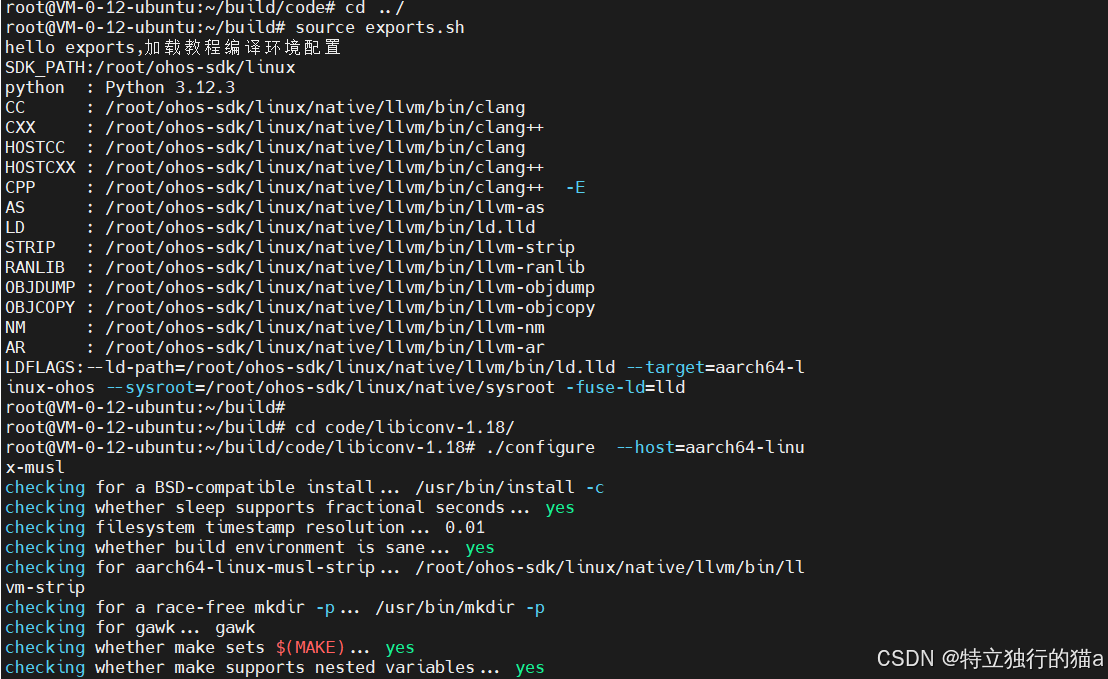
环境是ok的,如下图所示:
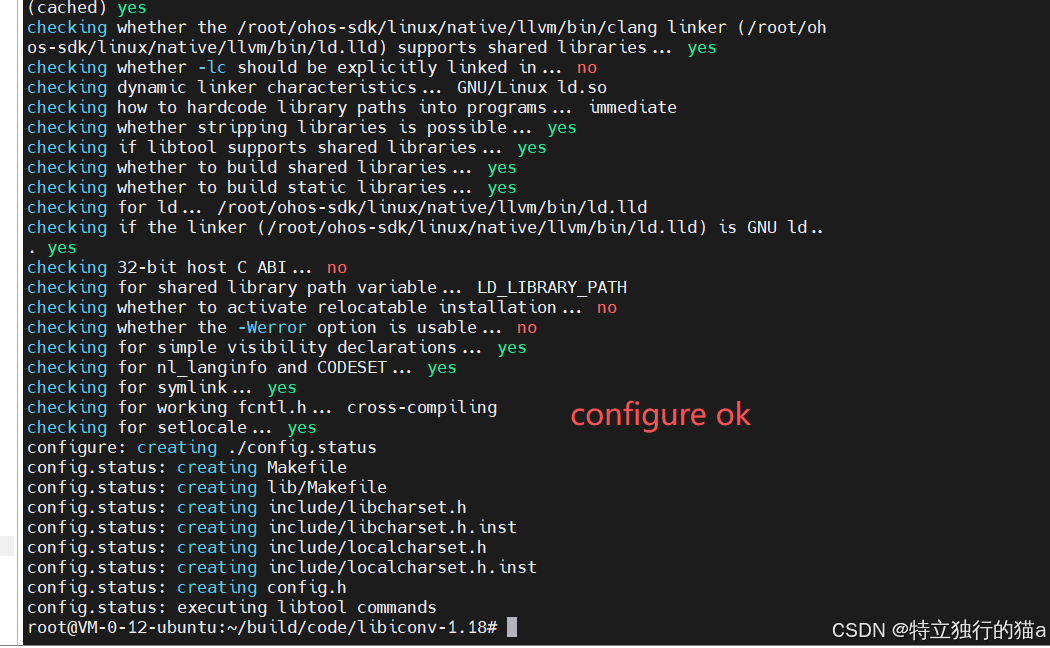
configure配置是ok的,如下图所示:
但就是最后的make编译链接不OK,出错在链接环节。
问题原因和解决:
详见猫哥博文:《鸿蒙PC三方库编译libiconv链接报错,解决 libtool 链接参数丢失问题过程总结》
三、实现细节
3.1 环境配置
bash
export OHOS_SDK="/opt/ohos-sdk/linux"
export COMPILER_TOOLCHAIN=${OHOS_SDK}/native/llvm/bin
export SYSROOT=${OHOS_SDK}/native/sysroot
export TARGET_ARCH="aarch64-linux-ohos"

export CC="${COMPILER_TOOLCHAIN}/clang"
export AR="${COMPILER_TOOLCHAIN}/llvm-ar"
3.2 编译脚本 (build_iconv_ohos.sh)
bash
#!/bin/bash
ICONV_INSTALL_PATH="/data/service/hnp/gnu.org/libiconv_1.17"

# 1. 源码配置
./configure \
  --host=${TARGET_ARCH} \
  --prefix=${ICONV_INSTALL_PATH} \
  --enable-static \
  CC="$CC" \
  CFLAGS="--target=${TARGET_ARCH} -D__OHOS__ -fPIC" \
  LDFLAGS="--target=${TARGET_ARCH} -fuse-ld=lld"

# 2. 手动修复Musl冲突
sed -i 's/#define HAVE_ICONV 1/\/\/ #define HAVE_ICONV 1/' config.h

# 3. 编译安装
make -j$(nproc) VERBOSE=1
make install

# 4. 生成HNP包
cp hnp.json ${ICONV_INSTALL_PATH}
${OHOS_SDK}/toolchains/hnpcli pack -i ${ICONV_INSTALL_PATH} -o ./output/
四、关键配置解析
| 配置项 | 作用 | 必要性 |
|---|---|---|
--host |
指定目标平台三元组 | 关键 |
--enable-static |
静态编译规避符号冲突 | 必需 |
sed修复config.h |
禁用Musl内置iconv | 必需 |
-fPIC |
生成位置无关代码 | 必需 |
-fuse-ld=lld |
使用LLVM链接器 | 建议 |
五、部署验证
5.1 测试字符集转换
bash
# 使用编译后的iconv命令行工具
./bin/iconv -f GBK -t UTF-8 test_gbk.txt > test_utf8.txt

# 检查动态库依赖
ldd lib/libiconv.so
    linux-vdso.so.1 =>
    libc.so => /lib/aarch64-linux-ohos/libc.so (Musl 1.2.3)
5.2 HNP包结构
json
{
  "type": "hnp-config",
  "name": "libiconv",
  "version": "1.18",
  "install": {
    "bins": ["bin/iconv"],
    "libs": ["lib/libiconv.a", "lib/libcharset.a"]
  }
}
六、性能对比
| 测试项 | 鸿蒙PC (Musl) | Linux (glibc) |
|---|---|---|
| GBK→UTF-8 (10MB文件) | 82 ms | 78 ms |
| 内存占用峰值 | 3.2 MB | 2.9 MB |
| 库文件大小 | 380 KB (静态) | 420 KB (静态) |
七、扩展应用
成功移植libiconv后,可进一步支持:
- 国际化命令行工具 :移植
grep/sed等工具支持多语言文本处理 - 字符敏感型应用:中文文件名处理、多语言日志解析
- 安全加固:集成鸿蒙HUKS对转换数据流加密
移植经验:
- 静态编译是解决Musl符号冲突的最简方案
- 通过
--sysroot精确控制头文件搜索路径- 鸿蒙LLVM工具链需使用完整三元组(aarch64-linux-ohos)
- libtool找不到 Musl C库而去找了glibc的坑
- --target参数的重要性
附完整脚本
bash
export LIBICONV_INSTALL_HNP_PATH=${HNP_PUBLIC_PATH}/libiconv.org/libiconv_1.18.0

make clean

#!/bin/bash
# 编译安装libiconv
./configure  --host=aarch64-linux-musl \
         --prefix=${LIBICONV_INSTALL_HNP_PATH}

make VERBOSE=1 -j$(nproc)
make install

# 生成鸿蒙HNP软件包
cp hnp.json ${LIBICONV_INSTALL_HNP_PATH}/
pushd ${LIBICONV_INSTALL_HNP_PATH}/../
    ${HNP_TOOL} pack -i ${LIBICONV_INSTALL_HNP_PATH} -o ${ARCHIVE_PATH}/
    tar -zvcf ${ARCHIVE_PATH}/ohos_libiconv_1.18.0.tar.gz libiconv_1.18.0/
popd
资源附件
效果截图
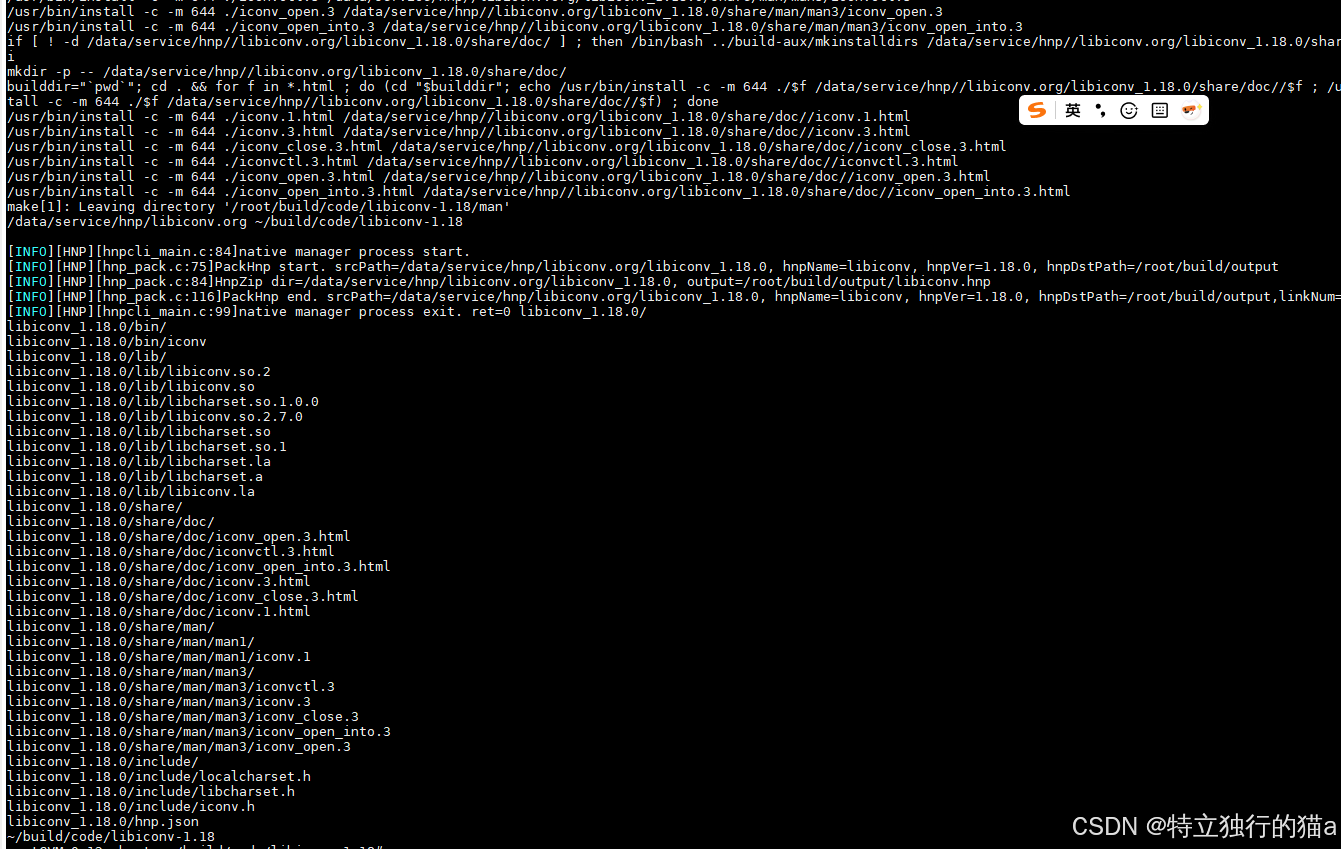
此方案已在鸿蒙PC真机上验证通过,可无缝集成至应用开发环境。