使用telink的sig mesh tool,点击scan控件后网关会把收到的unprovision beacon上报上来,上报格式为:TSCRIPT_GATEWAY_DIR_RSP+ HCI_GATEWAY_CMD_UPDATE_MAC+mac(6 bytes)+unprovision beacon。即:91+88+mac(6 bytes)+ unprovision beacon。参考SIG Mesh SDK - Telink Documents
sig mesh tool打印的Log如下:
<0001>10:02:21:584 INFO:(GATEWAY)HCI_GATEWAY_CMD_UPDATE_MAC : 91 88 20 19 11 22 ff 11 18 2b 00 d8 1e 92 20 c3 d0 f2 3f 9b f2 3c 5c 43 7e 75 cf 00 00 d9 74 78 b3 ee 00 00
<0002>10:02:21:584 INFO:(common)the unprovision beacon is : 18 2b 00 d8 1e 92 20 c3 d0 f2 3f 9b f2 3c 5c 43 7e 75 cf 00 00 d9 74 78 b3
Log解析如下:
91 88 → TSCRIPT_GATEWAY_DIR_RSP+ HCI_GATEWAY_CMD_UPDATE_MAC
20 19 11 22 ff 11 → mac(6 bytes)
18 2b 00 d8 1e 92 20 c3 d0 f2 3f 9b f2 3c 5c 43 7e 75 cf 00 00 d9 74 78 b3 → unprovision beacon
mesh标准文档对Unprovisioned Device beacon 的描述如下:
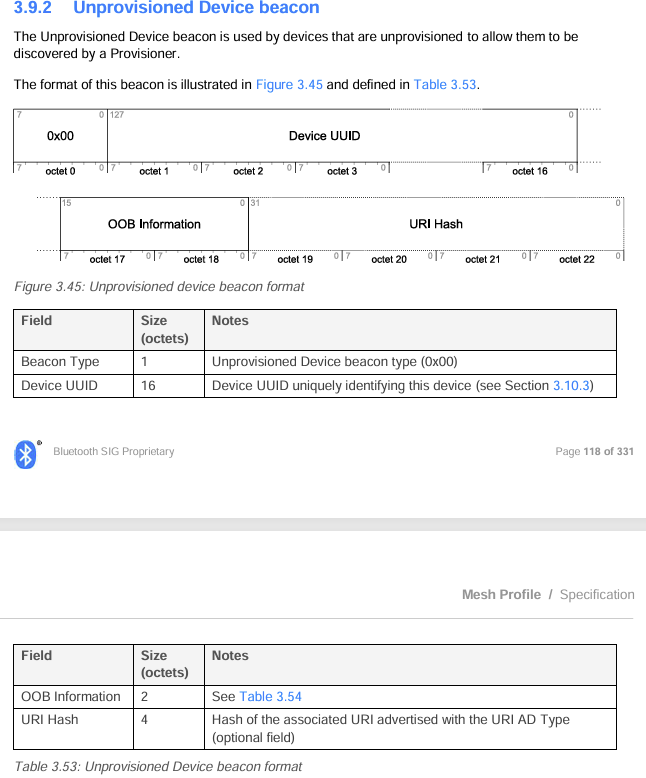
unprovision beacon:
18 2b 00 d8 1e 92 20 c3 d0 f2 3f 9b f2 3c 5c 43 7e 75 cf 00 00 d9 74 78 b3
18 → Len 0x18=24字节
2b → type=<<Mesh Beacon>> #define MESH_ADV_TYPE_BEACON (0x2B)
00 → Beacon Type→ 对应mesh标准文档章节spec 3.9.2 Unprovisioned Device beacon → Unprovisioned Device beacon type (0x00)
d8 1e 92 20 c3 d0 f2 3f 9b f2 3c 5c 43 7e 75 cf → Device UUID
00 00 → OOB Information: 0x00 00 表示 未使用 OOB 认证
d9 74 78 b3 → URI Hash:Hash of the associated URI advertised with the URI AD Type (optional field)
对于Unprovisioned Device beacon解析到此为止,接下来是对URI Data和URI Hash的验证。
telink SDK里的URI Data 和URI Hash例子如下:
URI Data : 172f2f7777772e6578616d706c652e636f6d2f6d6573682f70726f64756374732f6c696768742d7377697463682d7633
URI Hash : d97478b3667f4839487469c72b8e5e9e
接下来用python对上述URI Hash进行验算:
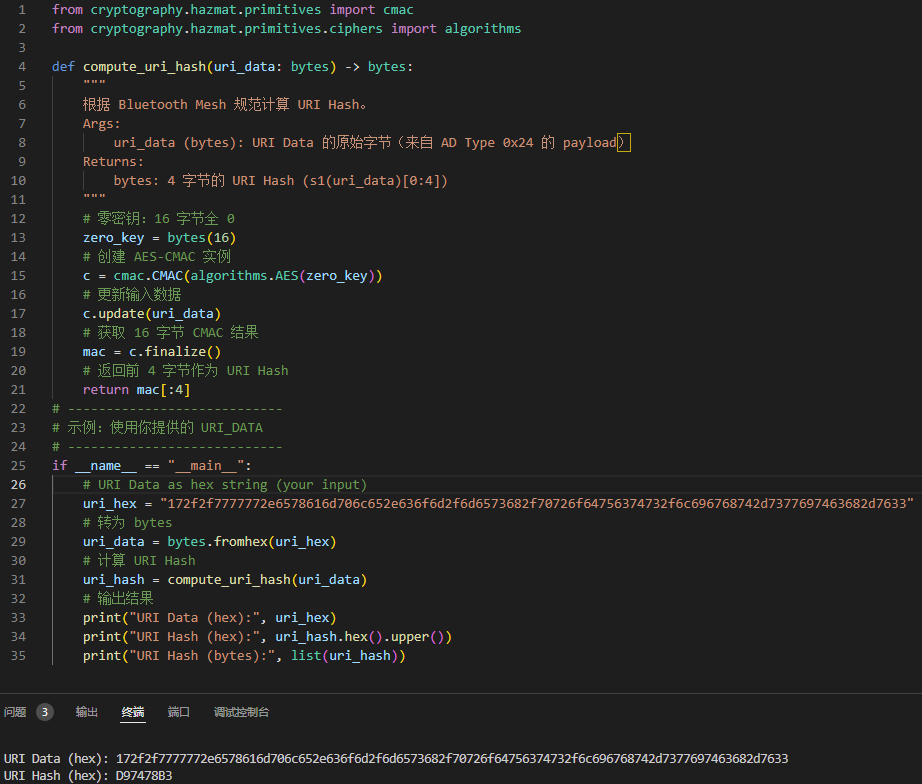
python
from cryptography.hazmat.primitives import cmac
from cryptography.hazmat.primitives.ciphers import algorithms

def compute_uri_hash(uri_data: bytes) -> bytes:
    """
    根据 Bluetooth Mesh 规范计算 URI Hash。
    Args:
        uri_data (bytes): URI Data 的原始字节(来自 AD Type 0x24 的 payload)
    Returns:
        bytes: 4 字节的 URI Hash (s1(uri_data)[0:4])
    """
    # 零密钥:16 字节全 0
    zero_key = bytes(16)
    # 创建 AES-CMAC 实例
    c = cmac.CMAC(algorithms.AES(zero_key))
    # 更新输入数据
    c.update(uri_data)
    # 获取 16 字节 CMAC 结果
    mac = c.finalize()
    # 返回前 4 字节作为 URI Hash
    return mac[:4]
# ----------------------------
# 示例:使用你提供的 URI_DATA
# ----------------------------
if __name__ == "__main__":
    # URI Data as hex string (your input)
    uri_hex = "172f2f7777772e6578616d706c652e636f6d2f6d6573682f70726f64756374732f6c696768742d7377697463682d7633"
    # 转为 bytes
    uri_data = bytes.fromhex(uri_hex)
    # 计算 URI Hash
    uri_hash = compute_uri_hash(uri_data)
    # 输出结果
    print("URI Data (hex):", uri_hex)
    print("URI Hash (hex):", uri_hash.hex().upper())
    print("URI Hash (bytes):", list(uri_hash))
结果如下:
URI Data (hex): 172f2f7777772e6578616d706c652e636f6d2f6d6573682f70726f64756374732f6c696768742d7377697463682d7633
URI Hash (hex): D97478B3
URI Hash (bytes): 217, 116, 120, 179
URI_DATA的哈希计算,telink的主要实现函数为mesh_sec_func_s1()
cpp
int mesh_sec_func_s1 (unsigned char *s1, unsigned char * m, int n);
...
mesh_sec_func_s1 (hash_tmp, uri_dat, sizeof(uri_dat));
结论:关于URI_Hash的计算,telink的实现遵循mesh的标准。