背景
一个List想实现拖拽排序,可以通过Foreach的onMove方法来实现拖拽排序。现在的开发需求如下:
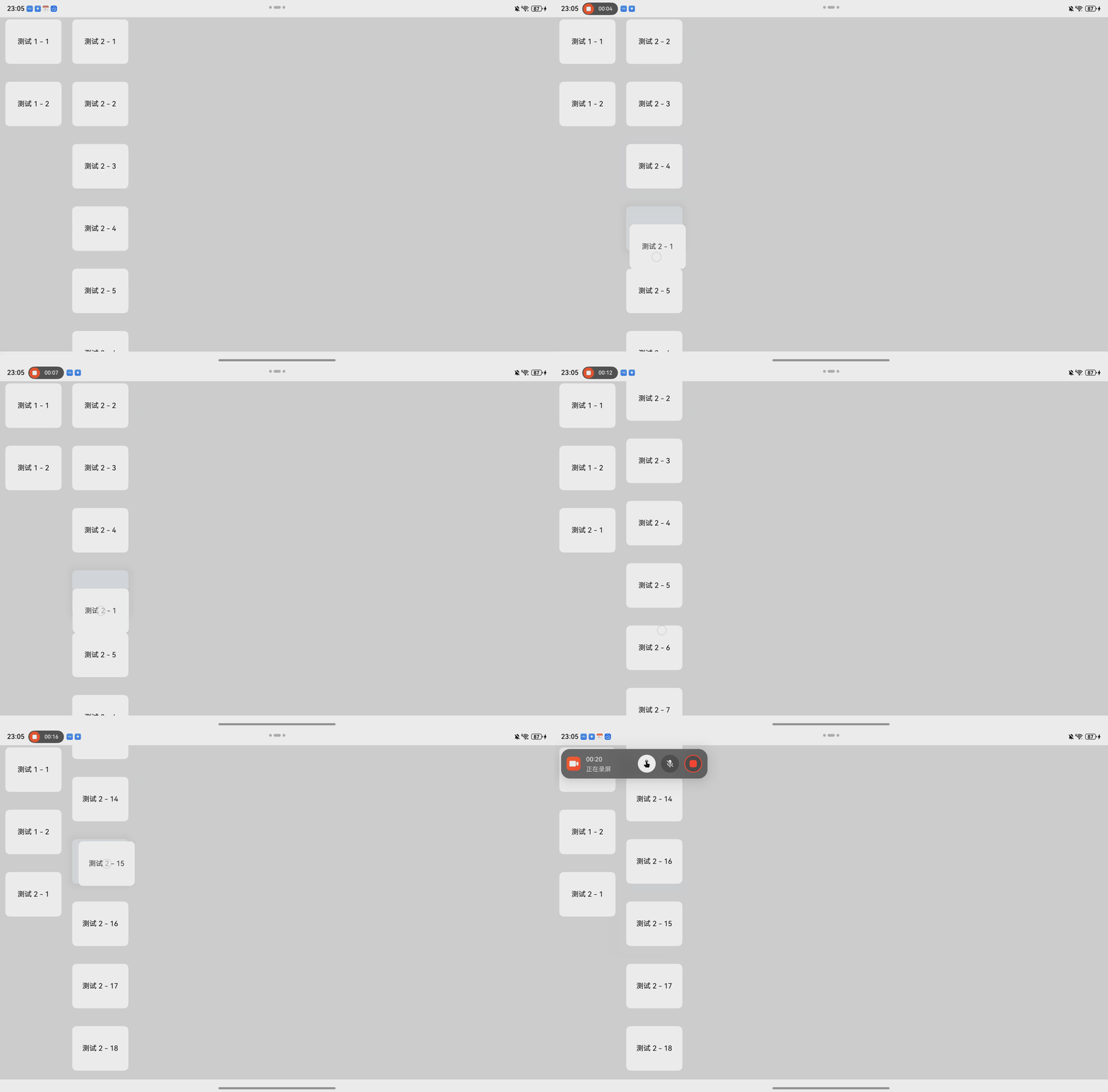
- 实现多个List相同列表和索引时,可以直接的拖拽排序。
- 实现点击拖拽时,移动到列表对象较少的列表时,可以默认添加到最底部。
实现如下动图的方式:
代码思路
- 在List的onItemDragStart方法中,添加选中的对象索引。
arkts
  /**
   * 拖拽开始方法
   * @param groupIndex
   * @param modelIndex
   * @param originX
   * @param originY
   */
  public DragStartEvent(groupIndex: number, modelIndex: number) {
    this.DragItem = this.Items[groupIndex].getData(modelIndex)
    let rectResult: RectResult = this.ItemListScroller[groupIndex].getItemRect(modelIndex);
    this.DragItemWidth = rectResult.width;
    this.DragItemHeight = rectResult.height;
    this.ModelIndex = modelIndex;
    this.GroupIndex = groupIndex;
    this.NewGroupIndex = groupIndex;
}- 在List的onItemDragStart方法中,返回拖拽的卡片样式
arkts
.onItemDragStart((event: ItemDragInfo, itemIndex: number) => {
  this.ItemParam.DragStartEvent(groupIndex, itemIndex);
  return this.ItemMoveBuilder(this.ItemParam.DragItem as ListInfo, this.ItemParam.DragItemWidth,
    this.ItemParam.DragItemHeight);
})

  @Builder
  ItemMoveBuilder(item: ListInfo, width: number, height: number) {
    Text(item.name)
      .width(width)
      .height(height)
      .fontSize(16)
      .textAlign(TextAlign.Center)
      .borderRadius(10)
      .backgroundColor(0xFFFFFF)
      .shadow({
        radius: 70,
        color: '#15000000',
        offsetX: 0,
        offsetY: 0
      })
}- 在onItemDragMove方法中,监控在List范围内的移动,需要排除相同组别和相同拖拽索引的特殊情况。
arkts
.onItemDragMove((event: ItemDragInfo, itemIndex: number, insertIndex: number) => {
  if ((insertIndex == this.ItemParam.ModelIndex && groupIndex == this.ItemParam.GroupIndex) ||
    insertIndex >= lazyModel.totalCount()) {
    return;
  }
  this.ItemParam.DragMoveEvent(insertIndex);
})

  /**
   * 拖拽竖向移动
   * @param moveY
   */
  public DragMoveEvent(insertIndex: number) {
    this.ItemMove(this.GroupIndex, this.ModelIndex, this.NewGroupIndex, insertIndex);
  }

  /**
   * 列表组件移动
   * @param groupIndex
   * @param modelIndex
   * @param newGroupIndex
   * @param newModelIndex
   */
  public ItemMove(groupIndex: number, modelIndex: number, newGroupIndex: number, newModelIndex: number) {
    this.ModelIndex = newModelIndex;
    this.GroupIndex = newGroupIndex;
    let moveModels = this.Items[groupIndex].DeleteData(modelIndex);
    this.Items[newGroupIndex].addData(newModelIndex, moveModels[0]);
}- 在onItemDragEnter方法中监控拖拽的对象是否到达新的List,并及时更新组索引。
arkts
.onItemDragEnter((event: ItemDragInfo) => {
  this.ItemParam.DragEnterEvent(groupIndex);
})

  /**
   * 移动到其他list中
   */
  public DragEnterEvent(nwGroupIndex: number) {
    if (nwGroupIndex == this.GroupIndex) {
      return;
    }
    this.NewGroupIndex = nwGroupIndex;
    //判断一下新的列表有没有modelIndex,有直接互换,没有添加到最末尾
    if (this.Items[nwGroupIndex].totalCount() > this.ModelIndex) {
      return;
    }
    this.ItemMove(this.GroupIndex, this.ModelIndex, nwGroupIndex, this.Items[nwGroupIndex].totalCount());
}- 在onItemDrop方法中初始化所有的中间临时参数
arkts
.onItemDrop((event: ItemDragInfo, itemIndex: number, insertIndex: number, isSuccess: boolean) => {
  this.ItemParam.DragEndEvent();
})

  /**
   * 移动结束
   */
  public DragEndEvent() {
    this.DragItem = undefined;
    this.GroupIndex = 0;
    this.NewGroupIndex = 0;
    this.ModelIndex = 0;
  }
完整代码
ListInfo.ets
arkts
@ObservedV2
export class ListInfo {
  @Trace icon: ResourceStr = '';
  @Trace name: ResourceStr = '';

  constructor(icon: ResourceStr = '', name: ResourceStr = '') {
    this.icon = icon;
    this.name = name;
  }
}
BasicDataSource.ets
arkts
/**
 * 懒加载基础数据
 */
export class BasicDataSource<T> implements IDataSource {
  private listeners: DataChangeListener[] = []

  public totalCount(): number {
    return 0
  }

  public getData(index: number): T | undefined {
    return undefined
  }

  registerDataChangeListener(listener: DataChangeListener): void {
    if (this.listeners.indexOf(listener) < 0) {
      console.info('add listener')
      this.listeners.push(listener)
    }
  }

  unregisterDataChangeListener(listener: DataChangeListener): void {
    const pos = this.listeners.indexOf(listener)
    if (pos >= 0) {
      console.info('remove listener')
      this.listeners.splice(pos, 1)
    }
  }

  notifyDataReload(): void {
    this.listeners.forEach(listener => {
      listener.onDataReloaded()
    })
  }

  notifyDataAdd(index: number): void {
    this.listeners.forEach(listener => {
      listener.onDataAdd(index)
    })
  }

  notifyDataChange(index: number): void {
    this.listeners.forEach(listener => {
      listener.onDataChange(index)
    })
  }

  notifyDataDelete(index: number): void {
    this.listeners.forEach(listener => {
      listener.onDataDelete(index)
    })
  }

  notifyDataMove(from: number, to: number): void {
    this.listeners.forEach(listener => {
      listener.onDataMove(from, to)
    })
  }
}
ListItemLazyModel.ets
arkts
import { BasicDataSource } from "./BasicDataSource";

@ObservedV2
export class ListItemLazyModel<T> extends BasicDataSource<T> {
  @Trace dataArray: Array<T> = new Array<T>()

  /**
   * 获取数据长度
   * @returns
   */
  public totalCount(): number {
    return this.dataArray.length
  }

  /**
   * 获取某项数据
   * @param index
   * @returns
   */
  public getData(index: number): T {
    return this.dataArray[index]
  }

  /**
   * 添加所有数据
   * @param data
   */
  public setAllData(data: Array<T>) {
    this.dataArray = [...data]
    this.notifyDataReload()
  }

  /**
   * 交换数据
   * @param idx_1
   * @param idx_2
   */
  public swapPositions(idx_1: number, idx_2: number) {
    // 利用中间常量存交换值
    const exchange = this.dataArray.splice(idx_1, 1)
    this.dataArray.splice(idx_2, 0, exchange[0])
    // 需要主动调用通知数据更新
    this.notifyDataReload()
  }

  /**
   * 获取数据
   * @returns
   */
  public getAllData() {
    return this.dataArray
  }

  /**
   * 插入数据
   * @param index
   * @param data
   */
  public addData(index: number, data: T): void {
    this.dataArray.splice(index, 0, data)
    this.notifyDataAdd(index)
  }

  /**
   * 追加数据
   * @param data
   */
  public pushData(data: T): void {
    this.dataArray.push(data)
    this.notifyDataAdd(this.dataArray.length - 1)
  }

  /**
   * 删除数据
   * @param index
   * @returns
   */
  public DeleteData(index: number): T[] {
    const exchange = this.dataArray.splice(index, 1);
    this.notifyDataDelete(index);
    return exchange
  }
}
ListItemDragParam.ets
arkts
import { ListItemLazyModel } from "./ListItemLazyModel"

@ObservedV2
export class ListItemDragParam<T> {
  /**
   * 列表数据
   */
  @Trace Items: ListItemLazyModel<T>[] = []
  /**
   * 列表滚动控制器
   */
  @Trace ItemListScroller: ListScroller[] = []
  /**
   * 列表对象的开始和结束位置索引(每个列表仅存开始和结束的索引)
   */
  @Trace ItemStartEndIndexList: number[][] = []
  /**
   * 长按选中对象
   */
  @Trace DragItem?: T
  /**
   * UI上下文
   */
  MyUIContext?: UIContext
  /**
   * 拖拽选项卡宽度
   */
  @Trace DragItemWidth: number = 0
  /**
   * 拖拽选项卡高度
   */
  @Trace DragItemHeight: number = 0
  /**
   * 拖拽选项卡索引
   */
  ModelIndex: number = 0
  /**
   * 拖拽选项卡组索引
   */
  GroupIndex: number = 0
  /**
   * 拖拽移动后的组索引
   */
  NewGroupIndex: number = 0

  /**
   * 初始化
   * @param uiContext
   * @param items 列表实体对象
   */
  public InitData(uiContext: UIContext, items: T[][]) {
    this.MyUIContext = uiContext;
    items.forEach((v, i) => {
      let dragItem: ListItemLazyModel<T> = new ListItemLazyModel();
      dragItem.setAllData(v);
      this.Items.push(dragItem);
      this.ItemListScroller.push(new ListScroller());
      this.ItemStartEndIndexList.push([0, 0]);
    })
  }

  /**
   * 监控每个list列表
   * @param groupIndex
   * @param start
   * @param end
   */
  public ListScrollIndexEvent(groupIndex: number, start: number, end: number) {
    if (this.ItemStartEndIndexList.length <= groupIndex) {
      return;
    }
    this.ItemStartEndIndexList[groupIndex] = [start, end];
  }

  /**
   * 拖拽开始方法
   * @param groupIndex
   * @param modelIndex
   * @param originX
   * @param originY
   */
  public DragStartEvent(groupIndex: number, modelIndex: number) {
    this.DragItem = this.Items[groupIndex].getData(modelIndex)
    let rectResult: RectResult = this.ItemListScroller[groupIndex].getItemRect(modelIndex);
    this.DragItemWidth = rectResult.width;
    this.DragItemHeight = rectResult.height;
    this.ModelIndex = modelIndex;
    this.GroupIndex = groupIndex;
    this.NewGroupIndex = groupIndex;
  }

  /**
   * 拖拽竖向移动
   * @param moveY
   */
  public DragMoveEvent(insertIndex: number) {
    this.ItemMove(this.GroupIndex, this.ModelIndex, this.NewGroupIndex, insertIndex);
  }

  /**
   * 移动结束
   */
  public DragEndEvent() {
    this.DragItem = undefined;
    this.GroupIndex = 0;
    this.NewGroupIndex = 0;
    this.ModelIndex = 0;
  }

  /**
   * 移动到其他list中
   */
  public DragEnterEvent(nwGroupIndex: number) {
    if (nwGroupIndex == this.GroupIndex) {
      return;
    }
    this.NewGroupIndex = nwGroupIndex;
    //判断一下新的列表有没有modelIndex,有直接互换,没有添加到最末尾
    if (this.Items[nwGroupIndex].totalCount() > this.ModelIndex) {
      return;
    }
    this.ItemMove(this.GroupIndex, this.ModelIndex, nwGroupIndex, this.Items[nwGroupIndex].totalCount());
  }

  /**
   * 列表组件移动
   * @param groupIndex
   * @param modelIndex
   * @param newGroupIndex
   * @param newModelIndex
   */
  public ItemMove(groupIndex: number, modelIndex: number, newGroupIndex: number, newModelIndex: number) {
    this.ModelIndex = newModelIndex;
    this.GroupIndex = newGroupIndex;
    let moveModels = this.Items[groupIndex].DeleteData(modelIndex);
    this.Items[newGroupIndex].addData(newModelIndex, moveModels[0]);
  }
}
ListItemDragPage.ets
arkts
import { ListInfo } from '../Model/ListInfo'
import { ListItemDragParam } from '../Model/ListItemDragParam';
import { JSON } from '@kit.ArkTS';
import { ListItemLazyModel } from '../Model/ListItemLazyModel';


@Entry
@ComponentV2
struct ListItemDragPage {
  @Local ItemParam: ListItemDragParam<ListInfo> = new ListItemDragParam()

  aboutToAppear(): void {
    let item: ListInfo[] = [];
    let item2: ListInfo[] = [];
    let item3: ListInfo[] = [];
    let item4: ListInfo[] = [];

    for (let index = 0; index < 2; index++) {
      let element: ListInfo = new ListInfo();
      element.name = `测试 1 - ${index + 1}`;
      item.push(element);
    }

    for (let index = 0; index < 18; index++) {
      let element: ListInfo = new ListInfo();
      element.name = `测试 2 - ${index + 1}`;
      item2.push(element);
    }
    for (let index = 0; index < 2; index++) {
      let element: ListInfo = new ListInfo();
      element.name = `测试 3 - ${index + 1}`;
      item3.push(element);
    }
    for (let index = 0; index < 5; index++) {
      let element: ListInfo = new ListInfo();
      element.name = `测试 4 - ${index + 1}`;
      item4.push(element);
    }

    this.ItemParam.InitData(this.getUIContext(), [item, item2]);
  }

  build() {
    Scroll() {
      Row() {
        ForEach(this.ItemParam.Items, (lazyModel: ListItemLazyModel<ListInfo>, groupIndex: number) => {
          List({ space: 20, scroller: this.ItemParam.ItemListScroller[groupIndex] }) {
            LazyForEach(lazyModel, (item: ListInfo, modelIndex: number) => {
              ListItem() {
                this.ItemBuilder(item);
              }
              .margin({ left: 12, right: 12, bottom: 20 })
              .clip(false)
            }, (item: ListInfo) => JSON.stringify(item))
          }
          .width(150)
          .height("100%")
          .scrollBar(BarState.Off)
          .clip(false)
          .onItemDragStart((event: ItemDragInfo, itemIndex: number) => {
            this.ItemParam.DragStartEvent(groupIndex, itemIndex);
            return this.ItemMoveBuilder(this.ItemParam.DragItem as ListInfo, this.ItemParam.DragItemWidth,
              this.ItemParam.DragItemHeight);
          })
          .onItemDragMove((event: ItemDragInfo, itemIndex: number, insertIndex: number) => {
            if ((insertIndex == this.ItemParam.ModelIndex && groupIndex == this.ItemParam.GroupIndex) ||
              insertIndex >= lazyModel.totalCount()) {
              return;
            }
            this.ItemParam.DragMoveEvent(insertIndex);
          })
          .onItemDragEnter((event: ItemDragInfo) => {
            this.ItemParam.DragEnterEvent(groupIndex);
          })
          .onItemDrop((event: ItemDragInfo, itemIndex: number, insertIndex: number, isSuccess: boolean) => {
            this.ItemParam.DragEndEvent();
          })
        })
      }
      .alignItems(VerticalAlign.Top)
      .justifyContent(FlexAlign.Start)
      .height('100%')

    }
    .width('100%')
    .height('100%')
    .align(Alignment.Start)
    .scrollable(ScrollDirection.Horizontal)
    .padding({ top: 5 })
    .backgroundColor(0xDCDCDC)
  }

  @Builder
  ItemBuilder(item: ListInfo) {
    Column() {
      Text(item.name)
        .width('100%')
        .height(100)
        .fontSize(16)
        .textAlign(TextAlign.Center)
        .borderRadius(10)
        .backgroundColor(this.ItemParam.DragItem === item ? "#e3e5e8" : 0xFFFFFF)
        .fontColor(this.ItemParam.DragItem === item ? Color.Transparent : Color.Black)
        .shadow(this.ItemParam.DragItem === item ? {
          radius: 70,
          color: '#15000000',
          offsetX: 0,
          offsetY: 0
        } :
          {
            radius: 0,
            color: '#15000000',
            offsetX: 0,
            offsetY: 0
          })
        .animation({ curve: Curve.Sharp, duration: 300 });
    }
  }

  @Builder
  ItemMoveBuilder(item: ListInfo, width: number, height: number) {
    Text(item.name)
      .width(width)
      .height(height)
      .fontSize(16)
      .textAlign(TextAlign.Center)
      .borderRadius(10)
      .backgroundColor(0xFFFFFF)
      .shadow({
        radius: 70,
        color: '#15000000',
        offsetX: 0,
        offsetY: 0
      })
  }
}
总结
- 需要注意的点是,不能使用Foreach来实现List数据的循环渲染。每次列表项对换的时候,会触发整个列表刷新。会导致列表索引直接回到0。初步分析,是因为Foreach对象是对整个列表数据的完全加载,因此修改其中的顺序,会导致整个列表的更新,因此,使用LazyForEach来实现局部的刷新。如果有更好的解释,也欢迎大家互相交流。
- 还没实现拖动移动到最后位置或者开头位置自动上下偏移效果。
- 还没实现转换动画和邻近选项动画。