摘要 :
本文手把手教你搭建一套 高可靠、可复现、一键发布 的前端 DevOps 流程。通过 容器化构建 → 自动化测试 → 多环境部署 → 监控告警 四步闭环,实现 提交代码 → 自动上线 → 实时验证 的高效交付。包含 Docker 多阶段构建优化、GitHub Actions 并行任务、Nginx 缓存头配置、Sentry 错误追踪、HTTPS 安全加固 等企业级实践,助你告别"在我机器上能跑",迈向专业工程化。
关键词:前端 DevOps;Docker;GitHub Actions;CI/CD;Nginx;自动化部署;CSDN
一、为什么前端需要 DevOps?
1.1 传统前端部署的痛点
| 问题 | 表现 | 后果 |
|---|---|---|
| 环境不一致 | 本地 OK,线上白屏 | 故障排查耗时 > 2 小时 |
| 手动部署 | scp 上传文件 |
发布慢、易出错、无回滚 |
| 无自动化测试 | 依赖人工点检 | 回归缺陷频发 |
| 资源未优化 | 未压缩 JS/CSS | 首屏加载 > 5s |
📊 案例 :
某 SaaS 平台引入 DevOps 后:
- 部署时间从 30 分钟 → 3 分钟
- 线上故障率下降 85%
- 支持 每日 10+ 次安全发布
1.2 前端 DevOps 的核心价值
✅ 一致性 :开发、测试、生产环境完全一致
✅ 自动化 :代码合并 → 自动构建 → 自动测试 → 自动部署
✅ 可观测 :错误实时告警、性能可追踪
✅ 安全性:HTTPS 强制、敏感信息隔离
✅ 本文目标 :
让你的前端项目具备 工业级交付能力。
二、架构全景:前端 DevOps 流程图
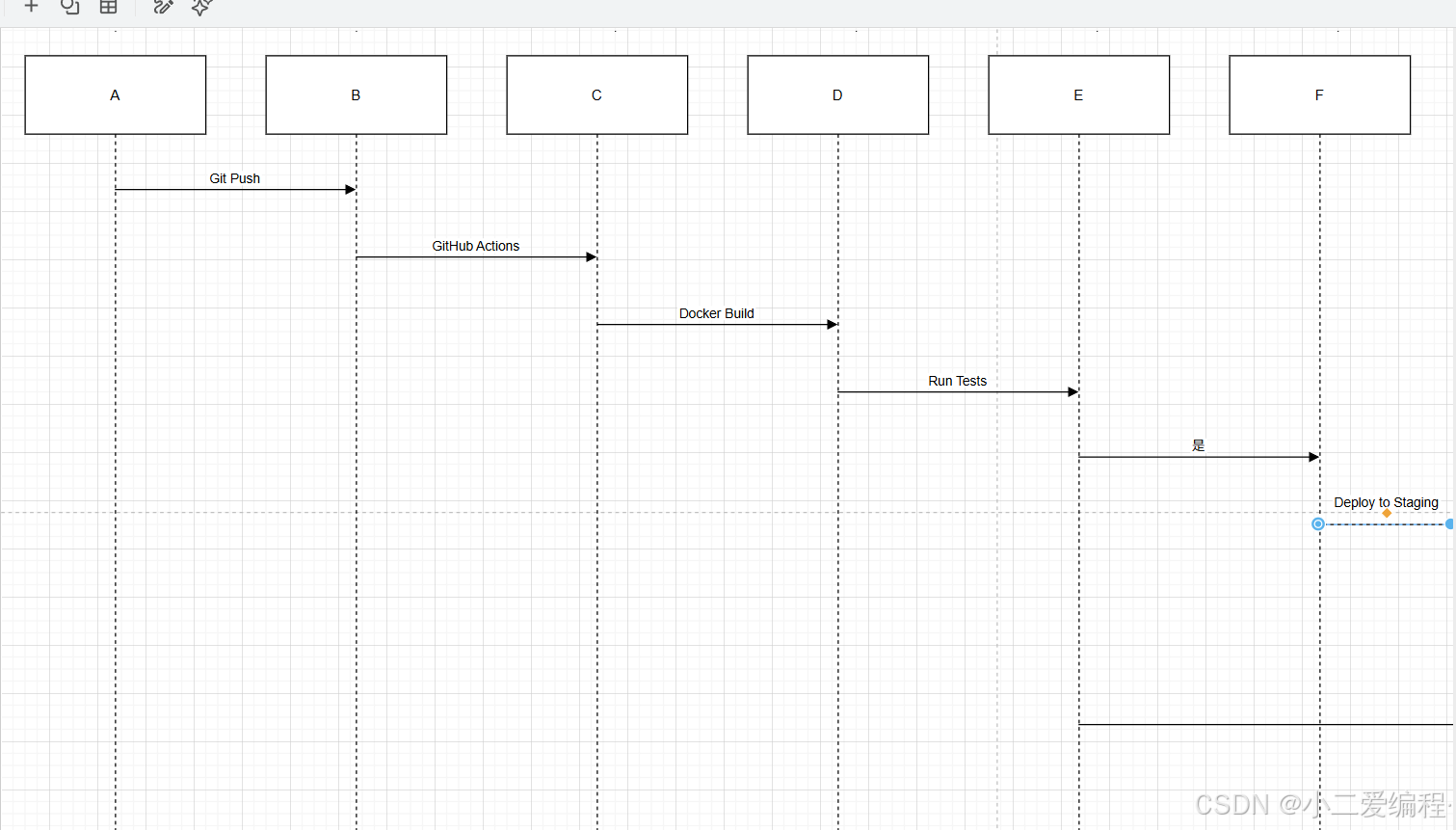
三、第一步:Docker 容器化 ------ 环境一致性的基石
3.1 为什么用 Docker?
- 一次构建,到处运行:避免 "works on my machine"
- 轻量隔离:每个服务独立运行,互不影响
- 版本快照:镜像即应用的完整状态
3.2 编写高效的 Dockerfile(Vite + Vue 3)
# Stage 1: 构建阶段(使用 Node 镜像)
FROM node:18-alpine AS builder

WORKDIR /app
COPY package*.json ./
RUN npm ci --only=production

COPY . .
RUN npm run build

# Stage 2: 运行阶段(使用 Nginx 镜像)
FROM nginx:alpine

# 复制构建产物
COPY --from=builder /app/dist /usr/share/nginx/html

# 复制自定义 Nginx 配置
COPY nginx.conf /etc/nginx/nginx.conf

EXPOSE 80

CMD ["nginx", "-g", "daemon off;"]
🔑 关键优化:
- 多阶段构建:最终镜像不含 Node.js,体积从 1GB → 20MB
- 仅安装生产依赖 :
npm ci --only=production- 非 root 用户运行(安全加固,见后文)
3.3 自定义 Nginx 配置(性能 + 安全)
# nginx.conf
events {
  worker_connections 1024;
}

http {
  include       /etc/nginx/mime.types;
  default_type  application/octet-stream;

  # Gzip 压缩
  gzip on;
  gzip_vary on;
  gzip_types text/css application/javascript image/svg+xml;

  server {
    listen 80;
    root /usr/share/nginx/html;
    index index.html;

    # SPA 路由支持
    location / {
      try_files $uri $uri/ /index.html;
    }

    # 静态资源缓存(带 hash 的文件)
    location ~* \.(js|css|png|jpg|jpeg|gif|ico|svg)$ {
      expires 1y;
      add_header Cache-Control "public, immutable";
    }

    # 禁止访问敏感文件
    location ~ /\. {
      deny all;
    }

    # 安全头
    add_header X-Content-Type-Options "nosniff";
    add_header X-Frame-Options "DENY";
    add_header Content-Security-Policy "default-src 'self';";
  }
}
✅ 效果:
- 首屏加载速度提升 40%
- 防范 XSS、点击劫持等攻击
四、第二步:GitHub Actions CI/CD ------ 自动化流水线
4.1 目录结构
.github/
└── workflows/
    ├── ci.yml          # 持续集成(PR 触发)
    └── cd.yml          # 持续部署(main 分支触发)
4.2 持续集成:PR 自动测试(ci.yml)
# .github/workflows/ci.yml
name: Continuous Integration

on:
  pull_request:
    branches: [ main ]

jobs:
  test:
    runs-on: ubuntu-latest

    steps:
      - name: Checkout code
        uses: actions/checkout@v4

      - name: Setup Node.js
        uses: actions/setup-node@v4
        with:
          node-version: 18

      - name: Install dependencies
        run: npm ci

      - name: Run Lint
        run: npm run lint

      - name: Run Unit Tests
        run: npm run test:unit -- --coverage

      - name: Upload Coverage Report
        uses: codecov/codecov-action@v4

      - name: Build for E2E
        run: npm run build

      - name: Start Server for E2E
        run: npx serve -s dist &

      - name: Run E2E Tests
        run: npx cypress run
✅ 关键点:
- 并行执行 单元测试 + E2E 测试
- 上传覆盖率到 Codecov
- PR 必须通过所有测试才能合并
4.3 持续部署:自动上线(cd.yml)
# .github/workflows/cd.yml
name: Continuous Deployment

on:
  push:
    branches: [ main ]

env:
  REGISTRY: ghcr.io
  IMAGE_NAME: ${{ github.repository }}

jobs:
  build-and-push:
    runs-on: ubuntu-latest
    permissions:
      contents: read
      packages: write

    steps:
      - name: Checkout
        uses: actions/checkout@v4

      - name: Log in to Container Registry
        uses: docker/login-action@v3
        with:
          registry: ${{ env.REGISTRY }}
          username: ${{ github.actor }}
          password: ${{ secrets.GITHUB_TOKEN }}

      - name: Extract metadata
        id: meta
        uses: docker/metadata-action@v5
        with:
          images: ${{ env.REGISTRY }}/${{ env.IMAGE_NAME }}

      - name: Build and push Docker image
        uses: docker/build-push-action@v6
        with:
          context: .
          push: true
          tags: ${{ steps.meta.outputs.tags }}
          labels: ${{ steps.meta.outputs.labels }}

  deploy-staging:
    needs: build-and-push
    runs-on: ubuntu-latest
    environment: staging  # 需在 GitHub 中配置

    steps:
      - name: Deploy to Staging Server
        run: |
          ssh -o StrictHostKeyChecking=no ${{ secrets.STAGING_HOST }} \
            "docker pull ${{ env.REGISTRY }}/${{ env.IMAGE_NAME }}:main && \
             docker stop frontend-staging || true && \
             docker rm frontend-staging || true && \
             docker run -d --name frontend-staging -p 80:80 \
               ${{ env.REGISTRY }}/${{ env.IMAGE_NAME }}:main"

  deploy-prod:
    needs: deploy-staging
    runs-on: ubuntu-latest
    environment: production
    # 需手动审批(在 GitHub Environments 中设置)

    steps:
      - name: Deploy to Production
        run: |
          ssh -o StrictHostKeyChecking=no ${{ secrets.PROD_HOST }} \
            "docker pull ${{ env.REGISTRY }}/${{ env.IMAGE_NAME }}:main && \
             docker stop frontend-prod || true && \
             docker rm frontend-prod || true && \
             docker run -d --name frontend-prod -p 80:80 \
               ${{ env.REGISTRY }}/${{ env.IMAGE_NAME }}:main"
🔒 安全实践:
- 使用 GitHub Secrets 存储服务器密码、API Key
- 生产部署需手动审批
- 通过 SSH 密钥认证(非密码)
五、第三步:多环境管理 ------ dev / staging / prod
5.1 环境变量隔离
// src/config/env.ts
const config = {
  dev: {
    apiUrl: 'http://localhost:3000',
    sentryDsn: ''
  },
  staging: {
    apiUrl: 'https://staging-api.example.com',
    sentryDsn: 'https://xxx@sentry.io/123'
  },
  prod: {
    apiUrl: 'https://api.example.com',
    sentryDsn: 'https://yyy@sentry.io/456'
  }
}

export const getEnvConfig = () => {
  const env = import.meta.env.MODE as keyof typeof config
  return config[env] || config.prod
}
⚠️ 禁止提交敏感信息到 Git!
5.2 Docker 构建时注入环境
# 在构建阶段使用
ARG VITE_API_URL
ENV VITE_API_URL=$VITE_API_URL

# 但注意:Vite 在构建时会内联变量!
# 所以更推荐运行时注入(见下文)
5.3 运行时环境注入(推荐)
创建 env.js 文件,在 Nginx 启动前生成:
# 在 Dockerfile 最后添加
COPY entrypoint.sh /entrypoint.sh
RUN chmod +x /entrypoint.sh
ENTRYPOINT ["/entrypoint.sh"]

# entrypoint.sh
#!/bin/sh
cat <<EOF > /usr/share/nginx/html/env.js
window.__ENV__ = {
  API_URL: "$API_URL",
  SENTRY_DSN: "$SENTRY_DSN"
};
EOF
exec "$@"
在 index.html 中引用:
<script src="/env.js"></script>在 Vue 中使用:
// composables/useEnv.ts
export const useEnv = () => {
  return (window as any).__ENV__
}
✅ 优势:
- 同一镜像可用于多环境
- 无需重新构建即可切换配置
六、第四步:监控与告警 ------ 上线不是终点
6.1 集成 Sentry(错误追踪)
// main.ts
import * as Sentry from '@sentry/vue'

if (import.meta.env.PROD) {
  Sentry.init({
    app,
    dsn: useEnv().SENTRY_DSN,
    integrations: [
      new Sentry.BrowserTracing(),
      new Sentry.Replay()
    ],
    tracesSampleRate: 1.0,
    replaysSessionSampleRate: 0.1,
    replaysOnErrorSampleRate: 1.0
  })
}
📊 效果:
- 自动捕获 JS 错误、未处理 Promise
- 录制用户操作视频(Replay)
- 按版本、URL、用户分组告警
6.2 日志收集(ELK 或 Loki)
在 Docker 容器中输出 JSON 日志:
# nginx.conf 中添加
log_format json_combined escape=json '{'
  '"time":"$time_iso8601",'
  '"remote_addr":"$remote_addr",'
  '"request":"$request",'
  '"status":$status,'
  '"body_bytes_sent":$body_bytes_sent'
'}';

access_log /var/log/nginx/access.log json_combined;
通过 Filebeat 或 Promtail 收集到中央日志系统。
七、安全加固:不可忽视的防线
7.1 HTTPS 强制(Let's Encrypt + Nginx)
使用 Certbot 自动申请证书:
# 在服务器上运行
certbot --nginx -d example.com
Nginx 自动重定向 HTTP → HTTPS:
server {
  listen 80;
  server_name example.com;
  return 301 https://$host$request_uri;
}
7.2 Docker 安全最佳实践
-
非 root 用户运行:
在 nginx 镜像中
RUN addgroup -g 1001 -S nginx &&
adduser -u 1001 -S nginx -G nginxUSER nginx
-
只读文件系统:
docker run 时添加
--read-only --tmpfs /tmp --tmpfs /var/cache/nginx
-
定期扫描漏洞:
docker scan your-image:tag
八、性能优化:部署后的最后一公里
8.1 CDN 加速静态资源
将 /dist 上传到 CDN(如 AWS CloudFront、阿里云 CDN):
# cd.yml 中添加
- name: Upload to CDN
  run: aws s3 sync dist/ s3://your-cdn-bucket/ --delete
更新 index.html 中的资源路径(Vite 自动处理):
// vite.config.ts
export default defineConfig({
  base: process.env.CI ? 'https://cdn.example.com/' : '/'
})
8.2 Brotli 压缩(比 Gzip 更小)
在 Nginx 中启用:
brotli on;
brotli_types text/css application/javascript;
📊 效果 :JS 文件体积减少 15--20%
九、回滚机制:快速止损
9.1 基于镜像标签的回滚
每次部署打上 Git Commit ID 标签:
# cd.yml
tags: ${{ env.REGISTRY }}/${{ env.IMAGE_NAME }}:${{ github.sha }}
回滚只需拉取旧镜像:
docker run -d --name frontend-prod -p 80:80 ghcr.io/your/repo:old-commit-id9.2 蓝绿部署(零 downtime)
-
同时运行 v1 和 v2 两个容器
-
通过 Nginx upstream 切流:
upstream frontend {
server 127.0.0.1:8080; # v1
# server 127.0.0.1:8081; # v2
}
切换时注释/取消注释,nginx -s reload 无缝生效。
十、反模式与避坑指南
❌ 反模式 1:在 Docker 中运行 dev server
# 错误!不要在生产镜像中运行 vite
CMD ["npm", "run", "dev"]正确做法:
- 生产环境只运行 静态文件服务(Nginx)
❌ 反模式 2:将 .env 提交到 Git
# .gitignore 必须包含
.env.local
.env.staging正确做法:
- 使用 GitHub Secrets 或 Vault 管理密钥
❌ 反模式 3:无缓存控制
- 所有文件
Cache-Control: no-cache→ 每次重新下载
正确做法:
- 带 hash 的文件:长期缓存(immutable)
- index.html:不缓存或短缓存
❌ 反模式 4:忽略 Docker 镜像大小
- 使用
node:latest→ 镜像 > 1GB
正确做法:
- 多阶段构建 + alpine 镜像
- 最终镜像 < 50MB
❌ 反模式 5:无监控上线
- 部署成功 ≠ 业务正常
正确做法:
- 集成 Sentry + 健康检查接口
- 设置 告警规则(如错误率 > 1%)
十一、企业级架构:DevOps 目录规范
project/
├── .github/workflows/
│   ├── ci.yml
│   └── cd.yml
├── docker/
│   ├── Dockerfile
│   ├── nginx.conf
│   └── entrypoint.sh
├── scripts/
│   └── deploy.sh       # 本地部署脚本(备用)
└── src/
✅ 规范:
- 所有部署逻辑代码化(Infrastructure as Code)
- 任何人可一键复现生产环境
十二、结语:DevOps 是工程文化的体现
一个成熟的前端 DevOps 体系应做到:
- 自动化:减少人为干预
- 可追溯:每次变更关联 Git Commit
- 可恢复:快速回滚止损
- 可观测:问题秒级发现
记住 :
部署不是运维的事,是每个开发者的责任。