目录
[1. 完整脚本](#1. 完整脚本)
[2. 使用说明](#2. 使用说明)
[2.1 前置准备](#2.1 前置准备)
[2.2 安装依赖](#2.2 安装依赖)
[2.3 配置修改](#2.3 配置修改)
[2.4 运行脚本](#2.4 运行脚本)
[2.5 后台运行(生产环境推荐)](#2.5 后台运行(生产环境推荐))
[2.6 告警测试](#2.6 告警测试)
[2.6.1 执行脚本](#2.6.1 执行脚本)
[2.6.2 触发告警](#2.6.2 触发告警)
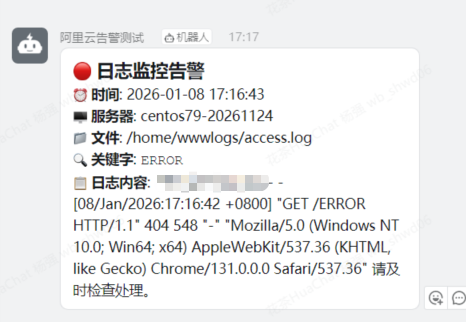
[2.6.3 钉钉告警](#2.6.3 钉钉告警)
1. 完整脚本
下面是一个完整的Python脚本方案,用于实时监控服务器日志并通过钉钉发送告警。这个方案结合了实时日志跟踪、关键字匹配和钉钉消息推送功能。
cat python_log_monitor.sh
#!/usr/bin/env python3
# -*- coding: utf-8 -*-

import re
import time
import requests
import json
import os
from datetime import datetime
from typing import List, Dict

class LogMonitor:
    def __init__(self, log_file: str, keywords: List[str], dingding_webhook: str,
                 check_interval: int = 2, max_message_length: int = 2000):
        """
        初始化日志监控器

        Args:
            log_file: 要监控的日志文件路径
            keywords: 监控的关键字列表
            dingding_webhook: 钉钉机器人Webhook地址
            check_interval: 检查间隔(秒)
            max_message_length: 消息最大长度(钉钉限制)
        """
        self.log_file = log_file
        self.keywords = keywords
        self.dingding_webhook = dingding_webhook
        self.check_interval = check_interval
        self.max_message_length = max_message_length
        self.last_position = 0
        self.keyword_pattern = re.compile('|'.join(keywords), re.IGNORECASE)

        # 验证文件存在性
        if not os.path.exists(log_file):
            raise FileNotFoundError(f"日志文件不存在: {log_file}")

    def tail_log(self) -> List[str]:
        """实时读取日志文件的新内容"""
        new_lines = []

        try:
            with open(self.log_file, 'r', encoding='utf-8', errors='ignore') as f:
                # 移动到文件末尾
                f.seek(0, 2)
                current_size = f.tell()

                # 如果文件被截断或重新创建,重置位置
                if current_size < self.last_position:
                    self.last_position = 0

                # 读取新内容
                if current_size > self.last_position:
                    f.seek(self.last_position)
                    new_lines = f.readlines()
                    self.last_position = f.tell()

        except Exception as e:
            print(f"读取日志文件错误: {e}")
            # 发生错误时重置文件指针
            self.last_position = 0

        return new_lines

    def contains_keyword(self, line: str) -> bool:
        """检查行是否包含关键字"""
        return bool(self.keyword_pattern.search(line))

    def send_dingding_alert(self, log_line: str, matched_keyword: str):
        """发送钉钉告警消息"""
        # 截断过长的消息
        if len(log_line) > self.max_message_length:
            log_line = log_line[:self.max_message_length] + "..."

        # 构建Markdown格式消息
        timestamp = datetime.now().strftime("%Y-%m-%d %H:%M:%S")
        hostname = os.uname().nodename if hasattr(os, 'uname') else "Unknown"

        markdown_content = f"""## 🔴 日志监控告警
**⏰ 时间**: {timestamp}
**🖥️ 服务器**: {hostname}
**📁 文件**: {self.log_file}
**🔍 关键字**: `{matched_keyword}`
**📋 日志内容**:
{log_line.strip()}
请及时检查处理。"""

        # 构建请求数据
        data = {
            "msgtype": "markdown",
            "markdown": {
                "title": "日志监控告警",
                "text": markdown_content
            },
            "at": {
                "isAtAll": False
            }
        }

        try:
            headers = {'Content-Type': 'application/json'}
            response = requests.post(
                self.dingding_webhook,
                data=json.dumps(data),
                headers=headers,
                timeout=10
            )

            if response.status_code == 200:
                print(f"{timestamp} - 告警发送成功")
            else:
                print(f"{timestamp} - 告警发送失败: {response.status_code} - {response.text}")

        except Exception as e:
            print(f"{timestamp} - 发送钉钉消息异常: {e}")

    def start_monitoring(self):
        """开始监控日志文件"""
        print(f"开始监控日志文件: {self.log_file}")
        print(f"监控关键字: {', '.join(self.keywords)}")
        print("监控已启动,按 Ctrl+C 停止...")

        try:
            # 初始化文件指针到文件末尾
            with open(self.log_file, 'r', encoding='utf-8', errors='ignore') as f:
                f.seek(0, 2)
                self.last_position = f.tell()

            while True:
                new_lines = self.tail_log()

                for line in new_lines:
                    if self.contains_keyword(line):
                        matched_keyword = self.keyword_pattern.search(line).group()
                        print(f"检测到关键字 '{matched_keyword}': {line.strip()}")
                        self.send_dingding_alert(line, matched_keyword)

                time.sleep(self.check_interval)

        except KeyboardInterrupt:
            print("\n监控已停止")
        except Exception as e:
            print(f"监控异常: {e}")

# 配置区域 - 请根据实际情况修改
CONFIG = {
    "log_file": "/home/wwwlogs/access.log",  # 监控的日志文件路径
    "keywords": ["ERROR", "Exception", "Failed", "500", "503"],  # 监控的关键字
    "dingding_webhook": "https://oapi.dingtalk.com/robot/send?access_token=c99999999999999999999999b68c729ef88888888888888",  # 钉钉Webhook
    "check_interval": 2  # 检查间隔(秒)
}

def main():
    """主函数"""
    try:
        monitor = LogMonitor(
            log_file=CONFIG["log_file"],
            keywords=CONFIG["keywords"],
            dingding_webhook=CONFIG["dingding_webhook"],
            check_interval=CONFIG["check_interval"]
        )
        monitor.start_monitoring()

    except Exception as e:
        print(f"启动监控失败: {e}")

if __name__ == "__main__":
    main()
2. 使用说明
2.1 前置准备
创建钉钉机器人获取Webhook地址中的access_token
2.2 安装依赖
pip install requests2.3 配置修改
修改脚本末尾的
CONFIG字典:
log_file: 改为你要监控的实际日志文件路径
keywords: 根据你的需求调整监控关键字
dingding_webhook: 替换为你的钉钉机器人Webhook地址
2.4 运行脚本
python3 log_monitor.py2.5 后台运行(生产环境推荐)
nohup python3 log_monitor.py > monitor.log 2>&1 &2.6 告警测试
2.6.1 执行脚本

2.6.2 触发告警

2.6.3 钉钉告警