背景
IBest-ORM是一个轻量、简单易用、全功能、支持实体关联、事务、自动迁移的鸿蒙开源ORM工具库,可以提高开发者对于数据库操作的开发效率。
部署
在DevEco的终端中执行下面的命令,部署第三方库
arkts
ohpm install @ibestservices/ibest-orm初始化
在EntryAbility的onWindowStageCreate方法中进行初始化。
下面为IBestORMInitOptions属性解析
| 属性名字 | 类型 | 备注 |
|---|---|---|
| name | string | 数据库文件名,默认为:ibest.db |
| debug | boolean | 是否开启调试日志,默认 true |
| logLevel | LogLevel | 日志等级 |
arkts
  async onWindowStageCreate(windowStage: window.WindowStage): Promise<void> {
    // Main window is created, set main page for this ability
    hilog.info(DOMAIN, 'testTag', '%{public}s', 'Ability onWindowStageCreate');
    await IBestORMInit(this.context, {
      name: 'Education3.db'
    })

    windowStage.loadContent('pages/EducationPage', (err) => {
      if (err.code) {
        hilog.error(DOMAIN, 'testTag', 'Failed to load the content. Cause: %{public}s', JSON.stringify(err));
        return;
      }
      hilog.info(DOMAIN, 'testTag', 'Succeeded in loading the content.');
    });
  }
模型定义
通过装饰器的方式去定义数据库模型
@Table
标记类为数据实体,可以自动判断类的名字,然后转成蛇形命名(使用下划线,一般小写的命名方法,如:teacher_details)的方式
arkts
@Table()  // 自动推断表名(类名转蛇形)

@Table({ name: 'custom_table' })  // 自定义表名
@PrimaryKey
标记属性,定义为主键字段,默认自增(需要是number类型),如果使用GUID字符串来做主键的话,需要把自增关掉。
arkts
@PrimaryKey()  // 默认自增
id?: number;

@PrimaryKey({ autoIncrement: false })  // 非自增主键
id?: number;
@Column
标记属性,定义为数据表普通列,可以通过自定义的方式,指定名字、类型、非空约束、默认值。
- type:ColumnType类型。现在仅支持INTEGER(整数)、REAL(浮点数,小数)、TEXT(文本类型)、BLOB(Uint8Array类型)
- name:自定义列名称。自动识别时,会自动转换成蛇形命名。
- notNull:不为null。
- defaultValue:默认值
arkts
// 自动推断类型
@Column()
name?: string;

// 显式指定类型
@Column({ type: ColumnType.INTEGER })
age?: number;

// 自定义列名
@Column({ name: 'user_name' })
name?: string;

// 非空约束
@Column({ notNull: true })
email?: string;

// 默认值
@Column({ defaultValue: 0 })
status?: number;
@NotNull
标记属性,定义当前字段为非空。
arkts
@NotNull()
@Column()
name?: string;
@CreatedAt
标记属性,定义当前字段为自动记录创建时间。
arkts
@CreatedAt()  // 默认列名 'created_at'
createdAt?: string;

@CreatedAt({ name: 'create_time' })  // 自定义列名
createTime?: string;
@UpdatedAt
标记属性,定义当前字段为自动记录更新时间。
arkts
@UpdatedAt()  // 默认列名 'updated_at'
updatedAt?: string;
@SoftDelete
标记属性,定义当前字段为软删除字段。对于重要的数据表,建议添加这个字段,这样子可以对数据进行缓存操作。
arkts
@SoftDelete()  // 默认列名 'deleted_at'
deletedAt?: string;

@SoftDelete({ name: 'delete_time' })  // 自定义列名
deleteTime?: string;
字段类型
| ColumnType | SQLite类型 | ArkTS类型 |
|---|---|---|
| INTEGER | INTEGER | number |
| REAL | REAL | number |
| TEXT | TEXT | string |
| BLOB | BLOB | Uint8Array |
基本使用
ORM框架对象
通过@ibestservices/ibest-orm的getORM 方法获取ORM框架对象。ORM对象是所有增删改查和事务的发起点。
arkts
@Local MyORM: ORM = getORM()相关方法
- query:获取查询构建器,传入数据表对象类型来获取查询的数据表对象。
- table:获取查询构建器,传入数据表名字来获取查询的数据表对象。
- migrate:数据库迁移。
- insert:插入实体。
- save:保存实体,有主键时自动更新,无主键时自动插入数据。
- delete:删除实体。
- deleteById:根据ID删除实体。
- beginTransaction:开启事务。
- commit:提交事务。
- rollback:回滚事务。
- executeSql:执行原生 SQL。
- getAdapter:获取适配器。
- close:关闭连接。
- insertWithRelations:级联插入实体。
- deleteWithRelations:级联删除实体。
- hasTable:检查表是否存在。
- hasColumn:检查列是否存在。
- getMigrationLogs:获取迁移日志。
- clearMigrationLogs:清空迁移日志。
- dropColumn:删除字段(带数据备份)。
- modifyColumn:修改字段类型。
- generateRollbackSQL:根据迁移日志生成反向操作的 SQL语句。
迁移表结构
在初始化的时候进行迁移。示例中迁移了三个数据表实体类。Teacher、Student、Course
arkts
    this.MyORM.migrate(Teacher)
    this.MyORM.migrate(Student)
    this.MyORM.migrate(Course)
增加数据
使用insert方法直接插入,可以单个实体插入,也可以集合的方式插入。
arkts
for (let index = 0; index < 50; index++) {
  const element = new Teacher();
  element.name = `老师 ${index + 1} `
  element.age = Math.floor(Math.random() * (50 - 20 + 1)) + 20
  this.TArray.push(element);
}
this.MyORM.insert(this.TArray);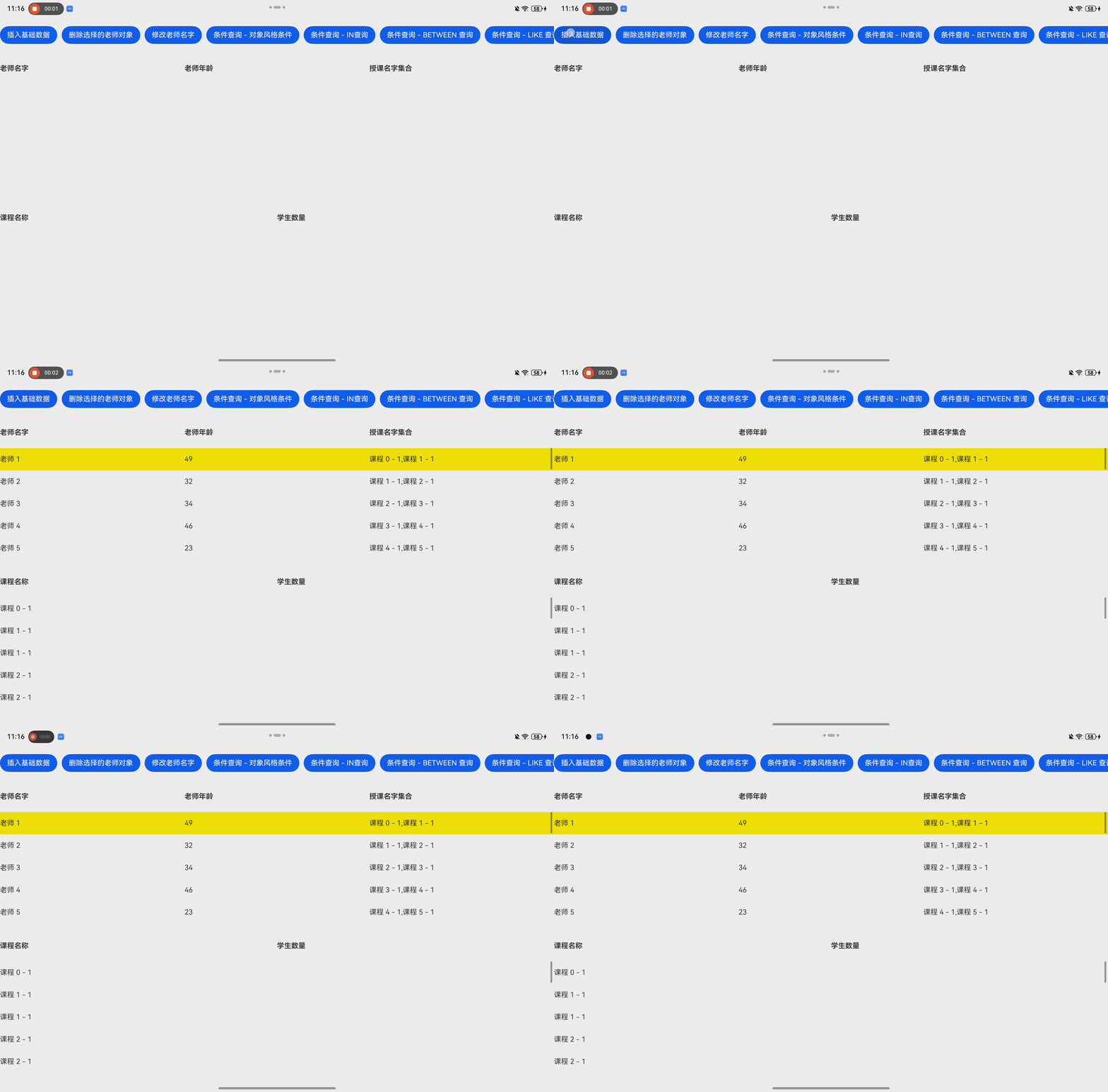
删除数据
通过delete方法或者deleteById方法进行数据的删除操作。
arkts
const deleteTeacher = this.TArray[this.TSelectIndex];
this.MyORM.delete(deleteTeacher);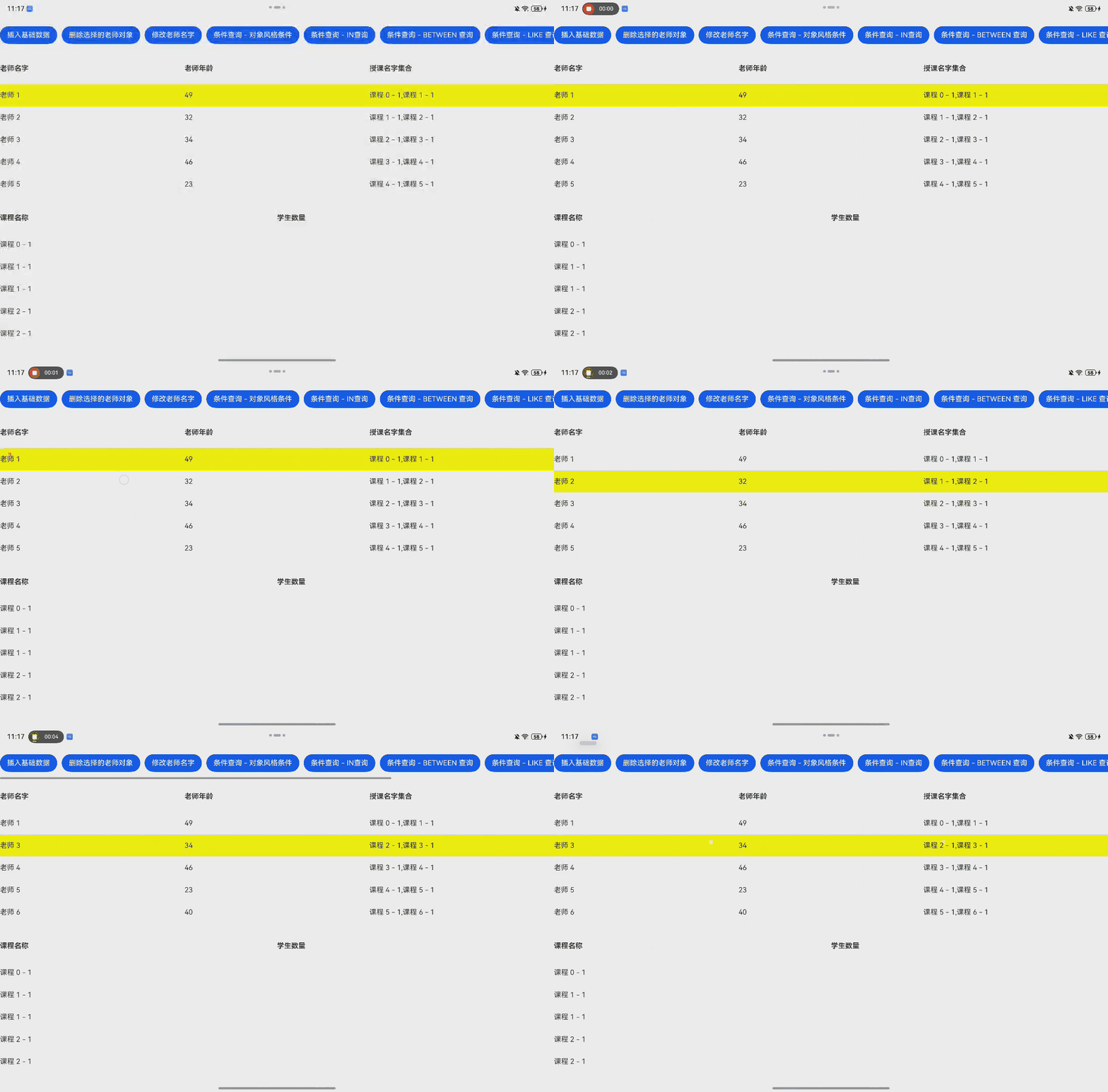
修改数据
通过save方法来修改数据。
arkts
const saveTeacher = this.TArray[this.TSelectIndex];
saveTeacher.name = "我是修改后的老师名字";
this.MyORM.save(saveTeacher);
this.TArray = this.MyORM.query(Teacher).with('courses').find();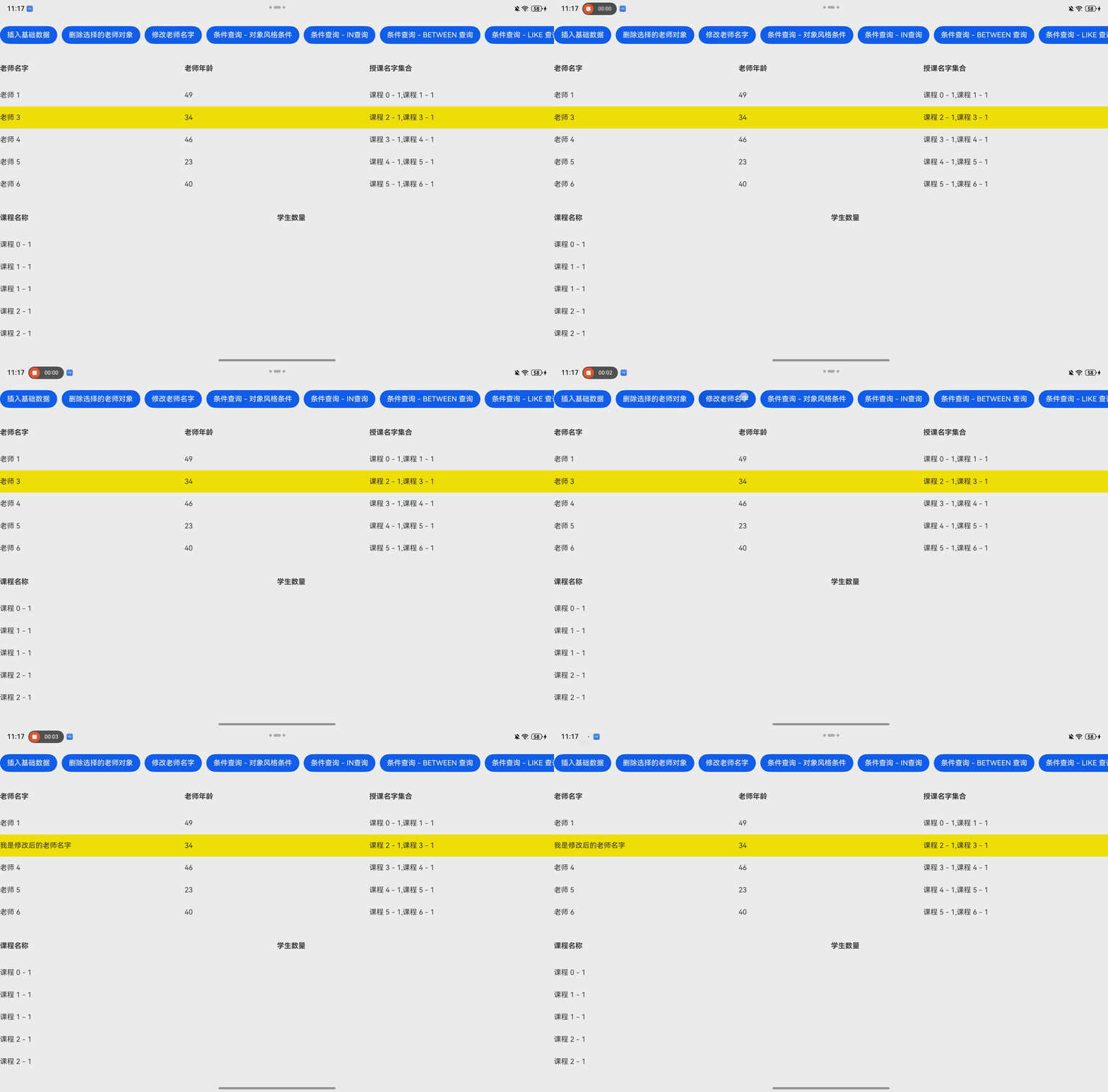
查询数据
通过对老师列表的数据变化来呈现查询的效果。
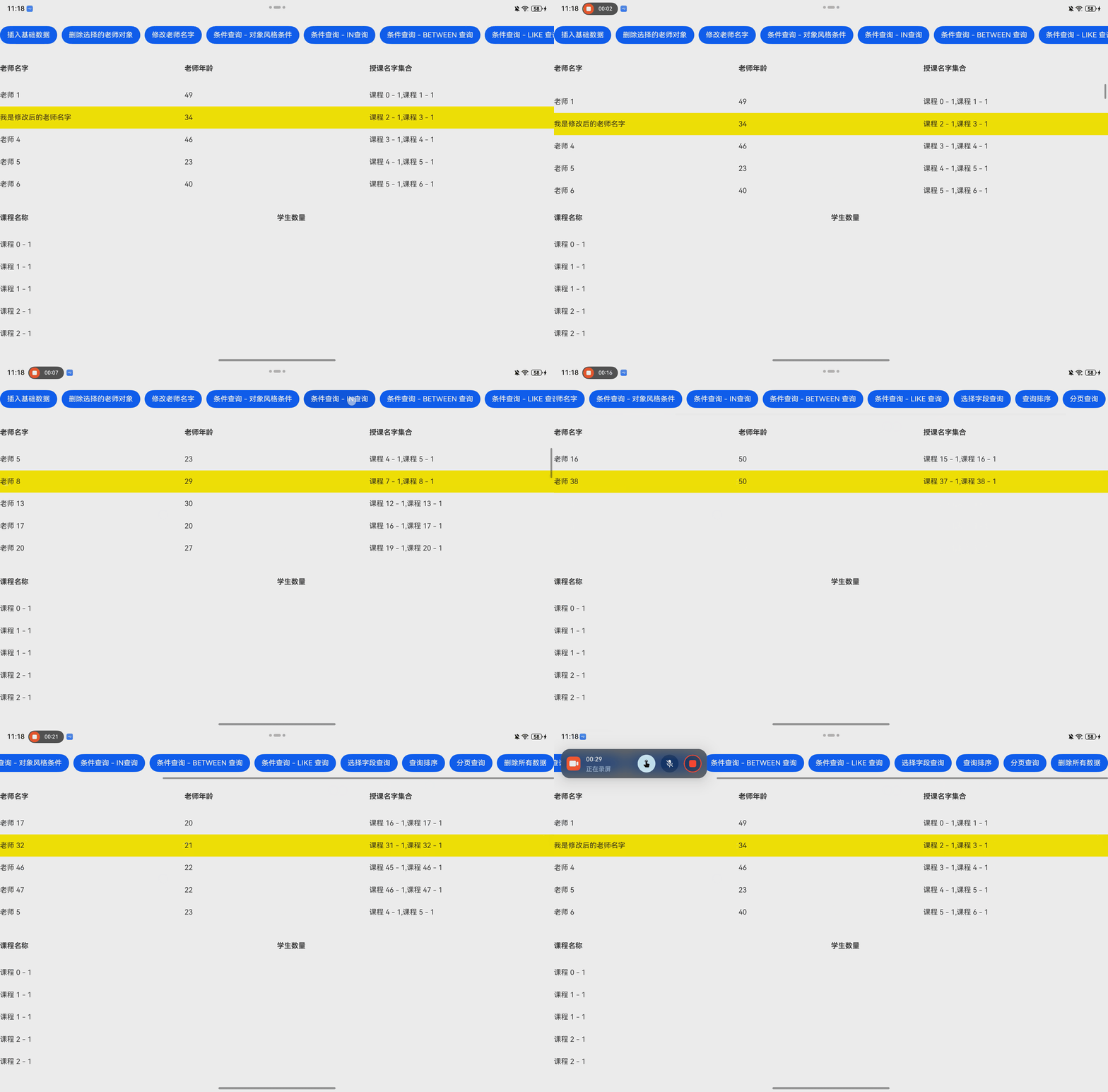
条件查询 - 对象风格条件
arkts
//gt:大于 gte:大于等于 lt:小于 lte:小于等于 ne:不等于
//示例:查询年龄在22岁到35岁的老师
this.TArray = this.MyORM.query(Teacher)
  .with('courses')
  .where({ age: { lte: 30 } })
  .where({ age: { gte: 20 } })
  .find();
条件查询 - IN查询
arkts
//查询年龄为25和35的老师
this.TArray = this.MyORM.query(Teacher)
  .with('courses')
  .whereIn('age', [25, 35])
  .find()
条件查询 - BETWEEN 查询
arkts
//查询年龄在25到35岁的老师,包含25和35岁
this.TArray = this.MyORM.query(Teacher)
  .with('courses')
  .whereBetween('age', 25, 35)
  .find()
条件查询 - LIKE 查询
arkts
//查询年龄尾数为5的老师,%5:以5开头,%5%:包含5,5%:以5结尾
this.TArray = this.MyORM.query(Teacher)
  .with('courses')
  .whereLike('age', '5%')
  .find()
选择字段查询
arkts
//只查询老师名字
this.TArray = this.MyORM.query(Teacher)
  .with('courses')
  .select('name')
  .find()
查询排序
arkts
//老师按年龄排序,asc:升序;desc:降序
this.TArray = this.MyORM.query(Teacher)
  .with('courses')
  .orderBy('age', 'asc')
  .find()
分页查询
arkts
// 分页查询,查询第二页的内容,每页10个老师
const page = 2;
const pageSize = 10;
this.TArray = this.MyORM.query(Teacher)
  .with('courses')
  .limit(pageSize)
  .offset((page - 1) * pageSize)
  .find();
完整Demo代码
EntryAbility
arkts
  async onWindowStageCreate(windowStage: window.WindowStage): Promise<void> {
    // Main window is created, set main page for this ability
    hilog.info(DOMAIN, 'testTag', '%{public}s', 'Ability onWindowStageCreate');
    await IBestORMInit(this.context, {
      name: 'Education4.db'
    })

    windowStage.loadContent('pages/EducationPage', (err) => {
      if (err.code) {
        hilog.error(DOMAIN, 'testTag', 'Failed to load the content. Cause: %{public}s', JSON.stringify(err));
        return;
      }
      hilog.info(DOMAIN, 'testTag', 'Succeeded in loading the content.');
    });
  }
BaseEntity
arkts
// 基础接口和类型定义
export interface BaseEntity {
  id?: number;
  createdAt?: string;
  updatedAt?: string;
}
Teacher
arkts
import {
  CascadeType,
  Column,
  ColumnType,
  CreatedAt,
  HasMany,
  PrimaryKey,
  Table,
  UpdatedAt
} from "@ibestservices/ibest-orm";
import { BaseEntity } from "./BaseEntity";
import { Course } from "./Course";

@Table()
export class Teacher implements BaseEntity {
  @PrimaryKey()
  id?: number;
  @Column()
  name?: string
  @Column({ type: ColumnType.INTEGER })
  age?: number
  @CreatedAt()
  createdAt?: string;
  @UpdatedAt()
  updatedAt?: string;
  @HasMany(() => Course,{
    foreignKey: 'teacher_id',
    cascade: [CascadeType.Delete]
  })
  courses?: Course[]
}
Student
arkts
import { BaseEntity } from "./BaseEntity";
import { Column, CreatedAt, ManyToMany, PrimaryKey, Table, UpdatedAt } from "@ibestservices/ibest-orm";
import { Course } from "./Course";

@Table()
export class Student implements BaseEntity {
  @PrimaryKey()
  id?: number;
  @Column()
  name?: string
  @CreatedAt()
  createdAt?: string;
  @UpdatedAt()
  updatedAt?: string;
  @ManyToMany(() => Course,{
    through: 'student_course',
    throughForeignKey: 'student_id',
    throughOtherKey: 'course_id'
  })
  courses?: Course[]
}
Course
arkts
import { BaseEntity } from "./BaseEntity";
import {
  BelongsTo,
  CascadeType,
  Column,
  ColumnType,
  CreatedAt,
  ManyToMany,
  PrimaryKey,
  Table,
  UpdatedAt
} from "@ibestservices/ibest-orm";
import { Teacher } from "./Teacher";
import { Student } from "./Student";

@Table()
export class Course implements BaseEntity {
  @PrimaryKey()
  id?: number;
  @Column()
  name?: string
  @CreatedAt()
  createdAt?: string;
  @UpdatedAt()
  updatedAt?: string;
  @Column({ name: "teacher_id", type: ColumnType.INTEGER })
  teacherId?: number
  @BelongsTo(() => Teacher,{ foreignKey: 'teacherId' })
  teacher?: Teacher
  @ManyToMany(() => Student,{
    through: 'student_course',
    throughForeignKey: 'course_id',
    throughOtherKey: 'student_id',
    cascade: [CascadeType.Delete]
  })
  students?: Student[]
}
EducationPage.ets
arkts
import {
  createCascadeHandler, getORM, metadataStorage, ORM
} from '@ibestservices/ibest-orm'
import { Course } from '../DBModel/Education/Course'
import { Student } from '../DBModel/Education/Student'
import { Teacher } from '../DBModel/Education/Teacher'

@Entry
@ComponentV2
struct EducationPage {
  @Local MyORM: ORM = getORM()
  @Local TArray: Teacher[] = []
  @Local CArray: Course[] = []
  @Local TSelectIndex: number = 0

  aboutToAppear(): void {
    this.MyORM.migrate(Teacher)
    this.MyORM.migrate(Student)
    this.MyORM.migrate(Course)

    this.TArray = this.MyORM.query(Teacher).with('courses').find();
    this.CArray = this.MyORM.query(Course)
      .with('students')
      .find();
  }

  build() {
    Column({ space: 10 }) {
      Scroll() {
        Row({ space: 10 }) {
          Button("插入基础数据").onClick((event: ClickEvent) => {
            for (let index = 0; index < 50; index++) {
              const element = new Teacher();
              element.name = `老师 ${index + 1} `
              element.age = Math.floor(Math.random() * (50 - 20 + 1)) + 20
              this.TArray.push(element);
            }
            this.MyORM.insert(this.TArray);
            this.TArray.forEach((t, tIndex) => {
              const c1 = new Course();
              c1.name = `课程 ${tIndex} - 1`;
              c1.teacherId = t.id;
              const c2 = new Course();
              c2.name = `课程 ${tIndex + 1} - 1`;
              c2.teacherId = t.id;
              this.MyORM.insert([c1, c2]);
            })
            this.CArray = this.MyORM.query(Course).find();
            this.TArray = this.MyORM.query(Teacher).with('courses').find();
          })
          Button("删除选择的老师对象").onClick(() => {
            const deleteTeacher = this.TArray[this.TSelectIndex];
            this.MyORM.delete(deleteTeacher);
            this.TArray = this.MyORM.query(Teacher).with('courses').find()
          })
          Button("修改老师名字").onClick((event: ClickEvent) => {
            const saveTeacher = this.TArray[this.TSelectIndex];
            saveTeacher.name = "我是修改后的老师名字";
            this.MyORM.save(saveTeacher);
            this.TArray = this.MyORM.query(Teacher).with('courses').find();
          })
          Button("条件查询 - 对象风格条件").onClick((event: ClickEvent) => {
            //gt:大于 gte:大于等于 lt:小于 lte:小于等于 ne:不等于
            //示例:查询年龄在22岁到35岁的老师
            this.TArray = this.MyORM.query(Teacher)
              .with('courses')
              .where({ age: { lte: 30 } })
              .where({ age: { gte: 20 } })
              .find();
          })
          Button("条件查询 - IN查询").onClick((event: ClickEvent) => {
            //查询年龄为25和35的老师
            this.TArray = this.MyORM.query(Teacher)
              .with('courses')
              .whereIn('age', [25, 35])
              .find()
          })
          Button("条件查询 - BETWEEN 查询").onClick((event: ClickEvent) => {
            //查询年龄在25到35岁的老师,包含25和35岁
            this.TArray = this.MyORM.query(Teacher)
              .with('courses')
              .whereBetween('age', 25, 35)
              .find()
          })
          Button("条件查询 - LIKE 查询").onClick((event: ClickEvent) => {
            //查询年龄尾数为5的老师,%5:以5开头,%5%:包含5,5%:以5结尾
            this.TArray = this.MyORM.query(Teacher)
              .with('courses')
              .whereLike('age', '5%')
              .find()
          })
          Button("选择字段查询").onClick((event: ClickEvent) => {
            //只查询老师名字
            this.TArray = this.MyORM.query(Teacher)
              .with('courses')
              .select('name')
              .find()
          })
          Button("查询排序").onClick((event: ClickEvent) => {
            //老师按年龄排序,asc:升序;desc:降序
            this.TArray = this.MyORM.query(Teacher)
              .with('courses')
              .orderBy('age', 'asc')
              .find()
          })
          Button("分页查询").onClick((event: ClickEvent) => {
            // 分页查询,查询第二页的内容,每页10个老师
            const page = 2;
            const pageSize = 10;
            this.TArray = this.MyORM.query(Teacher)
              .with('courses')
              .limit(pageSize)
              .offset((page - 1) * pageSize)
              .find();
          })
          Button("删除所有数据").onClick(() => {
            this.TArray.forEach((t, index) => {
              this.MyORM.deleteById(Teacher, t.id);
            })
            this.MyORM.query(Student).delete()
            this.TArray = this.MyORM.query(Teacher).with('courses').find();
            this.CArray = this.MyORM.query(Course)
              .find();
          })
        }
      }
      .scrollable(ScrollDirection.Horizontal)
      .height(80)
      .width("100%")

      Row() {
        Text("老师名字")
          .fontWeight(FontWeight.Bold)
          .layoutWeight(1)
        Text("老师年龄")
          .fontWeight(FontWeight.Bold)
          .layoutWeight(1)
        Text("授课名字集合")
          .fontWeight(FontWeight.Bold)
          .layoutWeight(1)
      }
      .width("100%")
      .height(50)

      List() {
        ForEach(this.TArray, (t: Teacher, teacherIndex: number) => {
          ListItem() {
            Row() {
              Text(t.name)
                .layoutWeight(1)
              Text(t.age?.toString())
                .layoutWeight(1)
              Text(t.courses?.map((c: Course, cIndex: Number) => c.name).join(','))
                .layoutWeight(1)
            }
            .width("100%")
            .height("100%")
            .backgroundColor(teacherIndex == this.TSelectIndex ? Color.Yellow : Color.White)
          }
          .width("100%")
          .height(50)
          .onClick(() => {
            this.TSelectIndex = teacherIndex;
          })
        })
      }
      .width("100%")
      .layoutWeight(1)

      Row() {
        Text("课程名称")
          .fontWeight(FontWeight.Bold)
          .layoutWeight(1)
        Text("学生数量")
          .fontWeight(FontWeight.Bold)
          .layoutWeight(1)
      }
      .width("100%")
      .height(50)

      List() {
        ForEach(this.CArray, (t: Course, cIndex: Number) => {
          ListItem() {
            Row() {
              Text(t.name)
                .layoutWeight(1)
              Text(t.students?.map((c: Student, cIndex: Number) => c.name).join(','))
                .layoutWeight(1)
            }
            .width("100%")
            .height("100%")
          }
          .width("100%")
          .height(50)
        })
      }
      .width("100%")
      .layoutWeight(1)
    }
    .height('100%')
    .width('100%')
  }
}
总结
解放开发者双手,不需要费大量心思去写sql语句,提供较多的方法供开发者使用。
IBest-ORM官网链接:https://ibest-orm.ibestservices.com/