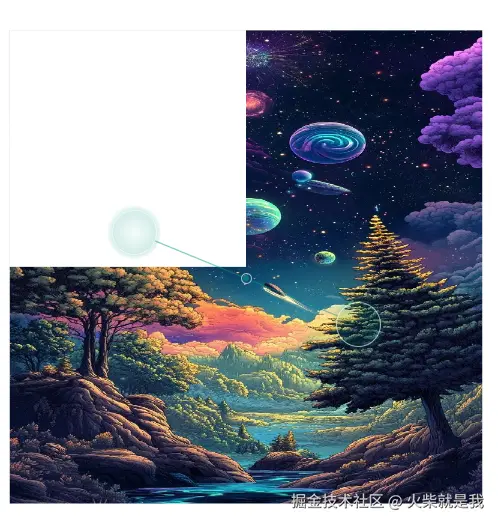
直接Paint 绘制混合
js
    canvas.saveLayer(Rect.fromLTWH(0, 0, width, height), Paint());
    Paint dstPaint = Paint()..color = Colors.red;
    dstPaint.strokeWidth = 20;
    dstPaint.style = PaintingStyle.stroke;
    canvas.drawImageRect(image!, Rect.fromLTWH(0, 0, image!.width.toDouble(), image!.height.toDouble()), Rect.fromLTWH(0, 0, width, height), dstPaint);

    var srcPaint = Paint()
      ..color = Colors.yellowAccent // 源颜色:蓝色
      ..style = PaintingStyle.fill // 填充模式
      ..blendMode = ui.BlendMode.clear
      ..strokeWidth = 70; // 混合模式
    canvas.drawRect(Rect.fromLTWH(0, 0, width, height).deflate(100), srcPaint);
效果图:
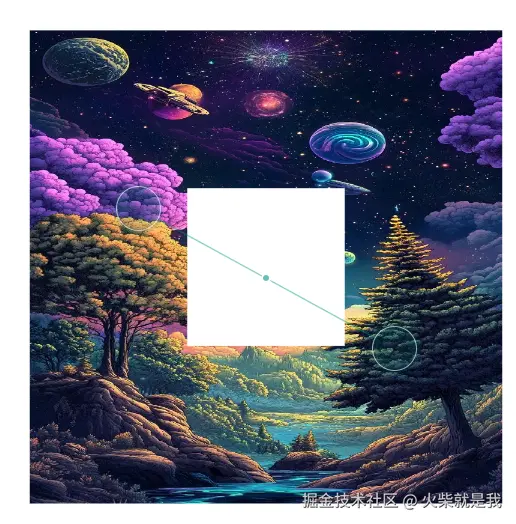
但是如果改成如下:
js
    canvas.saveLayer(Rect.fromLTWH(0, 0, width, height), Paint());
    Paint dstPaint = Paint()..color = Colors.red;
    dstPaint.strokeWidth = 20;
    dstPaint.style = PaintingStyle.stroke;
    canvas.drawImageRect(image!, Rect.fromLTWH(0, 0, image!.width.toDouble(), image!.height.toDouble()), Rect.fromLTWH(0, 0, width, height), dstPaint);

    canvas.saveLayer(Rect.fromLTWH(0, 0, width/2, height/2), ui.Paint()
    ..blendMode = ui.BlendMode.clear);

    var srcPaint = Paint()
      ..color = Colors.yellowAccent // 源颜色:蓝色
      ..style = PaintingStyle.fill // 填充模式
      ..strokeWidth = 70; // 混合模式
    canvas.drawRect(Rect.fromLTWH(0, 0, width, height).deflate(100), srcPaint);
目测代码逻辑是一样的只是把混合模式设置给了Layer。但是最终效果就是界面上啥页没有全部被清空了。这是因为设置了混合模式之后,整个图层都会被当作src 进行混合。并且第一个设置范围的参数也不生效。
如果想限制到指定范围可以在saveLayer前加如下内容:
js
canvas.clipRect(Rect.fromLTWH(0, 0, width/2, height/2));那么加完之后的效果图如下: