一 概述
该文章是通过分析srs4.0源代码 ,将srs4.0中代码摘出,另建一个工程,验证如何实现读取配置文件(*.conf)和日志打印.初步完成对srs流媒体服务器二次开发的基础环境搭建.
二 实现流程
1.使用clion IDE创建CMake工程
通过 clion IDE创建一个项目ParseConf.
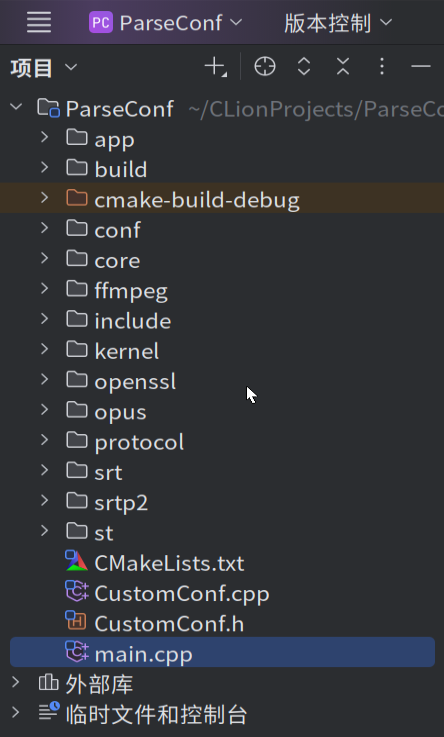
2.添加srs基础文件和依赖库
将srs的基础源码目录文件添加到工程中,目录包括:app,core,kernel,protocal;依赖库包括:st,openssl,ffmpeg,opus,srt,srtp2等。配置文件目录:conf。
3.编写CMakeLists.txt文件
bash
cmake_minimum_required(VERSION 3.0)

project(ParseConf LANGUAGES CXX C)

set(CMAKE_CXX_STANDARD 11)

# 查找系统OpenSSL库
#find_package(OpenSSL REQUIRED)

#指定openssl库
set(OPENSSL_LIBRARYS
        ${CMAKE_SOURCE_DIR}/openssl/lib/libssl.a
        ${CMAKE_SOURCE_DIR}/openssl/lib/libcrypto.a
)


#手动指定state-thread协程库
set(ST_THREAD_LIBRARY ${CMAKE_SOURCE_DIR}/st/libst.a)

#指定srtp2库
set(SRTP2_LIBRARY ${CMAKE_SOURCE_DIR}/srtp2/lib/libsrtp2.a)

#指定ffmpeg库
# 手动设置 FFmpeg 路径
set(FFMPEG_ROOT "/usr/local/ffmpeg")
set(FFMPEG_INCLUDE_DIR "${FFMPEG_ROOT}/include")
set(FFMPEG_LIB_DIR "${FFMPEG_ROOT}/lib")

#指定opus库
set(OPUS_LIBRARY ${CMAKE_SOURCE_DIR}/opus/lib/libopus.a)

#指定srt库
set(SRT_LIBRARY ${CMAKE_SOURCE_DIR}/srt/lib/libsrt.a)

#添加头文件搜索路径
include_directories(
${CMAKE_SOURCE_DIR}/include
${CMAKE_SOURCE_DIR}/app
${CMAKE_SOURCE_DIR}/core
${CMAKE_SOURCE_DIR}/kernel
${CMAKE_SOURCE_DIR}/protocol
${CMAKE_SOURCE_DIR}/st
${CMAKE_SOURCE_DIR}/srtp2/include
${FFMPEG_INCLUDE_DIR}
${CMAKE_SOURCE_DIR}/opus/include
${CMAKE_SOURCE_DIR}/srt/include
)
# 添加源文件
file(GLOB_RECURSE APP_SOURCES "app/*.cpp")
file(GLOB_RECURSE CORE_SOURCES "core/*.cpp")
file(GLOB_RECURSE KERNEL_SOURCES "kernel/*.cpp")
file(GLOB_RECURSE PROTOCOL_SOURCES "protocol/*.cpp")

# 合并所有源文件
set(ALL_SOURCES
        ${APP_SOURCES}
        ${CORE_SOURCES}
        ${KERNEL_SOURCES}
        ${PROTOCOL_SOURCES}
        CustomConf.cpp
        CustomConf.h
)


ADD_DEFINITIONS("-g -O0")


# 添加可执行文件
add_executable(ParseConf main.cpp
        ${ALL_SOURCES}
)

target_link_libraries(ParseConf -ldl -pthread)

# 链接OpenSSL库
target_link_libraries(${PROJECT_NAME} ${OPENSSL_LIBRARYS})

# 链接库st库
target_link_libraries(${PROJECT_NAME} ${ST_THREAD_LIBRARY})

#链接srtp2库
target_link_libraries(${PROJECT_NAME} ${SRTP2_LIBRARY})

#链接ffmpeg库
target_link_libraries(${PROJECT_NAME}
        ${FFMPEG_LIB_DIR}/libavcodec.so
        ${FFMPEG_LIB_DIR}/libavutil.so
        ${FFMPEG_LIB_DIR}/libswresample.so
        pthread
        dl
)
#链接opus库
target_link_libraries(${PROJECT_NAME}
        ${OPUS_LIBRARY}
)

#链接srt库
target_link_libraries(${PROJECT_NAME}
        ${SRT_LIBRARY}
)
3.编译工程
三 自己实现的代码
1. CustomConf类
CustomConf.h代码如下:
cpp
#ifndef PARSECONF_CUSTOMCONF_H
#define PARSECONF_CUSTOMCONF_H
#include <srs_app_log.hpp>
#include <srs_app_config.hpp>
#include <srs_service_log.hpp>
#include <srs_kernel_log.hpp>

class CustomConf {
public:
    static CustomConf* getInstance();
    void init();
private:
    CustomConf();
private:
    static CustomConf* _instance;
};


#endif //PARSECONF_CUSTOMCONF_H
CustomConf.cpp代码如下:
cpp
#include "CustomConf.h"

#include "srs_kernel_kbps.hpp"

bool _srs_in_docker = false;
extern SrsPps* _srs_pps_cids_get ;
extern SrsPps* _srs_pps_cids_set ;
// @global log and context.
ISrsLog* _srs_log = NULL;
ISrsContext* _srs_context = NULL;
// @global config object for app module.
SrsConfig* _srs_config = NULL;

CustomConf* CustomConf::_instance = nullptr;
CustomConf::CustomConf() {
}

CustomConf * CustomConf::getInstance() {
    if (_instance == nullptr) {
        _instance = new CustomConf;
    }
    return _instance;
}

void CustomConf::init() {
    _srs_log = new SrsFileLog();
    _srs_context = new SrsThreadContext();
    // @global config object for app module.
    _srs_config = new SrsConfig();

    _srs_pps_cids_get = new SrsPps();
    _srs_pps_cids_set = new SrsPps();
}
2. main.cpp
cpp
#include <iostream>

#include "CustomConf.h"


int main(int argc,char *argv[]) {

    CustomConf::getInstance()->init();

    _srs_config->parse_options(argc,argv);

    for (int i = 0; i < argc; i++) {
        srs_trace("argv[%d]=%s\n", i, argv[i]);
    }
    std::string msg = (true ==_srs_config->get_http_api_enabled()?"enable":"disable");
    srs_trace("http api is %s",msg.c_str());
    return 0;
}
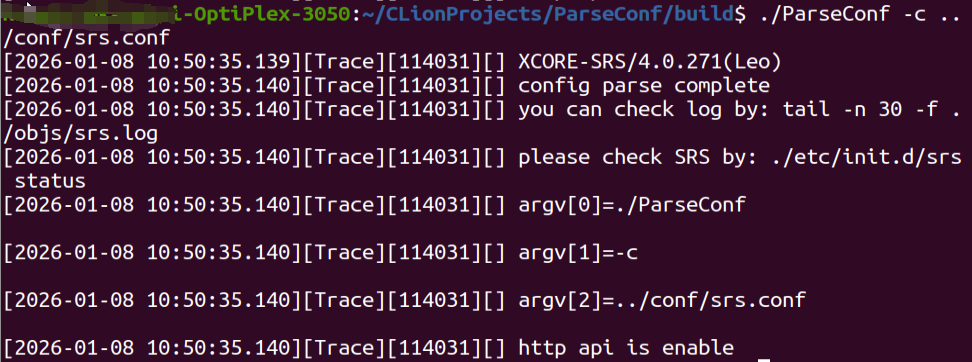
四 验证功能
五 参考
https://gitee.com/ossrs/srs.git https://gitee.com/ossrs/srs.git