紧接上篇,我们搭建了一套最新的微服务底层基础模块(tmccloud-base)
那么本篇我们尝试在此基础上搭建一个示例的web服务(tmccloud-base-demoweb),并注册到nacos,验证我们的基础模块封装得是否好使!
新建tmccloud-base-demoweb的maven模块
一、项目pom.xml配置
由于服务需要注册到nacos,因此这两个依赖引入必不可少
XML
<!--nacos 注册中心、配置中心客户端-->
        <dependency>
            <groupId>com.alibaba.cloud</groupId>
            <artifactId>spring-cloud-starter-alibaba-nacos-discovery</artifactId>
        </dependency>
        <dependency>
            <groupId>com.alibaba.cloud</groupId>
            <artifactId>spring-cloud-starter-alibaba-nacos-config</artifactId>
        </dependency>
web服务至少要需要引入base-web基础依赖
XML
 <!-- 引入 base-web 基础依赖 -->
        <dependency>
            <groupId>com.tingcream</groupId>
            <artifactId>tmccloud-base-web</artifactId>
            <version>1.0</version>
        </dependency>
由于我们这个服务还需要用到mysql及redis (验证mybatisplus、分页查询、redis操作),因此以下两项依赖也需要引入。
XML
        <!--   引入 base-mysql 基础模块   -->
        <dependency>
            <groupId>com.tingcream</groupId>
            <artifactId>tmccloud-base-mysql</artifactId>
            <version>1.0</version>
        </dependency>


        <!--   引入 base-redis 基础模块   -->
        <dependency>
            <groupId>com.tingcream</groupId>
            <artifactId>tmccloud-base-redis</artifactId>
            <version>1.0</version>
        </dependency>
由于我们还需要执行springboot测试用例,因此还需要引入
XML
 <!--springboot test-->
        <dependency>
            <groupId>org.springframework.boot</groupId>
            <artifactId>spring-boot-starter-test</artifactId>
            <scope>test</scope>
        </dependency>
二、SpringBoot启动类
java
package com.tingcream.tmccloud.basedemoweb;

import org.mybatis.spring.annotation.MapperScan;
import org.springframework.boot.SpringApplication;
import org.springframework.boot.autoconfigure.SpringBootApplication;
import org.springframework.cloud.client.discovery.EnableDiscoveryClient;
import org.springframework.cloud.openfeign.EnableFeignClients;
import org.springframework.context.annotation.EnableAspectJAutoProxy;
import org.springframework.stereotype.Controller;
import org.springframework.web.bind.annotation.RequestMapping;
import org.springframework.web.bind.annotation.ResponseBody;

@EnableDiscoveryClient
@SpringBootApplication(scanBasePackages = {"com.tingcream.tmccloud"})
@EnableFeignClients(basePackages= {"com.tingcream.tmccloud"})
@MapperScan(basePackages= {"com.tingcream.tmccloud"})
@EnableAspectJAutoProxy(exposeProxy=true,proxyTargetClass=true)
@Controller
public class TMCCCloudBaseDemoWebApplication {

    public static void main(String[] args) {
        System.out.println("TMCCCloudBaseDemoWebApplication 启动");
        SpringApplication.run(TMCCCloudBaseDemoWebApplication.class,args);
    }

    @ResponseBody
    @RequestMapping(value = "/")
    public String  index(){
        return "TMCCCloudBaseDemoWebApplication !!";
    }


}
三、项目bootstrap.yml配置
XML
spring:
  profiles:
    active: dev
bootstrap-dev.yml配置
XML
server:
  port: 8020

spring:
  application:
     name: tmccloud-base-demoweb
  cloud:
     nacos:
       discovery:
         server-addr: localhost:8849
         group: DEFAULT_GROUP
         username: nacos
         password: nacos123
       config:
         file-extension: yml
         server-addr: localhost:8849
         group: DEFAULT_GROUP
         username: nacos
         password: nacos123
         shared-configs:
           - dataId: application-${spring.profiles.active}.${spring.cloud.nacos.config.file-extension}
             refresh: true
             group: DEFAULT_GROUP

  config:
     activate:
       on-profile: dev
四、启动服务步骤
1、先开启服务器vm机(192.168.31.10),启动其mysql 、redis服务
2、启动本地nacos-2.5.2, 找到startup.cmd双击启动
3、启动tmccloud-base-demoweb 的springboot服务
五、Web服务功能验证
1、JSR303请求参数校验
web控制层代码
java
package com.tingcream.tmccloud.basedemoweb.controller;

import com.alibaba.fastjson.JSON;
import com.tingcream.tmccloud.base.core.Resp;
import com.tingcream.tmccloud.basedemoweb.req.PersonAddReq;
import com.tingcream.tmccloud.basedemoweb.service.PersonService;
import lombok.extern.slf4j.Slf4j;
import org.springframework.beans.factory.annotation.Autowired;
import org.springframework.validation.annotation.Validated;
import org.springframework.web.bind.annotation.RequestBody;
import org.springframework.web.bind.annotation.RequestMapping;
import org.springframework.web.bind.annotation.RequestMethod;
import org.springframework.web.bind.annotation.RestController;

/**
 * 人员管理
 */
@Slf4j
@RestController
@RequestMapping(value = "/person")
public class PersonController {
    @Autowired
    private PersonService personService;


    /**
     * 人员新增
     * @param req
     * @return
     */
    @RequestMapping(value = "/add",method = RequestMethod.POST)
    public Resp add(@RequestBody  @Validated PersonAddReq req){
        log.info("请求参数:{}",JSON.toJSONString(req));
        return Resp.success();
    }


}
PersonAddReq.java
java
package com.tingcream.tmccloud.basedemoweb.req;

import com.tingcream.tmccloud.baseweb.valid.IntValue;
import jakarta.validation.constraints.NotBlank;
import jakarta.validation.constraints.Pattern;
import lombok.Getter;
import lombok.Setter;
import org.hibernate.validator.constraints.Length;

@Getter
@Setter
public class PersonAddReq {
    /**
     * 姓名
     */
    @NotBlank(message = "姓名不能为空")
    @Length(message = "姓名长度不得超过32个字符")
    private String name ;

    /**
     * 性别 1男 2女
     */
    @IntValue(vals = {1,2},message = "性别只能传1男、2女")
    private Integer sex;

    /**
     * 手机号
     */
    @NotBlank(message = "手机号不能为空")
    @Pattern(message = "手机号格式不正确",regexp = "^1[3456789]\\d{9}$")
    private String phone ;
}
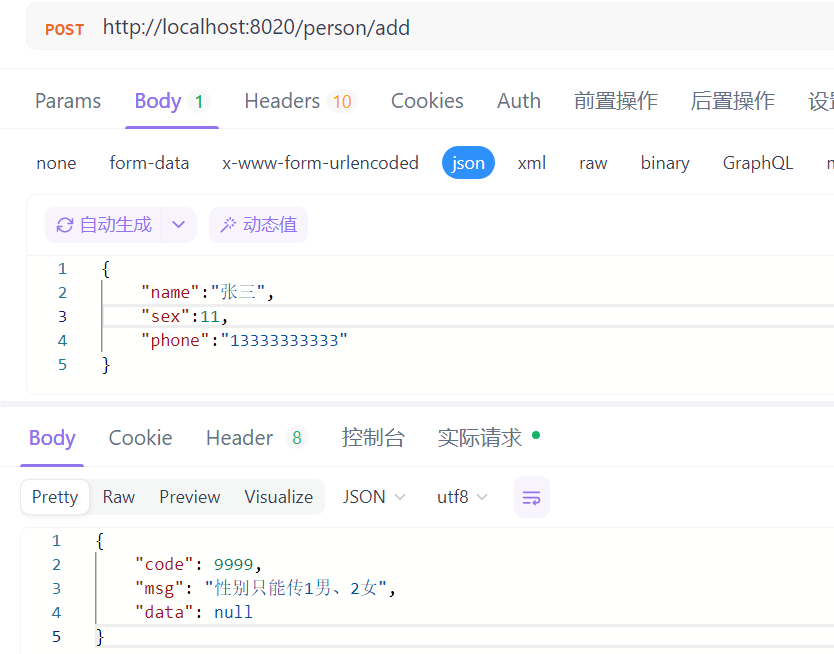
使用apifox工具发出http请求
2、全局异常处理器
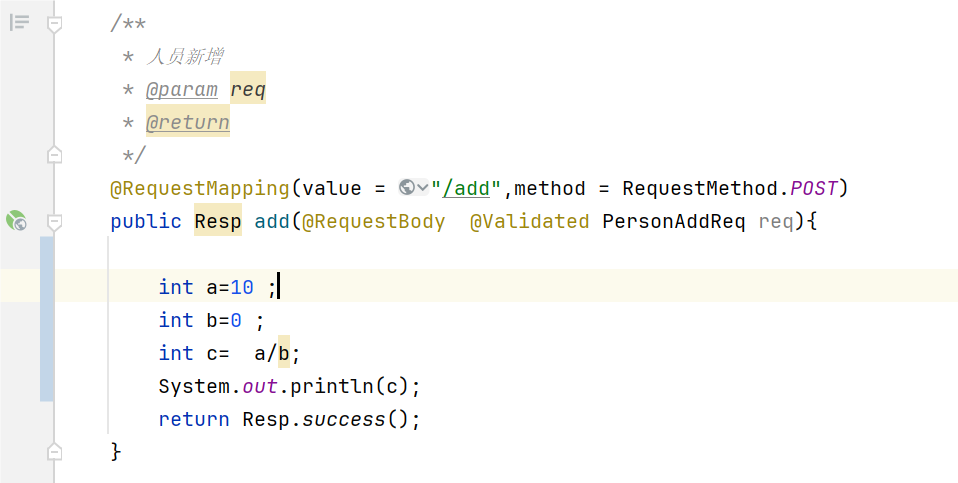
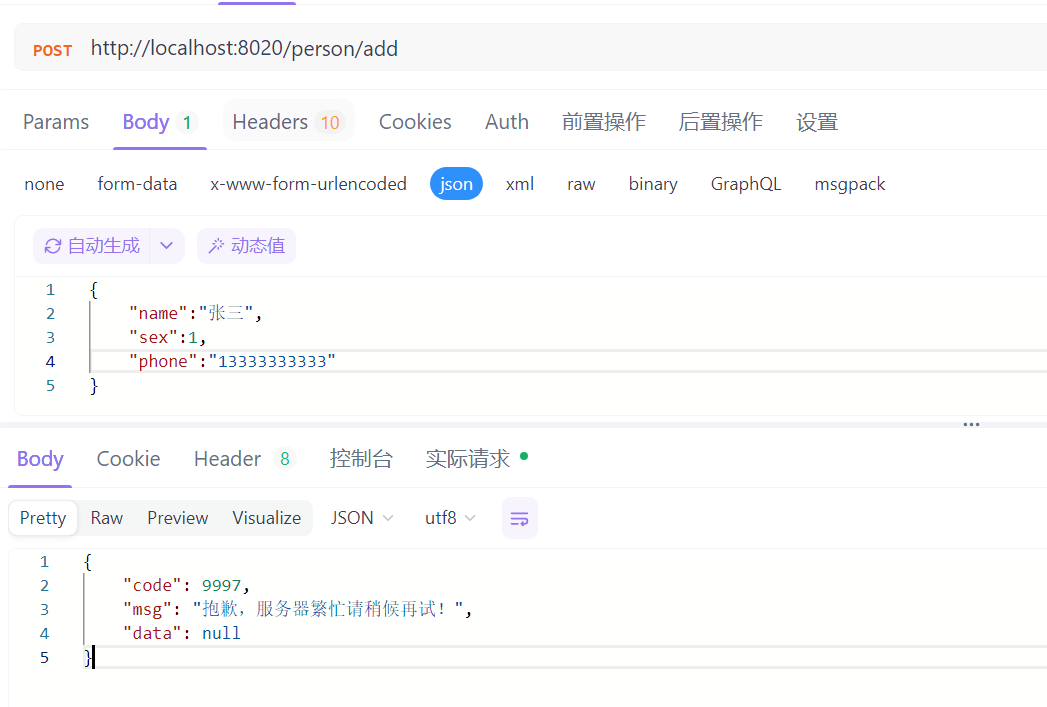
模拟抛出算数异常(0不能作为除数),发现异常处理器能捕获到并输出友好的错误提示。
使用apifox工具发出请求
3、mybatisplus操作数据库
Spring测试类
java
package com.tingcream.tmccloud.basedemoweb;


import com.alibaba.fastjson.JSON;
import com.tingcream.tmccloud.basedemoweb.mapper.PersonMapper;
import com.tingcream.tmccloud.basedemoweb.model.Person;
import lombok.extern.slf4j.Slf4j;
import org.junit.jupiter.api.Test;
import org.springframework.beans.factory.annotation.Autowired;
import org.springframework.boot.test.context.SpringBootTest;

import java.util.Date;
import java.util.LinkedList;
import java.util.List;

@Slf4j
@SpringBootTest(classes = TMCCCloudBaseDemoWebApplication.class)
public class PersonSpringTest01 {
    @Autowired
    private PersonMapper personMapper;

    /**
     * 测试mybatisplus的selectById
     */
    @Test
    public void test1(){
        Person person = personMapper.selectById(1L);
        log.info("person:{}", JSON.toJSONString(person));
    }

    /**
     * 测试mybatisplus的insertBatchSomeColumn 批量插入
     */
    @Test
    public void test2(){
        Date now =new Date();
        List<Person> list =new LinkedList<>();
        list.add(new Person("小王",1,"13456565655","123@163.com",now));
        list.add(new Person("小张",1,"13456565655","1122@163.com",now));
        personMapper.insertBatchSomeColumn(list);
    }

}
4、pageHelper分页查询
PersonController.java web控制层
java
package com.tingcream.tmccloud.basedemoweb.controller;

import com.github.pagehelper.PageInfo;
import com.tingcream.tmccloud.base.core.Resp;
import com.tingcream.tmccloud.basedemoweb.model.Person;
import com.tingcream.tmccloud.basedemoweb.req.PersonAddReq;
import com.tingcream.tmccloud.basedemoweb.req.PersonListReq;
import com.tingcream.tmccloud.basedemoweb.service.PersonService;
import lombok.extern.slf4j.Slf4j;
import org.springframework.beans.factory.annotation.Autowired;
import org.springframework.validation.annotation.Validated;
import org.springframework.web.bind.annotation.RequestBody;
import org.springframework.web.bind.annotation.RequestMapping;
import org.springframework.web.bind.annotation.RequestMethod;
import org.springframework.web.bind.annotation.RestController;

/**
 * 人员管理
 */
@Slf4j
@RestController
@RequestMapping(value = "/person")
public class PersonController {
    @Autowired
    private PersonService personService;


    /**
     * 人员-查询列表分页
     * @return
     */
    @RequestMapping(value = "/findPage",method = RequestMethod.POST)
    public Resp<PageInfo<Person>> findPage(@RequestBody  @Validated PersonListReq req){
        PageInfo<Person> pageInfo= personService.findPage(req);
        return Resp.success(pageInfo);
    }

}
PersonListReq.java 请求类
java
package com.tingcream.tmccloud.basedemoweb.req;

import com.tingcream.tmccloud.base.core.PageReq;
import lombok.Getter;
import lombok.Setter;

@Getter
@Setter
public class PersonListReq extends PageReq {
    /**
     * 姓名
     */
    private String name;

    /**
     * 手机号
     */
    private String phone ;

    /**
     * 开始时间(yyyy-MM-dd)
     */
    private String startTime;

    /**
     * 结束时间(yyyy-MM)
     */
    private String endTime;
}
PersonService.java 业务层
java
package com.tingcream.tmccloud.basedemoweb.service;

import cn.hutool.core.bean.BeanUtil;
import com.github.pagehelper.PageHelper;
import com.github.pagehelper.PageInfo;
import com.tingcream.tmccloud.basedemoweb.mapper.PersonMapper;
import com.tingcream.tmccloud.basedemoweb.model.Person;
import com.tingcream.tmccloud.basedemoweb.req.PersonListReq;
import org.springframework.beans.factory.annotation.Autowired;
import org.springframework.stereotype.Service;

import java.util.List;
import java.util.Map;

@Service
public class PersonService {
    @Autowired
    private PersonMapper personMapper;

    public PageInfo<Person> findPage(PersonListReq req) {
        Map<String, Object> map = BeanUtil.beanToMap(req);
        PageHelper.startPage(req.getPageNum(),req.getPageSize());
        List<Person> list =personMapper.findList(map);
        return new PageInfo<>(list);

    }
}
PersonMapper.java 接口
java
package com.tingcream.tmccloud.basedemoweb.mapper;

import com.tingcream.tmccloud.basedemoweb.model.Person;
import com.tingcream.tmccloud.basemysql.EasyBaseMapper;

import java.util.List;
import java.util.Map;

/**
 * <p>
 *  人员表Mapper 接口
 * </p>
 */
public interface PersonMapper extends EasyBaseMapper<Person> {

    List<Person> findList(Map<String, Object> map);
}
PersonMapper.xml
XML
<?xml version="1.0" encoding="UTF-8"?>
<!DOCTYPE mapper PUBLIC "-//mybatis.org//DTD Mapper 3.0//EN" "http://mybatis.org/dtd/mybatis-3-mapper.dtd">
<mapper namespace="com.tingcream.tmccloud.basedemoweb.mapper.PersonMapper">

    <select id="findList" resultType="com.tingcream.tmccloud.basedemoweb.model.Person">
        SELECT * FROM t_person  a
         <where>
             <if test="name!=null and name!=''">
                 and a.`name` LIKE CONCAT('%',#{name},'%')
             </if>
              <if test="phone!=null and phone!=''">
                  AND a.phone like CONCAT('%',#{phone},'%')
              </if>
              <if test="startTime!=null and startTime!=''">
                  <![CDATA[
                  AND a.`create_time` >= concat(#{startTime},' 00:00:00')
                  ]]>
              </if>
                <if test="endTime!=null and endTime!=''">
                    <![CDATA[
                   AND a.`create_time` <= concat(#{endTime},' 23:59:59')
                  ]]>
                </if>
         </where>

        ORDER BY a.`create_time` DESC
    </select>
</mapper>
5、redis操作
Spring测试类
java
package com.tingcream.tmccloud.basedemoweb;


import com.alibaba.fastjson.JSON;
import com.tingcream.tmccloud.basedemoweb.model.Person;
import com.tingcream.tmccloud.baseredis.RedisHelper;
import lombok.extern.slf4j.Slf4j;
import org.junit.jupiter.api.Test;
import org.springframework.beans.factory.annotation.Autowired;
import org.springframework.boot.test.context.SpringBootTest;
import org.springframework.data.redis.core.RedisTemplate;

import java.io.Serializable;

@Slf4j
@SpringBootTest(classes = TMCCCloudBaseDemoWebApplication.class)
public class SpringRedisTest01 {

    @Autowired
    private RedisHelper redisHelper;

    //获取到原始的 redisTemplate
    @Autowired
    private RedisTemplate<Serializable, Object> redisTemplate;

    @Test
    public void test1(){
        try {
            Person person = new Person();
            person.setName("王大锤");
            person.setSex(1);
            person.setPhone("13456565655");

            redisHelper.set("p1",person);
            log.info("保存对象到redis成功");

            Person p1 =(Person) redisHelper.get("p1");
            log.info("从redis中取出对象成功:{}", JSON.toJSONString(p1));

        }catch (Exception e){
            log.error(e.getMessage(),e);
        }
    }

    @Test
    public void test2(){
        redisTemplate.opsForValue().set("aa","hello world");
        String s =(String) redisTemplate.opsForValue().get("aa");
        log.info("从redis中取出缓存:{}",s);
    }

}
使用 RedisHelper 或 redisTemplate 均可,推荐项目中都统一使用RedisHelper这个bean
六、项目代码
见笔者gitee仓库 :
https://gitee.com/jellyflu/tmccloud-base 的tmccloud-base-demoweb模块,mysql数据库脚本在根目录下db。