【MCP】使用SpringBoot基于Streamable-HTTP构建MCP-Server
背景
最近几年AI应用越来越广泛,Anthropic公司在2024年11月提出了MCP协议,随着时间推移,支持MCP协议的厂商越来越多。
MCP的client端和server端通讯的协议也在逐步演进,一开始主流的是SSE协议,随后又诞生了Streamable-HTTP协议,用于取代SSE协议。
本文将介绍如何使用SpringBoot基于Streamable-HTTP构建MCP-Server服务端。
SSE与Streamable-HTTP
MCP(Model Context Protocol)协议通过PR #206引入的Streamable HTTP传输层,是针对AI模型与外部工具通信场景的一次底层革新。它并非简单替代传统HTTP+SSE方案,而是通过 "统一通信范式、动态传输适配、状态化增强" 三大核心设计,解决了企业级AI应用在高并发、长周期任务、复杂基础设施环境下的通信痛点,同时降低开发与维护成本,成为MCP协议规模化落地的关键支撑。
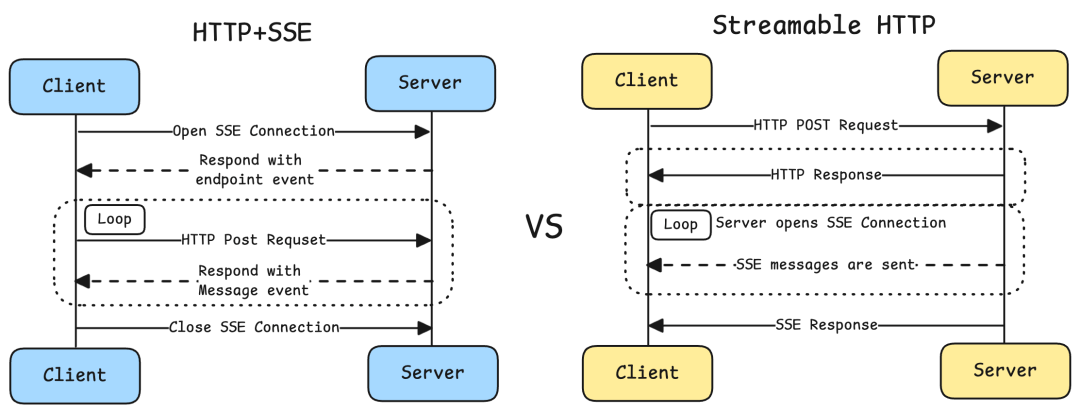
本文开发环境介绍
| 开发依赖 | 版本 |
|---|---|
| Spring Boot | 4.0.1 |
| spring-ai-bom | 2.0.0-M1 |
| spring-ai-starter-mcp-server-webflux | 2.0.0-M1 |
pom核心依赖
xml
<dependencyManagement>
  <dependency>
    <groupId>org.springframework.ai</groupId>
    <artifactId>spring-ai-bom</artifactId>
    <version>${spring-ai.version}</version>
    <type>pom</type>
    <scope>import</scope>
  </dependency>
</dependencyManagement>

<dependency>
  <groupId>org.springframework.ai</groupId>
  <artifactId>spring-ai-starter-mcp-server-webflux</artifactId>
</dependency>
<!--<dependency>-->
<!--  <groupId>org.springframework.ai</groupId>-->
<!--  <artifactId>spring-ai-starter-mcp-server-webmvc</artifactId>-->
<!--</dependency>-->
spring-ai-starter-mcp-server-webflux和spring-ai-starter-mcp-server-webmvc都可以,一种是响应式架构,一种是非响应式架构,两者只能二选一。
MCP工具类
创建一个MCP工具类,包含2个工具方法
java
package com.wen3.demo.ai.mcp.server.tools;


import lombok.extern.slf4j.Slf4j;
import org.springaicommunity.mcp.annotation.McpTool;
import org.springaicommunity.mcp.annotation.McpToolParam;
import reactor.core.publisher.Mono;

import java.util.Map;

/**
 * @author tangheng
 */
@Slf4j
public class DemoTool {

    @McpTool(name="hello", description = "根据城市名称获取天气预报")
    public Mono<String> hello(
            @McpToolParam(description = "城市名称,比如:广州") String city
    ) {
        log.info("city: {}", city);
        Map<String, String> mockData = Map.of(
                "西安", "晴天",
                "北京", "小雨",
                "上海", "大雨"
        );
        return Mono.just(mockData.getOrDefault(city, "抱歉:未查询到对应城市!"));
    }

    @McpTool(description = "根据名字算八字")
    public Mono<String> helloWithName(
            @McpToolParam(description = "姓名") String name
    ) {
       log.info("name: {}", name);
        return Mono.just("五行缺火!");
    }
}
创建自动配置类
java
package com.wen3.demo.ai.mcp.server.autoconfigure;


import com.wen3.demo.ai.mcp.server.tools.DemoTool;
import org.springframework.boot.autoconfigure.condition.ConditionalOnMissingBean;
import org.springframework.context.annotation.Bean;
import org.springframework.context.annotation.Configuration;

/**
 * @author tangheng
 */
@Configuration
class McpServerAutoConfiguration {

    @ConditionalOnMissingBean
    @Bean
    DemoTool demoTool() {
        return new DemoTool();
    }
}
创建启动类
最后创建Spring Boot应用的启动类
java
package com.wen3.demo.ai.mcp.server.autoconfigure;


import com.wen3.demo.ai.mcp.server.tools.DemoTool;
import org.springframework.boot.autoconfigure.condition.ConditionalOnMissingBean;
import org.springframework.context.annotation.Bean;
import org.springframework.context.annotation.Configuration;

/**
 * @author tangheng
 */
@Configuration
class McpServerAutoConfiguration {

    @ConditionalOnMissingBean
    @Bean
    DemoTool demoTool() {
        return new DemoTool();
    }

//    @ConditionalOnMissingBean
//    @Bean
//    public ToolCallbackProvider dateTimeTools() {
//        return MethodToolCallbackProvider.builder().toolObjects(demoTool()).build();
//    }
}
spring.ai.mcp.server.annotation-scanner.enabled=true默认是true,所以会自动扫描@McpTool标注的类,并注册为工具对象。不需要再使用ToolCallbackProvider进行注册,否则会重复注册。
配置文件
yaml
server:
  port: 9090

spring:
  ai:
    mcp:
      server:
        name: demo-mcp-server
        version: 1.0.0
        type: ASYNC  # Recommended for reactive applications
        protocol: STREAMABLE
        streamable-http:
          mcp-endpoint: /mcp
          keep-alive-interval: 30s
必须配置项
properties
spring.ai.mcp.server.protocol=STREAMABLE必须把
spring.ai.mcp.server.protocol设置为STREAMABLE,才能开启Streamable-HTTP协议
注意配置项
properties
spring.ai.mcp.server.type=ASYNC- 如果
spring.ai.mcp.server.type配置ASYNC,则工具的返回值类型必须是如下类型Mono<T>Flux<T>Publisher<T>
- 如果
spring.ai.mcp.server.type配置SYNC,则工具的返回值类型必须是如下类型- Primitive types (
int,double,boolean) - Object types (
String,Integer, custom POJOs) - MCP types (
CallToolResult,ReadResourceResult,GetPromptResult,CompleteResult) - Collections (
List<String>,Map<String, Object>)
- Primitive types (
相关配置类
org.springframework.ai.mcp.server.common.autoconfigure.properties.McpServerProperties前缀为spring.ai.mcp.server的配置项org.springframework.ai.mcp.server.common.autoconfigure.annotations.McpServerAnnotationScannerProperties前缀为spring.ai.mcp.server.annotation-scanner的配置项,默认为扫描@McpTool注解进行工具的注册org.springframework.ai.mcp.server.common.autoconfigure.properties.McpServerStreamableHttpProperties前缀为spring.ai.mcp.server.streamable-http的配置项,请求端点默认是/mcp
核心逻辑
io.modelcontextprotocol.server.transport.WebFluxStreamableServerTransportProvider#handlePost- 这个方法是收到
POST请求的处理逻辑 Accept: application/json、Accept: text/event-stream,同时包含这两个请求头,请求才会继续往下走
- 这个方法是收到
io.modelcontextprotocol.spec.McpSchema.deserializeJsonRpcMessage- 这个方法是解析
json参数的过程 - 同时传
method和id,就是JSONRPCRequest请求
- 这个方法是解析
protocolVersion这个字段不能是null,但可以是空字符串io.modelcontextprotocol.spec.McpStreamableServerSession#responseStream- 这里是根据不同
method,使用不同的McpRequestHandler进行处理
- 这里是根据不同
io.modelcontextprotocol.server.McpAsyncServer#prepareRequestHandlersMcpRequestHandler是在这个逻辑里添加的
curl测试
- 首选必须发起
initialize请求
shell
curl -ik -H "Accept: application/json" -H "Accept: text/event-stream" -XPOST --url "http://localhost:9090/mcp" -d '
{"id": "stream-1","method": "initialize", "params": {"capabilities":{}, "clientInfo": {}, "protocolVersion": ""}}
'initialize请求的响应如下,从响应中拿到Mcp-Session-Id
shell
HTTP/1.1 200 OK
Content-Type: application/json
Mcp-Session-Id: d6d67425-2d58-4758-9bbd-9b2c7521e033
Content-Length: 291

{"jsonrpc":"2.0","id":"stream-1","result":{"protocolVersion":"2025-06-18","capabilities":{"completions":{},"logging":{},"prompts":{"listChanged":true},"resources":{"subscribe":false,"listChanged":true},"tools":{"listChanged":true}},"serverInfo":{"name":"demo-mcp-server","version":"1.0.0"}}}- 发起
tools/list请求
shell
curl -ik -H "Mcp-Session-Id: d6d67425-2d58-4758-9bbd-9b2c7521e033" -H "Accept: application/json" -H "Accept: text/event-stream" -XPOST --url "http://localhost:9090/mcp" -d '
{"id": "stream-1","method": "tools/list", "params": {}}
'tools/list请求的响应如下
shell
HTTP/1.1 200 OK
transfer-encoding: chunked
Content-Type: text/event-stream;charset=UTF-8

event:message
data:{"jsonrpc":"2.0","id":"stream-1","result":{"tools":[{"name":"hello","title":"hello","description":"根据城市名称获取天气预报","inputSchema":{"type":"object","properties":{"city":{"type":"string","description":"城市名称,比如:广州"}},"required":["city"]},"annotations":{"title":"","readOnlyHint":false,"destructiveHint":true,"idempotentHint":false,"openWorldHint":true}}]}}- 发起
tools/call请求
shell
curl -ik -H "Mcp-Session-Id: d6d67425-2d58-4758-9bbd-9b2c7521e033" -H "Content-Type: application/json;charset=GBK" -H "Accept: application/json" -H "Accept: text/event-stream" -XPOST --url "http://localhost:9090/mcp" -d '
{"id": "stream-1","method": "tools/call", "params": {"name":"hello", "arguments": {"city": "北京"}}}
'
Content-Type: application/json;charset=GBK这个请求头主要用来指定编码格式,如果参数是GBK编码,则需要添加这个请求头,否则会出现乱码
tools/call请求的响应如下
shell
HTTP/1.1 200 OK
transfer-encoding: chunked
Content-Type: text/event-stream;charset=UTF-8

event:message
data:{"jsonrpc":"2.0","id":"stream-1","result":{"content":[{"type":"text","text":"小雨"}],"isError":false}}tools/call请求另一个工具
shell
curl -ik -H "Mcp-Session-Id: d6d67425-2d58-4758-9bbd-9b2c7521e033" -H "Content-Type: application/json;charset=GBK" -H "Accept: application/json" -H "Accept: text/event-stream" -XPOST --url "http://localhost:9090/mcp" -d '
{"id": "stream-1","method": "tools/call", "params": {"name":"helloWithName", "arguments": {"name": "Lucy"}}}
'- 响应如下
shell
HTTP/1.1 200 OK
transfer-encoding: chunked
Content-Type: text/event-stream;charset=UTF-8

event:message
data:{"jsonrpc":"2.0","id":"stream-1xx","result":{"content":[{"type":"text","text":"五行缺火!"}],"isError":false}}