本地文件操作是 Agent 处理离线数据的核心能力 ------ 通过读取、写入、搜索本地文件,Agent 可以管理个人文档、整理笔记、分析数据等,无需依赖网络。今天我们将学习如何设计文件操作工具,实现对本地文本、Excel 等文件的基础操作,并确保工具调用的安全性。
一、本地文件操作的核心场景与工具设计
1. 核心应用场景
本地文件工具主要解决三类问题:
- 读取文件:提取文档内容(如简历、合同、笔记)供 Agent 分析(例:"总结《项目计划书.docx》的核心目标");
- 写入 / 修改文件:让 Agent 生成内容并保存(例:"把今天的会议纪要写入 meeting_notes.txt");
- 搜索文件:在指定文件夹中按关键词查找相关文件(例:"找出含'2024 预算'的 Excel 文件")。
2. 工具功能拆分
为了让工具职责清晰、易于维护,我们将文件操作拆分为 3 个独立工具,分别对应不同功能:
| 工具名称 | 功能描述 | 核心参数 |
|---|---|---|
read_file |
读取指定路径的文件内容(支持 txt、docx 等) | file_path(文件路径,必填) |
write_file |
向指定文件写入内容(覆盖或追加) | file_path、content(内容)、mode(模式:覆盖 / 追加,默认覆盖) |
search_files |
在文件夹中按关键词搜索文件 | folder_path(文件夹路径)、keyword(关键词)、file_type(文件类型,如 txt、xlsx,可选) |
二、文件操作工具的 Schema 设计
延续第四天的 API 设计规范,为每个工具定义 Schema,明确功能、参数和格式,让 LLM 能准确调用。
1. read_file工具 Schema
json
{
  "name": "read_file",
  "description": "读取本地文件的内容,支持txt、docx、pdf(基础文本)、xlsx(表格数据)等格式",
  "parameters": {
    "type": "object",
    "properties": {
      "file_path": {
        "type": "string",
        "description": "文件的绝对路径或相对路径(如'C:/docs/report.txt'或'./notes/meeting.docx'),必须确保文件存在"
      }
    },
    "required": ["file_path"]
  }
}
2. write_file工具 Schema
json
{
  "name": "write_file",
  "description": "向本地文件写入内容,若文件不存在则创建;若文件已存在,可选择覆盖或追加内容",
  "parameters": {
    "type": "object",
    "properties": {
      "file_path": {
        "type": "string",
        "description": "文件的绝对路径或相对路径(如'C:/output/result.txt')"
      },
      "content": {
        "type": "string",
        "description": "需要写入的内容(文本格式)"
      },
      "mode": {
        "type": "string",
        "enum": ["overwrite", "append"],
        "description": "写入模式:'overwrite'表示覆盖原有内容,'append'表示追加到文件末尾,默认'overwrite'"
      }
    },
    "required": ["file_path", "content"]
  }
}
3. search_files工具 Schema
json
{
  "name": "search_files",
  "description": "在指定文件夹中搜索含关键词的文件,可按文件类型筛选",
  "parameters": {
    "type": "object",
    "properties": {
      "folder_path": {
        "type": "string",
        "description": "文件夹的绝对路径或相对路径(如'C:/docs'或'./data')"
      },
      "keyword": {
        "type": "string",
        "description": "搜索的关键词(如'项目计划''2024')"
      },
      "file_type": {
        "type": "string",
        "description": "文件类型筛选(如'txt''docx''xlsx',不填则搜索所有类型)"
      }
    },
    "required": ["folder_path", "keyword"]
  }
}
三、代码实现:文件操作工具的核心功能
1. 依赖库安装
处理不同格式文件需要特定库,先安装依赖:
pip install python-docx  # 处理docx文件
pip install PyPDF2       # 处理pdf文件(基础文本提取)
pip install openpyxl     # 处理xlsx表格
2. 工具代码实现(file_tools.py)
python
python
import os
from pathlib import Path
import docx
from PyPDF2 import PdfReader
from openpyxl import load_workbook

# ------------------------------
# 1. 读取文件工具(read_file)
# ------------------------------
def read_file(file_path):
    """读取文件内容,根据后缀名处理不同格式"""
    # 检查文件是否存在
    if not os.path.exists(file_path):
        return {"error": f"文件不存在:{file_path}"}
    if not os.path.isfile(file_path):
        return {"error": f"{file_path}不是文件"}

    # 获取文件后缀(小写)
    file_ext = Path(file_path).suffix.lower()

    try:
        if file_ext == ".txt":
            # 读取txt文件
            with open(file_path, "r", encoding="utf-8") as f:
                content = f.read()
            return {"content": content, "file_type": "txt"}

        elif file_ext == ".docx":
            # 读取docx文件
            doc = docx.Document(file_path)
            content = "\n".join([para.text for para in doc.paragraphs])
            return {"content": content, "file_type": "docx"}

        elif file_ext == ".pdf":
            # 读取pdf文件(提取文本)
            reader = PdfReader(file_path)
            content = "\n".join([page.extract_text() or "" for page in reader.pages])
            return {"content": content, "file_type": "pdf"}

        elif file_ext == ".xlsx":
            # 读取xlsx表格(提取前5行数据作为示例)
            wb = load_workbook(file_path, read_only=True)
            sheet = wb.active
            data = []
            for row in sheet.iter_rows(min_row=1, max_row=5, values_only=True):  # 只读前5行
                data.append([str(cell) if cell is not None else "" for cell in row])
            wb.close()
            return {"content": f"表格前5行数据:{data}", "file_type": "xlsx"}

        else:
            return {"error": f"不支持的文件类型:{file_ext}"}

    except Exception as e:
        return {"error": f"读取失败:{str(e)}"}


# ------------------------------
# 2. 写入文件工具(write_file)
# ------------------------------
def write_file(file_path, content, mode="overwrite"):
    """写入内容到文件,支持覆盖或追加"""
    try:
        # 创建父文件夹(如果不存在)
        parent_dir = os.path.dirname(file_path)
        if parent_dir and not os.path.exists(parent_dir):
            os.makedirs(parent_dir, exist_ok=True)

        # 选择写入模式:覆盖(w)或追加(a)
        open_mode = "w" if mode == "overwrite" else "a"

        with open(file_path, open_mode, encoding="utf-8") as f:
            f.write(content + "\n")  # 自动换行

        return {"status": "成功", "message": f"已{mode}文件:{file_path}"}

    except Exception as e:
        return {"error": f"写入失败:{str(e)}"}


# ------------------------------
# 3. 搜索文件工具(search_files)
# ------------------------------
def search_files(folder_path, keyword, file_type=None):
    """在文件夹中搜索含关键词的文件"""
    if not os.path.exists(folder_path):
        return {"error": f"文件夹不存在:{folder_path}"}
    if not os.path.isdir(folder_path):
        return {"error": f"{folder_path}不是文件夹"}

    matched_files = []
    # 遍历文件夹下所有文件(包括子文件夹)
    for root, dirs, files in os.walk(folder_path):
        for file in files:
            # 筛选文件类型(如果指定)
            if file_type and not file.lower().endswith(f".{file_type.lower()}"):
                continue

            # 检查文件名是否含关键词(简单匹配)
            if keyword.lower() in file.lower():
                file_path = os.path.join(root, file)
                matched_files.append({
                    "file_name": file,
                    "file_path": file_path,
                    "reason": f"文件名包含关键词'{keyword}'"
                })

    return {
        "count": len(matched_files),
        "files": matched_files
    }


# 测试工具功能
if __name__ == "__main__":
    # 测试读取txt文件
    print("测试read_file(txt):")
    print(read_file("test.txt"))  # 确保当前目录有test.txt

    # 测试写入文件
    print("\n测试write_file:")
    print(write_file("output.txt", "这是测试内容", mode="overwrite"))

    # 测试搜索文件
    print("\n测试search_files:")
    print(search_files("./", "test", file_type="txt"))  # 搜索当前目录含test的txt文件
3. 代码关键解析
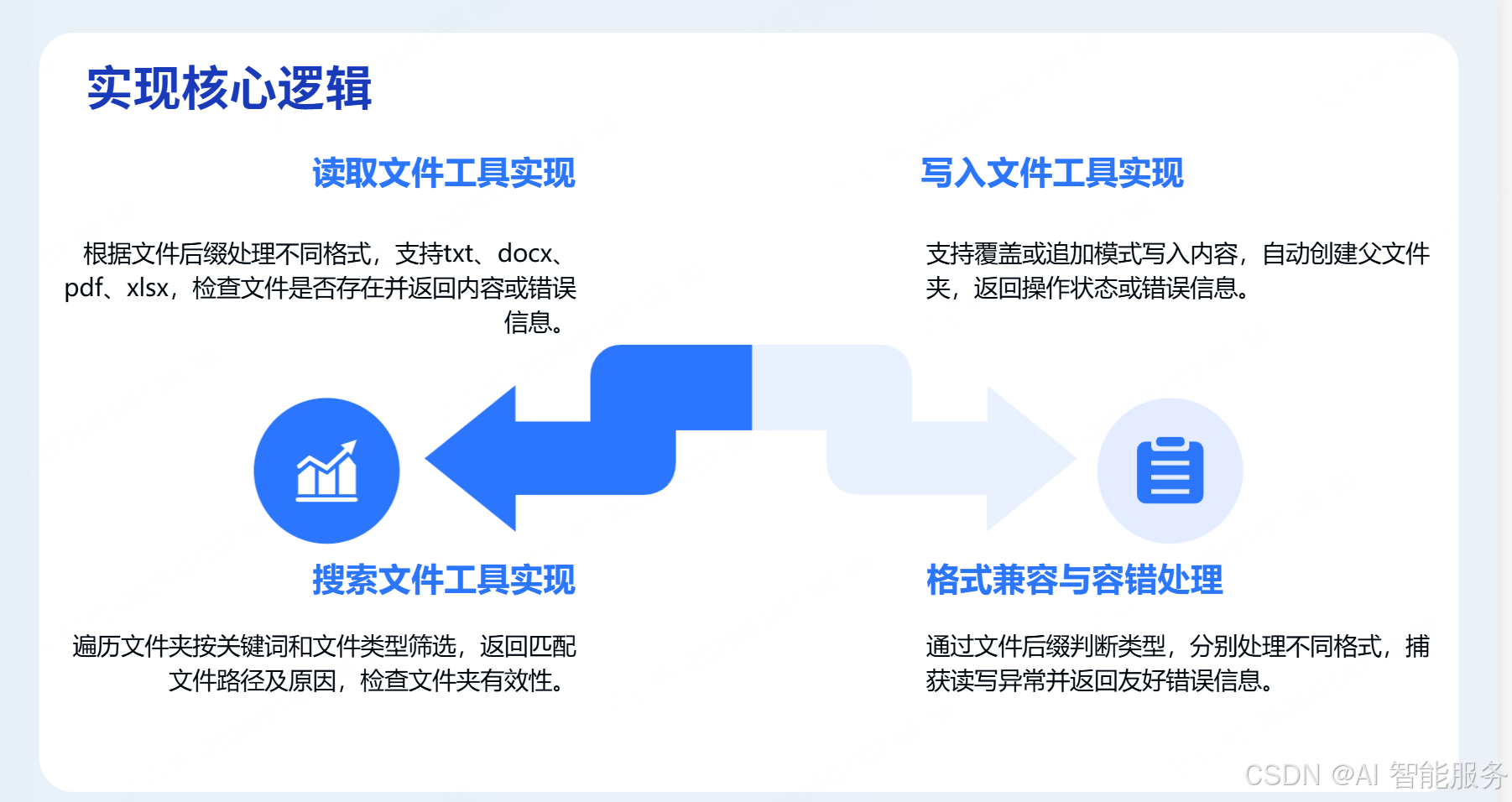
- 格式兼容 :通过文件后缀判断类型,分别处理 txt(直接读)、docx(用
python-docx)、pdf(用PyPDF2)、xlsx(用openpyxl提取表格数据); - 容错处理:检查文件 / 文件夹是否存在、是否为有效文件 / 目录,捕获读写异常(如权限不足),返回友好错误信息;
- 写入安全:自动创建父文件夹(避免 "路径不存在" 错误),支持覆盖 / 追加模式,满足不同场景需求;
- 搜索逻辑 :通过
os.walk遍历文件夹,按文件名关键词和类型筛选,返回文件路径和匹配原因。
四、安全控制:限制 Agent 的文件操作范围
本地文件操作存在风险(如误删重要文件、访问敏感目录),必须添加安全限制:
-
白名单目录 :仅允许 Agent 操作指定文件夹(如
./agent_files/),禁止访问系统目录(如C:/Windows/、/root/)。python
python# 安全检查函数(示例) def is_safe_path(file_path, allowed_dirs=["./agent_files"]): """检查文件路径是否在允许的目录内""" normalized_path = os.path.normpath(file_path) for allowed in allowed_dirs: allowed_path = os.path.normpath(allowed) if normalized_path.startswith(allowed_path): return True return False # 在工具中调用安全检查(如read_file) def read_file(file_path): if not is_safe_path(file_path): return {"error": f"禁止访问:{file_path},仅允许操作{allowed_dirs}"} # 后续读取逻辑... -
禁止删除 / 修改系统文件:工具只保留 "读""写""搜索" 功能,不实现删除、移动文件的操作(如需删除,需单独设计严格权限);
-
权限提示:在工具描述中明确告知用户 "Agent 只能访问指定文件夹",避免误解。
五、与 LLM 集成:让 Agent 自动处理文件
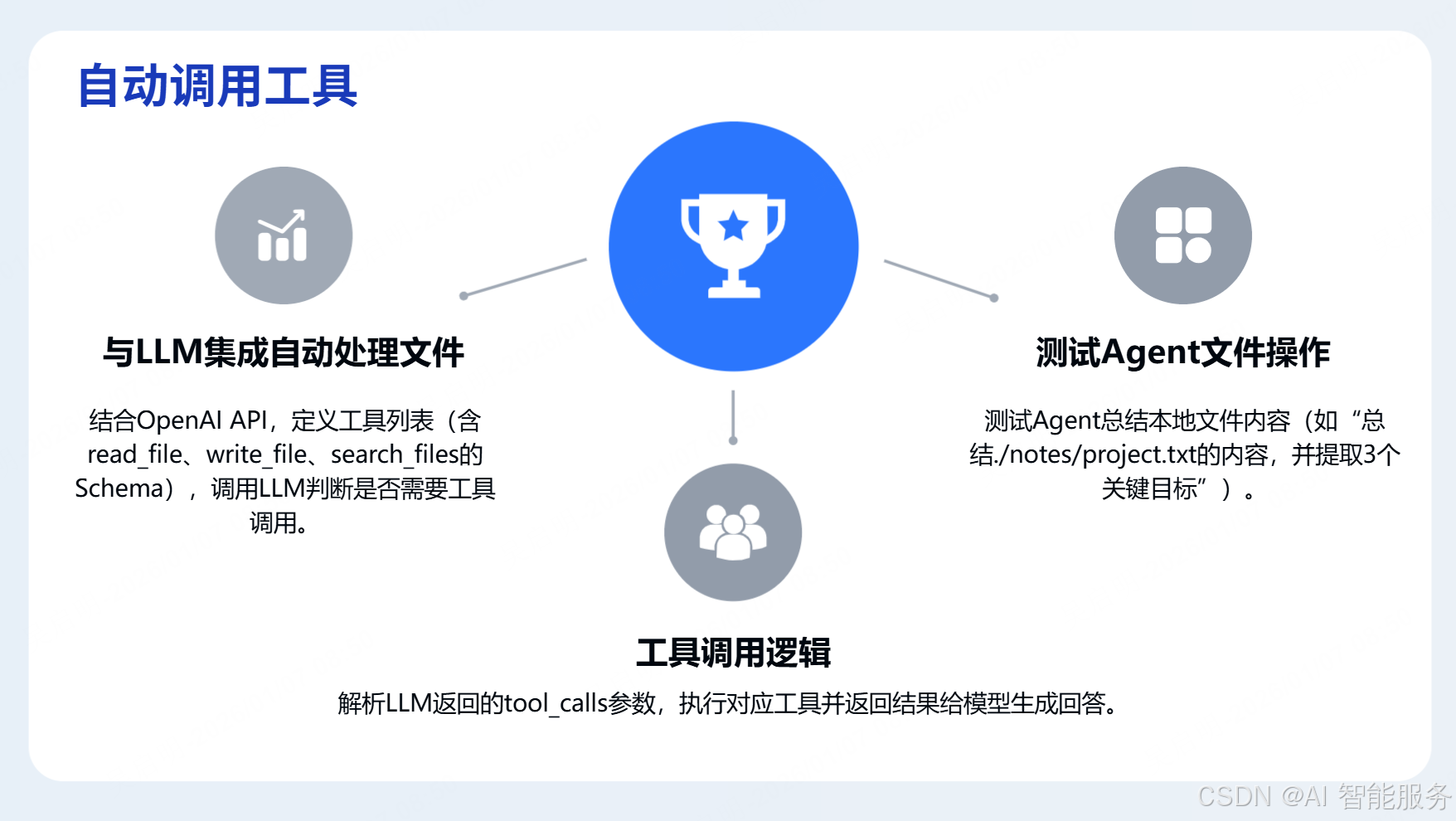
结合 OpenAI API,让模型根据用户需求调用文件工具:
python
python
import openai
import os
from file_tools import read_file, write_file, search_files
from dotenv import load_dotenv

load_dotenv()
openai.api_key = os.getenv("OPENAI_API_KEY")

def agent_file_operation(user_query):
    # 定义工具列表(包含3个文件工具)
    tools = [
        {"type": "function", "function": read_file_schema},  # 填入read_file的Schema
        {"type": "function", "function": write_file_schema}, # 填入write_file的Schema
        {"type": "function", "function": search_files_schema}# 填入search_files的Schema
    ]

    # 调用LLM,判断是否需要调用工具
    response = openai.ChatCompletion.create(
        model="gpt-3.5-turbo",
        messages=[{"role": "user", "content": user_query}],
        tools=tools,
        tool_choice="auto"
    )

    # 处理工具调用(类似第五天的联网搜索集成逻辑)
    response_message = response.choices[0].message
    if response_message.get("tool_calls"):
        # 解析调用参数,执行对应工具,返回结果给模型生成回答
        # (代码略,参考第五天的集成逻辑)
        pass
    else:
        return response_message["content"]

# 测试:让Agent总结本地文件
if __name__ == "__main__":
    print(agent_file_operation("总结./notes/project.txt的内容,并提取3个关键目标"))
六、实践任务
- 在
./agent_files文件夹中创建test.docx(写入一段项目描述),用read_file工具读取并打印内容; - 调用
write_file工具,将 "2024 年 Q1 工作重点:1. 完成产品迭代;2. 拓展 3 个客户" 写入./agent_files/plan.txt; - 实现
is_safe_path函数,限制工具只能访问./agent_files,测试访问../secret.txt是否被禁止; - 让 Agent 调用
search_files工具,在./agent_files中搜索含 "计划" 的 txt 文件。
通过今天的学习,你已掌握本地文件工具的设计、实现和安全控制 ------ 这是 Agent 处理离线数据的基础,也是构建 "个人助理" 类应用的核心能力。明天我们将综合前几天的工具,实现多工具协同的 Agent 应用。