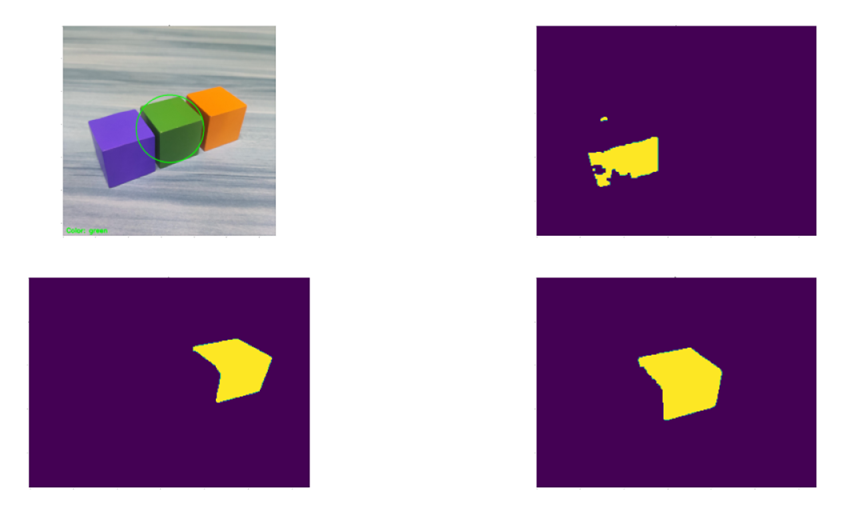
import sys
import cv2
import math
import numpy as np
import matplotlib.pyplot as plt

size = (320,240)
range_rgb = {'red': (0, 0, 255), 'blue': (255, 0, 0), 'green': (0, 255, 0)}
__target_color = ('red', 'green', 'blue')

#LAB颜色空间红、蓝、绿的颜色范围,即在(0, 160, 135) ~(255, 255, 255)之间认为是红色,以此类推
lab_data_max = {'red':  (255, 255, 255), 'black': ( 89, 255, 255), 'blue': ( 255, 254, 90), 'green': ( 255, 120, 180), 'white': ( 255, 255, 255)}
lab_data_min = {'red':  (0, 160, 135), 'black': ( 0, 0, 0), 'blue': ( 0, 120, 0), 'green': ( 0, 0, 100), 'white': ( 193, 0, 0)}

#在轮廓列表中获取面积最大的轮廓,返回面积最大的轮廓和该轮廓的面积
def GetAreaMaxContour(contours):
    coutousAreaMax = 0
    coutoursMax = None

    for c in contours:
        coutoursAreaTmp = math.fabs(cv2.contourArea(c))
        if coutoursAreaTmp > coutousAreaMax :
            coutoursAreaMax = coutoursAreaTmp
            coutoursMax = c

    return coutoursAreaMax , coutoursMax

#坐标的映射,根据轮廓尺寸等比例映射
def map( x , in_min , in_max , out_min , out_max ):
    return (x-in_min)*(out_max-out_min)/(in_max-in_min) + out_min

#主函数
if __name__=="__main__":
    img = cv2.imread("test10.1.jpg")
    img_h,img_w = img.shape[:2]	#获取图片的尺寸
    img_red = img
    img_blue = img
    img_green=img

    frm_resize = cv2.resize(img , size , interpolation=cv2.INTER_NEAREST)   #为简化处理,加快处理速度,将图片缩小
    frm_gb     = cv2.GaussianBlur( frm_resize,(3,3),3)  			#高斯滤波
    frm_lab    = cv2.cvtColor(frm_gb , cv2.COLOR_BGR2LAB)	#为便于确定颜色,转成LAB颜色空间

    Coutour_Max = None
    Coutour_Max_Area = 0

    for i in lab_data_max:
        if i in __target_color:
            frm_mask=cv2.inRange( frm_lab , (lab_data_min[i][0],lab_data_min[i][1],lab_data_min[i][2]),
                                       (lab_data_max[i][0],lab_data_max[i][1],lab_data_max[i][2]))#范围内颜色转成黑白

            opened = cv2.morphologyEx( frm_mask, cv2.MORPH_OPEN ,np.ones((3,3),np.uint8))
            closed = cv2.morphologyEx( opened, cv2.MORPH_CLOSE ,np.ones((3,3),np.uint8))	#开合操作,去除非连续点
            contours= cv2.findContours( closed, cv2.RETR_EXTERNAL ,cv2.CHAIN_APPROX_NONE)[-2] #找轮廓

            Coutour_TmpMax_Area , Coutour_TmpMax=GetAreaMaxContour(contours)	#寻找面积最大的轮廓

            if Coutour_TmpMax is not None:
                if Coutour_TmpMax_Area > Coutour_Max_Area :
                    Coutour_Max_Area = Coutour_TmpMax_Area
                    Coutour_Max = Coutour_TmpMax
                    Coutour_Max_Color = i
            if i == "red" :
                img_red = closed
            if i == "blue" :
                img_blue = closed
            if i == "green" :
                img_green = closed


#展示最终的效果
(center_x,center_y),radius = cv2.minEnclosingCircle(Coutour_Max)
    center_x = int(map( center_x , 0 ,size[0], 0 ,img_w))
    center_y = int(map( center_y , 0 ,size[1], 0 , img_h))
    radius   = int(map( radius , 0 ,size[0] , 0 ,img_w))

    cv2.circle( img , (int(center_x),int(center_y)) , int( radius) , range_rgb[Coutour_Max_Color], 2)
    cv2.putText(img, "Color: " + Coutour_Max_Color, (10, img.shape[0] - 10), cv2.FONT_HERSHEY_SIMPLEX, 0.65, range_rgb[Coutour_Max_Color], 2)
    plt.figure(figsize=(200,100),dpi=6)
    plt.subplot(221),plt.imshow(img),plt.title("org")
    plt.subplot(222),plt.imshow(img_red),plt.title("red")
    plt.subplot(223),plt.imshow(img_blue),plt.title("blue")
    plt.subplot(224),plt.imshow(img_green),plt.title("green")
    plt.show()
    cv2.waitKey(0)
    cv2.destoryAllWindows()