uniapp中使用uview表单时,自定义扩展的表单,无法及时触发uview表单验证,但是在提交的时候,表单又可以进行表单验证。其中的原因是uview触发机制所决定的。处理方法:需要在自定义扩展表单组件内部加入一个触发方法,触发on-form-change或者on-form-blur事件,这两个在rules里面对应 trigger:change 或 blur;(注意触发机制需要放在微任务或宏任务中,避免验证触发混乱),下面以on-form-change该事件为例子:
第一步: 在自定义扩展组件内部加入以下代码:(此代码在表单改变的时候触发,val为改变的结果值,后面会以自定义日期组件为例子,贴上完整代码)
javascript
onChangeFormItemValid(val) {
			this.$nextTick(() => {
				this.dispatch('u-form-item', 'on-form-change', val);
			});
		},
2、完成之上步骤,应该可以看到dispatch方法报错,那是因为我们的代码中没有这个方法。这个方法需要用到uview表单中的公共方法,使用如下:在自定义扩展表单组件中引入 Emitter,并使用
mixins: Emitter: 如图:
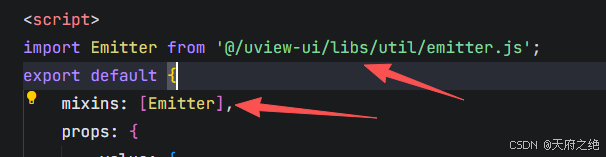
最后附上代码,供参考:
javascript
<template>
	<view class="mn-calendar">
		<view class="select-input" @click="!disabled && (show = true)">
			<template v-if="$slots.default || $scopedSlots.default">
				<slot :title="getTitle"></slot>
			</template>
			<template v-else>
				{{ getTitle || '请选择' }}
				<template v-if="!disabled">
					<view class="clear-icon" @click.stop="onClear" v-show="getTitle"><u-icon name="close"
							size="28"></u-icon>
					</view>
					<view class="arrow-icon"><u-icon name="arrow-right" size="38" color="#999"></u-icon></view>
				</template>
			</template>
		</view>
		<u-calendar v-model="show" :mode="mode" @change="onChange" :max-date="maxDate"></u-calendar>
	</view>
</template>

<script>
import moment from 'js/moment.js'
import Emitter from '@/uview-ui/libs/util/emitter.js';
export default {
	name: "mn-calendar",
	mixins: [Emitter],
	props: {
		value: String | Array,
		mode: {
			type: String,
			default: 'date'
		},
		disabled: {
			type: Boolean,
			default: false
		},
		maxDate: {
			type: String,
			default: moment().add(1, 'year').format('YYYY-MM-DD')
		}
	},
	data() {
		return {
			text: '',
			show: false
		};
	},
	computed: {
		getTitle() {
			if (!this.value) return ''
			if (this.mode === 'range') {
				return this.value.length == 2 ? `${this.value[0]} ~ ${this.value[1]}` : ''
			} else {
				return this.value
			}
		},
	},
	methods: {
		onChange(e) {
			if (this.mode === 'range') {
				const { startDate, endDate } = e
				this.$emit('input', [startDate, endDate])
			} else {
				this.$emit('input', e.result)
			}
			this.onEmitChange()
		},
		onEmitChange() {
			this.$emit('change', this.value)
			this.$nextTick(() => {
				this.dispatch('u-form-item', 'on-form-change', this.value);
			});
		},
		onClear() {
			if (this.mode === 'range') {
				this.$emit('input', [])
			} else {
				this.$emit('input', '')
			}
			this.onEmitChange()
		}
	}
}
</script>

<style lang="scss" scoped>
.mn-calendar {
	width: 100%;
}

.select-input {
	width: 100%;
	box-sizing: border-box;
	padding-right: 78rpx;
	padding-left: 0;
	position: relative;

	.clear-icon {
		position: absolute;
		right: 38rpx;
		padding: 20rpx;
		top: 50%;
		transform: translateY(-50%);
	}

	.arrow-icon {
		position: absolute;
		right: 0;
		top: 50%;
		transform: translateY(-50%);
	}
}
</style>
就可以按照u-input一样进行使用了,为了扩展性更强。